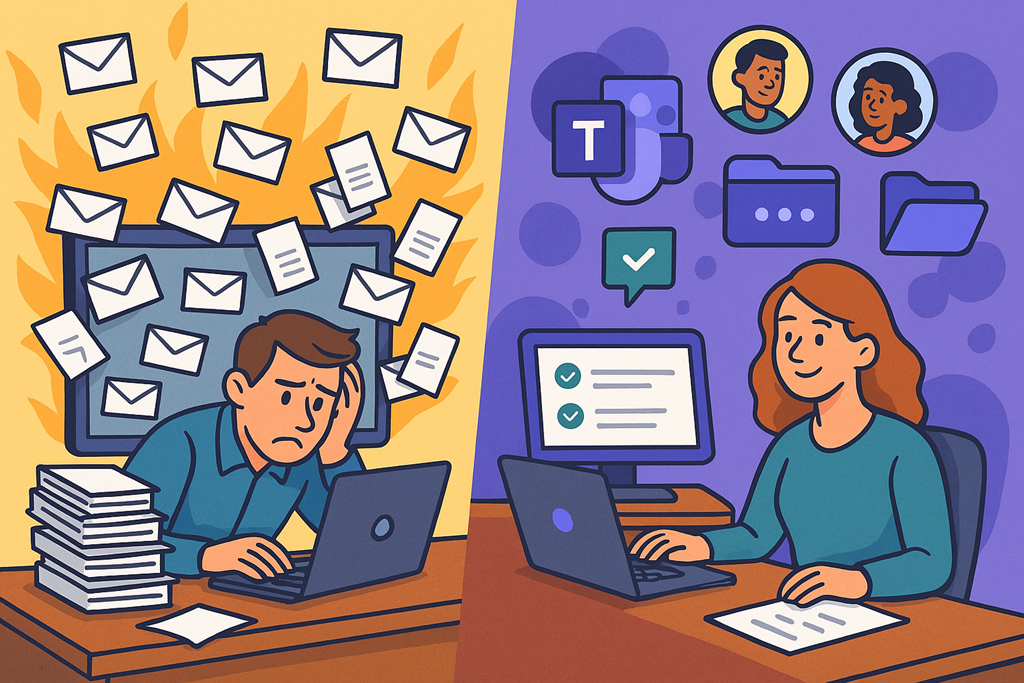
Five Microsoft Teams features most people still aren’t using (but should be)

image

Everyone uses Microsoft Teams.

Very few people use it well.

Most organisations I walk into are using Teams as a glorified chat tool with meetings bolted on the side. That’s fine… but it’s also leaving a huge amount of productivity on the table. The irony is that the features that save the most time are usually the least talked about, because they’re not flashy and they don’t sell licences.

So here are five lesser-known Microsoft Teams tips that actually make a difference in day-to-day work — especially for MSPs and busy IT teams who live in Teams all day.

No fluff. No theory. Just practical wins.


1. Save messages for later, not forever

If you’re using Teams chat as a to‑do list, you’re already behind.

Most people know you can Save a message (hover → three dots → Save), but hardly anyone actually uses it properly. Saved messages are searchable, centralised, and survive the chaos of busy channels.

Here’s the real productivity trick:

  • Save actionable messages immediately

  • Review them once a day

  • Unsave them when done

Think of Saved messages as your temporary inbox, not long-term storage. If it sits there for weeks, it’s noise, not productivity.

Pro tip: Search for saved in the Teams search bar to instantly pull them all up.


2. Turn off channel noise (selectively)

The biggest Teams lie is that everything needs your attention.

It doesn’t.

Most users either mute nothing (and drown) or mute everything (and miss important stuff). The smarter approach is channel‑level notifications.

Right‑click a channel → Channel notifications → Custom.

Set it so you only get notified for:

  • Mentions

  • Replies to threads you’ve participated in

  • Important channels only

This one change alone can claw back hours per week — especially in MSP environments where Teams sprawl is very real.


3. Use message links instead of “scroll up”

“See my message above.”

No. Just… no.

Every Teams message has a direct link. Right‑click → Copy link. Drop that link into chat, a ticket, or a document and suddenly context is preserved without anyone scrolling through 200 messages of noise.

This is gold for:

  • Service desk escalations

  • Internal handovers

  • Project discussions

If your team still says “scroll up”, this is an easy win to coach out.


4. Schedule messages (because you don’t need to interrupt people)

Most Teams messages don’t need to be sent now.

They need to be sent at the right time.

Scheduled messages let you write when it suits you and deliver when it suits the recipient. Right‑click the Send button → Schedule message.

This is brilliant for:

  • End‑of‑day thoughts you don’t want to forget

  • Early‑morning reminders without being “that person”

  • MSPs working across time zones

It’s a small feature, but it’s a big professionalism upgrade.


5. Use Teams search like a database, not a gamble

Teams search is wildly under‑used — mostly because people don’t know how powerful it actually is.

You can filter by:

  • Person

  • Date

  • Channel

  • Has files

  • Has links

Instead of “I think Dave mentioned this last week”, try:

from:Dave has:files

Once you treat Teams as a searchable knowledge base instead of a scrolling timeline, your reliance on “tribal memory” drops fast.


Final thought: Productivity isn’t about more tools

Microsoft keeps adding features. Most people keep ignoring them.

Productivity isn’t about learning everything Teams can do — it’s about mastering a small number of behaviours that remove friction from your day.

If you implement even two of these tips across your team, you’ll feel the difference almost immediately.

And if Teams still feels overwhelming after that?
That’s not a technology problem.

That’s a habits problem.

Effective Time Management Isn’t About Working Harder. It’s About Working Like an MSP

image

Ask most MSPs what their biggest challenge is and they’ll say time.

Not security.
Not staff.
Not tools.

Time.

There’s never enough of it. The queue never clears. The tickets keep coming. Every “quick question” turns into a 30‑minute distraction. And somehow, the most important work always gets pushed to “later”.

But here’s the uncomfortable truth:

Most MSPs don’t have a time problem.
They have a focus problem.

The MSP Time Trap

MSPs are uniquely bad at time management because the business model rewards reactivity.

You’re paid to respond.
You’re praised for being available.
You’re judged on how quickly you fix things.

So you build your day around interruptions.

Tickets. Alerts. Phone calls. Slack messages. Client “emergencies” that aren’t emergencies at all.

Before you know it, your entire day is spent being useful — but not effective.

And the work that actually moves the business forward?
Documentation. Automation. Process improvement. Training. Strategy.

That work gets done “after hours”.
Or more often, not at all.

Busy Is Not the Same as Productive

One of the biggest lies in the MSP world is that being busy means you’re doing well.

Busy just means demand exists.

Productive means leverage exists.

If you’re personally required for every decision, every escalation, every configuration change, your business doesn’t scale — it stalls.

Effective time management starts with recognising this:

If the business only works when you’re in the chair, you don’t own a business. You own a job with overheads.

Time Management Is a Design Problem

Most MSPs try to solve time management with tools.

New ticketing systems.
New dashboards.
New planners.
New apps that promise to “optimise your day”.

Tools don’t fix broken design.

If your processes are unclear, your time will leak. If your standards are vague, your time will vanish. If your team relies on tribal knowledge, your time will be consumed answering the same questions again and again.

The fastest way to reclaim time isn’t working faster.

It’s removing decisions.

Document Once. Reuse Forever.

Every undocumented task is a future interruption.

Every undocumented process guarantees:

  • inconsistent delivery

  • repeated questions

  • and you being the bottleneck

Effective MSPs treat documentation as time storage.

You invest time once. You get it back every week.

That doesn’t mean 50‑page manuals no one reads. It means:

  • clear checklists

  • repeatable standards

  • “this is how we do it here” guidance

When documentation exists, your team stops asking. When it doesn’t, they escalate — to you.

Calendar Control Is Leadership, Not Laziness

If anyone can book time with you at any moment, you’re not accessible — you’re exposed.

Effective MSP leaders aggressively protect their calendar.

Not because they’re avoiding work, but because they’re prioritising the right work.

That means:

  • blocking uninterrupted time for deep work

  • batching meetings instead of sprinkling them across the day

  • saying no to “quick calls” that have no agenda

If everything is urgent, nothing is important.

Stop Confusing Responsiveness with Value

Clients don’t pay MSPs for speed alone.

They pay for:

  • stability

  • predictability

  • reduced risk

  • and fewer problems over time

Ironically, the MSPs who are always available are often the ones whose environments generate the most noise.

The more reactive your business is, the less time you’ll ever have.

The more proactive it becomes, the quieter everything gets.

Silence is not failure.
Silence is maturity.

Automation Is Time Management in Disguise

Every manual task you repeat is stealing time from future you.

Effective MSPs obsess over automation not because it’s cool, but because it compounds.

A script that saves 5 minutes a day:

  • saves hours per month

  • days per year

  • and entire roles over time

Automation isn’t about replacing people. It’s about protecting attention.

The Real Measure of Time Well Spent

Here’s a simple test.

At the end of the week, ask:

  • Did the business move forward?

  • Or did it just survive?

If survival is the default state, time management will always feel impossible.

Effective MSPs design their week so progress is inevitable — not optional.

They don’t wait for time to appear.
They decide where it goes.

Because in the end, time doesn’t disappear.

It just gets spent on whatever you didn’t say no to.

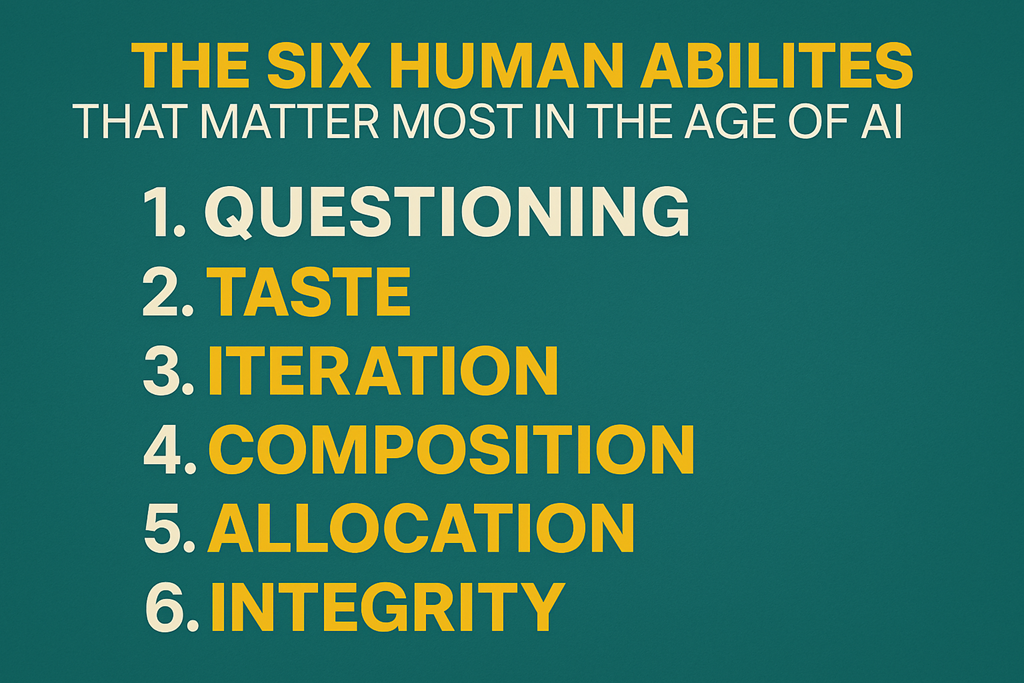
The Six Human Abilities That Matter Most in the Age of AI

image

Every time a new wave of AI tools lands, the same fear resurfaces: What happens to the humans?
The uncomfortable truth is that some work will disappear. But the more important question is this: what work becomes more valuable?

The image above nails it. In an age where machines can generate content, write code, analyse data, and automate workflows at scale, the differentiator isn’t technical capability alone. It’s the human abilities that sit around the technology.

These six skills aren’t soft. They’re not optional. And for MSPs and IT professionals, they may be the difference between being replaced… and being indispensable.

1. Questioning: The Skill AI Can’t Replace

AI is exceptional at answering questions.
It’s terrible at deciding which questions actually matter.

Most poor outcomes with AI don’t come from bad tools. They come from bad prompts, shallow thinking, or unchallenged assumptions. The real value comes from people who know how to ask:

  • What problem are we actually solving?
  • Who benefits from this answer?
  • What’s missing from this output?

In an MSP context, questioning is what separates “we deployed Copilot” from “we changed how the business operates”. It’s knowing when to push back on a client request, when to reframe the problem, and when the obvious solution isn’t the right one.

AI accelerates answers. Humans decide direction.

2. Taste: Knowing What “Good” Looks Like

AI can generate ten versions in seconds.
Taste is knowing which one to ship.

Whether it’s a policy document, a client report, a security recommendation, or a piece of marketing content, AI will happily give you something. What it won’t give you is judgement.

Taste is pattern recognition built over time. It’s experience. It’s knowing when something feels off, even if it technically works. It’s why two MSPs can use the same tools and produce vastly different outcomes.

In a world flooded with AI-generated noise, taste becomes a competitive advantage. Clients don’t pay for volume. They pay for discernment.

3. Iteration: Progress Beats Perfection

AI enables speed, but humans enable momentum.

One of the most overlooked skills in the AI era is the willingness to iterate in public. To test, refine, adjust, and improve without waiting for perfection. AI lowers the cost of iteration dramatically — but only if people are willing to use it that way.

MSPs who succeed with AI don’t roll out massive, once‑off transformations. They make small changes, learn quickly, and build confidence over time. Iteration is how ideas become systems, and experiments become offerings.

AI gives you the draft. Humans do the shaping.

4. Composition: Seeing the Whole, Not Just the Parts

AI is very good at isolated tasks.
Humans are still better at composition.

Composition is the ability to connect ideas, systems, and outcomes into something coherent. It’s understanding how security impacts productivity, how automation affects culture, and how tools interact across the Microsoft ecosystem.

For MSPs, composition is architectural thinking. It’s not just deploying solutions, but designing experiences. It’s knowing how Entra ID, Intune, Defender, Copilot, and business processes fit together — and explaining that clearly to non‑technical decision makers.

AI assists. Humans integrate.

5. Allocation: Deciding Where Effort Belongs

Time and attention are the new scarcity.

AI creates the illusion that everything can be done, all at once. Allocation is the skill of deciding what should be done — and what should be ignored.

Great operators know where human effort adds the most value, and where machines should take over. They know when to automate, when to delegate to AI, and when a human touch is non‑negotiable.

For MSPs under constant pressure, allocation is survival. It’s choosing focus over busyness, leverage over labour, and outcomes over activity.

6. Integrity: The Non‑Negotiable Advantage

This one matters more than most people realise.

As AI becomes capable of generating convincing outputs at scale, trust becomes the real currency. Integrity is what ensures AI is used responsibly, ethically, and transparently — especially when clients don’t fully understand what’s happening behind the scenes.

Integrity shows up in how data is handled, how recommendations are made, and how risks are communicated. It’s choosing long‑term trust over short‑term gains.

Technology changes fast. Reputation doesn’t.


The Bottom Line

AI isn’t replacing humans.
It’s exposing the difference between people who add judgement… and people who just follow instructions.

The future belongs to those who can question, curate, iterate, connect, prioritise, and act with integrity. Tools will come and go. These abilities compound.

And the MSPs who invest in them now won’t just survive the AI era — they’ll define it.

I’m Watching Business Owners Work Harder Than Ever – and Get Less Done

image

I’m seeing something that would have been unthinkable a few years ago.

Business owners are working harder than ever and achieving less than they did before.

Sixty‑hour weeks. Back‑to‑back meetings. Calendars so full there’s no white space left to actually think. They’re always “on”, always responding, always busy. And yet, when you strip it back, progress feels slower, decisions take longer, and strategy keeps getting pushed to “next week”.

At the same time, there’s a smaller group of business owners who seem to be playing a completely different game.

Same market.
Same team size.
Same pressures.

But they’ve quietly bought back 20 or more hours every week.

Not by hiring armies of staff.
Not by working harder.
And not by finding some mythical work‑life balance hack.

They’ve done it by changing what they do versus what AI does.

And that’s the part most people still don’t want to hear.

The Old Rulebook Worked – Until It Didn’t

For the last 20 years, the advice for business owners was brutally simple:

Work harder.
Do more.
Hustle.

If you hit your limits, you hired more people.

And for a long time, that worked. There was a reasonably straight line between hours worked and output created. More effort generally meant more results. More people meant more capacity.

But that line has snapped.

Not bent. Not blurred. Broken.

What used to be a law of work no longer applies.

The Moment Everything Changed

Not long ago, AI crossed a line most people didn’t notice at the time.

AI agents arrived.

And suddenly, you could hand off what used to be an eight‑hour task and get something usable back in minutes. Research that once swallowed entire days now runs overnight. Analysis that used to be blocked out in your calendar is ready before your first coffee.

This wasn’t just another productivity tool.

It rewrote the productivity equation itself.

For the first time, the constraint on output wasn’t human effort. It was decision‑making. Knowing what to do with the output became more important than doing the work to create it.

And that’s where the gap started to open.

Work Has Split Into Two Types

What I see now is that work has quietly divided itself into two categories.

The first is execution work: drafting, researching, summarising, analysing, documenting, formatting, preparing. Necessary, but largely mechanical.

The second is judgement work: deciding what matters, setting direction, weighing trade‑offs, saying yes to the right things and no to the rest.

AI is eating the first category at an alarming rate.

And many business owners are still spending most of their week buried in it.

They’re writing the documents.
They’re doing the research.
They’re preparing the decks.
They’re stuck in the weeds.

Not because they need to be there, but because that’s how they’ve always worked.

The Business Owners Who “Get It” Look Very Different

The business owners who figured this out early don’t look busier. They look calmer.

They’re not in operations anymore. They’re in strategy.

They’re not executing tasks. They’re making decisions.

They’re not asking, “How do I get through more work today?”
They’re asking, “What work should I never be doing again?”

They’ve learned how to hand off the right work to AI and keep the work that only a human business owner can do. Not blindly. Not recklessly. But deliberately.

That shift alone frees up hours every single day.

And those hours compound.

This Is Why the Gap Is Growing So Fast

Here’s the uncomfortable truth.

The gap between these two groups of business owners isn’t linear. It’s exponential.

While one group is still spending their time producing outputs, the other is spending their time deciding where the business should go next. While one group is drowning in tasks, the other is looking for leverage.

AI doesn’t just save time. It reallocates attention.

And attention is now the scarcest resource in running a business.

The business owners who are winning aren’t smarter or more disciplined. They’ve simply stopped doing work that no longer requires a human.

Everyone else is still busy proving they can.

This Isn’t About Replacing People

Let’s be clear. This isn’t about replacing teams or stripping businesses back to the bone.

It’s about redeploying human effort where it actually creates value.

AI doesn’t remove the need for leadership. It exposes the absence of it.

If your day is filled with work AI could already handle, that’s not a badge of honour. It’s a signal. One that says your role hasn’t evolved as fast as the tools around you have.

The Question Every Business Owner Needs to Ask

The most important question right now isn’t, “How do I work harder?”

It’s this:

“What am I still doing that AI could do better, faster, or cheaper than me?”

Until that question is answered honestly, nothing changes.

Calendars stay full. Weeks stay long. Strategy stays theoretical.

The business owners who answer it decisively are already operating at a different level.

And the longer others wait, the harder it will be to catch up.

Because this shift isn’t coming.

It’s already here.

SharePoint Online–Playbook for SMB

image

To receive a FREE copy of my SharePoint Online – Playbook for Small Businesses you’ll need to sign up for, and attend, this months CIAOPS Need to Know webinar:

You can register for the regular monthly webinar here:

October Registrations

(If you are having issues with the above link copy and paste – https://bit.ly/n2k2510)

The details are:

CIAOPS Need to Know Webinar – October 2025
Friday 31st of October 2025
11.00am – 12.00am Sydney Time

more webinar details.

The AI Advantage: Democratizing Expertise and Reducing Costs for Small Businesses

bp1

Artificial Intelligence (AI) is no longer the exclusive domain of large enterprises. For small and medium-sized businesses (SMBs), tools like Microsoft 365 Copilot are democratising expertise – making advanced intelligence accessible – while simultaneously reducing operational costs. This article explores how Microsoft 365 Copilot can empower SMBs by providing enterprise-grade AI capabilities, levelling the playing field and driving efficiency gains. All content is presented with Australian English spelling and terminology.


Introduction: AI as an Equaliser for SMBs

Small businesses often lack the resources to hire armies of experts, but AI tools are changing that. Microsoft 365 Copilot – an AI-powered assistant integrated into the Microsoft 365 suite – exemplifies AI’s potential to level the playing field by providing on-demand expertise in everyday tools like Word, Excel, Outlook, and Teams[1][2]. This democratization of AI means that SMBs can leverage expert-level insights and automation without requiring in-house data scientists or costly consultants, allowing them to compete more effectively with larger organisations[3].

At the same time, AI can handle repetitive tasks and optimise processes, which translates directly into cost savings. By automating routine work and improving decision-making with data-driven insights, SMBs can reduce operating costs and reinvest the savings into growth[4][3]. In the sections below, we delve into the key features of Microsoft 365 Copilot, its benefits for small businesses, and best practices for adopting this AI advantage.


What is Microsoft 365 Copilot?

Microsoft 365 Copilot is an AI-powered digital assistant integrated into Microsoft 365 apps and services[1]. It uses large language models and machine learning to understand user inputs, analyse data, and generate helpful outputs within the tools employees already use[1]. Some key features of Microsoft 365 Copilot include:

  • Intelligent Document Assistance: Copilot can suggest improvements as you write emails, reports, or presentations. It offers real-time tips on grammar, style, and content, helping users create high-quality documents effortlessly[1]. For example, in Word it might recommend clearer phrasing or point out inconsistencies.

  • Advanced Data Analysis & Visualisation: In Excel or other data-centric applications, Copilot can analyse datasets and generate charts or summaries. It finds patterns and insights that might be missed, essentially acting as a data analyst. Users can ask questions in natural language (thanks to Copilot’s natural language processing capability) and get instant answers or visualisations from their data[1][1].

  • Productivity Recommendations: Copilot observes how users work and offers suggestions to streamline workflows. It might highlight a faster way to accomplish a task or automate a sequence of steps, optimising daily operations and saving time[1].

  • Meeting and Collaboration Assistance: Integrated with Microsoft Teams, Copilot can serve as a virtual meeting assistant. It can generate intelligent recaps of meetings, listing key points and action items, and even help schedule or find related documents for meeting follow-ups[1][3]. This means less time spent writing minutes and more time acting on decisions.

  • Multilingual and Creative Support: Copilot isn’t limited to business analysis—its generative AI can draft creative content too. From crafting an email response to translating a document or even writing code snippets, Copilot helps users produce content in various formats and languages, broadening the scope of what small teams can handle internally[1].

In essence, Microsoft 365 Copilot functions as a collaborative “co-pilot” that works alongside staff, enhancing their abilities rather than replacing them. It learns from organisational data (with appropriate privacy controls) and from user behaviour to provide context-aware assistance[1]. For SMBs, this means each employee can perform at a higher level, with Copilot filling in knowledge gaps and handling drudge work.


Benefits of Copilot for Small Businesses

Implementing Microsoft 365 Copilot can yield significant benefits for SMBs. Early adopters have reported improvements in productivity, faster time-to-market, and cost reductions as detailed in a recent Forrester Consulting study[4][2]. Here are some of the top advantages:

  • Improved Productivity and Focus: By taking over routine tasks and providing instant insights, Copilot frees up employees to focus on strategic, high-value work. SMB employees often wear multiple hats; Copilot helps manage the load by automating repetitive jobs like scheduling, email summarisation, and report generation[3][3]. This not only saves time but also reduces the mental burden on staff, allowing them to channel their energy into creativity and problem-solving.

  • Democratised Expertise: Copilot democratises access to expertise. A small business might not have a full-time data analyst or legal expert, but Copilot’s AI capabilities can provide data analysis or even draft policy documents gleaned from best practices. This levels the playing field, enabling SMBs to operate with insights traditionally only available to larger firms with bigger teams[3]. It’s like having a team of specialists on-call within your software.

  • Cost Reduction and ROI: Perhaps most compelling is the impact on the bottom line. Copilot helps cut costs in various ways – by reducing errors (which can be costly to fix), speeding up processes, and optimizing resource use. The Forrester study projected a 20% reduction in operating costs for SMBs using Copilot, alongside a 6% increase in net revenue[4]. Additionally, businesses saw a 1% to 10% reduction in supply chain costs simply by using Copilot to identify inefficiencies[4]. These savings add up: over three years, the ROI of deploying Microsoft 365 Copilot for SMBs was estimated between 132% and 353%[4] – a striking return on investment.

  • Faster Time-to-Market: Copilot accelerates how quickly small businesses can turn ideas into deliverables. Whether it’s drafting a proposal, analysing market research, or prototyping a budget plan, the AI speeds up each step. In practice, SMBs using Copilot reported launching new products or campaigns faster – some observed a 11-20% improvement in time-to-market metrics[4]. Getting things done faster means SMBs can seize opportunities and respond to market changes more rapidly than before.

  • Enhanced Employee Satisfaction and Innovation: When mundane tasks are offloaded to AI, employees can engage in more meaningful work, which boosts morale. Staff can upskill by working alongside AI, learning to ask the right questions and guide Copilot effectively. In fact, early users note that Copilot serves as a partner, not a replacement – it augments human workers. As one study participant put it, “running a business without Copilot [in the future] would be like trying to run a company today using typewriters instead of computers”[4]. This sentiment underscores how integral AI assistance is becoming to a modern, innovative workplace.

  • Improved Collaboration: With intelligent summaries and data sharing, teams stay aligned. Copilot can pull information from emails, meetings, and documents to ensure everyone has the same context. For SMBs with remote or small teams, this is especially useful – AI can act as the always-attentive team member that notes everything and reminds everyone of key points and tasks[3]. The result is fewer miscommunications and a more cohesive effort across the organisation.

Real-world example: Morula Health, a small healthcare company, used Copilot in Word to summarise complex medical research data. This cut down their content creation time from weeks to days, while maintaining accuracy and compliance[2]. Another example is Newman’s Own marketing team, which leveraged Copilot to draft campaign briefs in 30 minutes instead of hours, letting them react quicker to trends[2]. These stories highlight how SMBs can punch above their weight with Copilot’s assistance.


Democratizing Expertise Through AI

One of the most transformative aspects of AI like Microsoft 365 Copilot is how it democratises expertise. This means making specialised knowledge and skills available to all, regardless of an organisation’s size or budget[3].

In the past, a small business might struggle due to lack of experience in certain areas – for instance, complex financial forecasting, legal contract wording, or advanced analytics. Copilot helps bridge these gaps:

  • It draws on vast training data and organisational information to provide informed suggestions or even complete drafts. Need to create an HR policy? Copilot can propose a structure based on industry standards. Trying to analyse customer feedback? Copilot can highlight trends (e.g. “customers often mention pricing in negative reviews”) without needing a data scientist on staff[2].

  • Leveled Playing Field: By providing such capabilities within familiar tools, AI ensures that SMBs can apply expert techniques just like big companies do[3]. For example, an independent retailer can use AI to analyse sales patterns and customer behaviour as effectively as a large chain with a dedicated analytics team. In fact, 91% of SMBs utilising AI believe that AI will boost their revenue, showing strong confidence that these tools help them compete with larger firms.

  • Accessibility and Ease of Use: Democratizing expertise isn’t just about availability, but also about ease of access. Copilot is integrated into everyday applications and responds to natural language requests, meaning you don’t need to be a technical guru to use it[1]. A marketing manager can ask, “Copilot, draft a social media post about our new product launch highlighting sustainability,” and get a solid first draft within seconds. This ease-of-use ensures the knowledge locked in AI is reachable by non-technical staff.

  • Continuous Learning: Another angle of democratised expertise is that Copilot learns and improves as more people use it across the organisation. It may learn the style and preferences of a company (for example, the tone used in customer communications) and tailor its outputs accordingly. Over time, even if an expert leaves the company, some of their know-how may live on in how the AI adapts to the established patterns.

In short, AI is like an equal-opportunity expert, giving a two-person startup similar analytical and creative muscle that a much larger competitor would have. This democratisation makes business knowledge a commodity available to all, fostering innovation and competition based on ideas and execution rather than sheer resource disparity.


Cost Reduction Strategies Enabled by AI

Reducing costs is a top priority for small businesses, and AI provides several mechanisms to save money or avoid expenses:

  • Automation of Routine Tasks: Copilot can handle mundane, repetitive tasks faster and with fewer errors than a human, whether it’s generating a monthly report, sorting emails, or entering data. By automating these duties, small businesses reduce labour hours spent on low-value work, effectively cutting salary costs or freeing those hours for more profitable activities[3]. For instance, if Copilot automates an employee’s 2-hour weekly task of compiling reports, that’s 104 hours a year redirected to more valuable work – equivalent to roughly 2.5 weeks of reclaimed time!

  • Error Reduction & Quality Improvement: Mistakes can be costly, leading to rework or financial loss. Copilot’s real-time guidance (like catching a budgeting error in Excel or a contract oversight in Word) helps avoid costly errors before they happen[1][1]. This preventive saving is hard to measure but very significant over time, especially in areas like finance or compliance where errors can lead to fines.

  • Optimising Operations: AI can identify inefficiencies that humans might overlook. As noted in the Forrester study, more than half of businesses using Copilot saw noticeable cost reductions in areas like supply chain and operations[4]. For example, Copilot might analyse project timelines and point out process bottlenecks that, when resolved, save time (and thus money). It could also suggest cheaper alternatives for a business trip by analysing travel data, or find unused subscriptions the company is still paying for. These insights trim the fat from the budget.

  • Scaling Expertise Without Scaling Headcount: Instead of hiring an additional employee or contractor for expertise in, say, analytics or content creation, SMBs can use Copilot to fill part of that need. While it’s not a complete substitute for human experts, it can often handle first drafts and initial analysis. This means SMBs can achieve more with the same number of employees, avoiding the cost of new hires or expensive consultants. As an example, if a small business was considering hiring a copywriter for occasional blogs and social media posts, Copilot might fulfill much of that function – generating content that a staff member can then lightly edit, saving the cost of a contractor.

  • Resource Reallocation: The cost savings from AI often come in the form of efficiency gains, which allow businesses to reallocate resources. The Forrester study highlights that companies could shift resources towards growth-focused initiatives thanks to cost savings from AI. In practice, money saved from AI-driven efficiency (like lower overtime or reduced need for temporary staff) can be invested in marketing, R&D, or better equipment. This virtuous cycle means AI not only cuts costs, but also enables investments that potentially increase revenue, amplifying the financial benefit.

Consider the ROI example from earlier: over three years, Copilot’s benefits can outweigh its costs multiple times over[4]. Of course, there is an upfront investment – Microsoft 365 Copilot is an add-on service (around $30 USD per user per month for Business Standard/Premium subscribers)[5]. But when balanced against the productivity lift and cost reductions, the long-term gains make a compelling case. In fact, one analysis showed that even at this price, the efficiency and automation provided by Copilot make it a cost-effective choice for many SMBs when aiming for growth and lean operations.


Implementing M365 Copilot Effectively in an SMB

Adopting Microsoft 365 Copilot in a small business environment does not happen overnight. To maximise its value, SMBs should approach implementation strategically:

  1. Start with Clear Objectives: Identify the key business challenges or goals where Copilot could help. Is it to reduce time spent on administrative tasks? Improve accuracy of financial forecasting? Speed up customer support responses? By focusing on specific use cases (e.g. “Copilot to summarise our weekly sales reports” or “Copilot to draft responses to common customer emails”), you can measure success and demonstrate quick wins[5]. Starting with well-defined pilot projects builds confidence in the tool.

  2. Prepare Your Data and Systems: Copilot works best with well-organised and accessible data. Make sure documents, spreadsheets, and emails are stored in Microsoft 365 (OneDrive, SharePoint, etc.) so Copilot can access them (with security permissions respected). Data formatting matters – for example, ensure Excel data is in a table format for optimal analysis by Copilot[3]. Also, review your data privacy settings; Copilot honours Microsoft 365’s security and compliance controls, so set up proper access rights and labels for sensitive information[5][1].

  3. Train and Educate Employees: Even though Copilot is designed to be user-friendly, staff may need training to fully leverage it. Provide tutorials or workshops on how to ask Copilot questions, how to refine its outputs, and how to incorporate its suggestions into their workflow. Microsoft provides training resources and an SMB Copilot success kit for this purpose[5][5]. Encourage a culture of experimentation – employees should feel comfortable asking Copilot for help in various tasks and learning from the results. The more they use it, the more value it will provide.

  4. Iterate and Customise: Gather feedback from your team on what’s working well and where there are challenges. Perhaps Copilot excels at meeting summaries but sometimes gives generic marketing content that needs heavy editing. Use this feedback to adjust how you use Copilot. Over time, Copilot can be customised (for example, using organisation-specific prompts or integrating with certain business data). Also, as Microsoft updates Copilot with new features, continuing education will help the team take advantage of improvements.

  5. Pair AI with Human Insight: Remind your team that Copilot is a partner, not an infallible oracle. Especially in the beginning, outputs should be reviewed by employees. This collaboration not only ensures quality control but also helps Copilot improve (as users correct or fine-tune its responses). Microsoft uses feedback mechanisms (thumbs up/down, suggestions) to refine Copilot’s models. Over time, less oversight may be needed, but an AI-best practice is to always have human judgement in the loop for important decisions.

By following these steps, SMBs can ensure a smoother implementation that truly augments their operations. When Copilot is thoughtfully integrated, it becomes part of the team – one that works 24/7, never takes a sick day, and constantly learns how to serve the business better.


Challenges and Considerations in Adopting AI

While the potential benefits of Microsoft 365 Copilot are significant, SMBs should be mindful of certain challenges and considerations when adopting AI:

  • Initial Costs and ROI Timing: For very small businesses or those with tight budgets, the upfront cost (licensing Copilot and possibly upgrading to Microsoft 365 Business Standard/Premium) is a consideration. It requires faith in future ROI. The Forrester study’s ROI of up to 353% is over three years, so businesses should be prepared for the investment to pay off over time, not immediately[4]. Planning and budgeting for this is important – perhaps starting with a subset of users or critical departments can control costs while proving value.

  • Workforce Adaptation: Employees might be skeptical or anxious about AI. Some may worry it could replace their jobs, or they might be uncomfortable trusting AI suggestions. It’s crucial to address these concerns through training and communication. Emphasise that Copilot is there to assist, not replace – it takes over tedious tasks and partners with employees[3]. Share success stories and involve staff in pilot programs so they become champions of the technology.

  • Data Security and Privacy: Copilot operates within your Microsoft 365 environment, which means it inherits the platform’s security and compliance frameworks[5]. Nonetheless, SMBs must ensure sensitive data is properly protected and labelled. For example, if you have confidential client information, you’d want to set it so only certain people (and thus Copilot for those people) can access it. There’s also the general risk of over-reliance on AI for decisions that involve sensitive info. Best practice is to combine AI insight with human oversight, especially for confidential or high-stakes matters. A related consideration is compliance: certain industries (like healthcare or finance) have regulations on how data can be processed, so ensure Copilot’s use aligns with those regulations – Microsoft has documentation on Copilot’s compliance capabilities that you should review.

  • Quality of Output and AI Limitations: AI, including Copilot, can occasionally produce incorrect or nonsensical output (often referred to as “AI hallucinations”). Businesses must maintain a review process to catch any errors. If Copilot drafts an email to a client, an employee should skim it before hitting send. If Copilot analyses data trends, a manager should validate the conclusions. Over time, as trust builds, Copilot can be given more autonomy, but initially caution is warranted. It’s also wise to set boundaries on what Copilot should not do, e.g., making financial transactions or deleting data, to prevent any mishaps.

  • Ethical Considerations: With AI generating content and insights, SMBs should think about ethical guidelines. For example, if Copilot helps draft hiring emails or performance reviews, ensure the tone and decisions remain fair and unbiased. AI can inadvertently reflect biases present in training data. Microsoft designs Copilot with responsible AI principles, but users should still apply their own ethical lens to its recommendations. Moreover, transparency is key: if AI is used in customer-facing ways (like an AI-generated response to a customer query), some companies choose to disclose that to maintain trust.

  • Technical Support and Continuous Learning: As with any tech tool, things can go wrong – maybe Copilot isn’t connecting properly to your SharePoint, or users encounter glitches. Ensure you have access to support (via Microsoft or a partner) during the rollout. Also plan for continuous learning: Microsoft 365 Copilot and AI in general are evolving quickly. New features will roll out, and staying informed will help your business stay ahead. Joining the Microsoft 365 Copilot community for SMBs or similar forums can provide updates and a place to share experiences[5].

By anticipating these challenges, SMBs can create mitigation strategies. For instance, to handle workforce adaptation, one might establish an “AI ambassador” in each team who is tech-savvy and can help colleagues. For security, involve your IT consultant or partner early to configure everything correctly. Ultimately, the challenges are manageable with a proactive approach, and the benefits of AI usually far outweigh the hurdles when implementation is done thoughtfully.


Future Trends: AI and the Evolving SMB Landscape

The journey doesn’t end at adoption. Looking forward, AI is poised to become even more ingrained in small business operations. A few trends on the horizon:

  • More AI-Powered Tools and Integration: Microsoft 365 Copilot is one of many emerging AI tools. We can expect deeper integration of AI across all business software. From accounting systems that automatically categorise expenses, to CRM systems that predict customer needs, SMBs will likely use multiple AI services in tandem. The key will be integration – ensuring these AI copilots talk to each other and provide a unified assistance experience.

  • Custom AI Models for SMBs: As AI technology becomes more accessible, smaller organisations might train their own mini AI models (or fine-tune existing ones) on their specific industry data. Imagine a Copilot that’s specifically tuned for a law firm versus one for a retail shop – each providing more tailored guidance. This “custom AI for SMB” trend will further democratise expertise, as even niche sectors can have AI that deeply understands their business nuances[3].

  • AI Agents and Autonomy: Today, Copilot mostly provides recommendations and drafts while humans remain the decision-makers. In the near future, we might see SMBs trusting AI agents with more autonomy for certain tasks. For example, an AI agent could automatically reorder inventory when levels drop, or autonomously handle certain customer inquiries end-to-end. This will require robust trust and clear parameters, but as confidence in AI grows, SMBs may increasingly delegate atomic decisions to AI to operate 24/7 and at scale.

  • Workforce Evolution: Just as computers became a fundamental skill, working alongside AI will be a core competency. The most successful SMB employees (and leaders) will be those who can effectively harness AI tools. We may see new roles emerge – like AI workflow optimisers or AI ethicists – even within small companies, focusing on maximising AI value and ensuring its responsible use. Training and ongoing education will be important so that staff skills keep up with AI advancements.

  • Greater Emphasis on Data: If AI is the engine, data is the fuel. Small businesses will place greater emphasis on collecting, cleaning, and securing good data. We might see even traditional small businesses (like local retailers or service providers) using IoT devices or online systems to gather more data because they know AI can turn that data into actionable insight. Data-driven decision-making, powered by AI, will become the norm for SMBs that want to stay competitive.

  • Regulatory and Ethical Frameworks: As AI use proliferates, there will likely be more formal guidelines or even regulations on its use, even affecting small businesses. Being proactive – like maintaining transparency about AI usage and ensuring privacy – will position SMBs well if/when such regulations come. Ethically, businesses that navigate AI use with respect for customer data and fairness will build stronger trust with customers and partners.

In summary, the future for SMBs is bright with AI, but it will be dynamic. Microsoft 365 Copilot is an entry point to this future – it’s a tool that can be transformative today and is also a stepping stone to more advanced capabilities tomorrow. Small businesses that embrace AI early, learn from it, and adapt with it, stand to gain a sustained competitive advantage in their markets.


Conclusion

Microsoft 365 Copilot and similar AI advancements represent a new era for small and medium-sized businesses. They provide an “AI advantage” by democratising expertise – allowing any business to tap into the kind of intelligence that was once the realm of specialists or large enterprises – and by driving efficiency that reduces costs.

For an SMB owner or manager, the message is clear: AI isn’t a luxury; it’s quickly becoming a necessity and a strategic asset. Those who leverage tools like Copilot early can streamline their operations, empower their employees with better insights, and delight their customers with faster, smarter responses. They can do more with less, an essential formula for success in the often resource-constrained world of small business.

To recap the key takeaways for SMBs exploring Microsoft 365 Copilot:

  • Enhanced Productivity: Automate routine tasks and focus your team on strategic work, thereby achieving more in the same amount of time[3].

  • Access to Expertise: Leverage AI as a built-in consultant for data analysis, content creation, and decision support – no need to always hire outside experts[3].

  • Cost Savings: Benefit from tangible reductions in operating costs and improvements in revenue, as demonstrated by early users, which can fund further growth[4].

  • Improved Collaboration: Keep your team on the same page with AI-curated summaries and insights, enhancing teamwork and communication.

  • Competitive Edge: Innovate and adapt faster than competitors by utilising AI for rapid prototyping, problem-solving, and customer engagement.

By embracing Copilot and AI, small businesses can turn what might seem like daunting challenges – limited manpower, tight budgets, fast-changing markets – into opportunities. The playing field is more even than ever. Expertise and efficiency are no longer solely the domain of big corporations. With the AI advantage, even the smallest business can dream big, act smart, and scale up with confidence.

In the age of democratized AI, size matters less – strategy and smart tool adoption matter more. And that’s great news for every small business ready to grow. [2]

References

[1] Microsoft Copilot: Key Features & Benefits Explained – Star Knowledge

[2] Use Microsoft 365 Copilot to drive growth for businesses of all sizes

[3] How Small Businesses Can Maximize Value From Microsoft 365 Copilot

[4] Microsoft 365 Copilot drove up to 353% ROI for small and medium …

[5] Microsoft 365 Copilot for Small and Medium Business – Microsoft Adoption

Leveraging AI for Mundane Tasks: How M365 Copilot Boosts SMB Efficiency and Client Focus

bp1

Small and medium-sized businesses (SMBs) are increasingly using AI tools like Microsoft 365 Copilot to streamline mundane tasks, freeing teams to focus on strategic, high-value work[1]. In today’s competitive environment, SMBs face the challenge of doing more with less. Microsoft 365 Copilot—an AI assistant integrated into the Microsoft 365 suite—can summarize meetings, draft emails, analyze data, and automate other time-consuming tasks. By offloading routine work to Copilot, SMB employees can spend more time on creativity, strategic planning, and nurturing client relationships, rather than getting bogged down in administrative duties[1][2]. This detailed guide explores the key features of M365 Copilot, its benefits for SMBs, real-world examples of success, and considerations for integration and security.


M365 Copilot in a Nutshell: Your AI Assistant in Everyday Apps

Microsoft 365 Copilot is an AI-powered digital assistant embedded in the apps you use daily – Word, Excel, PowerPoint, Outlook, Teams, and more[3]. It leverages large language models (LLMs) combined with your organization’s data to provide in-app assistance and cross-app intelligence. Users interact with Copilot through natural language prompts, and Copilot responds in real-time with AI-generated suggestions or content based on context from your files, emails, meetings, and chats[3][4]. In practical terms, Copilot can help with a wide range of tasks:

  • Drafting and Editing Content: Copilot can generate text for emails, reports, presentations, or documents. It suggests sentences or whole passages as you type, helping overcome writer’s block and speeding up content creation[2]. For example, it can draft a complete email response from a quick prompt, which you can then tweak and send[2]. It also offers real-time writing suggestions for improvement in grammar, clarity, and style[4].

  • Summarizing and Meeting Notes: In Microsoft Teams meetings, Copilot can summarize key discussion points and capture action items automatically[3]. It understands who said what, highlights areas of agreement or concern, and even answers questions about the discussion, during or after the meeting. After a busy day of meetings, you won’t need to manually compile notes – Copilot provides an organized summary of what happened and what’s next, ensuring everyone (including those who missed the meeting) stays informed[3].

  • Data Analysis and Visualization: Copilot helps analyze data in tools like Excel and beyond. It can pull together information from various sources (Excel sheets, Word documents, emails) and present it in an easy-to-understand format[1]. Using AI algorithms, Copilot can identify trends and generate insights from data quickly[1]. For instance, you can ask Copilot to examine a sales spreadsheet for patterns, and it might produce a chart or list of key trends, saving hours of manual analysis. It acts like a “shared brain,” cross-referencing complex data and removing bottlenecks in understanding information[1].

  • Task Automation Across Apps: Because Copilot is integrated across Microsoft 365, it can handle multi-step tasks. In Outlook, Copilot can summarize long email threads to surface the key points and action items. In Word, it can condense lengthy documents to an executive summary. In PowerPoint, it can generate draft slides from a document outline. It even helps manage calendars and to-dos – for example, by extracting commitments or deadlines from messages. These automations free you from repetitive copy-paste work and reduce the risk of missing important details[1].

In short, M365 Copilot serves as an intelligent assistant that handles the busywork – from note-taking to first-draft writing and data crunching – all within the familiar Microsoft 365 environment. Let’s delve deeper into how these capabilities translate into concrete benefits for SMBs.


Key Benefits for SMBs: Efficiency, Productivity, and Growth

Adopting M365 Copilot can be a game-changer for small and medium businesses, yielding efficiency gains, productivity boosts, and stronger client relationships. Here are the major benefits and outcomes SMBs can expect:

  • Time Savings & Efficiency Gains: By automating routine tasks, Copilot significantly cuts down the time employees spend on low-value activities. Repetitive chores like report drafting, inbox triage, or scheduling can be handled in seconds, not hours[1]. For example, Newman’s Own marketing team used Copilot to draft campaign briefs in 30 minutes instead of three hours[1]. Across many SMBs, this efficiency means projects move faster – a Forrester study found that using Copilot led to a faster time-to-market, increasing topline revenue by up to 6% for surveyed businesses[1]. Moreover, 59% of those businesses saw their operating costs decrease (by 1–20%) thanks to AI automation[1]. These time and cost savings allow SMBs to do more with the resources they have.

  • Enhanced Productivity & Focus on High-Value Work: When Copilot takes mundane work off employees’ plates, teams can focus on strategic, high-impact tasks, driving productivity to new heights[2]. In practice, companies report noticeable productivity boosts; for instance, at BCI (a Canadian investment management firm), employees using Copilot saw a 10–20% increase in productivity, thanks to faster data analysis and fewer manual tasks[1]. Workers can redirect their energy to brainstorming, problem-solving, and innovation, rather than clerical work. This not only accelerates output but also improves the quality of work, since employees have more time to think critically and creatively.

  • Improved Collaboration & Communication: Copilot helps maintain clear and consistent communication, which is vital for both team collaboration and client interactions. AI-generated summaries and suggestions ensure everyone is on the same page and nothing falls through the cracks. After meetings, action items are clearly itemized by Copilot[3], so team members know their next steps. In Outlook, Copilot’s ability to suggest polished phrasing and adjust tone ensures that emails – whether internal or to customers – are professional and on-point[5]. Teams using Copilot in a multilingual environment can even get instant translations of conversations or meeting notes, bridging language gaps and keeping global teams aligned[1]. All of this leads to smoother collaboration and prevents miscommunications, which is especially valuable in small teams where people often wear multiple hats.

  • Better Client Relationships and Responsiveness: By freeing up time and improving communication, Copilot enables SMBs to deliver better service to their customers. Employees have more bandwidth to engage with clients directly, respond faster, and tailor their interactions to client needs. For example, sales teams using Copilot can generate personalized sales decks or proposal documents quickly, then spend the saved time building rapport with customers[1]. At Joos, a small business cited by Microsoft, Copilot in PowerPoint keeps sales presentations fresh and customized, saving time while “employees now have more time to focus on fostering relationships with new customers.”[1]. Similarly, Copilot’s help in analyzing customer feedback (as used by PKSHA Technology) means SMBs can identify customer needs and pain points faster, leading to quicker improvements in products and services[1]. The result is more satisfied customers and stronger long-term relationships, as teams can be more proactive, attentive, and creative in meeting client needs rather than occupied with drudgery.

  • Innovation and Creativity Boost: With routine work automated, teams have greater mental space for creativity. Copilot can even assist in the creative process itself – for instance, by generating ideas or first drafts for marketing content, which the team can then refine. SMBs find that adopting AI helps cultivate a more innovative culture, where employees are encouraged to experiment and focus on new solutions. Copilot can produce multiple versions of a piece (be it a blog post, a product description, or a slide deck), sparking inspiration and accelerating the creative iteration process[3]. This means small businesses can punch above their weight in terms of creative output and agility in responding to market trends.

  • Cost Savings and ROI: Efficiency and productivity improvements ultimately translate into financial benefits. By reducing labor hours spent on menial tasks and avoiding costly errors, Copilot can help trim operating expenses. In fact, a Microsoft-commissioned Forrester economic study found that early Copilot adopters in SMBs not only sped up workflows but also achieved tangible cost reductions – 51% of surveyed businesses cut supply chain costs by 1–10%, for example[1]. Another analysis revealed up to 353% return on investment (ROI) over three years for SMBs using Microsoft 365 Copilot, due to time savings and business growth enabled by AI. Such figures underscore that Copilot isn’t just a fancy tool, but a sound investment that can pay for itself through improved business performance.


Real-World SMB Success Stories with Copilot

SMBs across various industries have already started reaping the benefits of Microsoft 365 Copilot. Here are a few real-world examples and case studies that illustrate how Copilot handles the mundane to drive strategic success:

  • Morula Health – a healthcare SMB – uses Copilot in Word to summarize complex scientific data tables, cutting down content creation time from weeks to days[1]. Despite dealing with stringent accuracy standards, Copilot helped them meet requirements while freeing employees to spend more time on in-depth data analysis and quality assurance rather than rote compilation.

  • PKSHA Technology – a technology company – relies on Copilot in Microsoft Teams to analyze customer feedback and spot trends in product development[1]. This AI-driven feedback analysis sped up their delivery timelines and minimized delays, because the team could quickly identify what customers were asking for and address those needs. In addition, PKSHA’s customer success team uses Copilot in Excel to identify usage patterns and trends in client data in less than an hour – a task that used to take 3-4 hours – enabling them to deliver insights and recommendations to clients more rapidly and improve customer satisfaction[1].

  • Newman’s Own (Marketing Team) – known for food products, this SMB’s marketing department leverages Copilot in Word to develop campaign briefs in as little as 30 minutes[1]. This task previously took up to three hours of a marketer’s time. With Copilot generating a solid first draft of a campaign plan or social media copy, the team can now react much more quickly to emerging trends and spend their energy on refining creative ideas and engaging with live campaigns.

  • British Columbia Investment Management Corp (BCI) – a financial services organization – turned to Copilot to automate note-taking and summaries for internal meetings. As a result, teams have more focused discussions and effective problem-solving sessions, rather than worrying about writing everything down[1]. BCI employees reported a 10–20% boost in productivity due to faster financial analysis and improved decision-making processes supported by Copilot[1]. The time saved on preparing meeting minutes or crunching numbers was reinvested in deeper analysis and strategic planning.

  • Floww – a fintech startup – uses Copilot to bring together technical, financial, and regulatory data from multiple sources (Word, Excel, Teams, Outlook) into one coherent, easy-to-understand format[1]. Copilot acts like a “shared brain” for the company, summarizing and cross-referencing complex documents. By removing bottlenecks in gathering and interpreting information, Floww was able to speed up project timelines and deliver innovative financial solutions to market faster than before[1].

  • The Rider Firm – a small manufacturer of performance bicycle products – deployed Copilot in Excel to automate the consolidation of product specification data. This streamlined their inventory management: the team can standardize and organize product data more efficiently, which keeps their website up-to-date with the latest specs[1]. Customers benefit by quickly finding the exact bike parts they need on the site, improving the shopping experience. Meanwhile, Rider Firm employees save time on data entry and can focus on product development and customer service.

  • Sensei – a health and wellness SMB – is harnessing Copilot to enhance patient care. Copilot pulls vetted data on approved wellness practices from SharePoint and other connected sources, then combines this information into tailored recommendations for clients[1]. This means each patient gets a personalized wellness plan instantly, without a staff member manually researching and compiling the information. As a result, healthcare professionals at Sensei spend less time on paperwork and more time focusing on direct patient interactions and outcomes, improving the quality of care.

  • Joos – a sales-focused SMB – uses Copilot in PowerPoint to keep sales pitch decks fresh and personalized for each prospect. This saves significant time in preparing presentations while ensuring materials are tailored to the audience, enhancing the customer experience[1]. With Copilot handling deck updates, Joos employees devote more attention to building relationships with new customers and addressing their needs directly[1]. Additionally, Joos leverages Copilot’s multilingual capabilities in Teams: the team can automatically translate meeting notes and recaps for international colleagues, so everyone stays informed without language barriers[1]. Faster communication across continents has enabled quicker decision-making and project turnarounds.

These examples highlight practical ways in which SMBs are using Copilot day-to-day. From cutting document prep time by 80% to accelerating data analysis or ensuring no action item is missed, Copilot is proving its value in real business scenarios. The successes of these early adopters offer inspiration and a roadmap for other SMBs looking to achieve similar results.


Seamless Integration and Ease of Use

One reason Microsoft 365 Copilot is well-suited for SMBs is its seamless integration into the tools employees already use, which makes it extremely user-friendly. SMB teams often don’t have extensive IT support or time for lengthy trainings on new software – and with Copilot, they don’t need it:

  • Familiar Environment: Copilot appears as a helpful assistant within Microsoft 365 apps like Word, Excel, Outlook, PowerPoint, and Teams, so users continue working in their usual environment. There’s no new interface to learn; you might see a Copilot icon or prompt window in your Outlook or Teams, ready to assist. Because it understands natural language, employees can simply ask in plain English (or their preferred language) for what they need, like “Summarize this email thread” or “Find action items from today’s meeting,” and Copilot will get to work[5].

  • Context-Aware Assistance: Copilot leverages the Microsoft Graph to be context-aware – meaning it understands your organization’s emails, documents, chats, and calendar (based on what you have permission to access) to provide relevant help[6][6]. For example, if you’re drafting a document and reference “the Q3 report,” Copilot can pull in information from that file if you have access, saving you the trouble of searching for it. This integration of enterprise data means Copilot’s suggestions are not generic, but tailored to your business context, which is incredibly useful for SMB employees wearing multiple hats. It’s like having an assistant who is already familiar with all your work files and conversations.

  • Minimal Learning Curve: Microsoft designed Copilot to be intuitive. Users receive context-aware guidance and suggestions as they work, which helps even less tech-savvy staff take advantage of advanced AI features with ease[2]. In fact, Copilot can reduce the learning curve for other Microsoft 365 features too. As one article noted, having Copilot is like providing “on-the-job training” to new employees – it offers tips and even completes tasks within your established tools, helping new team members become productive faster[2]. Instead of formal training on how to format a document or analyze a spreadsheet, an employee can rely on Copilot’s prompts and corrections to learn by doing.

  • Quick Adoption for SMBs: Enabling Copilot for your business is straightforward. If your company uses Microsoft 365 Business Standard or Business Premium, you can add Copilot as an add-on to your subscription[2]. Microsoft has made it accessible to businesses of all sizes now, not just enterprises[2]. After acquiring the licenses, setting up Copilot is as easy as an admin enabling the feature; from there, it lights up in the apps your team already uses. Microsoft also provides in-app tutorials and resources to help users discover Copilot capabilities as they go[1]. Many SMBs start seeing value from Copilot within days of enabling it, since employees immediately find relief from daily busywork.

  • Training and Support Resources: To maximize Copilot’s benefits, Microsoft offers plenty of support for SMBs. There are Copilot adoption guides and training kits specifically tailored for small businesses. For example, the Microsoft 365 Copilot Adoption Playbook and the Copilot SMB Success Kit provide step-by-step guidance on rolling out Copilot and tips for driving user engagement[1][7]. Microsoft Learn offers free modules on crafting effective Copilot prompts and using Copilot features across Word, Excel, PowerPoint, Outlook, and Teams[8][8]. Within the apps, users can access help articles or ask Copilot “What can you do?” to get a list of suggestions. And for ongoing support, the Microsoft 365 Copilot community forums allow SMB users to share advice and get answers. This rich ecosystem of support ensures that even without a large IT department, SMBs can successfully onboard Copilot and continuously improve how they use it[1][1].

In summary, Copilot’s tight integration with Microsoft 365 means SMB teams don’t have to overhaul their workflows to benefit from AI. It fits in naturally, making advanced technology accessible to all users and accelerating adoption across the organization.


Security, Privacy, and Compliance Considerations

Understandably, businesses may have concerns about data security and privacy when introducing an AI that accesses internal information. Microsoft 365 Copilot is built with enterprise-grade security and compliance in mind, so SMBs can trust that their data remains protected:

  • Built on Microsoft’s Security Framework: Copilot inherits all the existing Microsoft 365 security, privacy, identity, and compliance safeguards that businesses already rely on[7]. In other words, if your organization has set permissions so that only certain people can see a document or customer data, Copilot will respect those same permissions. It only surfaces data that the requesting user has access rights to[6]. Copilot does not override or change any security settings; it works within your established Microsoft 365 environment.

  • Data Privacy and No AI Training on Your Content: A key privacy promise from Microsoft is that Copilot will not use your individual or company data to train the underlying AI models[6][9]. Your prompts and Copilot’s responses aren’t fed back into the AI to improve it for others. They remain within your tenant’s environment. Microsoft uses a dedicated, secure instance of Azure OpenAI Service for Copilot processing, meaning your data isn’t sent to any third-party or public AI service[6]. All interactions with Copilot are kept within the Microsoft 365 service boundary, consistent with Microsoft’s existing commitments (such as GDPR compliance and EU data boundary commitments)[6].

  • Encryption and Data Security: Data handled by Copilot is encrypted at rest and in transit, just like the rest of Microsoft 365 data[9]. Microsoft 365 has robust security protocols to defend your data – including automated monitoring for unusual access, and protections against unauthorized use. Copilot also has built-in safeguards to prevent it from returning inappropriate content or sensitive information that a user shouldn’t have access to, using filters and policies to detect content like personally identifiable information (PII) or confidential data.

  • Compliance Adherence: Microsoft 365 Copilot complies with industry standards and regulations that Microsoft 365 supports. It meets the same compliance criteria (ISO, SOC, GDPR, etc.) that businesses expect from Microsoft cloud services[6]. For highly regulated SMBs (in finance, healthcare, legal, etc.), this means Copilot can be used while still satisfying audit and compliance requirements. Admins also have control over enabling Copilot features and can monitor Copilot’s usage through the Microsoft 365 admin center, providing governance as needed.

  • Transparency and Control: Microsoft has published documentation and FAQs about how Copilot handles data, ensuring transparency for users. As an admin or user, you remain in control – you can always decide when to use Copilot or not, and you can provide feedback if Copilot’s output contains errors or sensitive info, so Microsoft can improve those guardrails. Ultimately, you own the content Copilot helps create, just as if an employee wrote it, and you have control over its distribution and storage.

By adhering to Microsoft’s trusted security model, Copilot allows even small businesses to leverage advanced AI with peace of mind. The combination of privacy safeguards and compliance coverage means you get productivity gains without introducing unacceptable risk. Many SMBs have found that this balance of innovation and security makes Copilot an easy choice as they modernize their workflows.


Conclusion

Microsoft 365 Copilot empowers SMBs to automate the mundane and focus on what truly drives their business forward. By summarizing meetings, drafting communications, analyzing data, and handling other repetitive tasks, Copilot acts as a tireless assistant that boosts efficiency and productivity every day. The benefits are tangible: faster project completion, more time for strategic thinking, improved team collaboration, and better service for clients. Importantly, all this is achieved within the familiar Microsoft 365 ecosystem, lowering adoption barriers and ensuring that security and compliance remain rock-solid.

SMBs that have embraced Copilot are already seeing higher productivity, lower costs, and growth in their ability to innovate and build customer relationships[1][1]. Whether it’s a marketing team brainstorming the next campaign, a salesperson responding to clients, or a founder analyzing business data, Copilot helps make every role more effective by handling the busywork in the background.

In a world where small and medium businesses need to be agile and customer-centric, tools like M365 Copilot offer a competitive edge. They allow your team to achieve more with less effort – freeing human talent to focus on creativity, strategy, and relationships, where it matters most. By leveraging AI for routine tasks, SMBs can punch above their weight, drive growth, and create more value for their customers. It’s not just about working faster; it’s about working smarter and positioning your business for long-term success in the age of intelligent productivity.[1][1]

References

[1] Use Microsoft 365 Copilot to drive growth for businesses of all sizes

[2] Boost SMB Productivity with Microsoft Copilot for Microsoft 365 – BCNS

[3] Business cases for Microsoft Copilot. – Point Alliance

[4] Microsoft Copilot: Key Features & Benefits Explained – Star Knowledge

[5] How to use Copilot in Microsoft Outlook – Microsoft 365

[6] Data, Privacy, and Security for Microsoft 365 Copilot

[7] Microsoft 365 Copilot for Small and Medium Business – Microsoft Adoption

[8] Summarize and simplify information with Microsoft 365 Copilot

[9] M365 Copliot’s Approach to Data Privacy | Microsoft Community Hub

Reimagine, Don’t Just Automate: AI as a Core Partner for SMB Transformation

bp1

In the age of AI, doing business “faster” isn’t enough – we need to do things differently. Small and medium-sized businesses (SMBs) have a unique opportunity to reimagine their processes, not just automate them. Rather than simply speeding up old workflows, forward-thinking SMBs are rethinking how they operate, create value, and serve customers with AI as a core partner in the business. This post explores what that means in practice, focusing on Microsoft 365 Copilot as a prime example of AI empowering SMBs to transform. (All spelling adheres to Australian English.)

From Automation to Reimagination: What’s the Difference?

Traditional automation involves using technology to perform a task or process faster and with less human effort. For example, automating invoice data entry with software reduces manual work but doesn’t change the fundamental process – you’re still doing the same thing, just more efficiently. Reimagining a process, on the other hand, means redesigning the workflow entirely to leverage AI’s capabilities in ways that weren’t possible before. It’s about asking, “If AI were my partner from the start, how would I design this process?”

Key differences between “just automating” and “truly reimagining” processes:

  • Scope of Change: Automation optimises existing steps; reimagination may eliminate or radically alter steps. AI can handle tasks end-to-end, letting you revamp the workflow rather than simply speed it up.
  • Innovation Level: Automation often yields incremental improvements, while reimagining with AI can lead to transformative changes in products or services. Businesses that fully embrace AI often discover new ways of working and serving customers that set them apart.
  • AI’s Role: In mere automation, AI is a tool you apply to a task. In a reimagined process, AI is a collaborative partner – integrated deeply into decision-making and execution. For example, instead of just automating report generation, an AI partner could continuously analyse data and suggest entirely new insights or actions that a traditional report wouldn’t include.

As Microsoft co-founder Bill Gates observed, “The development of AI is as fundamental as… the internet… It will change the way people work… Entire industries will reorient around it. Businesses will distinguish themselves by how well they use it.”[1]. In other words, every aspect of work might change – and companies that embrace AI to rethink work will lead the way[1]. Simply automating old routines isn’t enough in this new era.

Meet Microsoft 365 Copilot: AI in Everyday Work

One of the most accessible AI partners for businesses today is Microsoft 365 Copilot. Copilot is an AI-powered assistant integrated into the Microsoft 365 apps that millions use daily – Word, Excel, PowerPoint, Outlook, Teams, and more[2]. It combines the power of large language models (like GPT-4) with your business data (through the Microsoft Graph) to provide intelligent assistance in real time[2]. In practical terms, Copilot can:

  • Draft and Edit Content: In Word, Copilot can draft proposals, reports, or job descriptions based on your prompts. It can even adjust tone or insert additional details on request. For example, you could ask Copilot to create a draft marketing email for a new product launch and then refine it to sound more formal or include a specific call-to-action.
  • Analyse and Visualise Data: In Excel, Copilot helps make sense of data. It can write formulas, analyse trends, or generate charts and insights from a spreadsheet. This goes beyond automation – even users without advanced Excel skills can ask questions about their data and get meaningful answers or visualisations.
  • Create Presentations: In PowerPoint, Copilot can generate an initial slide deck from a simple prompt or outline. It might turn a document into a slide summary or suggest relevant images. This jump-starts the creative process, letting you focus on fine-tuning the message.
  • Summarise Communication: In Outlook and Teams, Copilot can summarise lengthy email threads or meeting discussions. Imagine not having to read a 50-message email chain – Copilot can highlight the key points and suggested next steps. In Teams, it can recap meetings (with transcripts) and even translate or transcribe in real-time for multilingual collaboration[3].
  • Answer Questions & Assist Decisions: Because Copilot can tap into your organisation’s data (with proper permissions), it can be asked things like, “What is the status of Project X?” or “Pull up the latest sales figures and highlight any anomalies.” It’s like having a knowledgeable assistant who can fetch and analyse information across your files, emails, and meetings.
  • Work with Business Data via Agents: For more advanced scenarios, businesses can create Copilot “agents” connected to internal data sources[2]. For instance, a retail SMB could have a Copilot agent that knows the inventory database; an employee might ask, “Copilot, what were our top 5 selling items online last week?” and get an instant answer from that system.

All of this is done with enterprise-grade security and privacy – Copilot respects the user’s permissions and only accesses data the user could normally access[2][4]. For SMBs, the beauty of Copilot is that it brings cutting-edge AI capabilities without requiring in-house AI experts. It’s available as an add-on to Microsoft 365 Business subscriptions, making advanced AI tools as accessible to a 10-person company as to a large enterprise[4].

How AI Helps SMBs Reimagine Their Business

AI tools like Microsoft 365 Copilot offer tangible benefits that go far beyond speed. By deeply integrating AI, SMBs are seeing improvements across key areas:

1. Productivity and Efficiency Gains

AI frees teams from busywork, allowing them to focus on high-value tasks. Employees in SMBs often “wear multiple hats” and juggle diverse responsibilities[5]. Copilot lightens the load by handling routine, repetitive work, from drafting standard documents to scheduling meetings. This means staff can spend more time on strategy, creativity, and relationship-building instead of paperwork.

  • Faster Document Creation: For example, marketing teams at Newman’s Own used Copilot in Word to create campaign briefs in 30 minutes instead of 3 hours, enabling them to react quicker to trends[6][6]. That’s a 6x speed-up on a critical task.
  • Rapid Data Summaries: At British Columbia Investment Management Corporation (BCI), employees use Copilot to generate meeting notes and summaries, boosting productivity by 10–20% through faster analysis and decision-making[3].
  • Automated Admin Tasks: By delegating scheduling, email summarisation, and report formatting to Copilot, small teams reclaim hours of their day. One Forrester study found that 59% of businesses using Copilot saw operating costs decrease by 1%–20%[3], due in part to efficiency gains.

In short, AI helps get the mundane out of the way, so your talented people can do what only humans can – innovate, strategise, and connect with clients.

2. Faster Time-to-Market and Innovation

When freed from drudgery, teams can iterate and innovate faster. Early adopters of Copilot have reported bringing products to market sooner and seizing new opportunities:

  • In a Microsoft-commissioned study, 24% of SMBs saw a 16%–20% reduction in time-to-market for new products (and another 27% saw a 11%–15% reduction) by leveraging Copilot and AI[5]. Faster turnarounds mean beating competitors to the punch.
  • A tech services firm noted, “With Copilot, we have faster turnarounds… clients can come to us with more work. It can be 15% more business.”[5] Speed isn’t just about doing the same work quicker – it often translates into higher revenue, as you can handle more projects or sales in the same time.
  • AI can also spark new ideas. By analysing customer feedback or market data rapidly, AI can reveal trends that guide your next innovation. For instance, PKSHA Technology uses Copilot in Teams to analyse customer feedback and identify product trends faster, helping them deliver updates with less delay[6].

By integrating AI, SMBs become more agile. They can adapt to market changes swiftly and experiment with new offerings without lengthy research cycles. In fast-moving markets, this agility is a game-changer.

3. Improved Decision Making and Insights

AI doesn’t just do things faster – it can help you make better decisions. Machine learning can sift through data far beyond human capacity, uncovering patterns and insights to guide strategy:

  • Data-Driven Insights: Copilot can aggregate and analyse data from multiple sources (Excel sheets, databases, meeting transcripts). At Floww, employees use Copilot to combine technical, financial, and regulatory data from various documents, acting like a “shared brain” that cross-references complex information and removes bottlenecks[3]. This helps them speed up projects and catch issues that might be missed in siloed reviews.
  • Visualising Trends: In one case, a company’s customer success team used Copilot in Excel to identify trends in under an hour – a task that used to take 3–4 hours[3]. Quick access to trends means quicker strategic pivots.
  • Routine Checks and Alerts: AI can monitor ongoing operations and flag anomalies (e.g. a sudden spike in expenses or a delay in supply chain). Instead of waiting for a monthly report, leaders can get real-time alerts and make proactive adjustments.

In essence, AI serves as a 24/7 analyst for your business, ensuring decisions are backed by data. Small businesses that lack dedicated analytics teams especially benefit from this “analysis-as-a-service” capability.

4. Enhanced Customer Experience

Ultimately, reimagined processes should lead to happier customers. AI provides tools to better serve and engage customers:

  • Personalisation at Scale: AI can tailor experiences that would be impossible to do manually. For example, wellness provider Sensei uses Copilot to pull data from trusted sources and generate personalised wellness recommendations for patients[3]. Each client gets a custom experience, while staff save time on research. Even a small team can deliver highly personalised service with AI’s help.
  • Faster Response Times: With AI-generated content and automated support, SMBs can respond to customer inquiries or market trends much faster. Copilot can draft quick responses to emails or even help power chatbots for common questions. This immediacy boosts customer satisfaction.
  • Accuracy and Consistency: By relying on AI to handle information retrieval and basic queries, you reduce human error. Customers get more consistent answers. The Rider Firm, a niche bike products company, uses Copilot in Excel to consolidate product specs and keep their website inventory up-to-date, making it easier for customers to find exactly the right bicycle part promptly[3]. Up-to-date info means fewer disappointed customers.
  • Global Reach: Copilot’s translation and transcription capabilities in Teams enable seamless multilingual collaboration[3]. An SMB can service or negotiate with partners and clients across different languages without a language barrier, expanding their market reach.

By weaving AI into customer-facing processes, even a small business can deliver an experience that feels tailored, swift, and reliable, strengthening customer loyalty.

5. Employee Satisfaction and Skill Empowerment

While it might seem counterintuitive, AI done right can actually make employees happier. By taking away drudge work and empowering employees with new tools, SMBs can improve workplace morale and growth:

  • More Fulfilling Work: When Copilot handles the grunt work, employees get to focus on creative or strategic aspects of their job. The Forrester study of early Copilot users noted an average 18% increase in employee satisfaction, accompanied by a reduction in burnout and turnover[5]. People are simply more engaged when they’re doing meaningful work instead of mindless tasks.
  • Upskilling Opportunities: Introducing AI encourages a culture of learning. Staff naturally pick up new skills – for example, learning to write good prompts for Copilot or interpret AI-generated analyses. SMBs that invest in training employees to use AI see not just productivity gains but also a workforce that’s growing in digital skills. (It’s worth noting, however, that currently only about 33% of SMB AI users have received proper training, highlighting an area for improvement[7].)
  • Attracting Talent: A company that uses modern tools can be more attractive to new hires. It signals that the business is forward-looking. People, especially younger professionals, often want to join organisations that embrace innovation and will invest in their growth.

In summary, AI can augment your team, not replace it. By positioning Copilot as a helpful colleague for mundane work and a catalyst for development, SMBs create a work environment where employees feel supported rather than threatened by technology.

Real SMBs, Real Transformations: Case Studies

SMBs around the world are already reimagining their operations with AI. Here are a few examples that illustrate what’s possible:

  • Morula Health (Scientific Services): This small healthcare research firm needs to summarise complex scientific data for their clients. Using Copilot in Word, Morula’s team can distil lengthy, technical reports into concise summaries in days instead of weeks, all while maintaining the high accuracy required in their field[6]. By reimagining their reporting process with AI, Morula Health sped up content creation without sacrificing quality.
  • PKSHA Technology (Software/AI): PKSHA’s teams leverage Copilot in Teams and Excel to sift through customer feedback and product usage data. The AI identifies trends and common pain points much faster than manual analysis[6][3]. As a result, PKSHA can adapt its product roadmaps quickly, delivering updates that align closely with customer needs. They have basically embedded AI in their product development loop for continuous improvement.
  • Newman’s Own (Consumer Goods Marketing): As mentioned earlier, this company’s marketing department cut down the creation of campaign briefs from hours to minutes with Copilot[6]. But beyond just speed, it means their marketers can capitalise on timely social media trends with agility. Their process for brainstorming and drafting campaigns was reimagined into an AI-supported sprint, letting them seize opportunities in real-time.
  • The Rider Firm (Retail/E-Commerce): Managing inventory and product info was once a tedious chore. By automating data consolidation with Copilot (Excel), The Rider Firm achieved a single source of truth for product specifications[3]. This reimagined approach not only saved employee time, it directly improved the customer experience on their e-commerce site. It’s a great example of an internal process change (inventory management) yielding external benefits (customer satisfaction).
  • Sensei (Healthcare/Wellness): Sensei’s professionals use Copilot to combine data from SharePoint and other sources, creating personalised wellness plans for clients at scale[3]. What used to require a specialist’s full attention for each client can now be done in a fraction of the time, with AI ensuring nothing falls through the cracks. Therapists and coaches at Sensei can thus handle more clients or devote extra time to one-on-one care, knowing the preparatory research is handled by AI.

Each of these cases shows an SMB not just doing the same old thing faster, but rethinking the process with AI. Whether it’s reporting, product development, marketing, inventory, or client service – no process is too small to reimagine. SMBs often have the advantage of being nimble and not overly encumbered by rigid legacy processes, so they’re in a great position to leapfrog with AI and set new standards.

Challenges SMBs Face with AI Adoption (and How to Overcome Them)

Reimagining your business with AI sounds great, but let’s address the elephant in the room: what are the challenges, especially for SMBs, in integrating AI? And how can you overcome them to ensure success?

Common challenges include limited resources, lack of expertise, data/privacy concerns, and change resistance. Fortunately, none of these are insurmountable.

AI Adoption Challenge Possible Solution or Mitigation
Limited budget or resources Start small and leverage cost-effective AI services. Cloud-based AI tools allow pay-per-use, avoiding big upfront investments. For example, begin with a single Copilot add-on or use free trials to prove value before scaling up.
Lack of AI expertise Invest in training and use your domain experts. Encourage staff to learn AI basics (many free online resources and Microsoft’s Copilot training are available). You don’t need a PhD in AI – often, your team’s existing business knowledge + some AI upskilling is enough to implement impactful solutions. Consider appointing an “AI champion” internally to spearhead pilot projects.
Data privacy & security concerns Choose reputable, secure AI platforms and set clear policies. For instance, Microsoft 365 Copilot inherits your organisation’s existing security and compliance controls, so data stays within trusted boundaries. Establish guidelines on what data can be fed into AI systems, anonymise sensitive info, and review outputs for compliance. Transparency with customers about how you use AI can also build trust.
Fear of change / employee pushback Communicate benefits and score quick wins. Change can be daunting; combat this by highlighting how AI will make jobs easier, not eliminate them. Involve employees in pilot projects so they feel ownership. Focus on a couple of quick-win projects (like automating a tedious weekly report) to demonstrate value without overwhelming anyone. Celebrate those wins and share success stories internally to build enthusiasm.

Quick tip: Treat AI adoption as a journey of continuous improvement. An agile approach – experiment, learn, adjust – works well. Remember, even incremental progress is progress. As one expert noted, solving “six-figure problems” before “million-dollar problems” is a smart way to build confidence and ROI in the early stages[7][7].

Ensuring Ethical and Responsible AI Use

Alongside practical challenges, SMBs must also navigate the ethical considerations of using AI. Introducing AI into business processes raises questions about fairness, accountability, and transparency. Here’s how SMBs can ensure they use AI responsibly:

  • Bias and Fairness: AI systems learn from data, and if that data has biases, the AI can inadvertently perpetuate them. For example, an AI assisting in hiring or loan decisions could discriminate if not properly checked. SMBs should periodically audit AI outcomes for fairness. Microsoft and other providers often publish Responsible AI principles – e.g., fairness, reliability, privacy – that you can adopt as part of your policy.
  • Transparency: Be open about when AI is being used, both with your team and your customers. If customers interact with a chatbot or receive an AI-generated report, let them know. Internally, document what tools are in use and what their limitations are. Transparency builds trust and accountability.
  • Human Oversight: AI is a powerful partner, but it shouldn’t operate unchecked. Always keep a human in the loop for important decisions. Think of AI outputs as recommendations or drafts, and have employees review them, especially in critical processes. This ensures errors or inappropriate suggestions are caught before any harm is done.
  • Privacy and Data Protection: Use AI in line with privacy laws and your own data policies. Ensure any personal or sensitive data is handled carefully – many AI tools allow you to set data retention policies or opt out of sharing data for model improvement. Microsoft 365 Copilot, for instance, does not use your business data to train its public models and abides by enterprise data privacy commitments[4].
  • Employee Involvement and Training: Engage your employees in discussions about AI ethics. Provide forums for them to raise concerns or insights. An informed team is your best defence against unethical use of AI, since they can flag issues early. Also, as AI takes over certain tasks, upskill your staff for new roles so no one feels left behind or compelled to misuse the technology out of fear.

By building an ethical foundation for AI use, SMBs not only avoid pitfalls but also strengthen their reputation. Customers and partners will increasingly value businesses that can honestly say, “We use AI to serve you better, and we do so responsibly.”

The Road Ahead: AI Trends and the Future for SMBs

AI is not a one-time fad – it’s an evolving force that will continue to shape how businesses operate. Staying competitive as an SMB means keeping an eye on these emerging trends and being ready to adapt. Here are a few things on the horizon:

  • AI Ubiquity and Mainstreaming: AI tools are rapidly becoming more accessible. In 2023–24, we saw a jump in SMBs experimenting with generative AI – about 40% of SMBs were using gen AI by late 2024 (up 17% from earlier in the year)[7]. This number will keep climbing. Soon, using AI might be as commonplace as using email. In fact, experts suggest that in a few years, running a business without AI could feel as outdated as running one without computers[5].
  • Greater ROI and Performance Gaps: Early adopters are already reaping benefits (some SMBs projecting 132%–353% ROI from Copilot over three years[5][5]). As AI matures, the performance gap between those who leverage AI and those who don’t will widen. One industry leader noted that SMBs who embrace AI to improve operations will be “substantially more advantaged” over late adopters[6]. In short, to stay competitive, you’ll likely need to stay on the AI train.
  • New Business Models and Services: AI might enable entirely new offerings for SMBs. For example, a small consultancy could use AI to offer 24/7 data analysis services; a local retailer might implement AI-driven personal shopping experiences online that rival big e-commerce platforms. Business model innovation will be a trend, with AI at the centre of new value propositions.
  • AI Integration into All Tools: Today, Copilot is inside Office apps; tomorrow, expect AI copilots in every domain – design software, accounting systems, customer support platforms, you name it. Even specialized fields (architecture, supply chain, legal) are getting AI assistants tailored to their needs. SMBs should be ready to integrate multiple AI tools across their operations.
  • Continuous Learning Culture: The only constant with AI is change – models get updated, new features roll out, and best practices evolve. A key trend for successful SMBs will be fostering a culture of continuous learning. Teams that regularly update their AI knowledge and experiment with new features will stay ahead. Those monthly “What’s New in Copilot” blog posts can be a great resource to keep up, for example.
  • AI Governance and Strategy: As AI use deepens, even SMBs will need a simple AI governance plan – basically, a strategy for how they use AI and how they manage its risks. We foresee more SMBs establishing guidelines (some already turn to resources on crafting AI policies). This isn’t bureaucracy for its own sake, but ensures AI usage aligns with the company’s goals and values.

Looking ahead, the message is clear: AI will be a defining factor in SMB growth and competitiveness. Embracing it early and thoughtfully gives you a head start. But even if you’re just beginning, the landscape is welcoming – tools like Microsoft 365 Copilot are designed to be user-friendly, and there’s a growing community of SMBs sharing their AI journey experiences.

Resources for SMBs to Get Started with AI

For SMBs ready to dive in (or dip a toe) into AI-powered transformation, plenty of help is available:

  • Microsoft’s Copilot Adoption Resources: Since we focused on Microsoft 365 Copilot, it’s worth noting Microsoft offers a Copilot for SMB Success Kit[4][4]. This includes guidance on deployment, best practices, and even an SMB community forum for Copilot users[4]. There’s also a Copilot Prompt Gallery and Skilling Center for training[2] – great for learning how to craft effective prompts and integrate Copilot into workflows.
  • Case Studies and Webinars: Microsoft’s SMB blog and adoption site regularly share stories of small businesses using Copilot to gain an edge[4]. These can inspire ideas and show practical steps. Similarly, webinars or local tech community meetups can provide insight. Look for events or online sessions focused on “AI for small business” – many are free.
  • AI Learning Platforms: There are countless free or affordable courses that cover AI basics. For instance, Microsoft Learn has introductory modules on AI and specifically on Copilot. Coursera, edX, and others have SMB-friendly courses on how AI can be applied in business (often not heavy on coding).
  • Consulting and Partners: If you prefer a helping hand, consider reaching out to a Microsoft partner or an IT consultancy that specialises in SMB digital transformation. They can provide tailored advice or even manage a pilot project for you. Sometimes an initial investment in expert help pays off by ensuring you implement AI efficiently and get quick wins.
  • Community Forums and Networks: Join communities (online forums, LinkedIn groups, or local business networks) where other SMB owners and managers discuss tech adoption. Peer learning is powerful – hearing how a similar business overcame an AI challenge can provide you a roadmap for your own. The Copilot SMB Community[4] is one such place, and there are more broadly focused small business tech forums out there.
  • Responsible AI Guidelines: Familiarise yourself with ethical AI use guidelines. Microsoft’s Responsible AI principles or industry publications (like HBR’s “13 Principles for Using AI Responsibly”) provide frameworks that you can adapt for your business. Having your own simple checklist or principles will guide your team as you integrate AI into various processes.

Remember, you’re not alone on this journey. Thousands of small businesses are navigating it too, and many challenges (and solutions) are shared. By tapping into these resources, you accelerate your learning curve and avoid common pitfalls.


Conclusion

The rise of AI – and tools like Microsoft 365 Copilot – is a chance for small and medium businesses to punch above their weight. But the biggest gains won’t come from simply slapping AI onto existing processes; they’ll come from rethinking those processes altogether. Instead of asking, “How can I use AI to do this task faster?”, the winning question is, “With AI in my corner, what’s a better way to achieve my goal?” This mindset shift from automation to innovation is where real transformation happens.

SMBs are proving to be especially adept at this reimagination. With fewer silos and more agility, a small business can often implement AI changes faster than a large enterprise. Whether it’s drafting documents in minutes, launching products faster, delighting customers with personal touches, or empowering employees with new skills, the possibilities are expansive.

Adopting AI is not without challenges – from budget concerns to learning curves – but as we discussed, these can be managed with a pragmatic approach. Start small, stay focused on your business’s needs, and build on each success. Keep ethics and people at the heart of your AI strategy, and you’ll foster trust alongside innovation.

In the end, “reimagining” your business with AI means being open to change and courageous in the face of it. For those who do so, AI truly becomes a partner – one that can help your organisation achieve things that once only big companies with big budgets could. In this new era, size matters less; what counts is vision and adaptability. So, don’t just automate the old – reimagine the new. Your future, with AI as co-pilot, is brimming with potential.

Empower your business to not only do things right, but to do the right things. The companies that combine human creativity and judgement with AI’s efficiency and intelligence will be the ones that thrive in the years ahead[1][6]. And there’s no reason your SMB can’t be one of them. Here’s to reimagining success in the age of AI! [1][5]

References

[1] AI requires businesses to radically rethink how work gets done

[2] What is Microsoft 365 Copilot? | Microsoft Learn

[3] Use Microsoft 365 Copilot to drive growth for businesses of all sizes

[4] Microsoft 365 Copilot for Small and Medium Business – Microsoft Adoption

[5] Microsoft 365 Copilot drove up to 353% ROI for small and medium …

[6] 2025 AI Predictions For Small Businesses – Forbes

[7] AI is not just for giants: How small businesses can harness its power