Prefer Grease Over Gloss

Cartoon of a coach leaving a cluttered workshop with stained sleeves and a sticky-note prototype, colleagues leaning in

I scroll past another perfect feed and feel that familiar sour taste. Neat theories. Spotless creators. Slide decks that look like they have never met a real tenant. I do not learn much from people who only polish. I learn from people who still have grease under their sleeves.

I want the residue of making. Campaigns that actually shipped. Workshops that ran long because someone asked a hard question. Odd little experiments with clients where half the room shrugged and the other half leaned forward. What worked. What failed in spectacular fashion. The soot, not the lab coat. If the work left a mark on your day, I want to hear about that mark.

What I actually look for

In Microsoft 365 land the polished story is endless. Another AI deck. Another thread about how Copilot will change everything if you just adopt the mindset. Fine. I still want the artefacts. Screenshots with the edges showing. Notes scribbled beside a failed run. The version of the story you tell after the meeting, not the one you rehearsed before it.

Show me the Copilot prompt you tried in Word that spat out a policy draft with three confident wrong facts, and how you fixed the grounding. Show me the Outlook draft that saved you twenty minutes on a reply chain until it politely invented a deadline that never existed. Show me the Teams meeting summary that missed the one decision that mattered, so you had to go back into the recording like a detective with a coffee that had gone cold.

I care about the imperfect Power Automate flow that emailed the wrong SharePoint library for a week before someone noticed the condition was upside down. I care about the SharePoint build with three views too many and a permissions model you had to redraw on a whiteboard while the client watched. I care about the workshop demo that half-worked on the day — Copilot Chat answering beautifully until someone asked about their own retention labels and the room went quiet while we dug through the admin centre together.

That quiet is useful. That stumble is useful. The residue of a real session is useful. Perfect creators rarely leave residue. Practitioners leave trails you can follow.

Content theatre versus leftover evidence

Plenty of content is theatre. Lights up. Script tidy. No fingerprints. I am not interested in performing usefulness. I am interested in doing useful work and then talking about it. The difference sounds small until you have sat through both kinds of session and realised which one changed how you configure a tenant the next morning.

The best posts I have written for CIAOPS were not born as content calendars. They came from a messy Tuesday: a Copilot experiment in Word that surprised me, a flow that broke overnight, a Teams rollout where the chat etiquette mattered more than the licence SKU. I made something. Then I showed the leftovers. Colleagues remembered the leftovers longer than the slides.

When I stagger out of a workshop still holding a sticky-note laptop and a prototype that looks like it lost a fight with a highlighter, that is the signal. Not a victory lap. Just: we figured something out, and here is the board if you want to try it yourself. Bring your own stains. Ask awkward questions. Prefer the workshop mess over the feed glow.

In a world of perfect creators and AI slide decks, I would rather be the practitioner with dirty hands. Coach the work. Share the stains. Prefer makers over gloss.

Do something useful and talk about it. Make something and show it. That is enough.

Clear the Runway. Then Cross the Gap.

Warm cartoon office scene with a person at a desk facing a blank document and a colleague cheerfully narrowing a messy whiteboard of sticky notes into three simple cards

I have a habit when someone tells me they are stuck. A client, a mate, a team member staring at a half-finished brief. My first instinct is almost always the same: strip friction out of the process. Make the first step smaller. Hand them a simple framework. Cut a few steps so starting feels less heavy.

That instinct is usually right. Most creative stuckness is external. Too many options. No clear place to put the work. A blank page that asks for a masterpiece before it will accept a rough sentence. In Microsoft 365 we spend a lot of time removing exactly that kind of friction, and we should.

Tools that clear the runway

Copilot in Word is a clean example. The blank document used to be the whole problem. Now you can point Copilot at a previous proposal, a Teams thread, or a SharePoint folder and ask for a first pass. The page is no longer empty. Outlook is similar — a reply draft appears before you have argued with the empty compose window for ten minutes.

Teams and Planner do the framework job. Instead of “we should write something,” you get a channel, a few checklist cards, and an owner. Power Automate cuts the busywork between systems so the human only shows up for the judgement call. SharePoint stops the scavenger hunt for last quarter’s file. External friction falls away. People move.

I have watched this pattern work again and again. Clear the runway and most people take off.

When the gap is inside

Sometimes they don’t. They know exactly what to write. They want to write it. The brief is sitting in SharePoint, the Word outline is already there, Copilot even offered a draft — and still nothing happens. The gap is not between them and the tool. It is between wanting and starting.

That is internal friction, and no amount of Microsoft 365 polish removes it on its own. You can have Copilot ready in Outlook, a Planner board tidy enough to make a project manager smile, and a Power Automate flow that files the finished piece. The document still stays closed.

People invent odd personal tricks for this. A side quest before the real work. A particular playlist. Opening the file and typing one deliberately bad sentence so the page is no longer sacred. Rewriting the same bullet three times in Teams before pasting it into Word. From the outside it looks inefficient. From the inside it is charm and coping mechanism mixed together — a private on-ramp the process diagram never shows.

Make it worth wanting

Here is the part I used to resist. If it is not fun, or at least interesting, it often will not get done. Sometimes the answer is not to make the work easier. Sometimes you make a small part harder on purpose, because that hardness makes you want to engage.

I will pick a fancier Word template than I need. I will draft the hard paragraph by hand first and only then ask Copilot in Word to tidy the rest. I will turn a dull status update into a short story for the Teams channel, even though a bullet list would have been faster. The extra friction is the point. It pulls me over the start line.

So when someone is stuck, I still reach for the external fixes first. Copilot, Planner, Power Automate, a cleaner SharePoint path — clear the runway. Then I ask a quieter question: are they blocked by the process, or by the private gap between wanting and starting? Tools handle the first. The second needs a personal tactic, and occasionally a little deliberate difficulty, so the work feels worth beginning.

The Ambition Has to Start With You

image

I have noticed something uncomfortable about ambition. People are often happy to encourage a plan once it looks sensible, funded and likely to work. Very few will stand beside you when it is still just a rough idea that sounds too large for your current position.

That is not cruelty. Most people are busy carrying their own doubts, deadlines and responsibilities. They cannot see the picture in your head. If I wait for someone else to give my idea permission, I may be waiting forever.

Other people see the risk first

When I describe a bold goal, the first response is often practical. Who will pay for it? Where will the time come from? What happens if it fails?

But practicality can become a hiding place. It is easy to keep refining a modest plan because it attracts less criticism. It is harder to admit that the smaller plan does not really interest me.

I see this with business owners considering AI. They start by asking how Microsoft 365 Copilot can save a few minutes writing an email. That is useful, but it is rarely the biggest opportunity. The larger question is what the organisation could become if its people had more time to think, decide and serve customers well.

A bigger vision might involve redesigning how work moves through the business. I might use Copilot in Outlook to identify the recurring questions filling an inbox, then bring the themes into a Word document and map a better process with the team. The technology helps me examine the work. It does not choose the destination for me.

Start before the applause

The early stage of any worthwhile idea is usually quiet. There is no audience, no case study and no reassuring success story. There may only be a notebook, a half-built plan and a nagging sense that I should keep going.

That is where personal responsibility matters. I have to make the first version. I have to block out time. I have to test the idea while it is still easy for others to dismiss.

Copilot can help turn that private ambition into something I can work with. I can ask it to challenge assumptions in a business plan, summarise competing options, or turn scattered notes into a draft proposal. I can use Teams to bring the right people into the conversation once the idea has enough shape to discuss. None of that replaces courage. It simply reduces the friction between thinking and doing.

Build evidence, not permission

I do not need everyone to believe at the beginning. I need enough evidence to justify the next step.

That may be one customer conversation, one working prototype or one improved internal process. Small proof points matter because they change the discussion. A vague ambition becomes an observable result. People who could not picture the idea can finally see part of it.

This is also how I avoid confusing ambition with fantasy. A large goal still needs discipline. I can think expansively while testing carefully. I can hold onto the destination without pretending I already know the entire route.

The important thing is that I remain responsible for the direction. Advisers can sharpen it. Colleagues can strengthen it. Copilot can help me explore it. But none of them can want it on my behalf.

If there is an idea I cannot stop thinking about, I take that seriously. I write it down, give it structure and take one real step towards it. Support may come later. Momentum may attract people who could not see it at first.

But the first belief has to be mine.

Wealth Starts as a Way of Thinking

image

I have met plenty of people who earn good money and still feel poor. Every decision is made from fear. Every new idea is dismissed because it might fail. Every purchase is supposed to prove something to somebody else. The bank balance may look healthy, but the thinking behind it remains fragile.

I have also met people with modest means who are already building something valuable. They are curious. They learn. They delay easy rewards. They see a problem and ask what it can teach them. Their financial position may not have caught up yet, but their direction is clear.

The first asset is how I think

Long before income grows, I believe a person has to become comfortable with creating value. That means looking beyond the next invoice or pay cheque and asking better questions.

What do I know that solves a real problem? What can I learn that makes my work more useful? Where am I wasting time because I have never challenged the process? Which relationships deserve more attention?

I see this in technology all the time. Two businesses can buy the same Microsoft 365 licences and get completely different results. One treats the subscription as another monthly cost. The other uses it to improve how knowledge is captured, decisions are made and customers are served.

The technology is identical. The thinking is not.

Better tools should produce better judgement

Copilot is a good example. I can use Copilot in Outlook to make an email sound polished, then move straight to the next message. That saves a few minutes. Useful, but limited.

Or I can ask Copilot to summarise a long client thread, identify the unresolved concerns, and help me see where my communication created confusion. Now I am not merely processing email faster. I am improving how I communicate and how I make decisions.

The same applies in Teams. After a meeting, I can use Copilot to revisit the discussion and examine where assumptions replaced evidence. I can take those lessons into the next client conversation. Over time, that compounds.

I do not become more valuable because I possess an AI licence. I become more valuable when I use that tool to sharpen my judgement.

Mental wealth compounds quietly

A stronger financial position is usually visible. Better thinking often is not.

No one sees the Saturday morning spent learning a new capability. No one applauds the decision to document a repeatable process in SharePoint rather than keeping it in my head. There is no instant reward for asking Copilot to challenge a business plan in Word before I commit money to it.

But those small choices alter what happens next. I make fewer avoidable mistakes. I spot opportunities earlier. I become more useful to clients. I create systems that keep working when I am tired, distracted or away from the office.

That is where the real compounding begins.

Money can increase my options, but it cannot create discipline, curiosity or judgement for me. Those have to be built first. If they are missing, more money often makes the weakness larger. If they are present, even limited resources can be used intelligently.

I have come to believe that financial progress is often a delayed reflection of internal progress. The visible result arrives later.

So I am less interested in looking successful and more interested in becoming capable. I want better questions, sounder habits, stronger systems and clearer decisions. The bank account is important, but it is a lagging indicator.

The real work starts much earlier, in the way I choose to think.

The Colour of Your Calendar Tells the Truth

image

I’ve become a big fan of colour-coded calendars over the years. Not because they look neat. Not because they make me feel organised. And certainly not because I enjoy spending time categorising appointments.

I like them because they tell the truth.

The reality is that most of us have a very different perception of how we spend our time compared to what actually happens. Ask someone where their week went and you’ll usually get an answer based on memory, emotion or whatever felt busiest. Open a colour-coded calendar and suddenly the conversation changes.

The evidence is right there in front of you.

And sometimes it’s not what you expected to see.

Busy Doesn’t Mean Progress

One of the first things a colour-coded calendar exposes is whether you’re actually moving forward or simply staying occupied.

I’ve seen weeks where the calendar looked completely full. Every day packed from morning until late afternoon. At first glance it felt productive.

Then I looked at the colours.

Almost every block was internal meetings.

Status updates. Catch-ups. Reviews. Discussions about discussions.

There wasn’t much time allocated to activities that improved the business, created something new, built a process, documented knowledge or generated future value.

That’s a confronting realisation.

Many business owners and IT professionals spend their entire week responding to what’s already happening instead of creating what happens next. A simple colour system makes that visible very quickly.

The calendar doesn’t care how important the meeting felt at the time. It simply shows where the hours went.

Seeing the Cost of Context Switching

Another thing colour coding reveals is how fragmented your day has become.

You start with a customer conversation. Then jump into Outlook to clear email. Then sit through a Teams meeting. Then back to customer work. Then another meeting. Then more email.

By lunchtime you’ve changed focus so many times that it feels like you’ve been running all morning but haven’t actually completed anything meaningful.

I see this regularly with MSPs and small business teams.

The work itself isn’t necessarily the problem. It’s the constant switching between different types of work.

When each category has its own colour, the pattern becomes obvious. Instead of solid blocks of concentrated effort, the calendar looks like confetti scattered across the day.

Once you can see it, it’s much easier to fix.

You begin grouping similar activities together. Customer calls sit together. Administration sits together. Internal meetings get pushed into dedicated windows.

The day starts working for you instead of against you.

Your Best Hours Matter Most

The biggest lesson I keep coming back to is how valuable the first few hours of the day really are.

That’s when my thinking is usually at its sharpest.

It’s when I want to write, plan, create content, build presentations or work with Microsoft 365 Copilot to develop ideas and explore new approaches. Whether I’m using Copilot in Word to draft an article or reviewing strategy notes from a Teams meeting, those activities benefit from clear thinking and uninterrupted attention.

Yet many calendars tell a different story.

The most productive hours are often handed over to routine meetings, administrative work or conversations that could easily happen later.

When I review a colour-coded calendar, that issue jumps out immediately.

The colours show whether those high-energy hours are being invested or simply consumed.

That’s an important distinction.

The Colours Never Argue

What I like most about colour coding is its honesty.

It removes assumptions.

It removes excuses.

It removes that comfortable story we tell ourselves about where our time goes.

Open your calendar and look at the next seven days.

Which colour dominates?

Customer work? Internal meetings? Administration? Personal development? Strategic planning?

Whatever colour appears most often is receiving the largest investment of your time.

And over the long term, that’s probably where your business, career and attention are heading as well.

The colours won’t tell you what to do.

But they will show you the truth.

And that’s usually the first step towards making better decisions.

You Didn’t Build a Business. You Built a To-Do List That Breathes.

MAI_dd7b3dc5448fe805

I had coffee with an MSP owner a few weeks back who couldn’t tell me what his business actually did anymore. Not because he didn’t know — but because there was too much to say. Three service lines. A new marketing funnel. A second office. A partner program he’d signed up for and half-forgotten. A stack of AI tools nobody had time to learn. He listed it all, then went quiet, and said the thing I keep hearing: “I’m busier than I’ve ever been and I can’t feel any of it.”

That’s the trap nobody warns you about. We’re told growth is addition. More clients, more staff, more channels, more tools. So we add. And every addition feels like progress on the day you make it. The problem is what addition does over time. It buries the thing that made the business worth building in the first place.

More Doesn’t Sound Like More

When you started, people could hear you. A client rang and got you. An email went out and it sounded like a person. The whole thing had a voice because there was one person behind it, and that person was unmistakable.

Then you scaled. You hired. You layered in process and policy and a second tier of support. All sensible. All necessary. But somewhere in there your voice got distributed across fifteen people and four systems, and the signal faded. The business got louder and you got quieter. That’s not a failure of growth — it’s the natural physics of it. The bigger the thing, the harder it is to hear the person who started it.

The Calendar Owns You Now

Here’s the part that stings. You built this to get freedom, and now it runs your week. Your inbox sets your priorities. Your calendar tells you where to be. Saturday morning you’re at the desk again, not because anyone made you, but because the machine you built only runs if you keep feeding it. You didn’t escape the job. You promoted yourself into a bigger one.

I don’t think the answer is to add a productivity app to manage the other productivity apps. That’s just one more thing on the pile. The answer is subtraction — and the uncomfortable truth is that subtraction takes more discipline than addition ever did. Anyone can say yes to a new channel. Saying no, or worse, dismantling something you already built, feels like going backwards.

Where Copilot Actually Earns Its Keep

This is the one place I’ll defend the AI tools, because most of them genuinely are just more noise. The useful ones give you back the thing you lost: your attention.

I use Copilot in Outlook to clear the overnight pile in minutes instead of an hour — not to write clever emails, but to tell me which three actually need me and draft the rest so I can move on. I’ll open a week’s worth of Teams meetings I half-listened to and ask Copilot to pull out what was decided and what’s mine to do, so I’m not carrying it all in my head. When a client account feels foggy, I ask Copilot to summarise everything across the emails, the files in SharePoint, and the chat history into one page. That’s not adding a tool. That’s using a tool to remove the overhead the other tools created.

The test is simple. Does it give you back time, or does it ask for more? If a new system needs three people and a fortnightly meeting to maintain, it isn’t growth. It’s weight. I’ve quietly killed more standing meetings and subscriptions this year than I started, and the business got clearer for it.

Audit What You’ve Added

Try this. Open your calendar in Outlook and look at last month honestly. Every recurring meeting, every program, every channel — ask what it actually returns. Not what it promised when you started it. What it returns now. Most owners I know find a third of it could go tomorrow and nobody would notice, except them, who’d suddenly have their head back.

The strongest businesses I work with aren’t the ones that added the most. They’re the ones that stayed recognisable — where you can still hear the person who built it, because they were ruthless about what they let in.

You can add forever. There’s always another channel, another tool, another hire. But at some point the thing you built starts to own you instead of the other way around. The way out isn’t more. It’s less, chosen on purpose.

Outlook Draft Instructions vs Microsoft 365 Copilot Personalization — what’s the difference and which takes priority?

image

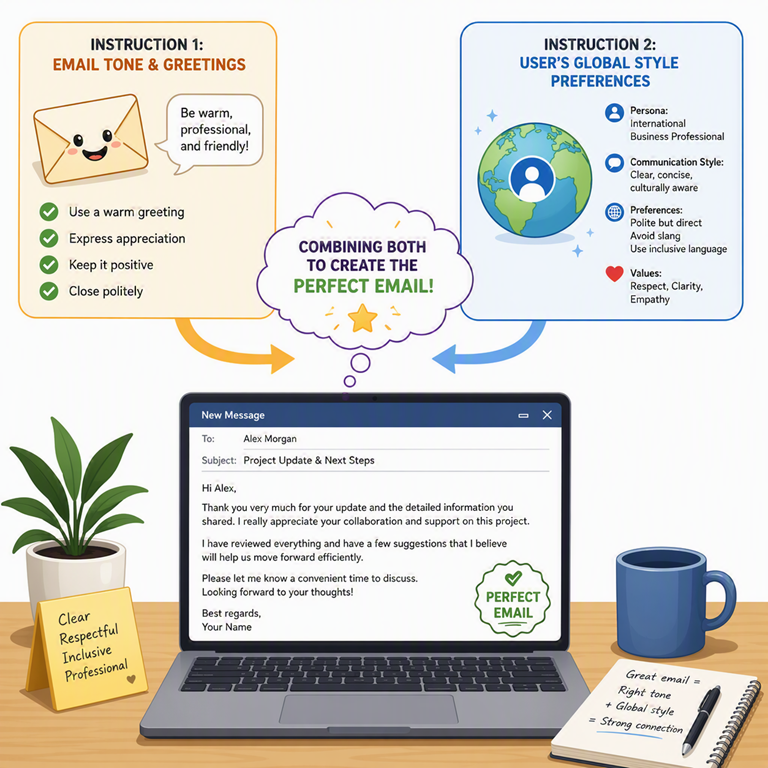
I see a lot of people trying out Microsoft 365 Copilot for Outlook, then asking why the emails it drafts don’t sound like them. Many end up manually tweaking every email Copilot writes, thinking it’s unavoidable.

“Why does Copilot always add ‘I hope you’re well’? I’m spending more time editing than drafting!”

Sound familiar? That’s not a failure of Copilot. That’s a missed opportunity. If you keep re-teaching Copilot your style every time you use it, you’re doing it wrong. The solution: set up the right instructions once, so Copilot learns how you want your emails written from the start.

What are Outlook Draft Instructions and Copilot Personalization, really?

Think of them as layers of guidance for Copilot. Outlook Draft Instructions are your email-specific preferences stored in Outlook. They’re all about how your email drafts should look: friendly vs formal tone, how long or detailed to make messages, whether to use bullet points, how to greet people, the sign-off you prefer—basically, how to sound like you in email (https://support.microsoft.com/outlook/copilot-outlook/ask-copilot-to-make-email-drafts-sound-like-you).

By contrast, Microsoft 365 Copilot Personalization is your global Copilot profile—the custom instructions and memory that apply across all Copilot experiences in Microsoft 365 (Word, Outlook, Teams, etc.), not just email. These personalization settings let Copilot know your role, typical audience, and general communication style so it can tailor any response, in any app, closer to what you need (Customize how Microsoft 365 Copilot responds to you).

Put simply: Draft Instructions tell Copilot how to handle your emails, while Copilot Personalization defines how Copilot behaves everywhere. And there’s no mystery about which one takes priority. When you click Draft with Copilot in Outlook, here’s the order in which Copilot follows your instructions:

  • Your prompt (highest priority): Anything you explicitly ask for (tone, style, language, etc.) in the prompt overrides everything else.

  • Outlook Draft Instructions: Your app-specific email defaults; used whenever your prompt doesn’t override them.

  • Global Copilot Personalization: Your general preferences fill any gaps not covered by your prompt or Outlook’s instructions.

  • Organizational policies: These always apply for compliance and safety (e.g. Data Loss Prevention (DLP) blocking sensitive info) but they don’t affect writing style.
Step-by-Step: Fine-tune Copilot for your email style
Open Outlook’s Copilot Draft Instructions

To set this up, you’ll need the new Outlook (or Outlook on the web) since the feature isn’t in classic Outlook’s UI. In the new Outlook on Windows or web, click the Copilot icon in the compose window. From the dropdown, select Settings, then click Draft Instructions.

Add your email style preferences

Turn on Use custom instructions when drafting email. Now type a short description of how you want Copilot to draft your emails. Be specific about tone, structure, greetings, and sign-offs. Do you prefer concise messages or detailed ones? Formal language or a friendly vibe? For example, you might write:

Use a friendly tone.
Start each email with "Hi [Name],".
Avoid corporate jargon and fluff.
Sign off with "Thanks, [Your Name]".

Notice what’s missing? We didn’t mention anything about length or level of detail in those instructions. That’s on purpose – if you leave something out here, Copilot will fall back to your global Personalization settings to fill in the blanks.

Set global Copilot Personalization

Next, open your Microsoft 365 Copilot settings (for example, in the Copilot Chat app or via the Copilot sidebar in any Office app). Go to Settings and select Personalization. Under Custom instructions, add broad guidance about yourself and your style that should apply everywhere. Tell it who you are and how you like your output across Microsoft 365. For instance, “I’m a small business owner writing for busy clients, so keep everything concise and professional.” Save your instructions.

Why this changes how you email

Once you’ve set up these preferences, you’ll stop fighting with Copilot’s tone and phrasing. Instead of manually fixing greetings or trimming fluff each time, you get drafts that fit your style on the first try. It’s like hiring an assistant who already knows your voice—from day one.

Better yet, showing your clients how to configure these settings is an easy win. It reduces their frustration with generic AI output, boosts their trust in Copilot, and makes you look like a trusted advisor. If you’re not helping them set their Copilot’s style, you’re leaving a lot of value on the table.

Copilot’s drafting preferences aren’t about adding complexity – they’re there to remove it.

Set them up once, and you can stop rewriting Copilot’s emails and start reaping the benefits of an AI that truly sounds like you.

Where Your Hours Go: A Calendar Lesson Worth Borrowing

image

I’ve been thinking a lot about calendars lately — mine in particular. There’s a quiet truth most of us would rather not admit: we aren’t running our calendars, our calendars are running us. Show me a fortnight of someone’s diary and I can usually tell you, with uncomfortable accuracy, what they actually care about. The hours don’t lie.

So I opened Outlook last Saturday morning and had a long, honest look at my own.

The Calendar Is the Confession

Most weeks of mine look fine on the surface. Meetings stacked tidily, deliverables ticking along, inbox manageable. But I tried something different this time — I colour-coded a fortnight of activities. Green for what energises me. Red for what drains me. The picture changed quickly. Most of the red was email triage, status check-ins that should have been a paragraph in a chat, and busywork dressed up as “real work”. I’d been treating execution time and thinking time as the same currency. They aren’t, and the account that pays out on each is very different.

The shift I’m trying to make is at an identity level. Stop measuring myself on output volume and start measuring myself on the quality of the decisions I make. A clear head making one good call beats a frantic day producing eight average ones. The problem is your calendar has to actually let you do that — and most calendars don’t.

Where Copilot Earns Its Seat

This is where Microsoft 365 Copilot has genuinely changed something in my week. Not in a flashy way — in a quietly structural way. The red activities on my audit, the energy-drain ones, are exactly the tasks Copilot is now doing for me.

Outlook is the obvious one. Copilot drafts replies, summarises long threads, and pulls out the actual ask buried six paragraphs deep. The hour I used to lose to inbox every morning is now closer to fifteen minutes. In Teams, Copilot recaps the meetings I couldn’t attend in plain prose, with decisions and action items separated — so I don’t have to sit through the recording at 1.5x speed pretending it’s productive. In Word and PowerPoint, the first draft writes itself from a few prompts, and I edit instead of starting from a blank page. In Excel, the analysis I used to wait on someone else for is now a conversation I have with the spreadsheet.

The principle behind all of this is simple. Pay someone, or something, to take low-value work off your plate so you can spend more hours on what only you can do. Copilot is the cheapest, most consistent assistant most of us will ever have. It doesn’t call in sick. It doesn’t need handover notes. And it’s already sitting inside the apps you use every day.

Design the Week First

The bit of this I’m trying hardest to apply is the simplest one. Schedule the personal commitments before the work ones. Block the gym session, the family dinner, the thinking time — then let work fit around what’s already there. It feels backwards the first time you do it, and right by the end of the week.

I’m watching my own calendar more carefully now. Not for gaps to fill, but for patterns I’d rather not repeat. If Copilot can hand me back ten hours a week of red-zone work, the question stops being “how do I find time” and becomes “what am I going to do with the time I’ve reclaimed”. That second question, I think, is the one worth answering well.