CIAOPS Need to Know Office 365 Webinar–October

laptop-eyes-technology-computer

Heaps of news and update to cover from the recent Microsoft Ignite conference plus a deep dive into SharePoint is going to keep us pretty busy this month. If you want to know the latest and coolest technologies coming to your Office 365 environment plus get a better understanding of how SharePoint integrates with services like Microsoft Teams then don’t miss this month’s webinar.

You can register for the regular monthly webinar here:

October Webinar Registrations

The details are:

CIAOPS Need to Know Webinar – October 2018
Wednesday 24th of October 2018
11am – 12am Sydney Time

All sessions are recorded and posted to the CIAOPS Academy.

There of course will also be open Q and A so make sure you bring your questions for me and I’ll do my best to answer them.

The CIAOPS Need to Know Webinars are free to attend but if you want to receive the recording of the session you need to sign up as a CIAOPS patron which you can do here:

http://www.ciaopspatron.com

or purchase them individually at:

http://www.ciaopsacademy.com/

Also feel free at any stage to email me directly via director@ciaops.com with your webinar topic suggestions.

I’d also appreciate you sharing information about this webinar with anyone you feel may benefit from the session.

CIAOPS Patron price changes

I am letting people know that I will be raising the entry prices for my CIAOPS Patron program from the 1st of January 2019. However, every one who is already in the program before that date will be grand fathered in at their existing rate.

Thus, if you have been thinking of jumping on board to take advantage of all the great resources that are available as apart of the program such as detailed Office 365 and Azure notebooks, a private community forum, access to online training and more, well now is the time to act. You can read more about these resources here:

www.ciaopspatron.com

If you join the program before the 1st of January 2019 you’ll not only receive all the existing benefits but all the new ones I plan to start rolling out in the new year.

If you work with the Microsoft Cloud, particularly Office 365 and Azure, then you are going to get loads of benefits from this program. It is really the best way to stay up to date with the Microsoft Cloud, all in a single location.

I hope to see you inside the program soon. Don’t hesitate, join the other successful Microsoft Cloud professionals who are already part of this program.

Absorbing content from Ignite 2018

One of the biggest challenges with events like Microsoft Ignite is simply the sheer scale of information presented. There is no way that you can see everything you want, let alone absorb it all in the time.

The great thing is that apart from Microsoft Live Streaming everything for those like me that weren’t there but they also record it and make it available at:

On demand sessions

Simply search for the session, title or topic that you want. The video content actually ends up on YouTube on the Microsoft Ignite channel. However, at the moment, the sessions from Ignite are unlisted so you need to know their direct URL.

As I did with Ignite 2017 I have created a list of all the session URLs on YouTube and posted that on my GitHub here:

https://github.com/directorcia/general/blob/master/ignite2018.txt

There currently are not many sessions in the list but I’ll continue to add them as I go along, so make sure you book mark that location. Also, if you find a link to a session please send it to me so I can include it.

Now one of the other things I like to do is go and grab all the slides from the sessions and upload them to my SharePoint site so I can search them if needed. There is great PowerShell script here:

https://gallery.technet.microsoft.com/Ignite-2016-Slidedeck-and-296df316

That will allow you to grab all the slides and all the videos if you want. The script is also smart enough to determine what you already have if you re run it as you can see –

image

and you may need to do this as all the content is not up there just yet. I’ve managed to grab about 1,115 or 1,620 sessions so far but I’ll be running the script a few more times over the next couple of weeks to make sure I get everything.

It’ll take me a a full 12 months to go through all these sessions but it is worth the investment and kudos to Microsoft for making all this content available to anyone and everyone.

More interesting news from Ignite 2018

Here are some more announcements from Microsoft Ignite 2018 that caught my eye:

Office 365 / Microsoft 365

Announcing new Microsoft Forms features at Microsoft Ignite – https://techcommunity.microsoft.com/t5/Microsoft-Forms-Blog/Announcing-new-Microsoft-Forms-features-at-Microsoft-Ignite/ba-p/263007

Introducing Multi-Geo in SharePoint and Office 365 Groups – https://techcommunity.microsoft.com/t5/Office-365-Blog/Introducing-Multi-Geo-in-SharePoint-and-Office-365-Groups/ba-p/263302

SharePoint powers teamwork in Office 365 – Ignite 2018 announcements – https://techcommunity.microsoft.com/t5/Microsoft-SharePoint-Blog/SharePoint-powers-teamwork-in-Office-365-Ignite-2018/ba-p/255465

What’s new in Microsoft Stream – Ignite 2018 announcements – https://techcommunity.microsoft.com/t5/Microsoft-Stream-Blog/What-s-new-in-Microsoft-Stream-Ignite-2018-announcements/ba-p/260334#

Beginning in October, employees can watch videos on the go with the Stream mobile app for iOS and Android, with support for offline viewing.

Passwordless phone sign-in with the Microsoft Authenticator app (public preview) – https://docs.microsoft.com/en-us/azure/active-directory/authentication/howto-authentication-phone-sign-in

Microsoft Whiteboard is now available for more devices – https://techcommunity.microsoft.com/t5/Office-365-Blog/Microsoft-Whiteboard-is-now-available-for-more-devices/ba-p/255431

Whiteboard on iOS – https://itunes.apple.com/us/app/microsoft-whiteboard/id1352499399

Azure

Private preview of Azure VM Image builder – https://azure.microsoft.com/en-us/blog/announcing-private-preview-of-azure-vm-image-builder/

Azure monitor alerting just got better – https://azure.microsoft.com/en-us/blog/azure-monitor-alerting-just-got-better/

Move Managed Disks and VMs now available – https://azure.microsoft.com/en-us/blog/move-managed-disks-and-vms-now-available/

Introducing Azure Functions 2.0 – https://azure.microsoft.com/en-us/blog/introducing-azure-functions-2-0/

Top learnings from Microsoft Ignite 2018–Day 1

Here’s what caught my attention on Day 1 of Ignite 2018:

1. Windows Virtual Desktop

Windows Virtual Desktop gives you a Windows 7 or 10 desktop on Azure – https://arstechnica.com/gadgets/2018/09/windows-virtual-desktop-gives-you-a-windows-7-or-10-desktop-on-azure/

https://azure.microsoft.com/en-us/services/virtual-desktop/#sign-up

“Access Windows Virtual Desktop for free if you’re a Microsoft 365 E3, E5, or F1 customer or a Windows E3 or E5 customer—you only need to setup or use an Azure free account to quickly deploy and manage your virtualization environment. Pay only for the virtual machines you use and take advantage of options such as Azure Reserved Virtual Machine Instances.”

2. File on demand for Mac

Try files on demand for Mac – https://support.office.com/en-us/article/try-files-on-demand-for-mac-529f6d53-e572-4922-a585-e7a318c135f0

3. Microsoft Learn

Microsoft Learn – https://docs.microsoft.com/en-us/learn/

4. OneDrive updates

Beginning later this year, automated transcription services will be natively available for video and audio files in OneDrive and SharePoint using the same AI technology available in Microsoft Stream. While viewing a video or listening to an audio file, a full transcript (improving both accessibility and search) will show directly.

and

Leverage intelligent search with the Microsoft Graph in OneDrive and SharePoint to find audio and video that contains specific words or phrases the same way you search across documents.

and

Use keywords found in transcribed audio and video can be used to kick off workflows in Microsoft Flow. For example, any content that contains a specific keyword can be copied to a marketing folder for that product.
<https://techcommunity.microsoft.com/t5/Microsoft-OneDrive-Blog/OneDrive-Announcements-at-Ignite-2018/ba-p/255201>

“We are pleased to announce that you’ll soon be able to sync folders from multiple Office 365 tenants on both PC and Mac.” – From <https://techcommunity.microsoft.com/t5/Microsoft-OneDrive-Blog/OneDrive-Announcements-at-Ignite-2018/ba-p/255201>

5. Staffhub to be retired

Microsoft Staffhub to be retired – https://support.office.com/en-us/article/microsoft-staffhub-to-be-retired-30ca17f3-5502-4bc9-bb0a-bed04bb362f0?ui=en-US&rs=en-AU&ad=AU

6. A mobile app for Microsoft Stream is coming

Beginning in October, employees can watch videos on the go with the Stream mobile app for iOS and Android, with support for offline viewing. From <https://www.microsoft.com/en-us/microsoft-365/blog/2018/09/24/10-new-ways-for-everyone-to-achieve-more-in-the-modern-workplace/>

7. Azure SMB files just gets better

A new era for Azure files – https://azure.microsoft.com/en-us/blog/a-new-era-for-azure-files-bigger-faster-better/

Today, we are pleased to announce the preview of Azure AD authentication for Azure Files SMB access. This feature allows the native preservation of Windows access control lists (ACLs) on Azure file shares. It also enables end users to access Azure file shares through an Azure AD Domain Services joined machine with Azure AD credentials.

Azure AD authentication for Azure SMB file access now in public preview – https://azure.microsoft.com/en-us/blog/azure-active-directory-integration-for-smb-access-now-in-public-preview/

8. New Azure exams

AZ-200 = Microsoft Azure Developer Core Solutions

AZ-201 = Microsoft Azure Developer Advanced Solutions

AZ-202 = Microsoft Azure Developer Certification Transition

9. New Office 365 (I suspect Microsoft 365) exam in March 2019

MS-100

MS-101

What will Day 2 bring?

September Office 365 Webinar Resources

Slides from this month’s webinar are at:

https://www.slideshare.net/directorcia/september-2018-office-365-need-to-know-webinar

If you are not a CIAOPS patron you want to view or download a full copy of the video from the session you can do so here:

http://www.ciaopsacademy.com.au/p/need-to-know-webinars

Watch out for next month’s webinar.

Need to Know podcast–Episode 190

Brenton and I take an opportunity to get you up to date ahead of Microsoft Ignite on all the latest news in the Microsoft Cloud. We have some news about SharePoint and Outlook as well as some changes to Windows 7 support. Brenton also suggests that maybe we need a dedicated episode on PowerShell. What do you think? Let us know.

Take a listen and let us know what you think –feedback@needtoknow.cloud

You can listen directly to this episode at:

https://ciaops.podbean.com/e/episode-190-cloud-updates/

Subscribe via iTunes at:

https://itunes.apple.com/au/podcast/ciaops-need-to-know-podcasts/id406891445?mt=2

The podcast is also available on Stitcher at:

http://www.stitcher.com/podcast/ciaops/need-to-know-podcast?refid=stpr

Don’t forget to give the show a rating as well as send us any feedback or suggestions you may have for the show.

Resources

@contactbrenton

@directorcia

New Outlook on the web

Helping customers shift to a modern desktop

Microsoft Ignite

Microsoft Teams data residency

Windows 7 monthly update charge

PowerShell basics

Initial set up of an Office 365 PowerShell environment

CIAOPS Learn

CIAOPS Patron

Auditing Office 365 logins

Using Azure Automation to schedule mailbox checks

Ignite 2017 sessions on YouTube

With Microsoft Ignite 2018 just around the corner I know there is always going to be a huge amount of content and no way that I can be across all of it immediately. Luckily, Microsoft has been recording these sessions and posting them up to YouTube for later review. This has allowed me to work through many sessions over the year to improve my knowledge.

image

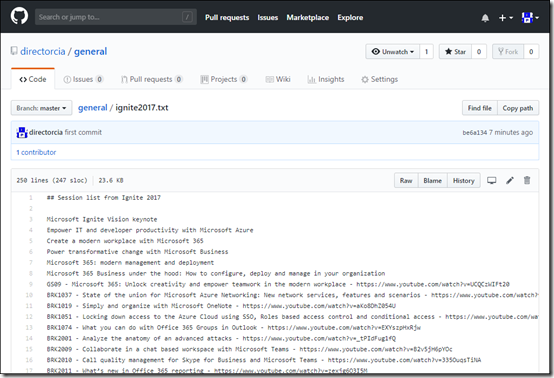
Unfortunately, there is not a single directory of all the session recordings in YouTube, at least not that I know of, so I have created and maintained a list of these sessions as I worked through them. I’ve now made my list of the Ignite 2017 sessions available via my GitHub repository at:

https://github.com/directorcia/general/blob/master/ignite2017.txt

Simply find the session that you are interested in a hopefully I’ve managed to capture the link to the session on YouTube. If you know of any sessions that aren’t listed let me and I’ll add to my catalogue.

Personally, watching the pre-recorded sessions gives me some benefits I don’t get attending in person. Firstly, I generally watch the sessions at 1.5 speed which allows me to get through more sessions. I’m also able to have my own Office 365 or Azure tenant up in another window and be following along with what I see being presented. I also get the ability to pause the session and come back later as YouTube keeps track of my history. Also, as I watch session YouTube suggest more sessions like the one I’m watching, so discovery of new relevant sessions becomes much easier once you start getting into it.

I plan to do the same for the Ignite 2018 sessions when they become available but I’ll start doing that immediately and posting into a new file in the same repository. So keep an eye out for that one coming soon.

Even after 12 months, I haven’t been able to get through everything but I do have to say thanks to Microsoft for making all this content freely available for those that couldn’t attend.