My Gear 2025

You can take a look back at last year’s gear here:

My Gear 2024

there were/are some major changes happening with my assortment.

Surface Duo 2 – My ‘Google’ phone. This as a ‘secondary’ or backup phone. It has all the Microsoft apps installed on it and is connected to my Microsoft 365 production account. Most importantly, it has the Microsoft Authenticator app for MFA access for certain apps.  I also have the latest Microsoft Surface pen which I really like. It is probably the best ‘electronic scribing’ device I have used.

Unfortunately Microsoft has decided to no longer support this device and effectively end support for it as detailed here:

The Surface Duo is dead

The Surface Duo has lamentably always been a bit of second class citizen in the Microsoft ecosystem and was never widely supported by consumers. Personally, I always liked the device but as a phone it wasn’t ever really going to work in that form factor and that severely restricted its penetration.

I will give credit to Microsoft for trying something different and trying a different approach from the standard form factor but who the Duo was aimed at was never really clear which did make it much harder to penetrate a very competitive market. I am sad to see it discontinued, but I understand why it has been.

Given that it is now unsupported means I need to start considering a supported Android device to replace this. I’m not going to throw away my Surface Duo 2 but I need to consider something that can maintain the latest version of Android so I can test with Intune policies. I am in no rush to do this but I will need to start thinking about a replacement.

iPhone 12 Pro Max – This remains my main mobile device still. It still has a number of cracks on the screen but it still does what it needs to do. The device lives in a Quad Lock case and I have Quad Lock mounts for both desktop and car, which I highly recommend and make life easy.

With Apple’s announcement of Apple Intelligence and its need for more powerful devices I was tempted to upgrade the phone but as I understand it the bulk of Apple’s new features are not yet available and when they fully launch they will require an even newer (as yet unreleased product). So, I’m still holding off upgrading this phone as it really does all I need to do currently and the investment in a new Apple device is not cheap. A basic iPhone 16 pro Max would be around AU$2,150 which I honestly feel I wouldn’t get full value from.

One thing that remains configured my iPhone for is default grey scale display. I do this for two major reasons, firstly to prevent the phone from grabbing and holding my attention and secondly to save power. With the colours disabled on your phone it is amazing at how les tempting it is to play with it and use it as a crux when you are bored.

The great thing I will say about about Apple devices is their battery life. My experience is that this allows them to work for years and years, providing great value.

So for now, unless this device breaks, I’m in no rush to replace it.

Surface Pro 9 – This is my travelling and demo machine and replaces the Surface Pro 6. Having a dedicated travel machine makes it easy to grab and also to only have the software on it that I need. By that I mean I’m not installing random stuff on it to test.

I like the size and also the fact that it comes with with a Surface pen, which is handy as I discovered that the Surface Pen also works on Surface Hubs! (Great when the Surface Hub pens don’t work).

I do most of my demos on this machine as well as Teams webinar work as it is nice and quick. This machine runs Windows 11 Enterprise.

I did consider replacing this machine with a Copilot+ PC but again can’t see the real benefits unless one of my other production Surface devices dies. Yes,Copilot+ PC is a better device. Yes, it has longer battery life, etc etc but am I really going to notice that day to day? Probably not. Starting at around AU$2,000, like a new phone, that is lot to pay for something for which I already have hardware that effectively does the same job and from what I understand there isn’t much software that takes advantage of the NPU. Of course, if one of my production machines were ti fail then I would certainly consider Copilot+ PC but for now, like the phone, I prepared to wait for later generations of devices to appear.

Surface Pro 7 – This is my main desktop machine. Being the same form factor as the Surface Pro 6, it just slotted directly into my Kensington SD7000 Surface Pro Docking Station I already have in place. This machine runs Windows 11 Enterprise.

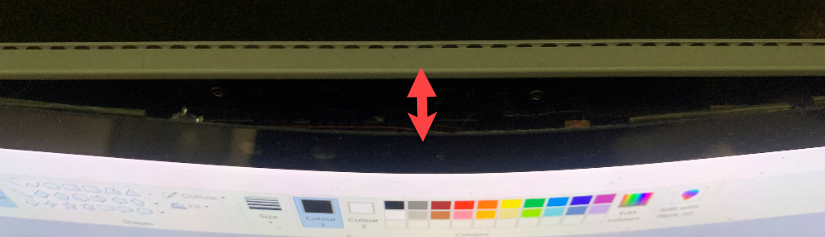
A problem has developed with this device where the screen goes blank below where the mouse cursor is. That makes using the device really, really annoying. I have multiple monitors connected to this device but being unable to use one screen intermittently is a productivity killer. It doesn’t happen all the time but it happens often enough that I think I really should replace it.

The downside of going to another Surface device is that it won’t fit in my Kensington SD7000 Surface Pro Docking Station which I really love. So if I upgrade this machine, I need to do away with the docking station as well.

Apart from the screen occasional screen issue this machine does the job it needs to. Sure a newer machine might run a bit faster but is the extra purchase price justify what would probably be only a small incremental gain? Currently, I don’t think so. Thus, until this device gives up the ghost it will probably remain as my main machine.

Surface Pro 6 – My backup machine. I use it pretty much every day as an adjunct to my main machine. It lives on my secondary Kensington SD3500v docking station connected to a full screen and acts as my backup in case my main machine fails or is unavailable for some reason. This machine run Windows 10 but could run Windows 11. I haven’t upgraded as yet because I want to maintain at least one production machine on Windows 10. With the end of life of Windows 10 coming in October 2025, I will probably have to upgrade this machine.

This machine is becoming noticeably slower to work with and takes much longer to boot up and run applications. Once these are all ‘fired up’ it is fine, but it is noticeably slower than the more modern Surface machines I have.

I did have an Benq PD3200Q-T monitor on this device but the power supply failed and to replace it would cost more than a new monitor so it went to recycling. The replacement monitor, a Samsung 32 Inch S39C FHD Curved Monitor (1920×1080) bought from Amazon unfortunately being bought in a rush, doesn’t have the same screen resolution as the original Benq, which is annoying at time when I have to full screen the application window when I never used to. I bought a curved screen to see if they really made any difference to my viewing experience but feel it hasn’t really.

I would like a higher resolution monitor as I had before with the Benq (a lesson for next time), but for now the Samsung does the job and if I did buy a new monitor where would I use the Samsung? For the price, I’m happy enough with the Samsung but for the next monitor purchase I will be more careful about getting a monitor with a higher resolution.

Surface Pro X – I use this machine as a ‘lite’ travelling desktop as well as a whiteboarding machine for demos and training. Give that it comes with the Surface Pen and has a nice large screen and will lie flat it makes the prefect device for scribing. I also use this device for writing note into places like OneNote. Perhaps not the most effective use of the device but it beats the iPad when it comes to scribing hands down in my books. This machine runs Windows 11.

This is another machine that I haven’t used as much as I want to, however it is fit for purpose in the role that it plays for me now. Also, given it is an ARM processor I’m interested to see whether maybe I can get Copilot+ PC features on that down the track when Microsoft opens these up. I doubt it as the process isn’t probably capable enough but let’s wait and see.

Surface Pro 3 – Continues to work fine and function as a test machine in my production environment. This machine has now been removed from my production network and operates stand alone. It does this so it can run my IoT project work. I found that with the security I have on my production network that I could not easily operate the IoT software I needed so the simple solution was to remove it from the production network and use it stand alone. This machine is slow and clunky, but for now it is doing the job it needs to. This machine is not suitable for Windows 11 and thus still happily runs Windows 10.

This device is now around 10 years old! and has been great value over that time and continues to do so for me. It goes to show how long modern devices live for.

Surface – I have had an original Surface version 1 for many years now. The keyboard has long since broken by the system still works fine, although somewhat under powered with only 4GB of RAM. This machine is now a dedicated device on a separate test tenant. This allows me to test Autopilot and other settings on it regularly. This machine is not suitable for Windows 11.

iPad mini 5th Gen – I decided I wanted a smaller ‘notebook’ size table to use like a paper diary, amongst other things, so I went out and bought an iPad mini.

I also now use this iPad mini with the Apple pencil, which generally works well, although the Apple pencil battery is pretty much knackered. The secret is to get a good case for both the iPad mini and the pencil. My choice was:

Finite Case with Pencil holder

which I’d certainly recommend as it is flexible, tough and cheap.

The only major downside of the iPad mini is that battery life is a lot less than the full size iPad, which is understandable. I have however never run out of juice but you do notice the power levels fall away quickly when compared to the full size version. I like that the iPad mini comfortable fits on my desk, works will with the Apple pencil and is much more transportable than the larger version. I was a little concerned that the screen size would be too small to enjoy movies and read web pages, etc but that hasn’t proved to be the case. I happy use it lying back on the couch to watch a variety of programs and read web sites.

After a number of years the Apple Pencil doesn’t really hold a charge any more. That is disappointing, although I appreciate it doesn’t have a huge battery. This has again increased the friction with me finding a suitable replacement for a paper notebook because every time I want to write something down, I need to charge the pencil up which takes ages.

Here is another device that works well and really has no need of a replacement but I have considered upgrading to a current iPad mini but again, I’m struggling to justify the AU$800 cost when the existing device is more than fit for purpose. Even if I did buy a new iPad mini what would I do with the current device?

D-Link Wireless N300 Model Router DSLG225 – to allow connect to the NBN broadband network.

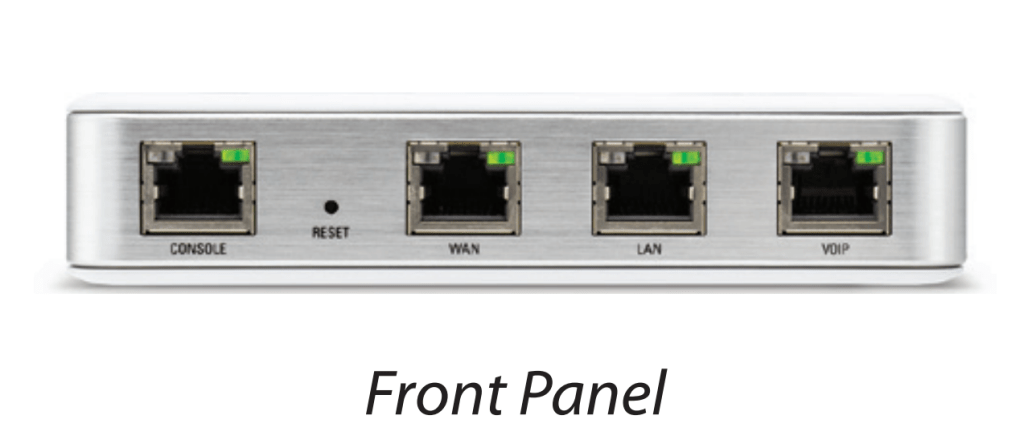
Ubiquiti – I have a variety of Ubiquiti equipment in place including a  Security Gateway. All these have worked flawlessly and I can’t recommend this gear highly enough.

Docking station – I still love my Kensington SD7000 Surface Pro Docking Station. It is a really neat device, that suits most modern Surface Pro devices. It is slim, compact and now allows me to have 3 external monitors off the one Surface devices (as you can never have enough screen now can you eh?). I can plug in all my devices, microphones, phones, etc to it and all the cables are hidden at the back. I also like that you can adjust the screen up and down, a bit like a Surface Studio.

If I did upgrade my Surface pro 7 device it could not be used with this dockign station which would be sad. Seems to me all the docking station form factors have moved to just being external bricks rather than the elegance this solution provides. being unable to use this docking device upon a device upgrade is a major reason preventing me from upgrading if I’m honest.

The original Kensington SD3500v has now moved to work with the Surface Pro 6 and that is also working well

Xbox One S – Still use it to watch YouTube, Netflix and Amazon video and playing some games, but not many.

Apart from a new monitor for the Surface Pro 6 my gear remain pretty much the same and functioning reliably. Some items, such as the iPhone and iPad Mini, I am considering upgrading but struggle to justify that given the existing equipment is working fine. It is too easy to buy new hardware because it is new. I’ve tried to discipline myself to ask whether it will in fact make me more productive and what will I do with the old device, which more often than not is still working.

I do see the need to replace the Duo with a supported Android phone in 2025, but again I don’t see a burning need to do that. In short, unless something breaks I can’t see me buying any major new pieces of hardware in 2025.

IoT motor connectivity

Although I had completed a project using a servo motor with the Sparkfun ThingPlus ESP32-S2 Wroom here:

New IoT device with a servo motor

turns out that to drive any motor more serious you’ll need a dedicated motor driver board and a separate power supply just for the motors. Luckily Adafruit has just such a board available:

https://core-electronics.com.au/dc-motor-stepper-featherwing-add-on-for-all-feather-boards.html

with the details here:

https://learn.adafruit.com/adafruit-stepper-dc-motor-featherwing

This board will allow you to drive up to 4 independent motors.

feather_2927-00.jpg

which you connect to M1, M2, M3 or M4 shown above.

feather_motorpower.jpg

Flipping the board over, you’ll also find the connection for the external power (5-12V DC) required to actually drive the motors. I decided to use 4 x AA batteries in a separate holder with an on/off switch:

https://core-electronics.com.au/4-x-aa-battery-holder-with-on-off-switch.html

4 x AA Battery Holder with On/Off Switch

I also got a Mini Robot Rover chassis kit:

https://littlebirdelectronics.com.au/products/mini-robot-rover-chassis-kit-2wd-with-dc-motors

Mini Robot Rover Chassis Kit - 2WD with DC Motors

that, as you can from the above, includes 2 x DC motors.

I connected these to M1 and M2 on the motor driver board, as well as also connecting up the external power for the motors.

feather_logipowr.jpg

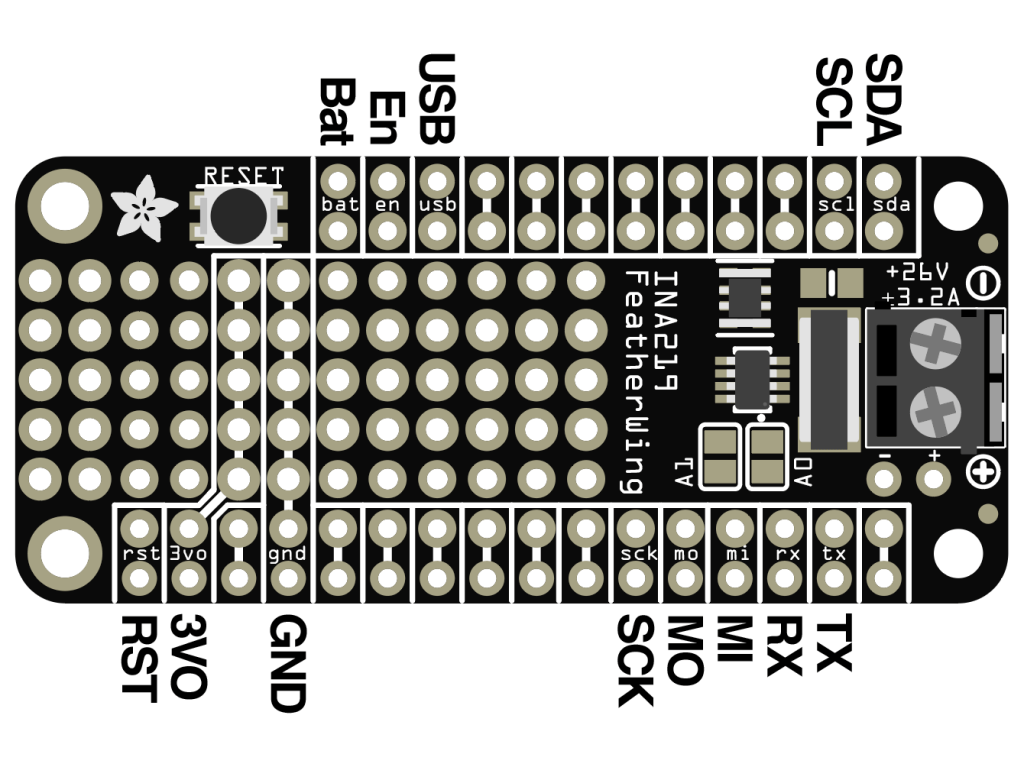
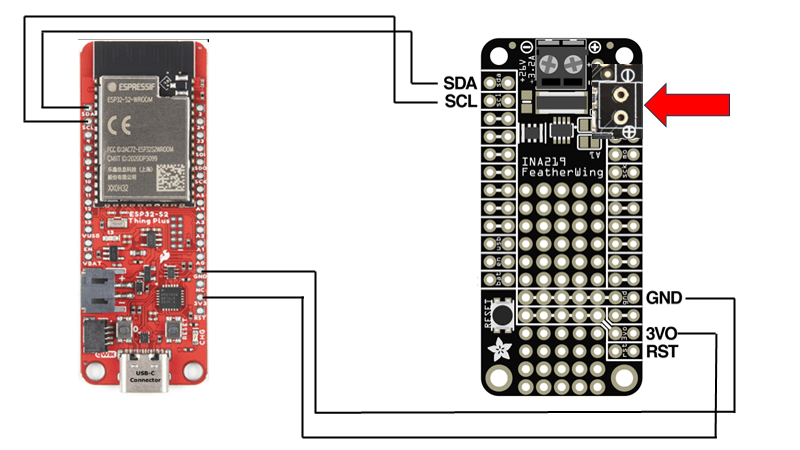
I then needed to connect 3.3V and GND to the motor driver board which are shown above and in more detail here:

The final piece of the puzzle is to connect the SDA and SCL pins from the Sparkfun ThingPlus ESP32-S2 Wroom to the SDA and SCL pins on the motor driver so they can communicate.

To talk to the motor driver board you’ll need to use the Adafruit motor shield v2 library. I’ll cover off some of the code I’ve created in an upcoming post.

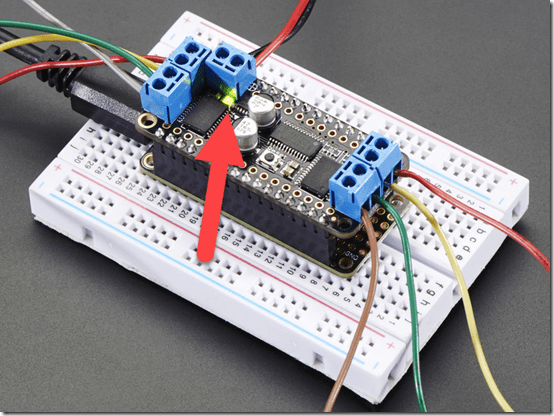
When you apply the power supply for the motors to this board a green LED is lit just under the power connector as shown above. I wasted a few hours with this until I discovered a fault solder joint that was the cause of my issues.

So my wiring looks like:

with the two motors for the drive wheels connected to M1 and M2 as mentioned above and whole thing sitting on the mini robot rover chasis.

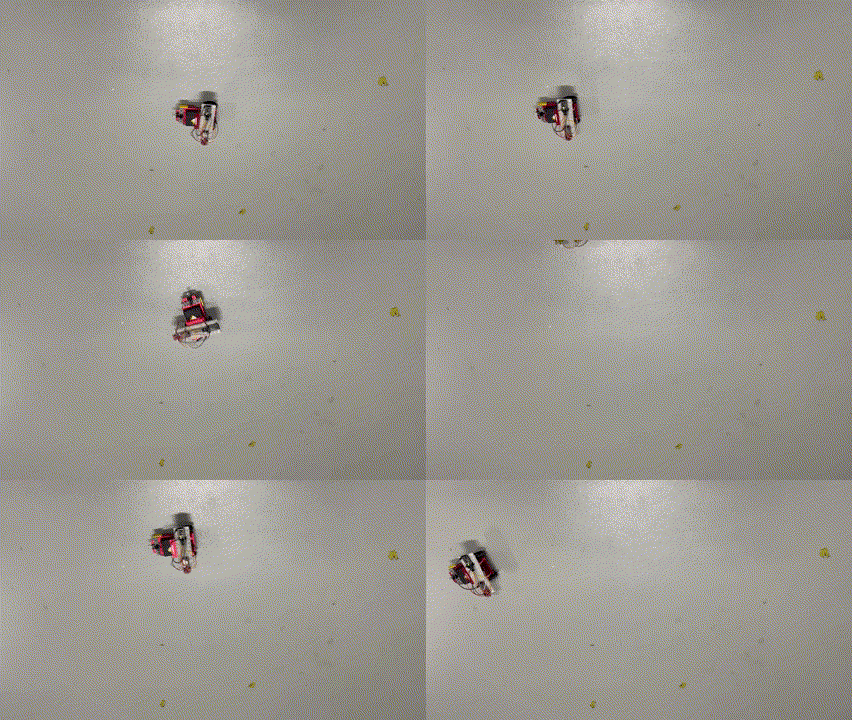
I now have a mobile device I can command to move about the room. Next step is actually writing the code to make it work, which I’ll cover off in an upcoming post, so stay tuned. However, here’s a sneak peak of what I managed to do:

My Gear 2023

You can take a look back at last year’s gear here:

My Gear 2022

there were/are some major changes happening with my assortment.

Surface Duo 2 – My ‘Google’ phone. This as a ‘secondary’ or backup phone. It has all the Microsoft apps installed on it and is connected to my Microsoft 365 production account. Most importantly, it has the Microsoft Authenticator app for MFA access for certain apps.  I also have the latest Microsoft Surface pen which I really like. It is probably the best ‘electronic scribing’ device I have used.

i have to admit that I haven’t used this device that much since I bought it. Some of the reasons for that were that I planned to use it as a writing device (i.e. notepad) but storing the pen with the device has proved problematic. yes, it does have a magnetic area to hold the pen but you can’t just throw the device in a bag and expect the pen to be still connected. The pen really needs some form of pouch in which the pen lives so it can always be with the device. The other thing is the large camera bump prevents the device from laying completely flat. This makes it very hard to use as a replacement notebook on a desk. One of my resolutions this year will be to try and use this device much more to get full benefits from the investment made as I do really like the device and feel it can serve a real purpose for me. I just have to work out how to reduce the friction of using it everyday..

iPhone 12 Pro Max – Is my main mobile device. Unfortunately, there is a growing crack on the screen that I believe was initiated by the Surface Duo 2 camera bump, when the devices where in my laptop bag together. The phone still works and the crack is off to one side of the screen but I can see the crack growing and full expect one day to have to replace the device. I want to delay this as long as possible since I have invested in a Quad Lock case and multiple holders (car, desktop, etc) for this case. A new phone will mean a new case, which isn’t the end of the world, just additional hassle.

One thing that I have configured my iPhone for is default grey scale display. I do this for two major reasons, firstly to prevent the phone from grabbing and holding my attention and secondly to save power. With the colours disabled on your phone it is amazing at how les tempting it is to play with it and use it as a crux when you are bored.

The great thing I will say about about iDevices is their battery life. My experience is that this allows them to work for years and years, providing great value.

Surface Pro 7 – This is my main desktop machine. Being the same form factor, it just slotted directly into my Kensington SD7000 Surface Pro Docking Station I already have in place. This machine runs Windows 11.

I am considering a potential Surface Pro 9 purchase, however as of yet I can’t really justify it. The other downside of going to a Surface Pro 9 is that it won’t fit in my Kensington SD7000 Surface Pro Docking Station which I really love.

Surface Pro 6 – My backup and travelling machine. I use it pretty much every day as an adjunct to my main machine. It lives on my secondary Kensington SD3500v docking station connected to a full screen and acts as my backup in case my main machine fails or is unavailable for some reason. It is also a handy way to test things from outside my environment by hot spotting to my phones. This machine run Windows 10 but could run Windows 11. I haven’t upgraded as yet because I want to maintain at least one production machine on Windows 10.

This is the machine I am considering replacing with a Surface Pro 9, given that it will plug directly into the existing Kensington SD3500v docking station. The question then is, what do I do with the Surface Pro 6? It still works. How can I make best use of this device if I no longer use it as my travelling device and backup? That, I haven’t figured out yet.

Surface Pro X – I use this machine as a ‘lite’ travelling desktop as well as a whiteboarding machine for demos and training. Give that it comes with the Surface Pen and has a nice large screen and will lie flat it makes the prefect device for scribing. I also use this device for writing note into places like OneNote. Perhaps not the most effective use of the device but it beats the iPad when it comes to scribing hands down in my books. This machine runs Windows 11.

This is another machine that I haven’t used as much as I want to. I am considering converting it to a full time desk notepad for writing (given it has a Surface Pen which I love). Last year saw the keyboard fail and I agonised over whether to replace it because it ain’t cheap. In the end I did buy a replacement keyboard to main the most functionality with the device. The problem is that if I use it as a dedicated desktop notebook device (i.e. flat on the desk with the cover removed) then it tends to get in way. I think I just need to spend some more time with the ergonomics on my desk to get the most productivity and use from this device going forward.

Surface Pro 3 – Continues to work fine and function as a test machine in my production environment. This machine has now been removed from my production network and operates stand alone. It does this so it can run my IoT project work. I found that with the security I have on my production network that I could not easily operate the IoT software I needed so the simple solution was to remove it from the production network and use it stand alone. This machine is slow and clunky, but for now it is doing the job it needs to. This machine is not suitable for Windows 11.

Surface – I have had an original Surface version 1 for many years now. The keyboard has long since broken by the system still works fine, although somewhat under powered with only 4GB of RAM. This machine is now a dedicated device on a separate test tenant. This allows me to test Autopilot and other settings on it regularly. This machine is not suitable for Windows 11.

iPad mini 5th Gen – I decided I wanted a smaller ‘notebook’ size table to use like a paper diary, amoungst other things, so I went out and bought an iPad mini.

I also now use this iPad mini with the Apple pencil, which generally works well. The secret is to get a good case for both the iPad mini and the pencil. My choice was:

Finite Case with Pencil holder

which I’d certainly recommend as it is flexible, tough and cheap.

The only major downside of the iPad mini is that battery life is a lot less than the full size iPad, which is understandable. I have however never run out of juice but you do notice the power levels fall away quickly when compared to the full size version. I like that the iPad mini comfortable fits on my desk, works will with the Apple pencil and is much more transportable than the larger version. I was a little concerned that the screen size would be too small to enjoy movies and read web pages, etc but that hasn’t proved to be the case. I happy use it lying back on the couch to watch a variety of programs and read web sites.

After a number of years the Apple Pencil doesn’t really hold a charge any more. That is disappointing, although I appreciate it doesn’t have a huge battery. This has again increased the friction with me finding a suitable replacement for a paper notebook because every time I want to write something down, I need to charge the pencil up which takes ages. I may look at getting a new and updated Apple pencil but unsure as to whether I can really justify that in line with the plan to use the Surface Duo more.

D-Link Wireless N300 Model Router DSLG225 – to allow connect to the NBN broadband network.

Ubiquiti – I have a variety of Ubiquiti equipment in place including a  Security Gateway. All these have worked flawlessly and I can’t recommend this gear highly enough.

Docking station – I still love my Kensington SD7000 Surface Pro Docking Station. It is a really neat device, that suits most modern Surface Pro devices. It is slim, compact and now all me to have 3 external monitors off the one Surface devices (as you can never have enough screen now can you eh?). I can plug in all my devices, microphones, phones, etc to it and all the cables are hidden at the back. I also like that you can adjust the screen up and down, a bit like a Surface Studio.

Occasionally, one of my monitors goes dark and a few seconds later comes back, kinda like it is doing a reset or refresh. Maybe I need to update some drivers? Apart from that it continues to perform flawlessly.

The original Kensington SD3500v has now moved to work with the travelling PC when it is running in my office and that is also working well, making it a truly ‘plug and play’ experience when I get back from road trips.

Amazon Kindle – Still have this but it has now largely been superseded by the iPad mini for reading books. I still love my Kindle but if I can have one less device then I’m going to take that option. so for now, the Kindle has been relegated as a backup.

Xbox One S – Still use it to watch YouTube, Netflix and Amazon video but now playing more games thanks to Minecraft Dungeons and Call of Duty game.

I didn’t make any major hardware investments in 2021.

The items that I retired from front line operations last year where:

1. WDSentinel

I will admit that I have my eye on a Surface Pro 9 replacement for the Surface Pro 7 depending on how things pan out this year. I doubt I’ll be upgrading to the new iPhone 13 as I don’t see any major benefits for the costs, that is unless the screen fractures. I want to focus on getting the most from my Surface Duo 2 given its price. I also hear rumours of a Duo 3, so hopefully I’ll be able to trade in Duo 2 in if I decide to.

My Gear 2022

You can take a look back at last year’s gear here:

My Gear 2021

there were/are some major changes happening with my assortment.

Surface Duo 2 – My ‘Google’ phone. This as a ‘secondary’ or backup phone. It has all the Microsoft apps installed on it and is connected to my Microsoft 365 production account. Most importantly, it has the Microsoft Authenticator app for MFA access for certain apps. I’ll need to spend more time with this device as it is quite different from a ‘normal’’ phone. I also have the latest Microsoft Surface pen which I really like. It is probably the best ‘electronic scribing’ device I have used.

I have relegated my Pixel 4XL phone now to the testing bench.

iPhone 12 Pro Max – Is now my main mobile device having replaced the old iPhone XS Max last year. I traded the XS Max in for the full amount on offer (around $600 from memory) and used this as a credit on the newer 12 Pro Max, which I decided to buy outright. With the contract expiring and a re-evaluation of how I use my phone I downgraded my calling plan and purchased the new phone outright. it ended up being much cheaper that way.

After a few years of living the ‘iPhone lifestyle’ I gotta admit I still don’t get people’s fanaticism about it. Yes, it is well engineered, better than most I’ll readily admit, but at the end of the day it is just a phone for me. I have a few common apps I use on it, apart from all the Microsoft ones, but honestly, I just use it as a phone not as a surrogate friend.

Surface Pro 7 – This is my main desktop machine. Being the same form factor, it just slotted directly into my Kensington SD7000 Surface Pro Docking Station I already have in place. This meant that my Surface Pro 6 device has been relegated to my backup or travelling device (which kinda didn’t happen at all in 2021 now did it!).

The only real noticeable difference with the Surface Pro 7 is that it is a little faster, however it is the machine that I use most day to day and has performed flawlessly.

Surface Pro 6 – Moved from being my primary desktop to being my backup and travelling machine. I use it pretty much every day as an adjunct to my main machine. It lives on my secondary Kensington SD3500v docking station connected to a full screen and acts as my onsite backup in case my main machine fails or is unavailable for some reason. It is also a handy way to test things from outside my environment by hot spotting to my phones.

Surface Pro X – I use this machine as a ‘lite’ travelling desktop as well as a whiteboarding machine for demos and training. Give that it comes with the Surface Pen and has a nice large screen and will lie flat it makes the prefect device for scribing. I also use this device for writing note into places like OneNote. Perhaps not the most effective use of the device but it beats the iPad when it comes to scribing hands down in my books.

Surface Pro 3 – Continues to work fine and function as a test machine in my production environment. This allows me to apply policies via Microsoft Endpoint Manager before applying them to my main production machines.

Surface – I have had an original Surface version 1 for many years now. The keyboard has long since broken by the system still works fine, although somewhat under powered with only 4GB of RAM. This machine is now a dedicated device on a separate test tenant. This allows me to test Autopilot and other settings on it regularly. This machine is not suitable for Windows 11.

iPad mini 5th Gen – I decided I wanted a smaller ‘notebook’ size table to use like a paper diary, amoungst other things, so I went out and bought an iPad mini.

I also now use this iPad mini with the Apple pencil, which generally works well. The secret is to get a good case for both the iPad mini and the pencil. My choice was:

Finite Case with Pencil holder

which I’d certainly recommend as it is flexible, tough and cheap.

The only major downside of the iPad mini is that battery life is a lot less than the full size iPad, which is understandable. I have however never run out of juice but you do notice the power levels fall away quickly when compared to the full size version. I like that the iPad mini comfortable fits on my desk, works will with the Apple pencil and is much more transportable than the larger version. I was a little concerned that the screen size would be too small to enjoy movies and read web pages, etc but that hasn’t proved to be the case. I happy use it lying back on the couch to watch a variety of programs and read web sites.

All in all I’m very happy with this devices as a replacement for a paper diary or notebook, although I hope that Duo 2 can take over this role soon.. When you add in everything else it can provide as well I’m happy to say that apart from my desktop PC, this is probably the device I use most.

D-Link Wireless N300 Model Router DSLG225 – to allow connect to the NBN broadband network.

Ubiquiti – I have a variety of Ubiquiti equipment in place including a  Security Gateway. All these have worked flawlessly and I can’t recommend this gear highly enough.

Docking station – I still love my Kensington SD7000 Surface Pro Docking Station. It is a really neat device, that suits most modern Surface Pro devices. It is slim, compact and now all me to have 3 external monitors off the one Surface devices (as you can never have enough screen now can you eh?). I can plug in all my devices, microphones, phones, etc to it and all the cables are hidden at the back. I also like that you can adjust the screen up and down, a bit like a Surface Studio.

Occasionally, one of my monitors goes dark and a few seconds later comes back, kinda like it is doing a reset or refresh. Maybe I need to update some drivers? Apart from that it continues to perform flawlessly.

The original Kensington SD3500v has now moved to work with the travelling PC when it is running in my office and that is also working well, making it a truly ‘plug and play’ experience when I get back from road trips.

WD Sentinel DX4000 – Thanks to the cloud and a decent broadband connection, I have now pretty much eliminated this device, although I still maintain it in a very minor capacity. Unless it completely fails, i doubt I will ever get rid of it and it does make a good place to store back ups of things like photos.

Amazon Kindle – Still have this but it has now largely been superseded by the iPad mini for reading books. I still love my Kindle but if I can have one less device then I’m going to take that option. so for now, the Kindle has been relegated as a backup.

Xbox One S – Still use it to watch YouTube, Netflix and Amazon video but now playing more games thanks to Minecraft Dungeons and Call of Duty game.

My major hardware investments in 2021 where:

1. iPhone 12 Pro Max

2. Surface Duo 2

The items that I retired from front line operations last year where:

1. iPhone XS Max

2. Pixel 4XL

2021 didn’t see too many changes overall. I will admit that I have my eye on a Surface Pro 8 replacement for the Surface Pro 7 depending on how things pan out this year. I doubt I’ll be upgrading to the new iPhone 13 as I don’t see any major benefits for the costs. I want to focus on getting the most from my Surface Duo 2 given its price. I also hear rumours of a Duo 3, so hopefully I’ll be able to trade in Duo 2 in if I decide to.

My Gear 2021

You can take a look back at last year’s gear here:

My Gear 2020

there were/are some major changes happening with my assortment.

Pixel 4 XL phone – My ‘Google’ phone. This as a ‘secondary’ or backup phone. It has all the Microsoft apps installed on it and is connected to my Microsoft 365 production account. Most importantly, it has the Microsoft Authenticator app for MFA access for certain apps.

This phone is becoming a bit old, tired and slow to be honest. I haven’t installed many new apps but it somehow feel slower? Maybe that has to do with the OS updates over the year? Given that my primary phone contract is due to expire in early 2021 I am debating whether to switch to Android? I’d really like to get Microsoft Duo phone but they are not yet available here in Australia. I appreciate the Duo has limitations and is expensive when compared to other phones but I’d like to see how the concept of dual screens works in a business context. We’ll have to wait and see if the Duo is rolled out Australia in 2021 and then I may retire my current Pixel. For now the Pixel will remain.

iPhone XS Max – This has been my main phone for almost two years now. As mentioned, the contact is up in February so I’m beginning to think about potentially replacing it. My main concern with doing that is not to lose my unlimited data contract, which got me out of a major jam last year when my ADSL broadband service failed for over 6 weeks.

After two years of living the iPhone lifestyle I gotta admit I still don’t get people’s fanaticism about it. Yes it is well engineered, better than most I’ll readily admit, but at the end of the day it is just a phone for me. I have a few common apps I use on it, apart from all the Microsoft ones, but honestly, I just use it as a phone not as a surrogate friend.

So when it comes to upgrading after the contract expires shortly, I’m kinda in two minds as to whether the benefits really justify this or whether it may be time to look live with Android for a while.

Surface Pro 7 – With the death of my Surface Pro 4 in late 2019 I invested in a new Surface Pro 7 as my main desktop machine. Being the same form factor, it just slotted directly into my Kensington SD7000 Surface Pro Docking Station. This meant that my Surface Pro 6 device has been relegated to my backup or travelling device (which kinda didn’t happen much in 2020 now did it!).

The only real noticeable difference with the Surface Pro 7 is that it is a little faster, however it is the machine that I use most day to day and has performed flawlessly.

Surface Pro 6 – Moved from being my primary desktop to being my backup and travelling machine. I use it pretty much every day as an adjunct to my main machine. It lives on my secondary Kensington SD3500v connected to a full screen and acts as my onsite backup in case my main machine fails or is unavailable for some reason. It is also a handy way to test things from outside my environment by hot spotting to my phones.

Surface Pro X – I had the opportunity in 2020 to buy a virtually new ARM based version of a Surface PC cheaply, so I did. I was interested to see how it performed with an eye to make it my travelling PC given it was lighter and was less power hungry. I also grabbed it to better understand the limitations that an ARM processor would bring to productivity work.

At the moment this device sits in my offsite  ‘back up’ office which I still visit regularly. The idea with my ‘back up’ office is that if my main office is unavailable for some reason (i.e. no broadband, on fire or under water, unable to access, etc) then I have another location I can work from that has everything I need, including infrastructure.

The major thing I like about the Surface Pro X is the pen. It is far superior to the Apple pencil in my opinion. It feels and operates far more like a real pencil. Given that this style of electronic scribe also comes with a Duo device is one of the major reason I am keen on getting it when it becomes available in Australia.

Can I use the Surface Pro X as a desktop replacement for say my Surface Pro 7? Yes, but with more reliance on the cloud to do things the Surface Pro X can’t do natively. Could others? probably not if they are dependent on ‘old world’ desktop software. However, as that dependency falls away I see a real place for devices like these. Maybe not this one, but something like it in the future. That’s why I’d love to get my hands on Duo device to see whether it is closer to this dream

Surface Pro 3 – Continues to work fine and functions as a Microsoft Teams ‘phone’ tablet on my desktop. Basically, it is now a device I use for making and receiving calls. It sits on my desk without a mouse and keyboard, arranged in portrait orientation. It doesn’t get used much to be honest but it still chugs along and while it does I’ll hang onto it if for nothing else than testing.

Surface – I have had an original Surface version 1 for many years now. The keyboard has long since broken by the system still works fine, although somewhat under powered with only 4GB of RAM. This is why this machine is the machine I use with Windows 10 insider builds. In essence, it is a test machine that I can reformat and reconfigure on a whim.

iPad mini 5th Gen – I decided I wanted a smaller ‘notebook’ size table to use like a paper diary, amoungst other things, so I went out and bought an iPad mini. My older, larger iPad was then repurposed for a family member, so it also still remain in operation.

I also now use this iPad mini with the Apple pencil, which generally works well. The secret is to get a good case for both the iPad mini and the pencil. My choice was:

Finite Case with Pencil holder

which I’d certainly recommend as it is flexible, tough and cheap.

Another reason for going with an iPad mini was that it would be less bulky to travel with but that didn’t get tested in 2020, hopefully 2021.

The only major downside of the iPad mini is that battery life is a lot less than the full size iPad, which is understandable. I have however never run out of juice but you do notice the power levels fall away quickly when compared to the full size version. I like that the iPad mini comfortable fits on my desk, works will with the Apple pencil and is much more transportable than the larger version. I was a little concerned that the screen size would be too small to enjoy movies and read web pages, etc but that hasn’t proved to be the case. I happy use it lying back on the couch to watch a variety of programs and read web sites.

All in all I’m very happy with this devices as a replacement for a paper diary or notebook. When you add in everything else it can provide as well I’m happy to say that apart from my desktop PC, this is probably the device I use most.

Ubiquiti – Towards the end of 2020 I started to have real issues with my ADSL broadband. This last for over six weeks and at times meant that I had to resort to using my mobiles. Luckily, after that NBN broadband FINALLY became available in my location but unfortunately the modem that I ordered from the new supplier decided to take a holiday trip around Australia instead of being delivered to me. I therefore went out and bought a D-Link Wireless N300 Model Router DSLG225 so I could at least connect.

Now thanks to the fact that I already had a variety of Ubiquiti in place I just needed to slap this modem inline, set it to bridge mode, may a few minor changes to the configuration of the Security Gateway and I was up and running.

image

This new broadband connection has made a huge difference to my work, especially have so much more upload speed! However, having the Ubiquiti stuff already in place removed the need for a major reconfiguration of my on premises infrastructure.

One of the items that I am again considering for 2021 (still) will be a Ubiquiti camera like this:

G3 micro

Again, not really a must have but I can see benefits of having one of these device to monitor things when I’m not there.

Docking station – I still love my Kensington SD7000 Surface Pro Docking Station. It is a really neat device, that suits most modern Surface Pro devices. It is slim, compact and now all me to have 3 external monitors off the one Surface devices (as you can never have enough screen now can you eh?). I can plug in all my devices, microphones, phones, etc to it and all the cables are hidden at the back. I also like that you can adjust the screen up and down, a bit like a Surface Studio.

Occasionally, one of my monitors goes dark and a few seconds later comes back, kinda like it is doing a reset or refresh. Maybe I need to update some drivers? Apart from that it continues to perform flawlessly.

The original Kensington SD3500v has now moved to work with the travelling PC when it is running in my office and that is also working well, making it a truly ‘plug and play’ experience when I get back from road trips.

WD Sentinel DX4000 – Now that NBN has finally arrived I’m beginning to shift most of my production data to Microsoft 365 and Azure. I doubt that I’ll de-commission this device as it is still useful as a backup and a repository for stuff that doesn’t make sense in the cloud. My on premises environment is connected to Azure via a site-to-site VPN so I can readily move files between the two locations.

In the end, this device serves less and less purpose as I move more and more data off it and into the cloud.

Personal fitness device – I am still in two minds about this. Is it something that I will really take advantage of? I am also somewhat concerned about the privacy of them, given that Google purchased Fitbit a while back. My major reason for such a device would be to monitor my sleep and my activity (steps). A heart rate monitor would also be handy. If I went with anything I think it would the Oura ring, but that ain’t cheap. So I am still deciding whether it is worth the investment.

Amazon Kindle – Still have this but it has now largely been superseded by the iPad mini for reading books. I still love my Kindle but if I can have one less device then I’m going to take that option. so for now, the Kindle has been relegated as a backup.

Xbox One S – Still use it to watch YouTube, Netflix and Amazon video but now playing more games thanks to the release of the latest Call of Duty game.

My major hardware investments in 2020 where a new Surface Pro 7, Surface Pro X and iPad mini. The arrival of NBN is now accelerating the retirement of the WD Sentinel. My major focus will be determining what I go for in regards my day to day phone and I would really love to see the Duo device arrive on our shores.

2020 was a very different year, with greatly reduced travel so we’ll see what this year brings but I kinda feel it is going to be pretty much the same for now.

My Gear 2020

You can take a look back at last year’s gear here:

My Gear 2019

there were/are some major changes happening with my assortment.

Pixel XL phone – In the last few months of the year, this phone died. Basically it would no longer charge no matter what I attempted to do to it. I managed to do a factory reset before it totally died and now won’t even power on. Purchased May 2017, died November 2019

Pixel 4 XL phone – My new ‘Google’ phone. This as a ‘secondary’ or backup phone. It has all the Microsoft apps installed on it and is connected to my Microsoft 365 production account. Most importantly, it has the Microsoft Authenticator app for MFA access. I was pretty much able to restore everything from the dead Pixel XL to here, without too much trouble.

I have shifted my major day to day on a device to being an iPhone XS Max now for no other real reason than wanting to experience the iPhone ecosystem for a period. I don’t use the Pixel 4 XL much but I think that has more options that I have found on the iPhone.

Summary – Old Pixel died, new 4XL model replacement

Lumia 950 XL –  To quote last year’s blog post

“So sometime this year it will be bye, bye Windows phone and hello iPhone (as well as bye, bye many dollars unfortunately at the same time).”

Summary – Retired. Replaced by iPhone X Pro.

iPhone XS Max – I decided to replace the Lumia 950XL with a iPhone 10 XS Max to get the iPhone ecosystem experience. I have this phone on a plan that includes unlimited data in Australia as well as some every generous overseas data limits as well. In all honest, I bought the unlimited data plan more than the phone.

The iPhone X has done the job for me so far. The main trick I learned is that to directly tether to a PC using a USB cable, you need the right (read Apple) cable. On the plus side, I will say that the batter life is really good in my experience. I don’t like the Apple podcasts app at all. Not nearly as good as Podcast Addict on Android, which you can’t get on the iPhone. If someone has a good podcasting app for iOS, I’m ALL ears! Apps like Waze aren’t as full featured on iOS as on Android in my experience and I gotta say that iOS has had lots of and lots of updates since I got this device. See, it isn’t just Windows PC’s people!

The iPhone again, runs all the Microsoft apps for business as well as a few key personal apps.

Summary – Using but not loving the experience. It is all becoming a bit ‘meh?’ now. It is a device that does a job. No more, no less in my opinion. If I really had to choose, I think I prefer the Pixel 4 XL overall but for now I’m sticking with the iPhone X as my primary phone

Surface Pro 3 – This device was ‘retired’ from the job of travelling PC in favour of the Surface 4, which in turn was replaced by a Surface Pro 6. Basically, the hand me down process if you follow. The Surface Pro 3 continues to work fine and functions as a Microsoft Teams ‘phone’ tablet on my desktop. Basically, it is now a device I use for making and receiving calls.

Surface Pro 4 – After deciding on a new Surface Pro 6 as my main machine, I ‘downgrade’ the existing main desktop, which was the Surface Pro 4, to the role the Surface Pro 3 played. That being a travelling machine for demos and remote work. Basically, the hand me down process as I said.

Unfortunately, the Surface Pro 4 has now started to fall apart as you can see below:

image

Yes that is the front of the screen pulling away from the back case. The case has also started to bulge at the rear, which I believe is an issue with the battery. The screen also has some ‘burn’ style markings on it that also indicates something is wrong there. In short, it is still working, but no longer fit for travel. Thus, it will need to be thrown out and replaced with something else.As I don’t want to go back to the Surface Pro 3 as a travelling PC. I think a Surface Pro 7 may be in my immediate future??

Summary – Had a hard and productive life but is now dying. Considering a Surface Pro 7 as a replacement. Purchased December 2016. Died December 2019.

iPad – Bottom of the range iPad (WiFi only) and an Apple pencil. The Apple pencil is a tad cumbersome and I would prefer something about half the size. I like that it is re-chargable, which the Surface pens aren’t, but that isn’t a huge issue. The Apple pencil does write well but I see no real difference to a Surface pen in that respect but the Surface pen wins on form factor if I was to make an ergonomic choice.

I’m now using this new iPad for anything to do with writing, business and personal. It travels with me, and I use it for both business and personal Tasks (such as watching movies).

I am considering maybe an iPad mini to see if the smaller form factor is a benefit. It is also handy that the iPad mini supports the Apple Pencil which I do use regularly. Starting at AU$599, it is still somewhat expensive to justify in light of the fact that I am more than happy with the current iPad I have. Maybe a bargain will come my way in 2020?

Summary – Basic iPad is now a central part of my daily routine. Considering an iPad mini if a bargain arises.

Ubiquiti – I left my old consumer router in place but disabled the WiFi access point and simply use it as a pass through now. I then connected it to the Security Gateway, connected everything else up behind the gateway and then configured it all from a web interface. Very, very impressed with the results. Super simple install. Easy to update the devices and great metrics on usage, devices and so on. Highly recommended.

One of the items that I am considering for 2020 (still) will be a Ubiquiti camera like this:

G3 micro

Again, not really a must have but I can see benefits of having one of these device to monitor things when I’m not there.

In theory, the Australian high speed National Broadband Network (NBN) was supposed to be rolled out to my location in December 2018 and (unsurprisingly, it wasn’t). Thus, I’m stull stuck on ADSL at the moment. The NBN roll out is planned for my address in June 2020 (yeah right). So, I currently have no other option but to wait. I get so frustrated with upload speeds (thanks to ADSL 2) that I now use my iPhone unlimited data plan to do my large upload, which are infinitely faster. The biggest limitation I face in my business today is the lack of a decent, fast Internet connection. It makes Australia the laughing stock of the developed world in my opinion. Let’s see what 2020 brings on the broadband front but I ain’t holding my breath!

I also now have a Site to Site VPN between my Ubiquiti Security Gateway and Azure, which took a little setting up due to my double NAT configuration, but all working well now!

Summary – Very happy with  Ubiquiti gear, with potentially a camera to be added. Awaiting roll out of NBN to complete project.

Docking station – 2019 also saw me upgrade my desktop docking station to:

Kensington SD7000 Surface Pro Docking Station

It is a really neat device, that suits most modern Surface Pro devices. It is slim, compact and now all me to have 3 external monitors off the one Surface devices (as you can never have enough screen now can you eh?). I can plug in all my devices, microphones, phones, etc to it and all the cables are hidden at the back. I also like that you can adjust the screen up and down, a bit like a Surface Studio.

The original Kensington SD3500v has now moved to work with the travelling PC when it is running in my office and that is also working well, making it a truly ‘plug and play’ experience when I get back from road trips.

Summary – Loving the new Kensington DV7000 and the old Kensington SD3500v is still in service and performing well.

WD Sentinel DX4000 – The plan was, with the NBN roll out I could all the data on this device to Azure and retain the same functionality. Unfortunately, high speed broadband is yet to some my way so this upgrade has been put on hold for now. I have set up a Site to Site VPN from my on premises environment to Azure and started shifting some of the data there, and I will do more in 2020. I’ll also be shifting some of the data into Microsoft 365 as well.

I really want to maintain some form of hybrid configuration just for experiences sake. That is , so I know how it needs to be configured and managed. However, over 202 I’m going to ensure that I have nothing of production value on this box so that it cane be retired at any point. Just frustrating that without enough bandwidth, it can’t happen sooner.

Summary – on the back burner to upgrade or replace. Awaiting broadband upgrade to move to Azure.

Personal fitness device – After the FitBit died last year, I was considering the the Oura ring, which I really like all the metrics around it. The challenge is I need to get my finger measured to find the right size. Oura does ship a sizing kit that allows you to check the size using plastic mock ups before you confirm but you still need to purchase the whole unit first.

Being a few hundred US$ doesn’t make this item cheap. Being that I also REALLY don’t need this item I’ve still in the due diligence phase, making sure that it is the best investment for my money as I know there are other devices out there. So again, probably something I’ll get in 2019 but no real rush as yet and as yet I’m not 100% sold given the cost.

Summary – Still deciding on suitable replacement and whether it is worth the investment.

Amazon Kindle – In use every day, no change. One of the best devices I have ever invested in.

Xbox One S – Still use it to watch YouTube, Netflix and Amazon video but now playing more games thanks to the release of the latest Call of Duty game.

Summary – Now mainly used for Call of Duty.

My major hardware investments in 2019 where a new iPhone, Surface Pro 6 and Pixel 4XL. I’ll definitely be needing a new travelling PC (looking like a Surface Pro 7) and maybe a few other ‘nice to have’s’ in 2020 depending on how things go. Let’s see.