Core Microsoft Cloud IT Professional Skills

pexels-photo-1216544

Last year I wrote an article about:

Core Professional Skills

which are still valid and I encourage you to go and read that article as well as this one.

For this article I want to focus on the more specific core skills for IT Professionals working with Microsoft Cloud Technologies such as Microsoft 365, Office 365 and Azure.

PowerShell

Being able to use PowerShell comfortably in today’s Microsoft Cloud landscape is mandatory I believe. There is so much that you can only do using PowerShell as well as it being the way to be more efficient when managing multiple environments. I am not saying however, that you need to become a developer or start using something like Visual Studio. As I often say, to be proficient in PowerShell you really only need two commands – Ctrl + C and Ctrl + V.

PowerShell allows you to easily take what others have created and run it or improve on it. I fully appreciate however, that getting up and running with PowerShell can be challenging, especially with so many services. With that in mind I wrote this article:

Microsoft Online PowerShell Setup/Update scripts

that will help you get up and running quickly. In fact you’ll find a whole swag of my scripts freely available at:

https://github.com/directorcia

Ensure you check back there regularly as I constant update and add more scripts.

The best way to become familiar with PowerShell is to use it! If you are doing things using the web interface, try replicating that task with a PowerShell script. Yes, it might take a little longer initially, but once you have the script you can re-use it over and over again. That’s one of the benefits of scripting.

PowerShell skills are not merely limited to the cloud, just about every Microsoft product support PowerShell in some form. That is a big differentiator when considering suppliers. For example, if you become a CIAOPS Patron, you get access to a best practices script that I have created and configures over 20 different items and services in a tenant to make it more secure and easier to use. You couldn’t do that easily with different vendors.

An investment in PowerShell as an IT Pro is simply a ‘must’ for anyone who wants to remain relevant in the Microsoft world going forward.

Identity

Understanding identity is something few IT Pros really have a good grip on in my experience, especially when it comes to the cloud. In short, there has to be a single master source of user identity somewhere in the environment. On prem, that was typically the domain controller. In the pure cloud that is Azure AD. However, things start to get complicated when you are talking about Azure AD Connect syncing and stuff like ADFS. This can place identity in multiple locations BUT the master is still in one place (on prem for both again). Now add to the mix things like Azure B2B and B2C, where is the master identity now? Further, add Azure AD Premium and enable attribute write back. Again, where is the master identity? Now add device management with the likes of Intune and you see pretty quickly how all of this stuff depends on identity. Get that wrong and stuff just doesn’t work.

You soon see that identity can involve a lot of moving parts very quickly. However, there are still basic principles that it conforms to, but in my experience few IT Pros seem to know these. Without these basic skills you are going to really end up chasing you tail when troubleshooting or potentially creating security holes during configuration.

Start with understanding the basic three Microsoft Cloud identity models – Cloud only, Synchronised, and Federated. Understand what the fundamental differences are between on premises AD and Azure AD (and there are plenty). Once you have a good grip on that start adding options like B2B, B2C, Azure AD Premium and so on.

Understanding how identity works in a hybrid and mobile world is critical for many aspects today and no more so than security. Spend the time and learn the basics and you’ll greatly reduce the chance of over sights or misunderstandings.

Use the stuff you sell

Another things that constantly amazes me is the number of IT Pros who DON’T use the services like Office 365 they actually sell to customers. Many still use on premises mail servers! Yes, there is an investment to be made coming up to speed with a range of new technologies but the best way to do this is to use them every day and learn in small increments. Simply ignoring them is merely kicking the can further down the road and making the mountain to eventually climb that much higher.

Sure, everything in Office 365 may not be relevant, but IT Pros should know something about everything on there. They should have some very basic idea of what the service does and how it could potentially help their customers. They don’t need to be an expert in it. If need be they can delegate that off to a partner who specialises in that particular service. Office 365 is now so large that most can’t, and shouldn’t do everything. However, they should always have the option to refer a colleague who can help if asked by a customer for anything they don’t know about because sooner or later the customer is going to ask what that service they have no idea about does. Not even knowing the basic of what it does looks really bad.

Some of the services in Office 365 you’ll probably need to play with and work out how they can benefit a business. This make it easier to sell and support customers. A recent good example I saw was a large Microsoft reseller business sending out surveys using the free version of Surveymonkey! Sure Surveymonkey can do the job but what about using Microsoft Forms and then integrating that with Microsoft Flow for automation, because the survey task doesn’t end with just collecting responses now does it? I’ve built a number of automated services in my business using Microsoft Flow, many of these I can sell to customers to also help streamline their business. What about things like Power BI and what it can do, etc, etc.

Every service in the Microsoft Cloud provides the potential to offer services around and therefore generate revenue. You don’t make money doing what everyone else does (i.e. migrating emails), that is a commodity market. You make money doing what few others can or want to do. The more work it takes to get into that area, the less competition there is and will be and higher the margins. That’s just simple business investment mathematics for you.

The opportunities inside the Microsoft Cloud of Office 365, Microsoft 365, Azure, etc are endless yet I see the majority of resellers doing almost next to nothing with these services themselves. Selling and supporting the stuff is so much easier when you actually use the stuff! Most partners also get the stuff from Microsoft for free. Go use it! NOW!

Become certified

For those that need some sort of syllabus to follow to learn the Microsoft Cloud I would suggest you consider completing the new certifications that are available for both Azure and Microsoft 365. I have written about

The benefits of certification

in the above article. It is not about getting a ‘bit of paper’ it is about using them as a focused way to learn the products, with the added benefit of being able to prove that you know your stuff.

I see that such certifications are going to become a real point of differentiation going forward. Office 365, Microsoft 365, Azure and the like are now common services that anyone and everyone can purchase and access. Thus, many believe they know what they are doing with these services but few really do. The only real way to get an independent verification of this knowledge is going to be via certifications.

I have been called into help so many customers with absolutely criminal Microsoft Cloud configurations done by some so-called ‘cloud guru’ who clearly had no idea at all of the products or what they were doing in any way shape or form. Many customers are becoming far more cautious about whom they trust their cloud services to, as they should be. They should really be asking questions about the experience and knowledge of those working with these systems. Ask yourself, how can you truly and honestly demonstrate your knowledge and experience with the Microsoft Cloud? If you can’t, then certifications maybe an option worth considering.

Above all else, I believe certifications provide a structured learning path and testing of your knowledge. You shouldn’t be afraid of failing a certification exam, you won’t die. Believe me you won’t. I haven’t and I’ve failed plenty of exams! See it as a way to confirmed your knowledge in a controlled environment. Personally, I’d rather find out that my knowledge wasn’t as strong as I thought in an exam rather than in the heat of battle. See certifications as a primary way to verify and expand your knowledge while reinforcing your commitment to professionalism in your chosen field.

Security starts at home

There is little doubt that IT security is now a big thing in the age of the cloud. Everyone is so dependent on IT systems today. No matter what the size of the business, IT security matters! Bad actors are smart operators. They know where Aladdin’s cave is typically located, inside an IT business. Why? Because inside an IT business is normally the keys to many, many other systems. If they can get in here, then the rewards can be enormous. That means IT Pros and IT businesses are big and enticing targets to crack.

If you are IT Pro, ask yourself whether you take security seriously. Are all your devices, phones, computers, files, etc encrypted at rest? Are you using MFA everywhere you can? Do you have good and unique passwords. Do you have alerting set up on your own environment? Have you reduced the surface area for attack as much as you can? Where is your documentation? What is your disaster recovery plan in case of internet outage, power outage, building inaccessibility, etc.

Unfortunately, my experience is that many IT Pros don’t have good best practices when it comes to security. They don’t follow industry best practices. They don’t have a good understanding of attacks and vulnerabilities and tend to give security best practices a low priority over getting the job done. For example, creating full admin accounts just to get something working or overriding security just to get a PowerShell script running. Yes, more security is painful, but that’s the idea. You want to make it as hard as you can for the bad actors.

Take a good hard look at all your systems and ask yourself if they are as secure as they could be. You’ll have to ask this question over and over again because the landscape is constantly changing. The price of security is eternal vigilance. Have you got things like Protection alerts enabled? What about Activity alerts? Activity auditing? Most importantly, do you have a checklist which you use to enable security? If you don’t, why don’t you? Do things randomly, get random results or in this case vulnerabilities.

Yes, security is hard. Yes, there are lots of options. But this is exactly what the bad actors exploit. They exploit the simple fact that people don’t want to put in the effort to be secure. That lack of effort sooner or later results in real financial loss.

The best way to sell security is to implement throughout your business. Ask yourself regularly, is this as secure as I can make it? Once you are serious about security other will see that and understand why they should also be. If they don’t, even after you have shown them, why should you continue to deal with them? Perhaps those businesses are not ones you should be associating with, because we are all only as secure as the weakest link in the chain and the closer you are to the vulnerable system the more financial damage your business is likely to feel when something inevitably happens.

Take responsibility for IT security seriously. Start with your own systems and be the example why others should be as well.

Write stuff down

Whether you use pen and paper, OneNote, a blog, or whatever, there is NO WAY you can keep all this stuff in your head! My number one destination for information is OneNote for many, many reasons. It doesn’t matter what you use. Just use something!

The benefit of maintaining a blog is that firstly it is available everywhere there is the Internet. Next, it may in fact help someone else. If you are reading this then you have benefited from what I post publicly. That’s the power of blogging. Adding to the aggregated knowledge of Microsoft Cloud services available for free is a good thing. Your unique experience and situation many one day turn out to help someone else in need. Pay it forward, as they say.

Another benefit of a blog is that you can point people to it to demonstrate your knowledge and dedication to your craft. Even if your destiny is not as a business owner, having a regularly updated blog stands you out from all the ‘wanna –be’s’ out there claiming to be IT Professionals. You don’t have to be more right that everyone else, you just need to show you are learning. True IT Professionals NEVER stop learning. They are not afraid to try and fail because that teaches them what not to do next time.

Learning is the one skill that once mastered will serve you no matter what changes happen in the industry, in your profession or in your life. You become better when you learn something. You become great when learning becomes part of your daily routine. Remember, most people in this game don’t actually have a structured learning system. They react, scramble around, do internet searches until something random puts out the fire. As they say, do random things and you get random results. Winners have systems. Be a winner, build a system.

True IT Professionals take a professional approach to their business and career. They are proud of the work they do and look to push themselves to improve. They are always looking to improve, invest in themselves and add value while helping others. They are humble enough to appreciate they need to continue to learn in this profession and welcome the challenge of developing their knowledge of the products and services that are available. They are always willing to help others and recognise those that help them. But most of all, they embrace the challenge that that IT profession provides them.

My Gear 2019

You can take a look back at last year’s gear here:

My Gear 2018

there were/are some major changes happening with my assortment.

Pixel XL phone – still using this as a ‘secondary’ phone. It has all the Microsoft apps installed on it and is connected to my Office 365 demo account. Most importantly, it has the Microsoft Authenticator app for MFA access to my demo accounts in Office 365. Anther major app I use on this phone is OneNote for accessing all my notes.

I connect this phone in my car for navigation (Waze), Podcast (Podcast Addict) and have recently discovered I can also get Amazon Music there as well via the phone. An upcoming post will detail all the mobile apps I use on my devices for you.

This phone continues to perform all the tasks it needs to well and I have no plans to replace it in the near future.

Summary – No change, still in use every day.

Lumia 950 XL – This Windows Phone continues to work but is beginning to show it’s age and lack of support. My main use of this device is simply to make and receive calls, but of late I’m starting to get issues where this isn’t always happening for some reason. Now that may not be the phone, it may be the sim or the network, however I’m also getting more lock ups and random reboots. Nothing major, but painful when it happens. Would it continue to work as an acceptable phone only device? Sure, but is that really serving my purpose and providing the best benefit? I’m beginning to think not.

Thus, I think one of the changes I’ll need to make in 2019 is to finally retire this device and look at a replacement. Given that I already have a functioning Android phone my choice is probably going to be an iPhone. However, given the outrageous prices of iPhones I’m not looking forward to that day and am waiting for some sort of sale or discount offer to eventuate. I have also read that there will be new iPhones coming soon with better support for e-sims so maybe I’ll hold off until then. It is really just my aversion to paying THAT MUCH for a phone.

So sometime this year it will be bye, bye Windows phone and hello iPhone (as well as bye, bye many dollars unfortunately at the same time).

Summary – will probably be replaced by iPhone sometime in 2019 once I can bear the cost of doing it.

Surface 3 and 4 – Are both working well. I use the Surface Pro 3 as a travelling device and the Surface Pro 4 as my desktop. I am considering getting a new travelling device or maybe a new desktop device, say a Surface Pro 6, and using the Surface Pro 4 for travel. I considered maybe a Surface Go as a new travelling device but decided it would not be powerful for what I need.

Looking a Surface Pro 6 brings into question what specs? I certainly don’t need a lot of local storage any more so a 256 GB SSD is fine. That storage capacity then limits me to 8GB of RAM, which I think is also fine. The final choice is an i5 or i7 processor. Since I’m going for a cheaper device here I’d look at the i5 processor as it does everything I need.

Some things to remember about buying a Surface. You’ll also need to add a keyboard and a pen. Doing so brings the price of such a device up to around AU$2,000! However, the biggest drawback is that these current generation of Surface Pro devices only come with Windows Home! On a Pro device? So, I’d now have also factor in an upgrade to Windows Pro as well. Now, that isn’t a huge issue but all up that is lot to pay for a desktop that I kinda really don’t need given the other two are working fine.

If you also couple that with the desire to get a new iPhone, the costs of hardware for both of those devices combined is approaching AU$5,000 which is madness for things I don’t really need urgently. Thus, I am putting both of these on hold until there is a more burning need for them. If a I see a good deal appear for either of these devices I might jump in, but man, that’s a lotta dollars for computers eh?

Summary – considering a Surface Pro 6 to replace Surface Pro 3 but need a practical and rational reason to make immediate change.

iPad – One of the other reasons I was considering a Surface Go was as a pure writing device to totally replace the pen and notebooks that I have. I have wanted to go totally paperless for years but never found the right device. The Surface Go was a contender but once you added all the bits, it became too expensive and somewhat bulky.

I then decided to go with the bottom of the range iPad (WiFi only) and an Apple pencil which brought the total to around AU$500. The Apple pencil is a tad cumbersome and I would prefer something about half the size. I like that it is re-chargable, which the Surface pens aren’t, but that isn’t a huge issue. The Apple pencil does write well but I see no real difference to a Surface pen in that respect but the Surface pen wins on form factor if I was to make an ergonomic choice.

Another reason for the new iPad was my original iPad 2 is now no longer able to be upgraded to new versions of iOS and has become quite slow. So my thinking was to get a new personal iPad device and repurpose the older iPad for testing. The last thing I need to do before I can fully repurpose the older iPad is move the Google Authenticator app off it to another device. That is going to be a major pain that I have so far put off but will need to be done sooner rather than later.

I’m now using this new iPad for anything to do with writing, business and personal. This new device has probably had the biggest impact on the way I do things in the last 12 months.

Summary – new basic iPad is now a central part of my daily routine. Old iPad 2 soon to be repurposed for testing.

Ubiquiti – After having a consumer grade WiFi setup for ages, and after some connectivity issues (which turned out not to be the WiFi after all) I decided that my whole setup needed upgrading. My greatest concern was that the consumer gear firmware was not being upgraded and that would potentially increase my risk, so it was therefore time to upgrade.

After reading Troy Hunt’s post on Ubiquiti and watching his free online course as well, I decided that I wanted something similar. I thus invested in:

Security Gateway

UniFi Switch 8 (150W)

UniFi nanoHD WiFi access point

Cloud Key Gen2 Plus

I left my old router in place but disabled the WiFi access point and simply use it as a pass through now. I then connected it to the Security Gateway, connected everything else up behind the gateway and then configured it all from a web interface. Very, very impressed with the results. Super simple install. Easy to update the devices and great metrics on usage, devices and so on. Highly recommended.

One of the items that I am considering for 2019 will be a Ubiquiti camera like this:

G3 micro

Again, not really a must have but I can see benefits of having one of these device to monitor things when I’m not there.

In theory, the Australian high speed National Broadband Network (NBN) was supposed to be rolled out to my location in December 2018. I hope that it isn’t too far away so I can complete the final part of the upgrade of my infrastructure and finally get some real high speed connectivity in place. I can’t wait.

Summary – very happy with major upgrade of my networking systems to Ubiquiti gear, with potentially a camera to be added. Awaiting roll out of NBN to complete project.

Docking station – Initially, I though that the cause of my connectivity issues was my old consumer grade WiFi but it turns out that the network port in the my existing Kensington USB 3.0 Docking Station SD3500v was becoming flaky. Problem was the docking station drives a lot of things besides my wired networking, like multiple monitors. The temporary solution was to just unplug the wired connection and go wireless with the Surface Pro 4. The longer term solution is going to be buying a new docking station.

The replacement is going to be:

Kensington SD7000 Surface Pro Docking Station

Unfortunately, there doesn’t appear to any here in Australia at the moment, so I’ve also added that to the 2019 wish list as a priority.

Summary – Kensington SD3500v has flaky network port and will thus probably be replaced with Kensington SD7000.

WD Sentinel DX4000 – I’d also like to upgrade this device as the installed Windows Server 2008 R2 is going into end of life. I’d like to be install Azure File sync on any device and that means Windows Server 2012 R2 or better. I don’t think that it would be a good idea to do an in place upgrade of the equipment, so new infrastructure seems to be required.

Now if I go for a new on prem server, do I get something a bit bigger that can actually function like a ‘normal’ server so I can do more testing? Like I said, I’d really like the ability to install additional software on there but all these wants increase the price. Maybe, I just leave the existing server in place but get a new ‘front end’ box to do what I want?

I still rather undecided on what to do here. Again, the existing server is doing its job well and suits my needs, however having some additional flexibility would be nice, especially for testing hybrid configurations. For the time being I’ve decided to put this on the back burner but would like to do something in 2019.

Summary – on the back burner to upgrade or replace.

Fitbit – The old Fitbit recharging port on the unit has become so broken that the charging cable will no longer attach to it. The cost of replacement items is too high in my books and I really don’t want another watch as I like my analogue one. Having used a Fitbit for many years, I have a lot of accumulated data that I’d be forgoing if I went to another device. However, on the other hand, how often do I look at that data? Rarely, if I’m honest.

The most likely replacement is probably going to be the Oura ring, which I really like all the metrics around it. Now the challenge is I need to get my finger measured to find the right size. Oura does ship a sizing kit that allows you to check the size using plastic mock ups before you confirm but you still need to purchase the whole unit first.

Being a few hundred US$ doesn’t make this item cheap. Being that I also REALLY don’t need this item I’ve still in the due diligence phase, making sure that it is the best investment for my money as I know there are other devices out there. So again, probably something I’ll get in 2019 but no real rush as yet and as yet I’m not 100% sold given the cost.

Summary – Fitbit has died after a long and productive life and it looks like the Oura ring will be the replacement.

Amazon Kindle – In use every day, no change. One of the best devices I have ever invested in.

Xbox One S – Twelve months old now and use it mostly to watch videos on Amazon Prime or YouTube. Play the occasional game when the mood takes me. Makes for a good distraction when the need arises.

Summary – mainly used as a consumption device with some gaming. No change or updates expected in 2019.

My major hardware investments in 2018 where new Ubiquiti networking and a new basic iPad to replace all paper notebooks. On the cards for 2019 are probably a new iPhone, Oura ring and docking station. What also will probably eventuate is a G3 micro video camera, new on prem server and maybe a new Surface Pro.

Let’s see what 2019 brings.

My Stuff 2019

his post my annual post is aimed at bringing the links to everything I have out there on the Internet together into a single place. Here we go.

About me

Social Media

Free Stuff

Regular technical and business information, tutorials, walk throughs, learnings, upcoming courses and more.

Here you’ll find currently almost 200 videos full of tutorials on SharePoint, Office 365, Azure and technology.

Presentations and whitepapers for free download.

Slideshare – https://www.slideshare.net/directorcia

Documentation for older versions of SharePoint on premises, especially the free versions and those that came with SBS.

Whitepapers and superseded documentation lives here.

With almost 200 episodes and now entering it’s 9th year my podcast focuses on providing you news and updates from the Microsoft Cloud around Office 365 and Azure.

You can subscribe using iTunes or Stitcher.

After the course complete this morphs into my Office 365 newsletter.

CIAOPS Yammer network is place you can visit to get answers on everything Microsoft Cloud all in one Yammer network:

Need to Know webinars are held monthly and announced on my blog but you can always register and get the details for the next one here:

Commercial stuff

This stuff helps pay for free stuff above so I appreciate your support for my paid work.

Access to the private CIAOPS community for technical support, product discounts and access to the best Office 365 and Azure information

For end user focused training on Office 365 services and applications:

Lots of courses on Office 365, PowerShell, Azure, SharePoint and the like.

Designed to help technology companies become cloud service providers

General Interest

This accounts sends a tweet to commemorate a significant dates from the Australian battles in France during World War 1.

I’m a big believer in supporting those who want to build their own business but just need a leg up to get started. Kiva is simply and easy way to provide this and I recommend this to everyone.

In 2018 I read over 20 books. That means I do a lot of reading on a variety of topics and with Goodreads you can follow along with the books I’m reading as well as those that I add to my bookshelf. I’ll have an upcoming post on my recommended reads, so watch out for that post coming soon.

Need to Know podcast–Episode 198

Join me with Nigel Moore for this episode as he talks about what successful Managed Service Providers (MSPs) are doing and thinking with the Microsoft Cloud and also into the future. Nigel shares his wealth of experience from running a successful MSP and now running a coaching business focused on helping MSPs become more successful. being the last episode before Christmas and New Year, both Brenton and I wish you all the best for the holiday season. We appreciate your support in 2018 and look forward to you joining us again in 2019.

Take a listen and let us know what you think –feedback@needtoknow.cloud

You can listen directly to this episode at:

https://ciaops.podbean.com/e/episode-198-nigel-moore/

Subscribe via iTunes at:

https://itunes.apple.com/au/podcast/ciaops-need-to-know-podcasts/id406891445?mt=2

The podcast is also available on Stitcher at:

http://www.stitcher.com/podcast/ciaops/need-to-know-podcast?refid=stpr

Don’t forget to give the show a rating as well as send us any feedback or suggestions you may have for the show.

Resources

@contactbrenton

@directorcia

The Tech Tribe – Nigel Moore

Zapier and Microsoft Teams integration

Introducing the Microsoft 365 freelance toolkit

Microsoft Teams adoption hub

What’s the difference between OneNote and OneNote 2016?

Teams usage passes Slack

Microsoft 365 update for November 2018

Updates to Azure AD Terms of Use functionality within conditional access

An easy way to bring back your Azure VM with in place restore

Final chance before price increase

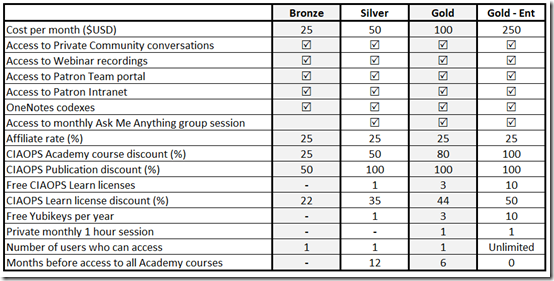
As I have mentioned over the past few months, I am planning to increase the entry price for my CIAOPS Patron program from the 1st of January 2019.

You can view a current summary table below:

image

If you are keen to stay up to date with the Microsoft Cloud including Office 365, Microsoft 365, Azure and more, then now is the time to jump on board so you can be grand fathered in at current rates. After the 1st of January the new rates will apply.

I have created what I believe to be single source of the best Microsoft Cloud information that can be found anywhere out there. The amount of time it will save you each and every day is well worth the subscription if you work in this space.

Join the community of people getting benefit today. Visit:

www.ciaopspatron.com

to sign up.

CIAOPS Patron price change

As mentioned in a previous update, I will raising the entry price for my CIAOPS Patron program from the 1st of January 2019. However, if you join before then you will be automatically grandfathered in at the existing rate.

You can find out more information and sign up here:

www.ciaopspatron.com

As an extra incentive to join before December 1 2018, I will be offering a free Yubikey to anyone who signs up prior to that date. Yubikeys can be used for MFA with Azure AD amongst other security configurations.


So sign up today to become a CIAOPS Patron and take advantage of this free Yubikey offer until the 1st of December.

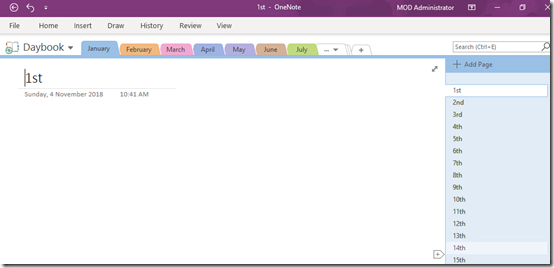
My OneNote daybook template

image

A while back I detailed how I use OneNote to replace my paper diary. You can read about that here:

One of the ways I use OneNote

The main benefits of a “daybook” for me are:

1. It is searchable

2. It is backed up

3. It is available on all my devices

This concept of a “daybook” is something that I use in my Office 365 adoption process. I have users create their very own “daybook” as part of learning how to use OneNote and OneDrive.

Creating a whole OneNote diary can be time consuming and many people simply want a completed “daybook” template that they can start using immediately. If you do, then I have uploaded to my GitHub repository for you here:

https://github.com/directorcia/general/blob/master/Daybook.onepkg

Simply download the file and open it with your favourite version of OneNote.

Go forth, save the trees and OneNote.

Need to Know podcast–Episode 193

Join us in this episode as Brenton speak with Lorenzo Coppa from Gluh, which is clever way for IT Resellers to sell more hardware with less hassle and overhead. Brenton and I also bring you up to date with all the latest Microsoft Cloud news. Just because Ignite is over doesn’t mean that the news stops from the cloud. We’ll bring you up to date with everything you need to know.

Take a listen and let us know what you think –feedback@needtoknow.cloud

You can listen directly to this episode at:

https://ciaops.podbean.com/e/episode-193-it-gluh/

Subscribe via iTunes at:

https://itunes.apple.com/au/podcast/ciaops-need-to-know-podcasts/id406891445?mt=2

The podcast is also available on Stitcher at:

http://www.stitcher.com/podcast/ciaops/need-to-know-podcast?refid=stpr

Don’t forget to give the show a rating as well as send us any feedback or suggestions you may have for the show.

Resources

@contactbrenton

@directorcia

Gluh

Updated version of Windows 10 1803 rolling out

Ignite book of news

Create an organisation wide team in Microsoft Teams

New capabilities coming to the SharePoint Migration Tool

How Azure AD can help clean up data in your on-premises Active Directory

Reset passwords from all versions of Windows

Ignite 2018 session Youtube index from CIAOPS

ID Fix tool