Learning Collaboration in Office 365

people-woman-coffee-meeting2

A little while ago I announced that I’ll be conducting a new course focused on showing you the best practices when it comes to collaboration in Office 365. This will answer questions about whether you should use Microsoft Teams over Yammer, what roles Groups plays and to drive adoption for your business to ensure that everyone makes full use of the Office 365 suite they have been allocated.

You’ll find all the original information about the course here:

Understanding collaboration in Office 365 course

The course gives you the opportunity to participate in the learning live. You’ll be able to complete the hands on tutorials right there and then. You’ll get immediate feedback on what you’ve learnt and you’ll also be able to ask questions and most importantly get your questions answered right there and then. If you think this is just going to be a boring webinar style presentation, then you in for a shock as nothing could be further from the truth. This course will be more hands on than if you were sitting in a classroom!

Best of all is that all the sessions will be recorded and made available to you, along with all the training materials (notes, links, whitepapers and more) FOREVER! That’s right, you can continue to come back to the course and watch the training at your leisure. You can even download it all and watch it offline. So if you are too shy to attend the live events you’ll still get full benefit from all the material.

Those lucky enough to have signed up already have been able to take advantage of the initial substantial early bird discount, however if you missed that then you need to act now to get a $30 discount. Use the coupon code EAERLYBIRD2 at checkout or click here to have the discount automatically applied upon registration:

Understanding collaboration in Office 365 – $30 discount

Remember, you need to use the link or the coupon code to get the discount.

An additional offer is that if you are not already a CIAOPS Academy affiliate you should sign up so you can offer this course to others and receive a commission. That’s right, just refer this (or any CIAOPS Academy course) to others and you’ll receive a percentage of the course direct to you. To become an affiliate simply sign up for free at the CIAOPS Academy and then contact me (director@ciaops.com) to let me know you want to be an affiliate and I’ll send you all the details and get you signed up asap.

The count down to the course kick off on the 1st of June is on and I’d encourage you to take advantage of this discount before it expires on the 19th of May. Remember, the course includes over 5 hours of hands on training, video recordings of all sessions as well a lifetime access to all the course materials including video replays, course notes, links, white papers and more. All of which you can download and view offline.

If you want to learn how Office 365 can give your business a completive edge by being more effective and productive then sign up today to take advantage of this discount.

I’ll also point out that if you sign up as a CIAOPS Patron you’ll not only receive discounts starting at 25% on this course but you’ll also get access to my private Office 365 Facebook community where you can get your questions answered by myself and other in the community daily. For all the benefits of being a CIAOPS Patron head over to:

http://www.patreon.com/ciaops

I hope to see you on the course with me and those who have already signed up.
Ownership is the key to adoption

It doesn’t matter whether you have the best technology, if people don’t use it then it it totally useless. It is very common for users to have access to a suite of services like Office 365 but rarely use anything more than mere email. Why? Because adoption was not considered something important in the migration and implementation process. I’ve talked about this before:

Stop making your users feel stupid!

The secret to adoption is to take off the technology hat and think like an average user who just wants to get their work done. They aren’t into technology. They aren’t interested in the ‘speeds and feeds’, most are simply interested in being able to do their jobs quicker and easier.

Another key aspect about average users is that they are resistant to change, far more so than those in IT. This means a different process needs to be considered when it comes to introducing new technology to this demographic. One of the major keys, I’d suggest, to successful adoption is fostering ownership.

What do I mean by ownership exactly? What I mean is that users will adopt technology far quicker if they feel a sense of ownership (and control) over what they use. So with a product like Office 365 how does one go about delivering this ownership?

image

image

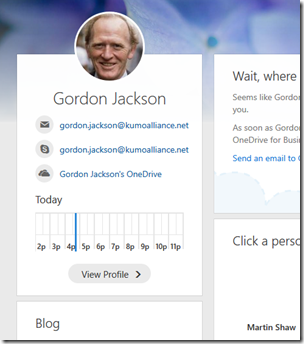
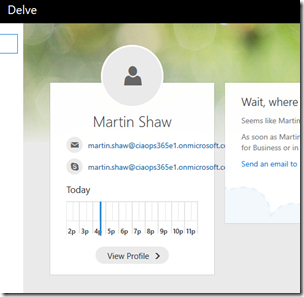
A good example is ensuring that every user has their profile picture set across the Office 365 services as you can see above in Delve. Having your own photo there in Delve immediately gives you a sense of ownership, a place that is ‘yours’ if you may. Having just an outline still makes the system all about IT. It is mere technology. However, with my picture in the profile then the system is ‘mine’.

One suggestion I have for businesses looking to drive Office 365 adoption is to pay for a professional photographer come in take high quality head shots of everyone so they can be used in Office 365. Users can then also use those head shots elsewhere like in Linkedin profiles.

Although most migrations to Office 365 start with email I’m an advocate of implementing Yammer first. Why? Firstly, Yammer has zero infrastructure impact, it is delivered totally via the web. Secondly, it has a mobile client that users can interact with inside and outside the Office (remember the phone is the desktop). Yammer also allows a users voice to be ‘heard’ and encourages ‘water cooler’ style chat online. Finally, Yammer is very much like other social networks that users are familiar with so the barrier to entry is much lower. In essence it becomes a users ‘presence’ in the new environment.

I also don’t recommend starting off with formal business groups in Yammer, I recommend setting up two groups, Social and Office 365 Q & A. Social is designed for general company ‘chit chat’. That is birthdays, best wishes, travel photos, footy tipping competitions and the like. The aim here is to get people using Yammer and comfortable interacting online. If you start with fun, then you are much more likely to see adoption. The Office 365 Q & A area is designed for users to post and share general information about Office 365.

When you implement a pseudo ‘help desk’ like this using Yammer a magical thing happens. For the majority of users it gives them a place they can ‘unload’ their questions and search for answers. However, the magic happens when other users, without prompting, take it on themselves to start answered those questions. Soon you end up with a self supporting help desk and training area in Yammer and all you did was simple tell people how to get there.

After Yammer the next Office 365 workload I suggest you target is OneDrive. Why? Again, because it is ‘personal’ to the user. It is their ‘space’ to upload their own private files. If you force them to go into a Team Site to work initially the change is generally too great. By getting them into OneDrive first you give them valuable experience working with just Document Libraries. This means when you introduce Team Sites down the track they already know something about how to use it, it also looks familiar so it also easier to adjust to and adopt.

After OneDrive then I’d suggest you get your users into OneNote. Show them all the benefits of creating a digital notebooks that is searchable, automatically backed up and available on all devices. Again, the important point here is to start with a personal OneNote for them so they get the feeling of ownership and are not afraid to play around with the technology. This experience will again stand them in good stead when it comes to work with group notebooks.

So in summary, my recommendation on adoption with Office 365 is to make the experience ‘personal’ to start with. I’d also suggest that rather than implementing just emails alone you do things in this order:

1. Email

2. Yammer

3. OneDrive

4. OneNote

That should at least get you started and make your users more open to consuming and utilising the other parts of Office 365, because they now feel some ownership and control of the technology. There will be of course, more adoption work to do but hopefully I’ve given you some ideas on what to focus on to get started and appreciate how successful adoption is about being ‘personal’ rather than being just about technology.

Need to Know podcast–Episode 152

We’re joined in this episode by the chief of Lobster Pot, Rob Farley a Microsoft MVP focused on SQL. However, in this episode we speak to Rob about his experiences in giving a keynote at a recent conference. As Rob explains here, there is far more to a keynote that you think. Luckily we get the low down and all the pointers so stay tuned.

Of course, Marc and I cover off all the latest Office 365 and Azure news to keep you up to date with the latest that’s happening in the Microsoft cloud.

Take a listen and let us know what you think –feedback@needtoknow.cloud

You can listen to this episode directly at:

https://ciaops.podbean.com/e/episode-152-rob-farley/

Subscribe via iTunes at:

https://itunes.apple.com/au/podcast/ciaops-need-to-know-podcasts/id406891445?mt=2

The podcast is also available on Stitcher at:

http://www.stitcher.com/podcast/ciaops/need-to-know-podcast?refid=stpr

Don’t forget to give the show a rating as well as send us any feedback or suggestions you may have for the show.

Resources

@marckean

@directorcia

@rob_farley

Lobster Pot

On keynotes by Rob Farley

Rhino room comedy club

Azure news from Marc

Outlook Customer manager rolling out

Groups now in Mac, iOS and Android

Server 2016 performance tuning

SharePoint Virtual Summit

Microsoft Build 2017

This episode brought to you buy:

https://cpem.io/tJ01Hzu2k.js

Don’t run away, filter for value

A common complaint today, especially in IT, is that it is impossible to keep. The premise is that there is simply too much information to stay abreast of. I am also seeing a growing number of people saying they are ‘quitting’ social media like Facebook because of all the ‘junk’ there. I, on the other hand, am finding huge value from social media, in fact, more and more so from Facebook. Let me show you how I manage that.

Firstly, I have to agree that there is a huge amount of irrelevant drivel on social media BUT you are the one who chooses to consume it. You don’t have to! You are seeing all that irrelevant stuff simply because you have accepted the defaults and have not learnt how to effectively use the social media platforms.

I think this speech by Clay ShirkyIt’s not information overload, it’s filter failure goes a log way to explaining why so many people are becoming overloaded with information. In short, it’s because they are allowing themselves to be. They have failed to implement appropriate filters to remove the stuff that is irrelevant.

Why have people largely failed to do this? The most common reason is FOMO or Fear Of Missing Out. To really get on top of your information consumption you need to abandon this concept and appreciate that you may indeed miss something but if you put the right information consumption practices in place the chances of doing so are extremely low.

Once you have abandoned FOMO, then you need to determine the BEST sources of information for you. In the context of business or technology, this means finding information sources that provide you the greatest return on investment for your time. If their value is not high enough then you need to abandon them, without regret.

image

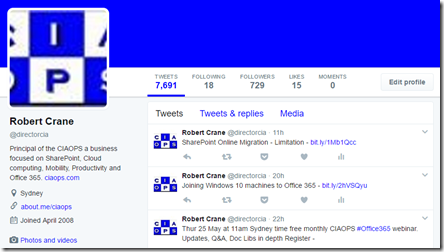
What’s the difference between my Twitter account and this one say?

image

Look at how few people I currently follow. Just 18! I only chose to follow high quality information sources and those that I do I consume fully, in that I read every one of their tweets. I have no idea how people can get value from following hundreds or even thousands of people.

Does the Twitter accounts I follow ever vary? Of course it does. I’m constantly adding and removing sources but I have a very high bar to follow an account. It really needs to provide me with information I’m unlikely to get elsewhere. This brings me to another best practice recommendation I have when it comes to social media. Have a separate business and personal account. Lumping everything together is going to generate twice the traffic from very two very different sources. Having two accounts also provides separation when it comes to posting and contributing also.

image

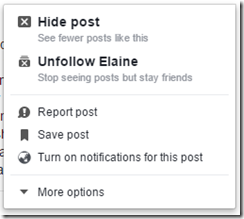
I am no fan of Facebook, however I recognise the value it has to my business. That’s why I’m there and why I’m using it more and more. However, like Twitter, I highly customise what I see by “unfollowing” low value information sources. Doing so, as you can see above, keeps them as a friend so they see my stuff but I don’t see theirs. Sure, they could do the same to me but firstly, most people generally don’t mute like I’m doing here and secondly, I’m aiming to make my social media content as high as possible so they stay tuned in.

Of course, I have had personal contacts find my business account on Facebook and complain that I only talk about “boring” IT. Right on! Because of the separation of business and personal accounts, my business account is aimed at business users and has content aimed at them not at personal contacts. If you try and be everything to everybody then you are nothing to nobody.

So, if you are “suffering” from information overload it’s time to go on a diet. Become ruthless with exactly what information you consume. If it has no value then DON’T consume it! That’s why I don’t consume a single hour of commercial TV or radio for example. If something doesn’t measure don’t hesitate to remove it and replace it with something better. Get those filters in place and working. Remember, your time is the most valuable commodity you have. Therefore treat it like it is actually valuable!

Understanding collaboration in Office 365 course

people-woman-coffee-meeting2

I’m happy to announce a new course is available from the CIAOPS Academy. This course will focus on the collaboration tools available in Office 365. This means SharePoint, Teams, Yammer, OneDrive and more. You’ll not only learn how these products work but you’ll also learn how to use them effectively to increase the productivity of your business.

The course will divided into 5 live sessions held every Friday in June. Thus:

Friday June 2nd 2017 – SharePoint & OneDrive
Friday June 9th 2017 – Groups, Teams and Staffhub
Friday June 16th 2017 – Yammer & Skype for Business
Friday June 23rd 2017 – Delve & Planner
Friday June 30th 2017 – Migration and Driving adoption

The sessions will run for 1 hour and be recorded. Session time are:

8am – 9am – Sydney, Australia
3pm – 4pm – PDT, USA
6pm – 7pm – EDT, USA
11pm – 12am – BST, UK

The recordings of each session will be available shortly after each session is completed. Although each session will run for 60 minutes, there will be an open Q and A at the end that will continue as long as people have questions not answered in the session.

All the material, including recordings, course notes and additional offers will be available for download after the fact.

The material presented during this course is a great way to fast track you understanding and adoption of Office 365 adoption tools in your business. Not only will you see the technology in use but the sessions will include hands on material for all students to participate in, so you’ll be directly interacting with the technology during the time. This way you’ll get to see and experience exactly what is possible with Office 365 collaboration technologies.

If you are keen to jump on board then I have a special early bird discount as a reward. Normally the cost of the course is US$299 but if you sign up before the 12th of May 2017 at 9:00am you’ll receive $60 off the cost using the coupon code EARLYBIRD1 or this direct link:

Understanding collaboration in Office 365 – $60 early bird discount

Remember, you need to use the link or the coupon code to get the discount.

An additional offer is that if you are not already a CIAOPS Academy affiliate you should sign up so you can offer this course to others and receive a commission. That’s right, just refer this (or any CIAOPS Academy course) to others and you’ll receive a percentage of the course direct to you. To become an affiliate simply sign up for free at the CIAOPS Academy and then contact me (director@ciaops.com) to let me know you want to be an affiliate and I’ll send you all the details and get you signed up asap.

In summary. Sign up for the upcoming CIAOPS Academy Office 365 collaboration course here (and get an early bird discount):

Understanding collaboration in Office 365 – $60 early bird discount

and contact me (director@ciaops.com) if you want to become an academy affiliate and receive commissions for courses you sell.

I hope to see you in attendance at the course in June.

CIAOPS Need to know Webinar–April 2017

laptop-eyes-technology-computer

Time for our April webinar! This month’s free webinar will feature the usual cloud updates and news along with open Q & A but also a look at Microsoft Staffhub that is now part of Office 365 and allows you to do basic rostering. I’ll show you the product and how it integrates into the Office 365 ecosystem.

You can register now for free at:

April Webinar Registration

The details are:

CIAOPS Need to Know Webinar – April 2017
Thursday 20th of April 2017
11am – 12am Sydney Time

All sessions are recorded and posted to the CIAOPS Academy.

There of course will also be open Q and A so make sure you bring your questions for me and I’ll do my best to answer them.

The CIAOPS Need to Know Webinars are free to attend but if you want to receive the recording of the session you need to sign up as a CIAOPS patron (for only USD$10 per month) which you can do here:

https://www.patreon.com/ciaops

or purchase them individually at:

http://www.ciaopsacademy.com/

Also feel free at any stage to email me directly via director@ciaops.com with your webinar topic suggestions.

I’d also appreciate you sharing information about this webinar with anyone you feel may benefit from the session.

Don’t say “can’t” when you mean “won’t”

image

When I present the Office 365 opportunity to IT resellers I typically show them the above slide which provides an overview of the major Office 365 suites and services that they contain.

I them ask them what is the most typical Office 365 suite they sell and is sold in overall in SMB. The answers is generally always Office 365 Business Premium. I then ask why that is? The response is that it is the cheapest way to get hosted email and the latest version of Office applications on the desktop.

I then suggest that instead of Business Premium they should be focused on only presenting the top of the range suite, E5, to all their customers as the starting point of any discussions about Office 365. It is at this point that I am greeted with the complete range of negative responses, from incredulity to outright hostility. At least I have you attention eh?

When pushed, most resellers retort that their customers “would never” pay for E5 over Business Premium. The reason sighted for that is purely based on price. My response is that ANYTIME you get push back from customers in regards to the price of a product, including Office 365 E5, it is because the seller has failed. They have failed to show the customer the value the E5 suite holds.

You then typically hear how resellers “know” their customers will never pay the extra for the E5 suite. Are you sure about that or just making assumptions based on your own prejudices? People will only ask for what they know, if they don’t know there is something better they won’t for it will they now? They haven’t been educated in what the full range of Office 365 plans offers so how will they “know” to ask for things like unlimited inboxes, unlimited personal file storage, legal hold, information rights management, customer lockbox, etc., etc.?. It’s not the customer’s job to know the product range and details, that’s the role the reseller should play.

So, the reason customers aren’t asking for the E5 suite is probably because they don’t even know that it exists or what it includes. Again, the responsibility falls to the reseller not to “guess” what the customer wants but to “show” them the what’s available and how different options may suit their needs. Showing them may in fact open their minds to opportunities in their business. It may show them how to solves a challenge or concern in their business today. But how the hell will they ever see that if it isn’t shown to them? They are being deprived of choice because a reseller “thinks” they understand what their customers want.

However, on the other hand, being able to demonstrate the benefits of the E5 plans means the reseller has to actually invest the time and firstly learn what the plan includes and then how those options help solve business needs. “Oh, I can’t do that”, is the typical response, “I don’t have enough time to dig into that” or “I don’t know where the information for that would be” or a variety of other lame excuses.

It comes down to saying “can’t” when you really mean “won’t”. It means you “won’t” tell customers about the value Office 365 E5 provides because you don’t know it yourself. It means that you “won’t” because you aren’t prepared to invest the time to learn about the benefits the E5 provides. It means you “won’t” try doing something different. It means you “won’t” focus on value rather than price. It means you “won’t” help give your customers the best solutions for their business. It means you “won’t” because you don’t want to invest the proposal process.

What do resellers have to lose by focusing on E5 and presenting this to customers? If you learn about E5 you learn the full suite of Office 365 services because every other suite is simply a subset of this one. E5 provides over twice the number of services that Business Premium provides. That means additional services you can enable, configure and bill for as a reseller.

Another benefit of focusing on E5 for customers is that if you have your business value proposals down and the majority of customers agree with you and go E5, but that one customer doesn’t. It might be an indication that that customer is focused more on price than on value. That means they are always going to be beating you down on the price of everything. Do you really want those sort of customers or the ones who see the value and are excited for you to enable everything E5 provides for them? I know what I’d be doing if faced with that decision.

Finally, by focusing on the right hand side of the above list of suites, you have a first fall back from E5 being E3 which still provides a HUGE amount of value and opportunity for customers and resellers. Why start trying to sell from the cheapest option? Pushing uphill than down is much harder in my experience. A much better approach is to educate customers on the full features set and help them understand the value. If you only show them the cheapest option, you are doing them a complete disservice as their technology provides and should hang your head in shame.

Everything I hear the phrase “I can’t sell anything but Office 365 Business Premium” I know that it typically really means “I won’t sell anything but Office 365 Business Premium because I have a closed mind set”. If you open your mind, invest in some deliberate learning around what the full suite Office 365 provides and develop business value scenarios, then have the courage to step outside your normal “won’t” mentality,  you may be surprised to find out what customers actually will buy!

If you focus solely on price, then that is how people see you as well. But if you focus on value ,you’ll graduate to a completely different level where price isn’t part of the equation.

More free training from CIAOPS

lecture-series

image

I’ve just added four more lessons to my free cloud training at:

CIAOPS Cloud Lecture Series

In there you’ll now find over 25 individual lessons on not only technical topics like Office 365 and Azure but you’ll also find information about building a successful cloud business. I cover a lots of the techniques I use and what you should also be using if you are a IT reseller focused on the Microsoft Cloud.

These are recorded sessions I have conducted live and now posted up for anyone to take advantage of. The ones that I have just added include:

– Office 365 adoption tool

– Selling Office 365 Azure options

– Marketing approaches

– How to demo Office 365

All the lesson materials can be downloaded for you to view at your own leisure without the need of an Internet connection.

Stay tuned for more free lessons soon.