What is your biggest challenge with the Microsoft Cloud

pexels-photo-356079

Tis the season for a survey I think. What I’d like to do is start off with this one question:

What is the biggest challenge you face with the Microsoft Cloud?

That’s it. Just one question. You can answer the question here:

http://bit.ly/mscloudsurvey

I’ll collate all the answers and report back on the results. I’ll try and group the issues into categories so you get a better of idea of what generally are the major challenges a majority of people have.

It doesn’t matter whether you are an end user, business, IT resellers, IT professional, whatever, please take a moment to share what you find most challenging about the Microsoft Cloud (Office 365, Microsoft 365, Azure, etc)

The more people that take a moment to answer the more results and information we’ll have to share. The results are anonymous.

Thanks in advance for completing the survey.

Need to Know podcast–Episode 196

I am joined by a familiar guest to many, previous co-host of the Need to Know podcast, Marc Kean, who shares with us what he has been up to lately and his career journey to now being a full time Microsoft employee. Listen along and you’ll get some insight into one of the technical job roles at Microsoft.

Of course Brenton and I also bring you up to date with the latest Microsoft cloud news including recent a Azure AD multi factor outage and how Microsoft is now more valuable than Apple! Listen on for full details.

Take a listen and let us know what you think –feedback@needtoknow.cloud

You can listen directly to this episode at:

https://ciaops.podbean.com/e/episode-196-marc-kean/

Subscribe via iTunes at:

https://itunes.apple.com/au/podcast/ciaops-need-to-know-podcasts/id406891445?mt=2

The podcast is also available on Stitcher at:

http://www.stitcher.com/podcast/ciaops/need-to-know-podcast?refid=stpr

Don’t forget to give the show a rating as well as send us any feedback or suggestions you may have for the show.

Resources

@marckean

@askbrenton

@directorcia

Marc’s blog

Azure AD MFA outage analysis – look for event on 19th November

Microsoft now more valuable than Apple

Microsoft helps create a secure modern workplace

New management for Microsoft Teams

Windows 1809 rollout continues

Ignite 2018 sessions on YouTube

With Microsoft Ignite 2018 now over for 2018 I wanted to let people know that like last year:

Ignite 2017 sessions on YouTube

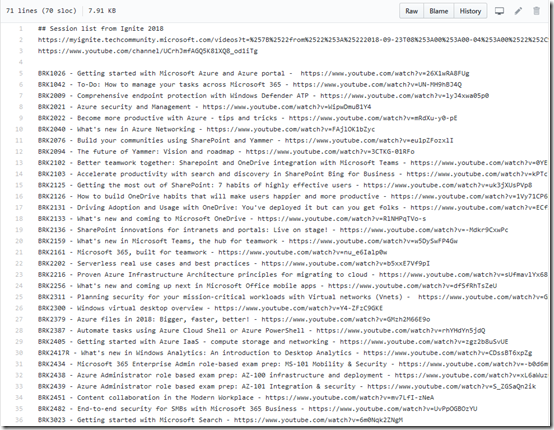
I’m maintaining a list of links directly to the sessions on Github.

image

The list is maintained at:

https://github.com/directorcia/general/blob/master/ignite2018.txt

and I will be updating it throughout the year as I find links to new sessions.

Of course, if you have a link to a session that I don’t have up there yet, please send it along so I can add it and we can all benefit.

All the sessions are not there as yet. I add them when I find them and the update this file, so make sure you check back regularly to get the latest list.

Thanks again to Microsoft for doing this and uploading the sessions to YouTube. They are a great source of learning and allows people like me would couldn’t get to Ignite the ability to work through the content.

Need to Know podcast–Episode 195

Troy Hunt makes a return to the podcast to talk about the power of serverless compute. We discuss how Troy has been successfully using serverless compute to run his website haveibeenpwned. Troy also shares with us some insights as to the practical day to day operations of running a site with 5 billion breach records. Brenton and I also update you on the latest Microsoft Cloud news including a raft of updates to Microsoft Teams.

Take a listen and let us know what you think –feedback@needtoknow.cloud

You can listen directly to this episode at:

https://ciaops.podbean.com/e/episode-195-troy-hunt/

Subscribe via iTunes at:

https://itunes.apple.com/au/podcast/ciaops-need-to-know-podcasts/id406891445?mt=2

The podcast is also available on Stitcher at:

http://www.stitcher.com/podcast/ciaops/need-to-know-podcast?refid=stpr

Don’t forget to give the show a rating as well as send us any feedback or suggestions you may have for the show.

Resources

@troyhunt

@contactbrenton

@directorcia

haveibeenpwned

Azure serverless compute

CIAOPS Patron program

Skype for Business is moving to Teams

What’s new in Microsoft Teams – November round up

Top scoring in industry AV tests

How can I get started with machine learning

Policy that prevents you from granting iOS Accounts the permissions

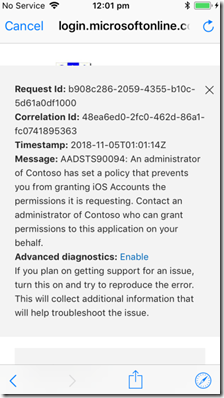
I was configuring an iPhone to access a Microsoft 365 Business tenant and when I attempted to add email to the native iOS email client I received the following error.

image

An administrator of Contoso has set a policy that prevents you from granting iOS Accounts the permissions it is requesting.

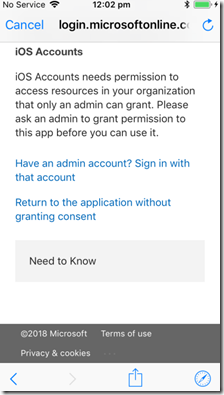
If I then closed that error message I was presented with:

image

Strange, haven’t seen this one before.

Turns out that one of the best practice recommendations I use on tenants is to disable users being able to Outlook plugins which I detailed here:

Thwarting the ransomware cloud

The down side to preventing this is that it also prevents iOS adding an Office 365 email account when you have modern authentication enabled, which again is best practice.

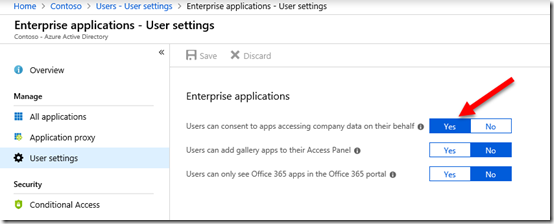
So, to allow iOS to add an Office 365 email account in the native iOS app you’ll need to allow users to “consent to apps accessing company data”.

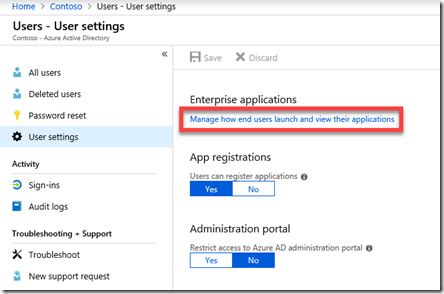
There are two methods to achieve this. You can firstly go to the Azure Portal as an administrator, locate Azure AD | Users | User settings as shown below:

image

Then select the hyperlink Manage how end users launch and view their applications as shown above.

image

From here, set the option Users can consent to apps accessing company data on their behalf to Yes and Save the change.

The second method is to use PowerShell with the command:

set-MsolCompanysettings -UsersPermissionToUserConsentToAppEnabled $true

Remember, that enabling this option will also allow users to potentially accept malicious add-ins in their application like Outlook so you should disable it once your iOS devices have been configured.

It would be nice if there was a policy that could be configured to change this setting just for iOS, but alas that currently isn’t the case that I can see. You’ll therefore need to go through this disable-enable-disable sequence to maintain best practices and allow iOS devices to be added to your environment.

Need to Know podcast–Episode 192

A follow up from our last episode with more news and updates from Microsoft Ignite. Brenton an I add a few more points of interest that came out of the conference including update on Microsoft Whiteboard, updates from Azure and multi geo for SharePoint and OneDrive plus plenty more. So tune in for the latest and greatest from Microsoft Ignite.

Take a listen and let us know what you think –feedback@needtoknow.cloud

You can listen directly to this episode at:

https://ciaops.podbean.com/e/episode-192-more-news-from-ignite/

Subscribe via iTunes at:

https://itunes.apple.com/au/podcast/ciaops-need-to-know-podcasts/id406891445?mt=2

The podcast is also available on Stitcher at:

http://www.stitcher.com/podcast/ciaops/need-to-know-podcast?refid=stpr

Don’t forget to give the show a rating as well as send us any feedback or suggestions you may have for the show.

Resources

@contactbrenton

@directorcia

More interesting news from Ignite

Absorbing content from Ignite 2018

New features for Microsoft Forms

Introducing Multi-Geo in SharePoint and Office 365 Groups

Passwordless phone sign in

SharePoint powers teamwork in Office 365

Microsoft whiteboard now available on more devices

Azure monitor just got better

Move managed disks and VMs now available

Announcing Microsoft Threat Protection

Need to Know podcast–Episode 191

Brenton and I get you up to date with all the most important announcements from Microsoft Ignite. You’ll hear about the new Microsoft Virtual Desktop services, improvements in OneDrive, and some exciting updates happening with Microsoft Stream. Throw in a Windows 10 update with news about Azure and there isn’t enough to cover everything in one episode. All this and whole heap more on this special Ignite update on the Need to Know podcast.

Take a listen and let us know what you think –feedback@needtoknow.cloud

You can listen directly to this episode at:

https://ciaops.podbean.com/e/episode-191-news-from-microsoft-ignite-2018/

Subscribe via iTunes at:

https://itunes.apple.com/au/podcast/ciaops-need-to-know-podcasts/id406891445?mt=2

The podcast is also available on Stitcher at:

http://www.stitcher.com/podcast/ciaops/need-to-know-podcast?refid=stpr

Don’t forget to give the show a rating as well as send us any feedback or suggestions you may have for the show.

Resources

@contactbrenton

@directorcia

Windows 10 1809 update

Top learnings from Microsoft Ignite

Password-less sign-ins

New in Teams

CIAOPS Patron price changes

I am letting people know that I will be raising the entry prices for my CIAOPS Patron program from the 1st of January 2019. However, every one who is already in the program before that date will be grand fathered in at their existing rate.

Thus, if you have been thinking of jumping on board to take advantage of all the great resources that are available as apart of the program such as detailed Office 365 and Azure notebooks, a private community forum, access to online training and more, well now is the time to act. You can read more about these resources here:

www.ciaopspatron.com

If you join the program before the 1st of January 2019 you’ll not only receive all the existing benefits but all the new ones I plan to start rolling out in the new year.

If you work with the Microsoft Cloud, particularly Office 365 and Azure, then you are going to get loads of benefits from this program. It is really the best way to stay up to date with the Microsoft Cloud, all in a single location.

I hope to see you inside the program soon. Don’t hesitate, join the other successful Microsoft Cloud professionals who are already part of this program.