A bit behind schedule per se but here are the recent updates I saw as important for IT Professionals in April.
You can download and view the slides here:

Information about SharePoint, Microsoft 365, Azure, Mobility and Productivity from the Computer Information Agency
A bit behind schedule per se but here are the recent updates I saw as important for IT Professionals in April.
You can download and view the slides here:
I’ve just completed a roadshow focusing on the security options in Office 365. I certainly cover what is in all plans but I do focus on what is available, and should be implemented, in the advanced plans such as E3 and E5. I also cover how the security in Office 365 can be enhanced using things such as Azure AD Premium, Intune, Azure Rights Management, Enterprise Mobility Suite and more.
The presentation was given to SMB resellers so it also contains some insights from me on how IT resellers can generate revenue for their business while providing greater levels of security for their customers.
Here are the slides:
or via:
I’ve also added the session to my free:
at the CIAOPS Academy

Marc and I report on our impressions of the recent Microsoft Build conference. There are quite a few things that caught our eye that we thought we’d like to share with our audience. Everything from CosmosDB to OneDrive on Demand and a few things in between. Get the latest information about all the important stuff for IT Pros from Build along with our thoughts on why they are things that you should be paying attention to.
Take a listen and let us know what you think –feedback@needtoknow.cloud
You can listen to this episode directly at:
https://ciaops.podbean.com/e/episode-153-microsoft-build-2017/
Subscribe via iTunes at:
https://itunes.apple.com/au/podcast/ciaops-need-to-know-podcasts/id406891445?mt=2
The podcast is also available on Stitcher at:
http://www.stitcher.com/podcast/ciaops/need-to-know-podcast?refid=stpr
Don’t forget to give the show a rating as well as send us any feedback or suggestions you may have for the show.
Resources
iTunes comes to the Windows Store
This episode brought to you by: https://cpem.io/tJ01Hzu2k.js
After watching the following Microsoft Mechanics video:
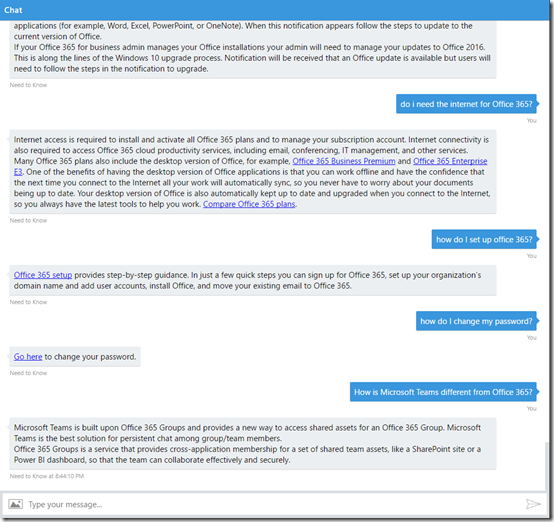
and being inspired by the information coming from Microsoft Build 2017 I decided to create my own Office 365 Q and A bot which you can see below.
It is actually live on the Internet right now but I’m going to do more detailed post on how easily I brought all this together when I’ve refined it just a tad more. Once that happens I’ll let you know where you can go to give it a spin and let me know what you think.
Sure, the bot currently has limitations but remember this is just the starting point! I can tell you that it only took me about 30 minutes to get it up and running. I’m keen to see where I can take this concept of an automated bot to answer your Office 365 questions but based on the knowledge based I’ve accumulated over the years. I see a lot of potential here if I can just tweak a few things to make it easy to import the information I have on hand currently.
Hopefully, if I open it up publically it can learn from user inputs and become even better at understanding the question. Again, early days, but I see this sort of things have a lot of application in a lot of businesses. That’s why I’m playing with this now. The future is here.
More soon on the new Need to Know bot from CIAOPS designed to answer your Office 365 questions.
We’re joined in this episode by the chief of Lobster Pot, Rob Farley a Microsoft MVP focused on SQL. However, in this episode we speak to Rob about his experiences in giving a keynote at a recent conference. As Rob explains here, there is far more to a keynote that you think. Luckily we get the low down and all the pointers so stay tuned.
Of course, Marc and I cover off all the latest Office 365 and Azure news to keep you up to date with the latest that’s happening in the Microsoft cloud.
Take a listen and let us know what you think –feedback@needtoknow.cloud
You can listen to this episode directly at:
https://ciaops.podbean.com/e/episode-152-rob-farley/
Subscribe via iTunes at:
https://itunes.apple.com/au/podcast/ciaops-need-to-know-podcasts/id406891445?mt=2
The podcast is also available on Stitcher at:
http://www.stitcher.com/podcast/ciaops/need-to-know-podcast?refid=stpr
Don’t forget to give the show a rating as well as send us any feedback or suggestions you may have for the show.
Resources
Outlook Customer manager rolling out
Groups now in Mac, iOS and Android
Server 2016 performance tuning
This episode brought to you buy:
I work across many different Office 365 (and Azure) tenants every day. Many times I need to be inside multiple tenants at the same time. How can I do that effectively? I use ‘private’ browsing modes inside each browser to keep login details isolated.
You can think of ‘private’ browsing as an isolated instance of surfing the web. When you start ‘private’ browsing you start with a ‘clean’ environment (no credentials, logins, etc) are remembered. When you close down the sessions everything is forgotten.
Here’s how you start ‘private’ browsing sessions across the major browsers.
Microsoft Edge
Right mouse click on the Microsoft Edge browser icon and select New InPrivate window from the menu that appears.
If you are already using Microsoft Edge, select the three dots in the upper right to display the above menu. Select the New InPrivate window option.
Google Chrome
Right mouse click on the Google Chrome browser icon and select New incognito window from the menu that appears.
If you are already using Google Chrome, select the three dots in the top right to display the menu shown above. From this menu select New incognito window.
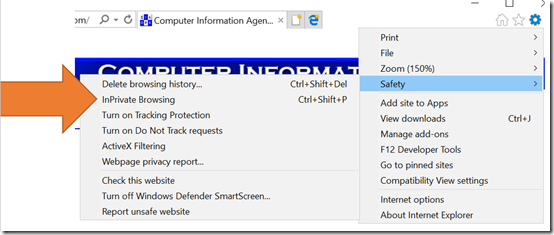
Internet Explorer
Right mouse click on the Internet Explorer browser icon and select Start InPrivate browsing from the menu that appears.
if you are already using Internet Explorer, select the Cog icon in the top right, then from the menu that appears select Safety. From the fly out menu that then appears, select InPrivate Browsing.
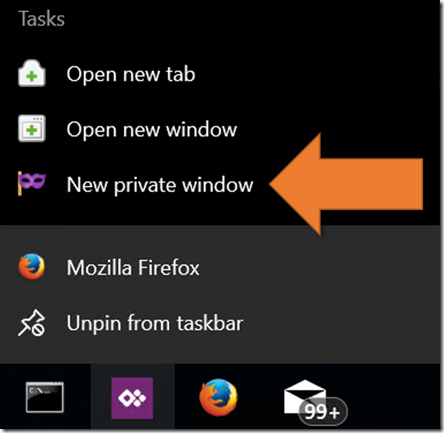
Firefox
Right mouse click on the Firefox browser icon and select New private window from the menu that appears.
If you are already using Firefox, select the three lines in the top right to display the menu shown. From the menu that appears, select New Private Window.
Thus, between these four major browsers and their ‘private’ browsing modes, I can work with eight different tenants all at once. Barely enough, I’m telling you. Barely enough.
We welcome Marc back after a ‘near death’ experience, well according Marc that is. That hasn’t stopped us bringing you the latest Microsoft Cloud news around Office 365 and Azure. We also feature some additional interviews Marc conducted in the halls of Experts Live 2017 recently with the likes of Daniel Mar, Thomas Maurer and Wally Mead. Listen along for loads of great Microsoft Cloud news and info.
Take a listen and let us know what you think –feedback@needtoknow.cloud
You can listen to this episode directly at:
https://ciaops.podbean.com/e/episode-151-experts-live-2/
Subscribe via iTunes at:
https://itunes.apple.com/au/podcast/ciaops-need-to-know-podcasts/id406891445?mt=2
The podcast is also available on Stitcher at:
http://www.stitcher.com/podcast/ciaops/need-to-know-podcast?refid=stpr
Don’t forget to give the show a rating as well as send us any feedback or suggestions you may have for the show.
Resources
No password sign in for Micrfosoft accounts
CIAOPS Introduction to PowerShell course
Upcoming Understanding collaboration in Office 365 CIAOPS training
This show brought to you by:
Yet another milestone achieved. Episode 150! Wow, but we still have lots more content to bring you so it’s head down towards episode 200! Thanks everyone for listening and keep the feedback and reviewing coming.
This episode is proudly brought to you by Exclaimer, the best option for Exchange signatures on premise or in the cloud.
After our usual updates of the latest cloud news you’ll hear a few sound bytes from local MVPs at the recent MVP Community event in Sydney. Marc and I then speak with Brad Shepard, Senior Product Specialist, from Exclaimer all about their product. You’ll learn what Exclaimer is and how it can be used to reduce the burden of managing email signatures in your business. You’ll also get some deeper insight into how the products works behind the scenes and the technology it uses.
Take a listen and let us know what you think –feedback@needtoknow.cloud
You can listen to this episode directly at:
https://ciaops.podbean.com/e/episode-150-exclaimer/
Resources
External access coming to Microsoft Teams
Editing posts in Yammer now available
Team news rolls up come to SharePoint homepage
This episode proudly brought to you by:




 CIAOPS