Azure VM host machines are being updated

All those VMs that you use in Azure have to run on a host. At the moment, the majority of these hosts are running Windows Server 2012 R2. With Server 2016 now being available that include a range of additional features and functionality Microsoft is going to up updating the host machines in its datacenters to Server 2016 over the coming months.

This video will give you some good guidance on what to expect during the process for you VMs currently hosted in Azure. Chances are it will mean a reboot of your VMs but you’ll get plenty of notice beforehand and it is something that you should undertake manually anyway to complete the migration process.

The video has lots of great info, so if you have VMs running in Azure, consider this a heads up for upcoming host maintenance for your machines.

Need to Know podcast–Episode 165

Marc travels to Adelaide AU to speak with MVP Adam Fowler about his road to being an MVP as well his IT resources. They also cover off the local IT community in Adelaide as well as the upcoming cloud migration projects that Adam is involved with. Marc and I cover off the latest Microsoft Cloud news for Azure and Office 365.

Take a listen and let us know what you think –feedback@needtoknow.cloud

You can listen directly to this episode at:

https://ciaops.podbean.com/e/episode-165-adam-fowler/

The podcast is also available on Stitcher at:

http://www.stitcher.com/podcast/ciaops/need-to-know-podcast?refid=stpr

Don’t forget to give the show a rating as well as send us any feedback or suggestions you may have for the show.

Resources

@marckean

@directorcia

@adamfowler_it

Adam Fowler IT Blog

Marc’s Azure news

Expand your collaboration with guest access in Microsoft Teams

How external access for Microsoft Teams

Shared status indicator in OneDrive

The SharePoint and OneDrive guide to Microsoft Ignite 2017

New Office 365 App Launcher

This program is brought to you by:

image

Azure Nested Virtualization

One of the things that Azure VMs currently don’t seem to allow is the ability to login to machines using just Azure AD credentials. So, how to overcome this issue but remain totally cloud based?

The solution is to use nested virtualisation in Azure which Microsoft recently announced here:

Nested Virtualization in Azure

Nested virtualization is only available on specific machines (See above link for details). One of these is the E_V3 series, which are currently not available in every region.

image image

Just for comparison, I looked at my usual ‘go to’ machine (a DS2_v2) and the supported E2S_V3. As you can see from the above the E2S_V3 is far better value, being cheaper and having more RAM.

This made me think that perhaps I should convert some of my stand alone test VMs into guest VMs in a nested arrangement. As long as I only use these machines together the compute cost would only be for the single host VM on which the multiple guests are running rather than multiple individual Azure VMs. Hmm…something to consider down the track.
image

So I ran up a E2S_V3 out of the West US 2 datacenter with Windows Server 2016 datacenter in the standard manner.

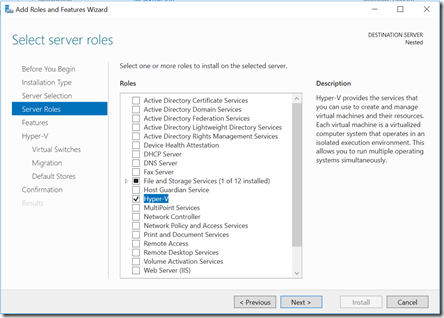
Once the server I up I simply went in and added the Hyper V role as you would with any Windows Server.
image

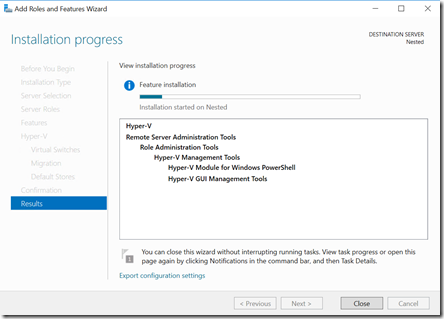
The feature installed and when complete I rebooted the server as required.
image

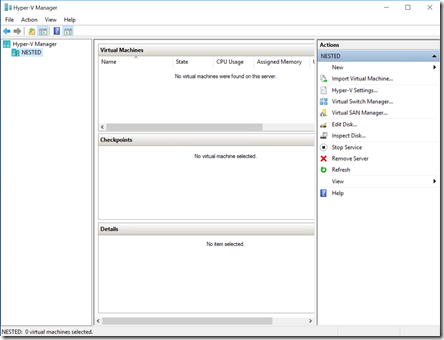
After the reboot I had access to the Hyper V Manager as you can see above, as with any Windows Server.
image

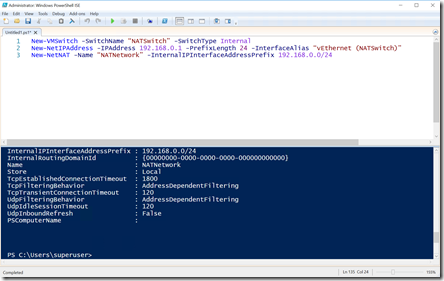
I now needed to create a new Hyper V Virtual Switch that would support NAT that my guests could connect to and then get access to the Internet.

To do this I needed to run 3 lines of PowerShell:

New-VMSwitch -SwitchName “NATSwitch” -SwitchType Internal

New-NetIPAddress -IPAddress 192.168.0.1 -PrefixLength 24 -InterfaceAlias “vEthernet (NATSwitch)”

New-NetNAT -Name “NATNetwork” -InternalIPInterfaceAddressPrefix 192.168.0.0/24

You can alter the IP addresses to suit.
image

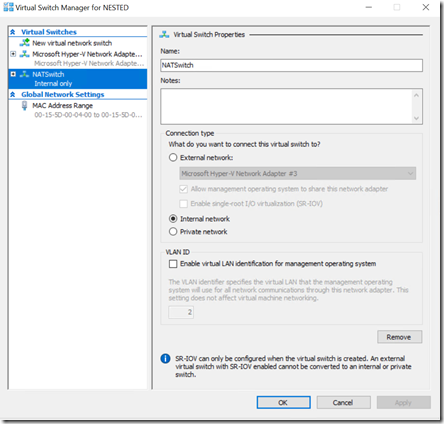
Once this is complete if I now look in my Hyper V Manager I see a new virtual switch as shown above. I’ll use this to connect the network card of my VMs to.

At this point I’ll need to assign the IP addresses to my virtual machines manually. I can configure an appropriate DHCP server if I want but I’ll leave that for a future article.
image

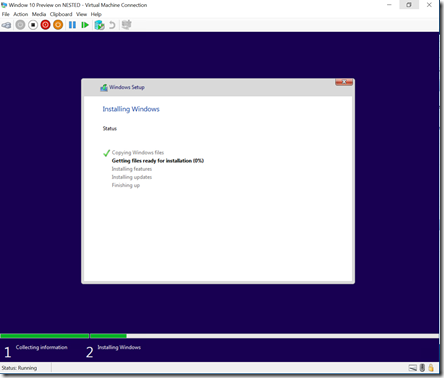
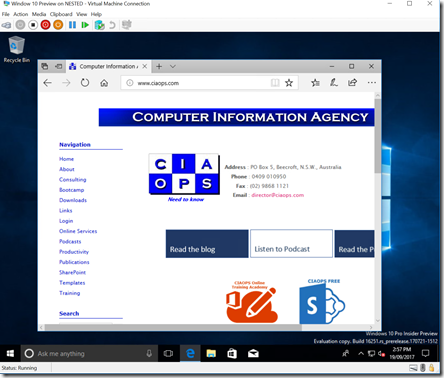
So now I just create a VM on this server as I would normally. In this case I chose a Windows 10 Preview edition.
image

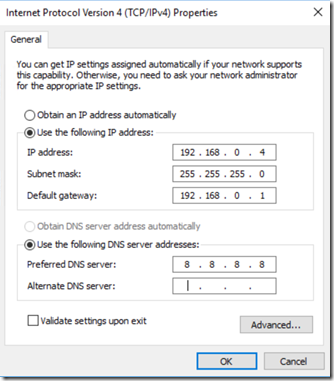
When complete I need to set a static IP until I get the DHCP server operating.
image

Voila, a nested VM in Azure connected to the Internet and ready for further testing.

I can’t tell you how much flexibility this is going to provide me. Not only can I now login to machines using Azure AD account but I can run up things like Windows 10S and (shock, horror) maybe even get SBS working as a guest. Now that would be really cool to achieve and I have added that to my ‘to do’ list. Watch for and article real soon!

Till then, all I can say is that Azure Nested Virtualization is super cool and really super cheap! Love the cloud!

Need to Know Podcast–Episode 164

Marc and I are back with the latest news and updates in the world of Office 365 and Azure. We are getting ready for the information overload we’ll suffer as Microsoft Ignite rolls around at the end of this month. Stay tuned right here for all the updates and maybe some special stuff!

In this episode I do a solo session around my belief that successful Office 365 adoption comes from focusing on the ‘me’ services – Yammer, OneDrive for Business, OneNote and Delve. I dive deep into my reasons and the actions you need to take away for success.

Take a listen and let us know what you think –feedback@needtoknow.cloud

You can listen directly to this episode at:

https://ciaops.podbean.com/e/episode-164-focus-on-me-services/

The podcast is also available on Stitcher at:

http://www.stitcher.com/podcast/ciaops/need-to-know-podcast?refid=stpr

Don’t forget to give the show a rating as well as send us any feedback or suggestions you may have for the show.

Resources

@marckean

@directorcia

Focus on the me service first

Conditional access with Microsoft Teams

Skype for Business becoming Microsoft Teams

Microsoft and Adobe build a closer relationship

Skype for Business updates on the Mac

This program is brought to you by:

image

September Azure Webinar resources

Slides from the very first CIAOPS Azure webinar are now available for download here:

https://www.slideshare.net/directorcia/ciaops-need-to-know-azure-webinar-september-2017

The recording is also available at:

http://www.ciaopsacademy.com.au/p/need-to-know-azure-webinars

which CIAOPS patrons get free access to as part of their subscription.

This webinar set the ground work for upcoming monthly webinars that will go deeper into Azure features and abilities.

So make sure you sign up for next month’s webinar. 

More benefits added to CIAOPS Patron program

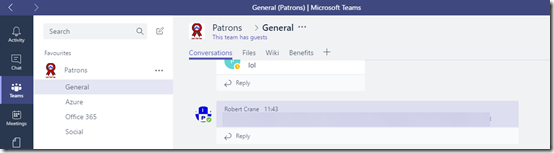
I am happy to announce that now Microsoft Teams is available to external users, so too is access to CIAOPS Patrons external Team from my own Office 365 tenant.

This means that all levels of CIAOPS Patrons now get access to an external Microsoft Teams resource that includes chat, SharePoint Team Site, Planner and more.

image

Not only will give you an better idea of what Microsoft Teams is all about, including how external access works, you’ll also get access to the variety of content that I’m adding into this Team.

The new external Microsoft Teams benefits is on top of all existing resources including a private Facebook community, webinar recording, access and more.

Visit www.ciaopspatron.com for more details of the program and watch out for further additions to the program.

Need to Know podcast–Episode 163

Marc joins us after his short break to cover off all the Azure news as only he can do while I do the Office 365 stuff as usual. Still plenty of news coming our way even though we are preparing for Microsoft Ignite very soon. Enjoy the return of Mr Azure in this episode. Thanks to Rode and Ingram Micro Cloud for the support of this podcast.

Take a listen and let us know what you think –feedback@needtoknow.cloud

You can listen directly to this episode at:

https://ciaops.podbean.com/e/episode-163-hes-back/

The podcast is also available on Stitcher at:

http://www.stitcher.com/podcast/ciaops/need-to-know-podcast?refid=stpr

Don’t forget to give the show a rating as well as send us any feedback or suggestions you may have for the show.

Resources

@marckean

@directorcia

Azure news from Marc

New and improved iPad app for Yammer

Easily access Secure Score

Microsoft Forms email notifications

Document Library properties in Microsoft Forms

Communications Sites comes to SharePoint mobile app

Slight change to SharePoint sharing

New group calendar web part rolling out

Microsoft Forms available in app launcher

This episode is brought to you by:

image