Need to Know podcast–Episode 294

Happy holidays everyone. Hope you are all enjoying the festive season. A few updates from Microsoft including the availability of Teams Premium plus an editorial on industry burnout. I’m seeing more and more IT Professionals becoming burnt out and feeling lost. At this time of the year take some time to look forward and decide whether it is time for a change. Also, don’t be afraid to reach out and share with others what your feeling. If anyone wants to chat feel free to reach out in total confidence via director@ciaops.com.

You can listen directly to this episode at:

https://ciaops.podbean.com/e/episode-294-defender-for-cloud-apps/

Subscribe via iTunes at:

https://itunes.apple.com/au/podcast/ciaops-need-to-know-podcasts/id406891445?mt=2

The podcast is also available on Stitcher at:

http://www.stitcher.com/podcast/ciaops/need-to-know-podcast?refid=stpr

Don’t forget to give the show a rating as well as send me any feedback or suggestions you may have for the show.

This episode was recorded using Microsoft Teams and produced with Camtasia 2022.

Brought to you by www.ciaopspatron.com

Resources

@directorcia

@directorcia@twit.social

Join my shared channel

CIAOPS merch store

Become a CIAOPS Patron

CIAOPS Blog

YouTube edition of this podcast

Azure Storage Mover–A managed migration service for Azure Storage

Attack Simulation Training: New insights into targeted user behavior

Manage your multi-cloud identity infrastructure with Microsoft Entra

Disconnected environments, proxies and Microsoft Defender for Endpoint

What’s New in Microsoft Teams | December 2022

SharePoint Roadmap Pitstop: December 2022

Cloud App Discovery/Security

What are the differences in discovery capabilities for Microsoft Defender for Cloud Apps and Cloud App Discovery?

Get started with Microsoft Defender for Cloud Apps

My Business Books – 2023

Check out my recommendations from last year:

My Business Books – 2022

Honourable mentions that I read last year:

–  Never Finished: Unshackle Your Mind and Win the War Within – David Goggins

– Discipline is Destiny – Ryan Holiday

You can follow all the books I read and want to read over at Goodreads where I have an account. You can also view my activity via:

https://www.goodreads.com/review/list/708903-robert?shelf=read

Here’s my current top business books in order:

1. The Art of War – Sun Tzu

The all time classic on strategy. As relevant today as it ever was. A very short read but very deep.

2. The Millionaire Fastlane – M.J. DeMarco

I love the brutal honesty of this book. It doesn’t mince words about what it takes to shift from a pay check to actually living the life you want.

3. The Tipping Point – Malcolm Gladwell

The world is all about not what you know but who you know. This book explains exactly how this works and how to use it to your advantage. A lot of Gladwell’s writing have been called into question of late. Even so, putting aside the example he uses, I think the concept surfaced have great merit.

4. The Four Hour Work Week – Tim Ferriss

Many people believe this book is about shirking responsibility. It is in fact a blueprint for how to free up your time to do things you want and enjoy. It will challenge the way you look at your career. This book has become some what dated so ensure you get the latest revised edition. Again, I would suggest you read this and consider the 30,000 foot view of challenging many people pre-conceived concepts about career. The ability to do anything, anywhere these days has never been truer.

5. Secrets of the Millionaire Mind: Mastering the Inner Game of Wealth – T. Harv Eker

The successful are defined by a different mindset. This mindset can be learned. It can be trained. This is a great book to show you how to do just that.

6. Talent is over rated: What Really Separates World-Class Performers from Everyone Else – Geoff Colvin

Demonstrates that the best comes from implementing a system. Having a system allows you to focus on the right thing and do that work that is required. If you want to take yourself to an elite level, beyond just good, then read this book.

7. Book Yourself Solid: The Fastest, Easiest, and Most Reliable System for Getting More Clients Than You Can Handle Even If You Hate Marketing and Selling – Michael Port, Tim Sanders

You can’t survive in business without a steady flow of customers. Selling to people is the wrong approach, you instead need to attract them to your business. This book helps you achieve exactly that.

8. Profit First: A Simple System To Transform Any Business From A Cash-Eating Monster To A Money-Making Machine – Mike Michalowicz

Business is about making a profit. This then gives you the freedom to do what you want with that profit. This book helps you focus on profit and setting up systems to make the most of the profit you generate.

9. Barking Up the Wrong Tree – Eric Barker

Conventional wisdom does not always apply and in some case can actually be detrimental. Challenging what is taken for granted should be in the play book of everyone who wants to achieve at the highest level. Important lessons can be learned in the strangest places and form the strangest people. Have an open mind and you might be surprised at what you have believed to be bad in fact turns out to get just what you need.

10. Unbeatable Mind: Forge Resiliency and Mental Toughness to Succeed at an Elite Level – Mark Divine

Another mindset book. Business is not always going to be easy or take the intended route. This is when you need to have the determination to see your plans through to success. This book shows you how to develop the mental toughness to make this happen.

11. Mastery – Robert Green

Excellent read with lots of great strategies to take away. Excellence is not a talent it is a skill. That means that it takes hard work to achieve, but hard work is available to everyone, yet few choose the path. There is no secret to Excellence, it is something only time and effort will reward you with and iof you choose that path you’ll be one of the few.

12. Tools of Titans – Tim Ferriss

There are few books that take the learnings for so many exceptional people and puts them at your fingertips. This is one such book that packs a lot of business and life learnings between the covers.

13. Predictably irrational: The Hidden Forces that Shape our Decisions – Dan Ariley

Although we like to think logic and rationality rule our world emotion is by far the more powerful influence. Understand this in the context of business and you are well on your way to understanding why people make the decisions they do and how to best profit from them.

14. Extreme Ownership – Jocko Willink and Lief Babin

Moving beyond blame is tough. This book illustrates the ownership of the problem and the environment is a key to success in the military or in business. It is a path few will elect to take voluntarily, however more may do so after reading this.

15. Peak Performance: Elevate your game, avoid burnout and thrive with the science of success – Brad Stulberg

Success is largely about developing a winning system. This book show you how to approach that pragmatically. If you want to see results use this book to help you build the system.

16. Blink: The Power of Thinking Without Thinking – Malcolm Gladwell

The older you get the more experience you get. This experience is aggregated in your ‘gut feel’. Trusting your ‘gut’ may not appear rational but this book will help you understand why it is in fact your best option in many cases. Again, take Gladwell’s examples with a grain of salt but the message is still relevant.

17. The Now Habit: A Strategic Program for Overcoming Procrastination and Enjoying Guilt-Free Play – Neil A. Fiore

Plenty of great productivity learnings in here that help you take action. It shows you how to focus on the right stuff in the right priority. Even if you are not a major procrastinator there is plenty in this book that you can take away.

18. The One Thing – Gary Keller

Multi-tasking is a myth. Focus is the key to success to bringing all your resources to bear in unison makes a hell of a lot of difference. Most people can’t do it, so those that can stand a much greater chance of success.

19. Deep Work – Cal Newport

Distractions are wasted energy and time that you’ll never get back. You’d be amazed at how distracting the modern world is. If you can minimise these distractions you can focus more and be far more productive.

20. The E-Myth – Michael Gerber

The classic on ‘procedurising’ your business and creating a structure that doesn’t need you to survive. The simple secrets inside this book can transform any business from hardship to joy.

Let me know what you think. Do these work for you? What’s your top business reads? I’d love to hear.

Some other business books that I read that may be worth considering:

– The Metaverse and how it will Revolutionize everything – Matthew L. Ball

– The Practice: shipping Creative Work – Seth Godin

– Principles for Dealing with the Changing World Order – Ray Dalio

– Scary Smart: The Future of Artificial Intelligence and How You Can Save Our World – Mo Gawdat

– Getting to Yes: Negotiating Agreement Without Giving in Roger Fisher

– The Organized Mind: Thinking Straight in the Age of Information Overload – Daniel J. Levitin

– After Steve: How Apple became a Trillion Dollar Company and lost its Soul – Tripp Mickle


Evaluating SaaS applications using Defender for Cloud Apps

Recently, there has been much talk and gnashing of teeth over what to do about the recent LastPass breach. There is plenty of chatter about wanting to make a change and much discussion about what to actually change to.

As a LastPass customer I’m starting the process of evaluation myself and a handy tool I found to help in the decision process is Microsoft Defender for Cloud Apps (i.e. the old MCAS).

image

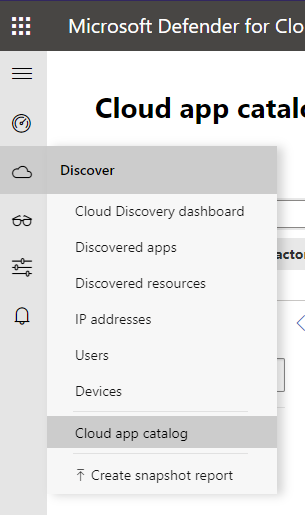
If you go into the Discover menu, you’ll find a Cloud app catalog option as shown above.

image

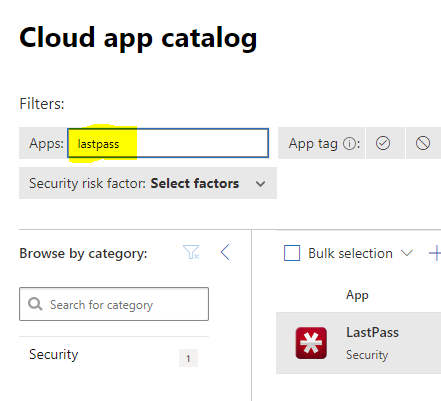
Enter the name of app you wish to search for and hit Enter.

image

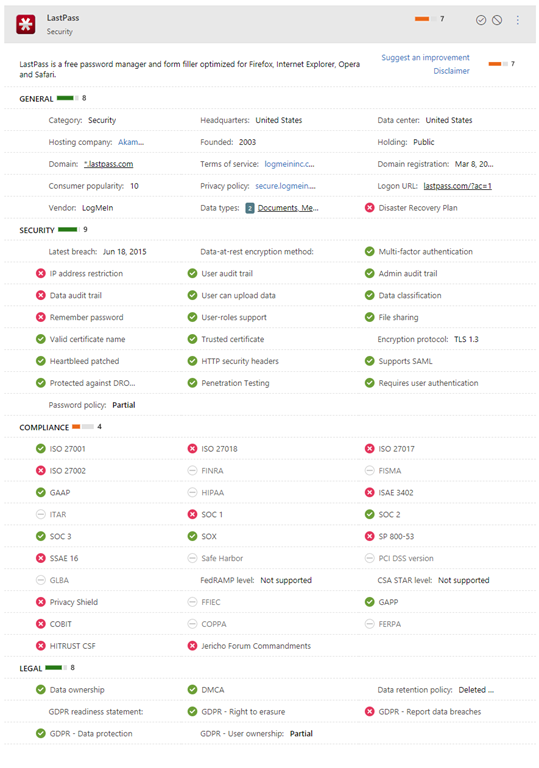
That should give you a page load of information like that shown above, which you can drill into if you want more details.

Of course, this information should only be part of your evaluation but it does provide a lot in one place for you to reference.

My Apps 2023

pexels-mohi-syed-50614

I remain a low volume mobile app user. I very selectively install apps on my device. Less is definitely more for me.

To see what I was using at the beginning of last year check out the article:

My Apps – 2022

My daily driver when it comes to a phone is an iPhone 12 pro Max currently but I also have a Surface Duo 2 as a backup. The other device that I use apps on is my iPad mini.

My most used apps on mobile devices over the last year were:

Castro on iOS to listen to all my podcasts on iOS.

Lastpass password manager and authenticator for general password management. This may change after the recent security issues with Lastpass.

Microsoft Authenticator – I use this for a number of select web sites as well as Microsoft 365.

Car Play – Connects to my daily drive to provide the ability to listen to podcasts as well as use Waze for navigation.

OneNote – is a must on every device I own. Syncs all my notes to every device. Allows me to not only truly have my information everywhere I am but also capture information quickly and easily.

OneDrive – This mobile app now not only allows me to manage my Microsoft 365 files but it also incorporates the more advanced Office Lens technology that scans and uploads, documents, whiteboards, etc.

Tripview – One of the few apps that I have happily paid for. I use this to let me know the Sydney train schedule to help me get around when I need to negotiate the ‘real world’. Although not much travel is happening at the moment, this app is super handy for negotiating local public transport.

Audible – If I can’t read my Kindle then I can normally always listen. This app allows me to listen to my audio books where ever I am. This and Castro on iOS are probably the most used applications on my devices.

Amazon Kindle – If I don’t have access to my Kindle then I can still read my books. In my case that will most likely be on my iPad. I also use the Kindle app on the iPad when the ebook has a lot of images that sometime don’t display well or are too small for the Kindle device.

The following as currently only iOS:

Rode Reporter – which I use for recording many of my presentations when I am out on the road, which ain’t so much these days but still a handy app to have.

Of course I have all the social media apps, such as Twitter, and Linkedin on my devices.

I also have all the Microsoft/Office 365 apps. The ones I use the most are probably To-Do, Outlook, SharePoint, OneDrive, Teams and Yammer, although Word and Excel also get used regularly. Just about every Microsoft Office 365 service has an app that you should have on your mobile device. On my Duo 2 I am also using Edge as the primary browser along with the new Edge Insider. I also have the Brave browser on my devices as I no longer use Chrome at all.

I’ve also added the Intune app to all my devices so they can be better managed.

I use the Signal messaging app for private conversations and groups that I am part of.

Some occasional ones I use include:

Get Pocket

Duolingo

Duolingo Math

– Uber

– Amazon music

I use the normal personal apps for things like Internet banking and so on. I also use Coin Gecko  for monitoring cryptocurrency.

One my iPad, which also serves as a personal entertainment device, I have the streaming services Netflix and Amazon Prime Video.

The above are my used apps across my various mobile devices. My aim to try and keep the apps standard across all the devices and as few as possible. I try and standardise on the Microsoft apps on all platforms and use these as much as possible. I certainly use a wide variety of apps on my devices by prefer the desktop versions if available.

Defender for Office 365 automated investigations

pexels-cottonbro-studio-5532675

A while ago I wrote an article:

Improved security is a shared responsibility

in which I encouraged the use of the Report message add in to Outlook.

What you may not realise about this add-in is that not only does it provide a centralised method to manage submissions per:

Providing feedback on user reported messages

but user reported messages also trigger an automated investigation:

What alert policies trigger automated investigations?

A security administrator can also manually trigger an investigation by using the Threat Explorer per:

Example: A security administrator triggers an investigation from Threat Explorer

If you want to better understand what Automated investigation and response (AIR) is and does, have look at:

AIR in Microsoft Defender for Office 365

This triggering of an automated investigation by simply using the Report message add in is another simple way to leverage the security tools that Defender for Office 365 provides and reduce administration workload.


CIAOPS Need to Know Microsoft 365 Webinar – January

laptop-eyes-technology-computer

Join me for the free monthly CIAOPS Need to Know webinar. Along with all the Microsoft Cloud news we’ll be taking a look at Defender for Business.

Shortly after registering you should receive an automated email from Microsoft Teams confirming your registration, including all the event details as well as a calendar invite.

You can register for the regular monthly webinar here:

January Webinar Registrations

(If you are having issues with the above link copy and paste – https://bit.ly/n2k2301

The details are:

CIAOPS Need to Know Webinar – January 2023
Friday 27th of January 2023
11.00am – 12.00am Sydney Time

All sessions are recorded and posted to the CIAOPS Academy.

The CIAOPS Need to Know Webinars are free to attend but if you want to receive the recording of the session you need to sign up as a CIAOPS patron which you can do here:

http://www.ciaopspatron.com

or purchase them individually at:

http://www.ciaopsacademy.com/

Also feel free at any stage to email me directly via director@ciaops.com with your webinar topic suggestions.

I’d also appreciate you sharing information about this webinar with anyone you feel may benefit from the session and I look forward to seeing you there.

My software and services 2023

startup-photos

Here’s last year’s post for comparison:

My software and services – 2022

My PC’s are either running the latest version of Windows 10 (22H2) or Windows 11 (22H2) without any issues. Some machines cannot be upgraded to Windows 11 and some I have left at Windows 10 for the time being to verify their operation. I no longer run any Windows 10 Insider builds as I had trouble backing out of these when I needed to. I still have Office Insider builds happening in my environment.

All Windows machines are directly joined to Azure AD and managed via Intune and Microsoft Endpoint Manager, except for one that remains stand alone for use with my IoT projects.  The Azure AD connected configurations are based on the Windows MDM security baseline settings. All machines only use  Windows Defender for local security monitoring and management. Thanks to Microsoft E5 on my production tenant, I am also using Microsoft Defender For Endpoint at the back end for monitoring and investigation of endpoint threats.

My two main tenants are an Office 365 E5 demo and Microsoft 365 production environments. A mix of Windows 10 Pro and Enterprise machines are all Azure AD joined to the Microsoft 365 production domain. The production Microsoft 365 tenant has Microsoft 365 Business for all users except myself. I have a Microsoft 365 E5 license on which I have configured all the services including integrated PSTN calling via Switch Connect.

I use Microsoft Sentinel to monitor threats across my environments via a single pane of glass. I have also now added Defender EASM.

I use the following major browsers:

Edge – my primary browser across all my devices including iOS and Android. I have it locked down with baseline policies via Microsoft Endpoint Manager.

Brave – I have become increasingly concerned about the surreptitious tracking that many sites perform, especially when it comes to social media sites. I therefore now do all my ‘random browsing’, searching and viewing of social media sites.

– Firefox – I now only use this on my Surface Pro X because Brave doesn’t offer an ARM version.

I have now cranked Edge up to the maximum security level but wanted to isolate the most likely tracking culprits into another browser that was security focused. After some evaluation, I have chosen Brave to be this browser. This is now where I do all the stuff that is more likely to be tracked and now hopefully blocked or at least minimised. I have also set this browser up to use Duck Duck Go as the default search engine, otherwise I use Bing for my production Edge browser. I have completely eliminated Google Chrome off all my machines without any issues and recommend those who are becoming more concerned about their privacy, like me, do the same.

Services like SharePoint Online and OneDrive I use regularly both in the demo and production tenant. I have the OneDrive sync client installed, running and connected to various locations on my production and demo tenants. I can now sync across all my different tenants as well as my consumer OneDrive storage. I have common places pinned to my Windows Explorer Quick access, which I find to be a real time saver.

I regularly use Microsoft Teams which is now my main messaging application. All the CIAOPS Patron resources like the intranet, team, etc all reside in the Office 365 E5 demo tenant but I connect to it on my desktop normally via an Azure B2B guest account from my production tenant. Thus, I can admin the Patron resources in a browser if need be but I get the same experience on my desktop as any Patron would. Handy to know what works and doesn’t work with Microsoft Teams guest access. Thanks to Microsoft E5 and Switch Connect, I also have Teams connected as a phone.

I use Lastpass to keep my passwords and private information secure. It allows me to do things like generate and store unique passwords for each website that I sign up for. It is also available across all browsers on my machine (including Microsoft Edge). I also now also use Lastpass to store secure notes. I will admit that recent security breaches with Lastpass have me concerned and I start exploring an alternative password manager.

The extensions I run in all my browsers are:

LastPass

GetPocket

Duck Duck Go Privacy Essentials

I use Microsoft Power Automate for automation as well as Azure Functions.

For my email newsletters I use Mailchimp.

My preferred public social networks for business, in order are:

1. Twitter

2. Linkedin

3. Mastodon

I consume a lot of content from YouTube both for business and personal interest. I also also use YouTube extensively for my publicly available training video training.

Microsoft Office desktop software is still part of my everyday workday via applications such as Outlook, Word, Excel, PowerPoint, etc. I use the desktop version of Outlook on my Surface Pro 7 which lives on my desk but I only use Outlook Web App on my travelling Surface Pro 6 device. I could happily not use Outlook on the desktop any more I believe but I still use so I understand the experience for most users. However, I do see the day when Outlook on the desktop begins to lose its appeal.

One of the things I have added to my desktop version of Outlook is a digital certificate that signs every email that I now send. This helps the receiver confirm that the message they have received is in fact from me and that it hasn’t been altered in any way. There are some issues when people attempt to reply to these emails from a mobile device but I believe a fix from Microsoft is coming..

The key application from the suite for me is OneNote. OneNote is my go to Swiss Army knife for just about everything digital. I use it to capture all sort of data. I even use it as a diary as I have detailed previous here:

One of the ways I use OneNote

The reason OneNote is key is because:

1. Just about everything I put in there us searchable

2. It is freely available across all platforms.

3. All my information is synced and accessible on all devices.

4. It is available on the web or offline if needed.

I am a big user of OneNote on my mobile devices. This combination has allowed me to totally eliminate my paper notebooks for things such as journaling.

I use Pure Text to easily paste information, especially to and from OneNote as only text.

I am now a big Microsoft To-Do user. I use it to keep many tasks and items that I need to follow up. I love how it is available on all my devices and syncs across them all as well.

I use Windows terminal now for things like PowerShell execution and Microsoft Whiteboard for demonstrations and training.

Microsoft PowerToys allows me to customise my desktop layouts using FancyZones, for those machines that are not running Windows 11 where this functionality is effectively included.

Another key service I use everyday along with Microsoft 365 and OneNote is Azure. Typically, I use it for running up virtual machines that I test various things with but I also use it with my IoT projects.

I use Microsoft Sentinel to monitor all my services and machines in one single console and tell me about any incidents now along with Defender EASM to search out vulnerabilities.

There is just so much that can be done with Azure and I pretty much use it everyday.

All of my data now lives in Microsoft 365 protected with things like Windows Information Protection and other Microsoft information protection options. All my Windows machines run with full disk encryption thanks to Bitlocker.

I have implemented Windows Defender Application Control (WDAC) to provide application control to improve security in my environment.

To capture my desktop for my online training academy or my YouTube channel I use Camtasia. I use SnagIt to capture screen shots and add highlights and emphasis to these. Snagit allows me to capture complete screens or specific areas quickly and easily.

I use Microsoft Teams to record my podcasts, which I then produce with Camtasia. These are uploaded to Podbean where they syndicated across various network.

To compose and publish blog articles I use Open Live Writer. My blog lives on WordPress.com.

My web site and Battlefields site live on Squarespace.

The majority of images I get, like the one at the top of this article, I get from Pexels. Pickit is also another great option.

For improved meeting management productivity I use Microsoft FindTime.

My Surface Duo 2 device is connected to my Surface Pro 7 using the Microsoft Your Phone app making it super easy to interact with the phone while on the desktop. I really wish they have this capability for the iPhone, but I’m not holding my breath,

I use Visual Studio Code in which I do most of my PowerShell editing and publishing. I also use it now for my IoT projects. The end result typically is my GitHub repository where you will find a range of scripts and other resources that I maintain regularly. With Visual Studio Code I can edit publish and sync all my machines and my GitHub repository no matter where I am. Very handy.

Here are also a few of the other items I use regularly that are not for business:

Amazon Prime Video – only place to the latest The Grand Tour action. I also liked the Jack Ryan series and well as the Gymkana Files but most of this viewing is now on my iPad mini.

NetFlix – Seen a lot of great stuff this give all the time in lock down but most of this viewing is now on my iPad mini.

XBox Live Gold – access to all the online Xbox goodness.

Duolingo – language learning, Japanese and Italian at the moment but most of this access is now on my iPad mini.

Duolingo Math – for keeping the brain sharp.

Kindle app – for typically reading books on my iPad

I try and keep my production machines as ‘clean’ and free of unused software as possible. I ensure that they are updated regularly. Any software testing that I need to do is typically done on a virtual machine in Azure.

So there you have it, the major software and services that I use regularly. I continue to search out additional software that will improve my productivity. If you use something that you’ve found really handy, please let me know and I always keen to explore what works for others.

My Gear 2023

You can take a look back at last year’s gear here:

My Gear 2022

there were/are some major changes happening with my assortment.

Surface Duo 2 – My ‘Google’ phone. This as a ‘secondary’ or backup phone. It has all the Microsoft apps installed on it and is connected to my Microsoft 365 production account. Most importantly, it has the Microsoft Authenticator app for MFA access for certain apps.  I also have the latest Microsoft Surface pen which I really like. It is probably the best ‘electronic scribing’ device I have used.

i have to admit that I haven’t used this device that much since I bought it. Some of the reasons for that were that I planned to use it as a writing device (i.e. notepad) but storing the pen with the device has proved problematic. yes, it does have a magnetic area to hold the pen but you can’t just throw the device in a bag and expect the pen to be still connected. The pen really needs some form of pouch in which the pen lives so it can always be with the device. The other thing is the large camera bump prevents the device from laying completely flat. This makes it very hard to use as a replacement notebook on a desk. One of my resolutions this year will be to try and use this device much more to get full benefits from the investment made as I do really like the device and feel it can serve a real purpose for me. I just have to work out how to reduce the friction of using it everyday..

iPhone 12 Pro Max – Is my main mobile device. Unfortunately, there is a growing crack on the screen that I believe was initiated by the Surface Duo 2 camera bump, when the devices where in my laptop bag together. The phone still works and the crack is off to one side of the screen but I can see the crack growing and full expect one day to have to replace the device. I want to delay this as long as possible since I have invested in a Quad Lock case and multiple holders (car, desktop, etc) for this case. A new phone will mean a new case, which isn’t the end of the world, just additional hassle.

One thing that I have configured my iPhone for is default grey scale display. I do this for two major reasons, firstly to prevent the phone from grabbing and holding my attention and secondly to save power. With the colours disabled on your phone it is amazing at how les tempting it is to play with it and use it as a crux when you are bored.

The great thing I will say about about iDevices is their battery life. My experience is that this allows them to work for years and years, providing great value.

Surface Pro 7 – This is my main desktop machine. Being the same form factor, it just slotted directly into my Kensington SD7000 Surface Pro Docking Station I already have in place. This machine runs Windows 11.

I am considering a potential Surface Pro 9 purchase, however as of yet I can’t really justify it. The other downside of going to a Surface Pro 9 is that it won’t fit in my Kensington SD7000 Surface Pro Docking Station which I really love.

Surface Pro 6 – My backup and travelling machine. I use it pretty much every day as an adjunct to my main machine. It lives on my secondary Kensington SD3500v docking station connected to a full screen and acts as my backup in case my main machine fails or is unavailable for some reason. It is also a handy way to test things from outside my environment by hot spotting to my phones. This machine run Windows 10 but could run Windows 11. I haven’t upgraded as yet because I want to maintain at least one production machine on Windows 10.

This is the machine I am considering replacing with a Surface Pro 9, given that it will plug directly into the existing Kensington SD3500v docking station. The question then is, what do I do with the Surface Pro 6? It still works. How can I make best use of this device if I no longer use it as my travelling device and backup? That, I haven’t figured out yet.

Surface Pro X – I use this machine as a ‘lite’ travelling desktop as well as a whiteboarding machine for demos and training. Give that it comes with the Surface Pen and has a nice large screen and will lie flat it makes the prefect device for scribing. I also use this device for writing note into places like OneNote. Perhaps not the most effective use of the device but it beats the iPad when it comes to scribing hands down in my books. This machine runs Windows 11.

This is another machine that I haven’t used as much as I want to. I am considering converting it to a full time desk notepad for writing (given it has a Surface Pen which I love). Last year saw the keyboard fail and I agonised over whether to replace it because it ain’t cheap. In the end I did buy a replacement keyboard to main the most functionality with the device. The problem is that if I use it as a dedicated desktop notebook device (i.e. flat on the desk with the cover removed) then it tends to get in way. I think I just need to spend some more time with the ergonomics on my desk to get the most productivity and use from this device going forward.

Surface Pro 3 – Continues to work fine and function as a test machine in my production environment. This machine has now been removed from my production network and operates stand alone. It does this so it can run my IoT project work. I found that with the security I have on my production network that I could not easily operate the IoT software I needed so the simple solution was to remove it from the production network and use it stand alone. This machine is slow and clunky, but for now it is doing the job it needs to. This machine is not suitable for Windows 11.

Surface – I have had an original Surface version 1 for many years now. The keyboard has long since broken by the system still works fine, although somewhat under powered with only 4GB of RAM. This machine is now a dedicated device on a separate test tenant. This allows me to test Autopilot and other settings on it regularly. This machine is not suitable for Windows 11.

iPad mini 5th Gen – I decided I wanted a smaller ‘notebook’ size table to use like a paper diary, amoungst other things, so I went out and bought an iPad mini.

I also now use this iPad mini with the Apple pencil, which generally works well. The secret is to get a good case for both the iPad mini and the pencil. My choice was:

Finite Case with Pencil holder

which I’d certainly recommend as it is flexible, tough and cheap.

The only major downside of the iPad mini is that battery life is a lot less than the full size iPad, which is understandable. I have however never run out of juice but you do notice the power levels fall away quickly when compared to the full size version. I like that the iPad mini comfortable fits on my desk, works will with the Apple pencil and is much more transportable than the larger version. I was a little concerned that the screen size would be too small to enjoy movies and read web pages, etc but that hasn’t proved to be the case. I happy use it lying back on the couch to watch a variety of programs and read web sites.

After a number of years the Apple Pencil doesn’t really hold a charge any more. That is disappointing, although I appreciate it doesn’t have a huge battery. This has again increased the friction with me finding a suitable replacement for a paper notebook because every time I want to write something down, I need to charge the pencil up which takes ages. I may look at getting a new and updated Apple pencil but unsure as to whether I can really justify that in line with the plan to use the Surface Duo more.

D-Link Wireless N300 Model Router DSLG225 – to allow connect to the NBN broadband network.

Ubiquiti – I have a variety of Ubiquiti equipment in place including a  Security Gateway. All these have worked flawlessly and I can’t recommend this gear highly enough.

Docking station – I still love my Kensington SD7000 Surface Pro Docking Station. It is a really neat device, that suits most modern Surface Pro devices. It is slim, compact and now all me to have 3 external monitors off the one Surface devices (as you can never have enough screen now can you eh?). I can plug in all my devices, microphones, phones, etc to it and all the cables are hidden at the back. I also like that you can adjust the screen up and down, a bit like a Surface Studio.

Occasionally, one of my monitors goes dark and a few seconds later comes back, kinda like it is doing a reset or refresh. Maybe I need to update some drivers? Apart from that it continues to perform flawlessly.

The original Kensington SD3500v has now moved to work with the travelling PC when it is running in my office and that is also working well, making it a truly ‘plug and play’ experience when I get back from road trips.

Amazon Kindle – Still have this but it has now largely been superseded by the iPad mini for reading books. I still love my Kindle but if I can have one less device then I’m going to take that option. so for now, the Kindle has been relegated as a backup.

Xbox One S – Still use it to watch YouTube, Netflix and Amazon video but now playing more games thanks to Minecraft Dungeons and Call of Duty game.

I didn’t make any major hardware investments in 2021.

The items that I retired from front line operations last year where:

1. WDSentinel

I will admit that I have my eye on a Surface Pro 9 replacement for the Surface Pro 7 depending on how things pan out this year. I doubt I’ll be upgrading to the new iPhone 13 as I don’t see any major benefits for the costs, that is unless the screen fractures. I want to focus on getting the most from my Surface Duo 2 given its price. I also hear rumours of a Duo 3, so hopefully I’ll be able to trade in Duo 2 in if I decide to.