Get Teams meeting Attendees [VIDEO]

A while back I wrote a script that allows you to report attendees of a Teams meeting with PowerShell:

https://blog.ciaops.com/2023/05/25/get-teams-meeting-attendees-via-powershell-and-the-microsoft-graph/

I have now done a video here:

https://www.youtube.com/watch?v=M0GBzGT3Igk

to provide a walk through of what the execution of that script looks like. The script is located at:

https://github.com/directorcia/Office365/blob/master/tms-attend-get.ps1

CIAOPS Need to Know podcast now available on Spotify

Spotify

I’m very happy to announce that my CIAOPS Need to Know podcast is now available on Spotify. You will find it here:

https://open.spotify.com/show/7ejj00cOuw8977GnnE2lPb

The reason for it taking this long was that Spotify only accepts audio only podcasts and while back I did a number of episodes that included video. Thus, MP4 vs MP3 versions prevented them being available on Spotify.

No longer. Subscribe and listen in to all the latest news from the Microsoft Cloud with a focus on SMB.

Need to Know podcast–Episode 326

You are going to need to update any global administrator account that doesn’t have MFA enabled soon. Failing to do so will cause you some pain when you visit the Azure, EntraID or Intune portal. See the included article for more details. This and lots of Microsoft cloud news in this episode including some great improvements to Microsoft Teams.

ou can listen directly to this episode at:

https://ciaops.podbean.com/e/episode-326-mfa-for-all/

Subscribe via iTunes at:

https://itunes.apple.com/au/podcast/ciaops-need-to-know-podcasts/id406891445?mt=2

Don’t forget to give the show a rating as well as send me any feedback or suggestions you may have for the show.

Brought to you by www.ciaopspatron.com

Resources

@directorcia

Join my shared channel

CIAOPS merch store

Become a CIAOPS Patron

CIAOPS Blog

CIAOPS Brief

CIAOPSLabs

Support CIAOPS

Announcing mandatory multi-factor authentication for Azure sign-in

Moving to OneNote on Windows

Microsoft Defender for Endpoint’s Safe Deployment Practices

Updates to Microsoft Copilot to bring enterprise data protection to more organizations

Reimagining content management at Microsoft with SharePoint Premium

Give a custom name to the General channel in Microsoft Teams

Enhanced presenter and attendee experience with the expanded gallery view in Teams

Face Check is now generally available

Show or hide the Discover feed in Microsoft Teams

Exploring the latest AI features in Clipchamp

Professional project management with Microsoft Planner

How Microsoft and NIST are collaborating to advance the Zero Trust Implementation

Detect compromised RDP sessions with Microsoft Defender for Endpoint

Enhancements to the Outbound Messages in Transit Security Report

Key Topics:
  • Mandatory Multi-Factor Authentication (MFA): Robert discussed the recent announcement by Microsoft regarding mandatory MFA for Azure sign-ins, affecting Azure portal and dependencies like Intune. He emphasized the need for configuring MFA for break glass accounts without it, suggesting options like Microsoft Authenticator, passkey, or Fido key hardware token. The deadline for compliance is mid-October. 1:16

  • OneNote on Windows Update: Robert shared updates on OneNote for Windows, indicating a shift from the Windows 10 standalone version to a continued development of the desktop edition, incorporating features from the Windows 10 edition. He recommended reviewing a specific Microsoft article for more details. 3:24

  • Microsoft Defender for Endpoint: Robert highlighted the importance of safe deployment practices for Microsoft Defender for Endpoint, referencing a Microsoft article that provides guidance on staged rollouts and managing engine updates. 4:15

  • Enterprise Data Protection: Robert mentioned updates to Copilot aimed at bringing enterprise data protection to more organizations. He noted some confusion between commercial and enterprise data protection but underscored the importance of securing Microsoft 365 accounts. 4:48

  • SharePoint Premium: Robert discussed the rebranding of SharePoint syntax to SharePoint Premium, detailing new features like autofill columns, document processing, and OCR. He also mentioned the cost-effective aspect of tying syntax usage to an Azure subscription for SMBs. 5:53

  • Custom Naming for General Channel in Teams: Robert shared a new feature in Microsoft Teams allowing users to give custom names to the general channel, addressing a long-standing request from users for more descriptive channel naming. 7:18

  • Enhanced Presenter and Attendee Experience in Teams: Robert praised the enhanced presenter and attendee experience in Teams, highlighting the ability for presenters to see what their screen is displaying to the audience. 7:47

  • Face Check Availability: Robert announced the general availability of Face Check, a facial recognition feature for secure app sign-ins. He speculated on its potential as an MFA replacement and encouraged exploring its integration with apps. 8:26

  • AI Enhancements in ClipChamp: Robert discussed new AI features in ClipChamp, such as background removal, enhancing the tool’s viability for users working with images and videos within Microsoft 365 subscriptions. 10:07

  • Planner Updates: Robert touched on updates to Planner, including a new interface and integration with Copilot for Microsoft 365, suggesting it as a useful tool for project management within teams. 10:39

  • Collaboration on Zero Trust Implementations: Robert mentioned a blog post detailing collaboration between Microsoft and NIST on advancing Zero Trust implementations, emphasizing the “trust no one” approach to security. 11:23

  • Detecting Compromised RDP Sessions: Robert highlighted Defender for Endpoint’s capability to detect compromised RDP sessions, sharing suggestions and KQL queries for identifying such sessions. 12:05

CIAOPS Brief 20240817

image

Moving to OneNote on Windows –

https://support.microsoft.com/en-us/office/moving-to-onenote-on-windows-4ba7b498-aafc-44b1-8326-a582a6c71196

Announcing mandatory multi-factor authentication for Azure sign-in –

https://azure.microsoft.com/en-us/blog/announcing-mandatory-multi-factor-authentication-for-azure-sign-in/

Microsoft Copilot for Security Now Covered by HIPAA Business Associate Agreement (BAA) –

https://techcommunity.microsoft.com/t5/microsoft-security-copilot-blog/microsoft-copilot-for-security-now-covered-by-hipaa-business/ba-p/4220174

Microsoft Defender for Endpoint’s Safe Deployment Practices –

https://techcommunity.microsoft.com/t5/microsoft-defender-for-endpoint/microsoft-defender-for-endpoint-s-safe-deployment-practices/ba-p/4220342

Multi-tenant insights to boost customer health in Microsoft 365 Lighthouse –

https://techcommunity.microsoft.com/t5/small-and-medium-business-blog/multi-tenant-insights-to-boost-customer-health-in-microsoft-365/ba-p/4177367

Updates to Microsoft Copilot to bring enterprise data protection to more organizations –

https://techcommunity.microsoft.com/t5/copilot-for-microsoft-365/updates-to-microsoft-copilot-to-bring-enterprise-data-protection/ba-p/4217152

Reimagining content management at Microsoft with SharePoint Premium –

https://www.microsoft.com/insidetrack/blog/reimagining-content-management-at-microsoft-with-sharepoint-premium/

Set up your iPhone for work –

https://www.youtube.com/watch?v=5TcfajFq0gg

Give a custom name to the General channel in Microsoft Teams –

https://insider.microsoft365.com/en-us/blog/give-a-custom-name-to-the-general-channel-in-microsoft-teams

Now Available: the Copilot for Microsoft 365 Risk Assessment QuickStart Guide –

https://techcommunity.microsoft.com/t5/copilot-for-microsoft-365/now-available-the-copilot-for-microsoft-365-risk-assessment/ba-p/4211925

Enhanced presenter and attendee experience with the expanded gallery view in Teams –

https://pre.insider.microsoft365.com/en-us/blog/efficient-multitasking-and-enhanced-presenter-experience-with-the-expanded-gallery-view-in-teams

Face Check is now generally available –

https://techcommunity.microsoft.com/t5/microsoft-entra-blog/face-check-is-now-generally-available/ba-p/4175880

Show or hide the Discover feed in Microsoft Teams –

https://insider.microsoft365.com/en-us/blog/show-or-hide-the-discover-feed-in-microsoft-teams

After hours

Working backward to solve problems – Maurice Ashley – https://www.youtube.com/watch?v=v34NqCbAA1c

Editorial

If you found this valuable, the I’d appreciate a ‘like’ or perhaps a donation at https://ko-fi.com/ciaops. This helps me know that people enjoy what I have created and provides resources to allow me to create more content. If you have any feedback or suggestions around this, I’m all ears. You can also find me via email director@ciaops.com and on X (Twitter) at https://www.twitter.com/directorcia.

If you want to be part of a dedicated Microsoft Cloud community with information and interactions daily, then consider becoming a CIAOPS Patron – www.ciaopspatron.com.


Watch out for the next CIA Brief next week

Disable Linkedin integrations in Microsoft 365

The first place to disable Linkedin integration in Microsoft 365 is inside the Azure portal.

image

Navigate to Microsoft Entra ID, then select Users as shown above.

image

Select User settings on the left and set the Linkedin account connections to No.

Remember to Save your settings before existing this page.

image

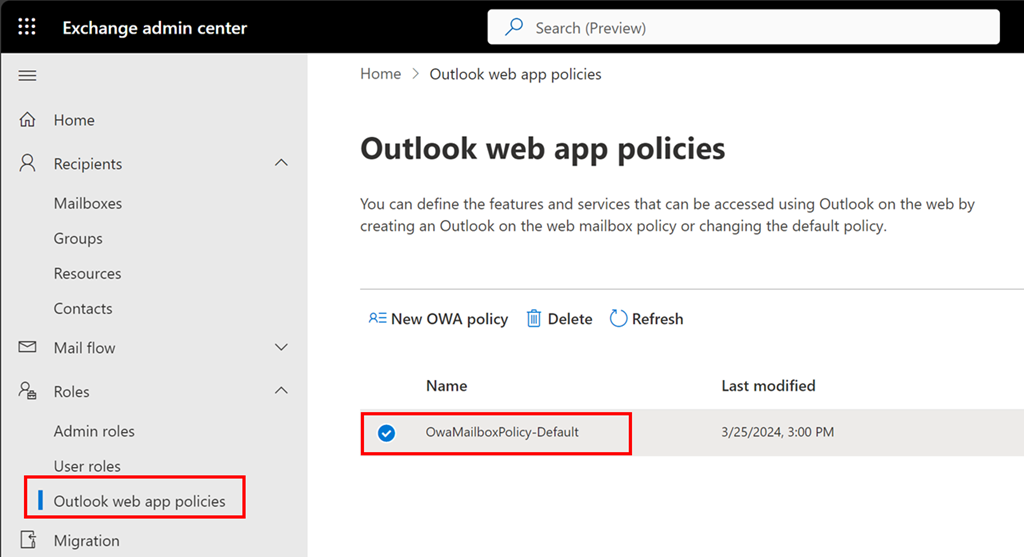
Now navigate to the Exchange Online administration portal. Expand the Roles option on the left and then select Outlook Web Apps policies.

Typically, there will only be one OWA policy as shown above. If there are more, then you will need to repeat this process with each.

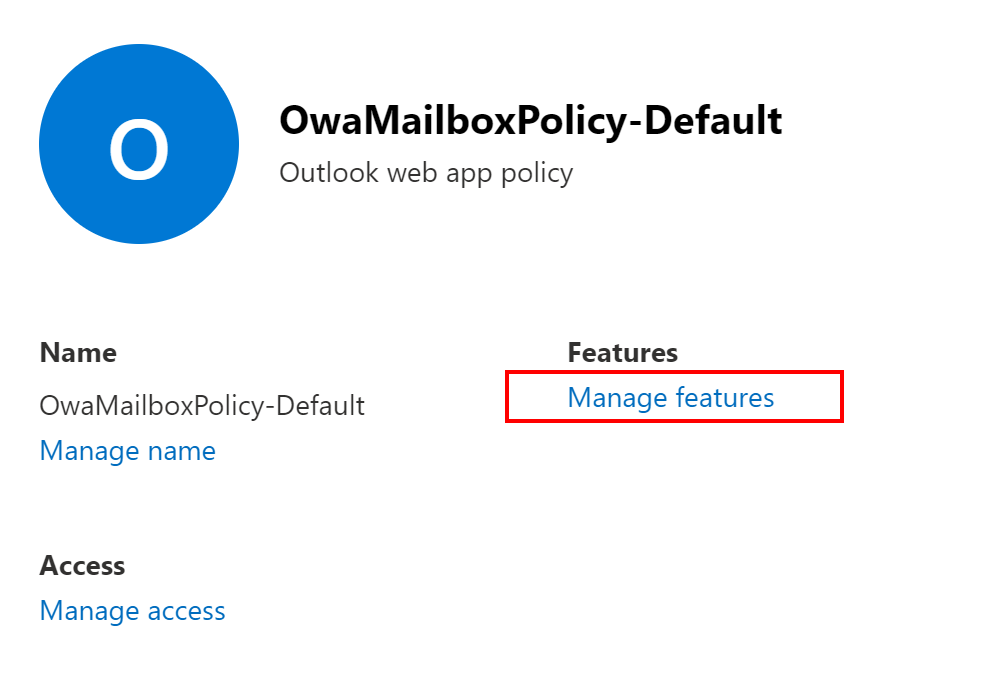
Select the policy name, here OwaMailboxPolicy-Default..

image

From the window that appears on the right select Manage features as shown above.

image

Ensure Linkedin contact sync is unselected as shown above.

Save your settings before you exit.

Set Exchange Online quarantine notification period

Many people have suspect emails sent to quarantine in Microsoft 365. This is achieved using a quarantine policy which you find at:

https://security.microsoft.com

image

You expand the options under Email & collaboration as shown above and select Policies and rules. On the right you select Threat policies as shown above.

image

If you scroll down the page a bit you’ll find Quarantine policies as shown above, which you should select.

image

The notification period is controlled in the GUI via the Global settings menu option as shown above.

image

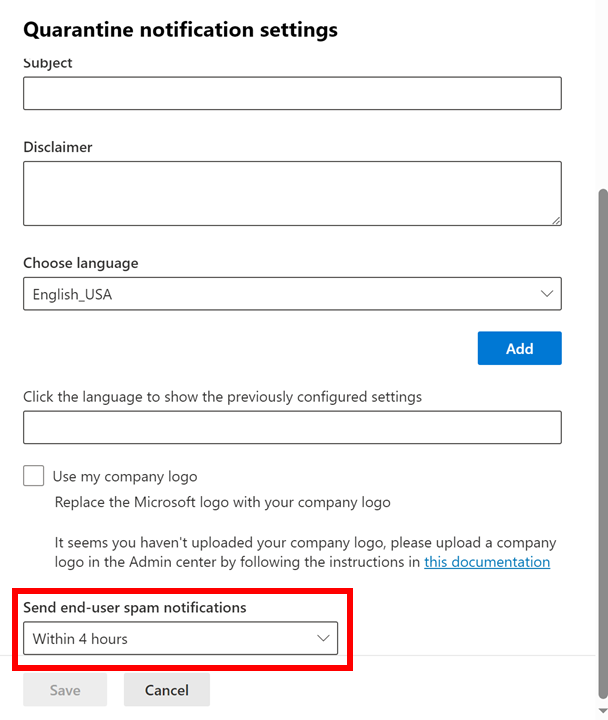
From the dialog that appears from the right, scroll down to the bottom of the page and you will find an option Send end-user spam notifications as shown above. Presently, the minimum you can configure this to is Within 4 hours.

After you make any changes here select the Save button at the very bottom to update these settings for all the quarantine policies you have.

CIAOPS Brief 20240810

image

Bridging the On-premises to Cloud Security Gap: Cloud Credentials Detection –

https://techcommunity.microsoft.com/t5/security-compliance-and-identity/bridging-the-on-premises-to-cloud-security-gap-cloud-credentials/ba-p/4211794

Exploring the latest AI features in Clipchamp –

https://insider.microsoft365.com/en-us/blog/exploring-the-latest-ai-features-in-clipchamp

Chained for attack: OpenVPN vulnerabilities discovered leading to RCE and LPE –

https://www.microsoft.com/en-us/security/blog/2024/08/08/chained-for-attack-openvpn-vulnerabilities-discovered-leading-to-rce-and-lpe/

Extend allow in Tenant Allow/Block List allow entries in a transparent data driven manner –

https://techcommunity.microsoft.com/t5/microsoft-defender-for-office/extend-allow-in-tenant-allow-block-list-allow-entries-in-a/ba-p/4213201

Professional project management with Microsoft Planner –

https://adoption.microsoft.com/en-us/guides/professional-project-management-with-microsoft-planner/

Ways to share files with people at work –

https://www.youtube.com/watch?v=TmjgDtHYBsE

How Microsoft and NIST are collaborating to advance the Zero Trust Implementation –

https://www.microsoft.com/en-us/security/blog/2024/08/06/how-microsoft-and-nist-are-collaborating-to-advance-the-zero-trust-implementation/

Detect compromised RDP sessions with Microsoft Defender for Endpoint –

https://techcommunity.microsoft.com/t5/microsoft-defender-for-endpoint/detect-compromised-rdp-sessions-with-microsoft-defender-for/ba-p/4201003

Enhancements to the Outbound Messages in Transit Security Report –

https://techcommunity.microsoft.com/t5/exchange-team-blog/enhancements-to-the-outbound-messages-in-transit-security-report/ba-p/4210332

After hours

You Should Probably Change Your Password! – https://www.youtube.com/watch?v=aHaBH4LqGsI

Editorial

If you found this valuable, the I’d appreciate a ‘like’ or perhaps a donation at https://ko-fi.com/ciaops. This helps me know that people enjoy what I have created and provides resources to allow me to create more content. If you have any feedback or suggestions around this, I’m all ears. You can also find me via email director@ciaops.com and on X (Twitter) at https://www.twitter.com/directorcia.

If you want to be part of a dedicated Microsoft Cloud community with information and interactions daily, then consider becoming a CIAOPS Patron – www.ciaopspatron.com.

Watch out for the next CIA Brief next week