Need to Know Podcast–Express Edition

Join returning guest Chip Reaves from Bigger Brains as he and I discuss the challenges of reaping productivity benefits from implementing technology in the business express edition of the CIAOPS Need to Know podcast. Who’s to blame? The vendors? The resellers? Or the end users?

Chip and I discuss a wide range of reasons why many businesses (especially amongst our customers) are not gaining tangible benefits from the technology being sold to them. Also, apart from shedding light on these issues we offer some solutions that may help improve this situation.

You can listen to this episode at:

http://ciaops.podbean.com/e/why-is-technology-not-making-business-more-productive/

The podcast is also available on Stitcher at:

http://www.stitcher.com/podcast/ciaops/need-to-know-podcast?refid=stpr

Don’t forget to give the show a rating as well as send me anyfeedback or suggestions you may have for the show.

Resources

Robert Crane – @directorcia

http://getbiggerbrains.com/

http://biggermsp.com/

www.getbiggerbrains.com

www.biggermsp.com

Why the economic payoff from technology is so elusive

Only a week until the CIAOPS August webinar

Hopefully you know about my free monthly webinar around Office 365 and the Microsoft Cloud. The next webinar is now but a week a way (on Wednesday the 17th of August at 11am Sydney time) and I’d urge you to register. You’ll find all the details here;

https://blog.ciaops.com/2016/07/ciaops-need-to-know-webinaraugust-2016.html

This month I’ll be focused on sharing with you what I believe is the most overlooked feature of Office 365. It something really simple that nearly everyone I come across either doesn’t know or realise is part of the product. If you aren’t using it now, I am certain that you will after the session. The webinar will also include news around Office 365 as well as an open Q and A session for any questions you may have about Office 365, Microsoft Cloud technologies or technology in general.

All you need to do to be part of my second monthly webinar is register at:

https://attendee.gotowebinar.com/register/5541257505109190401

I look forward to having you join me next week.

Innovations Days event in Sydney–Register now

I’m speaking at an upcoming event in Sydney. My topic will be on Azure Rights management. This includes the free version that comes with office 365 E3 or better as well as the stand alone Azure Rights Management product.

The event is Saturday the 17th of September 2016 from 8.30am at the NSI Tafe NSW, St Leonards Campus, Sydney. You can register now at:

http://innovationdays.com.au/register

Here are all the details about the day. I hope to see you there.


Join us at Innovation Days

Join Australian Most Valuable Professionals (MVP) and Industry Experts for a one day of accelerated learning about innovative technologies. Expert Speakers will present based on their real world experience in short action packed sessions.
Major Topics Includes:

Cloud and Datacenter Management
Topics covered include Private, Hybrid and Public Cloud and the future of applications, integrating Cloud into your IT strategy/the challenges of the journey to the cloud, managing scalable applications to managing customer relationships through social platforms; Linux and Windows OS migration to public Cloud.
Data Analytics and Integration
The world is moving faster than ever before, with more devices, more connections, more networks and new data. More than ever, to stay competitive, your business needs to move fast to process the large volumes of dynamically changing data. Learn how to be at the market frontier with enterprise analytics and unlock the power of your data in the cloud. 
Identity
Enterprise identity management has been primarily focused on access to employees and contractors. But as the industry has been perfecting how to serve employees, consumer identity has presented itself as a growth opportunity for businesses and identity professionals alike. Topics covered: Identity Management, Device Management and Identity as a Service.


Session Details

Date: Saturday, 17th September
Time: 08:30am to 05:30pm
Venue: NSI Tafe NSW – St Leonards Campus, Sydney, Australia
The day session will include: 16+ sessions, solution roadmaps, direct access to industry experts, networking and more.

Register

Proudly Supported by:


Office 365 E3 and above includes Rights Management

There are many benefits of the more advanced Office 365 plans. One of the benefits you receive with E3 licenses and above is Rights Management:

image

If you visit the E3 product page at:

https://products.office.com/en-us/business/office-365-enterprise-e3-business-software

You will find the above focus on the included Information Protection features. One of the ways this is provided is via Rights Management.

image

https://technet.microsoft.com/en-us/network/dn858608.aspx

If you visit the above link you’ll find the table that compares the Rights Management features you receive in Office 365 E3 or better and with Azure Rights Management Premium.

image 

Although Office 365 Rights Management isn’t as full featured as the premium product it does most things a business needs. It will basically protect documents no matter where they are located. Rights Management basically will encrypt documents and embed permissions inside the document. Thus, the permissions go wherever the document goes, inside or outside the business.

This is unlike most documents today that are only protected by the location in which they are stored. If you have a sensitive document on your file server, it is generally locked down via server permissions. However, that doesn’t prevent someone with the appropriate permissions sending that document, as an email attachment say, another person who doesn’t normally have permissions. That is because once the file is removed from its secure container it effectively is no longer protected. That’s because only the container the file lives in has permissions, not the file itself. With Rights Management, the permissions are embedded into the file, ensuring it is protected where ever it goes.

So, if you have Office 365 E3 or better, what’s the easiest way to start using the included Rights Management abilities you get with Office 365?

image

image

The easiest way is to configure information to be directly protected from the file system and desktop applications.

If you look at the above screen shots of PowerPoint and Windows Explorer you see there is no option to apply Rights Management. To provide that we need to firstly install the Rights Management agent software on the desktop.

image

To download the agent software, navigate to the Microsoft Rights Management download portal at:

https://portal.aadrm.com/Home/Download

image

Simply select the icon that matches your device. In this case we’ll select the Windows computer icon.

image

When the software has downloaded, run it.

image

Select Next to continue.

image

You’ll see the software configure and install Microsoft RMS for you.

image

After the installation is complete you’ll now need to Restart your system.

image

image

Now when you look at your Office applications you’ll see a new button called Share Protected as shown.

image

You’ll also find that Rights Management has been embedded into the file manager. Just right mouse click on any file and you’ll see the Protect with RMS option in the menu as shown.

I’ll cover off how you actually use this inbuilt Rights Management functionality to protect your information in an upcoming article, so stay tuned. However, at least now you have the agent installed on your desktop to make protecting your information with Rights Management easy.

Remember, Rights Management with Office 365 is currently only available with E3 or better suites but is also available as a stand alone purchase if you want it.

Need to Know Podcast–Episode 109

Marc and I are back again with all the latest news from the Microsoft Cloud around Azure and Office 365. More Azure services have become generally available and Office 365 has unveiled some cool new stuff that we want to ensure you know all about. Listen along and we’ll tell you all the latest plus provide our own unique commentary and opinions on everything Microsoft Cloud. Listen up for the latest.

You can listen to this episode at:

http://ciaops.podbean.com/e/episode-109-cloud-news/

or subscribe to this and all episodes in iTunes at:

https://itunes.apple.com/au/podcast/ciaops-need-to-know-podcasts/id406891445?mt=2

The podcast is also available on Stitcher at:

http://www.stitcher.com/podcast/ciaops/need-to-know-podcast?refid=stpr

Don’t forget to give the show a rating as well as send me any feedback or suggestions you may have for the show.

Resources

@marckean

@directorcia

Azure news from Marc

Office 365 Bookings released

Azure Logic Apps now generally available

SharePoint integration with Microsoft Flow and Power Apps

Microsoft announces Skype for Business PSTN conferencing available in Australia from September

New Office 365 Network community

Why Microsoft is not using Yammer for the new Office 365 Network Community

Driving Office 365 adoption

adoption-curve

I’ve been doing a lot of work recently helping businesses drive SharePoint and Office 365 adoption, in many cases after a failed implementations. I thought that I’d share some of my thoughts about the process for everyone.

Above you’ll see the typical diffusion of innovation curve. It describes the breakdown of typical mentalities in a business.

The first 2.5% are the innovators. These are the people that are fiddling with things way before anyone else.

The next 13.5% are you early adopters.

The next 34% are your early majority.

This takes you to 50% adoption. The last 50% of adopters are your late majority and finally your laggards being the last 16% typically.

The magic number we are looking for to achieve an adoption tipping point with technology so that it gains widespread acceptance in a business is around the 16% mark. In my experience getting to the 16% mark alone won’t guarantee your business wide adoption of a technology like SharePoint. You certainly can’t succeed without it, and it is the critical first step, but adoption success requires something further.

In my experience, the problem is that too many businesses target the wrong audiences when it comes to adoption. Most target only the early majority. The secret to success is in fact to target the audiences at the extremes (i.e. innovators and laggards). If you can succeed at the extremes the audiences in between naturally follow.

You also can’t use the same strategies with early adopters as you can with laggards. Each requires a unique approach.

For innovators, it is all about being first, being recognised as a leader and standing out from the crowd. While for laggards it is typically about time and convenience.

Your innovators are the smallest audience in a business making them the ones you should work with first. They need to be identified and then included in ‘exclusive’ adoption programs where they are given the initial opportunity to utilise the latest technology. Part of the responsibility of being considered an innovator is the expectation of passing knowledge on to the early adopters and easing their up take of the technology. Achievement of this knowledge transfer by innovators needs to be rewarded and recognised publically. It is important to note that innovators are driven far more by recognition than they are monetary rewards.

Once you have a successful adoption program in place for innovators now it is time to turn your attention to the laggards. This audience has no interest in technology, typically they see it as an impediment to doing their job. The adoption program you implement here needs to focus on benefits to getting the laggard’s job done, and this typically means allowing it to completed faster or with more convenience.

An example of something in Office 365 or SharePoint that appeals to laggards is the search ability across the data, allowing them to find what they want with minimal effort.

In essence, both innovators and laggards are strongly driven by the ‘what’s in for me’ mentality but for innovators it is about external benefits, while for laggards, it is about internal benefits in this regard. Understanding the core motivation of each audience is key to creating any successful adoption plan.

So there, you have some high level considerations and tips when it come to technology adoption. You now just need to develop specific adoption plans that make technologies like SharePoint and Office 365 appealing to those audiences. That only comes by understanding what motivates them and crafting the benefits to appeal to that directly.

Adoption of new technology like SharePoint and Office 365 fails when businesses treat everyone the same. There are distinct audiences inside any business and when it comes to adoption you simply can’t change those attitudes no matter how hard your try. So rather than fighting these, you need to tailor a strategy specifically to each audience. Only then will you stand a good chance of wide spread adoption. if you don’t, you are doomed before you fail in my books. Don’t believe me? Take a closer look at any failed technology implementation and you’ll find the root causes in what I have oulined here. I guarantee.

Uploading documents to SharePoint Online

Here’s another updated video using the new ‘modern’ SharePoint Online interface to show you all the basic ways to get documents into SharePoint Online Document Libraries.

You’ll see how to create new documents on the fly, upload single files as well as whole folders. You’ll also see how to drag and drop directly onto the browser and copy using the desktop sync software. This video is aimed at people new to using SharePoint Online to help them get their ‘stuff’ up into Document Libraries.

Watch out for more updated videos coming real soon!

The extinction of the drive letter

Pretty much my whole working career with PC’s there have been drive letters. I think the good ole local C: Drive will be around for a while longer but, it’s my opinion that the days of the network drive letter (e.g. S:, M:, F:, etc) are fast coming to an end. That has major ramifications for the way many work with technology, especially in this new cloud world. I’m not saying that you’ll wake up tomorrow and network drive letters won’t be with us. What I’m however saying is that now is the time to start preparing for the day when they are no longer with us.

One of the greatest inhibitions many people (and IT resellers) have around SharePoint is they can’t simply map a persistent network drive letter to it and have it operate the ‘way it has always worked’ like a network share. The reality is, firstly you can still map a drive letter to both OneDrive and a Team Site Document Library as I have detailed previously if you really want:

Mapping a drive to OneDrive for Business

But secondly, the trend with SharePoint Online is away from providing the ability to map drive letters. That should signal it is time to adapt, not throw yourself on the floor and have a tantrum that things are different.

image

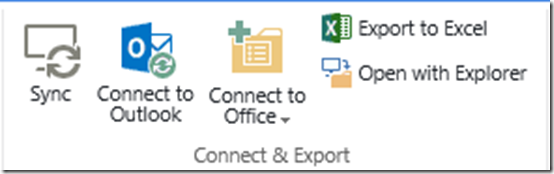
If we go into the ‘classic’ SharePoint interface with Internet Explorer and select the Library tab we can find the Open with Explorer option.
image

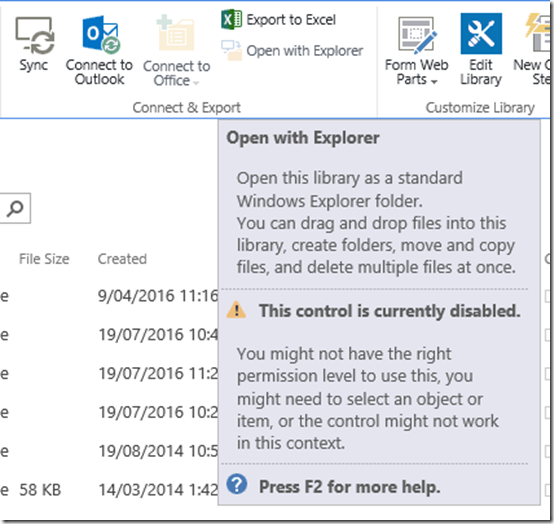
But if we repeat that on another browser like Microsoft Edge (or Chrome or Firefox) we see:
image

It isn’t supported. Remember, that Microsoft Edge is the ‘default’ browser for people using the latest version of Windows. Thus, it seems unlikely that you’ll be able to map a drive using the latest Microsoft browser going forward. 
image

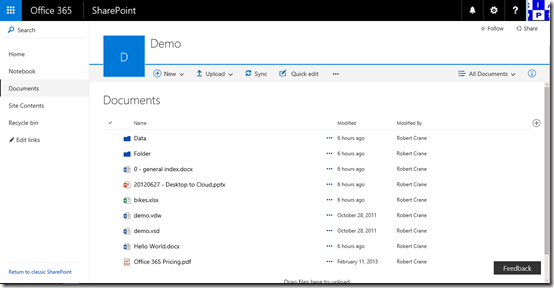
If we now look at the ‘updated’ SharePoint Document Library experience, there basically isn’t a way to open in Windows Explorer directly from the Document Library that I can find as there was in the ‘classic’ environment. No matter what browser you use.

Both of these factors should provide very strong evidence that the trend is away from mapped networked drives. Sure, I hear you that accessing a file from a M: drive was something you were comfortable with, but you know what? Doing so means you sacrifice a huge amount of functionality that is built into SharePoint. You can’t access any metadata associated with files using Windows Explorer. You can’t also filter and sort as you can in the browser. You don’t get the same search abilities and so on and so on. It’s like driving a Lamborghini in first gear! And who wants that??

As I said initially, you can still map a network drive letter to SharePoint Online if you really want to and are prepared to jump through some technical hoops. But you know what? The writing is on the wall that it is now time to shift your thinking to working in new way. To working in a world that doesn’t constrain you to a letter of alphabet. To a world of more functionality than you can imagine with your files. All that you need to do is let go of your dependency on the ways things ‘used to be’ and open your mind to the possibilities the new way offers. In my experience, those that embrace the new ways soon appreciate how limiting their concept of working with files used to be.

The major shift people traditionally tied to network driver letters have to make is from a world of file storage to collaboration as I have detailed previously:

The classic SharePoint Online migration mistake

I’ve also talked about how to get the most out of these new tools, like SharePoint Online, you need to invest time learning how to make the most of their features provided:

Getting more from office 365 means understanding SharePoint

I would also point out that Office 365 is far more than just somewhere to store emails and files, it is a complete platform that includes some fabulous tools like Delve and Yammer to name but two, that can transform any business. However, it will never do this until the ‘old world’ mentality of wanting to remain with network drive letters is banished.

Now is the time to commence this transition. Learn how collaboration trumps storage every time and how it can make any business more effective. Graduate your technology from the S: drive to a world of co-authoring, Delve, Yammer, Planner and more. Expand your mind and your business to the possibilities rather than relegating it to a technology designed for bygone era.

The extinction of the drive letter is near. Those who don’t want to upgrade from it are also destined to go the same way. Technology changes, and to get the most from it, so should you. The earlier you do, the easier it is and the tea leaves should be telling you that it is now time to start that change.

If you really don’t want to change from using network drive letters then I’d be suggesting to you that Team Sites and OneDrive for Business are probably not the best place for your files to reside. A better place may be Azure SMB file shares:

Creating an Azure SMB file share

but that too has it’s limitations and is a poor second to what SharePoint can offer.

A world without network drive letters is a big change for many, but you know what? If you show these people the benefits of the new collaboration platform SharePoint Online provides you’ll be surprised at how readily they’ll adopt it. The secret to adoption is showing them how to get started. All they need is a little help to conquer that first hill, some training wheels to ease into it. After that all you need to do is stand back and be amazed at how people use the functionality that is now available to them. Here are further thoughts from me on how critical initial adoption is:

Start up is key

So, start freeing your business and users from the constraints of network drive letters today because I’m pretty sure the old F: drive won’t be around for much longer.