CIAOPS Tech Dojo–December

pexels-pixabay-46253

In this month’s Tech Dojo we take a look at Azure AD Applications and their creation, use and management. These are virtual events, hosted using Microsoft Teams, that will provide you with deep dive into a technical topic from the Microsoft Cloud.

Costs:

Non CIAOPS Patrons = AU$99 inc GST

Date:

Wednesday December 15th 0930 – 1100 Sydney AU time

If you are interested in attending please complete the expression of interest here:

https://bit.ly/ciapatrondojo

and you’ll be sent more details of the event.

CIAOPS Need to Know Microsoft 365 Webinar – December

laptop-eyes-technology-computer

Join me for the free monthly CIAOPS Need to Know webinar and the last for 2021. Along with all the Microsoft Cloud news we’ll be taking a look at working with Microsoft Azure in your environment.

Shortly after registering you should receive an automated email from Microsoft Teams confirming your registration, including all the event details as well as a calendar invite! Yeah Teams webinars.

You can register for the regular monthly webinar here:

December Webinar Registrations

(If you are having issues with the above link copy and paste – https://bit.ly/n2k2112 – into your browser)

The details are:

CIAOPS Need to Know Webinar – December 2021
Friday 24th of December 2021
11.00am – 12.00am Sydney Time

All sessions are recorded and posted to the CIAOPS Academy.

The CIAOPS Need to Know Webinars are free to attend but if you want to receive the recording of the session you need to sign up as a CIAOPS patron which you can do here:

http://www.ciaopspatron.com

or purchase them individually at:

http://www.ciaopsacademy.com/

Also feel free at any stage to email me directly via director@ciaops.com with your webinar topic suggestions.

I’d also appreciate you sharing information about this webinar with anyone you feel may benefit from the session and I look forward to seeing you there.


Basic Azure Virtual Desktop (AVD) – Remote App setup

In a recent video I set up an Azure Virtual Desktop (AVD) environment. That showed how to create an Application Desktop. The above video now shows you how to extend that environment to include a Remote App into the same user Workspace. The Remote App capability allows you to publish just a hosted application for users rather that a whole desktop. This makes it easy to host virtual applications for additional security and cost reduction.

A direct link to the video can be found here:

Basic Azure Virtual Desktop (AVD) – Remote App setup – YouTube

Better passwordless logins are here

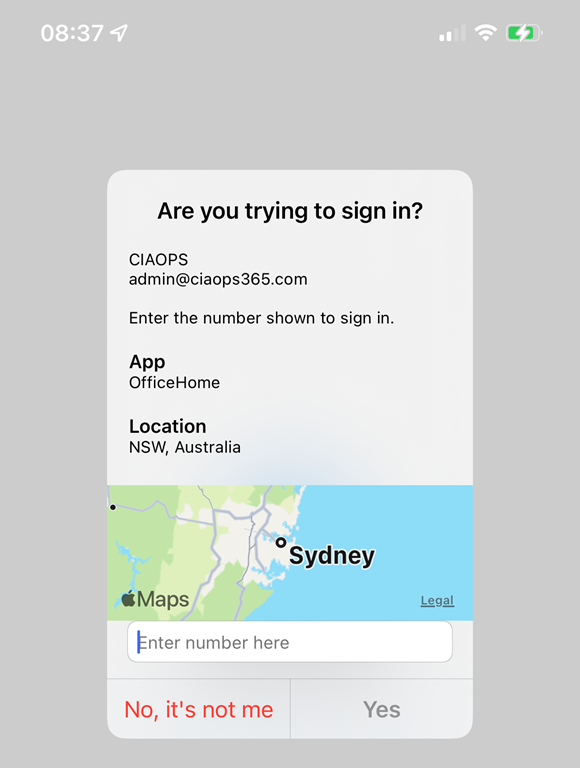
Microsoft has announced some great improvements to the Microsoft Authenticator passwordless process.

IMG_1151

One of these, as you can see above, I have already enabled on my tenant. It allows you to do number matching AND provides you the location from where you are logging in via a map.

To enable this in your tenant visit the link:

Enable additional context in the portal

This is a great enhancement for MFA with Microsoft 365. Simple and easy to use. Great work Microsoft. You can read about the other exciting announcements here:

Several Microsoft Authenticator security features are now available!

Need to Know podcast–Episode 278

In this episode I round up the major updates from Microsoft Ignite November 2021 as well as having a chat with Phil Meyer, Partner Technology Strategist – Hosting and Cloud from Microsoft about things like the new Microsoft commerce platform. Plenty of great information in this episode, so listen in and share around.

Take a listen and let us know what you think – feedback@needtoknow.cloud

You can listen directly to this episode at:

https://ciaops.podbean.com/e/episode-278-phil-meyer/

Subscribe via iTunes at:

https://itunes.apple.com/au/podcast/ciaops-need-to-know-podcasts/id406891445?mt=2

The podcast is also available on Stitcher at:

http://www.stitcher.com/podcast/ciaops/need-to-know-podcast?refid=stpr

Don’t forget to give the show a rating as well as send us any feedback or suggestions you may have for the show.

This episode was recorded using Microsoft Teams and produced with Camtasia 2020.

Brought to you by www.ciaopspatron.com

Resources

Phil Meyer – Linkedin, philme@microsoft.com

Ignite November 2021 book of news

Introducing Microsoft Defender for Business

Windows 365 Business will offer Windows 11 and admin capabilities

Change your SharePoint domain name (preview)

Rich, secure content and collaboration for hybrid work – Ignite 2021 announcements

New Power Platform capabilities announced at Microsoft Ignite

Introducing Microsoft Loop

Q&A in Teams is in Public Preview

Microsoft Ignite Fall 2021: Innovations coming to Microsoft Teams

Power Platform Community November webinar–Sessions

As mentioned here:

Power Platform Community November webinar

We had some issues with the screen recordings. The presenters graciously agree to re-record each of their sessions and they are now available for viewing here:

Patron Power Platform Community November 2021 Webinar – Session 1 – YouTube

Patron Power Platform Community November 2021 Webinar – Session 2 – YouTube

Patron Power Platform Community November 2021 Webinar – Session 3 – YouTube