Power Platform Community Monthly Webinar – September 2021

image

Join us for our first Power Platform Community webinar. The idea behind these is to share the latest news and event about the Microsoft Power Platform as well as share some of the things that we have learned recently in the hope that it can help others.

There’ll be 3 major presenters:

Andrew Gallagher

Bill Mallet

Yeoman Yu

who’ll share their knowledge, answer any questions you may have and then provide a tutorial into using Microsoft Forms as a trigger for Power Automate.

Come and join us by registering here:

https://bit.ly/ppc0921

If you wish to join our community and be part of the regular discussion and participation on the Microsoft Power Platform you can join via:

CIAOPS Patron

(look for the Power Platform option here to join us).

We look forward to seeing you on the webinar.

Secwerks–The bug

Registrations still open:

CIAOPS Secwerks

A virtual 16 hour level 400+ event focused on teaching the security best practices for Microsoft 365.

This remote classroom style learning event will be conducted over four half day sessions and cover topics such as Email security, Device configurations, Windows 10 Security features and more.

If you manage an Office 365 or Microsoft 365 environment, this event is for you.

Announcing the CIAOPS Patron Power Platform community

pexels-led-supermarket-577514

I am pleased to announce the new CIAOPS Patron Power Platform Community (3PC). The growing need for applications in modern businesses and the increasing functionality provided by the Microsoft Power Platform has created a need for skilled professionals. It is the aim of the CIAOPS Patron Power Platform Community to provide somewhere that people interested in solving business challenges with the Microsoft Power Platform can come together, share learn and grown their knowledge.

One of the things that makes the CIAOPS Patron Power Platform Community unique will be it’s focus on providing solution for small businesses. There are lots of resources available for larger businesses but we wanted to bring a similar set of resources plus more for smaller businesses. This community is also not solely focused on technology, it is designed as place to solve business challenges with technology, specially, with the Microsoft Power Platform. This means you don’t need to be a developer, and IT administrator or even have any experience with the Microsoft Power Platform to join. You just need to want to learn more about the Microsoft Power Platform and how it can be harnesses inside a business to improve productivity.

Another major difference with the CIAOPS Patron Power Platform Community is the desire to ensure that is an active community. This means that there is an expectation that to invest at least one hour a week in the community forums, attending events and contributing to group projects. We also encourage all member to obtain at least one Microsoft Power Platform certification (the PL-900 certification being the recommended starting point) within 6 months of joining. the community is full of all the resources you’ll need to pass these exams and there are members who are more than willing to help mentor you through your certification journey.

We want the CIAOPS Patron Power Platform Community to be a place where people can contribute to group projects that aim to build solutions such as the

Power Automate Drink Ordering System

Projects like these are the best way to learn about the Microsoft Power Platform as well as learn from those more experienced. We also love it when people bring a project they wish to develop with the help of the community. The more projects we work on the more we all learn.

We have big plans for the CIAOPS Patron Power Platform Community and we are just getting started. As such are offering a never to be repeated foundation membership of A$15 per month to be part of what we think will become much bigger in the not to distant future. Now is therefore the time to jump on board at this specially discounted rate and enjoy the benefits of membership for life! You’ll find the links to sign up here:

https://www.ciaopspatron.com/

scroll down the page until you see the Power Platform option.

We are super excited to launch this community publicly and we hope that you can join us on this journey with the Microsoft Power Platform.

Creating a file location with unique permissions in Microsoft Teams

I wrote and article about:

Creating unique file permissions with Microsoft Teams

but I thought I’d also do a video:

https://www.youtube.com/watch?v=13BifpwKTt4

as I do get this question a lot about having a different set of file permissions for users inside a Microsoft Team. Best practice is NOT to alter any of the existing permissions that are provisioned by channel creation. Instead, create a separate area, with the permissions you want, and then link that back into your team.

That provides a lot more flexibility and doesn’t ‘break’ any of the standard settings.

Getting Message Center information into Teams

Recently, I wrote the following article:

Syncing M365 Message Center to Microsoft Planner

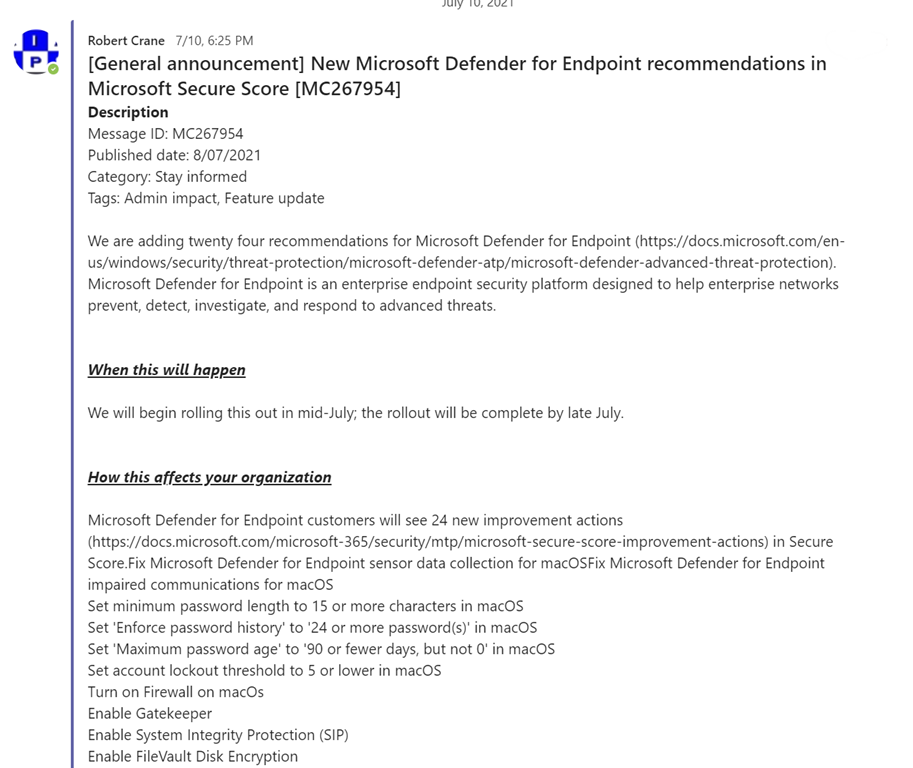
which took you through the process of getting Message Center information into Microsoft Planner. as good as that it is, the best place for that information should really be in Teams. The reason? With Teams people can ‘chat’ about the topics which adds far more value for an organisation in my opinion.

The good news is that it is very easy to not only sync messages with Microsoft Planner but also have them displayed in Microsoft Teams. It is all accomplished using Power Automate.
image

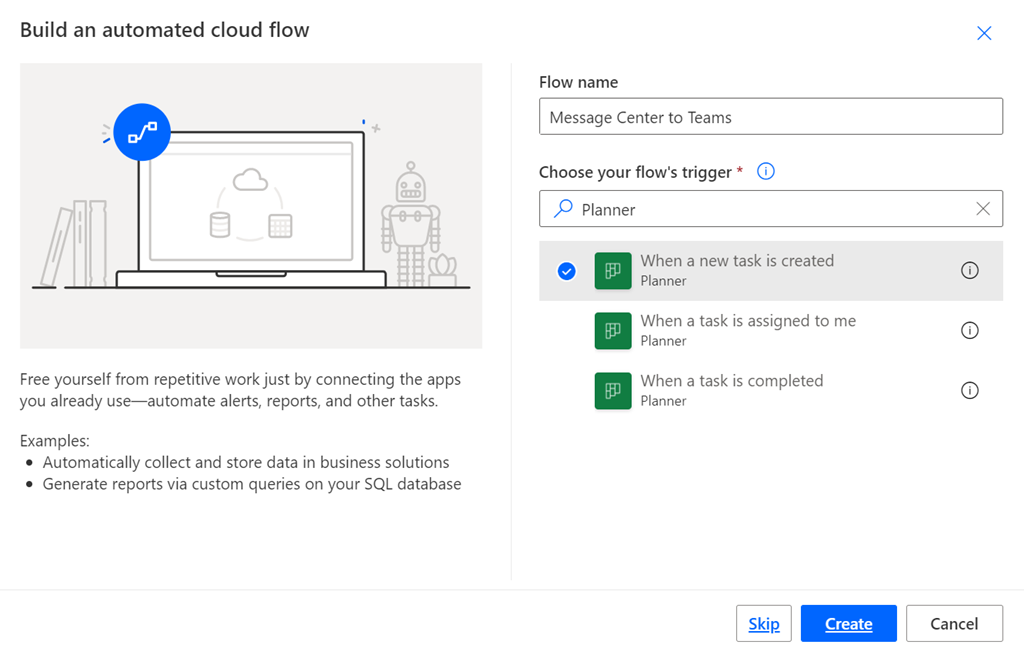
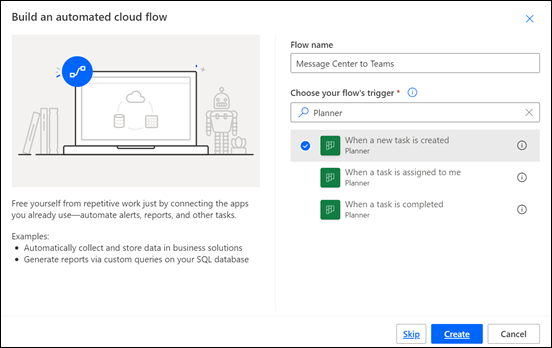
Create a new Flow and use the When a new task is created trigger as shown above. You’ll then need to configure this trigger action to point to the same Microsoft Plan into which you have already set up to sync with the Microsoft Message Center.
image

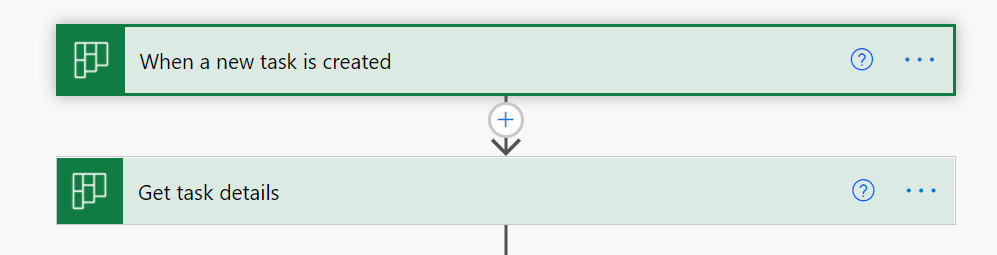
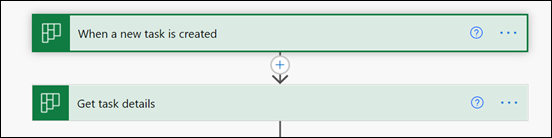
The next action should Get task details as shown above. You’ll need this to actually read the notes from each task, which contains the details of each item from the Message Center.
image

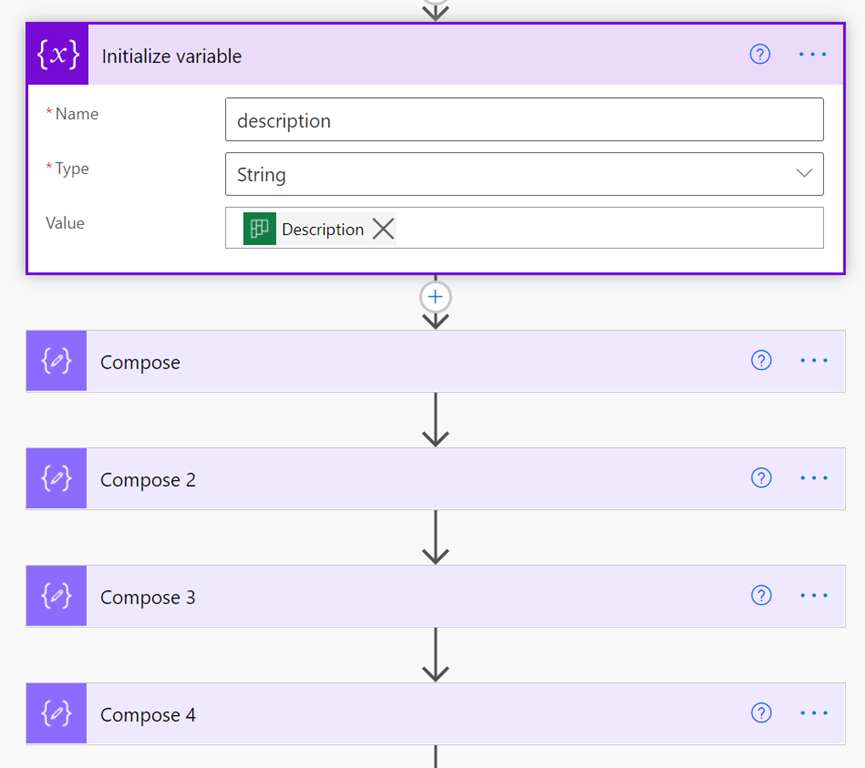
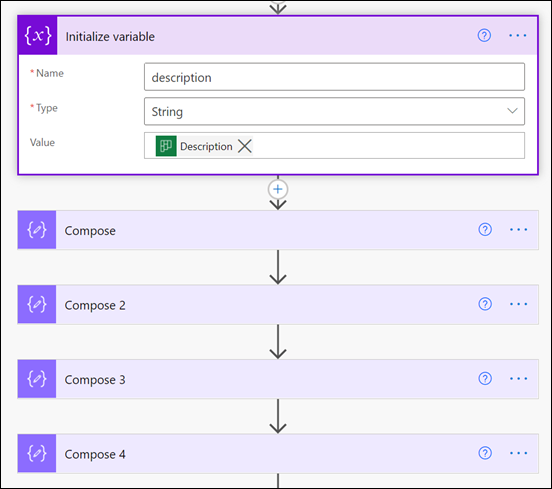
In my case, I save the Description field from the task into a string variable using the Initialize variable action as shown. I then use a number of separate Compose actions to search and replace text inside that variable to tidy up and format the Description field for posting into a Teams chat.

For example I remove the /r/n characters and replace them with the HTML line feed tag </br> using the following expression:

replace(variables(‘description’),decodeUriComponent(‘%0D%0A’),'</br>’)
image

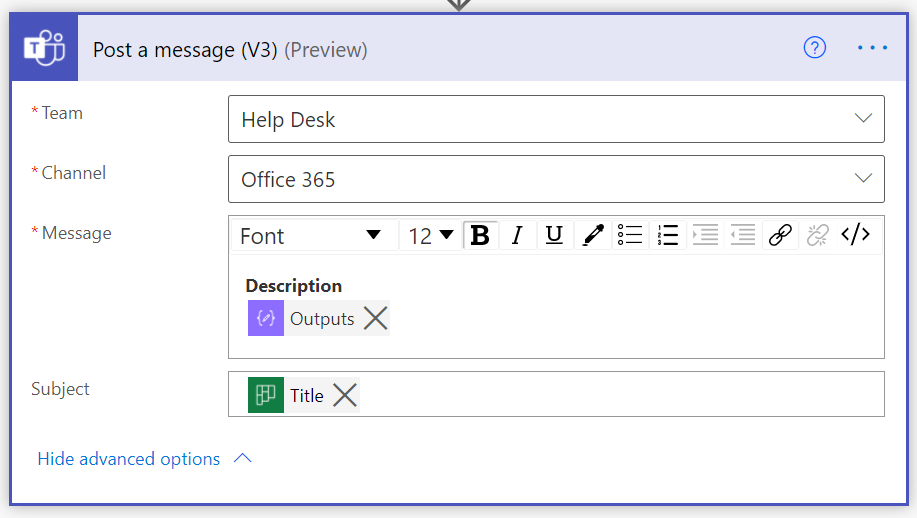
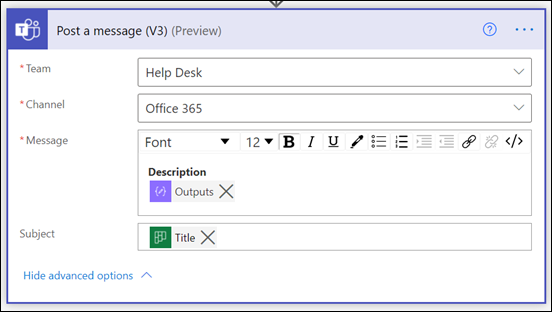
Once I have the Description field formatted the way I want it then I use the Post a message (V3) action as seen above. The Title of the new task from Planner is the subject of the thread and the body is my now nicely formatted Description field, which is the data from the Message Center item.
SNAGHTML210e1093

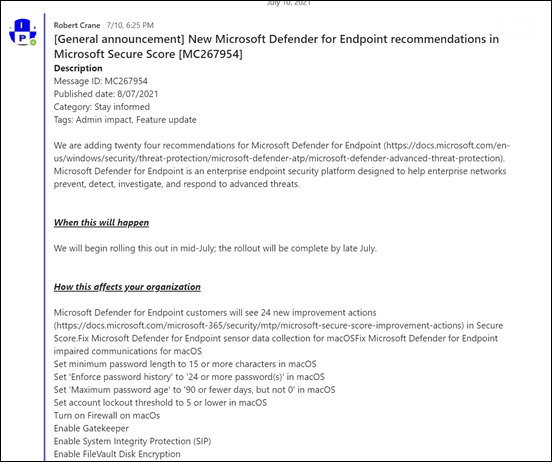
You can see the result in a channel in Microsoft Teams above. Now others can easily add their reactions, comments and generally collaborate far easier than within Microsoft Planner.

I think having the Message center information delivered to Microsoft Teams make a lot of sense since it is a place more people will be spending more of their time generally. However, getting the Message Center information into Microsoft Teams still requires the sync configuration to a Plan first. However, once that is done, Power Automate allows you to achieve just about anything!


10 years an MVP

MVP_Logo_Horizontal_Preferred_Cyan300_RGB_300ppi

image

I am happy to report that I have been renewed as an MVP for 2021-22. That now makes me a 10 year veteran of the program. I am very proud of that achievement in an ever changing technology environment.

As always, thanks to Microsoft for the recognition, for the last, and every other year. I am proud and honoured to be part of the MVP community and the amazing people there. The MVP community, as always, is an inspiring place to be and a group of individuals who love sharing, learning and helping others. Their influence and interactions continue to help me improve both professionally and personally.

I need to also thank everyone who takes the time to do things like read and comment on my blog, watch my YouTube channel, use my Github repo, attend events where I speak and more. Thanks everyone, I really do appreciate it. It is always good to understand the impact you are having out there.

Going forward, it seems we are in for more uncertain times, and we all know technology will continue to rapidly evolve. The best mindset to use is to look at both of these as a challenge not a burden. I appreciate that maybe difficult but you’d be amazed at what an open minded approach can achieve. Change what you can and be at peace with what you can’t, is a good recipe to strive for.

Once again, thanks to Microsoft for this award. I will continue to work hard to live up to the expectations of program going forward and thanks to everyone else out there who has been part of this journey with me.

Need to Know podcast–Episode 268

In this episode I speak with Ian Mikutel from Microsoft who is Head of Product for Microsoft Whiteboard for Teams & Surface. Ian shares some exciting news about the recently released updates for Microsoft Whiteboard as well as what is coming down the pipeline. I love Microsoft Whiteboard and use it regularly and I’d encourage you to also look at the enhancements it now provides, especially inside Microsoft Teams. of course, there are plenty of updates from the Microsoft Cloud that I’ll share with you. so listen along and let me know what you think.

This episode was recorded using Microsoft Teams and produced with Camtasia 2020.

Brought to you by www.ciaopspatron.com

Take a listen and let us know what you think – feedback@needtoknow.cloud

You can listen directly to this episode at:

https://ciaops.podbean.com/e/episode-268-ian-mikutel/

Subscribe via iTunes at:

https://itunes.apple.com/au/podcast/ciaops-need-to-know-podcasts/id406891445?mt=2

The podcast is also available on Stitcher at:

http://www.stitcher.com/podcast/ciaops/need-to-know-podcast?refid=stpr

Don’t forget to give the show a rating as well as send us any feedback or suggestions you may have for the show.

Resources

Ian Mikutel – Twitter, Linkedin

Microsoft Whiteboard

Meet the new Microsoft Whiteboard designed for Hybrid Work

Microsoft Whiteboard roadmap

CIAOPS Secwerks event

Explore Microsoft 365 extensibility opportunities with the Microsoft 365 Extensibility look book

Bringing Visio to Microsoft 365: Diagramming for everyone

A new, more powerful, and customizable Microsoft Bookings is here

Windows 11 leak reveals new UI, Start menu, and more

Announcing new Microsoft Defender for Endpoint capabilities on Android and iOS

Monitoring Microsoft Security Posture in Azure Sentinel

Behind the scenes of business email compromise: Using cross-domain threat data to disrupt a large BEC campaign

Microsoft acquires ReFirm Labs to enhance IoT security

Say it with Microsoft Dictate

Announcing a more intuitive sharing experience across Microsoft 365 for better collaboration