Keeping tabs on Azure costs via email

A common concern that holds many back from using all the resources available in Azure is consumption billing aka being billed for what you use rather than a flat fee as you get with Microsoft 365 services.

Here’s a way to keep an eye on those costs daily via email.

Firstly, login to the Azure portal as an administrator and then navigate to Cost Management + Billing. Next, you want to set up the report that you want to see daily.

Screenshot 2025-01-19 094010

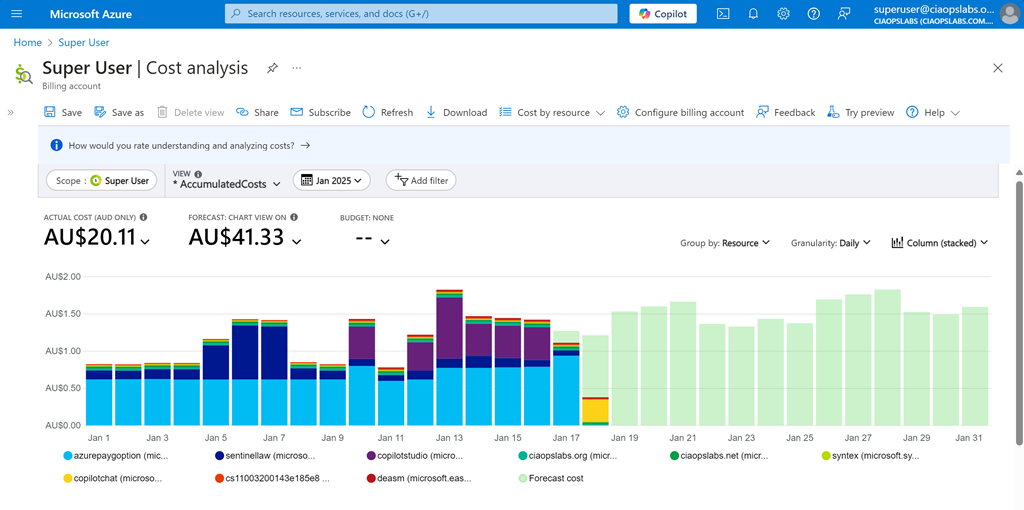
For me I want to see Cost Analysis for the current monthly with accumulated costs, grouped by resource, granularity daily and as a stacked column as shown above. When you have it the way you want select the Save option on the menu at the top of the page.

Screenshot 2025-01-19 095243

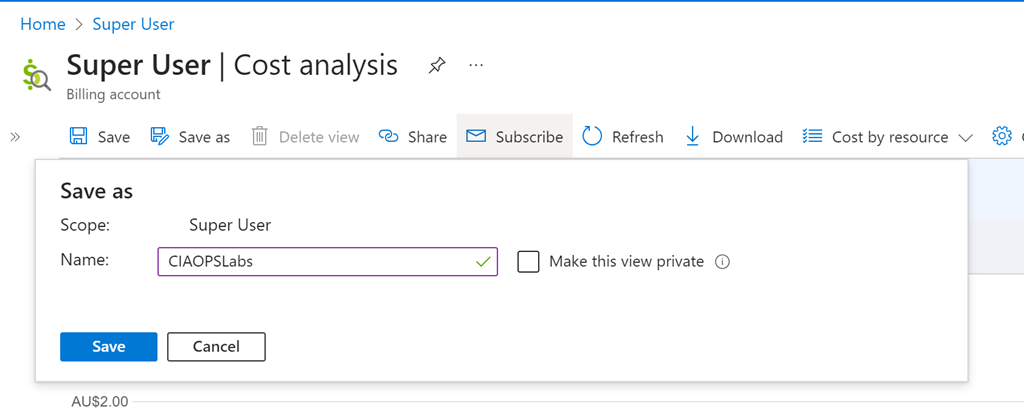
You’ll be asked for a name, as you see above. Select Save when complete. 

Screenshot 2025-01-19 095532

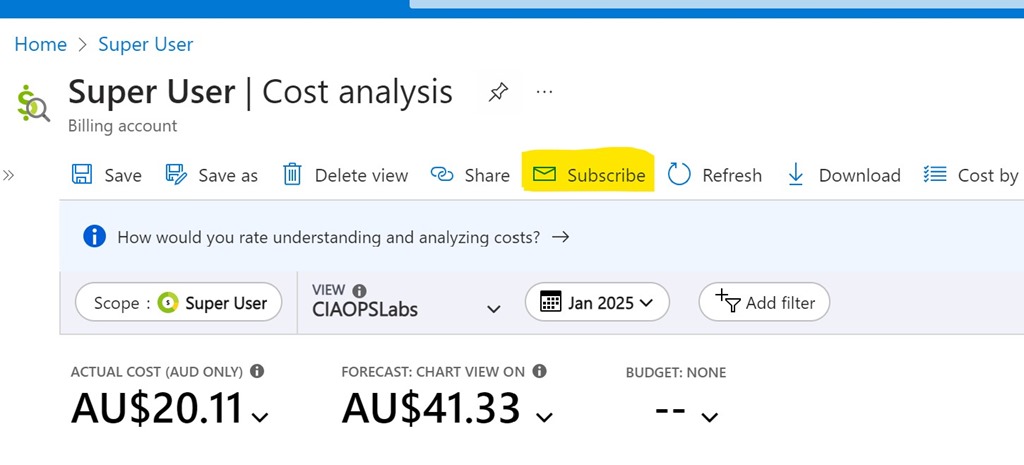
Also on the menu at the top, now select Subscribe as shown above.

Screenshot 2025-01-19 095742

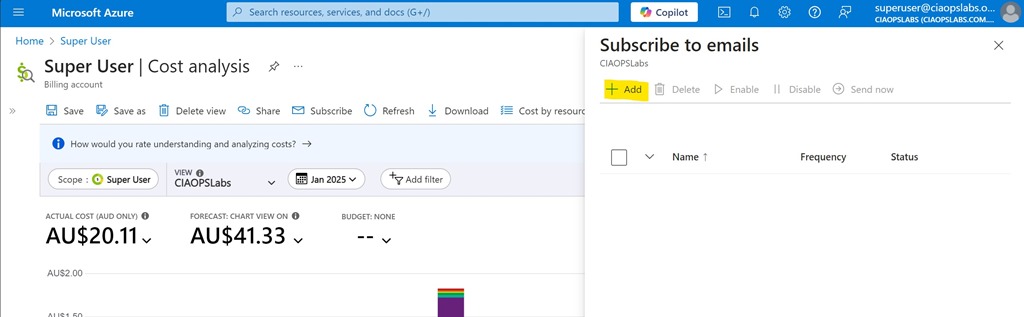
Select the Add option from the Subscribe to emails option that appears on the right as shown above.

Screenshot 2025-01-19 100019

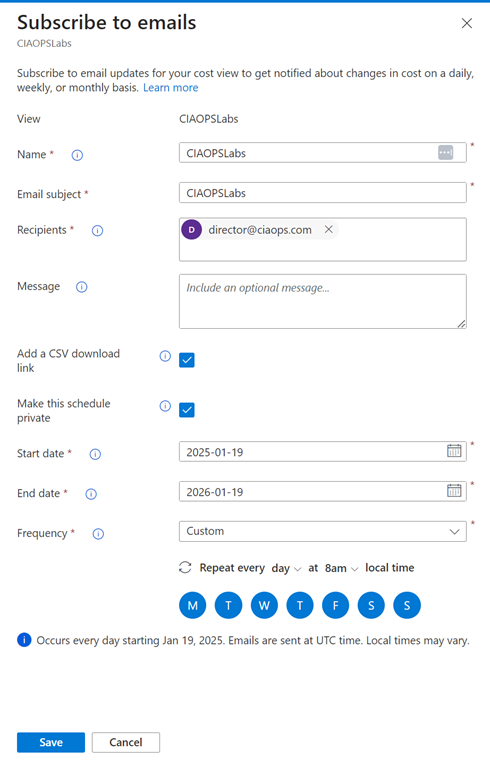
You should see the View you just saved at the top. Now complete the rest of the fields as desired. Personally, I select the option to include a CSV and want the report every day. The only challenge is that you can only specify a maximum end date 12 months out from the day you configure this. You’ll need to return annually to update this.

Screenshot 2025-01-19 100354

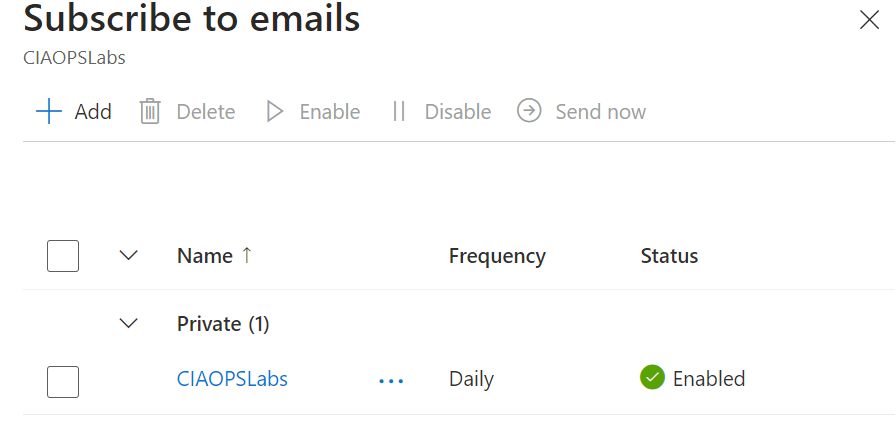
Select Save at the bottom of screen and you should now see your configuration listed as shown above.

Screenshot 2025-01-19 100809

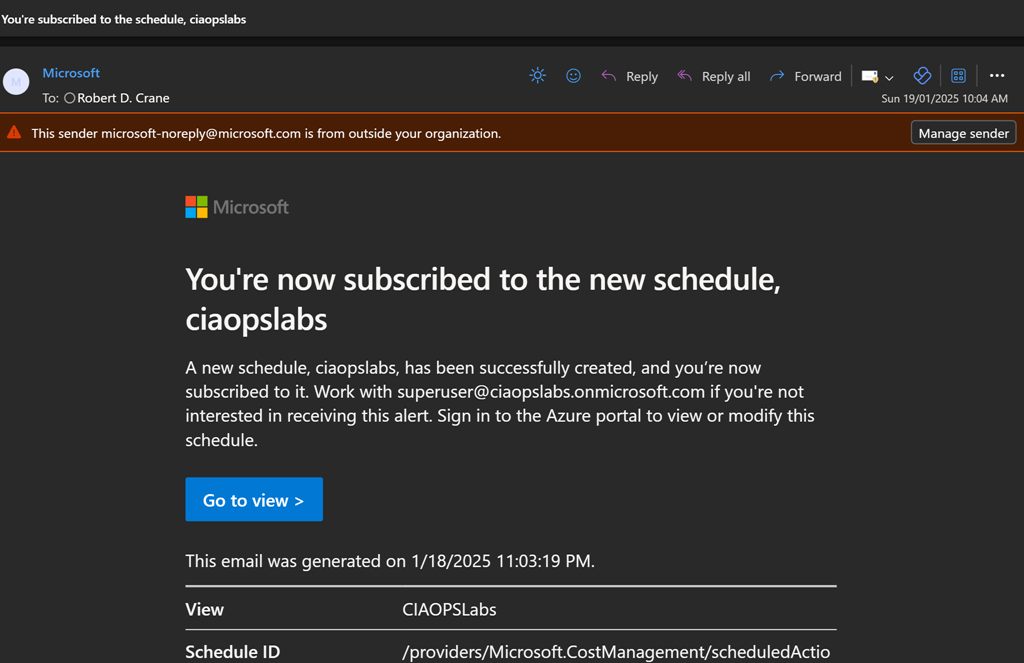
You’ll get a summary email confirming these settings as shown above.

Screenshot 2025-01-19 100531

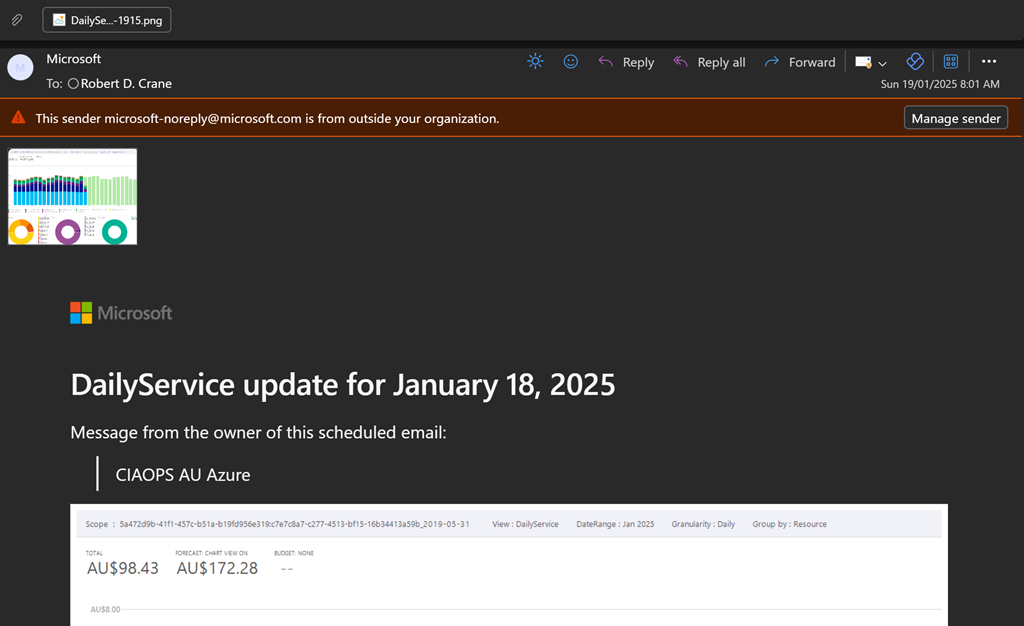
You should now start receiving a summary email on at the frequency your selected as shown above. You’ll see a screen shot of the report and a CSV attachment if you elected to include that.

Hopefully, this option provides greater piece of mind when it comes to monitoring costs with Azure. Remember, you can create as many subscription reports as you want to see a range of different details if desired.

Why can’t I delete a Power Platform PAYG billing plan?

*** Update 5 Feb 2025: Delete billing plan is now available. Developers were working on the back end causing the issue.

Screenshot 2025-01-17 154952

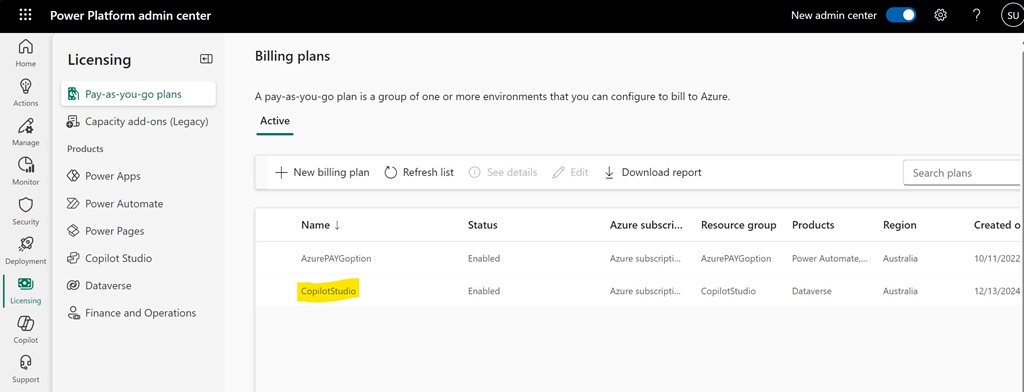
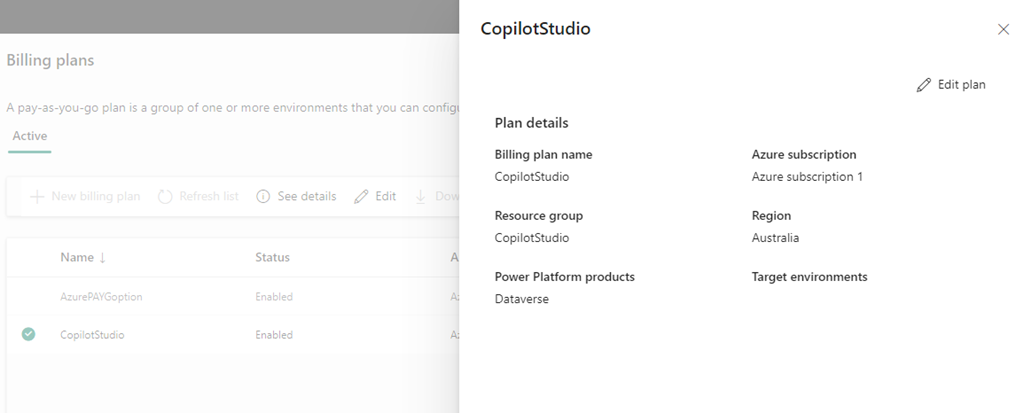
I want to delete the Power Platform PAYG Billing plan called CopilotStudio as seen above.

Screenshot 2025-01-17 155309

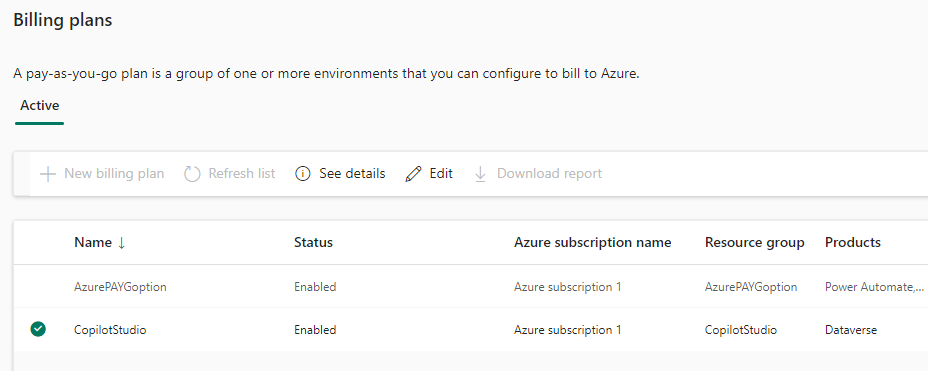
If I select the pla, as shown above, the the options See details and Edit are available only.

Screenshot 2025-01-17 155502

If I Select See details the above information is shown but with no delete option.

Screenshot 2025-01-17 155808

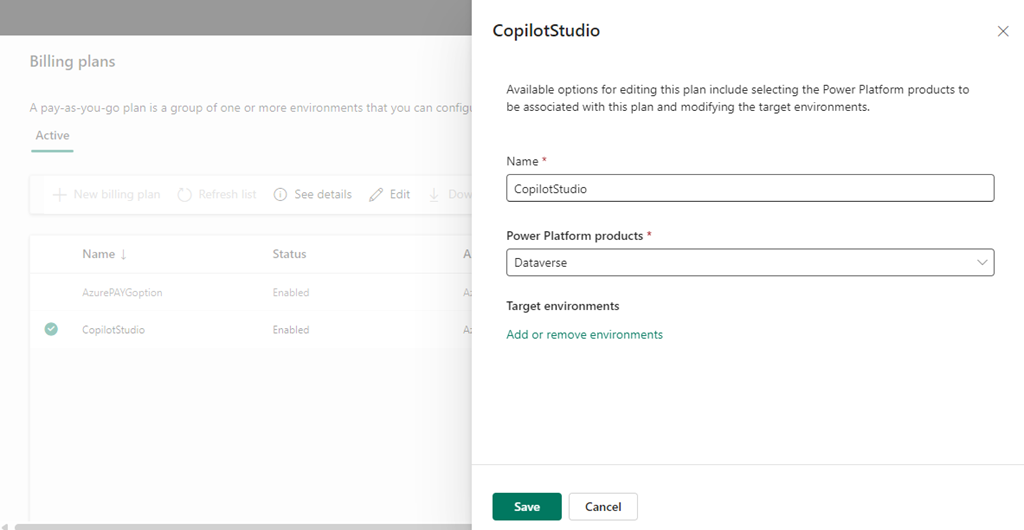
Selecting Edit plan displays the above, again with no Delete option.

The billing plan has no environments inside it.

Originally, the PAYG Billing plan was tied to an Azure Resource Group that has also now been removed. Yet, the billing plan remains?

Where is the delete option? Anyone know?

Distributed Password cracking attempts detected by Sentinel

image

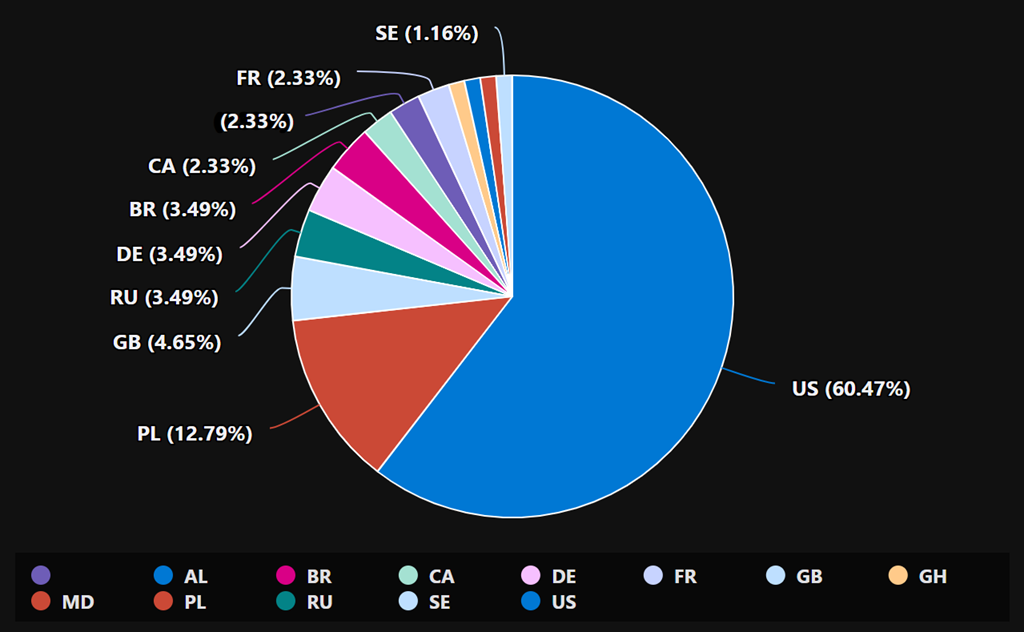
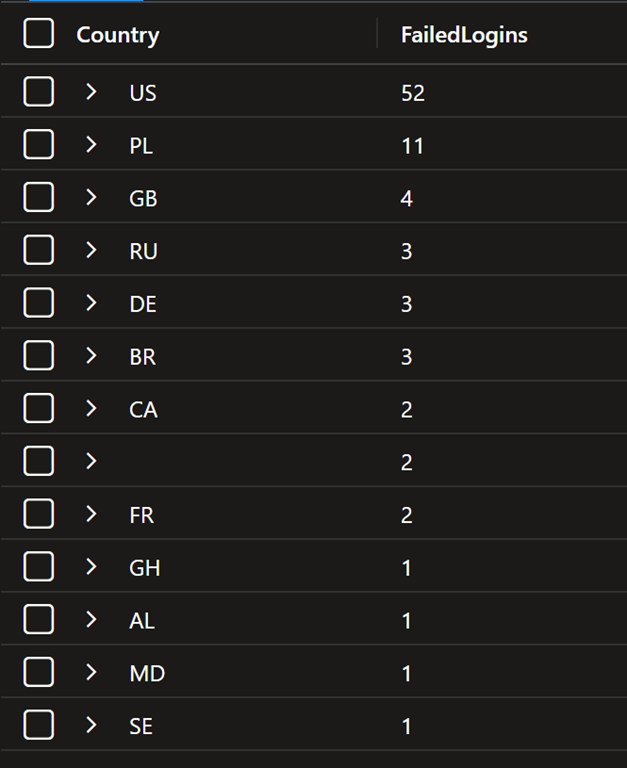
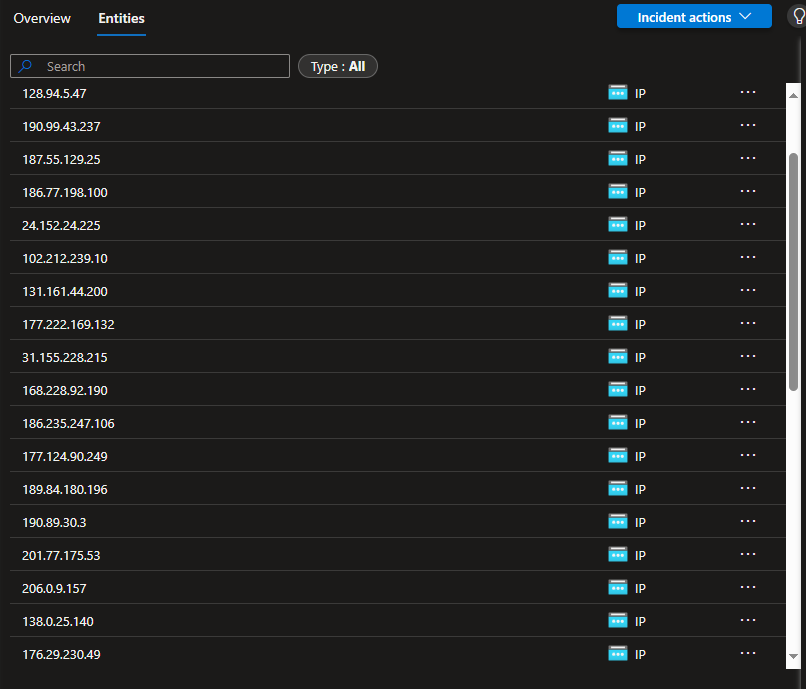
Over the past couple of days I’ve inundated with failed logins from locations all around the world. You can see a partial list of the those IPs reported in Sentinel above.

image

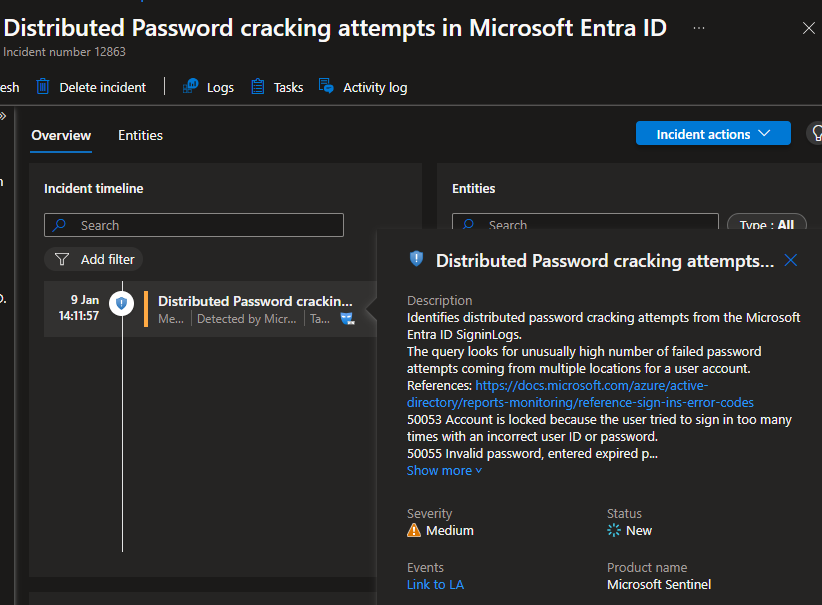
But, for the first time I also found this alert had triggered an incident in Sentinel – Distributed Password cracking attempts in Microsoft Entra ID, as seen above.

Here is the list and locations so far:

IP Address Origin (Country) Potential Organization (if identifiable)
31.141.37.30 Russia Provider: Rostelecom
38.222.57.97 United States Comcast Cable Communications
190.99.43.237 Argentina Telecom Argentina
187.55.129.25 Brazil Vivo (Telefônica Brasil)
186.77.198.100 Brazil Oi S.A.
24.152.24.225 United States Cox Communications
102.212.239.10 Uganda Uganda Telecom
131.161.44.200 United States Microsoft Corporation
177.222.169.132 Brazil TIM Brasil
31.155.228.215 Romania UPC Romania
168.228.92.190 Brazil NET Virtua
186.235.247.106 Brazil Oi S.A.
177.124.90.249 Brazil Vivo (Telefônica Brasil)
189.84.180.196 Brazil Oi S.A.
190.89.30.3 Brazil Vivo (Telefônica Brasil)
201.77.175.53 Brazil Oi S.A.
206.0.9.157 United States Comcast Cable Communications
138.0.25.140 Brazil Oi S.A.
176.29.230.49 Ukraine Ukrtelecom
191.99.34.144 Brazil Claro Brasil
87.116.135.139 France Orange S.A.
170.82.15.6 Brazil Claro Brasil
84.54.71.37 Spain Telefónica
170.231.164.96 Brazil Oi S.A.
45.231.208.166 Mexico Megacable
190.14.176.31 Colombia ETB (Empresa de Telecomunicaciones de Bogotá)
85.106.118.20 Italy TIM (Telecom Italia)
191.189.9.96 Brazil Claro Brasil
152.249.19.25 Argentina Telecom Argentina
189.34.199.125 Brazil Vivo (Telefônica Brasil)
41.225.129.174 Nigeria MTN Nigeria
85.96.249.52 Italy Vodafone Italia
197.26.214.34 South Africa MTN South Africa
187.183.41.6 Brazil Claro Brasil
177.126.234.232 Brazil Vivo (Telefônica Brasil)
149.86.137.85 United States AT&T

Always nice to have Sentinel on the job letting me know what’s going on!

Entra Global Secure Access client for iOS now in preview

In it’s simplest form, think of Entra Global Secure Access as a full time secure VPN to resources like Microsoft 365 services such as SharePoint, Exchange, Teams, etc as well as to on premises resources and finally to Internet web sites.

Entra Global Secure Access does this on iOS via a Microsoft Defender app on the device and configuration via Intune. You can now try this out by following:

Global Secure Access client for iOS (preview)

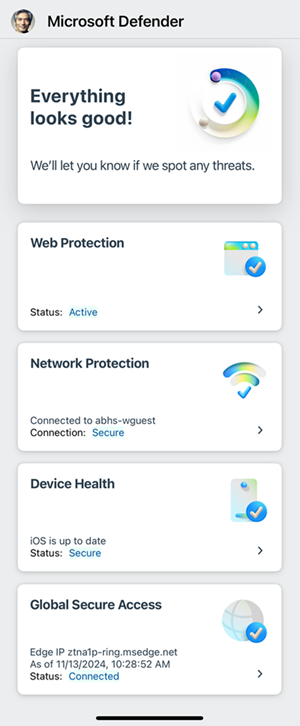
The Entra Global Secure Access service requires a paid subscription as well as Entra ID P1 or P2 (i.e. it is Microsoft 365 Business Premium compatible). When you have enabled the client you will see in Defender:

Screenshot of the iOS Microsoft Defender dashboard.

Unfortunately, the preview as yet doesn’t support the Internet traffic forwarding, which other clients do. Hopefully, that is not far away as that will really make this a killer product in my books.

I have been using Entra Global Secure access on all my Windows and Android devices for quite a while now without issues and look forward to seeing the iOS client fully mature.

Script to create EntraID reset app

After a recent incident, I decided that it would be a good idea to have an EntraID app that I could use to re-enable a users inside a tenant if I needed. I have previously detailed how to do this manually:

Create an EntraID app to allow user enablement

I’ve now created a script you can use to accomplish this which you will find here:

https://github.com/directorcia/Office365/blob/master/eid-resetapp-set.ps1

Let me walk your through its operation:

You’ll need to ensure the Microsoft Graph PowerShell module is installed in your environment.

The new EntraID app will be called ‘Reset’ by default but you can change that by changing the variable $appname in the script.

The first thing the script will do is connect to the Microsoft Graph using the appropriate scopes or permissions. Typically you will need to login to your tenant with an administrator account because an new EntraID app needs to be created.

Next, the script will use the new-mgapplication command to create a new EntraID app in your environment. It will then use the add-mgapplicationpassword command to set a password for that app.

image

The script will now display all the important details about the EntraID app just created on the screen which you need to record for later use. Again, write this stuff down!

The script will now build the appropriate API permissions required for the EntraID app which are:

– User.EnableDisableAccount.All

– User.ReadWrite.All

– Directory.ReadWrite.All

These are required by the update-mguser command detailed here:

https://learn.microsoft.com/en-us/powershell/module/microsoft.graph.users/update-mguser?view=graph-powershell-1.0#description

The script now uses the command update-mgapplication to add these API permissions to the new EntraID app.

image

It then builds a consent URL and copies that to the clipboard. This consent URL you will need to past into a browser and click Accept. The consent URL is also displayed on the screen so you can copy and paste from there if needed.

I have not been able to get this consent function working inside my script. I aim to keep working on that but for now you’ll need to use the browser to consent to the permissions. If anyone know how to do this please let me know as I can’t get it to work.

image

If you look inside your EntraID application you should now see one called ‘Reset’ with the appropriate API permissions consented to as shown above.

The completed script output should look like:

image

You should now be able to follow these instructions:

Using PowerShell to allow user enablement

to gain access if needed to enable a user, but don;t forget to save the credentials that this script produces for later use.

Need to Know podcast–Episode 324

Along with all the news and updates from the Microsoft Cloud I muse on the fact that the new Microsoft 365 Backup service may have been partially created to solve the storage issues of deleted data in Microsoft 365 environments. Just a theory, but listen along if you like to hear my thoughts.

You can listen directly to this episode at:

https://ciaops.podbean.com/e/episode-325-a-change-in-the-wind/

Subscribe via iTunes at:

https://itunes.apple.com/au/podcast/ciaops-need-to-know-podcasts/id406891445?mt=2

Don’t forget to give the show a rating as well as send me any feedback or suggestions you may have for the show.

Brought to you by www.ciaopspatron.com

Resources

@directorcia

Join my shared channel

CIAOPS merch store

Become a CIAOPS Patron

CIAOPS Blog

CIAOPS Brief

CIAOPSLabs

Support CIAOPS

Microsoft 365 Insider Round Up

Microsoft Defender XDR – Monthly news – August 2024

Windows 365 at three years: Customer-centric solutions for security, management and productivity

New Windows 365 features help provide a more secure workspace

Windows 365 GPU-enabled Cloud PCs now generally available

Supercharge Your Business: Simplify communications with AI in Microsoft Teams and Teams Phone

Microsoft Announces General Availability of Microsoft 365 Backup and Microsoft 365 Backup Storage

SharePoint roadmap pitstop: July 2024

What’s new in Copilot | July 2024

What’s New in Microsoft Teams | July 2024

Looking back on FY24: from Copilots empowering human achievement to leading AI Transformation

Best practices AI and machine learning Microsoft Purview 3 min read New Microsoft whitepaper shares how to prepare your data for secure AI adoption

Use WinGet 1.8 to download Microsoft Store apps

Monitoring Microsoft Sentinel Reports with Dashboard Hub & Power BI

Announcing quarantine release integration in MDO hunting experience!!

Windows Security best practices for integrating and managing security tools

Microsoft Purview Data Governance will be generally available September 1, 2024

Migrate ADAL apps to MSAL with enhanced insights

Public Preview: New Azure Monitor Auxiliary Logs Plan

Onyx Sleet uses array of malware to gather intelligence for North Korea

Zero Trust in the Age of AI: Join our online event to learn how to strengthen your security posture

Try out the new Copilot in Planner (preview) today in the new Microsoft Planner in Teams

OneDrive in-depth: Learning content

The Microsoft Copilot Dashboard is now included with Copilot for Microsoft 365

Prompts to try in Copilot for Microsoft 365