The impact of AI on the MSP business model

image

Today, I liken the impact of AI for MSPs to the scene inside the garbage crusher in the original Star Wars movie. On one side is the impact AI is having on the existing MSP model around configurations and maintenance and on the other is the challenge of how to provide new AI services to customers.

The starting point is to examine the current MSP business model which is largely based on a reactive approach, that is, get paid for fixing issues after they occur. The managed service that most MSP’s sell is a kind of insurance policy. This means the client agrees to pay a regularly fee per month and for that the MSP will ensure they are available to resolve issues that occur during that time period at no additional cost to the customer. The incentive then for the MSP is to thus reduce the chances of problems occurring by configuring systems to be as reliable as possible. However, no matter how much this is done things will still go wrong and require a reactive approach to resolution.

Enter AI. It is clear that AI is become more and more integrated into services sold to the customer. One simple example is Microsoft Security Copilot. This service can look across all the security signals in an environment and assist with investigations and incident response. We are beginning to see Microsoft Security Copilot being extended from a stand alone chat style interface to direct integration with Intune. This means that it can report and troubleshoot on policies used throughout Intune. At the moment this integration is largely just reporting but that ability to actually make changes and configure Intune directly cannot be far away. AI will soon be able to do the job of the MSP with Intune I would suggest.

Likewise, Security Copilot is also available in Defender XDR and Entra ID. I’m sure it won’t be long before it appears in places like Exchange Online and SharePoint Online as well as across the whole Microsoft 365 administration portals. In fact, that capability is already in preview (Copilot in Microsoft 365 admin centers). It won’t be long before it is available for every tenant. The Microsoft 365 administration portals used to be the sole purview of the MSP. No longer, AI will take up a lot of the load and probably allow customers to do most of the administration tasks that an MSP does today such as resetting accounts, creating users, assigning licenses, etc.

AI is really good a evaluating data and them coming to a decision about what option is best in a given circumstance. It is in fact probably going to be able to better evaluate the security of a customers environment and determine what settings should be enabled or disabled to provide this. What it will soon be able to do is actually take those recommended actions. In a world where AI is automatically handling the administration of a Microsoft 365 environment, what now is the role of an MSP, given the AI is largely doing what they used to do for a fee?

How will AI mitigate those challenging errors that also occur for users that you can’t plan for you may ask? Take a look at this example from the keynote at the last Microsoft Build conference :

https://youtu.be/8OviTSFqucI?si=j0oI1kbmbRgrvaSe&t=1260

(at time stamp 21:00 if needed)

It shows Copilot playing Minecraft by reacting to what is on the screen directly. Now extend that concept to desktop support where the AI is constantly watching and can interact directly with a user if an error appears. It may also get to the stage where the AI takes care of the error immediately without an interaction from the customer or MSP. AI today has the capability to see and talk based on its environment. As this matures I surely see it challenging the traditional help desk concept, especially for MSPs. Still not convinced? Take a look at this video of ChatGPT 4o interacting with data on the screen:

https://www.youtube.com/live/DQacCB9tDaw?si=j-KvPcNJwypvk1U9&t=1105

( at time stamp 18:34 if needed)

and remember that was back in May 2024! The capabilities have only increased since then (hello Sora)!

Can AI do every maintenance role that an MSP can do for their customers today? Not yet, but I very confident that it will do more and more over time (aka the walls are definitely coming in thanks to AI).

If AI is reducing the maintenance side of the MSP managed service model, where is the opportunity selling AI services to customers? When a customer wants Microsoft 365 Copilot, they simply buy a license and assign it to a user. That’s it! Microsoft 365 Copilot will automatically appear for the user as an icon that will open Copilot Bizchat so they now have an AI agent they can generate answers from. Microsoft 365 Copilot will automatically appear in all their desktop apps as well such as Word, Excel, Teams, and so on without the need for further configuration. Microsoft 365 Copilot will also automatically appear in SharePoint and Onedrive. The list goes on, Forms, Loop, etc, etc all without ANY further configuration.

As for AI training tools, they are already available such as Prompt Coach and are free. There is also the Copilot Prompt Gallery that the user has access to, again for free. There are also services like the Microsoft Copilot Academy available for free and integrated into the Microsoft 365 Copilot subscription. The list of free embedded training material is extensive. This is going to challenge an MSP to provide provide something that is better than what is already available and how will an MSP be able to charge a fee for that when quality embedded training is already available for free?

Once Microsoft 365 Coplot is in place I can’t see how it will need any maintenance. It doesn’t need password resets, it doesn’t need delivery troubleshooting, it doesn’t need to restored, it will just work. It won’t break or required support as other services MSPs supported did. In a world where services don’t require a managed maintenance service, how does the tradition MSP revenue model apply?

It is important to remember that Microsoft 365 Copilot doesn’t have any settings, such as for security. It relies on existing services like Entra ID, SharePoint permissions, DLP policies, Data Labelling and so on. These security settings really should already be in place prior to Microsoft 365 Copilot being enabled and once configured they largely won’t require any form on ongoing maintenance. As I have also suggested previously, I think the AI itself will play a bigger and bigger role in evaluating and acting to ensure Microsoft 365 environments remain constantly secure. Once again, the need to ongoing maintenance is reduced or eliminated which means another hit to the MSP business model.

The direction that most vendors like Microsoft are encouraging MSPs to move to is around building ‘apps’ or ‘agents’ for their customers to solve business challenges. The challenge there for MSPs, as I have called out before, is that fact that the majority are not skilled or experienced in the ‘creator’ model we see today. That model means taking tools such a Copilot Studio to create these ‘agents’. The big change to the MSP business model is thus a shift from reactive to proactive. Unfortunately, I just do not see any evidence of MSPs in general understanding or embracing this as part of their business. Most continue to place their faith in the old reactive business model, which introduces huge risks for their business. The biggest of these is that it allows an ‘AI aware’ provider to solve customer challenges with agents and then potentially scoop up the best of the business from the customer.

These are the reasons why I see most traditional (infrastructure focused) MSPs being stuck in the proverbial Star Wars compactor. Moving to an AI business model is a huge change in approach and it can certainly be done but I am not seeing it being embraced. To me, it harkens back to the early days of the cloud but I feel the AI transformation will have a far greater impact on MSPs of today than the cloud ever did. It is not too late to include a true focus on delivering AI effectively to customers while also using AI to minimise tenant maintenance costs but any effective strategy cannot be grounded in the status quo. You can’t expect to continue to apply the same old MSP business model and expect to be successful. The AI model is different. The AI model is proactive. The AI model is about code.

The walls are closing in from both sides on the traditional MSP business model from what I see and there is precious little time to escape. Much like in the Star Wars movie, the saviours to the compactor conundrum will be the bots (R2-D2 and C3PO in the movie), but not unless you invoke them.
The missed SMB AI opportunity

This is a follow to my article:

Talent versus Skill

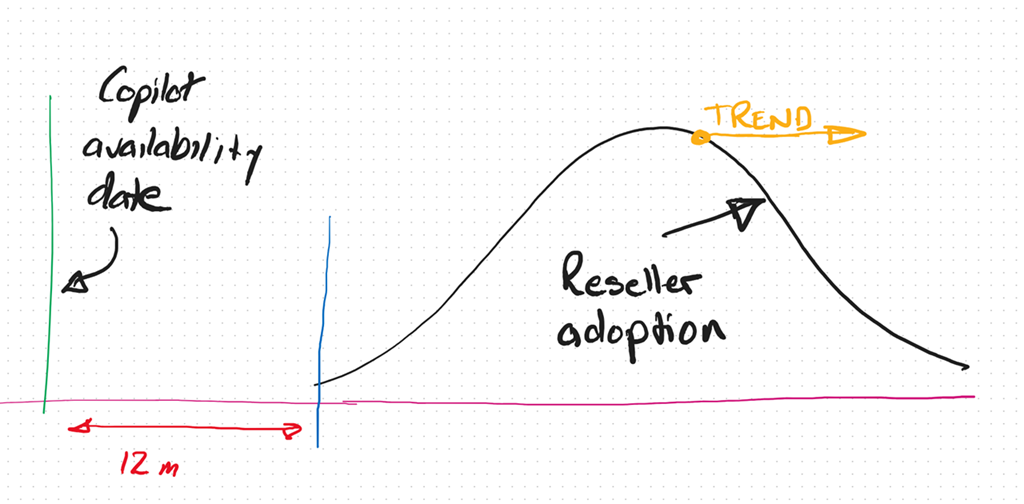
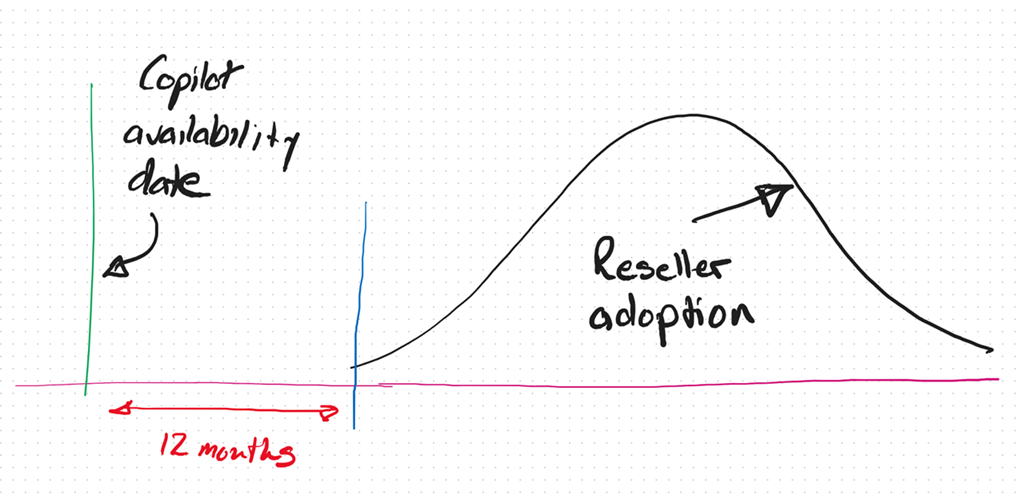
As we now approach the 12 month anniversary of when Microsoft 365 Coplot was available widely in SMB (16 January 2024), I thought I’d reflect on what I see in the market.

image

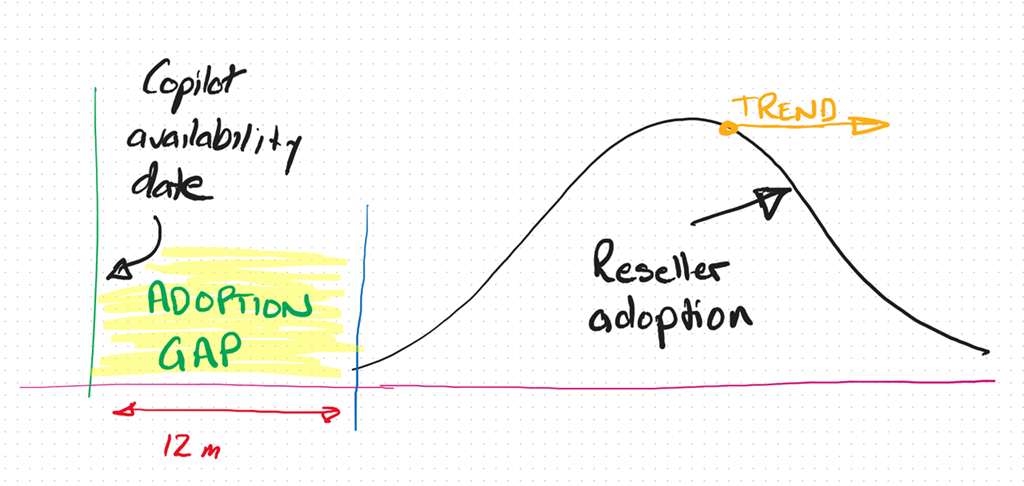
It is my experience that only now, 12 months after the release of Microsoft 365 Copilot, are the most progressive resellers and MSPs orientating themselves to understand and make AI part of their business and what they offer to their customers. This means even the most progressive are already at least 12 months behind.

As I have said previously, I see the reaction to Ai from SMB IT Professionals and MSPs much like what happened with the move to the cloud. In short, that cynicism at best and denial at worst, seems to have again reappeared.

If you simply look at the business opportunity presented by AI it is hard for me to grasp why more IT Professionals and MSPs are not taking advantage of this unique opportunity for their business.

image

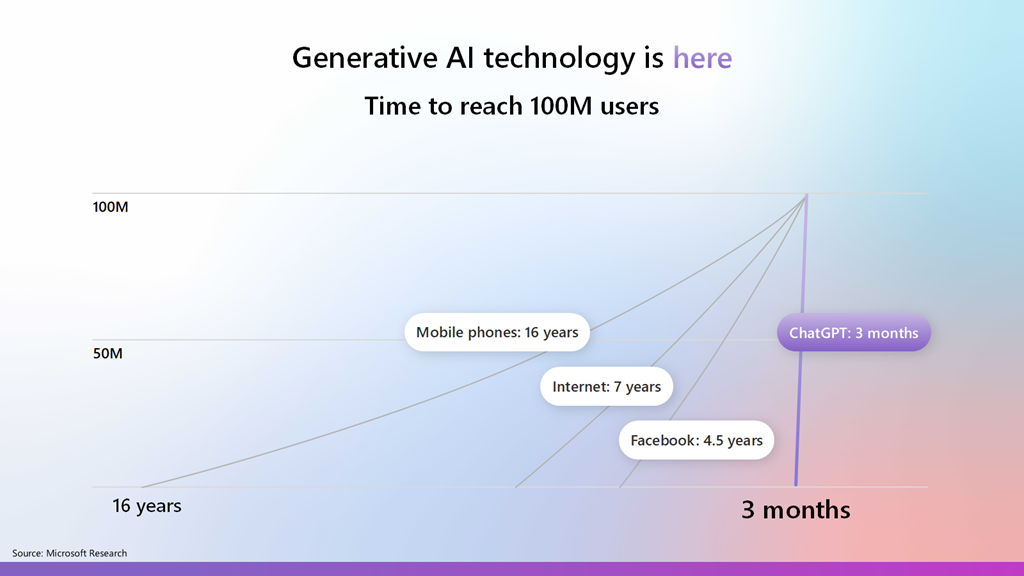
Most commentators agree that AI is one of the fastest adopted technologies in history and is now widely in use by individuals and business, because it part it is so easy to use. This explosive growth and penetration represents business opportunity that many IT Professionals and MSPs are well positioned to take advantage of, yet there seems to a hesitancy like there was moving to the cloud.

image

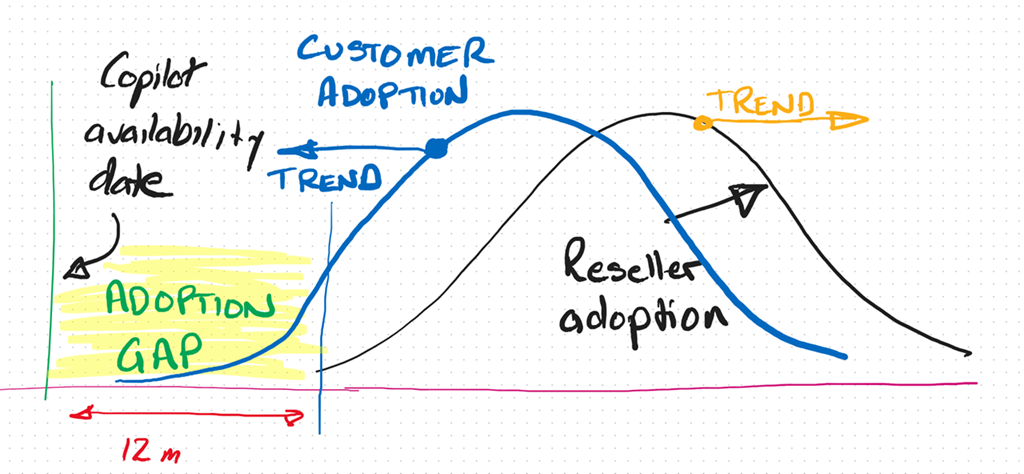
In fact, I see the IT Professional and MSP adoption curve with AI trending more and more away from adoption and integration into their businesses. To be brutally honest, the peak in that Reseller adoption curve, in my books, is at least 3 – 5 years behind already.

image

Thus, the adoption gap continues to increase. So too the opportunity.

image

Alternatively, if you look at the customer trends, you find they are adopting AI much faster and looking to integrate into their business to remain competitive. The net result is that customers and their IT providers are trending in opposite directions when it comes to adopting AI from what I see.

Any new technology requires re-tooling and an investment in knowledge. Both of these don’t magically just appear inside a business or an individual, they require a dedicated approach to integrating these as well as some work. From what I see, customers are prepared to do this work because they see the business benefits but most IT Providers don’t. To me, that represents a huge risk that many incumbent IT providers wil miss out on the opportunity that the AI wave presents. The worst case scenario is that customers will ‘do it themselves’ with any need of an IT Provider.

At its core I believe the mismatch I’m seeing is the result of the incumbent MSP model being ‘reactive’. That is, waiting until something breaks and then fix it. It is like the fire brigade that waits until the bell rings and then goes to put out the fire. I think we are shifting to work where more consideration has to be given to a proactive approach to solving business needs before they arise rather than waiting for them to happen and reacting. To many technology providers AI represents something that will ‘break’ the status quo and that is not something they desire.

A reactive business I would suggest is not appropriate in the age of AI. Why? Because Ai doesn’t break, doesn’t need configuring, doesn’t require on going maintenance, password resets, etc. The age of AI is all about software and creators not mechanics as most IT Providers are. The reality now is that you don’t need to be an ‘expert’ in your field, even when it comes technology. Many people, when augmented with Ai can perform a lot more tasks and topics than they ever could. The agent that I have built with Copilot Studio and publish into Teams to answer technical questions continues to amaze me daily with the quality of answers while reducing my need to do that manually. Why hasn’t every MSP implemented something like that in their business already? The tools are there to get more value from the knowledge in their business, make their lives easier and business more profitable.

Another factor I see is one of demographics. Most small MSPs are run by what you might euphemistically call ‘industry veterans’, meaning they have been doing what they do for a long time. This ‘time in business’ tends towards an inertia and a hesitancy to embrace or enthusiastically embrace change. The pace of technology change is increasing, not decreasing and that requires adaptation to the ever changing environment. This will always be challenging when the trend is to inertia.

A common approach with many SMB IT Providers is their belief that they have to do it all. Whether than belief comes from a desire for revenue or fear of competition, it is not something that is really possible in today’s diverse environment. Like ever other business, an IT provider runs a BUSINESS and the primary goal of any business is to make a profit to provide the freedom to grow, enjoy, help others, etc. Any business needs to make business decisions about what they do to generate revenue in their business. Sometimes, these business decisions are not easy. Generally, these decisions will also involve some form of risk. But, they need to be made for the business to succeed.

The simplest metric for making these decisions is profit. Will this decision generate my business more profit than this decision? Is the question du jour. This undoubtably means leaving somethings on the tables as well as abandoning others as time changes. To wit:

“You can’t do today’s job with yesterday’s methods and be in business tomorrow” – George W. Bush

The position that any business (or individual) is in today is a product of the choices they have made over time. Future success, thus, will also be a product of choices made now and into the future. All decisions come with a cost, the best choice for a business is the one which has the least risk and most profit opportunity?

Over many years, and having been through a few new technology cycles, I have learned that sometimes you can lead a horse to water but you can’t make them drink. Sometimes, inertia is too powerful and change doesn’t happen no matter how much you try. A better use of effort is with those that want the opportunity change brings. The good news for those select few is that, thanks to inertia, your competition is much smaller than it probably is in existing business models.

I am not suggesting that you throw the baby out with the bathwater here when it comes to AI and wholesale abandon business models that are currently profitable. What I am suggesting is to look to the future and see where the ‘ball is going’ and be there to meet it. Today, that only takes a small investment but overtime that investment will become larger and larger just to get onboard. As have highlighted with something like Bitcoin, a small investment early would today reap substantial rewards. You would never go all in, but a few hundred dollars back in the early days when most people scoffed at blockchain technology would certain see you having the last laugh now.

This AI stuff is, by all accounts, moving faster than any previous technology, which means the risks of getting left behind are much greater. It seems clear that Ai is going to have a major impact in all businesses, including small business. All businesses are looking to skilled providers to assist them with understanding and adopting AI. The good news I see for the very few SMB IT providers who ‘get’ Ai and integrating it into their business, is that there little competition now and into the foreseeable future. In an environment with increasing demand your chances of profitability are extremely high. It just takes a small amount of effort to overcome the effects of inertia and ride the coat tails of what certainly will be the next great wave in technology.

My Teams Copilot can now interpret images

image

A while back, I built an agent that I published into Teams to provide answers to technical questions on the Microsoft Cloud. I have always been super impressed by the results I get from it, but now, as you see above, it can also interpret images!

image

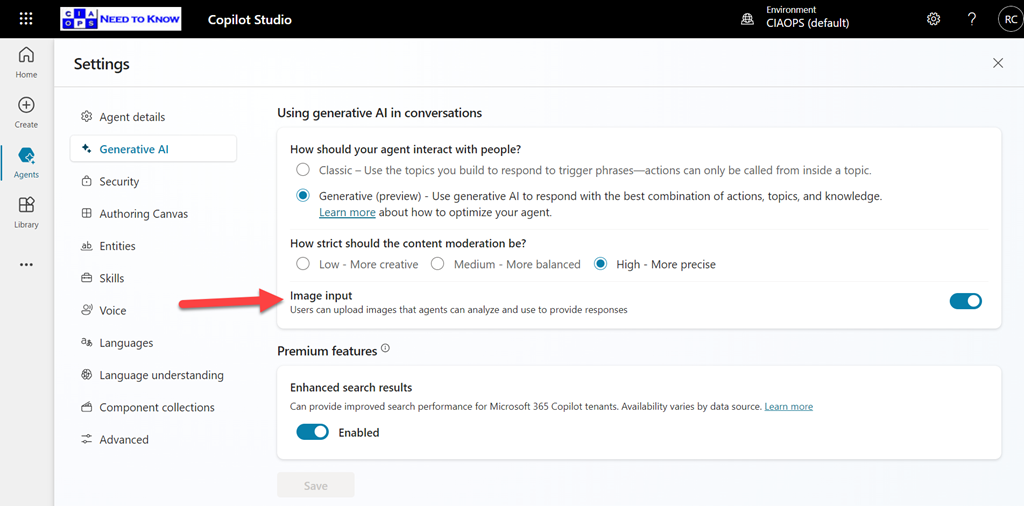
You need to enable the Image Input option in Settings for your agent as shown above, and of course, don’t forget to again publish your agent so the updates flow into Teams.

What is even more impressive, is that if you look at the error screen at the top of the page you’ll notice that it isn’t even in English and Copilot has extracted the text from the image, interpreted it and answered in English in Teams. Impressive!

Viewing Copilot prompt and responses across the organisation

image

To explore Copilot activity in your environment open:

https://purview.microsoft.com

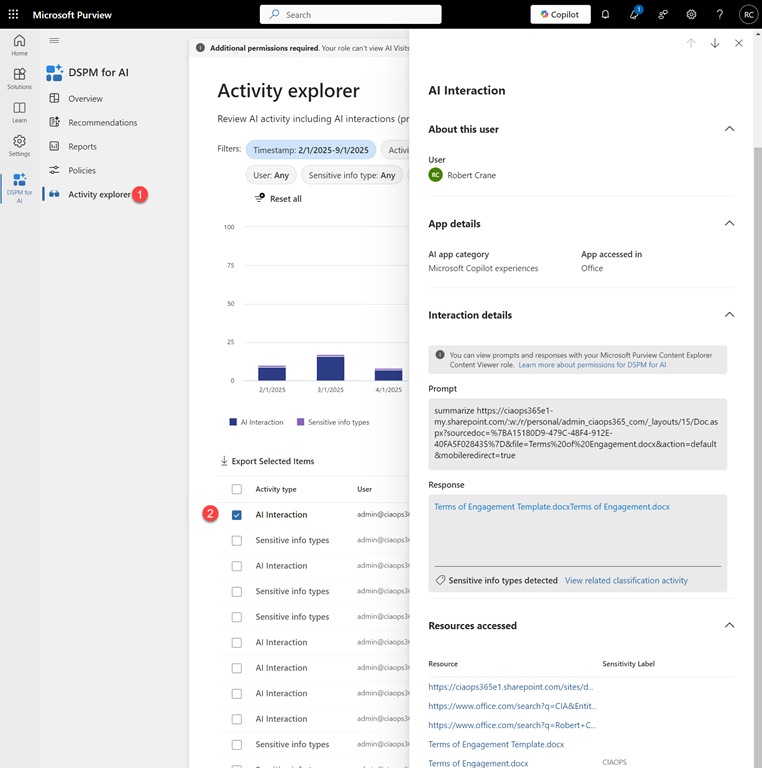
with a user with appropriate access. Select Solutions on the left and then DSPM for AI as shown above.

image

Then select Activity Explorer and from the list that appears on the right select an entry that says AI interaction as shown above.

You should now see a panel appear from the right with a range of details about that session. Towards the bottom you will find

image

both the Prompt and Response as shown above. You will also see an resources, for example files or links, used in that session.

image

A little further up you will also find where that session took place, in this case from inside an Office app.

The Data Security Posture Security Management (DSPM) for AI has many other resources that you can also take advantage of but the above is the simplest method I’ve found to quickly see what a Microsoft 365 Copilot prompt and response in the environment was.

Configuring DLP with Microsoft 365 Copilot

Here is a video that takes you through the process of setting up a Data Loss Prevention Policy (DLP) that protects content when used in Microsoft 365 Copilot.

To achieve this you need to set up Data Labelling in your Microsoft 365 environment which is not covered in this video. Documentation from Microsoft on DLP with Microsoft 365 Copilot can be found here:

Learn about the Microsoft 365 Copilot policy location (preview)

Copilot pages missing

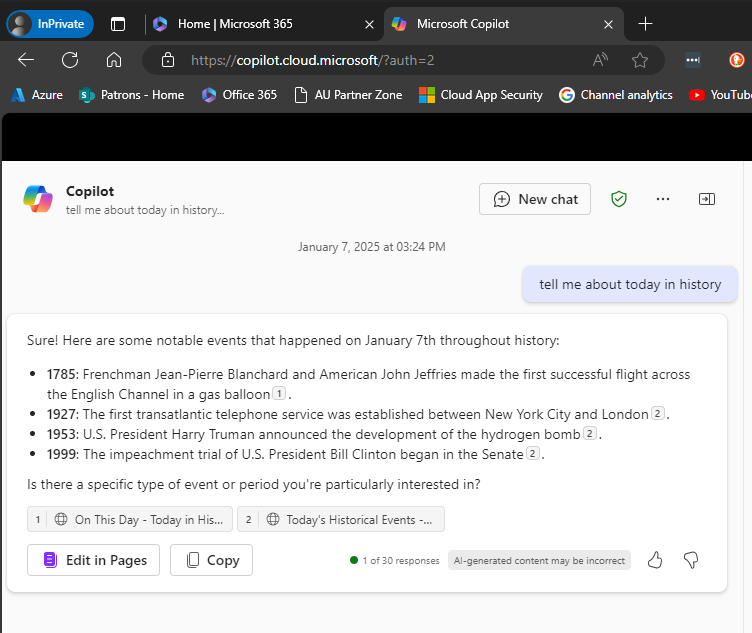
Recently, I discovered that Copilot pages were not appearing in Edge inprivate.

image

You can see the example above: Edge, inprivate and no Copilot pages.

image

It seems that a control in the Microsoft 365 administration portal (Copilot | Settings | Pin Copilot) plays a role somehow. Initially mine was set to Do not pin Microsoft Copilot to the navigation bar.

image

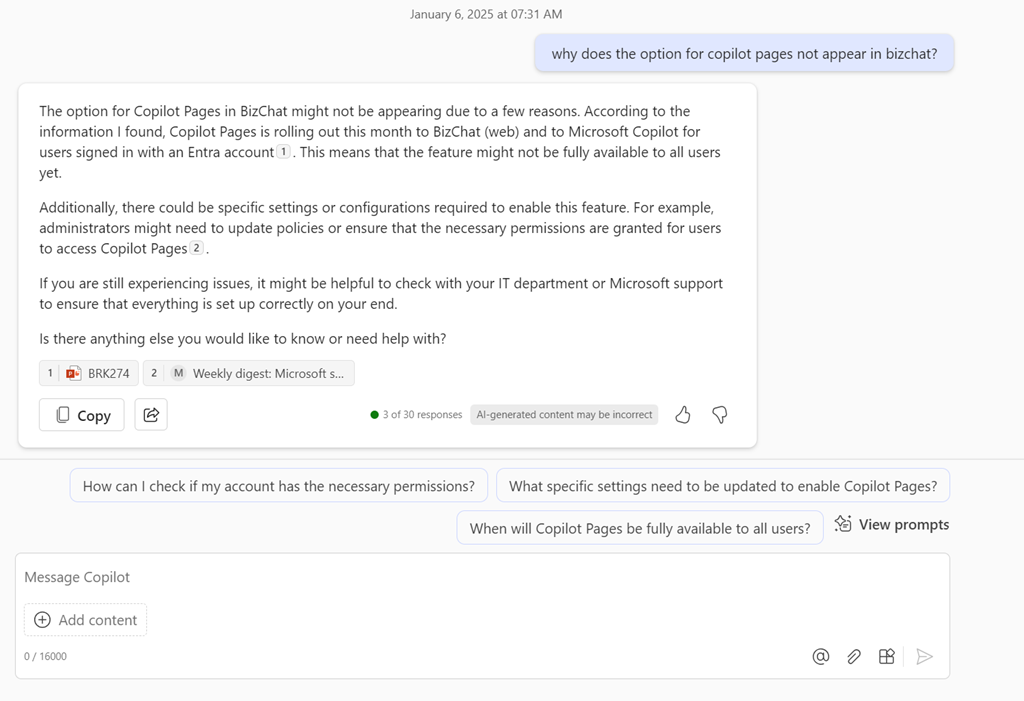
However, when I changed the setting to Pin Copilot to the navigation bar (recommended) and after a browser refresh or two (or close down/reopen browser), the Edit in Pages now appears within Edge inprivate as shown above.

What I also didn’t appreciate is that if you don’t have a paid version of Copilot for Microsoft 365 and simply use the free version of Copilot with your Microsoft 365 environment you can also get access to the Edit in Pages capabilities, which I thought required a fully paid Copilot for Microsoft 365. However, that doesn’t appear to be the case as the above screen shot came from a tenant with no paid Copilot for Microsoft 365 and the Edit in Pages is available, PROVIDED it seems, you turn on the pin Copilot option!

Of course, I can’t find this documented anywhere and only stumbled across it playing around. I have found the Edit in Pages button appearance to be somewhat unreliable when it did appear, but I have been turning the setting on and off to test, which have contributed to that unreliability.

After all this testing, my advice would be, based on the tests I’ve run, that even if you don’t have a pad version of Copilot for Microsoft 365 in your environment you want the option to Pin Copilot to the navigation bar enabled as I detailed above. That should allow the Edit in Pages to always appear regardless of a paid version of Copilot being in the tenant or not and regardless of browser or browser session you use.

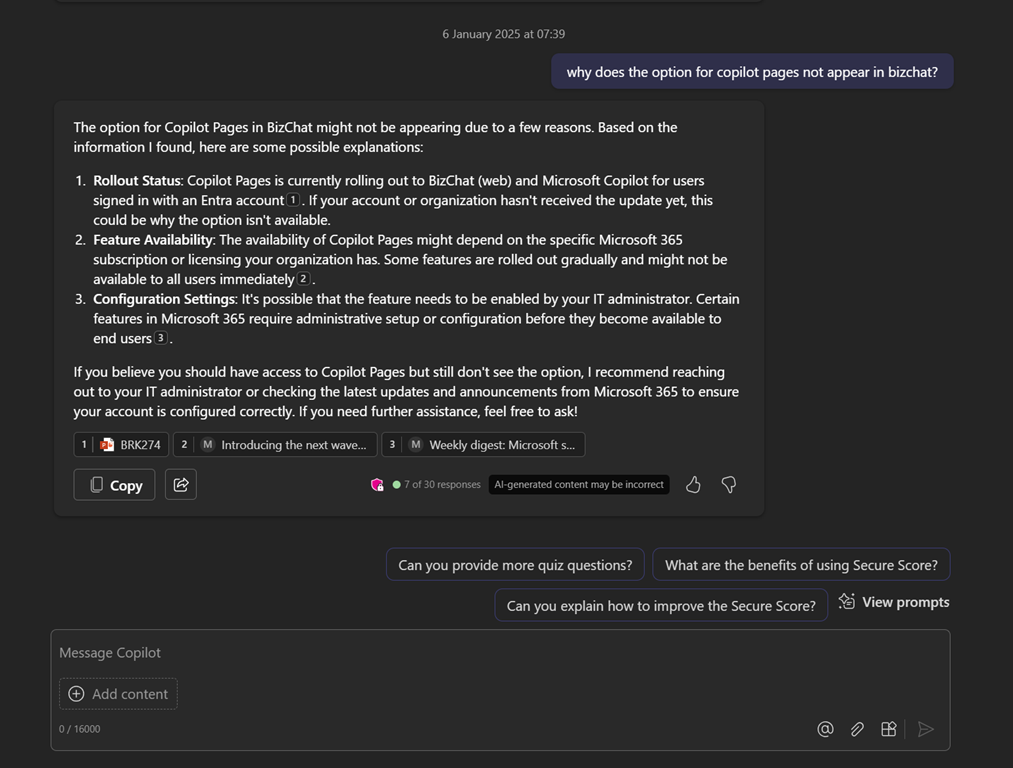
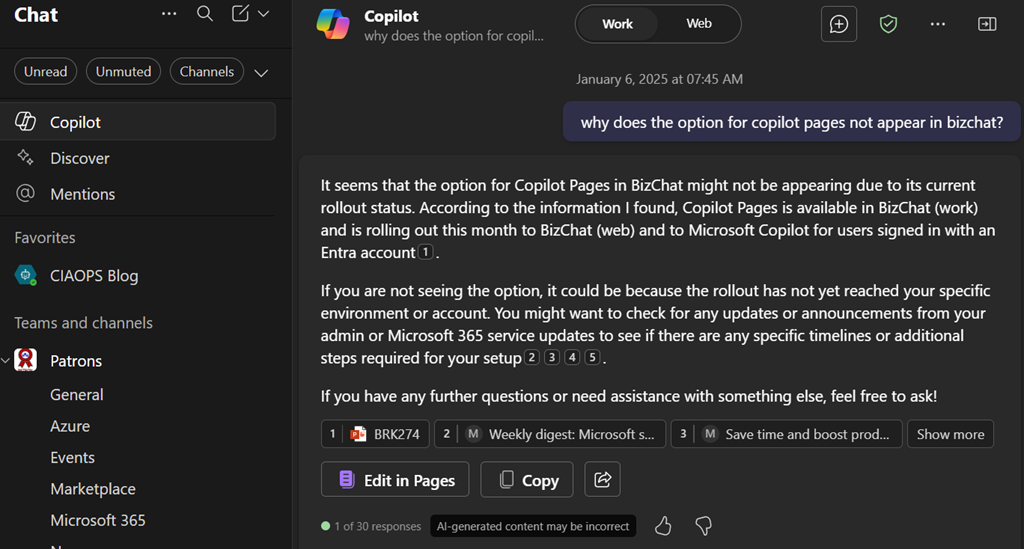
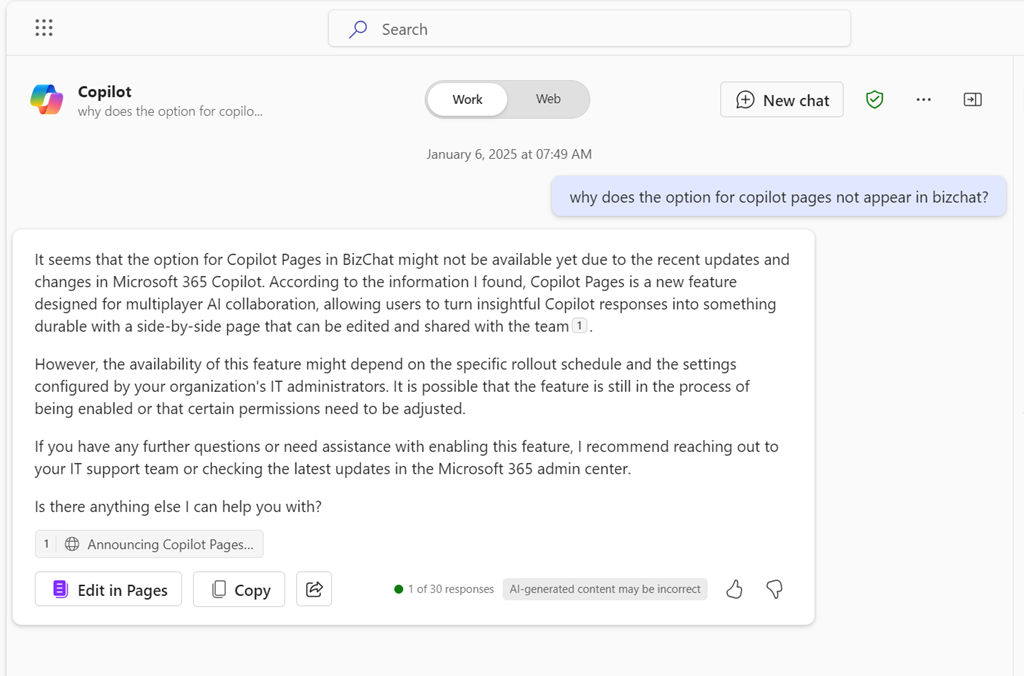
Another observation is that with the pinned option set, the free version of Copilot returns more information as you can see when you compare the screen shots. With the pinned option enabled you get citations and hyperlinsk to the citation. Interesting.

It would be nice to know for sure if this setting does what I have found but for now you’ll have to take my word for it based on what I have found in my testing.

Copilot pages not appearing in Edge inprivate

Here’s something weird. If I use Copilot with Edge inprivate I don’t see Copilot pages likes so:

Screenshot 2025-01-06 074334

and if I try again but this time in Teams, also within an Edge inprivate session:

Screenshot 2025-01-06 074453

but if I use the Teams desktop client I see Copilot pages:

Screenshot 2025-01-06 074632

I also see Copilot pages if I’m with a private session in another browser (here Brave):

Screenshot 2025-01-06 074835

and yet Edge in normal mode is fine:

Screenshot 2025-01-06 075045

I wonder what Edge is doing differently inprivate? For some reason, it seems that when I’m using Edge with inprivate I don’t see Copilot pages?

I’ll have to try a device that maybe isn’t locked down with Intuen to see if I get the same result.