CIAOPS Need to Know Microsoft 365 Webinar – May

laptop-eyes-technology-computer_thumb

Join me for the free monthly CIAOPS Need to Know webinar. Along with all the Microsoft Cloud news we’ll be taking a look at Microsoft Bookings.

Shortly after registering you should receive an automated email from Microsoft Teams confirming your registration, including all the event details as well as a calendar invite.

You can register for the regular monthly webinar here:

May Webinar Registrations

(If you are having issues with the above link copy and paste – https://bit.ly/n2k2405

The details are:

CIAOPS Need to Know Webinar – May 2024
Friday 31st of May 2024
11.00am – 12.00am Sydney Time

All sessions are recorded and posted to the CIAOPS Academy.

The CIAOPS Need to Know Webinars are free to attend but if you want to receive the recording of the session you need to sign up as a CIAOPS patron which you can do here:

http://www.ciaopspatron.com

or purchase them individually at:

http://www.ciaopsacademy.com/

Also feel free at any stage to email me directly via director@ciaops.com with your webinar topic suggestions.

I’d also appreciate you sharing information about this webinar with anyone you feel may benefit from the session and I look forward to seeing you there.

CIAOPS Brief 20240427

image

Day in the Life of a Board Game Founder –

https://www.youtube.com/watch?v=jlbQQZaCKKs

Microsoft’s AI Journey through HR | All in on AI –

https://www.youtube.com/watch?v=ffrmZhT3BJA

Learn about Microsoft secure access solution –

https://www.youtube.com/watch?v=rrA7gy942kg

How Microsoft Power Platform is driving real-world impact—March customer success stories –

https://www.microsoft.com/en-us/power-platform/blog/2024/04/18/how-microsoft-power-platform-is-driving-real-world-impact-march-customer-success-stories/

Prompt Like a Pro: Get to decisions faster in Teams meetings with Microsoft Copilot –

https://techcommunity.microsoft.com/t5/microsoft-teams-blog/prompt-like-a-pro-get-to-decisions-faster-in-teams-meetings-with/ba-p/4123197

Investigating Industrial Control Systems using Microsoft’s ICSpector open-source framework –

https://techcommunity.microsoft.com/t5/security-compliance-and-identity/investigating-industrial-control-systems-using-microsoft-s/ba-p/4120580

Leading in the era of AI: How Microsoft’s platform differentiation and Copilot empowerment are driving AI Transformation –

https://blogs.microsoft.com/blog/2024/04/24/leading-in-the-era-of-ai-how-microsofts-platform-differentiation-and-copilot-empowerment-are-driving-ai-transformation/

New Microsoft Incident Response guide helps simplify cyberthreat investigations –

https://www.microsoft.com/en-us/security/blog/2024/04/23/new-microsoft-incident-response-guide-helps-simplify-cyberthreat-investigations/

Find what you need in a Word doc with Copilot | Microsoft Copilot Tutorial –

https://www.youtube.com/watch?v=vtSSRkvyxeE

Summarize an email with Copilot | Microsoft Copilot Tutorial –

https://www.youtube.com/watch?v=4MFvG2OomhU

Get email coaching with Copilot | Microsoft Copilot Tutorial –

https://www.youtube.com/watch?v=dXtX0dqrJ7w

Creating balance in a digital world through precision and mindfulness in Japan l Cloud Cultures –

https://www.youtube.com/watch?v=YY1MfCvokB0

Learn how Microsoft manage risk and privacy solution –

https://www.youtube.com/watch?v=-1XRTdGUwpw

Get started with simulation automations | Microsoft Defender for Office 365 –

https://www.youtube.com/watch?v=QXElYtr7ZJ0

Microsoft Security Exposure Management introduces: Critical asset protection –

https://techcommunity.microsoft.com/t5/security-compliance-and-identity/microsoft-security-exposure-management-introduces-critical-asset/ba-p/4122645

Microsoft OneNote now available on Apple Vision Pro –

https://techcommunity.microsoft.com/t5/microsoft-365-blog/microsoft-onenote-now-available-on-apple-vision-pro/ba-p/4115959

Microsoft Copilot for M365 and Teams Premium work better together –

https://www.youtube.com/watch?v=F52eT-WvEGU

Tiny but mighty: The Phi-3 small language models with big potential –

https://news.microsoft.com/source/features/ai/the-phi-3-small-language-models-with-big-potential/

Learn how Microsoft defends against threats –

https://www.youtube.com/watch?v=b737gXZHF1I

Microsoft Intune Remote Help adds full control for Mac –

https://techcommunity.microsoft.com/t5/microsoft-intune-blog/microsoft-intune-remote-help-adds-full-control-for-mac/ba-p/4120480

Analyzing Forest Blizzard’s custom post-compromise tool for exploiting CVE-2022-38028 to obtain credentials –

https://www.microsoft.com/en-us/security/blog/2024/04/22/analyzing-forest-blizzards-custom-post-compromise-tool-for-exploiting-cve-2022-38028-to-obtain-credentials/

Trusted Signing is in Public Preview –

https://techcommunity.microsoft.com/t5/security-compliance-and-identity/trusted-signing-is-in-public-preview/ba-p/4103457

Data Discovery: The First Step to AI Readiness –

https://techcommunity.microsoft.com/t5/public-sector-blog/data-discovery-the-first-step-to-ai-readiness/ba-p/4113178

After hours

Vortex Cannon vs Drone – https://www.youtube.com/watch?v=SrGENEXocJU

Editorial

If you found this valuable, the I’d appreciate a ‘like’ or perhaps a donation at https://ko-fi.com/ciaops. This helps me know that people enjoy what I have created and provides resources to allow me to create more content. If you have any feedback or suggestions around this, I’m all ears. You can also find me via email director@ciaops.com and on X (Twitter) at https://www.twitter.com/directorcia.

If you want to be part of a dedicated Microsoft Cloud community with information and interactions daily, then consider becoming a CIAOPS Patron – www.ciaopspatron.com.

Watch out for the next CIA Brief next week.

April Microsoft 365 Webinar resources

image

The slides from this month’s webinar are available at:

https://github.com/directorcia/general/blob/master/Presentations/Need%20to%20Know%20Webinars/202404.pdf

If you are not a CIAOPS patron you want to view or download a full copy of the video from the session you can do so here:

http://www.ciaopsacademy.com.au/p/need-to-know-webinars

Watch out for next month’s webinar.

Recap from Copilot for Microsoft 365:

Generated by AI. Make sure to check for accuracy.

Meeting recap notes:

  • Robert talked about various topics in the meeting, including the need to know webinar for April 2024, Microsoft 365 cloud news, and Loop. He also provided information on how to keep up to date with Microsoft’s announcements and how to troubleshoot and assist in Intune using Copilot for Security.

    • Robert hosted a webinar on the need to know for April 2024. He thanked everyone for joining and confirmed that the sound and video checks were done, and the recording had started. He advised that the recording would be available afterward.

    • Robert discussed two topics in the meeting. Firstly, he talked about Microsoft’s plan to introduce an external recipient rate limit from January 2025.

    • Robert discussed Microsoft’s Loop product and its components, including task listing. He advised that it is important to learn how to use the tools before putting production information in them.
  • Robert talked about Microsoft licensing changes due to the European Union’s anti-competitive requirements. Teams will no longer be included in the suite and will need to be purchased as an add-on license. Microsoft Mesh, a virtual reality style world connected to teams, is now fully available but requires a premium license.

    • Robert discussed the changes in Microsoft licensing due to the European Union’s anti-competitive requirements. Teams will now be detached from new sales of Microsoft 365 and will need to be purchased as an add-on license. Existing licenses are not affected.

    • Robert discussed the wider environment and the premium license required to access it. He also talked about the Apple Vision Pro reports and its low adoption rate. Robert then moved on to talk about Teams, which is Microsoft’s major focus.

    • Robert discussed the challenges of using SharePoint and how Microsoft Teams can help. Teams leverages existing services like exchange online, SharePoint, planner chat, and more. By default, most users can create a team without needing any particular permissions.

    • Robert discussed the modern approach of using multiple social media accounts and how Teams is a combination of chat conversations, calls, chats, meetings, and video conferences. He also mentioned that Teams integrates with Office 365 apps and has customization extensibility.

    • Robert discussed the capabilities of Microsoft Teams, including the ability to set meetings on various platforms, integrate with telephony systems, and apply policies and compliance.
  • Robert talked about the benefits of using Teams for developing apps at zero or very little cost. He also discussed the integrations available to the administrator to control permissions and licenses. Robert explained how files work inside a team and how every team created creates a dedicated SharePoint site in the background.

    • Robert discussed the capabilities of Teams, including the ability to develop your own apps at zero or very little cost, and the various integrations available. He also explained how files work inside a team, with each team creating a dedicated SharePoint site.

    • Robert discussed the benefits of using Power Automate to create automated processes in Teams. He emphasized the importance of breaking up teams by department or function and highlighted the enterprise security compliance and manageability features available in Microsoft 365.

    • Robert discussed the benefits of using Microsoft Teams for work collaboration. He mentioned that the new Teams client is faster and better than the old one and allows for easy switching between different teams.

    • Robert discussed the benefits of using the new teams and encouraged everyone to start using it. He also highlighted the challenges of allowing remote access or group access and suggested using teams to collaborate with people inside and outside the organization.

    • Robert explained the limitations of guest users in external teams. They cannot be an administrator of a team or create channels.
  • Robert talked about enabling guests in teams, integrating phones into teams, and the premium features of Microsoft Teams. He emphasized that Microsoft is encouraging collaboration and making it possible out of the box, but users can restrict it with policies.

    • Robert discussed various aspects of Microsoft Teams, including enabling guests, integrating phones, and the premium offering. He emphasized that Microsoft is encouraging collaboration and making it possible out of the box.

    • Robert provided an overview of the capabilities of Teams Premium. He discussed the intelligent recap feature, which allows users to search for specific words or ideas mentioned in a meeting.

    • Robert introduced an app called Meet that gives a summary of all meetings and allows users to jump between them quickly. He recommended it for those who spend a lot of time in Teams meetings.

    • Robert discussed the capabilities of SharePoint in Teams. He explained how to search for SharePoint, launch a meeting inside a channel, control notifications, and pin conversations to the top. He also mentioned that each channel has a unique email address and a link.

    • Robert explained the features of Teams, including the ability to receive notifications for new updates and changes, chat with individuals or groups, share files and gifts, and escalate to audio or video calls.
  • Robert talked about Microsoft Teams and its capabilities. He explained how it is a different approach to collaboration and how it can help provide advanced productivity and save time in businesses. He discussed the integration with the phone system and OneDrive for Business.

    • Robert discussed the features and capabilities of Microsoft Teams in a meeting. He explained how to schedule a meeting, use the phone system, and work with personal and shared files.

    • Robert demonstrated the features of the Meet app and how it can be integrated with other apps. He emphasized the benefits of using Teams for collaboration, including the ability to search for data quickly and easily.

    • Robert demonstrated how to automate processes using Power Automate in Teams. He showed examples of automations such as dad joke of the day, space picture of the day, and chat GPT.

    • Robert discussed the benefits of using Teams for collaboration, highlighting its features such as working out loud, sharing, searching, and putting information and control in users’ hands.

    • Robert provided an overview of Microsoft Teams and its capabilities. He emphasized the importance of moving from one-to-one collaboration using email to working out loud.

Follow-up tasks:

  • Teams licensing: Review the changes in Teams licensing and pricing due to the EU decision and the new Teams premium option (Teams resellers and customers)

  • Copilot for security: Explore the benefits of Copilot for security, especially for Intune and Defender integration and troubleshooting (Teams admins and security managers)

  • Loop: Learn how to use Loop and its new task list component and compare it with other tools like OneNote and Planner (Teams users and collaborators)

  • Teams shared channel: Set up the required permissions to join the Teams shared channel and send an email to Robert to request access (Anyone interested in joining the Teams shared channel)

  • Teams premium features: Try the new Teams client and the new features like intelligent recap, branding, and mesh (Teams users and meeting organizers)

Service

The 25th of April is the day we in Australia pause to remember those who have served. This includes those in times past as well as in the present. The 25th of April is the anniversary of the Australian and New Zealand (ANZAC) forces landing at Gallipoli in 1915 as part of a campaign to shorten the first World War.

The sad reality was that nine months later no strategic value had been achieved and the forces were withdrawn and transferred to the Western Front to battle the Germans over the remaining years of World War I. Those nine months at Gallipoli resulted in around 9,000 of these forces being killed and around 18,000 being wounded. It was a high price to pay for a continued stalemate far away from home against a determined enemy defending their homeland.

The positives of this action are probably only best viewed with the benefit of hindsight. The largely represent the beginning of the appreciation that Australia was now a unique nation on the world stage and was united as it had never been. It also created a legacy of remembrance and recognition of service to the nation that endures today. Such appreciation has waxed and waned over the years but now appears to be as strong as it has ever been.

It is strange how ANZAC day bring people together now like few other modern causes or challenges. It is easy to judge sacrifice through the lens of history whilst enjoying all the benefits. We hope that we will never see the need for such service again but we also hope that if it is required that the sacrifices of the those before inspire those that need to. We know that for a select few who serve us today, it does.

One of the unique things about the ANZACS through their time in World War I is that they remained an entirely volunteer force, unlike many other nations who enacted conscription to fill their ranks. This, I believe, is what truly makes the ANZAC spirit unique. They were perhaps nieve but when most chose to remain and serve their ‘mates’ above all else. This is the true legacy I suggest they leave us all these later. This is the reason those who serve today do. They do so for other and the greater good. This is what we need to celebrate and honour.

Such an ideal is not something that you can put a price on or measure with a ruler but it is the reason why the majority of us are able to enjoy the lifestyle and freedoms that we. Our only duty, is therefore, to at least stop, remember and say thank you for what these people did and what other continue to do for us today. These commitments are the reasons why we enjoy our freedoms today.

Lest We Forget

For those interested in learning of the continued sacrifices that the ANZACs made after withdrawing from Gallipoli in World War 1, when they went to fight in northern France until the end of the war, should visit my web site:

ANZACs in France

and a good video about the history of Gallipoli can be found here:

https://www.youtube.com/watch?v=g0aBAq5z-PE

Need to Know podcast–Episode 318

I’ve now had a chance to play with Copilot for Security and can recommend it but to ensure that costs don’t spiral out of control for SMB, it needs to used in an ad hoc manner. Listen along for my thoughts and a walk through of resources available for you. Also news of updates of Exchange email threshold limits being changed as well as improvements for Microsoft Mesh, Loop and more. Listen in for the latest updates.

You can listen directly to this episode at:

https://ciaops.podbean.com/e/episode-318-copilot-for-security-in-the-flesh/

Subscribe via iTunes at:

https://itunes.apple.com/au/podcast/ciaops-need-to-know-podcasts/id406891445?mt=2

Don’t forget to give the show a rating as well as send me any feedback or suggestions you may have for the show.

Brought to you by www.ciaopspatron.com

Resources

@directorcia

Join my shared channel

CIAOPS merch store

Become a CIAOPS Patron

CIAOPS Blog

CIAOPS Brief

CIAOPSLabs

Support CIAOPS

Microsoft Copilot for Security

Microsoft Copilot for Security Intune Plugin Overview

How to Become a Microsoft Copilot for Security Ninja: The Complete Level 400 Training

Copilot for Security – The low down for SMB

Public Preview: High Volume Email for Microsoft 365

Exchange Online to introduce External Recipient Rate Limit

Hunting for QR Code AiTM Phishing and User Compromise

Microsoft Mesh: A new way to connect

Realigning global licensing for Microsoft 365

Improved task list components in Loop

Bringing the latest capabilities to Copilot for Microsoft 365 customers

Updates to Clipchamp that make video editing a breeze

Introducing “What’s New” in Microsoft Entra

Summary of podcast episode straight from Copilot for Microsoft 365:

Main ideas:

  • Podcast overview: The podcast provides news and information on the Microsoft Cloud, with a special focus on the SMB market. The host, Robert Crane, invites listeners to contact him via email, blog, YouTube, or shared channel.
  • New Azure service for security analysis: Microsoft copilot for security is an Azure service that leverages AI to assist security analysts and investigators. It uses a consumption billing model and can be turned on and off as required. It also supports plugins and custom documents to extend its capabilities.
  • Public preview of high volume email feature: Microsoft 365 customers can sign up for a public preview of high volume email, which allows them to send more emails than the existing mailbox limits. This feature is useful for SMBs who need to send newsletters or marketing campaigns to their customers.
  • Detection of QR code phishing attacks: QR code phishing is a technique that uses malicious QR codes to trick users into giving away their credentials. Microsoft provides some KQL queries that can be used in Defender for endpoint and Sentinel to detect and alert on these attacks.
  • Virtual reality platform for collaboration: Microsoft Mesh is a virtual reality platform that enables users to connect and collaborate in immersive 3D spaces. It requires a Teams premium license and a compatible device. It can be used for various purposes, such as training, events, or meetings.
  • Licensing changes for Microsoft 365 in the European Economic Area: Microsoft has agreed to separate Teams from the Microsoft 365 suite in the European Economic Area, to comply with competition rules. This means that Teams will be a separate add-on that needs to be purchased separately. Existing customers are not affected by this change.

CIAOPS Brief 20240420

image

Get started with reporting | Microsoft Defender Experts for XDR –

https://www.youtube.com/watch?v=Ymm6g_Eis34

Updates to Clipchamp that make video editing a breeze –

https://insider.microsoft365.com/en-us/blog/updates-to-clipchamp-that-make-video-editing-a-breeze

Get started with onboarding | Microsoft Defender Experts for XDR –

https://www.youtube.com/watch?v=eLEXPZ1mUwQ

AI study guide: The no-cost tools from Microsoft to jump start your generative AI journey –

https://azure.microsoft.com/en-us/blog/ai-study-guide-the-no-cost-tools-from-microsoft-to-jump-start-your-generative-ai-journey/

New Microsoft guidance for the DoD Zero Trust Strategy –

https://www.microsoft.com/en-us/security/blog/2024/04/16/new-microsoft-guidance-for-the-dod-zero-trust-strategy/

Microsoft Intune Makes It Possible –

https://www.youtube.com/watch?v=DFG7JbR-Eyc

Evolving the Meeting Details experience across Microsoft 365 apps and services –

https://insider.microsoft365.com/en-us/blog/evolving-the-meeting-details-experience-across-microsoft-365-apps-and-services

Accelerated Vulnerability Assessment with Copilot –

https://www.youtube.com/watch?v=JGpKZ1Bj6ew

Rapid Threat Intel Analysis with Copilot –

https://www.youtube.com/watch?v=nkIQb0ksaW4

Enhancing Security with MDEASM and Copilot: Streamlining External Attack Surface Management –

https://www.youtube.com/watch?v=UEb-PtKLO6Y

Enhancing Security with Script Analysis using Copilot –

https://www.youtube.com/watch?v=9BBok6bWFuk

Introducing “What’s New” in Microsoft Entra –

https://techcommunity.microsoft.com/t5/microsoft-entra-blog/introducing-quot-what-s-new-quot-in-microsoft-entra/ba-p/3796389

Exchange Online to introduce External Recipient Rate Limit –

https://techcommunity.microsoft.com/t5/exchange-team-blog/exchange-online-to-introduce-external-recipient-rate-limit/ba-p/4114733

7 ways AI makes life easier on the go –

https://news.microsoft.com/source/features/ai/7-ways-ai-makes-life-easier-on-the-go/

Microsoft Copilot for Security Intune Plugin Overview –

https://techcommunity.microsoft.com/t5/microsoft-security-copilot-blog/microsoft-copilot-for-security-intune-plugin-overview/ba-p/4114040

Leverage Custom Promptbooks to Optimize your Security Workflows –

https://techcommunity.microsoft.com/t5/microsoft-security-copilot-blog/leverage-custom-promptbooks-to-optimize-your-security-workflows/ba-p/4113221

Your Microsoft Security test automation framework! –

https://maester.dev/

https://maester.dev/docs/intro

What is Maester?
Maester is a PowerShell based test automation framework to help you stay in control of your Microsoft security configuration.

How to Become a Microsoft Copilot for Security Ninja: The Complete Level 400 Training –

https://techcommunity.microsoft.com/t5/microsoft-security-copilot-blog/how-to-become-a-microsoft-copilot-for-security-ninja-the/ba-p/4106928

After hours

New Electric Atlas Robot Revealed by Boston Dynamics – https://www.youtube.com/watch?v=raYWbqbZbmc

Editorial

If you found this valuable, the I’d appreciate a ‘like’ or perhaps a donation at https://ko-fi.com/ciaops. This helps me know that people enjoy what I have created and provides resources to allow me to create more content. If you have any feedback or suggestions around this, I’m all ears. You can also find me via email director@ciaops.com and on X (Twitter) at https://www.twitter.com/directorcia.

If you want to be part of a dedicated Microsoft Cloud community with information and interactions daily, then consider becoming a CIAOPS Patron – www.ciaopspatron.com.

Watch out for the next CIA Brief next week.

Configuring a budget for Copilot for Security

Screenshot 2024-04-16 115152

I have previously detailed how Copilot for Security is an excellent tool for SMB:

Copilot for Security – The lowdown for SMB

One of the major things that SMB need to pay very close attention to is the cost of Copilot for Security, given that it needs to be used in an ‘on-demand’ manner to be cost effective for smaller businesses. A good way to keep abreast of those costs is to use Budgets in Azure.

My recommendation is that you configure Copilot for Security in its own Azure Resource Group so that costs and permissions are easier to manage. Inside this dedicated Copilot for Security Resource Group you can attach a budget with notification. To this, navigate to the Azure Resource Group where Copilot for Security is provisioned. Locate the Budgets menu item on the left under the heading Cost Management as shown above. On the right, select +Add from the menu across the top.

Screenshot 2024-04-16 121310

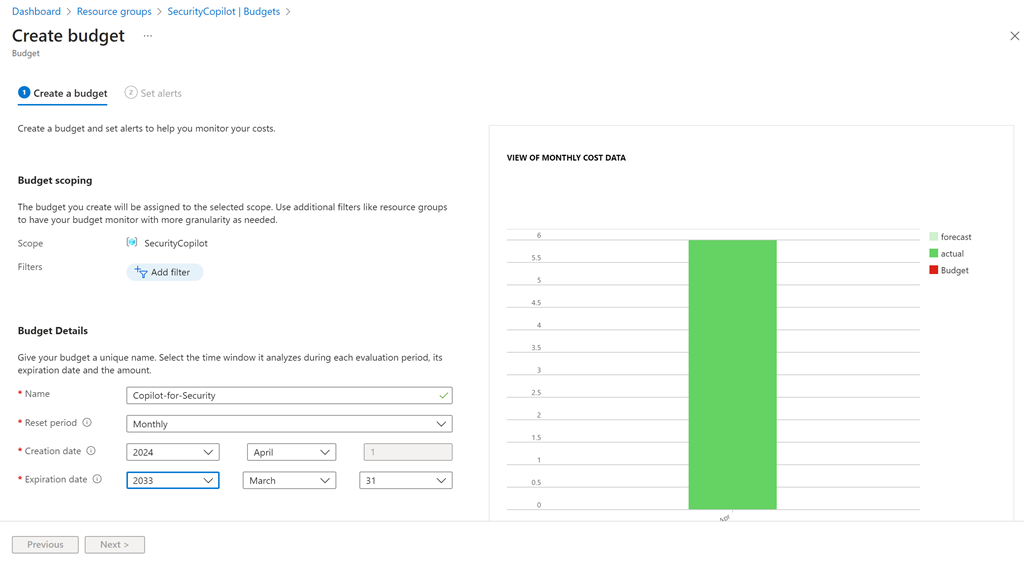
Give the budget a name, a reset period (typically monthly) and date range.

Screenshot 2024-04-16 121617

If you scroll down you’ll see that you can set a budget amount. Here I’m setting the budget to $150. Select the Next button at the bottom of the page to continue.

Screenshot 2024-04-16 121946

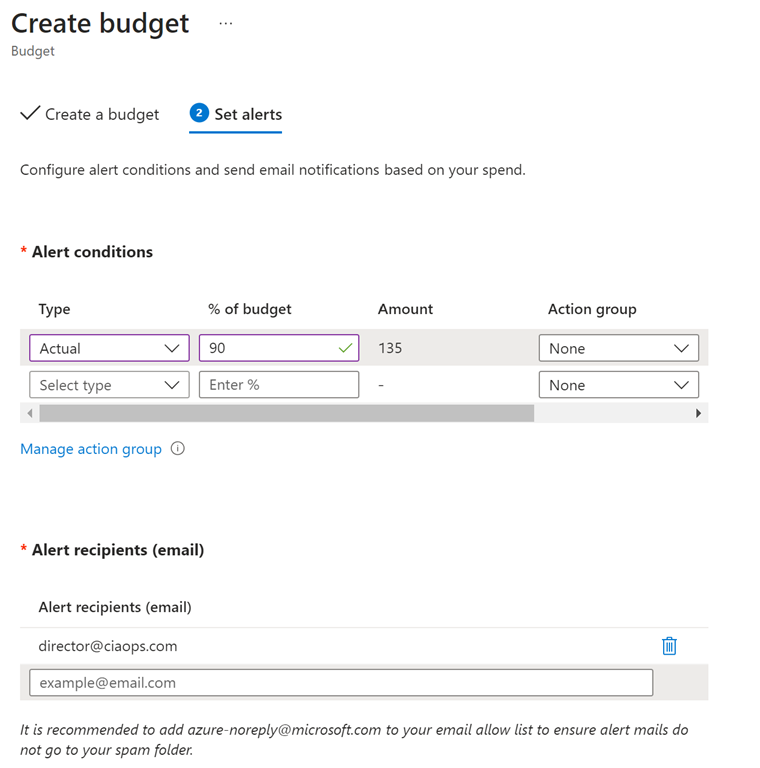
On the next screen you can configure a threshold alert level. Here I set that to 90% of my budget. This means I’ll start getting alerts about Copilot for Security when the cost reaches around $135. You can configure multiple thresholds if you wish.

You can also have the alert take automatic action via an Action Group (say shut down the resources), but I won’t cover this here.

A little further down you can configure the email you wish to receive the notification on. You can configure multiple emails to receive notifications if you wish.

Scroll to the bottom of the page and select the Create button.

Screenshot 2024-04-16 122404

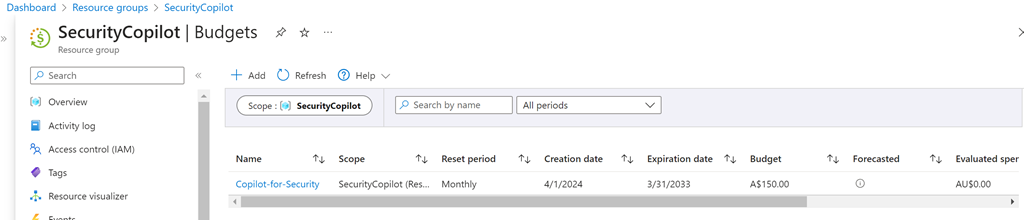
You should now see the budget you just created as shown above. You can click on the name for more details.

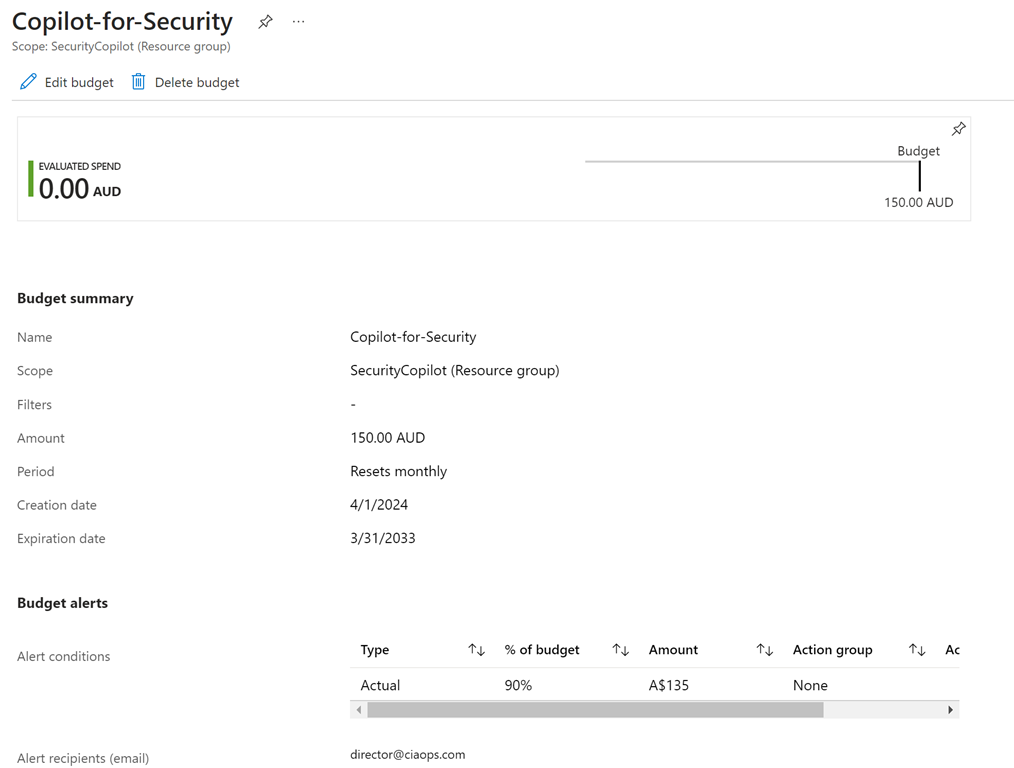
Screenshot 2024-04-16 122538

You can also edit and delete the configuration here if you wish.

Now, when you exceed the thresholds you set in this budget, you’ll get an email notification that your spending on Copilot for Security has reached the threshold you set.

CIAOPS Brief 20240413

image

A wave of AI innovation is overtaking Australia and New Zealand –

https://www.microsoft.com/en-us/microsoft-cloud/blog/2024/04/10/a-wave-of-ai-innovation-is-overtaking-australia-and-new-zealand/

Maximizing Data Protection with Copilot: Unveiling Hidden Risks and Prioritizing DLP Alerts –

https://www.youtube.com/watch?v=g9AqA3EVEvs

Microsoft Entra and Copilot for Security | Microsoft Security –

https://www.youtube.com/watch?v=yW7EAShfkRQ

Unleashing the Power of Copilot: Security Investigations from Defender XDR to Standalone Copilot –

https://www.youtube.com/watch?v=Sf_eRd45tko

Microsoft Copilot Dashboard Overview –

https://www.youtube.com/watch?v=ae6Ov_QBXaI

How to transform your workplace with AI –

https://www.youtube.com/watch?v=mk-I8xdj1qI

How Microsoft discovers and mitigates evolving attacks against AI guardrails –

https://www.microsoft.com/en-us/security/blog/2024/04/11/how-microsoft-discovers-and-mitigates-evolving-attacks-against-ai-guardrails/

Trim videos in PowerPoint for the web –

https://insider.microsoft365.com/en-us/blog/trim-videos-in-powerpoint-for-the-web

Efficient Device Troubleshooting with Microsoft Copilot | IT Solutions Simplified –

https://www.youtube.com/watch?v=pMYdjZmChx8

What are Copilot prompts and how to write them –

https://www.youtube.com/watch?v=bWAqW3aEXbc

Get Started with Microsoft Teams Premium – The smart place to work –

https://www.youtube.com/watch?v=jnkXIdNmng0

Toward greater transparency: Adopting the CWE standard for Microsoft CVEs –

https://msrc.microsoft.com/blog/2024/04/toward-greater-transparency-adopting-the-cwe-standard-for-microsoft-cves/

Strategies to monitor and prevent vulnerable driver attacks –

https://techcommunity.microsoft.com/t5/microsoft-security-experts-blog/strategies-to-monitor-and-prevent-vulnerable-driver-attacks/ba-p/4103985

How to protect your organization with AI and Microsoft Security –

https://www.youtube.com/watch?v=gdCy5ruhQKw

After hours

The Ocean Cleanup’s System 03 Captures Record Amounts of Plastic From the Pacific – https://www.youtube.com/watch?v=P8drUT_cZy8

Editorial

If you found this valuable, the I’d appreciate a ‘like’ or perhaps a donation at https://ko-fi.com/ciaops. This helps me know that people enjoy what I have created and provides resources to allow me to create more content. If you have any feedback or suggestions around this, I’m all ears. You can also find me via email director@ciaops.com and on X (Twitter) at https://www.twitter.com/directorcia.

If you want to be part of a dedicated Microsoft Cloud community with information and interactions daily, then consider becoming a CIAOPS Patron – www.ciaopspatron.com.

Watch out for the next CIA Brief next week.