Connecting Defender EASM logs to Sentinel workspace

A very important security task is to ensure you are collecting all the logging data for your services and sending them to a central location for storage and analysis.

Here’s how you can send the logs from Defender EASM into Sentinel.

You’ll need to have already established both Sentinel and Defender EASM instances. Underneath Sentinel is a Log Analytics Workspace that is where all the logging data for Sentinel is accumulated. It is into this workspace that the Defender EASM logs will be sent.
image

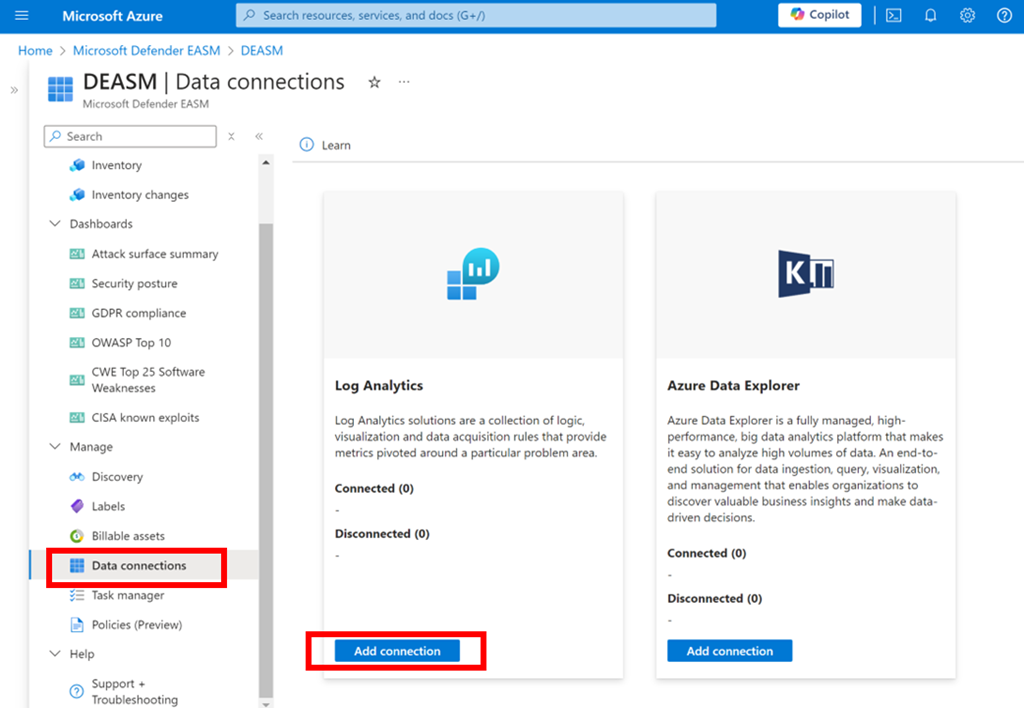
Log in to the Azure portal and navigate to Defender EASM as shown above. Select the Data connections option from the menu on the left. From the window that appears on the right select Add connection under Log Analytics as shown.
image

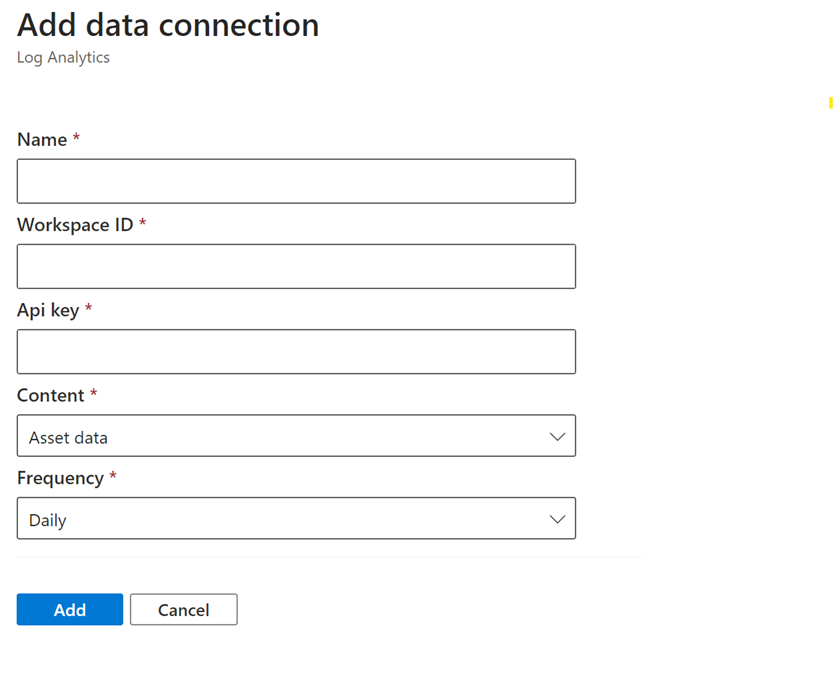
A dialog will appear from the right hand side prompting you for further information as shown above.

Open a new browser tab and navigate to Sentinel.

image

Select the Settings option at the bottom of the menu on the left hand side as shown above. From the windows that appears on the right select Workspace settings as shown.

image

In the Log analytics workspace for Sentinel select the Agents option under Settings from the menu on the left as shown.

In the window that appears on the right you will find both the Workspace ID and an API key as shown. Both of these will be required back in the Defender EASM connectors page.
image

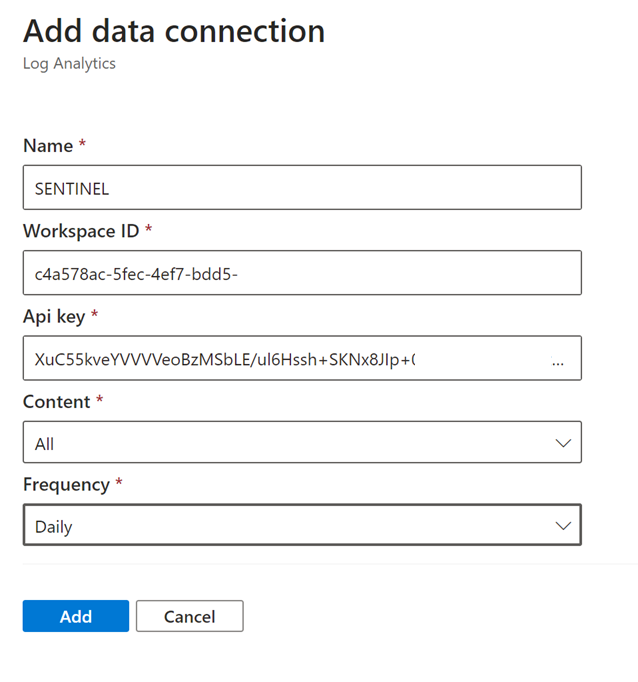
Return to the Defender EASM connectors page configuration and give this connection an appropriate Name. Enter the Workspace ID and Api key from the Sentinel Log Analytics page. Select All content and Daily for frequency.

Save these settings.
image

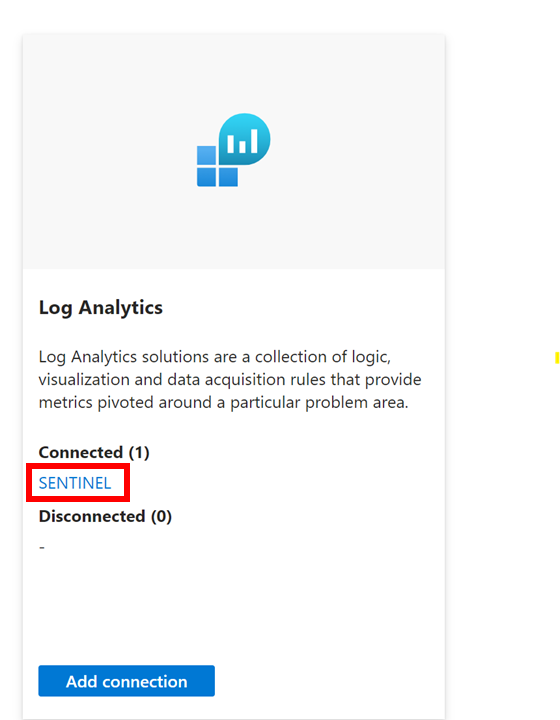
If everything is correct you should now see that the Log Analytics connexion now displays you settings under Connected as shown above.

The logs from Defender EASM will now start becoming available for you in Sentinel to use in things like KQL queries.


MVP 2024-25

image

I am happy to announced that I have again been recognised as a Microsoft Most Valued Professional (MVP) in the Microsoft 365 category for a new year 2024 – 2025.

It is always humbling to have such a recognition bestowed. This is now my 13th consecutive year as an MVP and it amazing to look back over that time at all the technology that has changed. On top of that, especially with AI, excitement around technology and Microsoft has never been higher. There is little doubt that in the last 12 months Copilot has really changed the landscape and probably changed it forever.

I’m excited to be part of these changes, now more than ever and being an MVP challenges me to keep current with the technology, understand it and then help others also determine the best way to implement inside their business.

A huge part of being an MVP is being part of a community all around the world who not only so skilled but also so willing to share their knowledge with others, including myself. I can’t tell you the number of times I’ve ended up on a MVP blog, video, etc when trying to solve some issue. It is amazing to be part of such a knowledgeable community. All of this is thanks to Microsoft and the MVP program, which again it is an honour to be part of.

I look forward to continuing to doing my best into the future around helping people understand M365 through mediums such as this blog, my podcast and YouTube channel. The core of being an MVP is that you love to help others with Microsoft technology so if you have a question, I’m all ears.

As the journey to the future continues to accelerate I am looking forward to more changes and mind blowing technology from Microsoft, especially around AI. It’s going to be another big year and I am happy and proud to me an MVP.

Thanks again for the honour Microsoft.

Need to Know podcast–Episode 322

Latest news and updates from the Microsoft Cloud. Global Secure Access pricing has been announced but not a lot of details published on this as yet, hopefully soon. Updates for both Entra and Copilot that you should take a look at. Also a great video demonstrating the use of Microsoft technology in a modern classroom. Thanks again for listening.

You can listen directly to this episode at:

https://ciaops.podbean.com/e/episode-322-global-secure-access/

Subscribe via iTunes at:

https://itunes.apple.com/au/podcast/ciaops-need-to-know-podcasts/id406891445?mt=2

Don’t forget to give the show a rating as well as send me any feedback or suggestions you may have for the show.

Brought to you by www.ciaopspatron.com

Resources

@directorcia

Join my shared channel

CIAOPS merch store

Become a CIAOPS Patron

CIAOPS Blog

CIAOPS Brief

CIAOPSLabs

Support CIAOPS

What is Global Secure access?

Microsoft Entra certificate-based authentication enhancements

OneNote Copilot now supports inked notes

What’s new in Microsoft Entra – June 2024

Intro to Config Refresh – a refreshingly new MDM feature

Why AI sometimes gets it wrong — and big strides to address it

More Threat Intelligence Content in MDTI, TA Enables Better Security Outcomes

What’s new in Copilot | June 2024

Driving Copilot for Microsoft 365 adoption with an assist from Microsoft Viva

Introducing the Microsoft Entra PowerShell module

Mitigating Skeleton Key, a new type of generative AI jailbreak technique

A basic demo of an AI crescendo [VIDEO]

Copilot for Security TI Embedded Experience in Defender XDR is now GA

User insights: Analyze customer identity data

How to start transforming your business with AI | AI at work with Microsoft’s Jared Spataro [VIDEO]

Inside UNSW’s State-of-the-Art Digital Teaching Studio – Microsoft Teams Rooms

Summary of podcast episode straight from Copilot for Microsoft 365:

Key Topics:
  • Introduction and podcast details: Robert Crane welcomes listeners to episode 322 of the Need to Know Podcast, a podcast with news and information on Microsoft Cloud for the SMB. He also shares how to contact him and support the podcast. 0:05

  • Global secure access pricing: Robert Crane informs listeners about the new pricing for global secure access, a feature of Microsoft Entra that allows private tunnelling for traffic to Microsoft 365, internet and on-premises resources. He also explains how it works and what benefits it provides. 1:47

  • Entra certificate based authentication enhancements: Robert Crane highlights a new article that explains the enhancements made to Entra certificate based authentication, a way to add additional security when logging in with or without MFA. 7:13

  • OneNote copilot linked notes support: Robert Crane announces that OneNote copilot now supports linked notes, a feature that allows users to link notes across different pages and notebooks. 7:35

  • What’s new in Entra June 2024: Robert Crane directs listeners to a detailed post that summarizes the updates and improvements made to Entra in June 2024, such as config refresh, user insights, PowerShell module and more. 7:54

  • AI security attacks: Robert Crane shares his interest in some attacks or threats that can be launched against AI, such as crescendo and skeleton key. He also provides links to videos and articles that explain how they work and how to defend against them. 9:56

  • Copilot for security TI embedded experiences: Robert Crane informs listeners that copilot for security TI embedded experiences is now generally available, a feature that allows users to use security copilot to query and analyze threat intelligence data. 12:57

  • Transforming your business with Microsoft technologies: Robert Crane recommends listeners to watch a short video by Jared Spataro, a Microsoft executive, that shows how to start transforming your business with Microsoft technologies, such as Viva, Teams, Stream and more. 14:21

  • UNSW digital teaching studio: Robert Crane praises a video that showcases the state of the art digital teaching studio at UNSW, a university in Australia, that uses Microsoft technologies to create a modern and engaging digital classroom. 14:36

CIAOPS Brief 20240706

image

Microsoft Entra certificate-based authentication enhancements –

https://techcommunity.microsoft.com/t5/microsoft-entra-blog/microsoft-entra-certificate-based-authentication-enhancements/ba-p/1751778

OneNote Copilot now supports inked notes –

https://insider.microsoft365.com/en-us/blog/onenote-copilot-now-supports-inked-notes

What’s new in Microsoft Entra – June 2024 –

https://techcommunity.microsoft.com/t5/microsoft-entra-blog/what-s-new-in-microsoft-entra-june-2024/ba-p/3796387

Intro to Config Refresh – a refreshingly new MDM feature –

https://techcommunity.microsoft.com/t5/windows-it-pro-blog/intro-to-config-refresh-a-refreshingly-new-mdm-feature/ba-p/4176921

After hours

Vacuum Cannon Explosions w/ Salish Matter!- Camp CrunchLabs Week 5 – https://www.youtube.com/watch?v=lsY99bDMXKA

Editorial

If you found this valuable, the I’d appreciate a ‘like’ or perhaps a donation at https://ko-fi.com/ciaops. This helps me know that people enjoy what I have created and provides resources to allow me to create more content. If you have any feedback or suggestions around this, I’m all ears. You can also find me via email director@ciaops.com and on X (Twitter) at https://www.twitter.com/directorcia.

If you want to be part of a dedicated Microsoft Cloud community with information and interactions daily, then consider becoming a CIAOPS Patron – www.ciaopspatron.com.

Watch out for the next CIA Brief next week

CIAOPS Need to Know Microsoft 365 Webinar – July

laptop-eyes-technology-computer_thumb

Join me for the free monthly CIAOPS Need to Know webinar. Along with all the Microsoft Cloud news we’ll be taking a look at Defender for Business.

Shortly after registering you should receive an automated email from Microsoft Teams confirming your registration, including all the event details as well as a calendar invite.

You can register for the regular monthly webinar here:

July Webinar Registrations

(If you are having issues with the above link copy and paste – https://bit.ly/n2k2407

The details are:

CIAOPS Need to Know Webinar – July 2024
Friday 26th of June 2024
11.00am – 12.00am Sydney Time

All sessions are recorded and posted to the CIAOPS Academy.

The CIAOPS Need to Know Webinars are free to attend but if you want to receive the recording of the session you need to sign up as a CIAOPS patron which you can do here:

http://www.ciaopspatron.com

or purchase them individually at:

http://www.ciaopsacademy.com/

Also feel free at any stage to email me directly via director@ciaops.com with your webinar topic suggestions.

I’d also appreciate you sharing information about this webinar with anyone you feel may benefit from the session and I look forward to seeing you there.

CIAOPS Brief 20240628

image

Working with a cybersecurity committee of the board –

https://www.microsoft.com/en-us/security/blog/2024/06/26/working-with-a-cybersecurity-committee-of-the-board/

Why AI sometimes gets it wrong — and big strides to address it –

https://news.microsoft.com/source/features/company-news/why-ai-sometimes-gets-it-wrong-and-big-strides-to-address-it/

More Threat Intelligence Content in MDTI, TA Enables Better Security Outcomes –

https://techcommunity.microsoft.com/t5/microsoft-defender-threat/more-threat-intelligence-content-in-mdti-ta-enables-better/ba-p/4177542

What’s new in Copilot | June 2024 –

https://techcommunity.microsoft.com/t5/copilot-for-microsoft-365/what-s-new-in-copilot-june-2024/ba-p/4173587

Driving Copilot for Microsoft 365 adoption with an assist from Microsoft Viva –

https://www.microsoft.com/insidetrack/blog/driving-copilot-for-microsoft-365-adoption-with-an-assist-from-microsoft-viva/

Bringing flexibility and customization to Microsoft Loop boards –

https://insider.microsoft365.com/en-us/blog/bringing-flexibility-and-customization-to-microsoft-loop-boards

Evolve your CIAM strategy with External ID –

https://techcommunity.microsoft.com/t5/microsoft-entra-blog/evolve-your-ciam-strategy-with-external-id/ba-p/3627348

Introducing the Microsoft Entra PowerShell module –

https://techcommunity.microsoft.com/t5/microsoft-entra-blog/introducing-the-microsoft-entra-powershell-module/ba-p/4173546

Architecting secure Generative AI applications: Safeguarding against indirect prompt injection –

https://techcommunity.microsoft.com/t5/security-compliance-and-identity/architecting-secure-generative-ai-applications-safeguarding/ba-p/4174083

Mitigating Skeleton Key, a new type of generative AI jailbreak technique –

https://www.microsoft.com/en-us/security/blog/2024/06/26/mitigating-skeleton-key-a-new-type-of-generative-ai-jailbreak-technique/

Copilot for Security TI Embedded Experience in Defender XDR is now GA –

https://techcommunity.microsoft.com/t5/microsoft-defender-threat/copilot-for-security-ti-embedded-experience-in-defender-xdr-is/ba-p/4114858

User insights: Analyze customer identity data –

https://techcommunity.microsoft.com/t5/microsoft-entra-blog/user-insights-analyze-customer-identity-data/ba-p/3827373

Get more device control flexibility with BitLocker settings in Defender for Endpoint –

https://techcommunity.microsoft.com/t5/microsoft-defender-for-endpoint/get-more-device-control-flexibility-with-bitlocker-settings-in/ba-p/4175131

How to start transforming your business with AI | AI at work with Microsoft’s Jared Spataro –

https://www.youtube.com/watch?v=LC1XMcKPklQ

New Recent Files widgets for Word, Excel, and PowerPoint for iOS –

https://insider.microsoft365.com/en-us/blog/new-recent-files-widgets-for-word-excel-and-powerpoint-for-ios

Microsoft Defender Experts for XDR recognized in the latest MITRE Engenuity ATT&CK® Evaluation for Managed Services –

https://www.microsoft.com/en-us/security/blog/2024/06/18/microsoft-defender-experts-for-xdr-recognized-in-the-latest-mitre-engenuity-attck-evaluation-for-managed-services/

After hours

Top Gear Australia: Full Episode– https://www.youtube.com/watch?v=VGolAWb3SJ4

Editorial

If you found this valuable, the I’d appreciate a ‘like’ or perhaps a donation at https://ko-fi.com/ciaops. This helps me know that people enjoy what I have created and provides resources to allow me to create more content. If you have any feedback or suggestions around this, I’m all ears. You can also find me via email director@ciaops.com and on X (Twitter) at https://www.twitter.com/directorcia.

If you want to be part of a dedicated Microsoft Cloud community with information and interactions daily, then consider becoming a CIAOPS Patron – www.ciaopspatron.com.

Watch out for the next CIA Brief next week