Can’t swap Azure subscriptions

Screenshot 2025-03-07 153419

So I have a situation where an Azure subscription expired and was then disabled (through no fault of my own I might add).

Screenshot 2025-03-07 154142

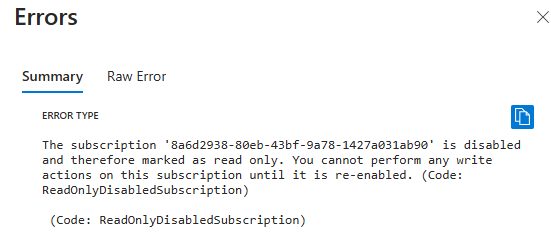
The status shows as disabled. Problem is now a new valid subscription has been added but I can’t move the resource groups from the old (and disabled) subscription to the new one because:

Error type

The subscription '8a6d2938-80eb-43bf-XXXX-142XXXX1ab90' is disabled and therefore marked as read only. You cannot perform any write actions on this subscription until it is re-enabled. (Code: ReadOnlyDisabledSubscription)
(Code: ReadOnlyDisabledSubscription)

In a nutshell the disabled subscription is now read only and I can’t shift resources if it is read write. That means I’d have to somehow re-enable it (typically converting it to PAYG), just to move to a new subscription.

So, the moral of this story seems to be, don’t let an Azure subscription expire and become disabled because migrating stuff out of it may not be possible!


CIAOPS Need to Know Microsoft 365 Webinar – March

laptop-eyes-technology-computer_thumb

Join me for the free monthly CIAOPS Need to Know webinar. Along with all the Microsoft Cloud news we’ll be taking a look at Purview (aka Compliance) in Microsoft 365.

Shortly after registering you should receive an automated email from Microsoft Teams confirming your registration, including all the event details as well as a calendar invite.

You can register for the regular monthly webinar here:

March Webinar Registrations

(If you are having issues with the above link copy and paste – https://bit.ly/n2k2503)

The details are:

CIAOPS Need to Know Webinar – March 2025
Friday 28th of March 2025
11.00am – 12.00am Sydney Time

All sessions are recorded and posted to the CIAOPS Academy.

The CIAOPS Need to Know Webinars are free to attend but if you want to receive the recording of the session you need to sign up as a CIAOPS patron which you can do here:

http://www.ciaopspatron.com

or purchase them individually at:

http://www.ciaopsacademy.com/

Also feel free at any stage to email me directly via director@ciaops.com with your webinar topic suggestions.

I’d also appreciate you sharing information about this webinar with anyone you feel may benefit from the session and I look forward to seeing you there.

CIA Brief 20250301

image

Disrupting a global cybercrime network abusing generative AI –

https://blogs.microsoft.com/on-the-issues/2025/02/27/disrupting-cybercrime-abusing-gen-ai/

Microsoft completes landmark EU Data Boundary, offering enhanced data residency and transparency –

https://blogs.microsoft.com/on-the-issues/2025/02/26/microsoft-completes-landmark-eu-data-boundary-offering-enhanced-data-residency-and-transparency/

Announcing Free, Unlimited Access to Think Deeper and Voice –

https://www.microsoft.com/en-us/microsoft-copilot/blog/2025/02/25/announcing-free-unlimited-access-to-think-deeper-and-voice/

Maximizing AI’s potential: Insights from Microsoft leaders on how to get the most from generative AI –

https://www.microsoft.com/en-us/microsoft-cloud/blog/2025/02/18/maximizing-ais-potential-insights-from-microsoft-leaders-on-how-to-get-the-most-from-generative-ai/

Move files to OneDrive –

https://www.youtube.com/watch?v=a2hq63Yfj3Y

Safeguarding AI against ‘jailbreaks’ and other prompt attacks –

https://news.microsoft.com/source/features/ai/safeguarding-ai-against-jailbreaks-and-other-prompt-attacks/

Focus on what matters most with Microsoft 365 Copilot –

https://www.youtube.com/watch?v=0-_xncOsEds

After hours

Gibberlink – https://www.youtube.com/watch?v=Z3yQHYNXPws

Editorial

If you found this valuable, the I’d appreciate a ‘like’ or perhaps a donation at https://ko-fi.com/ciaops. This helps me know that people enjoy what I have created and provides resources to allow me to create more content. If you have any feedback or suggestions around this, I’m all ears. You can also find me via email director@ciaops.com and on X (Twitter) at https://www.twitter.com/directorcia.

If you want to be part of a dedicated Microsoft Cloud community with information and interactions daily, then consider becoming a CIAOPS Patron – www.ciaopspatron.com.

Watch out for the next CIA Brief next week

A better KQL Query to report failed login by country

SigninLogs
| where ResultType != 0  // Non-successful sign-ins
| where TimeGenerated >= ago(30d)  // Last 30 days
| extend Country = tostring(LocationDetails.countryOrRegion)
| where Country != “AU”  // Exclude Australia
| summarize FailedLogins = count() by Country
| order by FailedLogins desc

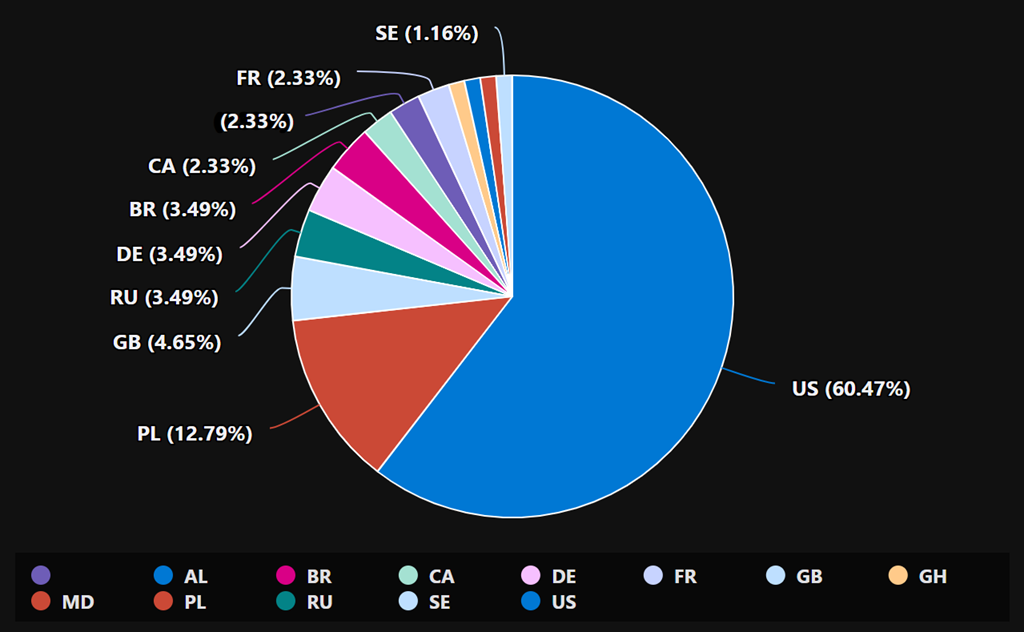
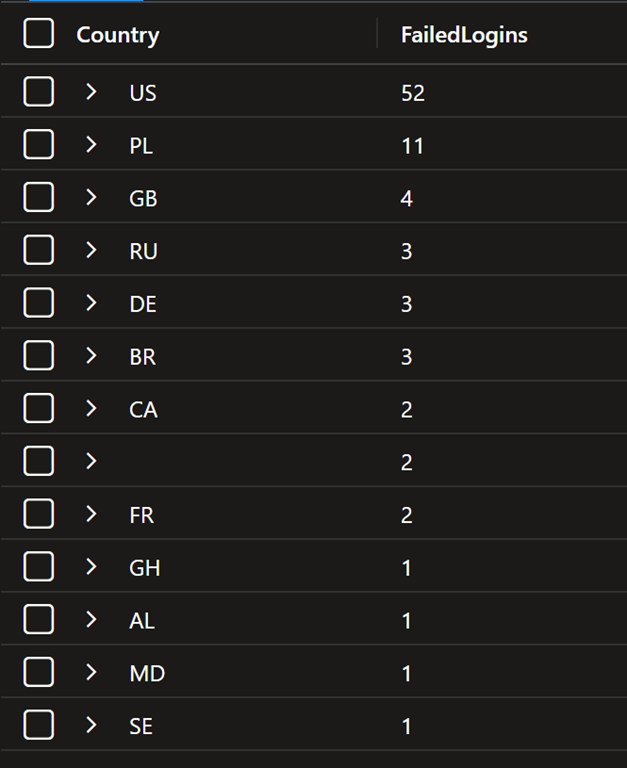
The above is an improved version of a KQL query you can use to report on failed logins to Entra ID over the past 30 days. It also excludes a country (here Australia) if desired.

image

image

The country codes are here:

https://en.wikipedia.org/wiki/ISO_3166-1_alpha-2

Note: if you copy and paste directly from here you will probably have the change the “ when you paste into your own environment as the wrong “ gets taken across!

Testing sensitive information types in Microsoft Purview

2025-02-25_07-45-21

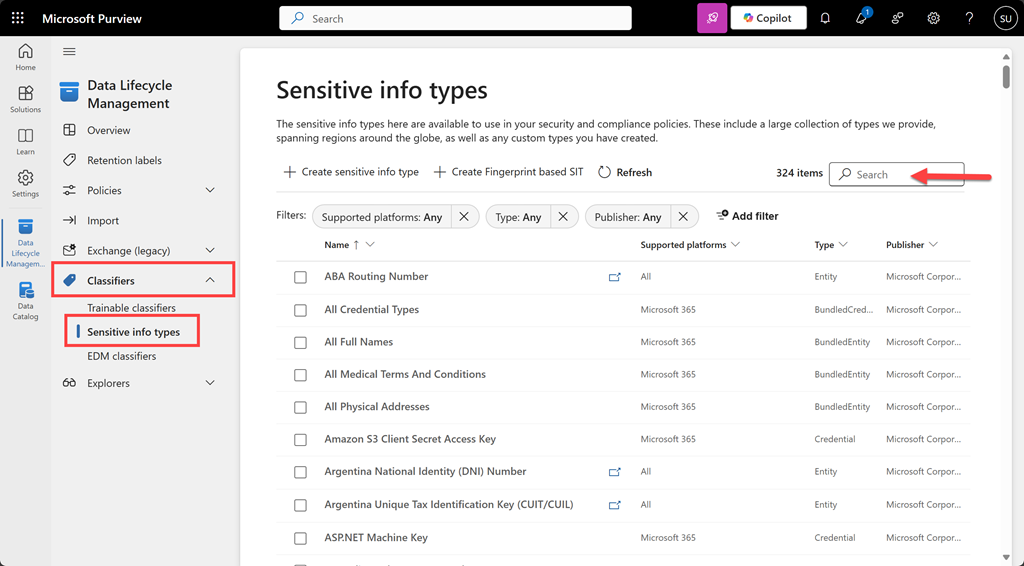
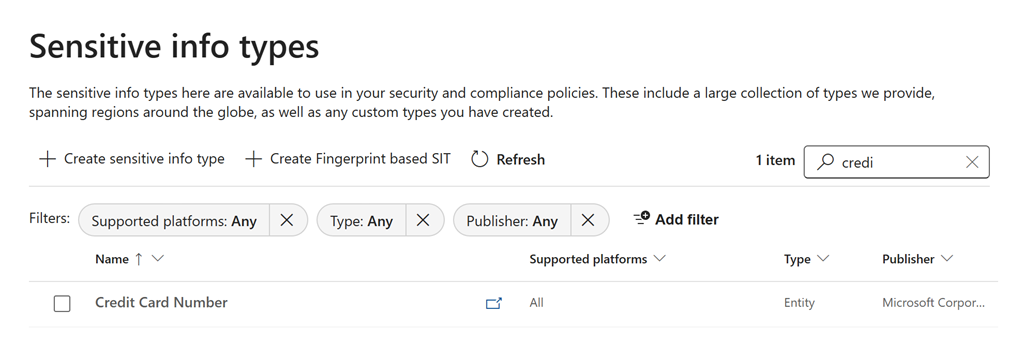
To test a file for a sensitivity type navigate to the Microsoft Purview portal. From the solutions icon on the left hand side select Data Lifecycle Management. Expand the Classifiers option from the menu and select Sensitive info types as shown above. You can search for the an item via a search in the top right.

image

Here, I’ll located Credit Card Number as shown above.

image

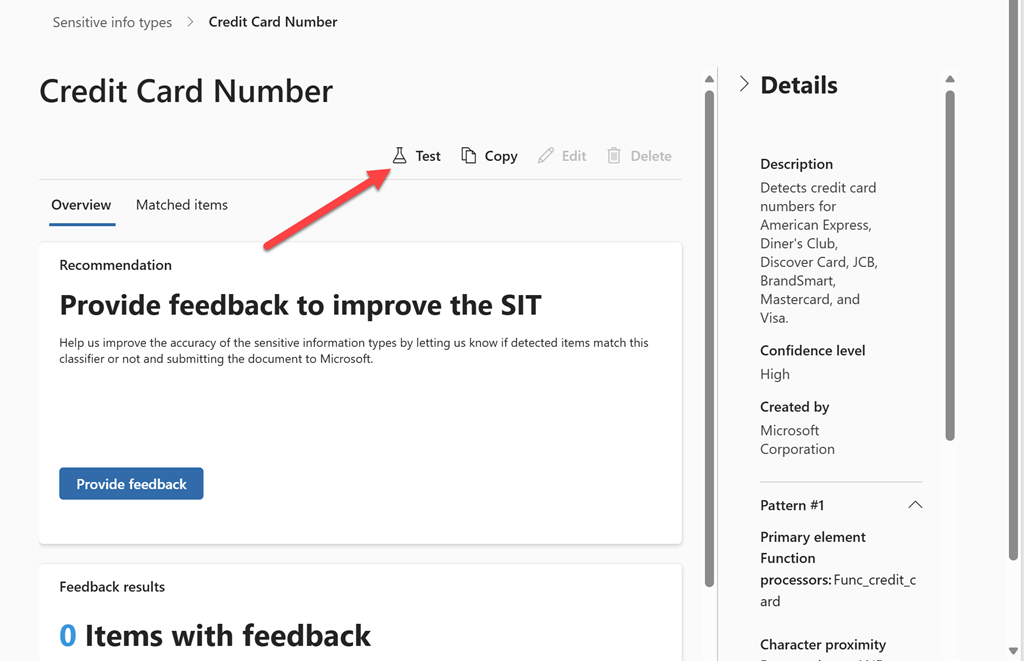
On the right hand side you will find a Test icon as indicated above.

image

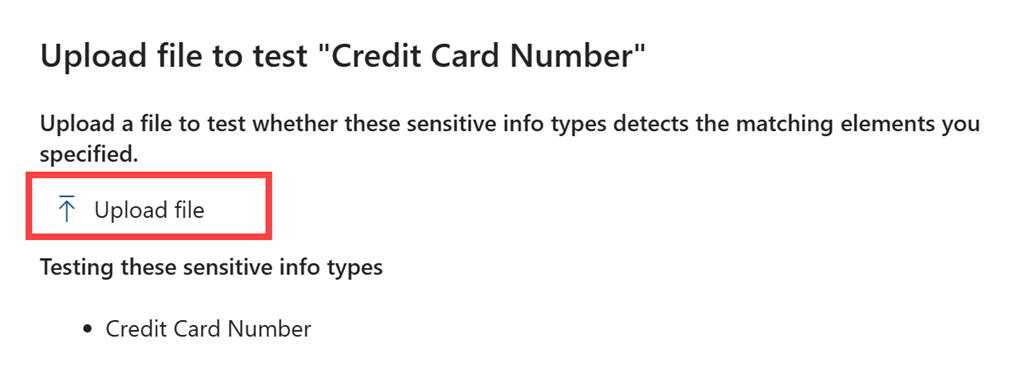
From the right will appear a window with an option to Upload file as shown above.

image

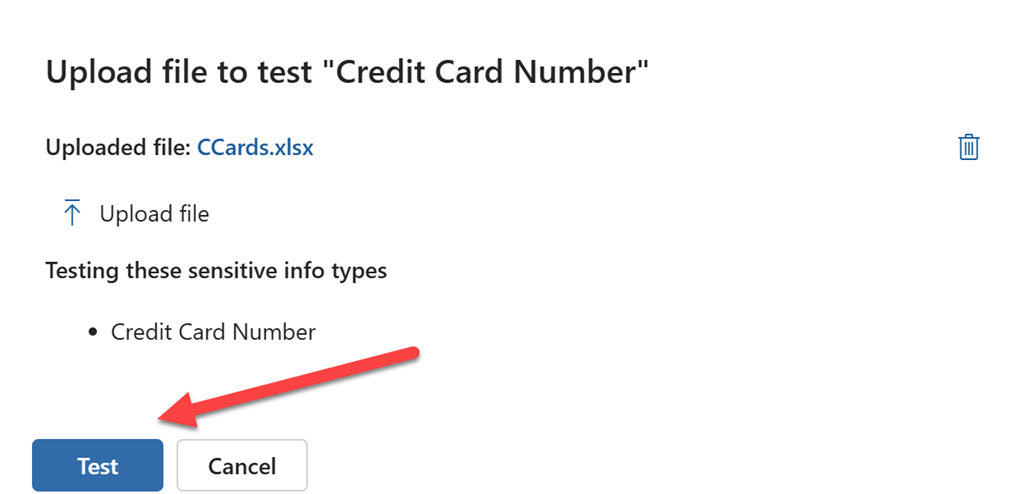
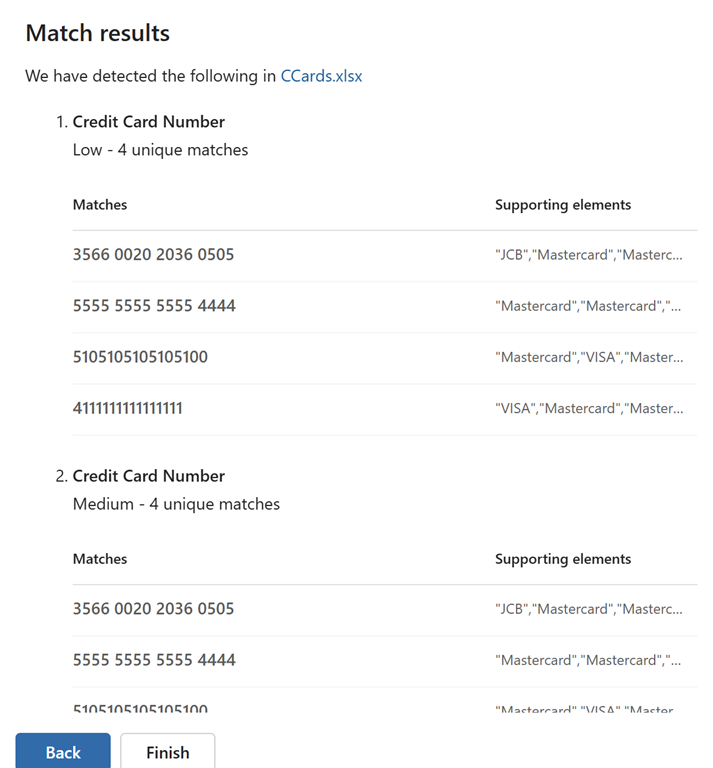
Once you have uploaded the file you wish to test, select the Test button at the bottom of the page as shown.

image

After a moment or two, you’ll see the results of the test as shown above.

This manual sensitive information testing process will allow you to verify whether your file content will be identified by services such as DLP in MIcrosoft Purview. This should make creating policies to ptotect your information easier.

Need to Know podcast–Episode 340

I take a look at something many overlook when it comes to security in their Microsoft 365 environment – Exposure score. In essence it is like a targeted Secure Score for a particular threat like Business Email Compromise. There is also news and updates from the Microsoft Cloud so listen along and review the show notes for more information.

Brought to you by www.ciaopspatron.com

you can listen directly to this episode at:

https://ciaops.podbean.com/e/episode-340-exposure-management/

Subscribe via iTunes at:

https://itunes.apple.com/au/podcast/ciaops-need-to-know-podcasts/id406891445?mt=2

or Spotify:

https://open.spotify.com/show/7ejj00cOuw8977GnnE2lPb

Don’t forget to give the show a rating as well as send me any feedback or suggestions you may have for the show.

Resources

@directorcia

Join my shared channel

CIAOPS merch store

Become a CIAOPS Patron

CIAOPS Blog

CIAOPS Brief

CIAOPSLabs

Support CIAOPS

The way to control EWS usage in Exchange Online is changing

New Microsoft-managed policies to raise your identity security posture

Storm-2372 conducts device code phishing campaign

Block malicious command lines with Microsoft Defender for Endpoint

Clipchamp: Elevating work communication with seamless video creation in Copilot

Sharing with Microsoft Whiteboard

AI agents at work: The new frontier in business automation

Copilot learning hub

New Certification for Microsoft information security administrators

What is Security Exposure Managenet?