One of the interesting things I find about Office 365 and the drive to get resellers and partners involved is the almost zero focus on the Small Business and Professional plan (P SKU). When you qualify as a Microsoft Cloud partner you get access to an Enterprise (E SKU) for testing and demonstration, which is great. However, the difference between the E plans and the P plan in my experience is vast. Now if you are an SMB reseller focused on installation up to 50 seats then the chances of you having to support P plans is pretty high. Unfortunately, as even I find myself, you can never quite sure of some of the ‘features’ (and importantly limitations) of these plans. This makes selling and supporting those plans difficult.
Now I have never really liked the P plans because I believe they are too limiting. Most customers may say they only care about price (which is a good thing about the P plans, they are cheap) but what typically happens is they later on down the track want the additional functionality offered by E plans (say, Form Services in SharePoint, Archiving in Exchange, or Office on their desktop). E plans have these options and more importantly can be scaled up or down to suit. Not so with the P plan. Once you are on a P plan you only get those features and nothing more. If you want to use the features of the E plan you have to migrate out of a P plan, delete it, and then migrate into an E plan. Painful stuff. This is why I advocate E plans everywhere, they simply provide more flexibility, which in my experience is the mainstay of what SMB customers need.
However, all that won’t prevent P plans being the main product sold to SMB’s. In fact reports are that 90% of Office 365 sales are made to SMB customers, and I’ll bet more than 50% of those sales are P plans. So no matter what happens P plans are here to stay and something most resellers and IT providers are going to know how to configure. Problem is they not been given access to a P SKU for their own use and that makes it hard to support when the differences are so marked.
A good example of this is configuring DNS. Now in the E plans you get to control your own DNS records as you would normally. However, in the P plan the ‘recommended’ method if to allow Office 365 to manage the DNS for you. This option to manage DNS is not available at all in the E plans.
The first step in the process for P plans is to create a TXT record in the DNS for the domain you wish to use with Office 365 P plans so that Office 365 can verify that you own that domain. This record is unique for each domain in Office 365. You login to your Office 365 portal as an admin and select Domains from under the Management section on the left.

You’ll then see a list of domains that this tenant of Office 365 uses (if any). Select the Add a domain option.

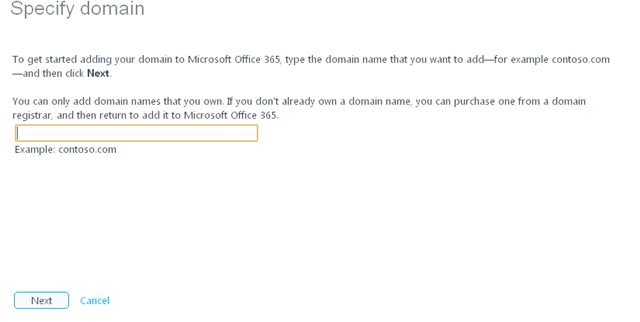
You’ll then be asked to enter the domain you wish to use.

Simply enter the domain and press Next.
You’ll then be asked to verify your domain.

You’ll see that you can pull down an option that will help you with setting up the required verification. In this case we’ll select General Instructions.

Here you will find the TXT record (or MX if you choose) that you need to insert into the DNS records of your domain. Once you have done that you need to press the Verify button so Office 365 can check that the required record is there for that domain and that domain. It is important to remember that when you change the DNS to add the required record it may take 72 hours for that to become available across the Internet.
This wait for verification can be very frustrating and I would recommend http://www.whatsmydns.net.
You enter in the domain you wish to check and the site will give your a report of whether the details for that domain appear in DNS servers around the globe. If it does then there is good chance Office 365 will be able to verify it.
Once the domain is verified you are requested to transfer the Name Server records for the domain to Office 365.

In this case it is asking for the Name Server to be changed to ns1.bdm.microsoftonline.com and ns2.bdm.microsoftonline.com. What Office 365 has done in the background is set up all the required Office 365 DNS records for you. Once the name server changes have filtered out to the Internet again you Office 365 should be operational.
If you return to your Domains area in Office 365 you’ll see that you can select a domain and then click Manage DNS. Again, this is only available with P Plans.

When you do so you’ll see a list of all the DNS records that existing in the Office 365 for that domain. They are basically all the records you’ll need to get Office 365 operational. If need be you can add DNS records but they can only be A or CNAME records, however that is for another blog post.
Now that is all well and good and to my knowledge at the time that was more or less the ‘only’ way that it could be done. For most resellers and IT providers that look after SMB customers they will want to manage the customers DNS records via their own DNS management tools. So their question was always ‘. How do we do this without using Office 365 DNS?’. My response was that it really couldn’t be done. However, as someone pointed out to me recently Microsoft has the following document that explains how to do set up DNS for P plans if you don’t want to use Office 365 DNS management.
http://onlinehelp.microsoft.com/en-us/office365-smallbusinesses/hh416759.aspx
In essence you go through that whole process but you merely duplicate the DNS records that Microsoft creates in the alternate DNS management tool and then point the Name Server records to the alternate DNS management tool and everything works fine.
So what is the downside to using an alternate DNS tool for the P Plans? According to the above document:
If you add your domain name to Office 365 without redirecting your name server records to Office 365, consider the following:
-
- SharePoint Online: If you enable SharePoint Online to host your public website, the DNS records that are required to route traffic to SharePoint Online won’t be created automatically by Office 365. You have to manually create those DNS records at your DNS provider, as described in this article, because Office 365 isn’t hosting the DNS records for your domain.
-
- Domains troubleshooting tool: Because you didn’t configure your name server records to point to Office 365 name servers, the Office 365 domains troubleshooting wizard will always report that your name server records are incorrect. You can disregard this warning because you have manually created the DNS records for each of your services.
-
- DNS manager: Microsoft Office 365 for professionals and small businesses provides DNS management tools that you can use to add custom DNS records. However, if you create, or have already created, custom records by using this tool, because the name server records for your domain don’t point to Office 365, the custom records won’t work. You must create, or recreate, any custom records by using your current DNS hosting provider.
-
- Future Office 365 updates: When we add new services to Office 365, we won’t be able to automatically add the DNS records that are required to enable the services to work on your domain. To use the services, you must manually add the DNS records at your DNS hosting provider.
Most IT reseller probably wouldn’t see this as a major downside as it gives them more control, however it is important to remember for P plans using an alternate DNS provider is not recommended.
To sum up then. You can host your DNS with an alternate provider on the P plans but it is not generally recommended and to my mind creates confusion as you have DNS records in Office 365 Domain Management as well as any alternate tool. Never good to have two sources of the same information. Knowing where the Name Server points in that case is VERY important.
My main point is that there ARE major differences between P and E plans and if you are selling and supporting them you really need to understand these differences. That is going to be especially hard in the case of the P plan because you don’t get a version you can play with as a Microsoft Cloud Partner by default. Given they are so cheap it is probably worthwhile going out and purchasing a copy for your own purposes. This something that I have had to do to get up to speed with the differences myself and I admit that I am still learning all of the nuances and will endeavour to detail them here for you as it goes along.
If you are selling Office 365 to SMB customers, P plans ARE very different from E plans in many, many ways. One of these is DNS which I have hopefully shed light on here.