Keeping tabs on Azure costs via email

A common concern that holds many back from using all the resources available in Azure is consumption billing aka being billed for what you use rather than a flat fee as you get with Microsoft 365 services.

Here’s a way to keep an eye on those costs daily via email.

Firstly, login to the Azure portal as an administrator and then navigate to Cost Management + Billing. Next, you want to set up the report that you want to see daily.

Screenshot 2025-01-19 094010

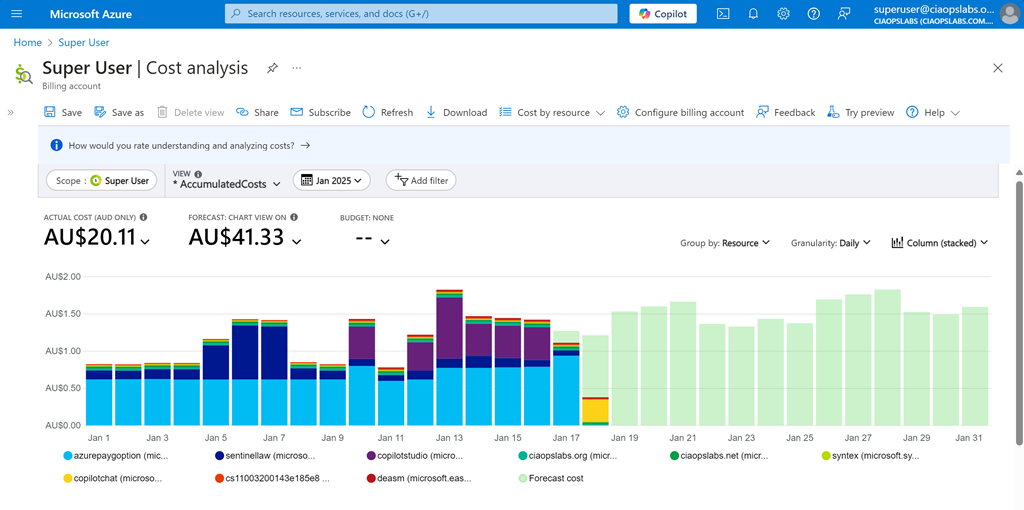
For me I want to see Cost Analysis for the current monthly with accumulated costs, grouped by resource, granularity daily and as a stacked column as shown above. When you have it the way you want select the Save option on the menu at the top of the page.

Screenshot 2025-01-19 095243

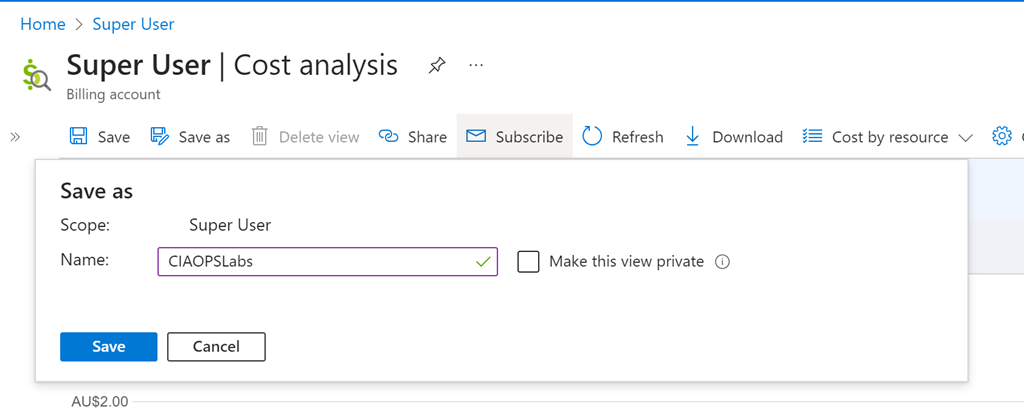
You’ll be asked for a name, as you see above. Select Save when complete. 

Screenshot 2025-01-19 095532

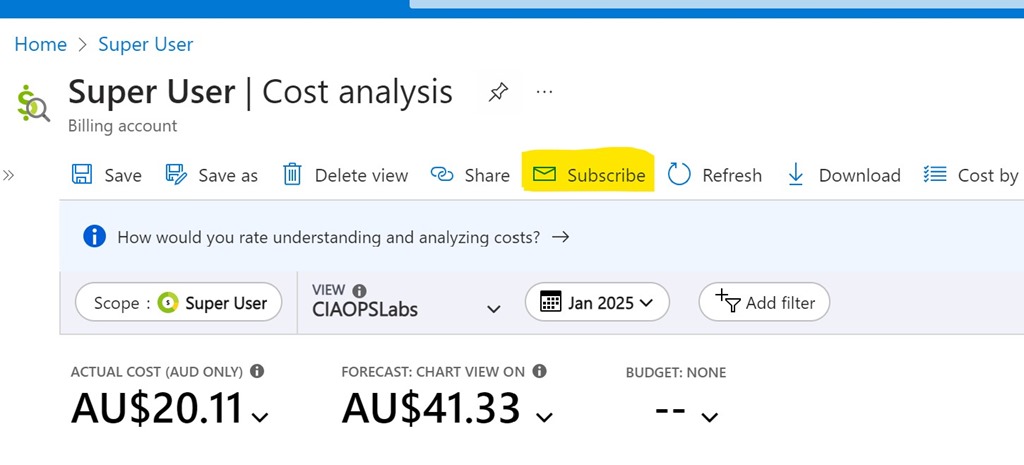
Also on the menu at the top, now select Subscribe as shown above.

Screenshot 2025-01-19 095742

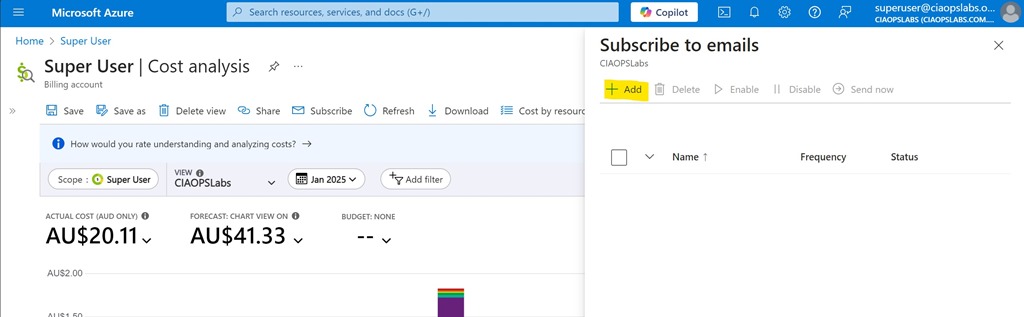
Select the Add option from the Subscribe to emails option that appears on the right as shown above.

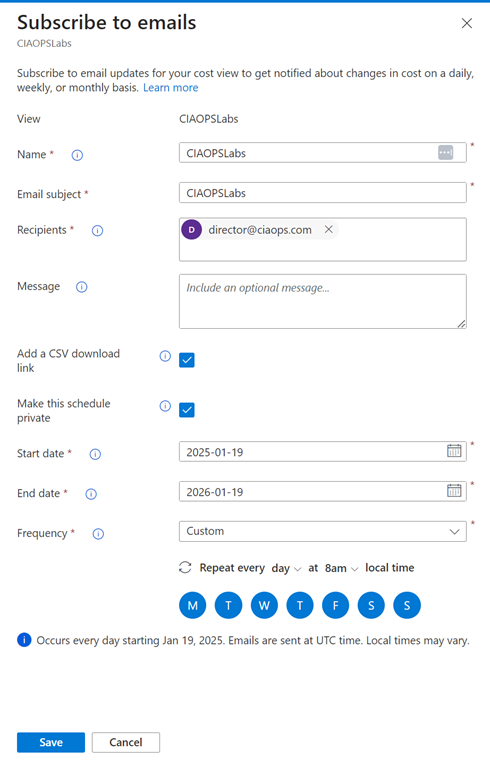
Screenshot 2025-01-19 100019

You should see the View you just saved at the top. Now complete the rest of the fields as desired. Personally, I select the option to include a CSV and want the report every day. The only challenge is that you can only specify a maximum end date 12 months out from the day you configure this. You’ll need to return annually to update this.

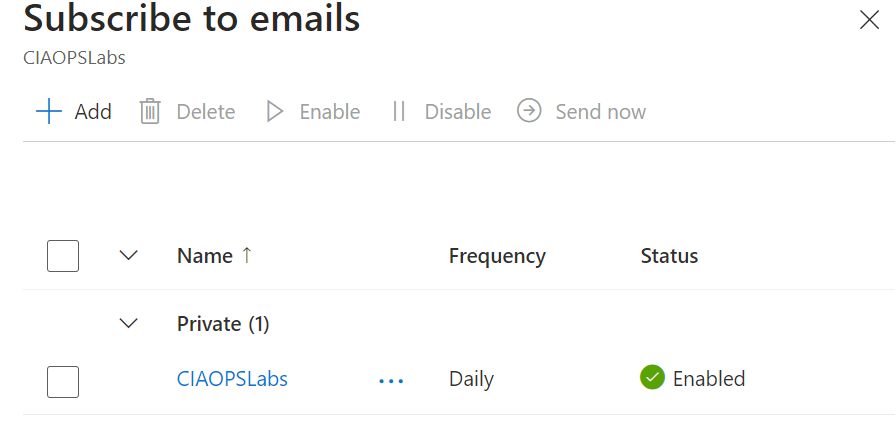
Screenshot 2025-01-19 100354

Select Save at the bottom of screen and you should now see your configuration listed as shown above.

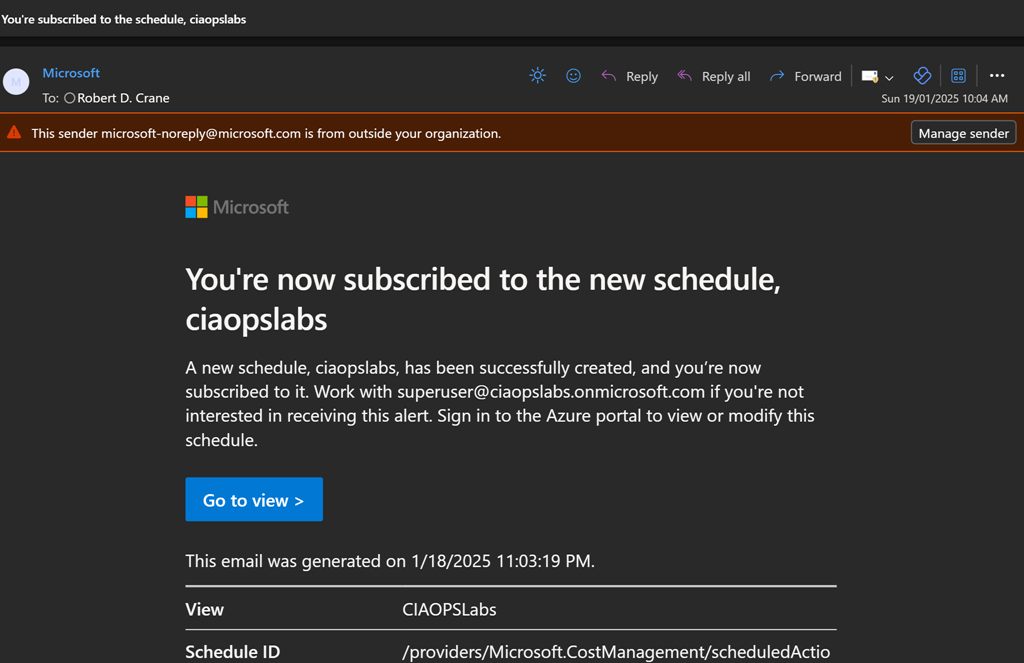
Screenshot 2025-01-19 100809

You’ll get a summary email confirming these settings as shown above.

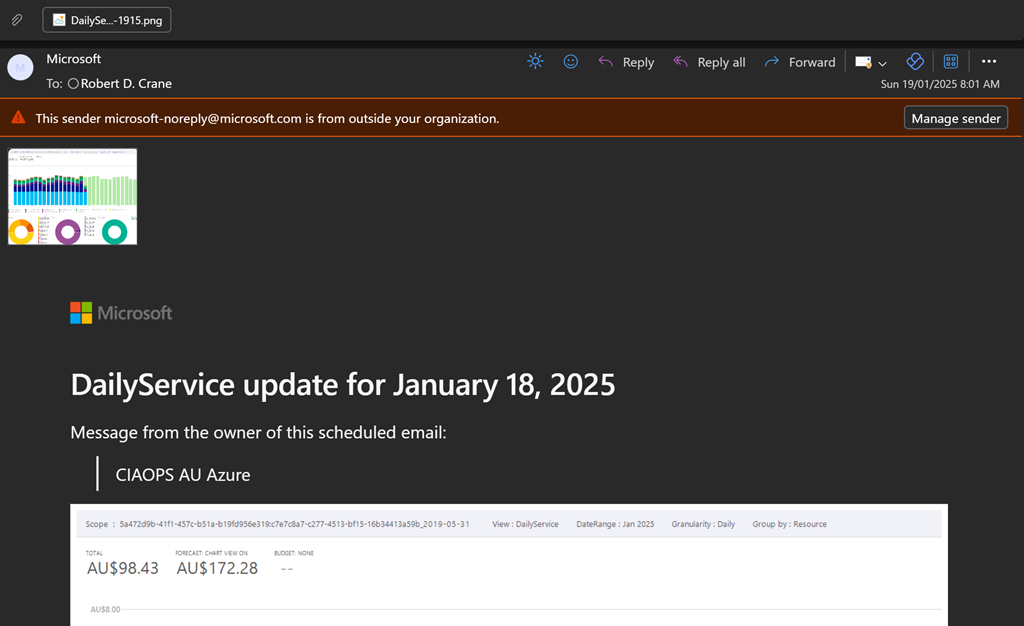
Screenshot 2025-01-19 100531

You should now start receiving a summary email on at the frequency your selected as shown above. You’ll see a screen shot of the report and a CSV attachment if you elected to include that.

Hopefully, this option provides greater piece of mind when it comes to monitoring costs with Azure. Remember, you can create as many subscription reports as you want to see a range of different details if desired.

CIA Brief 20250118

image

Take action by February 1: Azure AD Graph is retiring –

https://techcommunity.microsoft.com/blog/identity/take-action-by-february-1-azure-ad-graph-is-retiring/4365743

Copilot for all: Announcing Microsoft 365 Copilot Chat –

https://www.youtube.com/watch?v=K1h77wRwkb0

New Star Blizzard spear-phishing campaign targets WhatsApp accounts –

https://www.microsoft.com/en-us/security/blog/2025/01/16/new-star-blizzard-spear-phishing-campaign-targets-whatsapp-accounts/

Microsoft 365 Copilot Chat and Agent Starter Kit –

https://techcommunity.microsoft.com/blog/Microsoft365CopilotBlog/microsoft-365-copilot-chat-and-agent-starter-kit/4366245

Microsoft 365 Copilot Chat – Enterprise-ready web chat demo –

https://www.youtube.com/watch?v=ElcsGanlvRI

Microsoft 365 Copilot Chat – Manage agents demo –

https://www.youtube.com/watch?v=jMCn0-ZCHOM

Enabling agents in Microsoft 365 Copilot Chat –

https://www.microsoft.com/en-us/microsoft-copilot/blog/copilot-studio/enabling-agents-in-microsoft-365-copilot-chat/

I tried Microsoft Loop and here’s why I’m never going back to traditional productivity tools –

https://www.androidpolice.com/tried-microsoft-loop-never-going-back-to-old-tools/

New block screen capture for iOS/iPadOS MAM protected apps –

https://techcommunity.microsoft.com/blog/intunecustomersuccess/new-block-screen-capture-for-iosipados-mam-protected-apps/4366312

Customize the location of notifications in Teams –

https://techcommunity.microsoft.com/blog/Microsoft365InsiderBlog/customize-the-location-of-notifications-in-teams/4366056

Introducing Microsoft 365 Copilot Chat –

https://www.youtube.com/watch?v=rc-fc7pT9nw

Innovating in line with the European Union’s AI Act –

https://blogs.microsoft.com/on-the-issues/2025/01/15/innovating-in-line-with-the-european-unions-ai-act/

The First Purview AMA of 2025 is Now On-Demand –

https://techcommunity.microsoft.com/blog/azurepurviewblog/the-first-purview-ama-of-2025-is-now-on-demand/4365780

Windows 11 tips edition – January 2025 –

https://www.youtube.com/watch?v=gei0otVeueA

Step-by-Step Guide : How to use Temporary Access Pass (TAP) with internal guest users –

https://techcommunity.microsoft.com/blog/itopstalkblog/step-by-step-guide–how-to-use-temporary-access-pass-tap-with-internal-guest-use/4365541

Introducing Core AI – Platform and Tools –

https://blogs.microsoft.com/blog/2025/01/13/introducing-core-ai-platform-and-tools/

Analyzing CVE-2024-44243, a macOS System Integrity Protection bypass through kernel extensions –

https://www.microsoft.com/en-us/security/blog/2025/01/13/analyzing-cve-2024-44243-a-macos-system-integrity-protection-bypass-through-kernel-extensions/

3 takeaways from red teaming 100 generative AI products –

https://www.microsoft.com/en-us/security/blog/2025/01/13/3-takeaways-from-red-teaming-100-generative-ai-products/

AI Companions Will Change Our Lives –

https://time.com/collection/time100-voices/7204530/ai-companions/

Pop out Chat, Copilot, and Notes panes in Teams meetings –

https://techcommunity.microsoft.com/blog/Microsoft365InsiderBlog/pop-out-chat-copilot-and-notes-panes-in-teams-meetings/4365708

After hours

Starship launch and Super Heavy landing, 16 January 2025 – https://www.youtube.com/watch?v=v_4oS_M_0cc

Editorial

If you found this valuable, the I’d appreciate a ‘like’ or perhaps a donation at https://ko-fi.com/ciaops. This helps me know that people enjoy what I have created and provides resources to allow me to create more content. If you have any feedback or suggestions around this, I’m all ears. You can also find me via email director@ciaops.com and on X (Twitter) at https://www.twitter.com/directorcia.

If you want to be part of a dedicated Microsoft Cloud community with information and interactions daily, then consider becoming a CIAOPS Patron – www.ciaopspatron.com.

Watch out for the next CIA Brief next week

Checking your environment for oversharing

Microsoft now provides the ability to check yoru environment for oversharing my running a data assessment report which you’ll find in DSPM for AI inside Microsoft Purview.

Here’s my video to get you started:

https://www.youtube.com/watch?v=aVUQ6PGnMmE

some documentation to help is here:

Get started with Data Security Posture Management

Hopefully, the reporting will become more details and allow you to take direct action on individual items that are reported. However, for now, it is a handy report to have in your bag of tricks.

Why can’t I delete a Power Platform PAYG billing plan?

*** Update 5 Feb 2025: Delete billing plan is now available. Developers were working on the back end causing the issue.

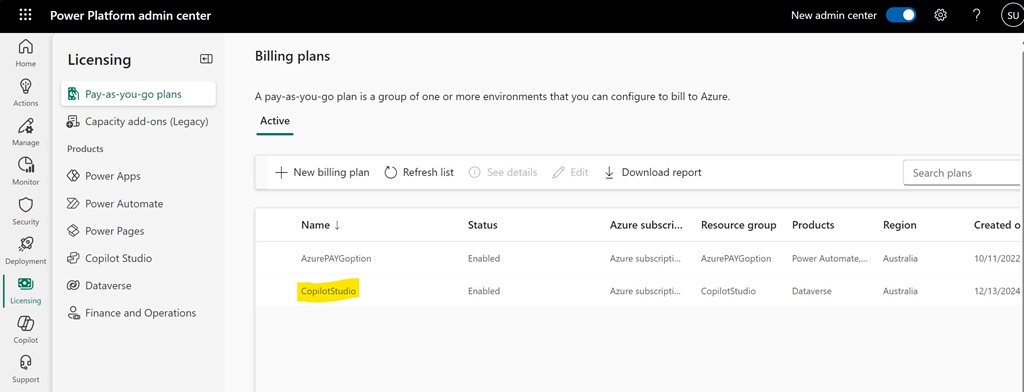
Screenshot 2025-01-17 154952

I want to delete the Power Platform PAYG Billing plan called CopilotStudio as seen above.

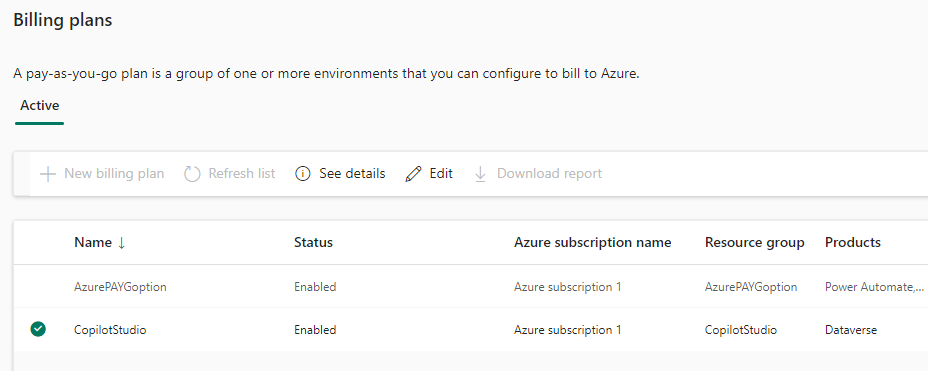
Screenshot 2025-01-17 155309

If I select the pla, as shown above, the the options See details and Edit are available only.

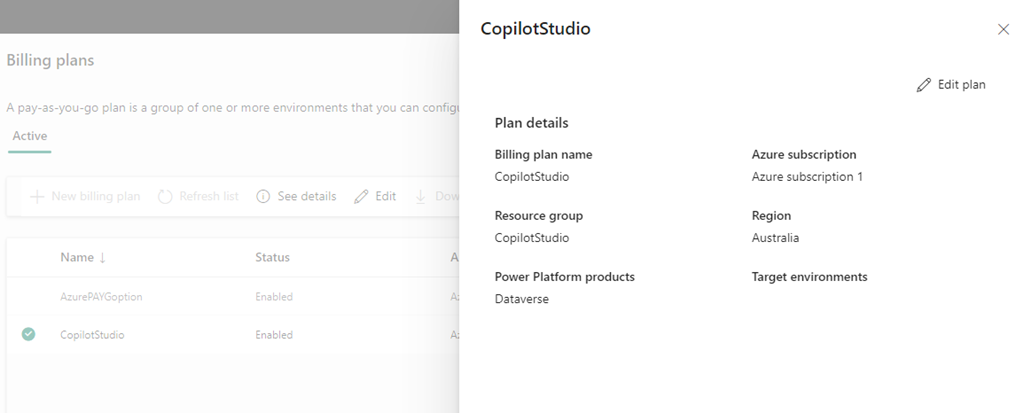
Screenshot 2025-01-17 155502

If I Select See details the above information is shown but with no delete option.

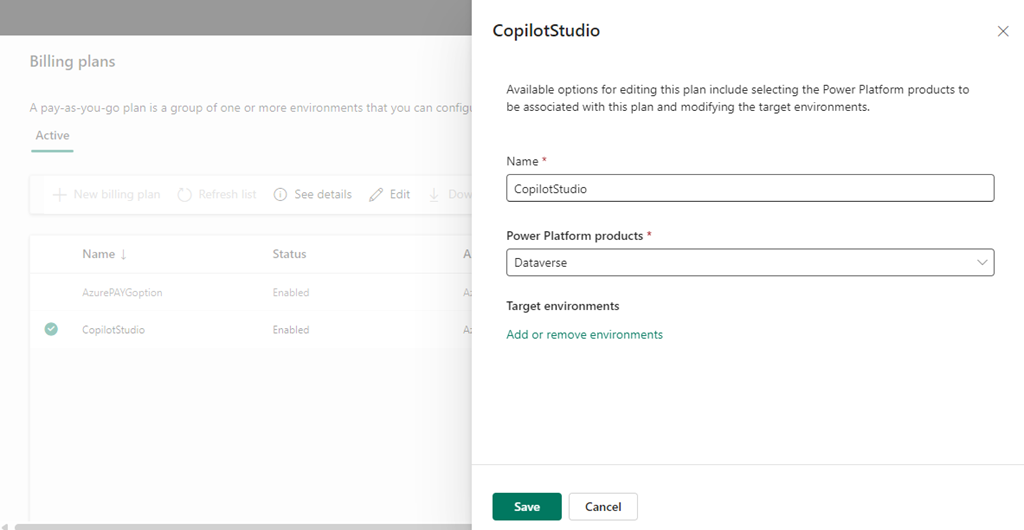
Screenshot 2025-01-17 155808

Selecting Edit plan displays the above, again with no Delete option.

The billing plan has no environments inside it.

Originally, the PAYG Billing plan was tied to an Azure Resource Group that has also now been removed. Yet, the billing plan remains?

Where is the delete option? Anyone know?

New mailbox logging settings

Screenshot 2025-01-16 165155

CISA released a Microsoft Expanded Cloud Logs Implementation Playbook that I recommend Microsoft 365 administrators take a look at.

“This playbook provides an overview of the newly introduced logs in Microsoft Purview Audit (Standard), which enable organizations to conduct forensic and compliance investigations by accessing critical events, such as mail items accessed, mail items sent, and user searches in SharePoint Online and Exchange Online. In addition, the playbook also discusses significant events in other M365 services such as Teams. Lastly, administration/enabling actions and ingestion of these logs to Microsoft Sentinel and Splunk Security Information and Event Management (SIEM) systems are covered in detail.”

“Default enablement is defined at a license level. For example, Auditing (Standard or Premium) is enabled by default for E3/E5/G3/G5 licenses. Some licenses, such as M365 Business Basic, M365 Business Standard, M365 Business Premium, and trial license accounts do provide access to Audit but do not currently have auditing enabled by default. These licenses will have Audit enabled by default in the future. If you are leveraging one of these license types, the steps below can be utilized to ensure that all audit features are enabled.”

Thus, if you are using ANY Microsoft 365 license in my books you want to ensure all the logging available to you is enabled for all user, regardless of Microsoft does.

The playbook will take you what needs to be done. Most of it relates to:

Mailbox actions for user mailboxes and shared mailboxes

with the most important being around the MailItemsAccessed setting, but there are others.

The most important thing to remember is that most of these settings cannot be set in the web portal and can only be set using PowerShell commands like:

Set-Mailbox – @{Add=“SearchQueryInitiated”}

Apart from these settings the playbook has lots of additional handy information that will help with the security of your Microsoft 365 environment and this makes it a recommended read for all administrators.

Need to Know podcast–Episode 337

Welcome to 2025. Thanks so much for listening. A couple of ‘summary’ or ‘annual’ blog posts that are worth taking a look at. I also do some annual posts on my blog around what I used over the previous year if you wanted to know. I also share how I capture and work with information on a daily and the tools I use to achieve this. Let me know what works for you.

Brought to you by www.ciaopspatron.com

You can listen directly to this episode at:

https://ciaops.podbean.com/e/tools-of-the-workday/

Subscribe via iTunes at:

https://itunes.apple.com/au/podcast/ciaops-need-to-know-podcasts/id406891445?mt=2

or Spotify:

https://open.spotify.com/show/7ejj00cOuw8977GnnE2lPb

Don’t forget to give the show a rating as well as send me any feedback or suggestions you may have for the show.

Resources

@directorcia

Join my shared channel

CIAOPS merch store

Become a CIAOPS Patron

CIAOPS Blog

CIAOPS Brief

CIAOPSLabs

Support CIAOPS

The transition to the new Outlook will begin on January 1, 2025

Action Pack goes away

Microsoft OneNote, a year in review: AI innovation and enhanced creativity

Build custom email security reports and dashboards with workbooks in Microsoft Sentinel

6 AI trends you’ll see more of in 2025

CES 2025: The year of the Windows 11 PC refresh

SharePoint Roadmap Pitstop December 2024

Microsoft Entra: Top 50 features of 2024

Get ready for the new year with Microsoft 365

Pocket

CIAOPS OneNote Daybook template

CIA Brief 20250111

image

What is Microsoft Security Copilot? –

https://www.youtube.com/watch?v=xmpyimizs-s

Microsoft OneNote, a year in review: AI innovation and enhanced creativity – https://techcommunity.microsoft.com/blog/Microsoft365InsiderBlog/microsoft-onenote-a-year-in-review-ai-innovation-and-enhanced-creativity/4363833

Build custom email security reports and dashboards with workbooks in Microsoft Sentinel – https://techcommunity.microsoft.com/blog/microsoftdefenderforoffice365blog/build-custom-email-security-reports-and-dashboards-with-workbooks-in-microsoft-s/4352242

Co-author a document in Microsoft 365 –

https://www.youtube.com/watch?v=S-5UGuQnD0g

Unified coverage management across SIEM and XDR in SOC optimization –

https://techcommunity.microsoft.com/blog/microsoftsentinelblog/unified-coverage-management-across-siem-and-xdr-in-soc-optimization/4363810

Choose a breakout room as a Teams meeting participant –

https://techcommunity.microsoft.com/blog/microsoft365insiderblog/choose-a-breakout-room-as-a-teams-meeting-participant/4363955

Exciting News: Microsoft Defender for Endpoint Extends Support to ARM-Based Linux Servers –

https://techcommunity.microsoft.com/blog/microsoftdefenderatpblog/exciting-news-microsoft-defender-for-endpoint-extends-support-to-arm-based-linux/4364066

6 AI trends you’ll see more of in 2025 –

https://news.microsoft.com/source/features/ai/6-ai-trends-youll-see-more-of-in-2025/

Achieve more with AI you can trust –

https://www.youtube.com/watch?v=9mu0aXee6FE

Automate the employee identity lifecycle with Microsoft Entra ID Governance –

https://www.youtube.com/watch?v=mX-j7lC2L3A

Microsoft announces US $3bn investment over two years in India cloud and AI infrastructure to accelerate adoption of AI, skilling and innovation –

https://news.microsoft.com/en-in/microsoft-announces-us-3bn-investment-over-two-years-in-india-cloud-and-ai-infrastructure-to-accelerate-adoption-of-ai-skilling-and-innovation/

Why security teams rely on Microsoft Defender Experts for XDR for managed detection and response –

https://www.microsoft.com/en-us/security/blog/2025/01/06/why-security-teams-rely-on-microsoft-defender-experts-for-xdr-for-managed-detection-and-response/

Considerations for risk identification and prioritization in Defender for Cloud –

https://techcommunity.microsoft.com/blog/microsoftdefendercloudblog/considerations-for-risk-identification-and-prioritization-in-defender-for-cloud/4359616

CES 2025: Advancing the future of automotive and mobility –

https://www.microsoft.com/en-us/industry/blog/manufacturing-and-mobility/2025/01/07/ces-2025-advancing-the-future-of-automotive-and-mobility/

Amedisys clinicians provide better home care with mobile devices managed by Microsoft Endpoint Manager –

https://www.microsoft.com/en/customers/story/1429868843053987347-amedisys-health-provider-microsoft-endpoint-manager

Access your new apps in Microsoft 365 –

https://www.youtube.com/watch?v=s-TuVtwgKAM

CES 2025: The year of the Windows 11 PC refresh –

https://blogs.windows.com/windowsexperience/2025/01/06/ces-2025-the-year-of-the-windows-11-pc-refresh/

SharePoint Roadmap Pitstop December 2024 –

https://techcommunity.microsoft.com/blog/spblog/sharepoint-roadmap-pitstop-december-2024/4361689

Microsoft Entra: Top 50 features of 2024 –

https://techcommunity.microsoft.com/blog/identity/microsoft-entra-top-50-features-of-2024/4352584

After hours

Scott & Mark Learn To… Find Joy in Hobbies – https://www.youtube.com/watch?v=Ypcog_lv0DA

Editorial

If you found this valuable, the I’d appreciate a ‘like’ or perhaps a donation at https://ko-fi.com/ciaops. This helps me know that people enjoy what I have created and provides resources to allow me to create more content. If you have any feedback or suggestions around this, I’m all ears. You can also find me via email director@ciaops.com and on X (Twitter) at https://www.twitter.com/directorcia.

If you want to be part of a dedicated Microsoft Cloud community with information and interactions daily, then consider becoming a CIAOPS Patron – www.ciaopspatron.com.

Watch out for the next CIA Brief next week

The missed SMB AI opportunity

This is a follow to my article:

Talent versus Skill

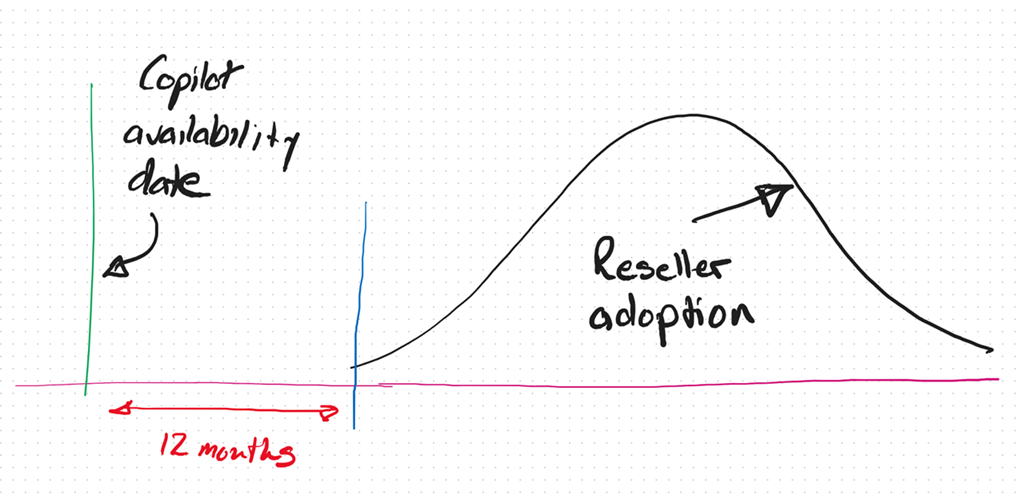
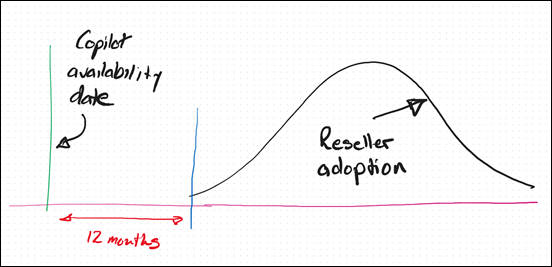
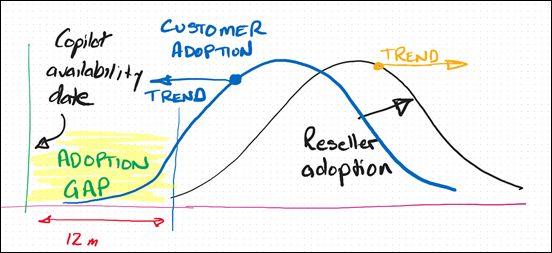
As we now approach the 12 month anniversary of when Microsoft 365 Coplot was available widely in SMB (16 January 2024), I thought I’d reflect on what I see in the market.
image

It is my experience that only now, 12 months after the release of Microsoft 365 Copilot, are the most progressive resellers and MSPs orientating themselves to understand and make AI part of their business and what they offer to their customers. This means even the most progressive are already at least 12 months behind.

As I have said previously, I see the reaction to Ai from SMB IT Professionals and MSPs much like what happened with the move to the cloud. In short, that cynicism at best and denial at worst, seems to have again reappeared.

If you simply look at the business opportunity presented by AI it is hard for me to grasp why more IT Professionals and MSPs are not taking advantage of this unique opportunity for their business.
image

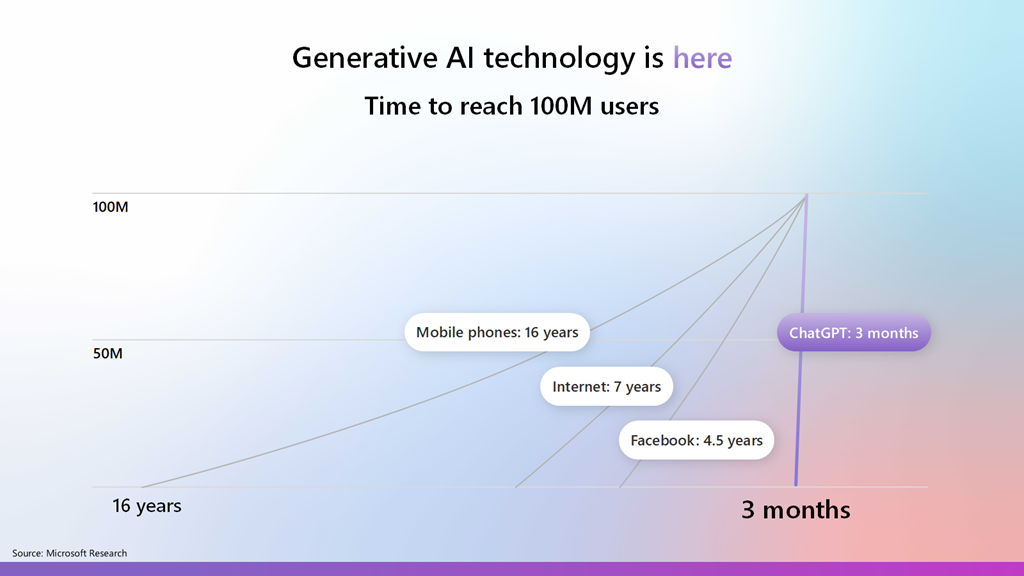
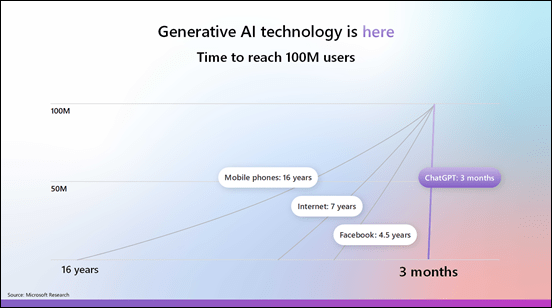
Most commentators agree that AI is one of the fastest adopted technologies in history and is now widely in use by individuals and business, because it part it is so easy to use. This explosive growth and penetration represents business opportunity that many IT Professionals and MSPs are well positioned to take advantage of, yet there seems to a hesitancy like there was moving to the cloud.
image

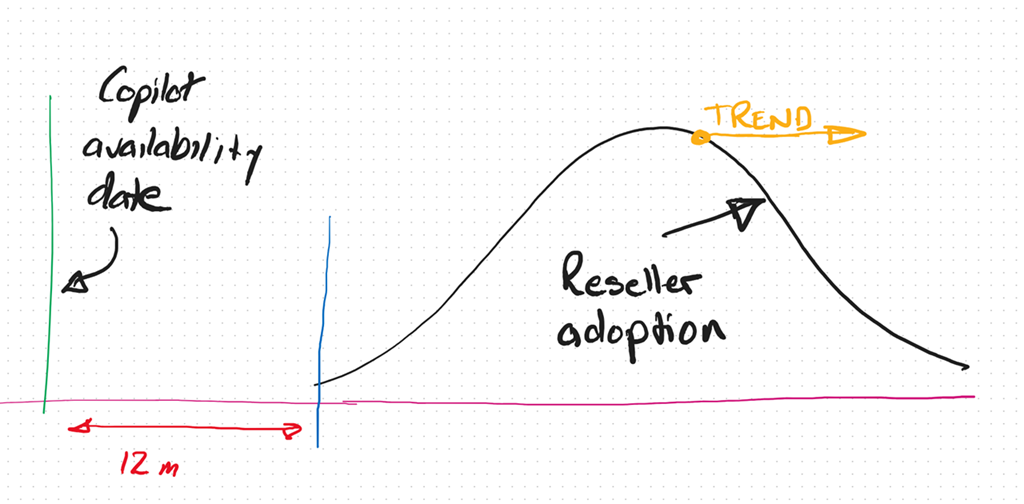
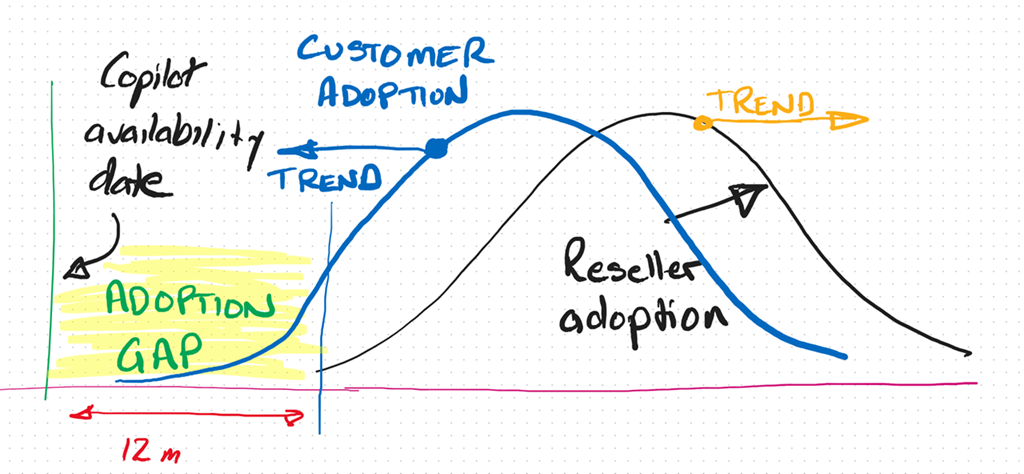
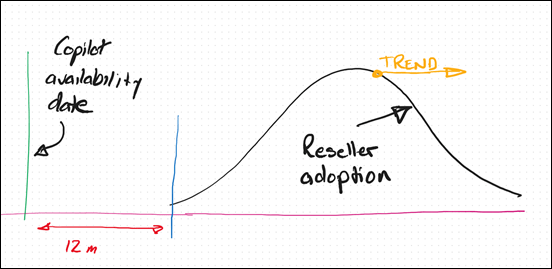
In fact, I see the IT Professional and MSP adoption curve with AI trending more and more away from adoption and integration into their businesses. To be brutally honest, the peak in that Reseller adoption curve, in my books, is at least 3 – 5 years behind already.

image

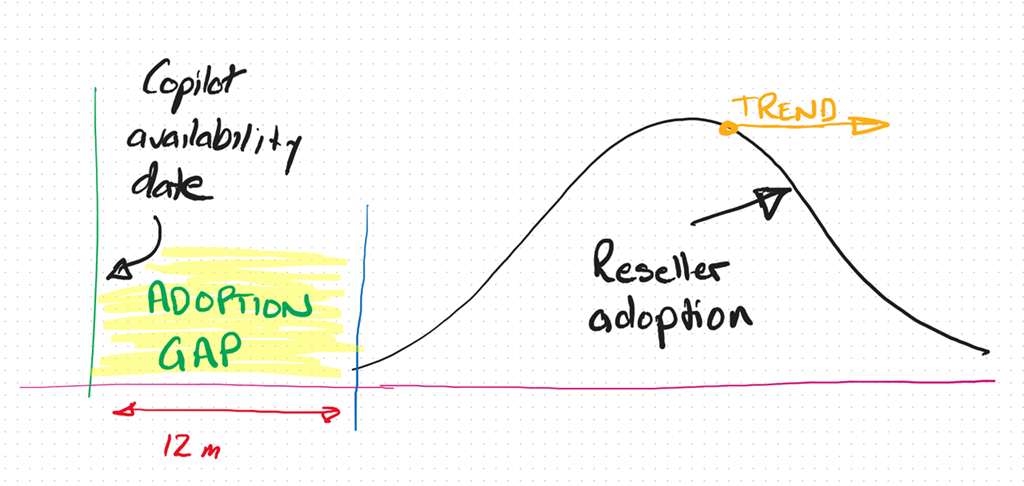
Thus, the adoption gap continues to increase. So too the opportunity.
image

Alternatively, if you look at the customer trends, you find they are adopting AI much faster and looking to integrate into their business to remain competitive. The net result is that customers and their IT providers are trending in opposite directions when it comes to adopting AI from what I see.

Any new technology requires re-tooling and an investment in knowledge. Both of these don’t magically just appear inside a business or an individual, they require a dedicated approach to integrating these as well as some work. From what I see, customers are prepared to do this work because they see the business benefits but most IT Providers don’t. To me, that represents a huge risk that many incumbent IT providers wil miss out on the opportunity that the AI wave presents. The worst case scenario is that customers will ‘do it themselves’ with any need of an IT Provider.

At its core I believe the mismatch I’m seeing is the result of the incumbent MSP model being ‘reactive’. That is, waiting until something breaks and then fix it. It is like the fire brigade that waits until the bell rings and then goes to put out the fire. I think we are shifting to work where more consideration has to be given to a proactive approach to solving business needs before they arise rather than waiting for them to happen and reacting. To many technology providers AI represents something that will ‘break’ the status quo and that is not something they desire.

A reactive business I would suggest is not appropriate in the age of AI. Why? Because Ai doesn’t break, doesn’t need configuring, doesn’t require on going maintenance, password resets, etc. The age of AI is all about software and creators not mechanics as most IT Providers are. The reality now is that you don’t need to be an ‘expert’ in your field, even when it comes technology. Many people, when augmented with Ai can perform a lot more tasks and topics than they ever could. The agent that I have built with Copilot Studio and publish into Teams to answer technical questions continues to amaze me daily with the quality of answers while reducing my need to do that manually. Why hasn’t every MSP implemented something like that in their business already? The tools are there to get more value from the knowledge in their business, make their lives easier and business more profitable.

Another factor I see is one of demographics. Most small MSPs are run by what you might euphemistically call ‘industry veterans’, meaning they have been doing what they do for a long time. This ‘time in business’ tends towards an inertia and a hesitancy to embrace or enthusiastically embrace change. The pace of technology change is increasing, not decreasing and that requires adaptation to the ever changing environment. This will always be challenging when the trend is to inertia.

A common approach with many SMB IT Providers is their belief that they have to do it all. Whether than belief comes from a desire for revenue or fear of competition, it is not something that is really possible in today’s diverse environment. Like ever other business, an IT provider runs a BUSINESS and the primary goal of any business is to make a profit to provide the freedom to grow, enjoy, help others, etc. Any business needs to make business decisions about what they do to generate revenue in their business. Sometimes, these business decisions are not easy. Generally, these decisions will also involve some form of risk. But, they need to be made for the business to succeed.

The simplest metric for making these decisions is profit. Will this decision generate my business more profit than this decision? Is the question du jour. This undoubtably means leaving somethings on the tables as well as abandoning others as time changes. To wit:

“You can’t do today’s job with yesterday’s methods and be in business tomorrow” – George W. Bush

The position that any business (or individual) is in today is a product of the choices they have made over time. Future success, thus, will also be a product of choices made now and into the future. All decisions come with a cost, the best choice for a business is the one which has the least risk and most profit opportunity?

Over many years, and having been through a few new technology cycles, I have learned that sometimes you can lead a horse to water but you can’t make them drink. Sometimes, inertia is too powerful and change doesn’t happen no matter how much you try. A better use of effort is with those that want the opportunity change brings. The good news for those select few is that, thanks to inertia, your competition is much smaller than it probably is in existing business models.

I am not suggesting that you throw the baby out with the bathwater here when it comes to AI and wholesale abandon business models that are currently profitable. What I am suggesting is to look to the future and see where the ‘ball is going’ and be there to meet it. Today, that only takes a small investment but overtime that investment will become larger and larger just to get onboard. As have highlighted with something like Bitcoin, a small investment early would today reap substantial rewards. You would never go all in, but a few hundred dollars back in the early days when most people scoffed at blockchain technology would certain see you having the last laugh now.

This AI stuff is, by all accounts, moving faster than any previous technology, which means the risks of getting left behind are much greater. It seems clear that Ai is going to have a major impact in all businesses, including small business. All businesses are looking to skilled providers to assist them with understanding and adopting AI. The good news I see for the very few SMB IT providers who ‘get’ Ai and integrating it into their business, is that there little competition now and into the foreseeable future. In an environment with increasing demand your chances of profitability are extremely high. It just takes a small amount of effort to overcome the effects of inertia and ride the coat tails of what certainly will be the next great wave in technology.