Passkeys in Microsoft Entra ID (formerly Azure Active Directory)

image

What are Passkeys?


At their core, Passkeys are a modern, highly secure, and user-friendly replacement for passwords. They are built upon the WebAuthn (Web Authentication) standard and the FIDO Alliance’s Client to Authenticator Protocol (CTAP).


Think of them as the next evolution of FIDO2 security keys, but designed for broader usability and syncing across devices.


Instead of a user remembering a secret (password), a Passkey relies on public-key cryptography:

Key Pair Generation:


  • Private Key: Stored securely on your device within a secure element. The private key never leaves your device.

  • Public Key: Sent to and stored by the service (Entra ID) and associated with your user account.

Authentication:


  • Entra ID sends a challenge to your browser/OS.

  • Your browser/OS prompts you to use your Passkey.

  • You unlock the private key using your device’s screen lock method (e.g., Face ID, Windows Hello).

  • The device signs the challenge.

  • The signed challenge is sent to Entra ID, which verifies it using the stored public key.

How Passkeys Work Specifically in Entra ID


Enablement (Admin Task):


Admins must enable FIDO2 security keys / Passkeys in the Entra ID portal (Authentication Methods Policy).

User Registration:


  • Visit https://aka.ms/mysecurityinfo

  • Choose “Add sign-in method” and select “Passkey (preview)” or “Security key”

  • Choose where to save the Passkey:


    • Synced Passkey: Uses phone/laptop and syncs via iCloud, Google, etc.

    • Device-Bound Passkey: Uses a physical hardware key like a YubiKey.


  • Authenticate to your device to generate the key pair and register with Entra ID.

User Authentication:


  • Visit a Microsoft sign-in page.

  • Enter username and choose “Sign in with a passkey”.

  • Authenticate with your Passkey using biometrics or PIN.

  • Entra ID sends a challenge; your device signs it and sends it back.

  • Entra ID verifies the signature and grants access.

Benefits of Passkeys Over Traditional Passwordless Methods


Feature Passkeys (Synced/Discoverable) Traditional FIDO2 Keys (Device-Bound) Windows Hello for Business (WHfB) Authenticator App (Passwordless Phone Sign-in)
Phishing Resistance Highest Highest High High
Usability/Convenience Very High Moderate Very High High
Cross-Device Sync Yes No No Yes
Cross-Platform Yes Yes No Yes
Need Separate Item? No Yes No No
Backup/Recovery Managed by Platform Difficult Difficult Good
Standardization High High Moderate Lower
Attack Surface Relies on device/platform security Isolated TPM-backed Phone/app security

Key Advantages Summarized:


  • Ultimate Phishing Resistance: Passkeys are tied to the website’s origin, blocking phishing attacks.

  • Superior User Experience: Device unlock methods are faster than typing passwords or using codes.

  • Cross-Device Availability: Passkeys sync across devices via platforms like iCloud or Google.

  • No Shared Secret: No password or hash is stored server-side — only the public key.

  • Reduced Friction: No more password resets, complexity rules, or rotation policies.

  • Strong Standardization: Based on open standards for broad compatibility.

In essence: Passkeys combine FIDO2-level security with a streamlined user experience, cross-device syncing, and deep platform integration — making them ideal for secure, passwordless authentication in Entra ID and beyond.

Need to Know podcast–Episode 344

Join me to hear about the latest news and update from the Microsoft cloud as well as a deep dive into SharePoint agents. Plenty of AI news is again coming your way in this episode as Copilot spreads its wings and continues to grow across the stack. List in for more details.

Brought to you by www.ciaopspatron.com

you can listen directly to this episode at:

https://ciaops.podbean.com/e/episode-344-sharepoint-agents/

Subscribe via iTunes at:

https://itunes.apple.com/au/podcast/ciaops-need-to-know-podcasts/id406891445?mt=2

or Spotify:

https://open.spotify.com/show/7ejj00cOuw8977GnnE2lPb

Don’t forget to give the show a rating as well as send me any feedback or suggestions you may have for the show.

Resources

@directorcia

Join my shared channel

CIAOPS merch store

Become a CIAOPS Patron

CIAOPS Blog

CIAOPS Brief

CIAOPSLabs

Support CIAOPS

Widespread Microsoft Entra lockouts tied to new security feature rollout

FYAI: How agents will transform business and daily work

Announcing new computer use in Microsoft Copilot Studio for UI automation

Introducing agent flows: Transforming automation with AI-first workflows

Five things for IT administrators to know about SharePoint agent management

How to deploy Microsoft Purview DSPM for AI to secure your AI apps

Transforming security​ with Microsoft Security Exposure Management initiatives

Microsoft Purview: New data security controls for the browser & network

Step-by-Step Guide : How to enable QR code authentication for Microsoft Entra ID (Preview)

ActiveX disabled by default in Microsoft 365

Achieve greater security with Intune and Microsoft 365

Troubleshooting Windows Feature updates in Microsoft Intune

Azure Files: More performance, more control, more value for your file data

Feature deep dive: Using PDFs in OneDrive and our journey thus far

CIA Brief 20250419

image

Student SOCs turn college experience into career readiness –

https://www.microsoft.com/en-us/education/blog/2025/04/student-socs-turn-college-experience-into-career-readiness/

Analyze an uploaded document with Microsoft 365 Copilot Chat –

https://www.youtube.com/watch?v=75vF2ysGgbo

Identify your readiness for AI-first development with agents and Microsoft Power Platform –

https://www.microsoft.com/en-us/power-platform/blog/2025/04/14/identify-your-readiness-for-ai-first-development-with-agents-and-microsoft-power-platform/

Upcoming changes to Microsoft Purview eDiscovery –

https://techcommunity.microsoft.com/blog/microsoft-security-blog/upcoming-changes-to-microsoft-purview-ediscovery/4405084

Turn voice notes into structured documents with Microsoft Copilot –

https://techcommunity.microsoft.com/blog/Microsoft365InsiderBlog/turn-voice-notes-into-structured-documents-with-microsoft-copilot/4404558

Transforming security with Microsoft Security Exposure Management initiatives –

https://www.microsoft.com/en-us/security/blog/2025/04/15/transforming-security-with-microsoft-security-exposure-management-initiatives/

FYAI: How agents will transform business and daily work with Business and Industry Copilot Corporate Vice President Charles Lamanna –

https://www.microsoft.com/en-us/microsoft-cloud/blog/2025/04/10/fyai-how-agents-will-transform-business-and-daily-work-with-business-and-industry-copilot-corporate-vice-president-charles-lamanna/

Introducing agent flows: Transforming automation with AI-first workflows –

https://www.microsoft.com/en-us/microsoft-copilot/blog/copilot-studio/introducing-agent-flows-transforming-automation-with-ai-first-workflows/

o3 and o4-mini: Unlock enterprise agent workflows with next-level reasoning AI with Azure AI Foundry and GitHub –

https://azure.microsoft.com/en-us/blog/o3-and-o4-mini-unlock-enterprise-agent-workflows-with-next-level-reasoning-ai-with-azure-ai-foundry-and-github/

Announcing new computer use in Microsoft Copilot Studio for UI automation –

https://www.microsoft.com/en-us/microsoft-copilot/blog/copilot-studio/announcing-computer-use-microsoft-copilot-studio-ui-automation/

Buy Microsoft 365 Copilot for your business –

https://www.youtube.com/watch?v=jQgkvJe_7Nk

Feature deep dive: Using PDFs in OneDrive and our journey thus far –

https://techcommunity.microsoft.com/blog/onedriveblog/feature-deep-dive-using-pdfs-in-onedrive-and-our-journey-thus-far/4403628

Microsoft Purview: New data security controls for the browser & network –

https://techcommunity.microsoft.com/blog/microsoftmechanicsblog/microsoft-purview-new-data-security-controls-for-the-browser–network/4402736

Create your own agents in Copilot Chat –

https://www.youtube.com/watch?v=2oeng2JAMuE

Step-by-Step Guide : How to enable QR code authentication for Microsoft Entra ID (Preview) –

https://techcommunity.microsoft.com/blog/itopstalkblog/step-by-step-guide–how-to-enable-qr-code-authentication-for-microsoft-entra-id-/4393286

Threat actors misuse Node.js to deliver malware and other malicious payloads –

https://www.microsoft.com/en-us/security/blog/2025/04/15/threat-actors-misuse-node-js-to-deliver-malware-and-other-malicious-payloads/

How to deploy Microsoft Purview DSPM for AI to secure your AI apps –

https://techcommunity.microsoft.com/blog/microsoft-security-blog/how-to-deploy-microsoft-purview-dspm-for-ai-to-secure-your-ai-apps/4397714

Get Microsoft 365 Copilot Chat for your business –

https://www.youtube.com/watch?v=8nJCt_BSdZQ

3 new ways AI agents can help you do even more –

https://news.microsoft.com/source/features/ai/3-new-ways-ai-agents-can-help-you-do-even-more/?ocid=msftnews_x

Five things for IT administrators to know about SharePoint agent management –

https://techcommunity.microsoft.com/blog/spblog/five-things-for-it-administrators-to-know-about-sharepoint-agent-management/4402036

Repurpose existing content with Microsoft 365 Copilot –

https://techcommunity.microsoft.com/blog/Microsoft365InsiderBlog/repurpose-existing-content-with-microsoft-365-copilot/4397178

ActiveX disabled by default in Microsoft 365 –

https://techcommunity.microsoft.com/blog/Microsoft365InsiderBlog/activex-disabled-by-default-in-microsoft-365/4403157

After hours

How Do Hot Air Balloons Actually Steer? – https://www.youtube.com/watch?v=g6tlNyr5sl8

Editorial

If you found this valuable, the I’d appreciate a ‘like’ or perhaps a donation at https://ko-fi.com/ciaops. This helps me know that people enjoy what I have created and provides resources to allow me to create more content. If you have any feedback or suggestions around this, I’m all ears. You can also find me via email director@ciaops.com and on X (Twitter) at https://www.twitter.com/directorcia.

If you want to be part of a dedicated Microsoft Cloud community with information and interactions daily, then consider becoming a CIAOPS Patron – www.ciaopspatron.com.

Watch out for the next CIA Brief next week

Likelihood of SMB MSP Survival

image

The consensus is that AI presents both a significant challenge and a substantial opportunity for SMB MSPs. Survival is not guaranteed for those who stand still, but highly likely for those who adapt and evolve.

  • The Threat: AI and automation will inevitably take over many routine, repetitive tasks currently performed by MSPs. This includes basic monitoring, patch management, Level 1 support ticket resolution, automated reporting, and even some aspects of threat detection. MSPs whose business models rely heavily only on these basic, commoditized services are at the highest risk of becoming obsolete or facing intense price pressure.
  • The Opportunity: AI also creates immense opportunities.
    • Increased Efficiency: MSPs can leverage AI internally to automate their own processes, freeing up technicians for higher-value tasks, reducing costs, and improving service delivery speed and accuracy.
    • Enhanced Service Offerings: AI enables more sophisticated services like predictive analytics for hardware failure, advanced cybersecurity threat hunting (using AI to detect anomalies humans might miss), optimized cloud management, and data-driven business insights for clients.
    • New Service Lines: There’s a growing need for businesses, especially SMBs, to understand, implement, and manage AI tools safely and effectively. MSPs are perfectly positioned to become AI consultants and implementation partners for their clients, guiding AI adoption strategies.
    • Cybersecurity Imperative: As cyber threats become more sophisticated (partially driven by AI used by attackers), the need for advanced, AI-enhanced cybersecurity services provided by MSPs will increase.

Conclusion on Likelihood: The traditional MSP model focused solely on basic IT support is under threat. However, the role of the MSP is evolving, not disappearing. Those MSPs that embrace AI, automate internally, and shift their focus to higher-value, strategic services have a strong likelihood of survival and even significant growth. Industry reports show optimism among MSPs, viewing AI as a driver for future business opportunities, particularly in AI consulting and cybersecurity.

Best Business Strategies for SMB MSPs to Survive and Thrive

  1. Embrace AI and Automation Internally:

    • Adopt AIOps: Use AI for IT Operations to automate routine tasks (ticketing, monitoring, patching, root cause analysis).
    • Streamline Processes: Implement AI tools for billing, reporting, customer relationship management (CRM), and even sales proposal generation to boost efficiency and reduce errors.

    • Free Up Human Resources: Allow AI to handle repetitive tasks so skilled technicians can focus on complex problem-solving, strategic planning, and client relationships.
  2. Move Up the Value Chain – Become a Strategic Partner:

    • Shift from IT Support to Business Advisor: Focus on understanding clients’ business goals and how technology (including AI) can help achieve them.

    • Offer Strategic IT Consulting: Provide guidance on digital transformation, cloud strategy, data governance, and AI adoption roadmaps.

    • Become the AI Guide: Help SMB clients navigate the complexities of choosing, implementing, securing, and managing AI tools within their own businesses.
  3. Deepen Cybersecurity Expertise:

    • Leverage AI for Security: Implement and manage advanced AI-powered security tools (Managed Detection and Response – MDR, Security Information and Event Management – SIEM, anomaly detection).
    • Offer Comprehensive Security Services: Expand beyond basic antivirus to include vulnerability assessments, penetration testing, security awareness training, incident response planning, and compliance management (including cyber hygiene assessments for AI readiness).

    • Address AI-Specific Risks: Help clients understand and mitigate the security and ethical risks associated with AI implementation (data privacy, bias, new attack vectors).
  4. Specialize:

    • Vertical Focus: Develop deep expertise in specific industries (e.g., healthcare, finance, manufacturing) and tailor services to their unique needs and compliance requirements.

    • Technology Focus: Become experts in specific high-demand areas like specific cloud platforms, advanced data analytics, or particular AI applications.
  5. Enhance Customer Experience and Relationships:

    • Personalization: Use AI insights (e.g., analyzing support tickets, client feedback) to anticipate needs and personalize service delivery, but maintain the crucial human touch.

    • Focus on Trust: While AI handles tasks, the human element of trust, strategic advice, and relationship management becomes a key differentiator.

    • Client Education: Proactively educate clients on evolving technology landscapes, security threats, and the benefits/risks of AI.
  6. Invest in Training and Talent:

    • Upskill Current Staff: Train technicians on new AI tools, cybersecurity practices, data analysis, and consultative skills.

    • Strategic Hiring: Consider hiring personnel with data science or AI-specific expertise if needed.
  7. Develop Robust Data Management and Governance Practices:

    • For Clients: Offer services to help clients manage their data effectively, which is crucial for successful AI implementation.
    • Internally: Ensure high-quality data hygiene within the MSP’s own systems to maximize the effectiveness of internal AI tools and analytics.

By adopting these strategies, SMB MSPs can transition from potentially threatened basic IT providers to indispensable strategic technology partners, well-equipped to navigate and capitalize on the changes brought by AI.

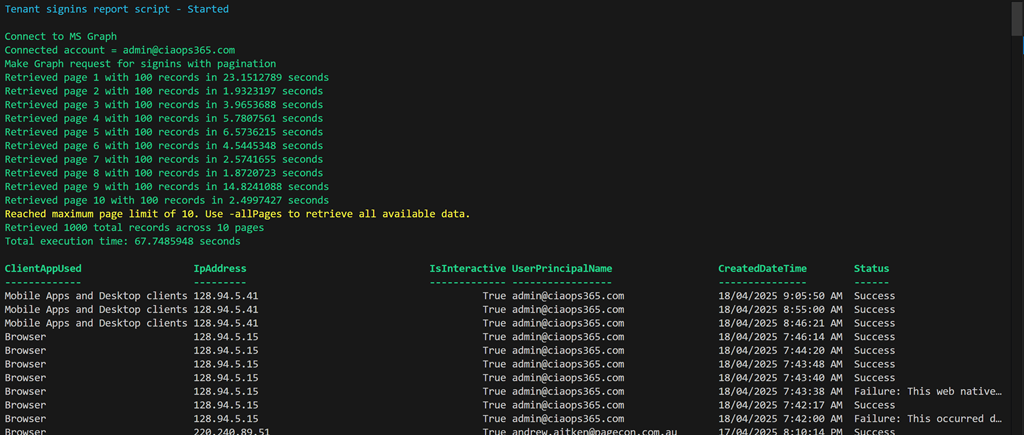
PowerShell script to report EntraID signin update

One the things that I have tasked myself with is to go back through my scripts and using AI (aka Github Copilot) to improve my code.

Screenshot 2025-04-18 095201

The latest script to get this treatment is:

https://github.com/directorcia/Office365/blob/master/graph-signins-get.ps1

which now has greater flexibility and speed. I also used Copilot to produce documentation for the script which is here:

https://github.com/directorcia/Office365/wiki/Get-tenant-signins

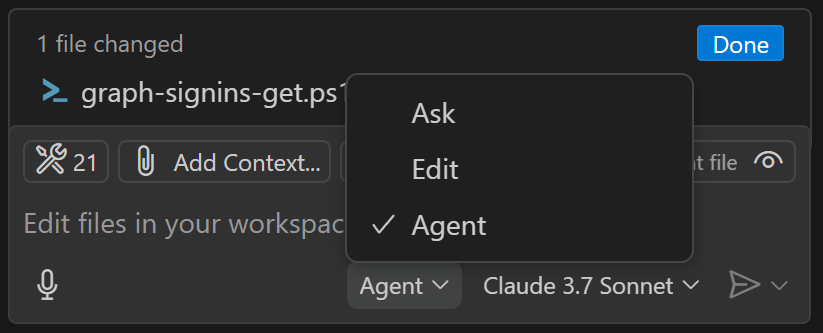
In my Visual Studio Code editor what I did was simply to open up the script.

Screenshot 2025-04-18 100356

I then set Copilot to operate in ‘agent’ mode, as shown above. I also selected an AI model to use. I have the default choices of:

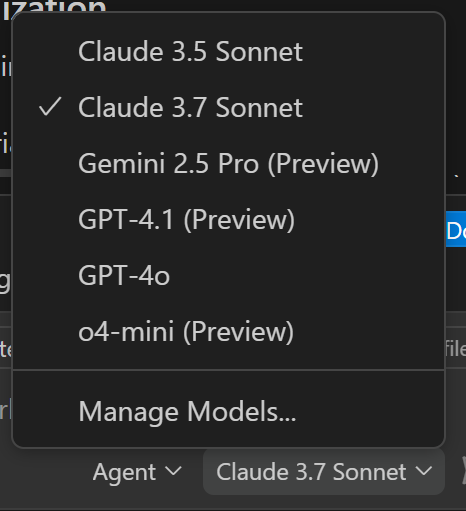
Screenshot 2025-04-18 100555

I can also configure others like Gemini if I want. This time I selected Claude 3.7 and then basically told Copilot to ‘improve’ my code. After that I asked it to provide options for using paging to get more results as well as ensuring the output was in local time.

After one update to the time format it produced an error when it ran but I simply told Copilot to fix that error and it did so. The code once again executed.

Thus, the updated script and documentation is now available via the links above and I am amazed at how easy it was to make all these changes to get the result that I wanted without having to type any additional code myself into the script! I suppose he downside is that the code is more complex and I don’t intrinsically understand it as well as if I had written every line, but I have Copilot to help explain any part of the code to me if needed and the time savings getting to a result speak for themselves.

The functionality that AI provided for me via Github Copilot is enormous and should make short work of any PowerShell automation I do in the future. If you are using PowerShell (or any code) then you really need to be looking at the benefits AI will provide you.

Enhancing Your Copilot Studio Agent with Topics and Actions

Video URL = https://www.youtube.com/watch?v=O-nHz5Z3Avk

In this video, we explore how to extend the capabilities of your Copilot Studio agent by integrating external knowledge sources using topics and actions. Here’s a step-by-step guide based on the video content:

1. Creating the Agent:

  • Start by creating an agent as usual, providing a description and general instructions. Ensure the orchestration option is selected and enabled. 0:12

  • The initial knowledge source selected is a single site, which allows the agent to answer questions in a basic manner. 0:23

2. Improving Information Retrieval:

  • To enhance the agent’s responses, especially for current news, create an action using Brave search. 0:54

  • Set up a free Brave account and obtain the API key for Brave search. 1:08

  • Configure the action to use Brave search for web news queries. 1:18

3. Creating and Configuring Topics:

  • Add a new topic that triggers when users ask about news. 2:01

  • Describe the trigger conditions and steps for the topic. 2:13

  • Create a search query variable to feed into the Brave search action. 2:31

  • Ensure the variable captures the prompt and keywords from the user’s query. 3:09

4. Testing and Publishing:

  • Test the setup by asking the agent for the latest news on a specific topic, such as “Alpine” or “Ferrari”. 3:58

  • Verify that the topic triggers correctly and retrieves detailed news results via Brave search. 4:19

  • Publish the updated agent to make the enhancements live. 4:35

By following these steps, you can significantly improve the relevance and detail of the information your Copilot Studio agent provides, leveraging external knowledge sources effectively.

Thank you for watching the video!

CIA Brief 20250412

image

Cloud Exposure Management with Microsoft Defender for Cloud, Microsoft Security Exposure Management –

https://www.youtube.com/watch?v=zY13PZ3GpIY

Differences between Microsoft 365 Copilot Chat and Copilot –

https://www.youtube.com/watch?v=RKM91qb53qI

News What is the latest news about Microsoft 365 Business premium

Management Made Simple with Administrative Units – Microsoft Entra ID –

https://techcommunity.microsoft.com/blog/nonprofittechies/management-made-simple-with-administrative-units—microsoft-entra-id/4393548

How cyberattackers exploit domain controllers using ransomware –

https://www.microsoft.com/en-us/security/blog/2025/04/09/how-cyberattackers-exploit-domain-controllers-using-ransomware/

SOC can see Microsoft analysis for Third-party add-in user report –

https://techcommunity.microsoft.com/blog/microsoftdefenderforoffice365blog/soc-can-see-microsoft-analysis-for-third-party-add-in-user-report/4402601

The Importance of the Microsoft Community at Microsoft 50th Anniversary –

https://techcommunity.microsoft.com/blog/communitynewsdesk/the-importance-of-the-microsoft-community-at-microsoft-50th-anniversary/4402118

Microsoft Sentinel, a modern cloud-native SIEM –

https://www.youtube.com/watch?v=2KCN_W9G6XQ

Achieve greater security with Intune and Microsoft 365 –

https://techcommunity.microsoft.com/blog/microsoftintuneblog/achieve-greater-security-with-intune-and-microsoft-365/4402130

Troubleshooting Windows Feature updates in Microsoft Intune –

https://techcommunity.microsoft.com/blog/intunecustomersuccess/troubleshooting-windows-feature-updates-in-microsoft-intune/4401828

WHAMM! Real-time world modelling of interactive environments –

https://www.microsoft.com/en-us/research/articles/whamm-real-time-world-modelling-of-interactive-environments/

Exploitation of CLFS zero-day leads to ransomware activity –

https://www.microsoft.com/en-us/security/blog/2025/04/08/exploitation-of-clfs-zero-day-leads-to-ransomware-activity/

Microsoft Copilot in Azure is now generally available –

https://techcommunity.microsoft.com/blog/azureinfrastructureblog/microsoft-copilot-in-azure-is-now-generally-available/4402033

AU Skip navigation Search Create Avatar image Microsoft Copilot reunites Bill Gates, Steve Ballmer, and Satya Nadella –

https://www.youtube.com/watch?v=ncjM7mY4LvE

Upload a phone image to Microsoft 365 Copilot –

https://techcommunity.microsoft.com/blog/Microsoft365InsiderBlog/upload-a-phone-image-to-microsoft-365-copilot/4398121

Monthly news – April 2025 –

https://techcommunity.microsoft.com/blog/microsoftthreatprotectionblog/monthly-news—april-2025/4401552

After hours

Microsoft Copilot reunites Bill Gates, Steve Ballmer, and Satya Nadella – https://www.youtube.com/watch?v=ncjM7mY4LvE

Editorial

If you found this valuable, the I’d appreciate a ‘like’ or perhaps a donation at https://ko-fi.com/ciaops. This helps me know that people enjoy what I have created and provides resources to allow me to create more content. If you have any feedback or suggestions around this, I’m all ears. You can also find me via email director@ciaops.com and on X (Twitter) at https://www.twitter.com/directorcia.

If you want to be part of a dedicated Microsoft Cloud community with information and interactions daily, then consider becoming a CIAOPS Patron – www.ciaopspatron.com.

Watch out for the next CIA Brief next week

Techwerks 27

bw-car-vehicle

CIAOPS Techwerks face to face returns to Melbourne CBD on Thursday the 22nd of May 2025. The venue for the event will be:

Melbourne City College
Level 9, 120 Spencer St
MELBOURNE VIC 3000

The course is limited to 20 people and you can sign up and reserve your place now! You reserve a place by completing this form:

http://bit.ly/ciaopsroi

or by sending me an email (director@ciaops.com) expressing your interest.

The content of these all day face to face workshops is driven by the attendees. That means we cover exactly what people want to see and focus on doing hands on, real world scenarios. Attendees can vote on topics they’d like to see covered prior to the day and we continue to target exactly what the small group of attendees wants to see. Thus, this is an excellent way to get really deep into the technology and have all the questions you’ve been dying to know answered. Typically, the event produces a number of best practice take aways for each attendee. This event will largely focus on AI including Copilot, Agents and Agent creation, etc with a special focus on what is relevant for small business.

Recent testimonial – “I just wanted to say a big thank you to Robert for the Brisbane Techworks day. It is such a good format with each attendee asking what matters them and the whole interactive nature of the day. So much better than death by PowerPoint.” – Mike H.

The cost to attend is:

Gold Enterprise Patron = $50 ex GST

Gold Patron = $90 ex GST

Silver Patron = $180 ex GST

Bronze Patron = $360 ex GST

Non Patron = $720 ex GST

I hope to see you there.