CIA Brief 20250315

image

How-To Sync EntraID Group Memberships Into Any System –

https://techcommunity.microsoft.com/blog/coreinfrastructureandsecurityblog/how-to-sync-entraid-group-memberships-into-any-system/4383082

Microsoft Security Implementation Proof of Concept by Lighthouse with Microsoft 365 Defender –

https://www.youtube.com/watch?v=rxiVirns1D4

Announcing a Limited Preview of GPT-4.5 in Copilot Studio –

https://www.microsoft.com/en-us/microsoft-copilot/blog/copilot-studio/announcing-limited-preview-gpt-4-5-microsoft-copilot-studio/

Phishing campaign impersonates Booking .com, delivers a suite of credential-stealing malware –

https://www.microsoft.com/en-us/security/blog/2025/03/13/phishing-campaign-impersonates-booking-com-delivers-a-suite-of-credential-stealing-malware/

Copilot supports communication in every style –

https://techcommunity.microsoft.com/blog/Microsoft365InsiderBlog/copilot-supports-communication-in-every-style/4386393

Securing Your Nonprofit Environment (Part 2): Best Practices to Secure Your Admin Accounts –

https://techcommunity.microsoft.com/blog/nonprofittechies/securing-your-nonprofit-environment-part-2-best-practices-to-secure-your-admin-a/4385305

Jailbreaking is (mostly) simpler than you think –

https://msrc.microsoft.com/blog/2025/03/jailbreaking-is-mostly-simpler-than-you-think/

Improve your DLP maturity with DLP Analytics –

https://techcommunity.microsoft.com/blog/microsoft-security-blog/improve-your-dlp-maturity-with-dlp-analytics/4392655

Take Flight with Microsoft Security Copilot Flight School –

https://techcommunity.microsoft.com/blog/securitycopilotblog/take-flight-with-microsoft-security-copilot-flight-school/4391712

Defending Against OAuth-Based Attacks with Automatic Attack Disruption –

https://techcommunity.microsoft.com/blog/microsoftthreatprotectionblog/defending-against-oauth-based-attacks-with-automatic-attack-disruption/4384381

Boost customer engagement with live chat in Microsoft Teams –

https://www.youtube.com/watch?v=y_fTX0E08BU

Introducing Microsoft Entra Health alerts: An enhancement to tenant health monitoring –

https://techcommunity.microsoft.com/blog/microsoft-entra-blog/introducing-microsoft-entra-health-alerts-an-enhancement-to-tenant-health-monito/4352583

New XCSSET malware adds new obfuscation, persistence techniques to infect Xcode projects –

https://www.microsoft.com/en-us/security/blog/2025/03/11/new-xcsset-malware-adds-new-obfuscation-persistence-techniques-to-infect-xcode-projects/

Built-in report button is available in Microsoft Outlook across platforms –

https://techcommunity.microsoft.com/blog/microsoftdefenderforoffice365blog/built-in-report-button-is-available-in-microsoft-outlook-across-platforms/4388434

Blog Series: Charting Your Path to Cyber Resiliency –

https://techcommunity.microsoft.com/blog/microsoft-security-blog/blog-series-charting-your-path-to-cyber-resiliency/4390355

After hours

Gemini Robotics: Bringing AI to the physical world – https://www.youtube.com/watch?v=4MvGnmmP3c0

Editorial

If you found this valuable, the I’d appreciate a ‘like’ or perhaps a donation at https://ko-fi.com/ciaops. This helps me know that people enjoy what I have created and provides resources to allow me to create more content. If you have any feedback or suggestions around this, I’m all ears. You can also find me via email director@ciaops.com and on X (Twitter) at https://www.twitter.com/directorcia.

If you want to be part of a dedicated Microsoft Cloud community with information and interactions daily, then consider becoming a CIAOPS Patron – www.ciaopspatron.com.

Watch out for the next CIA Brief next week

SharePoint Agents PAYG costs

image

To get a better idea of the costs of using SharePoint Agents, I’d suggest you have a look at:

https://techcommunity.microsoft.com/blog/spblog/consumption-based-pricing-for-sharepoint-agents/4389591

with the highlight being:

Under the PAYGO model, customers are billed $0.01 per message. Each interaction with a SharePoint agent uses thirty-two (32) messages, so customers are billed at $0.32 per interaction with SharePoint agents. The PAYGO meter uses your Azure subscription as the payment instrument, ensuring seamless integration with existing billing processes. This meter is available worldwide.

and

There are no in-product feature differences between the PAYGO meter, and the SharePoint agent included in the Microsoft 365 Copilot license. Users have the same capabilities and benefits, regardless of the billing model they choose.

Thus, with each interaction being $0.32, let say that typically a user will interact with SharePoint agents three times during any inquiry. That makes it about $1 per enquiry. If we now say that an average user will make 20 inquiries per day, that is $20 per user per day. Multiply that across all the users in an organisation and you can see how it could get very expensive very quickly.

Clearly then, pay as you go SharePoint agents is for very low volume of usage across the organisation, typically one enquiry per day. Otherwise, it make more sense to buy a full license of Microsoft 365 Copilot for the user in question because they effectively get unlimited SharePoint agent enquiries as well as a personal AI assistant plus more.

If you combine any other pay as go usage of Copilot, such as with Copilot Studio as I have outlined before, then it make far more sense to get a full Microsoft 365 Copilot for those who need to use any AI tools. However, pay as you go billing does provide you the flexibility to mix and match with full Microsoft 365 Copilot licenses. If you have a business with 5 major users and 20 casual users then teh starting point is for those 5 users to have full Microsoft 365 Copilot license, while the rest simply use an Azure subscription to cover any incidental costs until the point when another person in the business needs a full license.

To keep control of any SharePoint or Copilot pay as you go, you shoudl always set up a budget in Azure as I have outlined before with Security Copilot

Pay as you SharePoint agents do provide a degree of flexibility of quickly and easily enabling AI across your SharePoint information for your whole organisation but if usage of AI starts to grow then so too will the costs, and potentially quite dramatically if appropriate limits are not configured. The best option with pay as you go SharePoint agents then is its use in combination with full Microsoft 365 Copilot licenses for users who need to use AI extensively in their jobs, while casual users can remain on the pay as you go option. The good news is that you do have the flexibility to mix and match with the two types of licenses as needed and Azure does give you the added benefit of being able to turn off immediately where Microsoft 365 Copilot licenses are typically an annual commitment.

Copilot Studio PAYG costs

Now that I have set up pay as you go (PAYG) Copilot Studio via an Azure subscription, the next big question is what are the costs likely to be? These are somewhat hard to quantify exactly because it ‘depends’ on a lot of factors.

Start with:

Copilot Studio licensing here:

https://learn.microsoft.com/en-us/microsoft-copilot-studio/billing-licensing

which says:

  • Pay-as-you-go: $0.01 per message

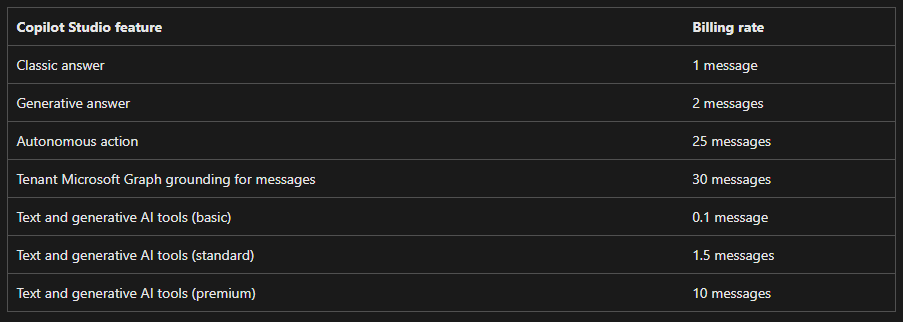
but then it isn’t a simple ratio of 1 question = 1 message, oh no. You need to look at this:

Message scenarios

which gives you this table:

Screenshot 2025-03-13 140428

The example Microsoft provides is:

Diagram illustrating various Copilot Studio events and their corresponding billing events.

Each interaction with an agent might utilize multiple message types simultaneously. For example, an agent grounded in a tenant Microsoft Graph could use 32 messages (30 messages for the Microsoft Graph grounding, and two for generative answers) to respond to a single complex prompt from a user.

Agent costs depend on an agent’s complexity and its usage.

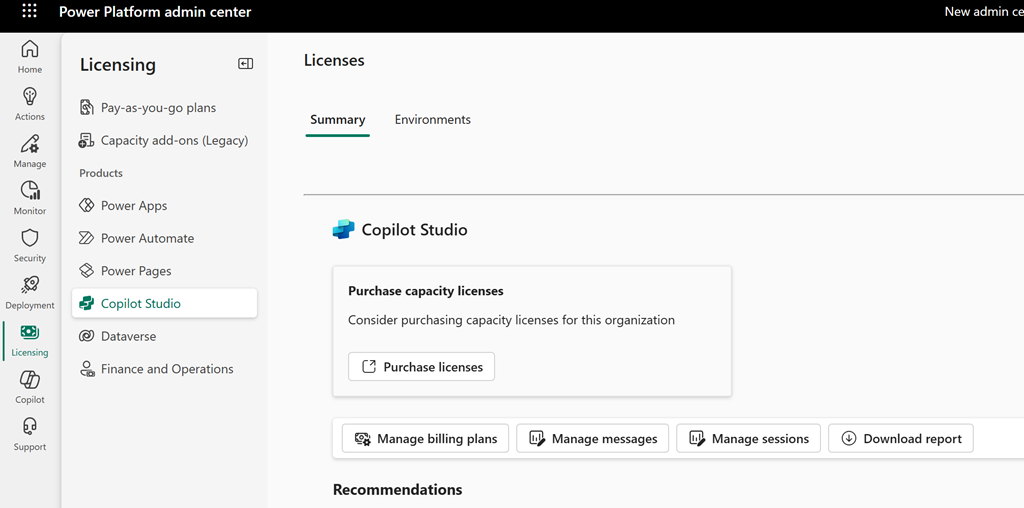
Inside the Power Platform admin center, under licensing and Copilot Studio I see this:

Screenshot 2025-03-13 141042

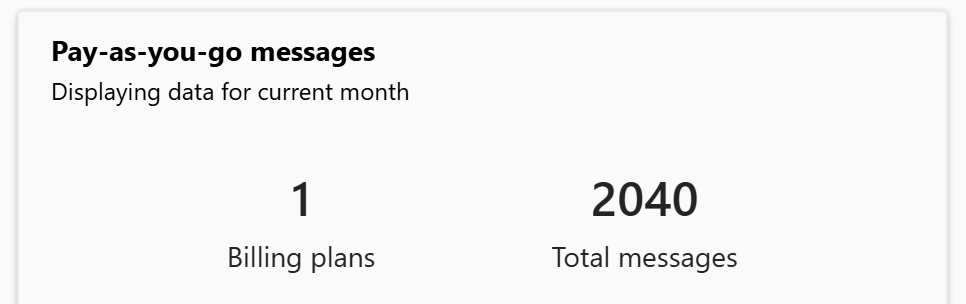
if I drill into this a little more I find:

Screenshot 2025-03-13 141024

Ok, so 2,040 messages is the usage.

I then waited and checked my Azure billing for the period and it reports:

Screenshot 2025-03-13 134801

which is AU$20.30 for Copilot Studio usage across those 2,040 messages I suggest. If you divide the cost by the messages you come out to around that suggested $0.01 per message as expected.

How does that relate to usage? Again, hard to exactly quantify as I was the only user and I was building and testing an autonomous agent with Copilot Studio for around 8 hours roughly. Thus, that means an average of 255 AI message per hour or 4.25 messages per minute.

Based on that, the best estimate (rule of thumb) I could give you would be, based on ‘average use’ across a typical day (8 hours), for a single user using Copilot regularly throughout the day the cost is going you around AU$20 per user for that 8 hours of sustained usage.

I fully appreciate this is nowhere near exact but, so far it is the best average I can come up with for sustained daily usage.

If we assume that a ‘normal’ user is not going to using AI in the sustained manner across the whole day we could then apply say a 50% usage discount and settle on around AU$10 per user per day for an ‘average’ user using Copilot resources in an ‘average’ way per day. More intensive usage would be considered around AU$20 per user per day I suggest.

In summary then, via my imperfect observations and calculations I would suggest to you that if you do indeed implement Copilot service via Pay As You Go (PAYG) then the ‘typical’ costs you can expect would be around AU$10 per user per day up to AU$20 per user per day. If this was sustained across a full month then you would be looking at $300 per average user per month which is way above the cost of a full license of Microsoft 365 Copilot whih which would be a flat fee of around AU$45 per user per month.

This is the best estimate I can give you and your costs and usage will vary but I think $10 per user per day for average Copilot use on a PAYG plan is as good as any place to start.

Clearly then, if your users are planning on sustained Microsoft 365 Copilot usage a paid license of Microsoft 365 Copilot is a much more effective investment from what I can determine.

Need to Know podcast–Episode 341

In this episode I provide the benefits that become available once you add and Azure subscription to your Microsoft environment. From pay as you go options with Copilot and SharePoint all the way through adding more security to your environment, Azure contain a range of features that you should consider. I’ll also bring you up to date with all the latest news from the Microsoft Cloud, so listen along and enjoy.

Brought to you by www.ciaopspatron.com

you can listen directly to this episode at:

https://ciaops.podbean.com/e/episode-341-why-add-azure/

Subscribe via iTunes at:

https://itunes.apple.com/au/podcast/ciaops-need-to-know-podcasts/id406891445?mt=2

or Spotify:

https://open.spotify.com/show/7ejj00cOuw8977GnnE2lPb

Don’t forget to give the show a rating as well as send me any feedback or suggestions you may have for the show.

Resources

@directorcia

Join my shared channel

CIAOPS merch store

Become a CIAOPS Patron

CIAOPS Blog

CIAOPS Brief

CIAOPSLabs

Support CIAOPS

Microsoft 365 E5 Security is now available as an add-on to Microsoft 365 Business Premium

Microsoft Technical Takeoff: Windows + Intune

Azure Lighthouse support for MSSP use of Security Copilot Sentinel scenarios in Public Preview

Get the most out of OneNote with these little-known features

Edit your name in Teams meetings

Rethinking remote assistance security in a Zero Trust world

Introducing Exchange Online Tenant Outbound Email Limits

CIA Brief 20250308

image

Microsoft Technical Takeoff: Windows + Intune –

https://techcommunity.microsoft.com/event/techcommunitylive/microsoft-technical-takeoff-windows–intune/4304008

Strengthening Cloud Compliance and Governance with Microsoft Defender CSPM –

https://techcommunity.microsoft.com/blog/MicrosoftDefenderCloudBlog/strengthening-cloud-compliance-and-governance-with-microsoft-defender-cspm/4385215

6 ways AI is making a difference in the world –

https://news.microsoft.com/source/features/ai/6-ways-ai-is-making-a-difference-in-the-world/?ocid=msftnews_x

Azure Lighthouse support for MSSP use of Security Copilot Sentinel scenarios in Public Preview –

https://techcommunity.microsoft.com/blog/SecurityCopilotBlog/azure-lighthouse-support-for-mssp-use-of-security-copilot-sentinel-scenarios-in-/4384386

Malvertising campaign leads to info stealers hosted on GitHub –

https://www.microsoft.com/en-us/security/blog/2025/03/06/malvertising-campaign-leads-to-info-stealers-hosted-on-github/

Edit your display name in Teams meetings –

https://techcommunity.microsoft.com/blog/Microsoft365InsiderBlog/edit-your-display-name-in-teams-meetings/4389359

Who’s Using Copilot? | HYPE Customer Story –

https://www.youtube.com/watch?v=nD9YZjARVWk

Business efficiency: How a small business operates like a corporation –

https://www.youtube.com/watch?v=Zwl6z6UZgeQ

Microsoft 365 E5 Security is now available as an add-on to Microsoft 365 Business Premium –

https://techcommunity.microsoft.com/blog/microsoft365businessblog/microsoft-365-e5-security-is-now-available-as-an-add-on-to-microsoft-365-busines/4388436

Silk Typhoon targeting IT supply chain –

https://www.microsoft.com/en-us/security/blog/2025/03/05/silk-typhoon-targeting-it-supply-chain/

What is cybersecurity analytics? –

https://www.microsoft.com/en-us/security/business/security-101/what-is-cybersecurity-analytics

Evolving small business with Microsoft Teams and Copilot –

https://www.youtube.com/watch?v=lDJzF0lZ-7A

Newsletters in Outlook (Preview) –

https://support.microsoft.com/en-us/office/newsletters-in-outlook-preview-b35566e6-d319-450d-8930-86e483cda3ee

Windows 365 Disaster Recovery Plus extends Cloud PC resilience –

https://techcommunity.microsoft.com/blog/windows-itpro-blog/windows-365-disaster-recovery-plus-extends-cloud-pc-resilience/4387492

Available today: DeepSeek R1 7B & 14B distilled models for Copilot+ PCs via Azure AI Foundry – further expanding AI on the edge –

https://blogs.windows.com/windowsdeveloper/2025/03/03/available-today-deepseek-r1-7b-14b-distilled-models-for-copilot-pcs-via-azure-ai-foundry-further-expanding-ai-on-the-edge/

Disrupting a global cybercrime network abusing generative AI –

https://blogs.microsoft.com/on-the-issues/2025/02/27/disrupting-cybercrime-abusing-gen-ai/

After hours

Formula 1: Drive To Survive Season 7 Official Trailer | Netflix – https://www.youtube.com/watch?v=rZlzeKPFTco

Editorial

If you found this valuable, the I’d appreciate a ‘like’ or perhaps a donation at https://ko-fi.com/ciaops. This helps me know that people enjoy what I have created and provides resources to allow me to create more content. If you have any feedback or suggestions around this, I’m all ears. You can also find me via email director@ciaops.com and on X (Twitter) at https://www.twitter.com/directorcia.

If you want to be part of a dedicated Microsoft Cloud community with information and interactions daily, then consider becoming a CIAOPS Patron – www.ciaopspatron.com.

Watch out for the next CIA Brief next week
Can’t swap Azure subscriptions

Screenshot 2025-03-07 153419

So I have a situation where an Azure subscription expired and was then disabled (through no fault of my own I might add).

Screenshot 2025-03-07 154142

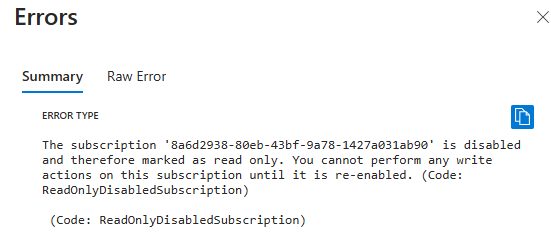
The status shows as disabled. Problem is now a new valid subscription has been added but I can’t move the resource groups from the old (and disabled) subscription to the new one because:

Error type

The subscription '8a6d2938-80eb-43bf-XXXX-142XXXX1ab90' is disabled and therefore marked as read only. You cannot perform any write actions on this subscription until it is re-enabled. (Code: ReadOnlyDisabledSubscription)
(Code: ReadOnlyDisabledSubscription)

In a nutshell the disabled subscription is now read only and I can’t shift resources if it is read write. That means I’d have to somehow re-enable it (typically converting it to PAYG), just to move to a new subscription.

So, the moral of this story seems to be, don’t let an Azure subscription expire and become disabled because migrating stuff out of it may not be possible!


CIAOPS Need to Know Microsoft 365 Webinar – March

laptop-eyes-technology-computer_thumb

Join me for the free monthly CIAOPS Need to Know webinar. Along with all the Microsoft Cloud news we’ll be taking a look at Purview (aka Compliance) in Microsoft 365.

Shortly after registering you should receive an automated email from Microsoft Teams confirming your registration, including all the event details as well as a calendar invite.

You can register for the regular monthly webinar here:

March Webinar Registrations

(If you are having issues with the above link copy and paste – https://bit.ly/n2k2503)

The details are:

CIAOPS Need to Know Webinar – March 2025
Friday 28th of March 2025
11.00am – 12.00am Sydney Time

All sessions are recorded and posted to the CIAOPS Academy.

The CIAOPS Need to Know Webinars are free to attend but if you want to receive the recording of the session you need to sign up as a CIAOPS patron which you can do here:

http://www.ciaopspatron.com

or purchase them individually at:

http://www.ciaopsacademy.com/

Also feel free at any stage to email me directly via director@ciaops.com with your webinar topic suggestions.

I’d also appreciate you sharing information about this webinar with anyone you feel may benefit from the session and I look forward to seeing you there.