A better KQL Query to report failed login by country

SigninLogs
| where ResultType != 0  // Non-successful sign-ins
| where TimeGenerated >= ago(30d)  // Last 30 days
| extend Country = tostring(LocationDetails.countryOrRegion)
| where Country != “AU”  // Exclude Australia
| summarize FailedLogins = count() by Country
| order by FailedLogins desc

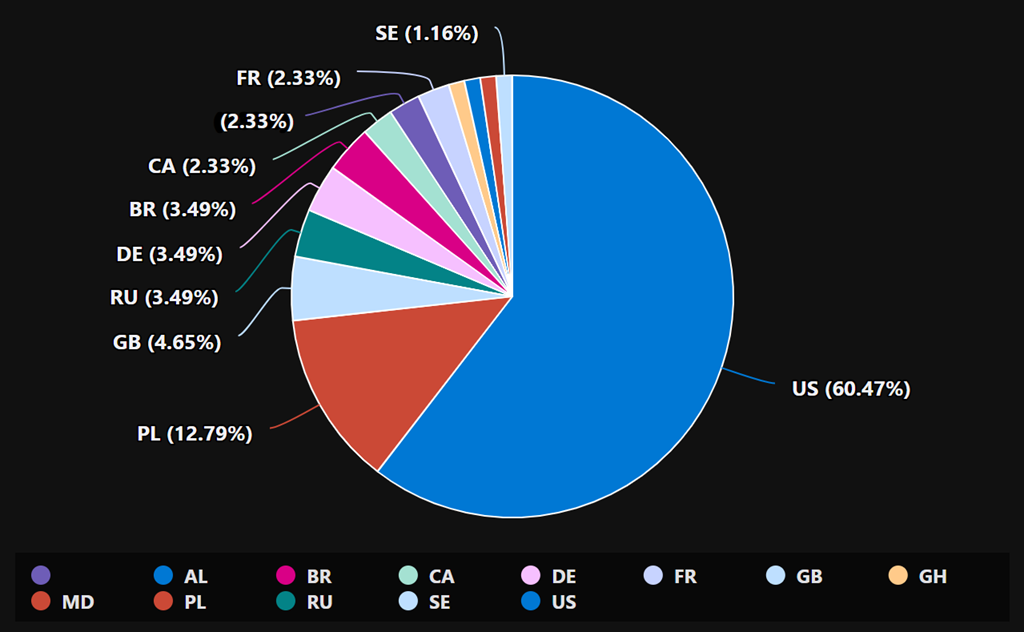
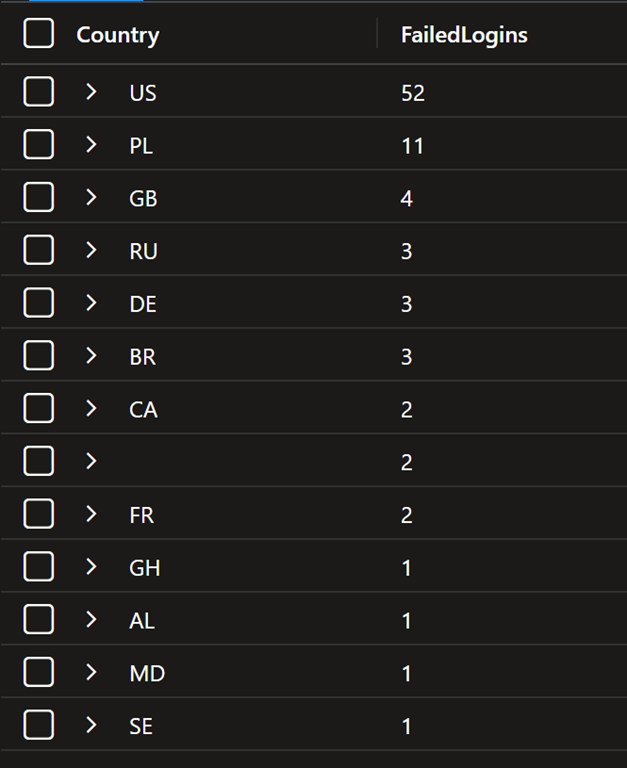
The above is an improved version of a KQL query you can use to report on failed logins to Entra ID over the past 30 days. It also excludes a country (here Australia) if desired.

image

image

The country codes are here:

https://en.wikipedia.org/wiki/ISO_3166-1_alpha-2

Note: if you copy and paste directly from here you will probably have the change the “ when you paste into your own environment as the wrong “ gets taken across!

Testing sensitive information types in Microsoft Purview

2025-02-25_07-45-21

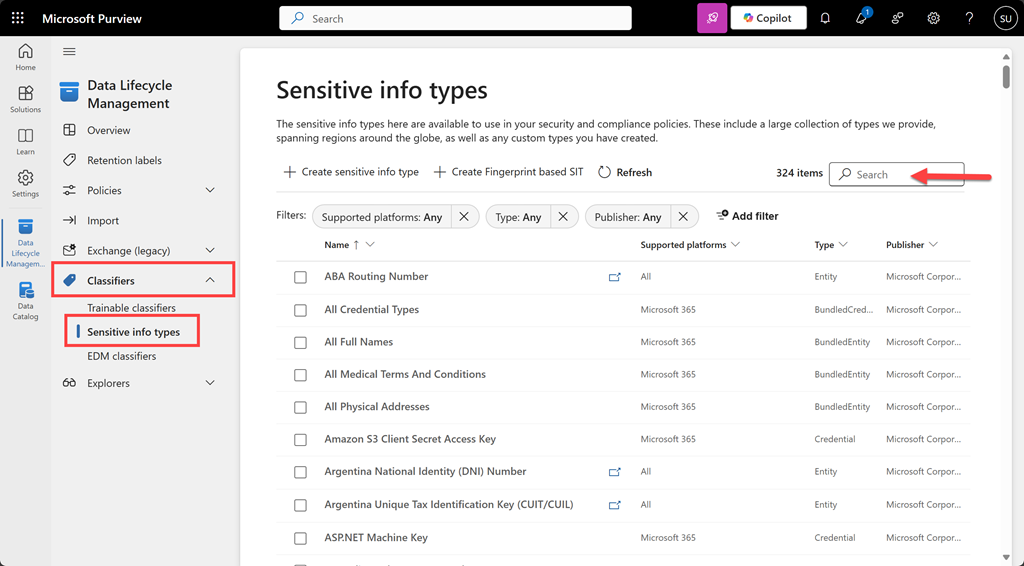
To test a file for a sensitivity type navigate to the Microsoft Purview portal. From the solutions icon on the left hand side select Data Lifecycle Management. Expand the Classifiers option from the menu and select Sensitive info types as shown above. You can search for the an item via a search in the top right.

image

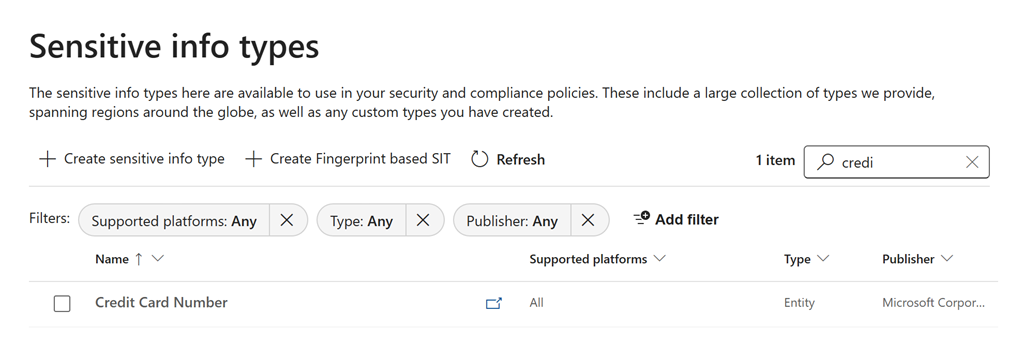
Here, I’ll located Credit Card Number as shown above.

image

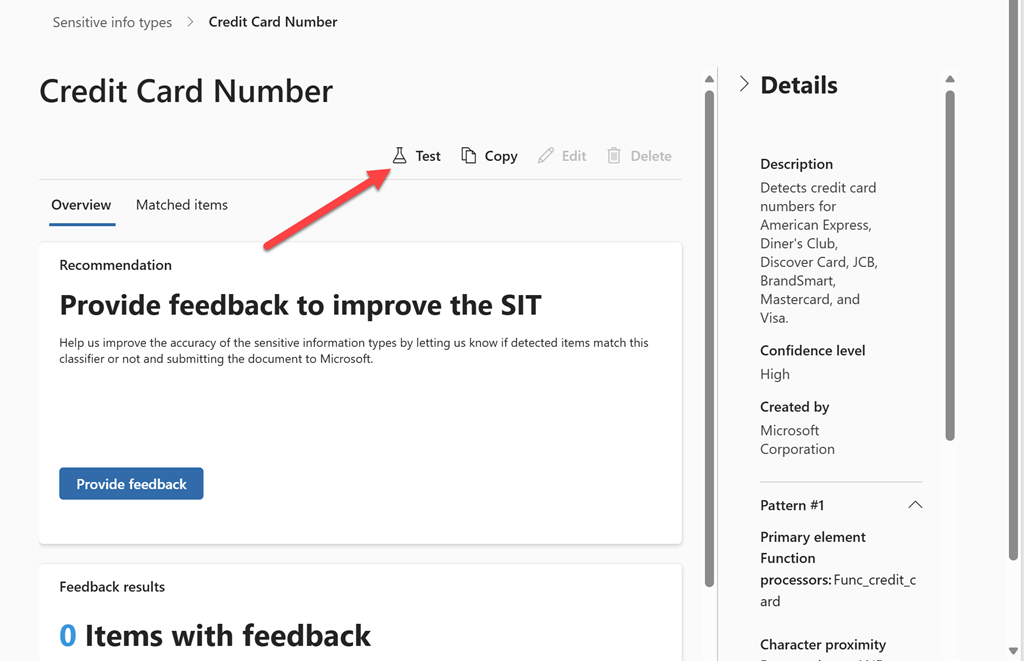
On the right hand side you will find a Test icon as indicated above.

image

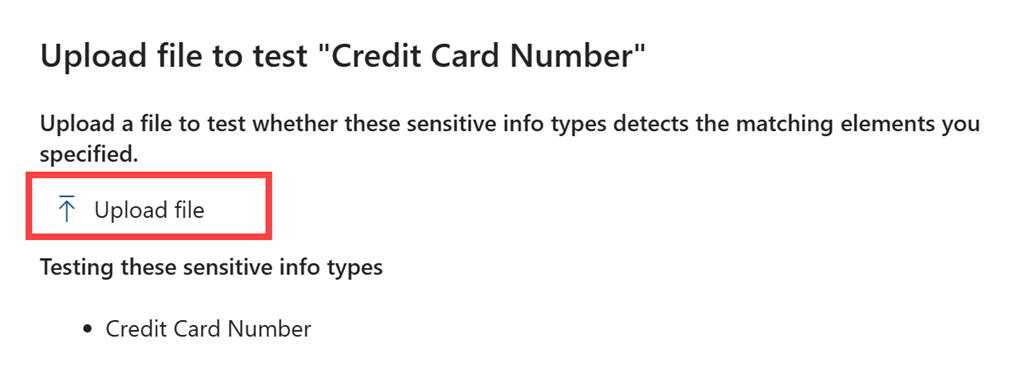
From the right will appear a window with an option to Upload file as shown above.

image

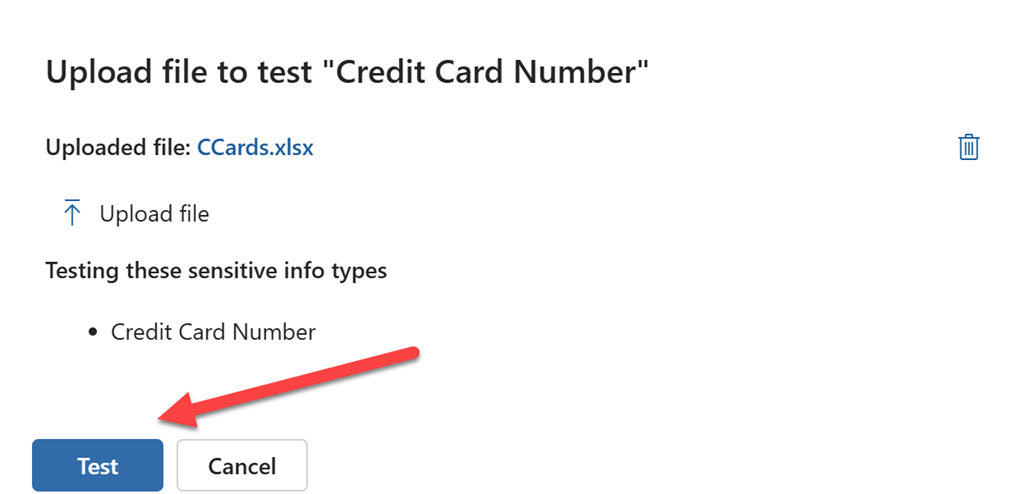
Once you have uploaded the file you wish to test, select the Test button at the bottom of the page as shown.

image

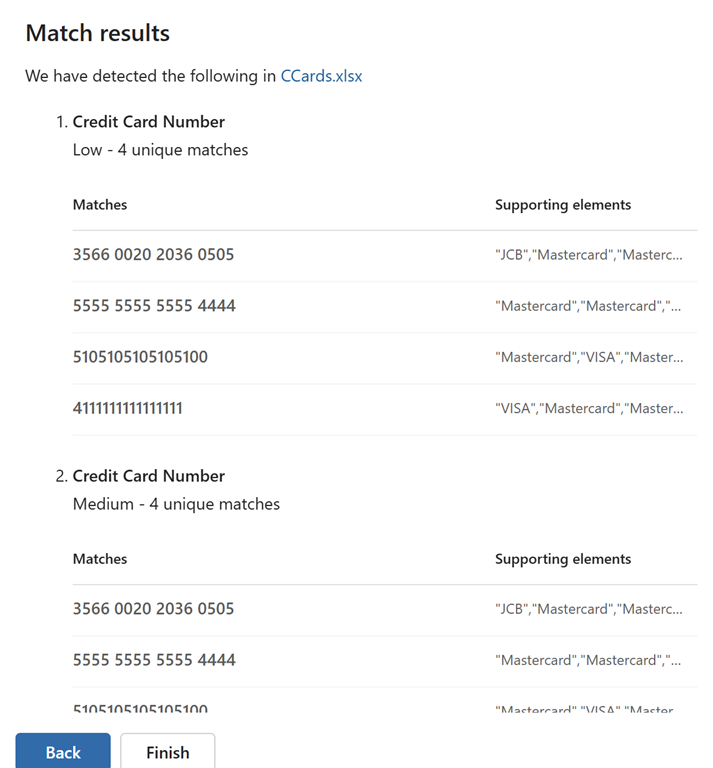
After a moment or two, you’ll see the results of the test as shown above.

This manual sensitive information testing process will allow you to verify whether your file content will be identified by services such as DLP in MIcrosoft Purview. This should make creating policies to ptotect your information easier.

Need to Know podcast–Episode 340

I take a look at something many overlook when it comes to security in their Microsoft 365 environment – Exposure score. In essence it is like a targeted Secure Score for a particular threat like Business Email Compromise. There is also news and updates from the Microsoft Cloud so listen along and review the show notes for more information.

Brought to you by www.ciaopspatron.com

you can listen directly to this episode at:

https://ciaops.podbean.com/e/episode-340-exposure-management/

Subscribe via iTunes at:

https://itunes.apple.com/au/podcast/ciaops-need-to-know-podcasts/id406891445?mt=2

or Spotify:

https://open.spotify.com/show/7ejj00cOuw8977GnnE2lPb

Don’t forget to give the show a rating as well as send me any feedback or suggestions you may have for the show.

Resources

@directorcia

Join my shared channel

CIAOPS merch store

Become a CIAOPS Patron

CIAOPS Blog

CIAOPS Brief

CIAOPSLabs

Support CIAOPS

The way to control EWS usage in Exchange Online is changing

New Microsoft-managed policies to raise your identity security posture

Storm-2372 conducts device code phishing campaign

Block malicious command lines with Microsoft Defender for Endpoint

Clipchamp: Elevating work communication with seamless video creation in Copilot

Sharing with Microsoft Whiteboard

AI agents at work: The new frontier in business automation

Copilot learning hub

New Certification for Microsoft information security administrators

What is Security Exposure Managenet?

CIA Brief 20250222

image

Quick Setup – Microsoft Entra Verified ID –

https://www.youtube.com/watch?v=YnukKchoN28

Talk and translate on-the-go with Copilot –

https://www.youtube.com/watch?v=P4lKB5Yz9Sg

Amtrak improve efficiency and safety with Microsoft Power Platform –

https://www.youtube.com/watch?v=292tyXQLie0

The way to control EWS usage in Exchange Online is changing –

https://techcommunity.microsoft.com/blog/Exchange/the-way-to-control-ews-usage-in-exchange-online-is-changing/4383083

Enhanced data control while submitting Microsoft 365 Copilot feedback –

https://techcommunity.microsoft.com/blog/Microsoft365InsiderBlog/enhanced-data-control-while-submitting-microsoft-365-copilot-feedback/4382668

New Microsoft-managed policies to raise your identity security posture –

https://techcommunity.microsoft.com/blog/microsoft-entra-blog/new-microsoft-managed-policies-to-raise-your-identity-security-posture/4286758

Clipchamp: Elevating work communication with seamless video creation in Copilot –

https://techcommunity.microsoft.com/blog/microsoft_365blog/clipchamp-elevating-work-communication-with-seamless-video-creation-in-copilot/4375660

With Copilot agents, Pets at Home unleashes an AI revolution –

https://news.microsoft.com/source/emea/features/with-copilot-agents-pets-at-home-unleashes-an-ai-revolution/

Majorana 1 Explained: The Path to a Million Qubits –

https://www.youtube.com/watch?v=wSHmygPQukQ

Sharing with Microsoft Whiteboard –

https://www.youtube.com/watch?v=RXAo9JGZS44

Facilitating sessions with Microsoft Whiteboard –

https://www.youtube.com/watch?v=UNqtsIqNK7s

Get help or support as an admin –

https://www.youtube.com/watch?v=0s1Cof06VfA

Seamless Security: Smartcard Logon from Entra-Only Machines to domain-joined Servers or AVDs –

https://techcommunity.microsoft.com/blog/coreinfrastructureandsecurityblog/seamless-security-smartcard-logon-from-entra-only-machines-to-domain-joined-serv/4381789

Minimize email drafts in Outlook for Android and iOS to easily task switch –

https://techcommunity.microsoft.com/blog/microsoft365insiderblog/minimize-email-drafts-in-outlook-for-android-and-ios-to-easily-task-switch/4375165

How to protect against Device Code Flow abuse (Storm-2372 attacks) and block the authentication flow –

https://jeffreyappel.nl/how-to-protect-against-device-code-flow-abuse-storm-2372-attacks-and-block-the-authentication-flow/

After hours

Introducing Helix – https://www.youtube.com/watch?v=Z3yQHYNXPws

Editorial

If you found this valuable, the I’d appreciate a ‘like’ or perhaps a donation at https://ko-fi.com/ciaops. This helps me know that people enjoy what I have created and provides resources to allow me to create more content. If you have any feedback or suggestions around this, I’m all ears. You can also find me via email director@ciaops.com and on X (Twitter) at https://www.twitter.com/directorcia.

If you want to be part of a dedicated Microsoft Cloud community with information and interactions daily, then consider becoming a CIAOPS Patron – www.ciaopspatron.com.

Watch out for the next CIA Brief next week

Updated Windows for Endpoint Security Baseline

image

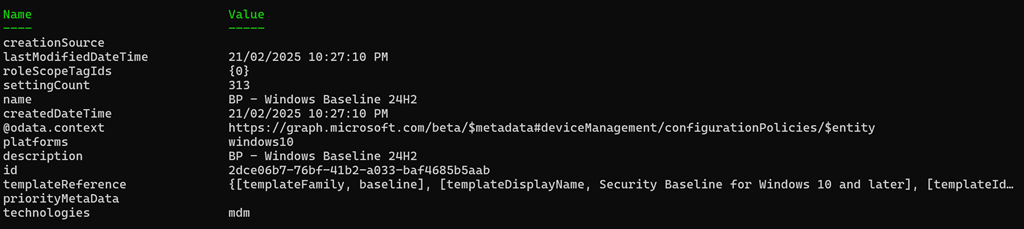
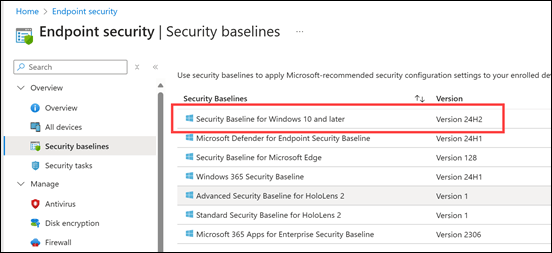
Microsoft has updated the Windows Security Baseline for Endpoint Security in Intune to 24H2 as shown above. Baselines are an easy way to set a vast array of best practice settings across your Windows devices in a single policy, already pre-configured by Microsoft.

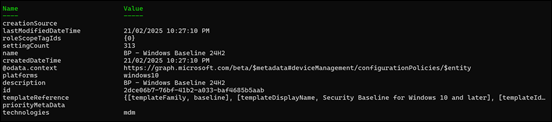
I have extracted the policy to a JSON file and made it available at:

https://github.com/directorcia/bp/blob/main/Intune/Policies/Endpoint/Baselines/win.json

and the previous one is here:

https://github.com/directorcia/bp/blob/main/Intune/Policies/Endpoint/Baselines/Archive/win.json

You can now simply import that directly into your environment programmatically using something like PowerShell.

I will note that when I initially exported the templated and tried to import it back I got the error:

Invalid Reference id found in Policy

after a lot of troubleshooting (and I mean a LOT) I tracked down the issue to be related to id 241:

{
   “id”: “241”,
   “settingInstance”: {
     “choiceSettingValue”: {
       “value”: “device_vendor_msft_policy_config_deviceguard_machineidentityisolation_0”,
       “children”: [],
       “settingValueTemplateReference”: {
         “useTemplateDefault”: false,
         “settingValueTemplateId”: “6a208e4b-0e34-4d12-a821-3173e99f3ce0”
       }
     },
     “@odata.type”: “#microsoft.graph.deviceManagementConfigurationChoiceSettingInstance”,
     “settingDefinitionId”: “device_vendor_msft_policy_config_deviceguard_machineidentityisolation”,
     “settingInstanceTemplateReference”: {
       “settingInstanceTemplateId”: “1fa97457-2a1f-4e33-b3c2-9a4c8930510d”
     }
   }
}

removing that from teh template allowed the rest of the template to import. I’ll have to spend some more time working out the exact settings and hopefully by then Microsoft fixes the issue and I’ll update the JSON in my Best Practices repository. However, for now the JSON at the URL can be imported.
image

February Microsoft 365 Webinar resources

image

The slides from this month’s webinar are available at:

https://github.com/directorcia/general/blob/master/Presentations/Need%20to%20Know%20Webinars/202502.pdf

If you are not a CIAOPS patron you want to view or download a full copy of the video from the session you can do so here:

http://www.ciaopsacademy.com.au/p/need-to-know-webinars

Watch out for next month’s webinar.

CIA Brief 20250215

image

Turn everyday spreadsheets into actionable insights with Microsoft 365 Copilot in Excel –

https://www.youtube.com/watch?v=YNcIN_bXpuA

Microsoft OneDrive Mobile App –

https://www.youtube.com/watch?v=Ba7zone0Xk0

Microsoft 365 admin center in simplified view –

https://www.youtube.com/watch?v=XCyaw2Uufzc

AI agents at work: The new frontier in business automation –

https://azure.microsoft.com/en-us/blog/ai-agents-at-work-the-new-frontier-in-business-automation/

Applying Zero Trust principles to the cloud-native journey –

https://techcommunity.microsoft.com/blog/microsoftintuneblog/applying-zero-trust-principles-to-the-cloud-native-journey/4378578

Copilot learning hub –

https://learn.microsoft.com/en-us/copilot/

Securing DeepSeek and other AI systems with Microsoft Security –

https://www.microsoft.com/en-us/security/blog/2025/02/13/securing-deepseek-and-other-ai-systems-with-microsoft-security/

Storm-2372 conducts device code phishing campaign –

https://www.microsoft.com/en-us/security/blog/2025/02/13/storm-2372-conducts-device-code-phishing-campaign/

Grow your security skill set with the latest resources on Microsoft Learn –

https://techcommunity.microsoft.com/blog/microsoftlearnblog/grow-your-security-skill-set-with-the-latest-resources-on-microsoft-learn/3644510

Build a stronger security strategy with proactive and reactive incident response: Cyberattack Series –

https://www.microsoft.com/en-us/security/blog/2025/02/10/build-a-stronger-security-strategy-with-proactive-and-reactive-incident-response-cyberattack-series/

New Certification for Microsoft information security administrators –

https://techcommunity.microsoft.com/blog/microsoftlearnblog/new-certification-for-microsoft-information-security-administrators/4159976

Increase Your Productivity with Copilot on OneNote Web and OneNote in Teams –

https://techcommunity.microsoft.com/blog/Microsoft365CopilotBlog/increase-your-productivity-with-copilot-on-onenote-web-and-onenote-in-teams/4374756

What’s new in Microsoft Intune: January 2025 –

https://techcommunity.microsoft.com/blog/microsoftintuneblog/what%E2%80%99s-new-in-microsoft-intune-january-2025/4373560

Multiple sources, one cohesive document—Microsoft 365 Copilot in Word makes it possible –

https://www.youtube.com/watch?v=FKJhmeNDWPc

Access Copilot anywhere on the canvas in Word for the web –

https://techcommunity.microsoft.com/blog/Microsoft365InsiderBlog/access-copilot-anywhere-on-the-canvas-in-word-for-the-web/4374199

After hours

Bill Gates: Source Code – https://www.gatesnotes.com/meet-bill/source-code

Editorial

If you found this valuable, the I’d appreciate a ‘like’ or perhaps a donation at https://ko-fi.com/ciaops. This helps me know that people enjoy what I have created and provides resources to allow me to create more content. If you have any feedback or suggestions around this, I’m all ears. You can also find me via email director@ciaops.com and on X (Twitter) at https://www.twitter.com/directorcia.

If you want to be part of a dedicated Microsoft Cloud community with information and interactions daily, then consider becoming a CIAOPS Patron – www.ciaopspatron.com.

Watch out for the next CIA Brief next week

Copilot for M365 Administration

image

A while back, I spoke about the fact that Microsoft was bringing Copilot to many of the administration portals in Microsoft 365. As you can see above I now have Copilot in my Microsoft 365 admin center.

image

You can see that it provides a pretty comprehensive answer when I ask it a common administration task such as resetting a users password.

All of this is available to all administrators provided there is just ONE full license of Microsoft 365 Copilot in a tenant! You can read more at :

Copilot in Microsoft 365 admin centers

I would expect to see Copilot for M365 administrator start to appear in more and more places in the future. How much easier will email troubleshooting appear when it arrives there?