
Here is a video tutorial showing you how to create an agent using Copilot Studio that is published into a Microsoft Teams channel. In this case, the billing is via consumption linked to an Azure subscription. Just remember it takes a few hours for the agent to start responding to requests.
Month: January 2025
Need to Know podcast–Episode 338

A change of format for this episode. I recorded an interview with Andrew Bremner and Tim Stephinson around insurance for MSPs which I think provides a lot of value. Been a while since I have done an interview episode, so let me know what you think and whether you want to see more interviews like this? In the meantime, the news in the Microsoft Cloud never stops and I’ll bring you up to date with the latest as well.
Brought to you by www.ciaopspatron.com
You can listen directly to this episode at:
https://ciaops.podbean.com/e/episode-338-ensure-to-insure/
Subscribe via iTunes at:
https://itunes.apple.com/au/podcast/ciaops-need-to-know-podcasts/id406891445?mt=2
or Spotify:
https://open.spotify.com/show/7ejj00cOuw8977GnnE2lPb
Don’t forget to give the show a rating as well as send me any feedback or suggestions you may have for the show.
Resources
Announcing mandatory multifactor authentication for the Microsoft 365 admin center
New Identity Secure Score recommendations in General Availability
Enhancing Security with Entra PIM and Conditional Access Policy using Authentication Context
Microsoft Teams, a year in review: AI-powered customization and upgraded presentations
Enabling agents in Microsoft 365 Copilot Chat
CIA Brief 20250125

Microsoft 365 Copilot l SharePoint agents –
https://www.youtube.com/watch?v=G4T7_9t0u0I
AI at Work: What Are AI Agents, and How Do They Help Businesses? –
https://www.microsoft.com/en-us/worklab/ai-at-work-what-are-agents-how-do-they-help-businesses
Announcing Public Preview: New STIX Objects in Microsoft Sentinel –
Microsoft Copilot Studio 2025 Release Wave 1 Release Highlights –
https://www.youtube.com/watch?v=x2KQOxTfCuQ
Get greater visibility with aggregated reporting of endpoint telemetry signals –
Microsoft Teams, a year in review: AI-powered customization and upgraded presentations –
Improve SecOps collaboration with case management –
Announcing mandatory multifactor authentication for the Microsoft 365 admin center –
Overview of Microsoft 365 for business setup –
https://www.youtube.com/watch?v=sK2YrZTKYEc
New Identity Secure Score recommendations in General Availability –
Disabling Immersive Reader for protected documents in Word for the web –
Microsoft and OpenAI evolve partnership to drive the next phase of AI –
Windows 11 Security Book –
https://learn.microsoft.com/en-us/windows/security/book/
Enhancing Security with Entra PIM and Conditional Access Policy using Authentication Context –
Australian Super turns on Security Copilot –
https://www.itnews.com.au/news/australiansuper-turns-on-security-copilot-613914
Hunt for identity-based threats with Security Copilot and Microsoft Sentinel –
Microsoft Teams, a year in review: AI-powered customization and upgraded presentations –
After hours
The Coming Wave animation – https://www.youtube.com/watch?v=4ReMavRec7U
Editorial
If you found this valuable, the I’d appreciate a ‘like’ or perhaps a donation at https://ko-fi.com/ciaops. This helps me know that people enjoy what I have created and provides resources to allow me to create more content. If you have any feedback or suggestions around this, I’m all ears. You can also find me via email director@ciaops.com and on X (Twitter) at https://www.twitter.com/directorcia.
If you want to be part of a dedicated Microsoft Cloud community with information and interactions daily, then consider becoming a CIAOPS Patron – www.ciaopspatron.com.
Watch out for the next CIA Brief next week
The impact of AI on the MSP business model

Today, I liken the impact of AI for MSPs to the scene inside the garbage crusher in the original Star Wars movie. On one side is the impact AI is having on the existing MSP model around configurations and maintenance and on the other is the challenge of how to provide new AI services to customers.
The starting point is to examine the current MSP business model which is largely based on a reactive approach, that is, get paid for fixing issues after they occur. The managed service that most MSP’s sell is a kind of insurance policy. This means the client agrees to pay a regularly fee per month and for that the MSP will ensure they are available to resolve issues that occur during that time period at no additional cost to the customer. The incentive then for the MSP is to thus reduce the chances of problems occurring by configuring systems to be as reliable as possible. However, no matter how much this is done things will still go wrong and require a reactive approach to resolution.
Enter AI. It is clear that AI is become more and more integrated into services sold to the customer. One simple example is Microsoft Security Copilot. This service can look across all the security signals in an environment and assist with investigations and incident response. We are beginning to see Microsoft Security Copilot being extended from a stand alone chat style interface to direct integration with Intune. This means that it can report and troubleshoot on policies used throughout Intune. At the moment this integration is largely just reporting but that ability to actually make changes and configure Intune directly cannot be far away. AI will soon be able to do the job of the MSP with Intune I would suggest.
Likewise, Security Copilot is also available in Defender XDR and Entra ID. I’m sure it won’t be long before it appears in places like Exchange Online and SharePoint Online as well as across the whole Microsoft 365 administration portals. In fact, that capability is already in preview (Copilot in Microsoft 365 admin centers). It won’t be long before it is available for every tenant. The Microsoft 365 administration portals used to be the sole purview of the MSP. No longer, AI will take up a lot of the load and probably allow customers to do most of the administration tasks that an MSP does today such as resetting accounts, creating users, assigning licenses, etc.
AI is really good a evaluating data and them coming to a decision about what option is best in a given circumstance. It is in fact probably going to be able to better evaluate the security of a customers environment and determine what settings should be enabled or disabled to provide this. What it will soon be able to do is actually take those recommended actions. In a world where AI is automatically handling the administration of a Microsoft 365 environment, what now is the role of an MSP, given the AI is largely doing what they used to do for a fee?
How will AI mitigate those challenging errors that also occur for users that you can’t plan for you may ask? Take a look at this example from the keynote at the last Microsoft Build conference :
https://youtu.be/8OviTSFqucI?si=j0oI1kbmbRgrvaSe&t=1260
(at time stamp 21:00 if needed)
It shows Copilot playing Minecraft by reacting to what is on the screen directly. Now extend that concept to desktop support where the AI is constantly watching and can interact directly with a user if an error appears. It may also get to the stage where the AI takes care of the error immediately without an interaction from the customer or MSP. AI today has the capability to see and talk based on its environment. As this matures I surely see it challenging the traditional help desk concept, especially for MSPs. Still not convinced? Take a look at this video of ChatGPT 4o interacting with data on the screen:
https://www.youtube.com/live/DQacCB9tDaw?si=j-KvPcNJwypvk1U9&t=1105
( at time stamp 18:34 if needed)
and remember that was back in May 2024! The capabilities have only increased since then (hello Sora)!
Can AI do every maintenance role that an MSP can do for their customers today? Not yet, but I very confident that it will do more and more over time (aka the walls are definitely coming in thanks to AI).
If AI is reducing the maintenance side of the MSP managed service model, where is the opportunity selling AI services to customers? When a customer wants Microsoft 365 Copilot, they simply buy a license and assign it to a user. That’s it! Microsoft 365 Copilot will automatically appear for the user as an icon that will open Copilot Bizchat so they now have an AI agent they can generate answers from. Microsoft 365 Copilot will automatically appear in all their desktop apps as well such as Word, Excel, Teams, and so on without the need for further configuration. Microsoft 365 Copilot will also automatically appear in SharePoint and Onedrive. The list goes on, Forms, Loop, etc, etc all without ANY further configuration.
As for AI training tools, they are already available such as Prompt Coach and are free. There is also the Copilot Prompt Gallery that the user has access to, again for free. There are also services like the Microsoft Copilot Academy available for free and integrated into the Microsoft 365 Copilot subscription. The list of free embedded training material is extensive. This is going to challenge an MSP to provide provide something that is better than what is already available and how will an MSP be able to charge a fee for that when quality embedded training is already available for free?
Once Microsoft 365 Coplot is in place I can’t see how it will need any maintenance. It doesn’t need password resets, it doesn’t need delivery troubleshooting, it doesn’t need to restored, it will just work. It won’t break or required support as other services MSPs supported did. In a world where services don’t require a managed maintenance service, how does the tradition MSP revenue model apply?
It is important to remember that Microsoft 365 Copilot doesn’t have any settings, such as for security. It relies on existing services like Entra ID, SharePoint permissions, DLP policies, Data Labelling and so on. These security settings really should already be in place prior to Microsoft 365 Copilot being enabled and once configured they largely won’t require any form on ongoing maintenance. As I have also suggested previously, I think the AI itself will play a bigger and bigger role in evaluating and acting to ensure Microsoft 365 environments remain constantly secure. Once again, the need to ongoing maintenance is reduced or eliminated which means another hit to the MSP business model.
The direction that most vendors like Microsoft are encouraging MSPs to move to is around building ‘apps’ or ‘agents’ for their customers to solve business challenges. The challenge there for MSPs, as I have called out before, is that fact that the majority are not skilled or experienced in the ‘creator’ model we see today. That model means taking tools such a Copilot Studio to create these ‘agents’. The big change to the MSP business model is thus a shift from reactive to proactive. Unfortunately, I just do not see any evidence of MSPs in general understanding or embracing this as part of their business. Most continue to place their faith in the old reactive business model, which introduces huge risks for their business. The biggest of these is that it allows an ‘AI aware’ provider to solve customer challenges with agents and then potentially scoop up the best of the business from the customer.
These are the reasons why I see most traditional (infrastructure focused) MSPs being stuck in the proverbial Star Wars compactor. Moving to an AI business model is a huge change in approach and it can certainly be done but I am not seeing it being embraced. To me, it harkens back to the early days of the cloud but I feel the AI transformation will have a far greater impact on MSPs of today than the cloud ever did. It is not too late to include a true focus on delivering AI effectively to customers while also using AI to minimise tenant maintenance costs but any effective strategy cannot be grounded in the status quo. You can’t expect to continue to apply the same old MSP business model and expect to be successful. The AI model is different. The AI model is proactive. The AI model is about code.
The walls are closing in from both sides on the traditional MSP business model from what I see and there is precious little time to escape. Much like in the Star Wars movie, the saviours to the compactor conundrum will be the bots (R2-D2 and C3PO in the movie), but not unless you invoke them.
Configuring Microsoft 365 Copilot Chat PAYG
https://www.youtube.com/watch?v=lmvuKIkLexY
How to add a metered or consumption billing to Microsoft 365 Copilot Chat is provided in this video. You’ll see s step by step process of what you need to do to allow agents built with Copilot Studio to your free version of Microsoft 365 Copilot Chat.
Keeping tabs on Azure costs via email
A common concern that holds many back from using all the resources available in Azure is consumption billing aka being billed for what you use rather than a flat fee as you get with Microsoft 365 services.
Here’s a way to keep an eye on those costs daily via email.
Firstly, login to the Azure portal as an administrator and then navigate to Cost Management + Billing. Next, you want to set up the report that you want to see daily.
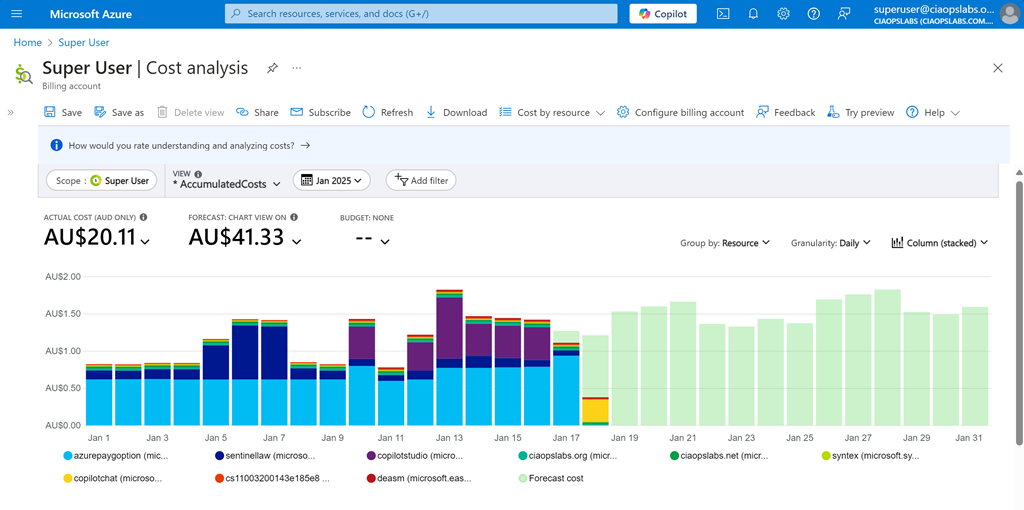
For me I want to see Cost Analysis for the current monthly with accumulated costs, grouped by resource, granularity daily and as a stacked column as shown above. When you have it the way you want select the Save option on the menu at the top of the page.
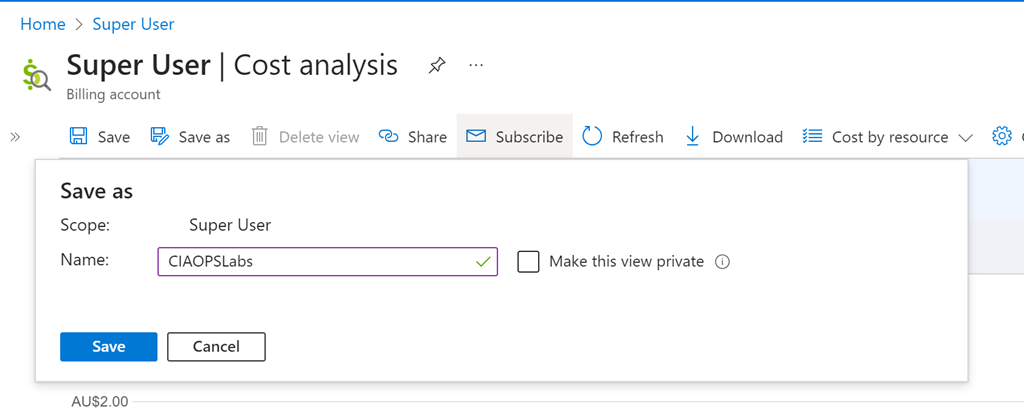
You’ll be asked for a name, as you see above. Select Save when complete.
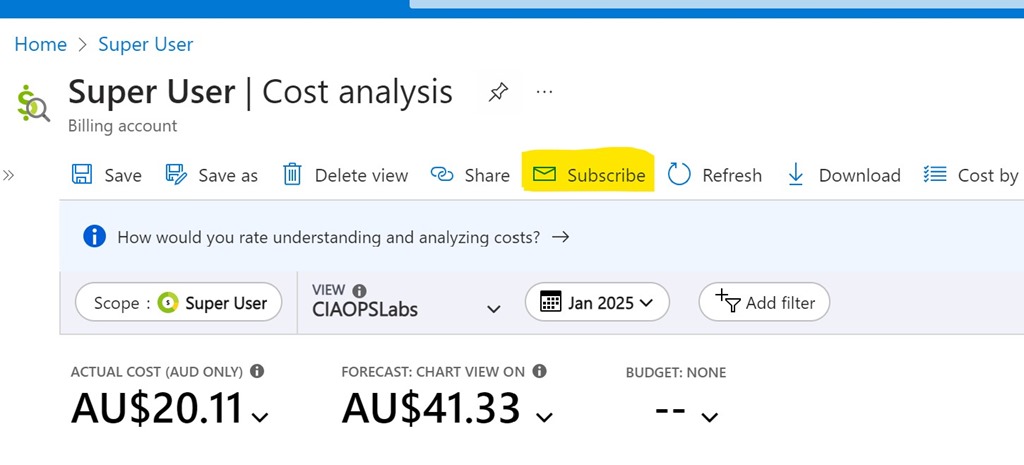
Also on the menu at the top, now select Subscribe as shown above.
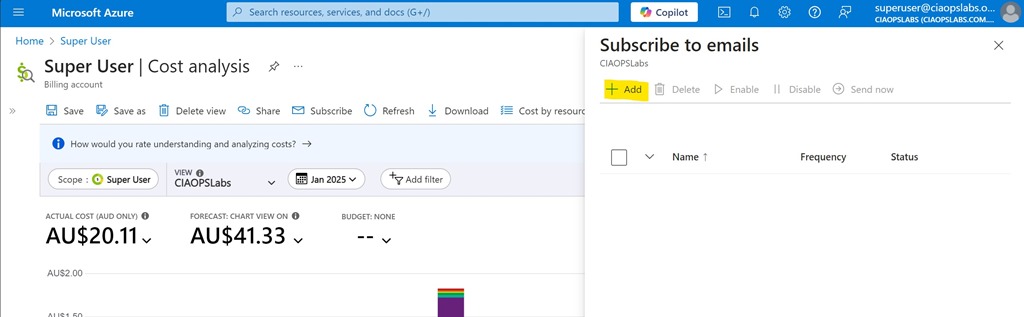
Select the Add option from the Subscribe to emails option that appears on the right as shown above.
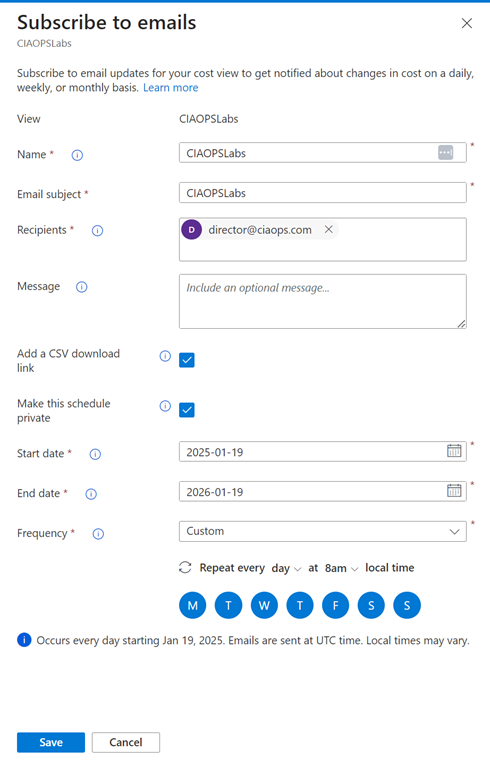
You should see the View you just saved at the top. Now complete the rest of the fields as desired. Personally, I select the option to include a CSV and want the report every day. The only challenge is that you can only specify a maximum end date 12 months out from the day you configure this. You’ll need to return annually to update this.
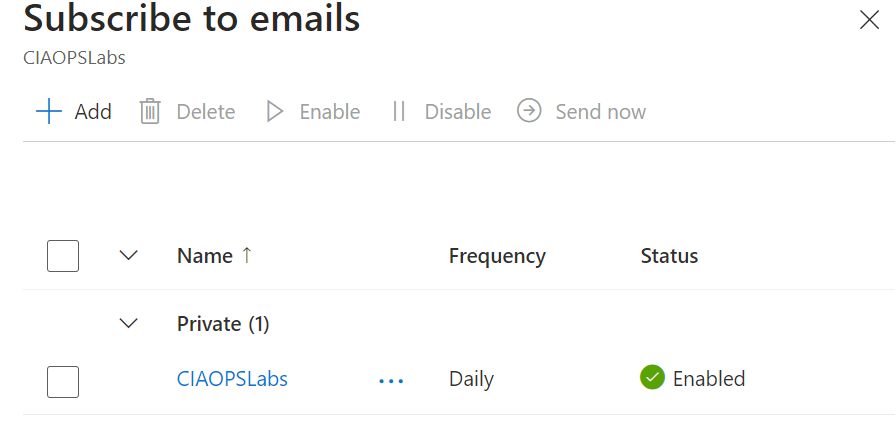
Select Save at the bottom of screen and you should now see your configuration listed as shown above.
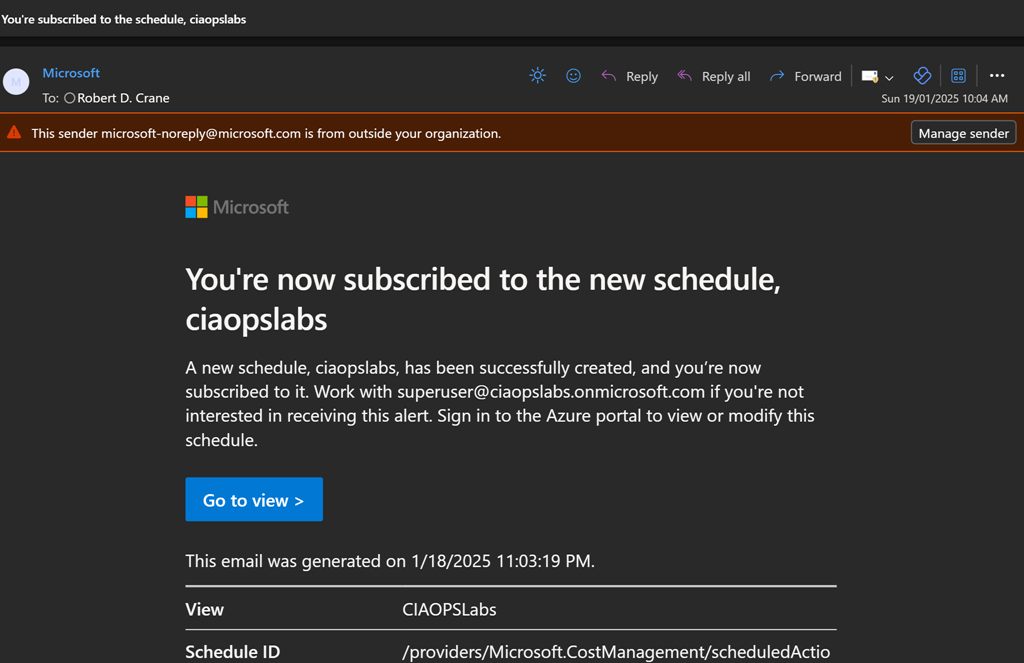
You’ll get a summary email confirming these settings as shown above.
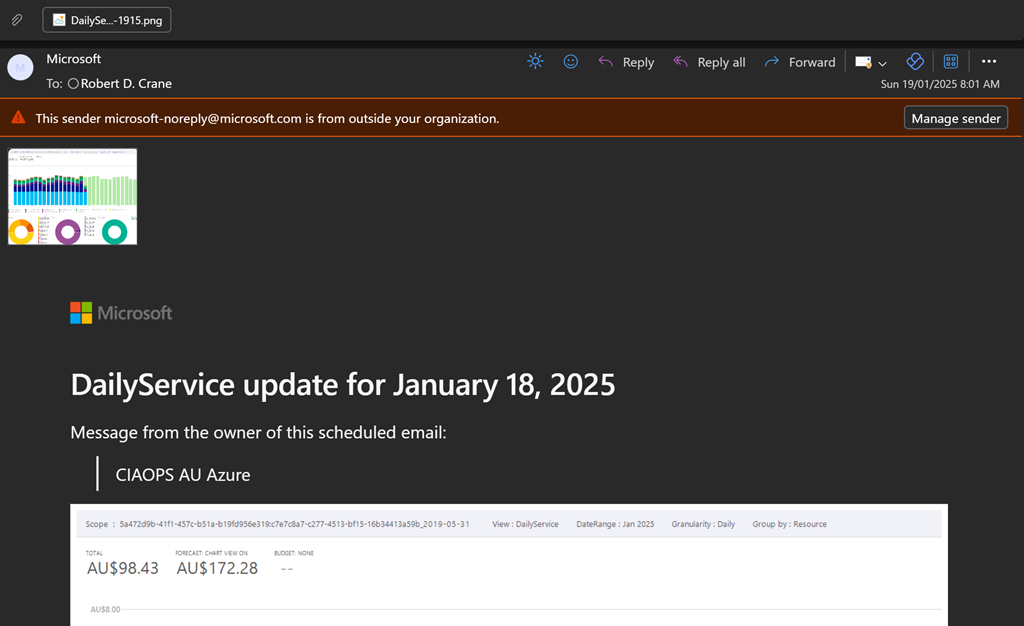
You should now start receiving a summary email on at the frequency your selected as shown above. You’ll see a screen shot of the report and a CSV attachment if you elected to include that.
Hopefully, this option provides greater piece of mind when it comes to monitoring costs with Azure. Remember, you can create as many subscription reports as you want to see a range of different details if desired.
CIA Brief 20250118
Take action by February 1: Azure AD Graph is retiring –
Copilot for all: Announcing Microsoft 365 Copilot Chat –
https://www.youtube.com/watch?v=K1h77wRwkb0
New Star Blizzard spear-phishing campaign targets WhatsApp accounts –
Microsoft 365 Copilot Chat and Agent Starter Kit –
Microsoft 365 Copilot Chat – Enterprise-ready web chat demo –
https://www.youtube.com/watch?v=ElcsGanlvRI
Microsoft 365 Copilot Chat – Manage agents demo –
https://www.youtube.com/watch?v=jMCn0-ZCHOM
Enabling agents in Microsoft 365 Copilot Chat –
I tried Microsoft Loop and here’s why I’m never going back to traditional productivity tools –
https://www.androidpolice.com/tried-microsoft-loop-never-going-back-to-old-tools/
New block screen capture for iOS/iPadOS MAM protected apps –
Customize the location of notifications in Teams –
Introducing Microsoft 365 Copilot Chat –
https://www.youtube.com/watch?v=rc-fc7pT9nw
Innovating in line with the European Union’s AI Act –
The First Purview AMA of 2025 is Now On-Demand –
Windows 11 tips edition – January 2025 –
https://www.youtube.com/watch?v=gei0otVeueA
Step-by-Step Guide : How to use Temporary Access Pass (TAP) with internal guest users –
Introducing Core AI – Platform and Tools –
https://blogs.microsoft.com/blog/2025/01/13/introducing-core-ai-platform-and-tools/
Analyzing CVE-2024-44243, a macOS System Integrity Protection bypass through kernel extensions –
3 takeaways from red teaming 100 generative AI products –
AI Companions Will Change Our Lives –
https://time.com/collection/time100-voices/7204530/ai-companions/
Pop out Chat, Copilot, and Notes panes in Teams meetings –
After hours
Starship launch and Super Heavy landing, 16 January 2025 – https://www.youtube.com/watch?v=v_4oS_M_0cc
Editorial
If you found this valuable, the I’d appreciate a ‘like’ or perhaps a donation at https://ko-fi.com/ciaops. This helps me know that people enjoy what I have created and provides resources to allow me to create more content. If you have any feedback or suggestions around this, I’m all ears. You can also find me via email director@ciaops.com and on X (Twitter) at https://www.twitter.com/directorcia.
If you want to be part of a dedicated Microsoft Cloud community with information and interactions daily, then consider becoming a CIAOPS Patron – www.ciaopspatron.com.
Watch out for the next CIA Brief next week
Checking your environment for oversharing
Microsoft now provides the ability to check yoru environment for oversharing my running a data assessment report which you’ll find in DSPM for AI inside Microsoft Purview.
Here’s my video to get you started:
https://www.youtube.com/watch?v=aVUQ6PGnMmE
some documentation to help is here:
Get started with Data Security Posture Management
Hopefully, the reporting will become more details and allow you to take direct action on individual items that are reported. However, for now, it is a handy report to have in your bag of tricks.
 CIAOPS