CIAOPS Brief 20241012

image

Microsoft Defender for Cloud remediated threats 30% faster than other solutions, according to Forrester TEI study –

https://www.microsoft.com/en-us/security/blog/2024/10/07/microsoft-defender-for-cloud-remediated-threats-30-faster-than-other-solutions-according-to-forrester-tei-study/

Corning Incorporated boosts efficiency with OneDrive’s advanced security & compliance features –

https://www.youtube.com/watch?v=dpzqJT-rT5Q

Cyber Signals Issue 8 | Education under siege: How cybercriminals target our schools –

https://www.microsoft.com/en-us/security/blog/2024/10/10/cyber-signals-issue-8-education-under-siege-how-cybercriminals-target-our-schools/

Welcome to the New Era of Microsoft OneDrive: AI, Productivity, and Memories at Your Fingertips –

https://techcommunity.microsoft.com/t5/microsoft-onedrive-blog/welcome-to-the-new-era-of-microsoft-onedrive-ai-productivity-and/ba-p/4265409

Create desktop flows using the AI Recorder –

https://www.youtube.com/watch?v=rkbzxIy05X4

Token theft protection with Microsoft Entra, Intune, Defender XDR & Windows –

https://techcommunity.microsoft.com/t5/microsoft-mechanics-blog/token-theft-protection-with-microsoft-entra-intune-defender-xdr/ba-p/4265675

Use community queries to hunt more effectively across email and collaboration threats –

https://techcommunity.microsoft.com/t5/microsoft-defender-for-office/use-community-queries-to-hunt-more-effectively-across-email-and/ba-p/4254664

What’s new in Microsoft Entra – September 2024 –

https://www.youtube.com/watch?v=GFx6btsxtRU

Passkeys on Windows: Authenticate seamlessly with passkey providers –

https://blogs.windows.com/windowsdeveloper/2024/10/08/passkeys-on-windows-authenticate-seamlessly-with-passkey-providers/

Research Threat intelligence Microsoft Defender XDR Business email compromise 9 min read File hosting services misused for identity phishing –

https://www.microsoft.com/en-us/security/blog/2024/10/08/file-hosting-services-misused-for-identity-phishing/

Welcome to the New Era of Microsoft OneDrive: AI, Productivity, and Memories at Your Fingertips –

https://techcommunity.microsoft.com/t5/microsoft-onedrive-blog/welcome-to-the-new-era-of-microsoft-onedrive-ai-productivity-and/ba-p/4265409

Improved user experience for Dictate in new Outlook for Windows and Outlook for the web –

https://techcommunity.microsoft.com/t5/microsoft-365-insider-blog/improved-user-experience-for-dictate-in-new-outlook-for-windows/ba-p/4232294

Get to know Copilot in OneDrive –

https://techcommunity.microsoft.com/t5/community-news-desk/get-to-know-copilot-in-onedrive/ba-p/4262317

Anatomy of a Copilot –

https://www.microsoft.com/en-us/worklab/anatomy-of-a-copilot?ocid=FY25_soc_omc_br_x_AnatomyCopilot

How the cloud and community strength fuel success in Spain | Cloud Cultures by Microsoft Azure –

https://www.youtube.com/watch?v=AdOF-y27U4U

After hours

FIRST RIDE: Tesla Robotaxi – Our Driverless Future Has Arrived! –

https://www.youtube.com/watch?v=3LFYM86BjU0

Editorial

If you found this valuable, the I’d appreciate a ‘like’ or perhaps a donation at https://ko-fi.com/ciaops. This helps me know that people enjoy what I have created and provides resources to allow me to create more content. If you have any feedback or suggestions around this, I’m all ears. You can also find me via email director@ciaops.com and on X (Twitter) at https://www.twitter.com/directorcia.

If you want to be part of a dedicated Microsoft Cloud community with information and interactions daily, then consider becoming a CIAOPS Patron – www.ciaopspatron.com.

Watch out for the next CIA Brief next week
Find the largest files in OneDrive for Business

image

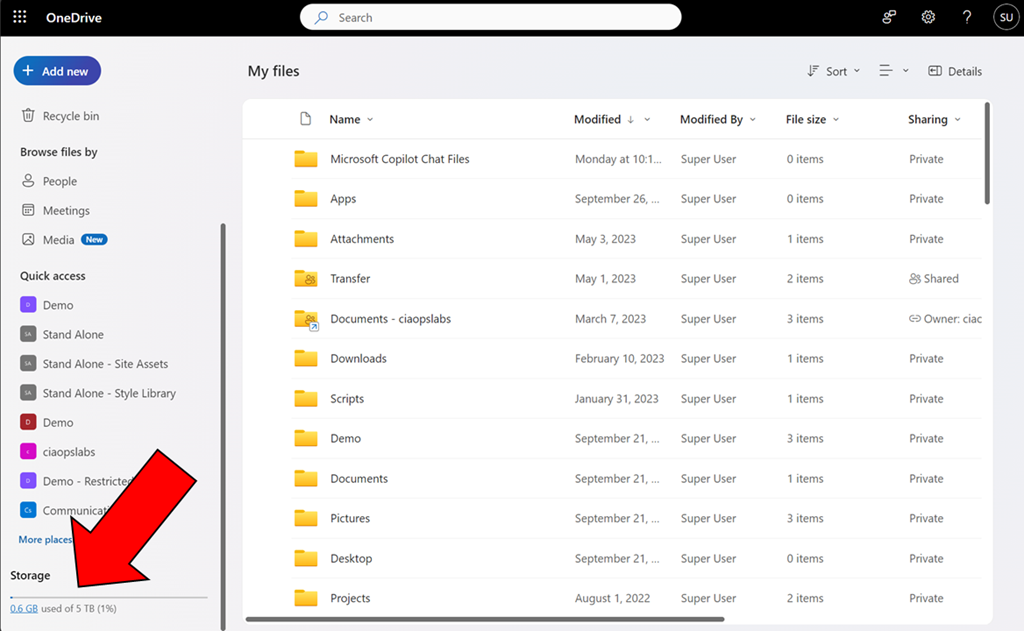
If you navigate to your OneDrive for Business and select My files and then scroll down to the bottom on the left navigation pane you will find teh following option.

image

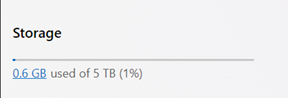
This option give you an indication of the space consumed for your OneDrive for Business.

You might also notice that the used storage is hyperlinked.

image

If you select that hyperlink you will now see a descending list of the largest file sizes you have saved into your OneDrive for Business as shown above.

This option make it easy to quickly see your total OneDrive for Business storage usage as well as finding the largest files you have saved. Very handy!

CIAOPS Need to Know Microsoft 365 Webinar – October

laptop-eyes-technology-computer_thumb

Join me for the free monthly CIAOPS Need to Know webinar. Along with all the Microsoft Cloud news we’ll be taking a look at SharePoint.

Shortly after registering you should receive an automated email from Microsoft Teams confirming your registration, including all the event details as well as a calendar invite.

You can register for the regular monthly webinar here:

October Webinar Registrations

(If you are having issues with the above link copy and paste – https://bit.ly/n2k2410

The details are:

CIAOPS Need to Know Webinar – October 2024
Friday 1st of November 2024
11.00am – 12.00am Sydney Time

All sessions are recorded and posted to the CIAOPS Academy.

The CIAOPS Need to Know Webinars are free to attend but if you want to receive the recording of the session you need to sign up as a CIAOPS patron which you can do here:

http://www.ciaopspatron.com

or purchase them individually at:

http://www.ciaopsacademy.com/

Also feel free at any stage to email me directly via director@ciaops.com with your webinar topic suggestions.

I’d also appreciate you sharing information about this webinar with anyone you feel may benefit from the session and I look forward to seeing you there.

Script to create EntraID reset app

After a recent incident, I decided that it would be a good idea to have an EntraID app that I could use to re-enable a users inside a tenant if I needed. I have previously detailed how to do this manually:

Create an EntraID app to allow user enablement

I’ve now created a script you can use to accomplish this which you will find here:

https://github.com/directorcia/Office365/blob/master/eid-resetapp-set.ps1

Let me walk your through its operation:

You’ll need to ensure the Microsoft Graph PowerShell module is installed in your environment.

The new EntraID app will be called ‘Reset’ by default but you can change that by changing the variable $appname in the script.

The first thing the script will do is connect to the Microsoft Graph using the appropriate scopes or permissions. Typically you will need to login to your tenant with an administrator account because an new EntraID app needs to be created.

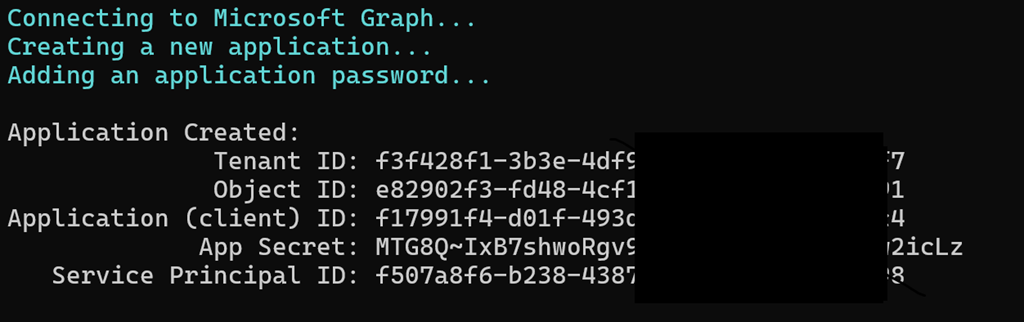
Next, the script will use the new-mgapplication command to create a new EntraID app in your environment. It will then use the add-mgapplicationpassword command to set a password for that app.

image

The script will now display all the important details about the EntraID app just created on the screen which you need to record for later use. Again, write this stuff down!

The script will now build the appropriate API permissions required for the EntraID app which are:

– User.EnableDisableAccount.All

– User.ReadWrite.All

– Directory.ReadWrite.All

These are required by the update-mguser command detailed here:

https://learn.microsoft.com/en-us/powershell/module/microsoft.graph.users/update-mguser?view=graph-powershell-1.0#description

The script now uses the command update-mgapplication to add these API permissions to the new EntraID app.

image

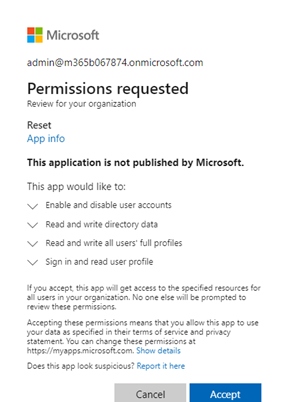
It then builds a consent URL and copies that to the clipboard. This consent URL you will need to past into a browser and click Accept. The consent URL is also displayed on the screen so you can copy and paste from there if needed.

I have not been able to get this consent function working inside my script. I aim to keep working on that but for now you’ll need to use the browser to consent to the permissions. If anyone know how to do this please let me know as I can’t get it to work.

image

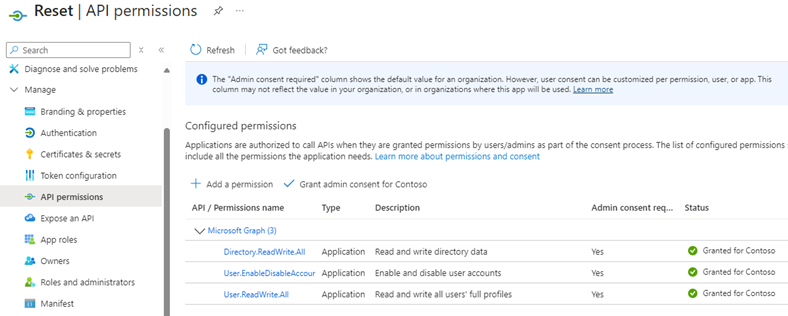
If you look inside your EntraID application you should now see one called ‘Reset’ with the appropriate API permissions consented to as shown above.

The completed script output should look like:

image

You should now be able to follow these instructions:

Using PowerShell to allow user enablement

to gain access if needed to enable a user, but don;t forget to save the credentials that this script produces for later use.

CIAOPS Brief 20241005

image

What is Microsoft Entra (and why use it)? –

https://techcommunity.microsoft.com/t5/apps-on-azure-blog/what-is-microsoft-entra-and-why-use-it/ba-p/4262826

Install apps for your business –

https://www.youtube.com/watch?v=qfUYWKEAtBk

Microsoft starts paying publishers for content surfaced by Copilot –

https://techcrunch.com/2024/10/01/microsoft-starts-paying-publishers-for-content-in-copilot/

Level Up Your Security Skills with the New Microsoft Sentinel Ninja Training! –

https://techcommunity.microsoft.com/t5/microsoft-sentinel-blog/level-up-your-security-skills-with-the-new-microsoft-sentinel/ba-p/4260106

Microsoft Defender XDR Monthly news – October 2024 –

https://techcommunity.microsoft.com/t5/microsoft-defender-xdr-blog/monthly-news-october-2024/ba-p/4258305

Cybersecurity Awareness Month: Securing our world—together –

https://www.microsoft.com/en-us/security/blog/2024/10/01/cybersecurity-awareness-month-securing-our-world-together/

Windows 11, version 24H2 security baseline –

https://techcommunity.microsoft.com/t5/microsoft-security-baselines/windows-11-version-24h2-security-baseline/ba-p/4252801

Windows 11, version 24H2: What’s new for IT pros –

https://techcommunity.microsoft.com/t5/windows-it-pro-blog/windows-11-version-24h2-what-s-new-for-it-pros/ba-p/4259108

Introducing Copilot Labs and Copilot Vision –

Introducing Copilot Labs and Copilot Vision | Microsoft Copilot Blog

New experiences coming to Copilot+ PCs and Windows 11 –

New experiences coming to Copilot+ PCs and Windows 11 | Windows Experience Blog

An AI companion for everyone –

https://blogs.microsoft.com/blog/2024/10/01/an-ai-companion-for-everyone/

Security settings management is available for multi-tenant environments in Microsoft Defender XDR –

https://techcommunity.microsoft.com/t5/microsoft-defender-for-endpoint/security-settings-management-is-available-for-multi-tenant/ba-p/4250996

Securing our future: September 2024 progress update on Microsoft’s Secure Future Initiative (SFI) –

https://www.microsoft.com/en-us/security/blog/2024/09/23/securing-our-future-september-2024-progress-update-on-microsofts-secure-future-initiative-sfi/

What’s New In Copilot | September 2024 –

https://techcommunity.microsoft.com/t5/microsoft-365-copilot/what-s-new-in-copilot-september-2024/ba-p/4256443

New Copilot for Security Plugin Name Reflects Broader Capabilities –

https://techcommunity.microsoft.com/t5/microsoft-defender-threat/new-copilot-for-security-plugin-name-reflects-broader/ba-p/4258810

Getting started with the new Outlook for Windows –

https://support.microsoft.com/en-us/office/getting-started-with-the-new-outlook-for-windows-656bb8d9-5a60-49b2-a98b-ba7822bc7627

After hours

The Eisenhower matrix: How to manage your tasks with EISENHOWER –

https://www.youtube.com/watch?v=tT89OZ7TNwc

Editorial

If you found this valuable, the I’d appreciate a ‘like’ or perhaps a donation at https://ko-fi.com/ciaops. This helps me know that people enjoy what I have created and provides resources to allow me to create more content. If you have any feedback or suggestions around this, I’m all ears. You can also find me via email director@ciaops.com and on X (Twitter) at https://www.twitter.com/directorcia.

If you want to be part of a dedicated Microsoft Cloud community with information and interactions daily, then consider becoming a CIAOPS Patron – www.ciaopspatron.com.

Watch out for the next CIA Brief next week