Recent presentation resources

I recently did two presentations for which the resources can be found at:

What most IT Pros overlook when configuring Microsoft 365

Microsoft 365 has a huge range of features that are designed to help keep users safe. Many of these are not fully enabled by default and typically should be. This session will highlight what are the most common settings that IT Pros overlook when setting up security for a Microsoft 365 environment

https://bit.ly/cia-m365overlooked

and

How can IT Pros get more out of Copilot

Copilot is now a vast array of services that leverage AI to make life easier. How should and IT Pro be using these AI services from Microsoft and how do they make sense inside a business to drive value for both the customer and the IT Pro. This session is more than just looking at Microsoft 365, it considers the suite of AI that is available from Microsoft and what can be done with these services.

https://bit.ly/cia-getmorefromcopilot

Need to Know podcast–Episode 330

Microsoft announced last week new agents that can be created with Copilot studio to automate tasks using AI capabilities. Also in this episode you’ll find a great new tool from CISA called Scubagear that will allow you to check the baseline security of your Microsoft 365 environment. Plenty more updates and information from the Microsoft Cloud, so listen along.

You can listen directly to this episode at:

https://ciaops.podbean.com/e/episode-330-copilot-agents-emerge/

Subscribe via iTunes at:

https://itunes.apple.com/au/podcast/ciaops-need-to-know-podcasts/id406891445?mt=2

or Spotify:

https://open.spotify.com/show/7ejj00cOuw8977GnnE2lPb

Don’t forget to give the show a rating as well as send me any feedback or suggestions you may have for the show.

Brought to you by www.ciaopspatron.com

Resources

@directorcia

Join my shared channel

CIAOPS merch store

Become a CIAOPS Patron

CIAOPS Blog

CIAOPS Brief

CIAOPSLabs

Support CIAOPS

AI Tour Demo: Copilot Studio and Pre-built Agents

Scale your team with new autonomous agents

Unlocking autonomous agent capabilities with Microsoft Copilot Studio

Reimagine business process with Copilot and agents

Unlock Autonomous Agent Capabilities with Copilot Studio

Microsoft 365 Copilot drove up to 353% ROI for small and medium businesses—new study

Favorite Microsoft 365 Copilot Prompts

Enhancing Security with CISA’s ScubaGear Baselines for M365

Phish, Click, Breach: Hunting for a Sophisticated Cyber Attack

Microsoft Digital Defense Report 2024

New macOS vulnerability, “HM Surf”, could lead to unauthorized data access

Demystify potential data leaks with Insider Risk Management insights in Defender XDR

Increase productivity with Copilot in OneNote for iPad and Mac for commercial customers

Unleash your creativity with new pen tools in OneNote

What’s new in Microsoft Intune October 2024

Microsoft 365 Insider Handbook

Prepare now for key end of support moments in 2025

CIAOPS Brief 20241027

image

Queues app for Microsoft Teams now generally available –

https://techcommunity.microsoft.com/t5/microsoft-teams-blog/queues-app-for-microsoft-teams-now-generally-available/ba-p/4276837

Microsoft 365 admin center in dashboard view –

https://www.youtube.com/watch?v=XpZqWHoTwXE

Increase productivity with Copilot in OneNote for iPad and Mac for commercial customers –

https://techcommunity.microsoft.com/t5/microsoft-365-insider-blog/increase-productivity-with-copilot-in-onenote-for-ipad-and-mac/ba-p/4272321

Seamlessly switch between your Apple devices with Handoff support for Word, Excel, and PowerPoint –

https://techcommunity.microsoft.com/t5/microsoft-365-insider-blog/seamlessly-switch-between-your-apple-devices-with-handoff/ba-p/4275907

Enhancing Security with CISA’s ScubaGear Baselines for M365 –

https://techcommunity.microsoft.com/t5/public-sector-blog/enhancing-security-with-cisa-s-scubagear-baselines-for-m365/ba-p/4276782

As the U.S. election nears, Russia, Iran and China step up influence efforts –

https://blogs.microsoft.com/on-the-issues/2024/10/23/as-the-u-s-election-nears-russia-iran-and-china-step-up-influence-efforts/

SharePoint content processing updates – translation and simple prebuilt models –

https://techcommunity.microsoft.com/t5/microsoft-sharepoint-blog/sharepoint-content-processing-updates-translation-and-simple/ba-p/4275859

Microsoft Threat Intelligence healthcare ransomware report highlights need for collective industry action –

https://www.microsoft.com/en-us/security/blog/2024/10/22/microsoft-threat-intelligence-healthcare-ransomware-report-highlights-need-for-collective-industry-action/

Upcoming design updates: Microsoft Purview Message Encryption Portal –

https://techcommunity.microsoft.com/t5/security-compliance-and-identity/upcoming-design-updates-microsoft-purview-message-encryption/ba-p/4274433

Bidirectional translation support now available for language interpretation in Teams –

https://techcommunity.microsoft.com/t5/microsoft-365-insider-blog/bidirectional-translation-support-now-available-for-language/ba-p/4237385

AI Tour Demo: Copilot Studio and Pre-built Agents –

https://www.youtube.com/watch?v=gLNjFP6BKtQ

Scale your team with new autonomous agents –

https://www.microsoft.com/en-us/dynamics-365/blog/business-leader/2024/10/21/transform-work-with-autonomous-agents-across-your-business-processes/

Unlocking autonomous agent capabilities with Microsoft Copilot Studio –

https://www.microsoft.com/en-us/microsoft-copilot/blog/copilot-studio/unlocking-autonomous-agent-capabilities-with-microsoft-copilot-studio/

Reimagine business process with Copilot and agents –

https://www.youtube.com/watch?v=Lw7H4TFX5TM

Increase productivity with Copilot in OneNote for iPad and Mac for commercial customers –

https://techcommunity.microsoft.com/t5/microsoft-365-insider-blog/increase-productivity-with-copilot-in-onenote-for-ipad-and-mac/ba-p/4272321

Unlock Autonomous Agent Capabilities with Copilot Studio –

https://www.youtube.com/watch?v=qxMi-tLg4MA

What’s new in Microsoft Intune October 2024 –

https://techcommunity.microsoft.com/t5/microsoft-intune-blog/what-s-new-in-microsoft-intune-october-2024/ba-p/4273353

After hours

When Technology Becomes a Human Problem – https://www.youtube.com/watch?v=GS3lw5_BAqo

Editorial

If you found this valuable, the I’d appreciate a ‘like’ or perhaps a donation at https://ko-fi.com/ciaops. This helps me know that people enjoy what I have created and provides resources to allow me to create more content. If you have any feedback or suggestions around this, I’m all ears. You can also find me via email director@ciaops.com and on X (Twitter) at https://www.twitter.com/directorcia.

If you want to be part of a dedicated Microsoft Cloud community with information and interactions daily, then consider becoming a CIAOPS Patron – www.ciaopspatron.com.

Watch out for the next CIA Brief next week

Add OneNote integration to New Outlook

The new Outlook is slowly improving.

image

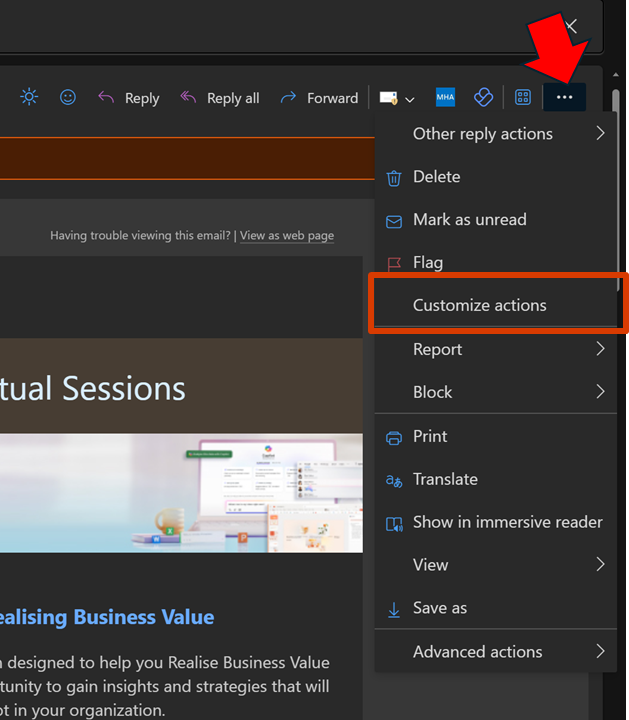
One key missing component for me was the integration with OneNote, as I like to send stuff from Outlook to OneNote. That feature is now there but simply isn’t enabled. To enable OneNote integration, open an email and select the ellipse (3 dots) as shown. From the menu that appears select Customize actions.

image

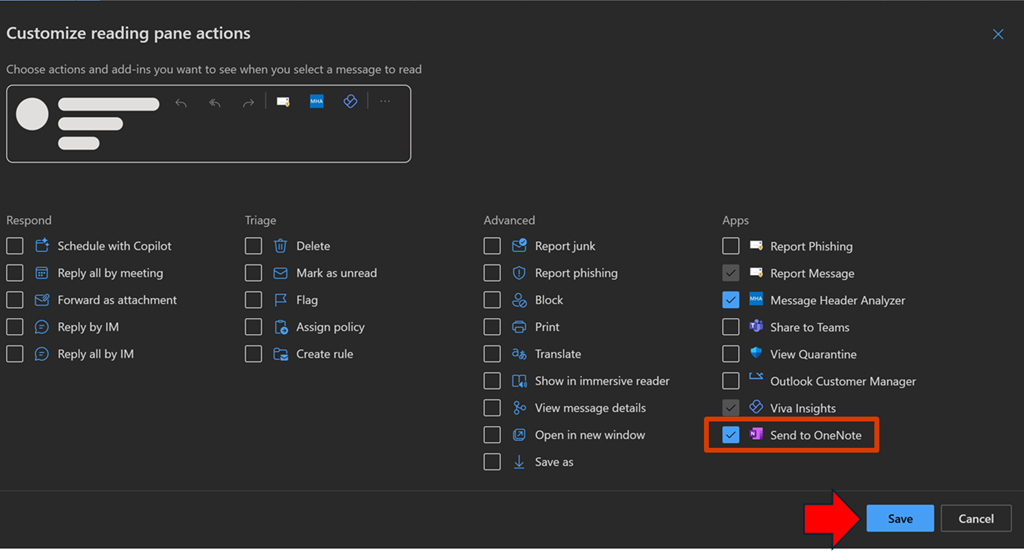
From the menu that select Send to OneNote, as shown above. Then select Save.

image

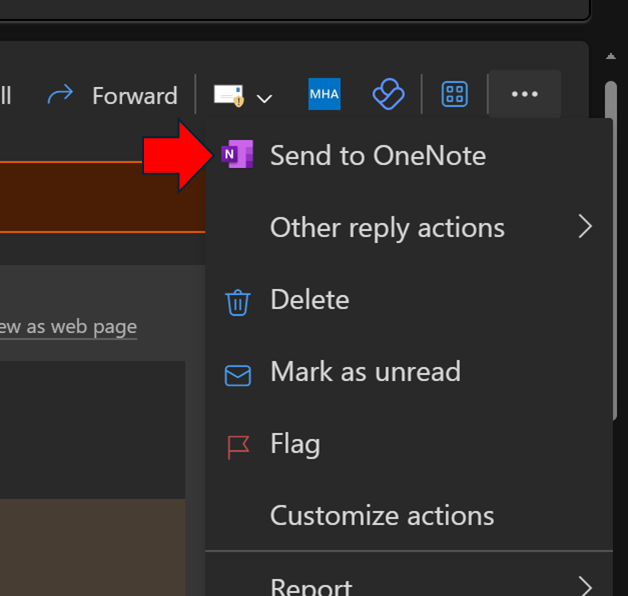
When you return to that menu for an email you should see the Send to OneNote as shown above.

image

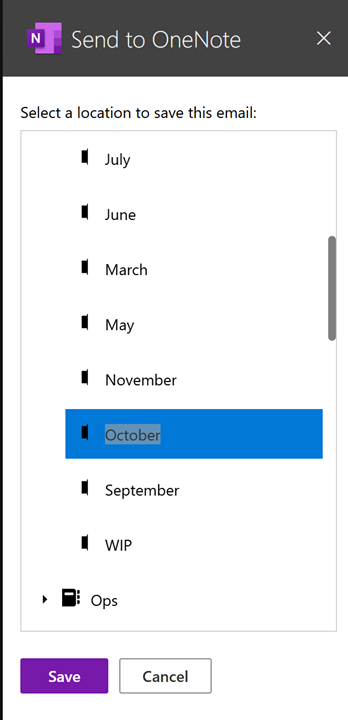
A dialog will appear on the right as shown above, allowing you to select where you wish the email saved.

Unfortunately, it only currently saves the content to a new page in the section in the notebook you nominate, not inside an existing page as used to happen in Outlook ‘classic’.

Hopefully, we’ll get the ability to send to an existing OneNote page as we used to be able to. At least I can send information to OneNote that I was unable to before I customized the actions as I have shown here.

CIAOPS Brief 20241019

image

How connection and cloud foster multicultural exchange in Chile | Cloud Cultures by Microsoft Azure –

https://www.youtube.com/watch?v=KMaNs8f0vAY

Create neat lines and shapes with ink in Excel and PowerPoint for Windows –

https://techcommunity.microsoft.com/t5/microsoft-365-insider-blog/create-neat-lines-and-shapes-with-ink-in-excel-and-powerpoint/ba-p/4271290

Microsoft named a Leader in the 2024 Gartner® Magic Quadrant™ for Unified Communications as a Service for the sixth year in a row –

https://www.microsoft.com/en-us/microsoft-365/blog/2024/10/16/microsoft-named-a-leader-in-the-2024-gartner-magic-quadrant-for-unified-communications-as-a-service-for-the-sixth-year-in-a-row/

New macOS vulnerability, “HM Surf”, could lead to unauthorized data access –

https://www.microsoft.com/en-us/security/blog/2024/10/17/new-macos-vulnerability-hm-surf-could-lead-to-unauthorized-data-access/

Microsoft 365 Copilot drove up to 353% ROI for small and medium businesses—new study –

https://www.microsoft.com/en-us/microsoft-365/blog/2024/10/17/microsoft-365-copilot-drove-up-to-353-roi-for-small-and-medium-businesses-new-study/

Unleash your creativity with new pen tools in OneNote –

https://techcommunity.microsoft.com/t5/microsoft-365-insider-blog/unleash-your-creativity-with-new-pen-tools-in-onenote/ba-p/4261197

Microsoft 365 Insider Handbook –

https://techcommunity.microsoft.com/t5/microsoft-365-insider-blog/microsoft-365-insider-handbook/ba-p/4205461

Using AI to balance preservation and innovation in South Africa | Cloud Cultures by Microsoft Azure –

https://www.youtube.com/watch?v=pM4lGLsusy0

Support tip: Always unenroll from MDM when unjoining and rejoining Microsoft Entra hybrid devices –

https://techcommunity.microsoft.com/t5/intune-customer-success/support-tip-always-unenroll-from-mdm-when-unjoining-and/ba-p/4270668

Phish, Click, Breach: Hunting for a Sophisticated Cyber Attack –

https://techcommunity.microsoft.com/t5/microsoft-security-experts-blog/phish-click-breach-hunting-for-a-sophisticated-cyber-attack/ba-p/4267916

Microsoft Digital Defense Report 2024 –

https://www.microsoft.com/en-us/security/security-insider/intelligence-reports/microsoft-digital-defense-report-2024

Favorite Microsoft 365 Copilot Prompts –

https://techcommunity.microsoft.com/t5/microsoft-365-blog/favorite-microsoft-365-copilot-prompts/ba-p/4270282

What to do if your Sentinel Data Connector shows as [DEPRECATED] –

https://techcommunity.microsoft.com/t5/microsoft-sentinel-blog/what-to-do-if-your-sentinel-data-connector-shows-as-deprecated/ba-p/4270346

Prepare now for key end of support moments in 2025 –

https://techcommunity.microsoft.com/t5/microsoft-365-blog/prepare-now-for-key-end-of-support-moments-in-2025/ba-p/4267800

Demystify potential data leaks with Insider Risk Management insights in Defender XDR –

https://techcommunity.microsoft.com/t5/microsoft-defender-xdr-blog/demystify-potential-data-leaks-with-insider-risk-management/ba-p/4269184

National Australia Bank invests in an efficient, cloud-managed future with Windows 11 Enterprise –

https://customers.microsoft.com/en-us/story/1781804873110601091-national-australia-bank-microsoft-edge-banking-and-capital-markets-en-australia

After hours

EPISODE 1 – Scott & Mark Learn to Influence Without Authority –

https://www.youtube.com/watch?v=JxRLX4VGuYg

Editorial

If you found this valuable, the I’d appreciate a ‘like’ or perhaps a donation at https://ko-fi.com/ciaops. This helps me know that people enjoy what I have created and provides resources to allow me to create more content. If you have any feedback or suggestions around this, I’m all ears. You can also find me via email director@ciaops.com and on X (Twitter) at https://www.twitter.com/directorcia.

If you want to be part of a dedicated Microsoft Cloud community with information and interactions daily, then consider becoming a CIAOPS Patron – www.ciaopspatron.com.

Watch out for the next CIA Brief next week

Bulk senders insight in Exchange Online

image

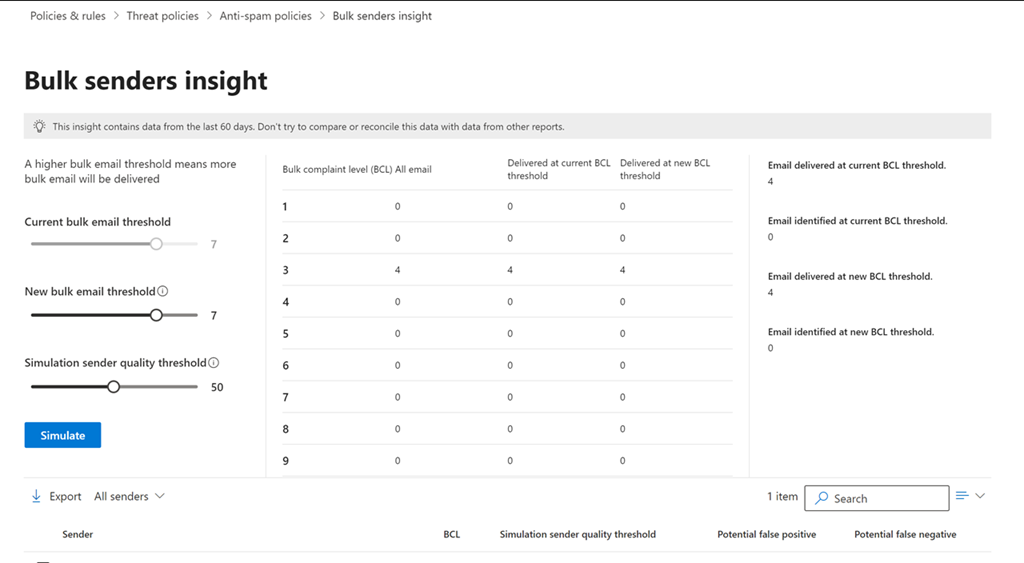
If you navigate to

https://security.microsoft.com/senderinsights

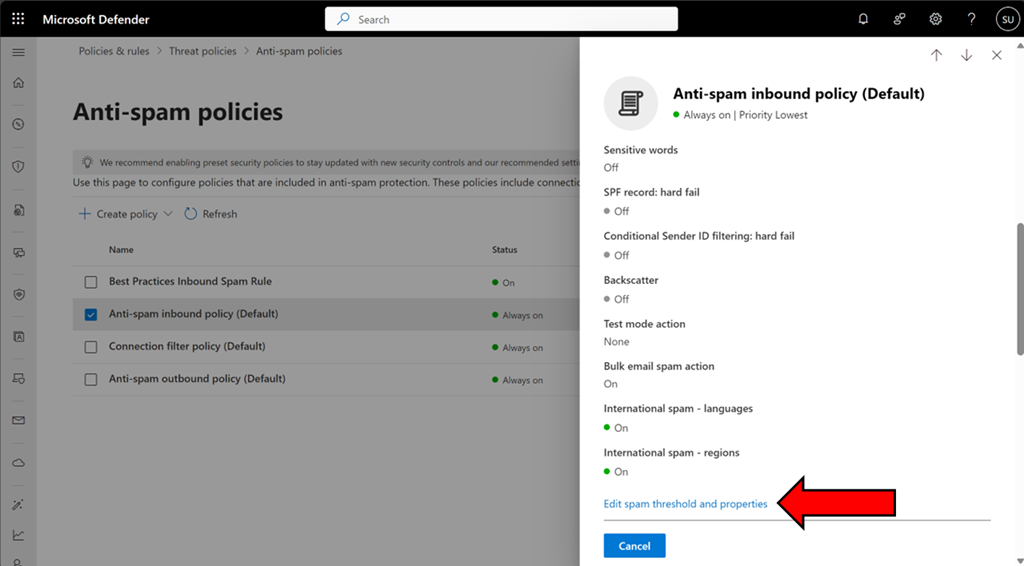
you should see the above Bulk senders insight console. You can also get to this if you select an Exchange Online anti spam policy like so:

image

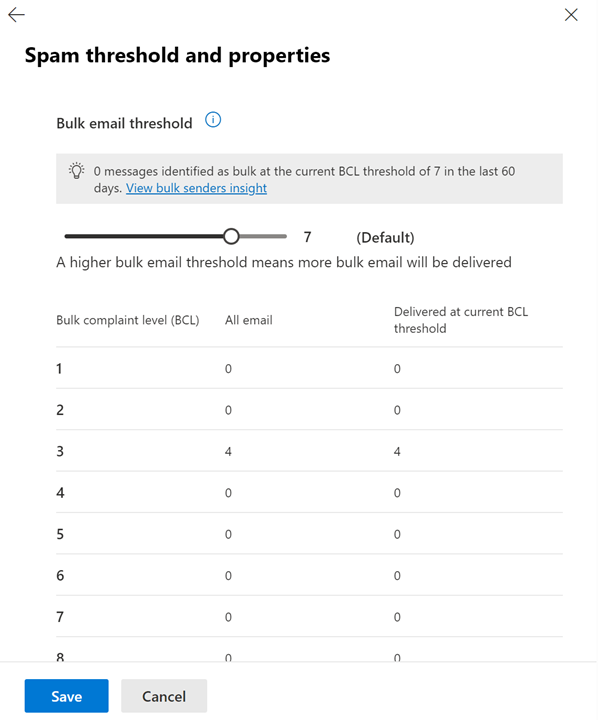
and scrolling down the dialog that appears on the right and selecting Edit spam threshold and properties as shown above.

image

and then scroll up to the top of the dialog as shown above.

You can read more about this capability here:

https://learn.microsoft.com/en-us/defender-office-365/anti-spam-bulk-senders-insight

image

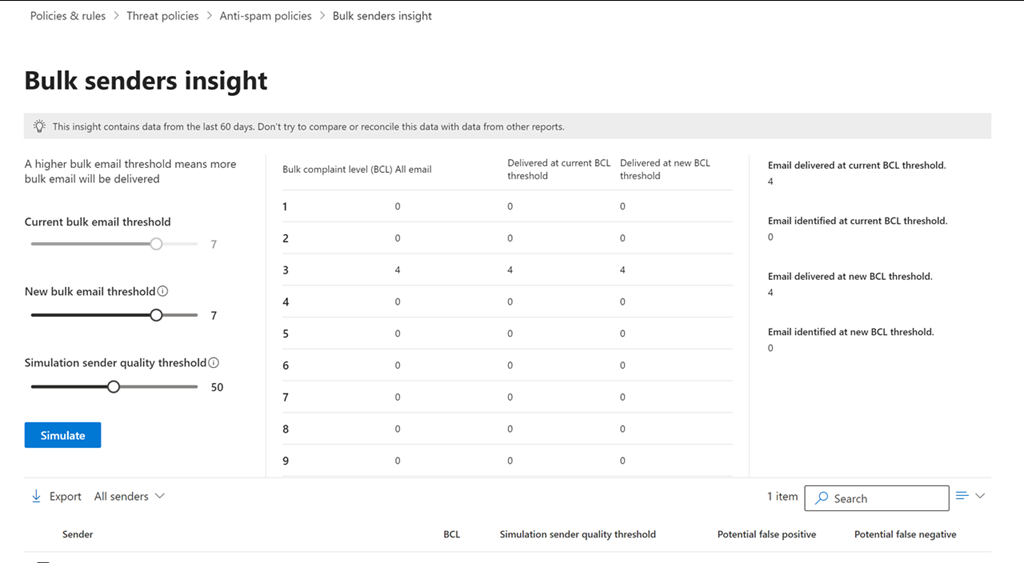
You can adjust the sliders on the left and then select the Simulate button to report on the emails that would be caught by this new level before actually applying to the policy. The list below will also show those that have been caught so you know exactly which emails would be caught if this change was made to the BCL level in a spam policy setting.

This now a handy way to fine tune the BCL settings inside Exchange Online antispam policies.

Shortcuts in OneDrive for Business get the benefits of Copilot for Microsoft 365

image

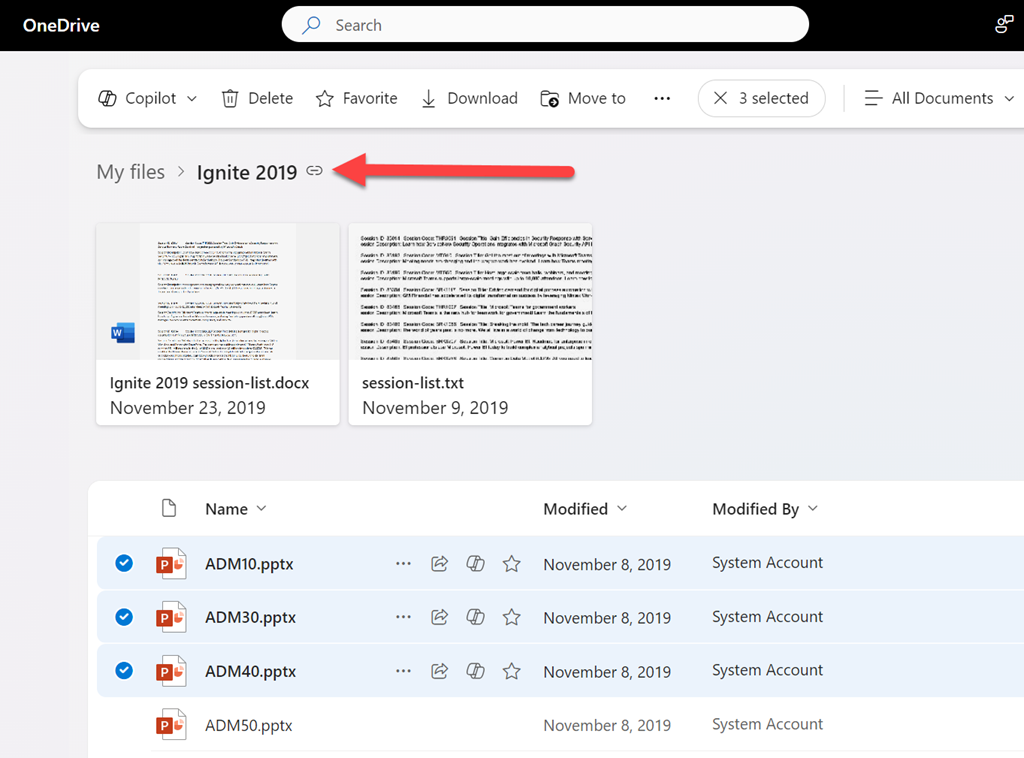
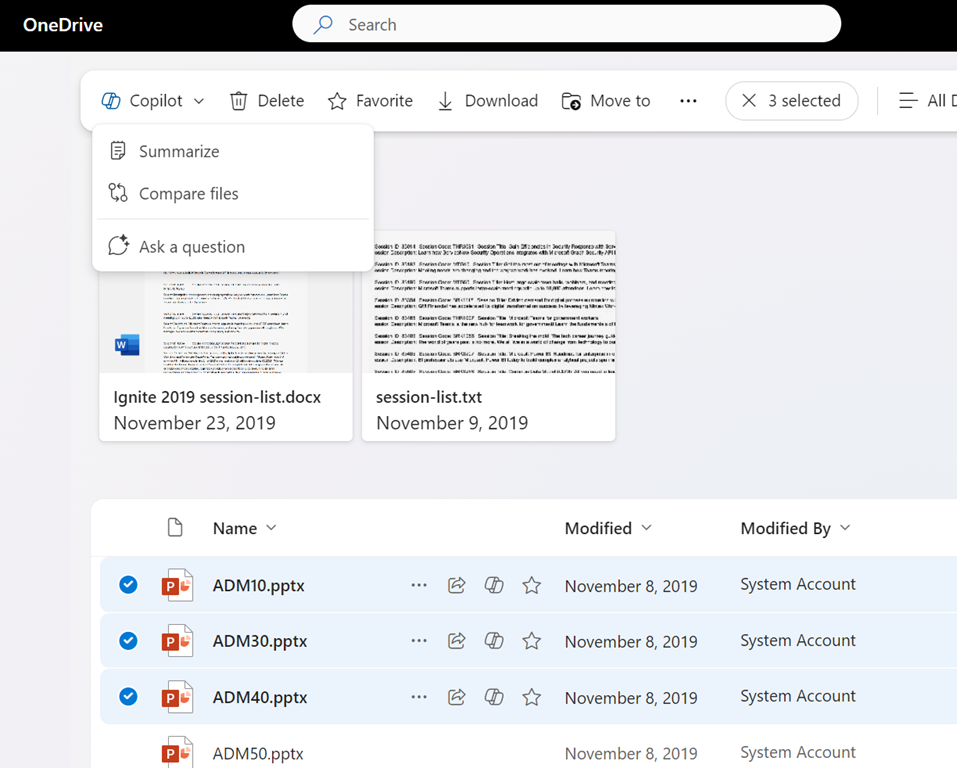
If you have Copilot for Microsoft 365 you will find you have a number of Copilot abilities surfaced in your OneDrive for Business as shown above, such as Summarize, Compare files, etc.

image

What you may not be aware of, is when you add a Shortcut to OneDrive as shown above, from your SharePoint document libraries or Teams channels,

image

that shortcut then appears in the list of folders in OneDrive as shown above

image

and the contents of this shortcut, in your OneDrive, also now have the ability to be used with Copilot themselves just like any normal file in OneDrive for Business. Thus, if you ‘link’ your SharePoint and Teams documents to your OneDrive for Business you can now use them direct with Copilot for Microsoft 365 to do things such as create FAQs, comparisons, summaries, etc.

Need to Know podcast–Episode 329

It’s OneDrive’s turn in the spotlight. After a recent dedicated OneDrive event I have all the latest about updates and improvements that have been announced. Of course, there is plenty of other news also around security and Copilot as well as improvements to the new Outlook that you should check out. Thanks again for listening.

You can listen directly to this episode at:

https://ciaops.podbean.com/e/episode-329-onedrive-improvements/

Subscribe via iTunes at:

https://itunes.apple.com/au/podcast/ciaops-need-to-know-podcasts/id406891445?mt=2

or Spotify:

https://open.spotify.com/show/7ejj00cOuw8977GnnE2lPb

Don’t forget to give the show a rating as well as send me any feedback or suggestions you may have for the show.

Brought to you by www.ciaopspatron.com

Resources

@directorcia

Join my shared channel

CIAOPS merch store

Become a CIAOPS Patron

CIAOPS Blog

CIAOPS Brief

CIAOPSLabs

Support CIAOPS

Welcome to the New Era of Microsoft OneDrive: AI, Productivity, and Memories at Your Fingertips

Get to know Copilot in OneDrive

Introducing Copilot in OneDrive: Now Generally Available

What’s New In Copilot | September 2024

New Copilot enhancements help small and medium-sized businesses innovate

Introducing Copilot Labs and Copilot Vision

New experiences coming to Copilot+ PCs and Windows 11

An AI companion for everyone

Create desktop flows using the AI Recorder

Token theft protection with Microsoft Entra, Intune, Defender XDR & Windows

Use community queries to hunt more effectively across email and collaboration threats

What’s new in Microsoft Entra – September 2024

What is Microsoft Entra (and why use it)?

Research Threat intelligence Microsoft Defender XDR Business email compromise

Improved user experience for Dictate in new Outlook for Windows and Outlook for the web

Getting started with the new Outlook for Windows

Learn about the new Outlook for Windows

Level Up Your Security Skills with the New Microsoft Sentinel Ninja Training!

Microsoft Defender XDR Monthly news – October 2024

Windows 11, version 24H2 security baseline

Windows 11, version 24H2: What’s new for IT pros

Security settings management is available for multi-tenant environments in Microsoft Defender XDR

Implementing a secure by default approach with Microsoft Purview and address oversharing

Microsoft Intune support for Apple Intelligence

Microsoft is named a Leader in the 2024 Gartner® Magic Quadrant™ for Endpoint Protection Platforms

Microsoft Ignite