
In recent article:
Block applications on Windows devices using Intune
I outlined how to prevent an application from running on a Windows device. It would be nice to know how many people are running this application prior to it being blocked (and even before). You can achieve this using Sentinel.
Many don’t appreciate
The extra value that Microsoft Defender provides
apart from security. In a nutshell, Defender for Endpoint sends signals from devices into the Microsoft cloud that something like Sentinel can take advantage of. This is something that can be taken advantage of to see application usage.
DeviceNetworkEvents
| where InitiatingProcessFileName contains “msedge.exe”
| project TimeGenerated, RemoteUrl, RemoteIP, DeviceName, InitiatingProcessAccountName
| summarize count() by bin(TimeGenerated,1day),DeviceName
| render columnchart
an example of this is the above KQL query, which when run provides an output like:
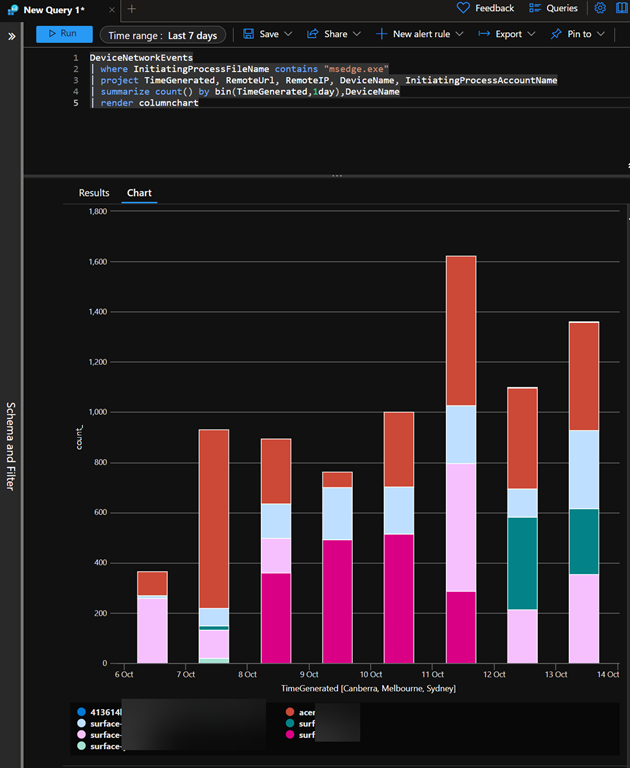
The result is basically a bar graph, over whatever time you specify, of how many times an application has been used. This is a great indicative way to get a feel for how often a device is running a particular application (here msedge.exe). The different bar colours show each particular device and each bar height represents the total usage of that application for one day.
The great thing is that you can further customize and enhance this query to suit your needs to product the output your require. You can then take that query and embed it into a Sentinel workbook so that it is available as part of a dashboard.
There is just so much that you can do and all it takes is becoming familiar with the tools Microsoft provides in your environment.
 CIAOPS