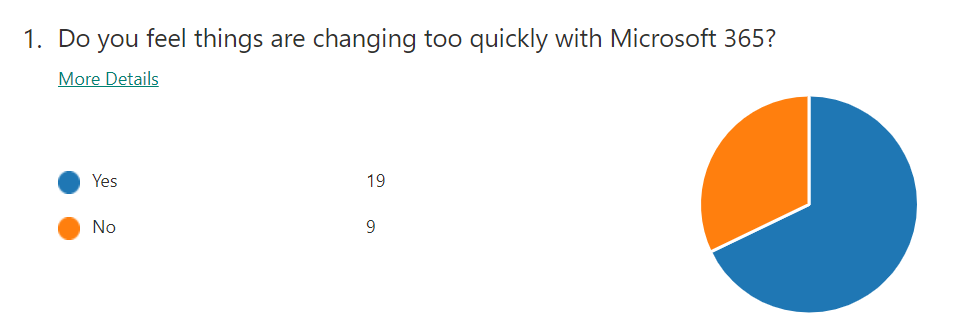
November poll

ask-blackboard-chalk-board-chalkboard-356079

For November I’m asking people:

Are you using a third party product/service to ‘backup’ Office 365 outside of what Microsoft provides?

which I greatly appreciate you thoughts here:

http://bit.ly/ciasurvey202011

You can view the results during the month here:

http://bit.ly/ciaresults202011

and I’ll post a summary at the end of the month here on the blog.

Please feel free to share this survey with as many people as you can so we can get better idea on this question.

Integrate Office 365 with Microsoft Defender for Endpoint

One of the benefits of using security solutions in the Microsoft Cloud is that they integrate together, quickly and easily. If you are using Microsoft Defender for Endpoint then signals from this can be shared with the Microsoft 365 Threat environment.

SNAGHTML15c406c8

To enable this integration navigate to the Office 365 Security & Compliance portal. Expand the Threat Management option from the menu on the left. Then select Explorer from the options that appear. Finally, in the right hand pane scroll to the right until you locate the WDATP Settings hyperlink as shown above, and select it.

image

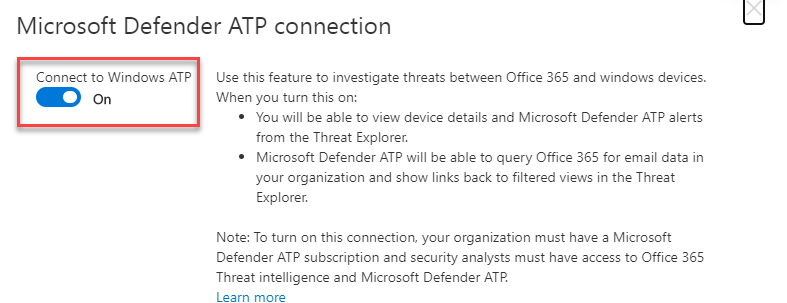
Ensure the Connect to Windows ATP is set to On, typically it is off by default.

image

In the Microsoft Defender Security center navigate to Settings. Select the Advanced features option from the menu on the left. Ensure the Office 365 Threat Intelligence connection is set to On.

Once done, your systems are integrated and will now share information between them. This will make identifying threats much easier because now:

  • You will be able to view device details and Microsoft Defender for Endpoint alerts from the Threat Explorer.

  • Microsoft Defender for Endpoint will be able to query Microsoft 365 for email data in your organization and show links back to filtered views in the Threat Explorer.

Disabling basic authentication in Microsoft 365 admin console

I’ve previously spoken about why it is important to:

Disable basic auth to improve Office 365 security

PowerShell is generally the easiest manner in which that can be done. However it is possible via the Microsoft admin portal.

image

Navigate to:

https://admin.microsoft.com/

and select Settings from the options on the left. Then select Org settings and then Modern authentication on the right as shown above.

image

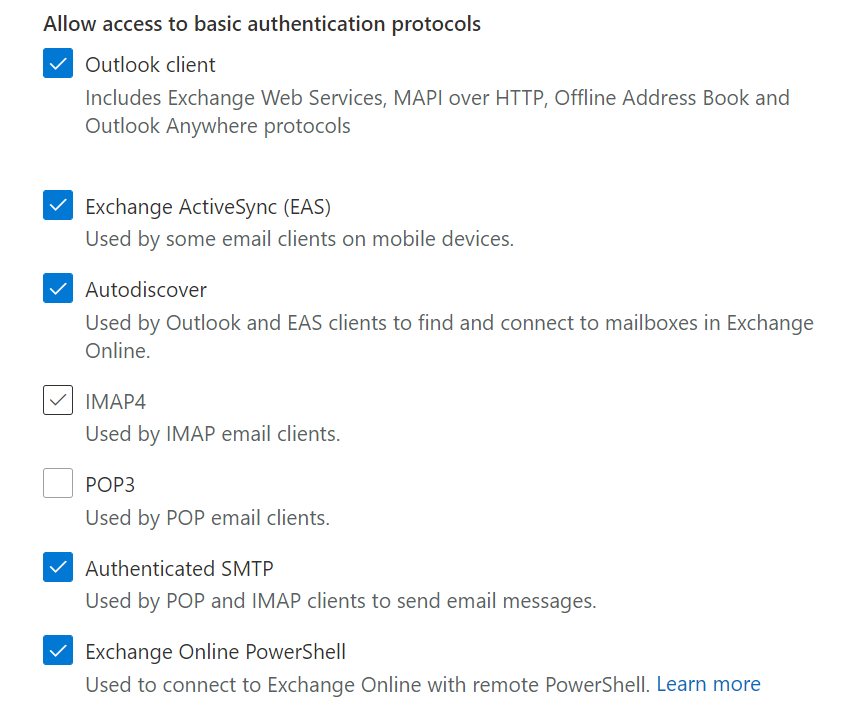
You should then see a dialog box appear like that shown above. At the bottom you will find the capability to enable or disable basic authentication.

image

If you want to disable basic authentication for the protocols listed simply unselect that option as shown above where it has been done for IMAP4 and POP3.

Before you go and disable things it is a good idea to have and see what maybe using basic authentication. You can do that by following the steps I outlined in this article:

Determining legacy authentication usage

Disabling basic authentication is a major way to improve the security of your tenant and is strongly recommended for all environments.

CIAOPS Need to Know Microsoft 365 Webinar–November

laptop-eyes-technology-computer

The most under utilised tool in the Microsoft suite is OneNote. Join us for a deep dive into what OneNote is and how to make the most from it personally and professionally. There is also plenty of news that I’ll cover as well as open Q and A for any questions you may have.

You can register for the regular monthly webinar here:

November  Webinar Registrations

The details are:

CIAOPS Need to Know Webinar – November 2020
Friday 27th of November 2020
11.00am – 12.00am Sydney Time

All sessions are recorded and posted to the CIAOPS Academy.

The CIAOPS Need to Know Webinars are free to attend but if you want to receive the recording of the session you need to sign up as a CIAOPS patron which you can do here:

http://www.ciaopspatron.com

or purchase them individually at:

http://www.ciaopsacademy.com/

Also feel free at any stage to email me directly via director@ciaops.com with your webinar topic suggestions.

I’d also appreciate you sharing information about this webinar with anyone you feel may benefit from the session and I look forward to seeing you there.

Need to Know podcast–Episode 258

Apart from all the latest Microsoft Cloud news, I speak with David Bjurman-Birr who is a security architect, especially focused on the SMB space. David shares plenty of great tips when it comes to ensuring your Microsoft 365 tenant. Listen along to stay safe.

This episode was recorded using Microsoft Teams and produced with Camtasia 2020

Take a listen and let us know what you think – feedback@needtoknow.cloud

You can listen directly to this episode at:

https://ciaops.podbean.com/e/episode-258-david-bjurman-birr/

Subscribe via iTunes at:

https://itunes.apple.com/au/podcast/ciaops-need-to-know-podcasts/id406891445?mt=2

The podcast is also available on Stitcher at:

http://www.stitcher.com/podcast/ciaops/need-to-know-podcast?refid=stpr

Don’t forget to give the show a rating as well as send us any feedback or suggestions you may have for the show.

Resources

David Bjurman-Birr

@directorcia

CIAOPS Patron Community

CIAOPS Blog

The definitive guide to Productivity Score

Microsoft Teams reaches 115 million DAU—plus, a new daily collaboration minutes metric for Microsoft 365

Darknet Diaries podcast

Security Unlocked podcast

Uncovering hidden risk podcast

Microsoft announces plans to establish its first cloud region in Austria to accelerate local innovation and growth

Microsoft to establish its first datacenter region in Taiwan

Microsoft’s commercial cloud continues to hum with Azure sales up 48% in Q1

Plus Addressing Now Available in Exchange Online

NIST cybersecurity framework

Australian cybersecurity guidance for SMBs

Australian essential eight explained

Office 365 investigation tooling

Guide to implementing CIS Controls with Microsoft 365 Business Premium

Practical guide to securing remote work using Microsoft 365 Business Premium

SMB Tech community

Intune Data Collection Policy Error 0x87d1fde8

State = error

State Details = -2016281112 (Remediation failed)
image

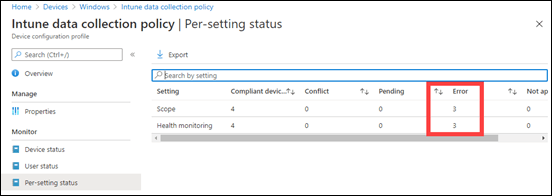
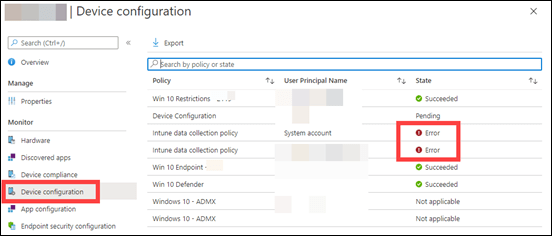
It all started when I was checking my Intune Configuration policies and I found that all of a sudden I have a new policy called Intune data collection policy as shown above, that I didn’t created. Worse, it had errors!
image

When I looked at a specific device that was affected, as shown above, I could see two errors on the device. One was from a user designated as System account, which was also somewhat puzzling.
image

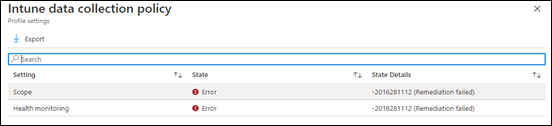
Digging further I found that the State was Error and the State details were -2016281112 (Remediation failed) as you can see above.

image

At the most granular level, I found the Error code was 0x87d1fde8 as shown above.

image

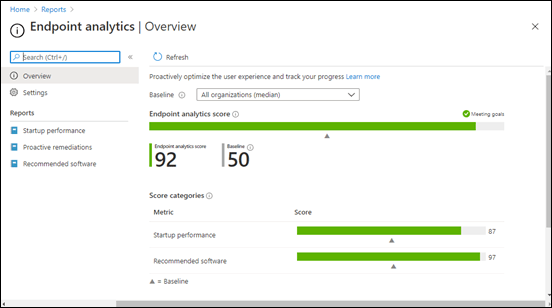
It turns out that the Intune data collection policy gets created when you use Endpoint Analytics as shown above.
image

This gives you some really nice reports as shown above on your Windows devices. You can read more about it here:

What is Endpoint Analytics?

I had now solved where the mystery Intune data collection policy came from and after much research it turns out that the device errors are because of licensing as you can read here:

Licensing Prerequisites

which says:

Endpoint analytics is included in the following plans:

Proactive remediations also require one of the following licenses for the managed devices:

  • Windows 10 Enterprise E3 or E5 (included in Microsoft 365 F3, E3, or E5)

  • Windows 10 Education A3 or A5 (included in Microsoft 365 A3 or A5)

  • Windows Virtual Desktop Access E3 or E5

The error I was seeing was due to those machines only being Windows 10 Pro, NOT Win 10 Enterprise! Endpoint Analytics currently only works with Windows 10 Enterprise licensed devices.

Once I had changed the Intune data collection policy to exclude the Windows 10 Pro machines the errors went away, as did the duplicate System account as well.

Hopefully, Microsoft will consider extending Endpoint Analytics to Windows 10 Pro machines as well, but for now you’ll need to exclude them from any Intune data collection policy if you don’t want errors in Endpoint Manager.