SBS to Azure online training course

image

I know there are a lot of Microsoft Small Business Servers (SBS) still out there in the wild. Unfortunately, they are becoming rather long in the tooth and harder to support and maintain.

Migrating all the functions that SBS provided can be a challenge not to mention confusing in today’s world of cloud. For that reason I’ve put together this online training course:

SBS to Azure

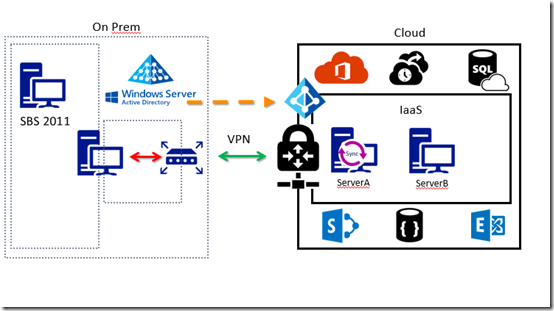
It’s aim is to show you the basics of connecting an SBS (or any legacy on premises) environment to the Microsoft cloud.

The course will step you through the process of linking your existing on premises network to Azure via a site to site VPN. It will show you how to create Azure virtual networks and virtual machines. You’ll then see how to use these to easily extend your on premises environment.

The course will show you how to set up Azure AD Connect to sync your on premises users to Azure and Office 365 while also taking advantage of Azure DNS. There is even a dash of PowerShell thrown in for good measure.

Unfortunately, there is not a single button that will migrate your SBS environment to the cloud, however this course aims to give you a much better understanding of how to tackle that tasks as well the concrete steps you need to take when doing a migration.

There are over 12 lessons with over 2 hours of interactive video training and resources. If you visit the course today you can access a free preview of the first lesson which is an overview.

I will continue to improve the course material over time but I certainly hope that you’ll consider it if you are looking to moving SBS to the Microsoft cloud.

Learning Collaboration in Office 365

people-woman-coffee-meeting2

A little while ago I announced that I’ll be conducting a new course focused on showing you the best practices when it comes to collaboration in Office 365. This will answer questions about whether you should use Microsoft Teams over Yammer, what roles Groups plays and to drive adoption for your business to ensure that everyone makes full use of the Office 365 suite they have been allocated.

You’ll find all the original information about the course here:

Understanding collaboration in Office 365 course

The course gives you the opportunity to participate in the learning live. You’ll be able to complete the hands on tutorials right there and then. You’ll get immediate feedback on what you’ve learnt and you’ll also be able to ask questions and most importantly get your questions answered right there and then. If you think this is just going to be a boring webinar style presentation, then you in for a shock as nothing could be further from the truth. This course will be more hands on than if you were sitting in a classroom!

Best of all is that all the sessions will be recorded and made available to you, along with all the training materials (notes, links, whitepapers and more) FOREVER! That’s right, you can continue to come back to the course and watch the training at your leisure. You can even download it all and watch it offline. So if you are too shy to attend the live events you’ll still get full benefit from all the material.

Those lucky enough to have signed up already have been able to take advantage of the initial substantial early bird discount, however if you missed that then you need to act now to get a $30 discount. Use the coupon code EAERLYBIRD2 at checkout or click here to have the discount automatically applied upon registration:

Understanding collaboration in Office 365 – $30 discount

Remember, you need to use the link or the coupon code to get the discount.

An additional offer is that if you are not already a CIAOPS Academy affiliate you should sign up so you can offer this course to others and receive a commission. That’s right, just refer this (or any CIAOPS Academy course) to others and you’ll receive a percentage of the course direct to you. To become an affiliate simply sign up for free at the CIAOPS Academy and then contact me (director@ciaops.com) to let me know you want to be an affiliate and I’ll send you all the details and get you signed up asap.

The count down to the course kick off on the 1st of June is on and I’d encourage you to take advantage of this discount before it expires on the 19th of May. Remember, the course includes over 5 hours of hands on training, video recordings of all sessions as well a lifetime access to all the course materials including video replays, course notes, links, white papers and more. All of which you can download and view offline.

If you want to learn how Office 365 can give your business a completive edge by being more effective and productive then sign up today to take advantage of this discount.

I’ll also point out that if you sign up as a CIAOPS Patron you’ll not only receive discounts starting at 25% on this course but you’ll also get access to my private Office 365 Facebook community where you can get your questions answered by myself and other in the community daily. For all the benefits of being a CIAOPS Patron head over to:

http://www.patreon.com/ciaops

I hope to see you on the course with me and those who have already signed up.

Understanding collaboration in Office 365 course

people-woman-coffee-meeting2

I’m happy to announce a new course is available from the CIAOPS Academy. This course will focus on the collaboration tools available in Office 365. This means SharePoint, Teams, Yammer, OneDrive and more. You’ll not only learn how these products work but you’ll also learn how to use them effectively to increase the productivity of your business.

The course will divided into 5 live sessions held every Friday in June. Thus:

Friday June 2nd 2017 – SharePoint & OneDrive
Friday June 9th 2017 – Groups, Teams and Staffhub
Friday June 16th 2017 – Yammer & Skype for Business
Friday June 23rd 2017 – Delve & Planner
Friday June 30th 2017 – Migration and Driving adoption

The sessions will run for 1 hour and be recorded. Session time are:

8am – 9am – Sydney, Australia
3pm – 4pm – PDT, USA
6pm – 7pm – EDT, USA
11pm – 12am – BST, UK

The recordings of each session will be available shortly after each session is completed. Although each session will run for 60 minutes, there will be an open Q and A at the end that will continue as long as people have questions not answered in the session.

All the material, including recordings, course notes and additional offers will be available for download after the fact.

The material presented during this course is a great way to fast track you understanding and adoption of Office 365 adoption tools in your business. Not only will you see the technology in use but the sessions will include hands on material for all students to participate in, so you’ll be directly interacting with the technology during the time. This way you’ll get to see and experience exactly what is possible with Office 365 collaboration technologies.

If you are keen to jump on board then I have a special early bird discount as a reward. Normally the cost of the course is US$299 but if you sign up before the 12th of May 2017 at 9:00am you’ll receive $60 off the cost using the coupon code EARLYBIRD1 or this direct link:

Understanding collaboration in Office 365 – $60 early bird discount

Remember, you need to use the link or the coupon code to get the discount.

An additional offer is that if you are not already a CIAOPS Academy affiliate you should sign up so you can offer this course to others and receive a commission. That’s right, just refer this (or any CIAOPS Academy course) to others and you’ll receive a percentage of the course direct to you. To become an affiliate simply sign up for free at the CIAOPS Academy and then contact me (director@ciaops.com) to let me know you want to be an affiliate and I’ll send you all the details and get you signed up asap.

In summary. Sign up for the upcoming CIAOPS Academy Office 365 collaboration course here (and get an early bird discount):

Understanding collaboration in Office 365 – $60 early bird discount

and contact me (director@ciaops.com) if you want to become an academy affiliate and receive commissions for courses you sell.

I hope to see you in attendance at the course in June.

More free training from CIAOPS

lecture-series

image

I’ve just added four more lessons to my free cloud training at:

CIAOPS Cloud Lecture Series

In there you’ll now find over 25 individual lessons on not only technical topics like Office 365 and Azure but you’ll also find information about building a successful cloud business. I cover a lots of the techniques I use and what you should also be using if you are a IT reseller focused on the Microsoft Cloud.

These are recorded sessions I have conducted live and now posted up for anyone to take advantage of. The ones that I have just added include:

– Office 365 adoption tool

– Selling Office 365 Azure options

– Marketing approaches

– How to demo Office 365

All the lesson materials can be downloaded for you to view at your own leisure without the need of an Internet connection.

Stay tuned for more free lessons soon.

Stop making your users feel stupid!

A common complaint I hear from IT Professionals today is that technology is moving too fast and they can’t keep up. Yup, agreed. However, did you ever take a step back and think about what it’s like for your users? The people who actually need to use this stuff to actually get their jobs done? People who only want to use technology as a tool, not something to ‘play’ with?

I see so many instances of IT Professionals bearing the brunt of end user frustrations when it comes to migration to Office 365. You wanna know why that is most of the time? Simple. Almost zero effort and resources have been invested in end user adoption. IT Professionals focus on what they know and love, the technical back end and system bits, and then leave users to fend for themselves when it comes to actually using the technology. “They’ll work it out” is the catch cry of the IT Professional who thinks their job is done just getting the technology running.

Nothing could be further from the truth. Yes, the back end technical stuff is important but just as important is user adoption and the most important aspect of this is first impressions. If an end user has a bad first impression with a technology a the outset (i.e. they don’t know what it is for or how to use it) then their chances of adopting it are minimal. So what techniques do YOU have in place to ensure this doesn’t happen if you are an IT professional?

This means that a much great focus needs to be placed on the end user’s journey with the technology. From start to finish. How are they going to use it? How can they use it to help them get their work done? How can working with the technology be made easier? What resources do they need to help them understand and adopt the technology? IT Professionals simply can’t install the software then leave an user to adopt it. Without assistance and guidance they never will. To think otherwise is delusional. To do so is irresponsible and unprofessional to say the least.

You need to create a broad supportive environment to help all sorts of people learn any new technology. Different people learn in different ways and at different speeds. This means having different resources and programs for your users. From videos, to case studies (hello Teams Site portal). From tutorials to question and answer sessions (hello Skype for Business lunch and learns). You need to make it easy for users to get over that initial hurdle when it comes to adoption.

Nobody wants to feel stupid and few people really have the discipline or motivation to ‘nut’ out something technically for themselves. Fewer still have a good appreciation of how something can help them do their job better. They just want to do their job. Period. They don’t want to ‘play’ with technology. People learn best from the experiences of others and that is why shared experience and feedback are so important to the adoption process (hello Yammer or Teams!).

The amount of times I walk into a business that has Office 365 but has no idea about anything other than email is amazing! Most have no concept of basic productivity enhancements in Office 365 that provide ‘quick wins’ like OneDrive for Business, OneNote, Skype for Business and so on. Too many IT Professionals want to inflict the hardest adoption hurdles on end users out of the gate. Why? Take the low hanging fruit first. Drive adoption with quick and easy wins. As I have said many, many times here, just dumping file server data into a single document library in SharePoint is a recipe for disaster. Why? Too much change too quickly for most users. In such cases, zero consideration was given to the end users use of SharePoint. They were simply thrown to the lions and expected to ‘learn’ for themselves. That process is only going to instil frustration and resistance as well as overt hostility. In short, it just makes everything worse. So why do it?

Technology is a massive enabler in business today, but it is also a massive distraction. The technology is the same, the difference between success and failure is how that technology is used. Usage is dictated by adoption and adoption is something that doesn’t appear magically. Adoption is the end result of a process, not random circumstance. Adoption is a focus, not a result!

Successful IT resellers are focused on ensuring the success of the end user’s journey. They treat adoption and enablement with equal importance to technical deployment. They provide the resources to help their end users embrace the technology and becomes fans of it. That’s the key way to measure the successful adoption of technology inside a business. Do people simply use it or do they love it? If you ever find users who don’t love, yes I said love, the technology they are working with, then that is a sign of a failed adoption process. Such failures are the sole responsibility of the IT professionals who rolled it out, not the end users.

Take heed, IT Professionals. In a world where anyone can buy and sell cloud services like Office 365, the key differentiation point is how you go about helping your users move from mere adoption to adoration of the technology. If you view technology as mere technical problems to solve you are failing your customer and you are not doing your job. Your job is to help those with less knowledge and experience understand how the tools you are providing help them do a better job, and how it improves the way they work.

Anyone can sell technology today, but in my experience very few can actually successfully implement it. Why? Because they fail to appreciate that success is judged in the eye of end user not those who roll it out. Adoption is key to success today, so pay attention to it because without it you’ll NEVER succeed!

Getting Started With SharePoint Online course

Getting Started With SharePoint Online course

If you are struggling to put the pieces together when it comes to SharePoint and OneDrive for Business then I have created this course especially for you. Hi, I’m Robert, a technology trainer and SharePoint veteran who is also a Microsoft MVP that has been helping people for years when it comes to understanding and working better with SharePoint.

I understand that SharePoint seems really daunting and you’re not sure where to begin. Well, I’ve made that easy for you with my course. The lessons here take a complex topic like SharePoint and break them down into small pieces. They focus on a single topic that takes only a few minutes to complete and include a video tutorial showing you exactly what to do as well as providing you downloadable notes you can keep and review at anytime. There are also links to additional information if you want to extend your knowledge further.

My aim is to make you as productive as quickly as possible with SharePoint and that’s why the first lessons show you how to get your documents into SharePoint Online. From there you learn how to use common tools like calendars, tasks lists, and more. I’ll then show you how to recover deleted information as well as use the powerful built-in search functionality that comes with SharePoint Online to find anything! There are over twenty lessons you can work through at your own pace. You are free to return at any point to review all the content at your leisure. You are also free to jump to any lesson that takes your fancy, allowing you to learn at your own pace and in your own way.

The course contains over three hours of video tutorials, 200+ pages of documentation and 30 additional web locations to extend your knowledge. I’m confident that by the end of the course you’ll be using SharePoint like a pro. I’ve worked really hard in creating this course to pass on my knowledge and experience of SharePoint to people like you who need it to do their job. People like you who need to learn SharePoint but don’t know where to start. This course has been built for you and the many others who struggle coming to grips with SharePoint. Read their testimonials below to see how this course has helped them.

Testimonials

“Great introduction to the vast array of capabilities offered by SharePoint via Office 365. Really demystified SharePoint for me in a very easy to follow and practical manner. Thanks heaps Rob!” – Darren Chapman (Pivotal Data Solutions).

“Robert, you’ve done a great job of providing bites size chunks of relevant information to get me on the road to using SharePoint” – Nathan Oldfield (Cybercomp)

“As a user with no/very limited SharePoint experience, I found this course extremely helpful. As course notes have been included it makes referring back to something very easy. I would recommend this course” – Ursula Kriel (Multotec)

“The material is easy to understand and follows a logical sequence that makes learning fun! I would recommend these courses to anyone and they should come out with a better understanding in using all of the tools available to the share point user. Thanks for such a well designed course!” – Charles Perry

“The best training I have been to in recent memory – very practical, customer-focused exercises and loads of great information and resources.” – Tristram Morgan (365 Architects)

“Robert Crane from CIAOPS has created an incredible resource for anyone wanting to get into Sharepoint for Office 365. They are well presented and laid out for users on any level from beginner to advanced. If you follow through the steps and examples you are guaranteed to learn something new even if you think you know it all. Roberts learning academy online should be a go to place for anyone who wants to get serious about their IT.” – Craig Young (Greendata Pty Ltd)

CIAOPS Azure VPN course

I’ve just uploaded a new online technology training course to the CIAOPS Academy. This one is focused on Azure VPNs. You will find the course here:

http://ciaops-academy.teachable.com/p/azure-vpn/

The course will show you how to configure:

– Azure Point to Site VPNs

– Service Manager Site to Site VPNS

– Resource Manager Site to Site to VPNS

– Connections between Azure VNets using VPNs

– and VNet peering

Each lesson contains a video tutorial as well as a number of resources for your continued learning.

You can purchase the course individually or you can purchase access to the complete course catalogue that covers any new courses created as well. You can also select from many other stand alone courses on Azure, Office 365 and more.

I’ll be adding more courses soon so stay tuned to further updates from the CIAOPS Academy.

CIAOPS Online training special offer

With 2016 drawing to a close, I thought I’d do a special offer on the Complete Course Catalogue for my online training academy you can find at:

www.ciaopsacademy.com

The Complete Course Catalogue is an annual subscription that gives you access to every course I have created (including courses on Azure, Office 365, Yammer, SharePoint and more) and will create. Thus, if you sign up today you get access to the 25+ courses I have already created PLUS you’ll also get access to all the new courses I have in the works for 2017.

So the deal until December 25 and for a strictly limited number of takers is:

10% discount off the first year’s subscription ($60 value)

– a 1 hour remote consulting call with me that you can use for training, business mentoring or the like ($275 value)

– access to the private CIAOPS Facebook tech community to discuss and ask your questions in and share with other members ($120 value)

– free Getting Started With Skype for Business eBook ($10 value)

– free Beyond the Basics with SharePoint Online eBook ($10 value)

That’s over $450 in value plus what you’ll get from the online courses that include video lessons, downloadable notes, links and more.

As I said, this offer is strictly limited until the 25th of December 2016 or until sold out, so don’t delay. Sign up today to take advantage of this strictly limited learning opportunity.

To take advantage of this deal use the code MERRY2016 at checkout or click this link:

http://ciaops-academy.teachable.com/p/complete-catalogue/?product_id=153214&coupon_code=MERRY2016

I look forward to seeing you in the CIAOPS Academy and Facebook Tech group.