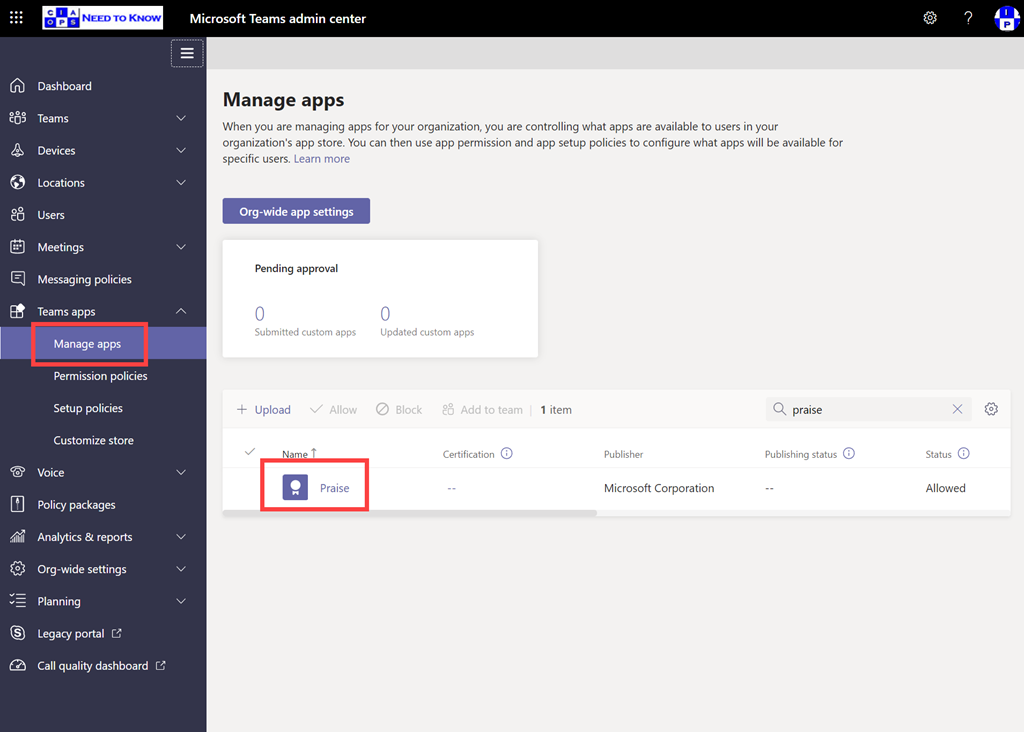
If you navigate to the Teams admin portal and expand the Teams apps option from the menu on the left, you should see a Managed apps option. You can locate the Praise app by using search on the right.
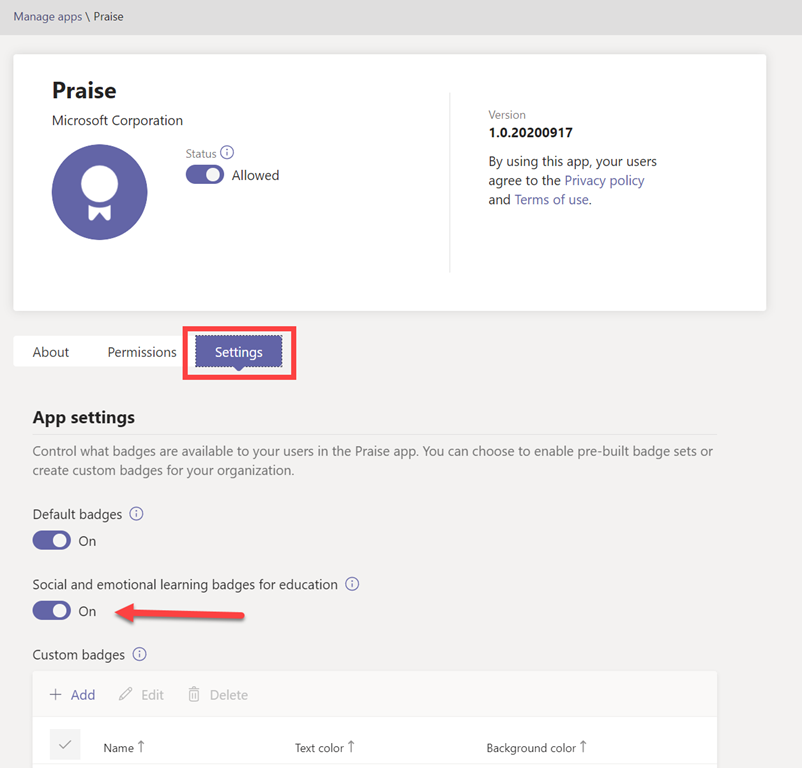
If you select the Praise app you’ll then see a screen like that shown above. If you then select the Settings option just under the information banner you get the badges options.
Generally, default badges are enabled but why not also enable the Social and emotional learning badges for education as well? They are free after all!
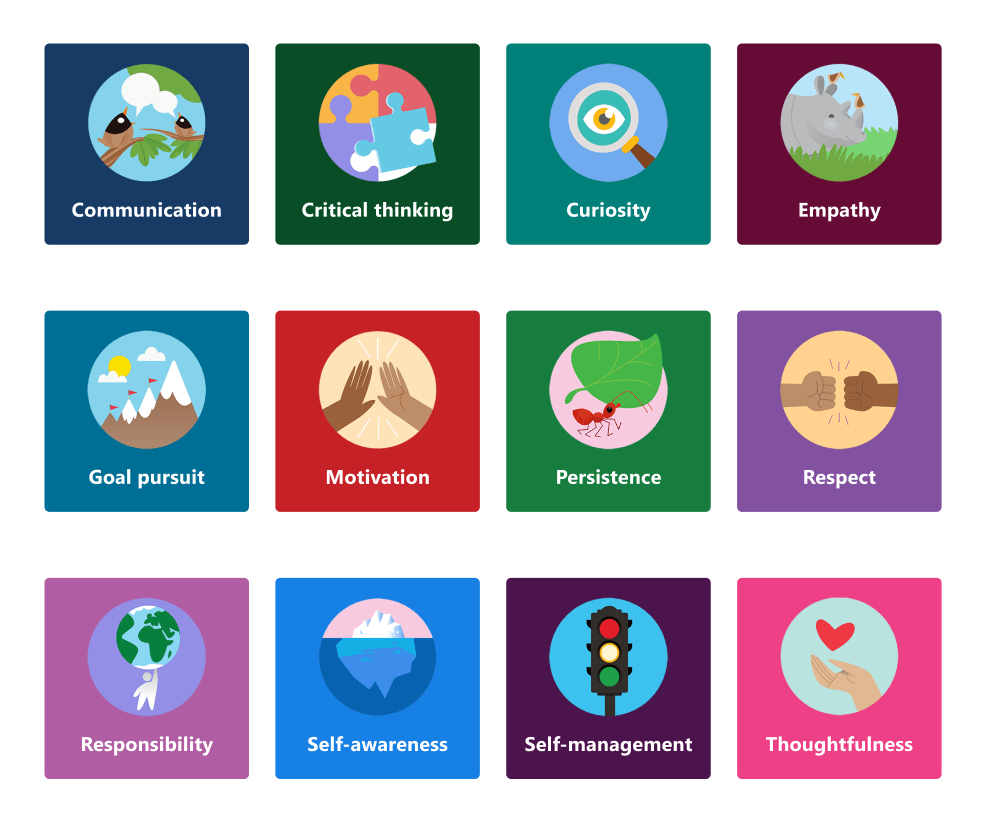
When you do so, you’ll see the additional badges shown above in your Teams Praise app.
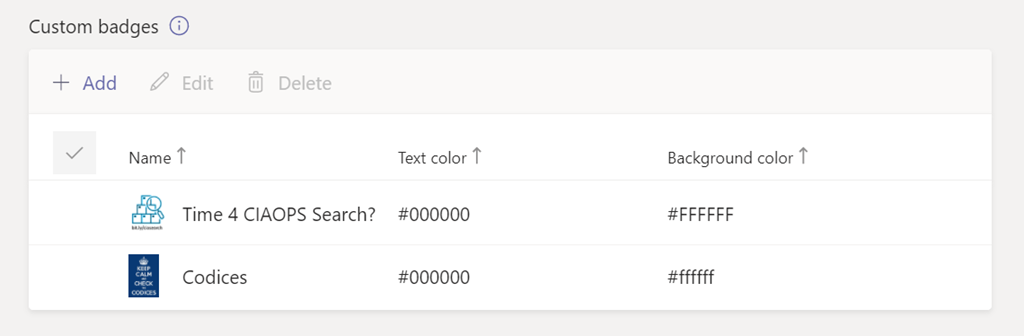
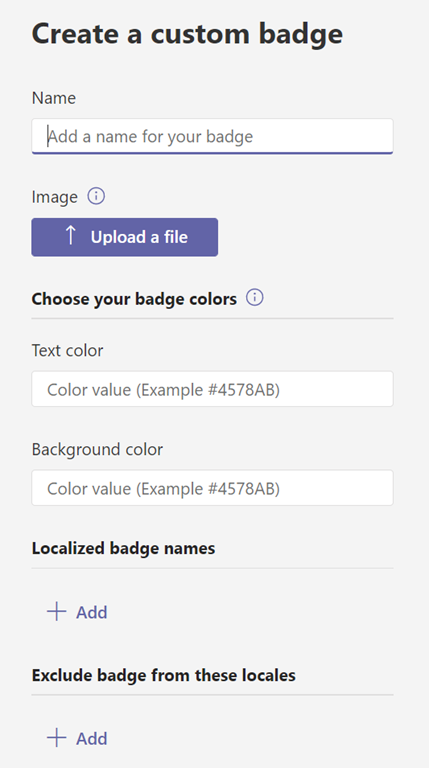
Even better, further down, you can also add you own custom Praise apps.
Just update a suitable badge graphic and add the details about the badge.
So now, when you Praise someone in Teams, you have many more options, including your own custom ones as shown above.
When selecting an image, keep badge dimensions in mind. For the best quality, we recommend uploading an image file that is 216 x 216 pixels (which are the maximum dimensions). Avoid stretching or distorting the image to fit these dimensions.
It’s about time we revisited what Microsoft Teams is all about and how to get the most from this major service in Microsoft 365. Join us for a deep dive into what Teams is and how to make the most from it in your business. I’ll warn you that it probably going to challenge the way you think about collaboration. There is also plenty of news that I’ll cover as well as open Q and A for any questions you may have.
You can register for the regular monthly webinar here:
CIAOPS Need to Know Webinar – October 2020 Friday 30th of October 2020 11.00am – 12.00am Sydney Time
All sessions are recorded and posted to the CIAOPS Academy.
The CIAOPS Need to Know Webinars are free to attend but if you want to receive the recording of the session you need to sign up as a CIAOPS patron which you can do here:
Also feel free at any stage to email me directly via director@ciaops.com with your webinar topic suggestions.
I’d also appreciate you sharing information about this webinar with anyone you feel may benefit from the session and I look forward to seeing you there.
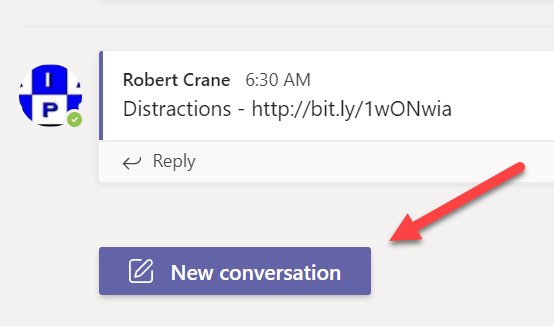
A New conversation button has appeared for me inside my tenant both on the desktop and on the web as shown. This is very much like the button you in the mobile experience of Teams.
One of the major challenges with conversations or chats in Teams was the simplicity that you could create new conversation threads. This simplicity was its own worse enemy unfortunately, because what you’d find is that people would post new message threads rather than posting to the current or existing one. Many users didn’t notice that fact and you ended up with many, many disjointed conversations. That reduced Teams chat benefits and effectiveness.
This New conversation button will ensure that any existing reply will stay in the existing thread and you’ll only get a new conversation by pressing that button. It also makes the interface between, desktop, mobile and web more consistent.
Look out for the New conversation button coming to your Teams environment soon.
In this episode I speak with MVP Megan Strant all about adoption. However, in this discussion we focus on the human side of adoption and change management which can be really challenging for many organisations to successfully manage. Megan shares her experiences and provides some handy insight into how we can improve our chances of successful adoption of Microsoft 365.
Of course, there is always Microsoft Cloud news which I’ll bring you up to date with. We will be expecting a whole lot more once Microsoft Ignite starts, so stay tuned here for all the latest!
This episode was recorded using Microsoft Teams and produced with Camtasia 2020
By default, in Microsoft Teams, you have the ability to delete your own messages but not other people’s. That’s a good thing unless you are an administrator or owner of the Team. There are plenty of cases where a chat message from another member of the Team could be considered inappropriate and needs to be removed by an administrator. Problem is that, generally, even an administrator cannot delete another person’s chat message.
This behaviour can be changed in the Teams administration portal by making changes to the appropriate Messaging policy.
You’ll firstly need to navigate to the Teams administration center which you can access via the Microsoft 365 admin center. You can also get there directly by navigating to:
You then need to select Messaging policies from the items on the left as shown above.
Then, on the right, you will see the option to Manage policies, which you should select.
Most tenants should only have a single policy as shown above, but if not you’ll need to select the appropriate policy you wish to change. Simply click on the policy name you wish to change. Here, I’ve selected the only one available Global (Org-wide default).
Ensure the option Owners can delete sent messages is set on On as shown above.
You’ll now need to wait for that policy to be updated to your Team. It will take a little while so don’t expect the changes to be seen immediately. Not that I have tried to see whether using PowerShell to force the changes works any quick but if you find it does, let me know. The command you want if you plan to user PowerShell to make this change is:
Once the changes in the policy have been pushed out to the Team, any owner of that Team will now be able to delete any chat message from any user as simply as they can their own messages.
This ability will hopefully make life a little easier for Team owners who need to ensure compliance and appropriate behaviour in their Teams.
I speak with Michael Van Horenbeek who is one of the authors of a new Microsoft 365 Security eBook. We talk everything Microsoft 365 security as well a little about the challenges of publishing. I also get you up to date with the latest news from the Microsoft Cloud.
This episode was recorded using Microsoft Teams and produced with Camtasia 2020
Even though still in lockdown we are bringing you the latest Microsoft Cloud news along with an interview with long time MVP and creator of VisualSP, Asif Rehmani. Asif’s VisualSP tool is a amazing way to help people learn more about Microsoft 365 by providing context sensitive help via the single press of a button. He is also passionate about adoption and looking at helping customers by looking at their needs through their own eyes. Lots of great take away from a very experienced trainer.
We hope everyone stays safe and enjoys this episode.
This episode was recorded using Microsoft Teams and produced with Camtasia 2019
Robert Crane 0:43
Welcome along to another need to know podcast? My name is Robert Crane , this is Episode 236. And joining me on the other side of the microphone there is Brenton Johnson Welcome back.
Brenton Johnson 0:52
Good to be back, Robert.
Robert Crane 0:54
So unfortunately we are basically in the same side of the phase when it comes to Coronavirus and staying sanitised? Hopefully everything at your end is still positive there is a lot of negativity around at the moment we still don’t know the end result of this. It’s going to be a challenge but working from home now a lot of people seem to have adjusted to how are you finding it now what’s probably Week Four of lockdown or week three of lockdown these days.
Brenton Johnson 1:21
It’s ok for for me because I was an early adopter to the whole lockdown thing. Interesting this 60% of Australians can work from heart. So it’s quite remarkable numbers. We’re seeing the rise of zoom, which has been hilarious. And people not realising that they have video conferencing on their computer and then going Oh, can you instal zoom on like, I can. But can you read these articles from all the top cybersecurity buddies first, and then sign off on the risk? And like yeah, we don’t care zoom. I’m like okay. For the bar, you know, for the most part, it’s been fairly time, you know, most of our customers are zero trust. Anyway, so it hasn’t really registered too much. It’s just really my own sanity of sitting around the harm and, you know, getting out for walks every day and just trying to keep active and trying to keep, you know, keep moving. has been the main thing. How about yourself, Robert?
Robert Crane 2:28
Well, again, it’s a it’s a bit of a you get a bit of cabin fever, I think sitting in the same room looking at the same screens and you do go for a walk and do a bit of exercise and read up other things. But again, it does ghin begin to get a little bit claustrophobic. I think that people who aren’t used to working from home for extended periods, again, are going to obviously struggle we see that if you got kids or husband, all these other things all under one roof or trying to use the same internet to get work done to stay basically distracted then again, it’s going to be a big challenge. I think that Not knowing exactly how long this is going to last makes it very difficult for a lot of people. But luckily, we’ve still got the ability obviously to go shopping and do that. And in Australia at least it seems that we are now well on top of the the infections, we’re not obviously out of the woods, but we are much better off than we were. But the question then comes again to the you know, the certainty of when all this is going to end Now, speaking of that, it’s very interesting that Microsoft came out and said they are not planning to run any face to face events until July 2021. So again, they will obviously really evaluate that over time. That’s a pretty big statement when you think about it, they’re not prepared to run any so inspires not going to be on ignites potentially not going to be on build. All of those face to face events are going virtual, from Microsoft’s point of view. So that is a huge change and obviously they need to book venues and arrange stuff well in advance so they getting out in front of these early so I’m sure a lot of other suppliers a lot of other vendors are Doing this as well. But that’s going to be, you know, a major impact, I think for quite an extended period of time. And it goes back to this, how do we effectively, you know, network in inverted commas when we aren’t at these sort of events. So that’s going to be, I think, a big challenge going forward. And a lot of people look forward to some of the very large events. But I think also too, I heard a comment, which is interesting. This may give Microsoft the excuse to pull all of those events into one super mega event being basically Ignite. So build will go into Ignite. All the other stuff will go into one super mega conference that Microsoft run once a year in the US. So we’ll see how that goes. But that sort of the, the position that Microsoft’s taken on, a lot of other companies are going virtual as well. Have you partaken in any you know, meetings or those sorts of things from vendors so far? Brenton?
Brenton Johnson 4:54
Oh, yes, same old webinars and stuff. I’ve been poking my head in those but You know, nothing that would have been in person that’s gone virtual, I’ve really seeked out. I’m doing so much video conferencing and firing and all of this that I’m calling a barber To be honest, I want to just get out, walk around the like, listen to podcasts and just, you know, do that sort of thing. So the idea of sitting at home watching a webinar is not my idea of good time and everyone’s doing it at the moment. And I think people will get good at doing
Robert Crane 5:32
it well either like that’s the other challenge as well. I think a lot of people undertaken doing webinars for the first time and again, they aren’t doing it you know, as well as they could be because they treat it like a an in person event or something. So yeah, there are some challenges, certainly some challenges there. Now, probably best to launch into some news. There are some important items now. Obviously, the the number one item which I don’t think we talked about last time was the renaming of the Office 365 business skews to Microsoft 365. So basically the Business Essentials and business premium now moves to a Microsoft 365 naming conventions there are now three Microsoft 365 business skews was like what’s this thing is called This is a basic or standard, then sorry, a basic standard and then a a premium. And the that transition happens, I think on the 21st of April and that would indicate to me that all the other schools, the enterprise schools are probably going to be renamed to Microsoft Certified business as well. So, yeah, what’s your take on these? This renaming thing that Microsoft’s undertaking?
Brenton Johnson 6:42
I think it’s good. I think it’s gonna cause a lot of confusion in the marketplace. around you know, what used to be office 365 business premium is now going to be Microsoft 365 business. What’s Microsoft 365 business is now going to be Microsoft three Six, five business premium, those sorts of things are going to be very challenging for people. They usually just see the 365 people, you know, just call it 365. That being said, in if you think outside of your immediate 12 month period of change, the naming convention makes a lot more sense, rather than having a conversation about what’s the difference between office 365 and Microsoft 365. You just say, hey, there’s three plans. One is web apps, SharePoint, you know, file storage email, you know, for a basic sort of worker that’s not an information worker. If you need desktop apps, that’s an extra 10 bucks a month. And if you need security over the top of it, you can step up to the premium, which comes with security, and Device Management and those sorts of things. So that’s a much easier conversation and trying to explain. So yes, you have office 365 and Microsoft 365 and have you heard of Microsoft 365 and blah, blah, blah, like all this sort of stuff now, it’s just it’s a easy step up in price. Now it’s about 10 bucks every jump. And it’s, it makes sense to explain to people, the naming convention aligns to the value proposition, which I think is the problem that they are having people go, Oh, well, I’m already on the premium product. Why would I go down to the business product? And that I heard that’s just the office as I know, that’s office 365. Business, Microsoft 365. Businesses business Premium Plus security. What? So yeah, all of that is very, very positive, I think, but it’s going to be painful in the in the short term. But I think now that we’re very much settled in this cloud productivity space, it’s going to make a big difference and we need to start putting in big rock foundations. Now also, we don’t have this confusion forever. So a little bit of short term pain for long term In my opinion, so just
Robert Crane 9:02
to be clear, office 360, we’ll put the link in the show notes, office 365 Business Essentials, which was the web version of everything is now Microsoft 365, business basic, office 365 business premium, which was the desktop and the back end Web Services now become Microsoft 365 Business Standard. And the Microsoft 365 business, which was the services the desktop apps plus, basically, the Enterprise Mobility Suite on top is now become Microsoft issued five business premium. So we now have as Brenton indicates a basic standard or premium. I think they make a hell of a lot of sense, as you said, going forward. Yes, there will be some confusion initially with people that are transitioning, but I think in the long run, if you’re playing the long game, it does make a lot of sense. And my gut feeling is is that they will make the same changes to enterprise as well. In the near future. I would guess. The other thing they’ve done, which I think, to me is a little bit more confusing, maybe not to the people, most people The renaming of the just the pure desktop apps to Microsoft 365 apps. So that’s an interesting one as well. So I will put a link in the show notes, you can go and have a review. But at the end of the day, there are no functionality differences or changes between the two at this stage. But it’s really like I said, a moving towards a total Microsoft 365 brand rather than an office 365 because now we’re incorporating all the security in these add ons now, to speak about some value ads that have come now to Microsoft 365 business premium, they’ve now included the full version of Azure AD p one, that is fantastic news. Now, the other thing I note also is they’re now going to include the Microsoft Cloud Print is also going to come to Microsoft 365 business premium as well. So you’ll be able to use the new Microsoft Cloud printing service with your Microsoft 365 business premium, Azure AD Pay one is also included. So that’s going to give you things like dynamic groups and a number of other a few other missing features, and again, make it much easier to sell and to understand, I think so this sort of all works in, I think into this Microsoft 365. rebranding as well. So what’s your thoughts on the addition of Azure AD p one?
Brenton Johnson 11:20
I think from a simplicity point of view, it’s, um, it’s really good because we’re having these conversations with customers, where it’ll be like, now you get paid one, but only parts of pay one, and they go which parts and it’s like, well, I’ll have to look it up every time because I keep adding and changing it or adding new things to it. So things like conditional access, when initially in Microsoft 365 business, there was lots of features that really cater the value proposition of Microsoft 365 business that just weren’t included when it first launched, you know, things like ATP and stuff. So it was very difficult now it’s just okay, you get paid one. So everything that you were talking about, you know, it’s just less things to remember less exceptions. And when you try to troubleshoot stuff, it makes things a lot easier to. So this article is quite good. In a sense, it points out a few good capabilities that are coming. So Cloud App Security, sorry, our cloud app discovery, I should say. So you can say what’s going on in your environment, who’s doing what you’ll get the application proxy, the dynamic groups, and password lists, authentication. So the all of this sort of stuff, makes things a lot, a lot easier. When you’re talking to people. I don’t know how much of a big of a difference it’s going to make. Certainly some customers will be impacted a lot. But I think it’s going to be much more of a bump for the service providers. You no longer have to figure out what’s in what’s out and then explain that to the customer. So much easier just to say, you know, you get paid one, it’s worth eight bucks a month or something. So yeah, it’s basically worth jumping up to business, Microsoft 365 business premium from Microsoft 365 Business Standard, because you’re gonna pay that any way to jump up to p one. So those sorts of conversations become so much easier. I think it’s great. Not much more to say on early.
Robert Crane 13:29
Oh, again, I think that’s that alignment piece that we’ve been talking about, you know, it’s going to include the full one of these two for one of that before one of these. So that makes it much easier to understand remove some of that complexity, as you said. Now, I noticed in the notes here, you’ve got some things that are coming shortly, to teams you can probably let people know about so what do we have on the roadmap that people should be seeing very shortly in their Microsoft Teams meetings?
Brenton Johnson 13:55
All right, so I just want to do a bit of a because teams has become such a massive part. Of what everyone is doing. I want to do a quick recap of some of the stuff that’s happened this year. So, oh, that ain’t to December last year, you can get it on Linux show, they’ll make a big difference to people. Yeah, so you got display names in teams, Windows Server gets the desktop app teams, read receipts. I bet that’s pretty cool for a lot of people paying your favourite apps, editing. So you can now edit stuff, which is go you can tag mentioned a group role department, etc. You can work offline now in teams, which is pretty cool. There’s a lot of people who live and die by the offline mode in Outlook because they don’t want to be hassled but all their work is in there. So they have to have outlook open so they put it in offline mode. So that’s kind of cool. Cool improvements for the team calendar. And now you can end the meeting for everybody, which is kind of cool. So that’s what’s happened. What’s coming up is we’re going to have background effects in teams meetings. So for those who remember when Microsoft relates the blurring of the video, one of the ways I promoted is there was a news anchor in the UK and he was working from home and this kid came in and just started screaming in the background and all of that sort of thing. And Microsoft put the blur around the background. So it’s like, this is what it looks like with blur. So now they’re extending that capability. You know, people are very it says it’s very heavily popular blur feature. So you can put in your new background,
Robert Crane 15:50
custom, supposedly a custom backgrounds, you can look as I enter the office, bleach everybody. Anytime you’re on a team’s meeting somebody from Microsoft, you always see them with a custom background. I will know Briefly that that blurring actually came from an engineer at Microsoft, who was basically Deaf now, when they met on teams with their parents over in India, they were distracted by all the other stuff going on in the around the, you know, around the meeting. So, she basically went in and programmed to have the blue so she could just focus on a parent speaking it was like, very interesting that you know, such a, an inclusive, you know, requirement is now proved so popular. So, yeah, we should see that hopefully, I probably can add your own custom backgrounds. So again, I haven’t seen that in my tenant and hopefully won’t be too far away. So what else we got?
Brenton Johnson 16:41
Yeah, we got the new experience for launching instant channel meetings. So that’s, oh, have you seen this one yet? pop up in your tenant?
Robert Crane 16:52
Yeah, look, there’s there’s been a couple little bits and pieces you get them. And there are like I said, the I think the end meetings very good because again, if you leave them And someone stays in there or they haven’t disconnected and that meeting continues on and on and on and on. You can also like say what is in media, you can force people to get out. One of the things you can also do is you can now basically make somebody an attendee, one of the things that is also coming is the hand up. So raise their hands, if you do have a question, you can basically go and raise your hand and then that can be answered now, for anybody who’s been on teams meeting with, you know, with a lot of people that can be challenged when you’re working with a with a large group, everybody want to talk at the top. So the raise the hand features are a nice one that will be added shortly. So I think there’s a lot of these to an extent, you’ve got to realise that suppose initially teams really wasn’t designed for this mess, the sudden uptake, and there are a lot of features on the roadmap but good on Microsoft, they bring a lot of these forward because people are asking for them like the custom backgrounds raised hand in meeting those sort of things. So there are a lot of these sort of features we should expect to see before the end of this month. And I would accept expect to To keep adding more and more features again it’s very much in the spotlight and the amount of users keeps growing day in and day out. So again a good opportunity to start rolling out some of these things I think.
Brenton Johnson 18:10
Yeah, definitely.
Robert Crane 18:13
All right, so one another one from me that I found basically he is there’s been a couple of Microsoft articles about you know, setting up a home business working from home and also how people how you can as an IT department, effectively support your mobile worker. This will be a challenge for many people because they will come to a PC which is normally a home PC they’ll be expecting to work and how is the secure how’s the company information, lockdown, Microsoft’s got some good articles there to help people understand what the challenges are and how to again make these bite more secure. One of the other ones that I’m really keen to see and can’t wait to get my hands on is project cortex or project cortex will basically take information stored your vironment and And kind of build the intranet for you on the fly customised to your own needs. I think we’re going to see that in a short order of time. And we really good to see what how that works, what it does, how effective it is that may change the collaboration approach in this modern age where you don’t have to worry about building necessarily an intranet. It’s built for you on the fly with AI. So that’s pretty, pretty interesting. We’ve also also popped some articles in there for you to have a look at around the security of Microsoft Teams. So, given Zoom’s challenges, Microsoft came out with a response saying, look, this is how we secure teams, this is what we comply with. So if you do need to compare one with the other, there are some articles there from Microsoft that you can go in and have a look at. There’s a few updates on the OneDrive roadmap. There’s, for example, document coming to Android. So have a look at those. I expect more and more stuff again to come out for OneDrive shortly. Again, I think Microsoft very focused at the moment on making sure teams is up and running and working and ashes working and all this sort of stuff because the demand has increased, basically, dramatically. So let’s keep our fingers crossed that they make sure that all of that’s working. The other one that I thought was interesting is the general availability now of the robotic process, automation RPA stuff. So that will allow you to interface older applications with things like flow to automate a lot of processes. And that is now general generally available, you can now buy a licence for it and use it inside your environment to automate a lot of your stuff. And another one there is the power of AI in Microsoft 365. There’s a lot of artificial intelligence automation built in there. There’s an article in there that we can put in for you in for you to go and have a look so even down at the desktop, Microsoft’s doing a lot of stuff there as well. What else have you got on your radar there? Brenton?
Brenton Johnson 20:57
Huh? Yeah. So Bit of a got to actually let’s start with a more comical one. So if anyone has skills in COBOL programming, they might be a job for you. So there’s some legacy applications always find these legacy authentic applications hilarious. I always like learning about how like someone had wrote an application 40 years ago, they’ve never ever updated it. And now, there’s no one else to code it. They’re saying the biggest problem with COBOL programme is, is they’re all in the higher risk COVID group. So they’re pretty difficult to find in the first instance. And yet, they can’t really come in and work on the product without being at heightened risk of potentially dying from the disease. So anyway, I put that in there as a bit of a laugh because this unemployment crisis, old patents On this old COBOL programming, and you can imagine how hard that’s getting smashed at the moment. So it’s probably a good cautionary lesson for people that you’re talking to who want to hold on to their old legacy applications and you go, this might not be you today, but it will be you eventually. So it’s time to make the leap and start fixing some of these problems and it’s a good time to do it while it’s quiet. And the other one left is from one of my favourite publications Ars Technica, and Jim Slater, he assaulter has he put up some unique things that are only in the Edge browser than on in Chrome that will compel you to switch. So if you haven’t switched to the new krej or chromium edge, then he is some really good reasons and the last reason He’s put on here is the high definition Netflix? Apparently the only way you can get 4k Netflix is with Microsoft Edge on Windows 10. I don’t know why. But you know, they’ve got things like edge collections, the reading mode, the smart copy, you know, vertical tabs, which, you know, that looks really cool. Particularly if you’re an ultra wide like me, I could certainly leave with that. Vertical tabs, so I get the extra real estate. So yeah, really, really cool. So check that out. If you you know, if you’re trying to try and get everyone on the edge, knock on crime, whatever, this might get them across the line.
Robert Crane 23:42
So that’s all for me profiles in it. So you can run multiple office 365 sessions. So that’s really good. So I can log into multi tenant and not be, you know, not have clashes and issues and token issues. I think that’s familiar. That’s the the major thing as well and it supports all the extensions that are used as well. So I think It’s been fantastic. And I also like the ability that you can apply policy to it from Intune, which helps you lock it down and again, make it more secure. So, certainly if you haven’t tried it, I think most windows 10 machines have automatically updated to the new version now. So again, Mark to Microsoft’s credit, again, throw away its old browsers. Now, again, it seems to be getting some great success for this. So if you haven’t had a look at it, I would certainly recommend I think it runs on just about every platform to I think it runs back to Windows seven if you still got that as well. So, again, Microsoft’s done the right thing, they finally got around to doing it. But again, it’s shows you what they can do when they focus. Alright, anything else we need to cover before we wind up and let people get into our interview for this episode?
Brenton Johnson 24:45
No, that’s all from me.
Robert Crane 24:47
All right. Well, how can we stay in contact with Brendan, the man
Brenton Johnson 24:52
best way to get on to me is Twitter. Say at contact Brenton. You can just google me Brandon Johnson. I’ll be the first result.
Robert Crane 25:01
Excellent. All right, well, you can follow the podcast at UK podcast on Twitter and Facebook feedback at need to know cloud will send us an email that, again, we hope that you take the time to let us know what you’d like to hear any feedback that you’ve got. We welcome all of that. And myself. I’m found on the Twitter at director CIA. I’ll take this opportunity to thank Brenton and make sure that everybody out there stay safe. Hopefully we’ll be back with a another episode when things are a little bit more positive. Fingers crossed, but and to let go.
I’m joined by Asif Romani. Welcome, Asif. Thank you. Good to be here. So as always, I will get Steve to introduce yourself. Let everybody know who he is and what he does. So if you could do that for us, that’d be great.
Asif Rehmani 25:49
Absolutely. My name has mentioned by Robert is Asif Rehmai. I’m from Chicago, Illinois, United States. been an MVP since 2007 with Microsoft and I love to train to mentor and basically help people, that’s what I’ve been doing for quite some time started with SharePoint in 2001. Then obviously migrated with everybody else to Office 365. But anything and everything Microsoft I love to talk about.
Robert Crane 26:13
So I will let people know that I have been following your stuff for a long wall. And I remember back in the day, and this is taking us back to prehistoric days, the stuff used to do around infopath That’s right. And that was that was really fantastic at the time was a bit of a brain meld for me to try and work and use this and then you know, found your stuff and consumed a lot of that. So, again, thanks for that. And obviously, thanks for all the stuff that you are doing and being an MVP for quite a long time there. So again, appreciate the effort and work you’re doing in the space. Now pleasure. What I’ve done is I’ve asked Asif to come around and to talk about some of the training Eddins we can add into our environments, especially around the SharePoint teams. To help people get up to speed and to learn this because for a lot of people, all of a sudden they’ve moved from maybe a traditional on prem f drive, you know, files and folders into suddenly this new web based world that is SharePoint that is teams is very different. And that requires them to step up their knowledge. So how are we going to help them do that now, again, probably the place to start is a product or a service or an offering from Microsoft called learning pathways which we can plug in for free into our SharePoint environment to us a bit of training now, I think this is a really smart offering a really good offering from Microsoft, what’s your sort of take on the this sort of service offering from Microsoft,
Asif Rehmani 27:47
with any manufacturer of any software, honestly, they need to serve their customers so the software could be used on a effective basis, and I think, learning pathways offering which It is an open source offering, obviously, not officially supported by Microsoft but supported by the community. But the offering itself, I think it was a should have been offered a long time ago. I’m very, very glad that Microsoft did offer that to consolidate all the material that they’ve been producing anyway, in terms of articles and videos and all and make it available, easily accessible through a communication site that people can go to and take basically courses. So I’m glad Microsoft did that. I wish they had done it even earlier. But hey, better late than never. And definitely, I’ve been telling people about this as well that if you don’t have anything currently and you want something for free and get started with a matter of days, you can do that with learning pathways.
Robert Crane 28:45
So in your experience, obviously working in this environment and training and all that, do you see, what do you feel is sort of the biggest challenge for people coming into this environment is that, you know, simply getting their head around the whole thing or working with files or, you know, they want to customise, what do you find is their biggest challenge once this sort of plunked into this environment that they, you know, need a product, a training product, whatever come?
Asif Rehmani 29:14
Well, I come from a SharePoint background. And then from SharePoint Now, of course, looking all different office 365 tools. Some of the same challenges that were there in the SharePoint on premises days are still have now in SharePoint Online and everything else in office 365. And that is, where do I go to do what if I’m looking to gather a list of content? Where do I go? What do I do? And how do I get help when I need help? I think that still remains a challenge since Microsoft has always been a company that provides wonderful, but too many tools to do some similar things to what do I do when and how do I do it? And where do I go to start is still beautiful? A fear that I think end users have. So that still remains a challenge when I’m looking at something exactly how do I know what I’m looking at what I shouldn’t be doing what I should not be doing, according to Microsoft, and also according to my company rules and regulations. That whole dilemma still stymies. And user adoption, unfortunately, still gets people to hesitate for them to do their job. I’ve been a big believer in the whole aspect of end users are there to get their job done. They’re not necessarily looking to get trained, they just want to get their job done and be done with it. And that’s been a challenge and continues to be challenge I feel within the Microsoft world.
Robert Crane 30:42
So if we have a look at learning pathways, and I’ve put this in for a few people and shown them and basically to give people a bit of an idea, it’s basically a site collection that you put inside your environment. You create the links you point people to it, the content is largely surface from other Microsoft resources. So it’s kept up to date. But its surface through a nice easily to use site now, I would suggest in my personal experience has been with is is that users like it, they certainly see it. I think it’s great. I mean, the most, one of the most common questions I get from users is, where’s the office 365 manual. So this is a very good way to point people. Now, one of the downsides, I find is that you show it to them and they look at it. But then over time, they get distracted, they want to do other things. They don’t tend to come back because they have to navigate to that actual location, go to that site, like a book on the shelf, they don’t pull it down and read it. I mean, is that sort of your experience as well, when it comes to you know, utilising a tool like this?
Asif Rehmani 31:48
Yeah, you know, the importance of context. I cannot emphasise enough. It’s like, we have a gym membership, but how many times we’re going to go to the gym, you know, as opposed to if you have something right there. You go out and use it, lift some weights, etc. Or you have a wonderful, no digital camera, but you don’t have it in the time when you really need it. So you pull out your phone, and then you go ahead and take a picture with that. What you have available at the context of when you need something is much, much more important, much more important. Then some place which is going to have an abundance of what you need is my experience. So I’ve been a trainer for a very long time. I’ve trained developers, then administrators, and then power users, which is my infopath, SharePoint designer days. And then I started training end users. And I realised something which is a what I alluded to, before that end users don’t want to be trained. And I repeat that end users really don’t want to be trained, they just want to get their job done. And when they’re looking to get their job done, at that point, their moment of need, it’s very difficult for them to get out from that context and go to a different context to find something that they’re looking for. makes it very difficult, even if it’s a very readily somewhere, but they have to actually navigate their search, there is an actual destination that they have to go to look for it. It’s much easier when you have even if it’s not, that’s not that much information, but only the stuff that you need available to you in your context. So yes, that’s been definitely my experience, that users when they find something in context of their environment, they’re much more motivated, as opposed to having to go to a destination to look for something.
Robert Crane 33:27
So strangely enough, it would seem to me that there is a need in the market for this. And I would suggest that probably you have a solution to this, don’t you?
Asif Rehmani 33:35
Now we do. We do because of my own experience as a trainer, and our company has been focused on the context sensitive help and context sensitive training space for a long time. It just made sense for us to build on top of learning pathways. We partnered up we were we were one of the early adoption partners in the programme officially for Microsoft. And we have a better together story where we take their content and To expose it in context of the environment for the user. So when they’re in their own OneDrive, their own document library or their own Excel Online or whatever, they see the context, I’m sorry, they see the content coming from Microsoft directly in their context. And what we do and I know, verbally talking about is, of course not as is the exact same as visual, but I’ll try to paint a story that a tab comes up on their screen, it says need help, question mark. And that just follows them around when they navigate from place to place. And whenever they click on that tab, it will show them all the information that they need to know what is OneDrive, for example, how do I change the margins? And if I’m in a Word document, what is the if look function, if I’m in Excel and things like that, things that you know that you need to know, but you don’t know exactly where to find it, it’s right there. Within that Need Help tab, click on it, you get the information, and you use it and you’re done. Very simple.
Robert Crane 34:56
All right. So again, certainly recommend this. I think is a great solution. But before we maybe dive into a little bit deeper, do you want to tell people the easy way they can get this obviously for their browser, but also for teams. And again, it is a free plugin for both. So it does give us a bit of an idea of how they can actually step through and get this fantastic tool you’ve created.
Asif Rehmani 35:19
Absolutely. The best and easiest way is to do a search for visual SP. That’s one word visual S. p space plugin, because they do a search for that. The first first link that comes up actually has the download for for everything. And that is it’s a browser plugin that they instal in any browser edge, Chrome, Internet Explorer, or Firefox, whatever. Once they instal it, it appears for them in their browser wherever they go. That’s the first thing. within that same download page. They will also see an app that they can go to for Microsoft Teams that they can Access. And you can also go to Microsoft Teams directly and do the do a search in the App Store gallery for visual SP and you’ll find it there. So there’s an app, visual SP, you download that added either of those things take literally 10 seconds each to add to your environment. Once you do it, it just works because it authenticates you realises who you are, and gives you the content directly coming from Microsoft.
Robert Crane 36:25
Okay, so we obviously now know how to go in and instal it in teams and in our browser, and again, totally recommend that for people giving people the context of being able to get help exactly where they are. So why don’t you give us a bit of an idea or I suppose as to you know, the extent of these I mean, what when they do, ask for help, what are they going to see, is it just going to be a link to somewhere else? What sort of content are they going to see when they do ask for help?
Asif Rehmani 36:58
Yeah, So, as I’ve mentioned before, let’s say you are in OneDrive, you’re looking to see how do I share content with someone? Or how do I do a search in OneDrive? Or how do I set metadata, they do a search, or they navigate through the content available, which is, like I said, coming from Microsoft learning pathways through visual SP to them. Once they find something that they were looking for, they click on the actual item. And it brings up the item directly within the context of their environment in a splash screen. There is no new tab that opens up, there’s a new window that opens up. And they might seem like small things that a new tab and a new window. So what it’s not a big deal, it is a big deal. It is a big deal for the user, because the context changes to have to go somewhere then to look for it. So we don’t send them anywhere. The modal dialogue as it’s called by developers or just a splash screen that comes up and it shows them whichever specific video or article or something else, whatever the format, it isn’t directly On top as a layer on top of their environment, and that helps to keep the context keep the user in their learning in their, you know, flow fork, as I like to call it. So their flow of work does not change, they see exactly what they want to see and they get back to work immediately.
Robert Crane 38:17
I agree with you, I think that again, if a user is distracted by another tab, they potentially don’t go to it or they get distracted and go somewhere else. So it gives them it sort of splits their attention or distracting them, I suppose, is another way to look at but if it pops up inside the environment and again, how it sort of darkens or you know, basically puts the focus on on what they learned and I think the the concept that I like especially with you know, the way that you’ve done it here is this concept of micro learning I just need to learn this I get a video a little bit of text, right you know, I maybe five 610 minutes, and then I go on and keep doing my job. So I think this concept of micro learning is really really powerful because at the moment as we would appreciate many people are very, very good. Hi, I’m poor, and I just need to know how to do this quickly and blah, blah, blah. So I think that is really powerful Now, is there a way to look at it, let’s take a step back and let’s Okay, that’s great in front end user, I can get the information I want, I’ve got it in my face and got it when I need it, which is great. But let’s step back and look at the business owner here. The business owner here is hopefully paying these employees to get their job done, and to work and, you know, how are they going to be able to, to know that these people are learning effectively or are consuming this information and not you know, just making mistakes in the product? What what’s in the, you’re offering there for the administrator?
Asif Rehmani 39:45
Yeah. So our product is much, much more fully featured. In addition to what we’ve talked about. So far. The freemium part of the product, our partnership with the with Microsoft, is to provide all this content available. Free of charge a product is free, their content is free comes to the user for free. However, when a manager does have those additional needs of how do I customise things, how do I make my own content? How do I see the analytics of what people are searching for? What they’re clicking on, which, you know, places they’re going to what do I need to provide them help with? For that we have the analytics, the customization features, the management features for the help items for the administrators of how who do I want within my company to have the permission to change some things around and who might not want to mess with it? All those things are premium feature features that provide that come with visual speed as well.
Robert Crane 40:42
So I think that would you agree that probably analytics a so super important these days to actually get a feel for what’s going on but they’re also so much easier now? Because they baked into the one interface, but do you actually see people using them, or is it maybe something that’s overlooked that they’re not taking advantage of, in your experience?
Asif Rehmani 41:06
analytics have been ignored, unfortunately, for quite some time in the past. In fact, even Microsoft, I think, had a wake up call a few years back when they started seeing all that data of what is being used and what is not being used within Office 365 Microsoft became one of the biggest tenant of all these companies out there, right, providing all these services. And they realised that some of the things which seemed to be simple and straightforward that people should know about it, people were not clicking on it, but they were not, you know, getting benefit from it. And then Microsoft started taking a look at the data very, very closely as a tenant host provided himself and then same thing happened, I think, trickled down a lot more people within the tendencies within their environment, they started taking a look much more deeply as to what is exactly going on. And they realise the exact same thing. Once again is a full feature rich set of applications and services that they’re providing. They’re building all these solutions, but you know, not many people are taking advantage of some of these deep technologies. And then you start looking at as to all right, what’s going on? Why is the interfaces not correct? Am I not providing the right kind of help to people? What’s going on and but it all starts with looking at analytics first, and then diving as to the why the psychology empathising with the users understanding exactly what they need the help on the guidance on and then changing interfaces or whatever else that’s needed to make it simple for them. So the no features that were not exposed before make it become easily become easier for them to get good access to. I agree, I’m sorry. Good.
Robert Crane 42:48
I was gonna say it’s, I think, the more you begin to look at this, you look at it and you step back and look at it as a trainer or or somebody who’s trying to help users get up to speed it. It really is interesting, too. actually see, as you said, the analytics because what you think, you know, is easy turns out to be very hard for users. Yeah, of course, we’ve been doing it or you know it, people have been doing it or SharePoint people have been doing it for years, it’s a natural thing to, you know, upload something to a library or create a folder. But you overlook, again, this fact that the user in many cases, especially today, this could be their very first experience where they’re actually forced to, you know, work totally in this environment. And you know, that blocker, initial blocker can have such ramifications down the track because if they don’t have a good experience initially Oh, I can’t get over that that blocker quickly. They really form this this you know, don’t say hatred, but this you know, I don’t like this product, you know, they they feel this resistance to it. And I think anything that you can do to improve that, look at the analytics and then implementing, you know, tools like you have in the learning paths as well to overcome that is going to be so important. I think moving forward especially Now we’re seeing such a massive need for people to move from, you know, these old comfortable world they are in into this new modern, you know, web interface. So yeah, I really think the analytics are, as you say, a place to start, and that’s why it’s worth you know, investing in that and getting that sort of information. Yeah. available to your managers to the people to make sure that the people that they’re working with are are fully productive. And again, you know, that’s what I think is a key component if you’re really serious about this and implementing lycett a product like you’ve got so i think that’s that’s really good is there there any other things in your experience that that you’ve learned over the time that you’ve brought to your product to to help overcome this this you know, this learning stigma or or getting people on the fast track to using the product?
Asif Rehmani 44:48
I’ll use the example that you’ve mentioned actually of micro learning. That is super important for folks to understand that. It’s not just us talking about it here but Microsoft himself and Other companies outside of Microsoft, SAP and Salesforce and everybody else’s thinking about how do we get information to end users, we’re not talking about power users and developers, we’re talking about end users quickly, easily, efficiently to them. And that means if we’re making videos has got to be approximately two minutes or less, if we’re making articles has got to be right to the point where they need, what they need it and be done. All those things are very important. In the end of the day, we need to truly truly empathise with the end users and not give them the same tools that would work for IT professionals or developers because they just don’t work for end users. Many of us who have had the it background, think like it people and it’s hard to make that turn that pivot in our minds to understand what is important to an end user who is just trying to get their job done. They might be very super intelligent in their own profession, such as a legal profession or health or manufacturing or whatever else, but they might not have any The desire to become a quote unquote, office 365 person or SharePoint person, they just want to use these tools, get their job done, and then move on to the next task. How do we help them do that the best way possible. That is, I think the main thing that I learned many years back and I try to tell as many people as possible to keep that in mind before designing anything.
Robert Crane 46:24
So you have a huge amount of experience over time with the Microsoft products and SharePoint on prem. And then in the cloud, training users training people, you know, in these environments, and you’ve obviously created and crafted solution to solve many of these problems. What sort of if you look ahead, where do you see this, this sort of going in general, the, the, as more people I would assume, now that we’ve been forced to a lot of people being forced to move into these online environment, which is a large mental shift you do you feel that okay, after a period of time, people will get The basics and they’ll move on. I mean, how do you see it sort of, you know, I suppose down the track, what are the requirements going to be is going to be the same or users simply going to need to be taught the same things? Or are we going to have to, you know, take them to the next level? I mean, again, just looking into the future, what do you see?
Asif Rehmani 47:17
Yeah, well, eventually, we’ll get to a point. But this is quite some time later, in my opinion, where we’ll start predicting what the user needs, and then giving it to them before they even know that they need it. And that’s where the artificial intelligence machine learning will come into play. And what I mean by that is, if you have a big mass of data from, let’s say, a million users of what they’re doing in a specific interface, it’s easy to predict what is important to 80% of them and what is not important. So you start surfacing that content up, you start surfacing that help up. So even before they need that thing, it just becomes available to them at the right time. machine learning, artificial intelligence will definitely get there. But us as humans also have to pay attention to what the needs are even before that, and try to understand that user behaviour, and then trying to serve our users, especially now in the remote scenario, where you can’t go to a cubicle or you can’t send some a meme or something like that easily to get to people. How do you get to them and help them do their job at their moment of need? We will definitely get there with all these technologies. But as humans, we also have to change our behaviour to support our users before we get there, from the systems and processes level, in my opinion.
Robert Crane 48:40
Okay, well, it’s a fair comment. I agree with you that the AI is going to pay more important role and I think the signals that Microsoft’s getting from a large environment now and growing environment of users can help them produce better results and hopefully, again, make people more and more productive. Now in your product. Are there any other, you know, hidden gems that you found that that really worked for people, what some other features of you know your environment, you’ve created that that again, you find work really, really well to serve the needs we’ve talked about?
Asif Rehmani 49:15
Sure.
One of the things that works well with any product, including ours, in my opinion, is looking at the behaviour that people are already doing outside of work, and try to emulate those behaviours inside the work environment. So I’ll give you a very specific example. Many times when we go to our websites that we go as consumers to do our personal work, for example, you go to your bank website, or you go to your auto loan and you’re looking for insurance or something like that. All different things like you find help directly on the page as you need it in form of, for example, in line help, or a walkthrough that comes up and a bubble that shows your right you’re here for the first time. I know you’re For the first time, let me walk you through certain things that you need to know. Or if you don’t need to know anything right now, the inline help with the small circle and question mark is available by the label, maybe it’s complex label that you’ve maybe you’ll need in the future, but it’s there. It’s all over the internet. You know, it’s in many, many SaaS applications that we use as consumers, why not bring the same functionality within the enterprise applications that we’re using. We’ve done that with visual SP. So we provide a way for administrators of their environment to put in line help or to put walkthroughs, which are very specific to what their users need. For example, if I’m going to a SharePoint site, we’ll talk about SharePoint specifically here. I need to know who the owner for this site is, or I need to get some information that’s not readily available. That’s not provided by Microsoft because Microsoft doesn’t know my environment. I need to know what’s what makes sense for us. How to open up a support ticket. If I need help, those kind of things are easily surfable by using walkthrough as an inline help, which our application lets administrators make extremely easily and quickly without using any code whatsoever. I’ve been a big believer in producing no code or low code solutions. So when we started building this application, many years ago, there was something that I insisted on that we also do, and make it easier for power users, business managers, intranet managers, communication specialists, enterprise managers, whatever you want to call these folks, but folks who are responsible for their users to help them you know, they are the ones who make these layers for their users. They don’t have to go to a developer to do it. Because developers are always busy. They’re always busy, is good for these folks themselves to do what they need to do to help their users and that’s what we allow them to do with their product.
Robert Crane 51:56
Alright, so apart from what we’ve spoken about, Apart from the fact that the users, people listening can go and grab some of your tools there for free, is the best way for people to get a feel for the advanced features and what we’ve talked about here and what is available in the commercial versions to visit websites that the best location for them to get that sort of information.
Asif Rehmani 52:21
Yes, there will be the best way. So apart from like I said, we already talked about that if you do a search for visual SP space plugin, they’ll get to the plugin page which all the different plugins teams as well as browser. However, if they want to know all the all the different features, they can go to visual sp.com. From there from the products menu, they’ll see all the different specific use case scenarios and products that we have for Microsoft Teams for learning pathways as well and for office 365 as well as if they just want to communicate information to users. For example, in terms of announcements or Or alerts or things like that, which is very, very important these days, how they can do that everything is available on the website,
Robert Crane 53:07
I’ll make sure that all the links in the show notes, when we release the episodes, you can go and look at that in more detail and encourage you to do that. And I think that the pricing There is also so very, very cost effective. So if you do want to look at that, add it to environment, obviously start with the free ones, get a feel for it, but I think you’ll be pretty impressed. And again, if you’re a manager wanting to take to the next level, look at some of the advanced features, I certainly encourage you to go and look at those details. And certainly consider this as an option. Because I think and you probably agree with me that probably most people being a technical background and experienced in the product. They do the migration and they typically expect the user then to just pick up and run with it. And one of the things that’s generally overlooked or not invested in is his training. And again, that’s why obviously I’ve created this product. I mean, is that sort of what we’re seeing in the The market, you know, the expectation that users will pick this sort of stuff up rather than actually giving him a helping hand.
Asif Rehmani 54:06
I was one of those people who thought that well making amazing solutions that obviously people are going to use it. Until I learned the hard way that that is not how technology works. That’s not how people work. You know, it’s the build it and they will come has never been true. But we just thought it was true because we didn’t have the right data. Or we’re not looking at the right data. We were just thinking, well, it’s beautiful. Of course people use it. When people like myself also started to look deeply as to what is it that people are actually using or not using? That’s when our eyes opened up, like oh my god, it doesn’t matter how much beautiful wonderful, amazing tools and utilities you give them. It didn’t it’s always gonna come down to what’s in it for them. You know, I like to talk about wi I FM what’s in it for them as a radio station, radio w FM is playing in everybody’s mind. And you have to tune into that station, you have to understand exactly what they are thinking about what’s in it for them, and then align your frequency with their frequency to help them with what they’re looking for. Once you do that, then everything else becomes easy. But until you do that, nothing is easy. Doesn’t matter how wonderful beautiful, amazing solutions you think you’re building, they will not use it.
Robert Crane 55:24
Alright, so as we get towards the end here and begin to wrap up, I’m going to ask you to do is again to share any contact details with our audience, how can they keep up with you on the social or reach out or wave Hello, wherever they want to do on the socials. But as a long term experienced SharePoint operator, a lot of people are coming into this environment, the SharePoint and teams environment for the very first time, many of them may be doing it without the help of a skilled IT person in the sort of tools and services. So if you can give us maybe, you know, a couple of kicks in just for those people who are just coming into this, you know, relatively new and beginning to experience this environment. You know what some basics they can do, obviously apart from adding the fantastic tools that you make available, but are there any other simple tips that they could take to make their life easier just based on your experience? So if you could do that, and also have any contact details you wish to share with people, that’d be great.
Asif Rehmani 56:23
Absolutely. What I’ve learned in my own experience, and this goes way beyond SharePoint or even computers in general is you only bite off what you can chew. And same thing when looking for your own customers, your own employees in this case, give them what they need, and only what they need. If you give them too many systems, too many ways of doing the exact same thing. They will turn them off. Too much is not always good. Sometimes less is more I’m sure we’ve all heard that before but I’m I don’t think we all follow that unfortunately. In terms of Office 365. For example, if you’re coming in for the first time, obviously the, you’re gonna see all the different apps and you’re gonna think, Oh, well, let’s open everything up. Bad idea, in my humble opinion, give people what they need, and then ramp it up instead of giving them everything, realising a month, six months from now that everything is in chaos, chaos, you know, chaotic right now and then pulling everything back. So starting here mentally, give what people need, grow from there. And then same thing as you’re giving them specific tools, utilities, applications, give them the right guidance, the training, the governance regulations, whatever they need to know, as you’re opening things up. So they get comfortable using these things, and they keep coming back instead of looking into for the first time I never coming back. So think about these things. In my humble opinion. These things have always at least from what I’ve seen work, when you go complete, open everything up. That has never worked, at least from what I’ve seen. So that’s my humble opinion. My contact information is If you do want to get in touch with me, I am on Twitter, LinkedIn email as well. My name as if at visual sp.com is the email address. Or you can go with my complete name also for money. One word, that’s how I am in Twitter and then just also for money on LinkedIn as well. These are the three best ways to connect with me.
Robert Crane 58:21
Excellent Well, I will make sure that all those contact details in the show notes of people get in contact you with links to the products that you have mentioned in highly recommend that people go and have a look at the website. The videos you’ve got up there that actually demonstrate this unfortunately can’t do justice to this necessarily. In audio only visual is a very important component. I would also echo your statement about not overloading customers. My I like to consider that Robert’s rule of three years you don’t give people more than three things or three changes at a time to deal with that can be very frustrating for it. People who just want to do everything and close the ticket and move on this is you’ve got a sword Ease people into it because for them, it’s a massive change, you know, you just don’t appreciate they’ve been doing, you know, Ctrl F or Ctrl S, you know, saving all their life and all of a sudden, you know, SharePoint is automatically saving in the background. And that can be, again, very confusing. So again, Holly, echo those thoughts as well. I will take the opportunity to thank SJ for his time today and the information that he has shared and also on behalf of the community, the work that he is making available for free as part of this and again, encourage people to do that reach out to him make contact with him. And again, consumers products are I think they in this day and age, I think they are a massive value add and again, great and really appreciate you doing that. at no cost. I can’t thank you very much for being on podcast and sharing.
Asif Rehmani 59:46
Thank you very much, Robert for having me. It’s been a pleasure.
Robert Crane 59:48
Excellent. All right. Well, I thank everybody for listening to this episode of The Need to Know podcast.
Announcer 59:54
You have been listening to the Needs to Know podcast from CIA ops to training on using technologies like SharePoint online or Microsoft 365, visit www dot CIA ops academy.com. by purchasing from the selections available, you’ll be directly supporting this podcast. To provide feedback on this episode, visit www dot CIA ops.com slash contact