
I have uploaded a 10 minute preview of the webinar I did today on SkyDrive.
http://www.youtube.com/watch?v=EN77PL16sAw
CIAOPS SharePoint and Office 365 subscribers receive a complete copy free as part of their subscription. More details about the Guide at www.wssops.com
Look out for future technology webinars from the CIAOPS.
CIAOPS SharePoint Online bootcamp
Come and learn about SharePoint in the cloud and the opportunities it presents. With the major focus on SharePoint via Office 365 this bootcamp will teach you all about what products and versions are available, how to configure them, options for migrating data and how to build solutions for businesses.
Details:
Date: Thursday 21st February 2013
Location: North Ryde RSL Club Sydney
Price: $299 inc
URL: http://ciaops210113.eventbrite.com.au
Discount codes:
– CIAOPS SharePoint Guide and Office 365 Guide subscribers contact me directly for a special promotional code
– Super Earlybird (prior to Dec 21, 2012) use SUPEREB for $50 discount on entry
– Earlybrid (prior to January 21, 2012) user EARLYBIRD for $25 discount on entry
Any questions let me know and I hope to see you there.
Testimonial:
We attend so many ‘official’ courses and training sessions that lack meaningful content which are led by ‘instructors’ who are sadly lacking in knowledge. By contrast, EVERY one of Robert’s training sessions that I have attended are packed full of relevant content and supplemented with in depth and meaningful discussion. Exceptional value for money. (Mike Hatfield)
CIAOPS bootcamps – http://www.ciaops.com/bootcamp/
Adding a SharePoint calendar
One of the features that SharePoint provides teams is the ability to share a calendar in SharePoint. This means that everyone can access and view the calendar directly from the SharePoint site via a web browser. What many are not aware of is that this same calendar can be linked to Outlook on a users desk. This linking can be accomplished with SharePoint on premise and via Office 365.

When you visit a calendar in SharePoint you can press the Calendar tab at the top of the page to expose the Ribbon Menu as shown. In the Ribbon Menu you will find a Connect to Outlook to button. Press this to connect this calendar to a local copy of Outlook on the desktop.

A security dialog will now be displayed. This is asking whether to be allowed to open content from the Internet (since in this example the SharePoint site is from Office 365). Press the Allow button to continue. Once allowed this prompt should not reappear.

Another security dialog may be displayed. This one is asking whether to allow content from the Internet onto the local computer through the inbuilt Windows Firewall (since in this example the SharePoint site is from Office 365 in the cloud). Press the Allow button to continue. Once allowed this prompt should not reappear.

The final security option will be to allow the calendar to connect to the Outlook application. This prompt appears because the request is to have Outlook to connect to external content. This prompt will be evident no matter which version of SharePoint in linked to. Press the Yes button to continue. Once allowed this prompt should not reappear.

You should now see the SharePoint calendar displayed side by side with the normal personal calendar. The linked SharePoint calendar is on the right and you can see it contains a single appointment.

If the SharePoint appointment is opened you will see in the lower part of the window that it is In Shared Folder Office – Calendar. This is an indication that the calendar is from SharePoint.
You will also notice a Copy to My Calendar button on the ribbon menu for this item. If you select this a copy of this appointment will be made to the users personal calendar. It is important to realize that this is only a copied appointment, it is no linked back to the SharePoint calendar in anyway. This means that if the appointment is changed in SharePoint those changes will not be reflected in the copy that is now in the users personal calendar. Likewise, if the user changes the copy of the SharePoint appointment in their own personal calendar that change will not flow through to the SharePoint calendar. Only the linked SharePoint calendar will reflect changes.

If however the appointment is changed in the SharePoint calendar that was linked (i.e. the calendar on the right previously) as shown above, then

that change WILL flow through to the SharePoint and to all users who have linked to the calendar as shown above.

Likewise, if the appointment is changed in SharePoint,

the appointment in the linked SharePoint calendar in Outlook will reflect that change, however

the version that was originally copied to the users personal calendar, as shown above, will not have any of the changes since it is not linked.

So, in summary, calendar linked from SharePoint are displayed as separate calendars in Outlook. Items can be copied from the synced SharePoint calendar to the users calendar but those items are not linked.
SharePoint Careers
I maintain that there is a huge amount of opportunity in the SharePoint field, whether that be on premise or in the cloud. If it is SharePoint, then there is opportunity. If you are considering what options in the field maybe available to you here are some thoughts on the three major career paths open to you as I see it.
1. Infrastructure
If you are an IT Professional who likes fiddling around with servers, running them up, configuring them, installing drivers and so on then this is probably for you. SharePoint requires Windows Servers and SQL to operate. That means it also requires server hardware on which to run. Many larger organizations may prefer the flexibility of their own version of SharePoint to that hosted in the cloud. I would therefore expect plenty of opportunity to not only implement SharePoint but also maintain the infrastructure on which it operates.
However, I see that the skill set required here is going to demand enterprise grade experience. You are going to need to be comfortable with things such as multi-server environments, load balancing, advanced SharePoint configurations. From what I have seen, there are not a lot of people with the experience to be able to design and implement a SharePoint extranet (internal and external users) for a large user population (100+ users say). I certainly know that there is the demand, however I also appreciate that the experience and skill set required is unique.
If you have chosen to stick with the on premise side of IT I believe that for you to remain employable you need to look at skilling yourself up to the enterprise level. Dealing with a single server environment like SBS is simply not going to provide a decent living anymore. However, moving up to the enterprise can provide a real challenge for those that already get a kick out of working with physical machines.
2. Developer
If you are more into code cutting then SharePoint also has a bright future for you. There are in fact even more options available to SharePoint developers.
Firstly, you could use tools like Visual Studio and create web parts that plug into SharePoint. Now with the market place available in SharePoint 2013 (including SharePoint Online) and Office 2013 the opportunity to create a sell a solution to a world wide audience has never been easier.
Secondly, there is huge demand for the ability to brand SharePoint sites. That is, to add logos, create themes and generally make SharePoint look ‘pretty’ in the customers eyes. To achieve this you are going to need to know things like HTML, Javascript, CSS and so on. The good thing about these skills is that they will translate to many other web technologies.
The challenge with being a developer is that there is a lot of learning that is needed. In most cases you can’t really start obtaining revenue until you can produce something and for that you need not only skills but also experience. The good thing is that once you have all these they can be easily replicated. Thus, if you develop a web part and it proves popular you can resell it multiple times. So the rewards can be great (given the new Office marketplace) but there is fair amount of investment up front in knowledge that is required.
3. Business Intelligence
This career path is more for those who assist customers create processes and automate them using technology. They would analyse a customers business and then determine how to improve that using technology.
With SharePoint this could mean things like using document libraries to better manage files. It could mean interfacing SharePoint to desktop applications like to provide better collaboration. It could mean using SharePoint Designer to automate processes that are currently being done manually. It could also mean using a tool like InfoPath to help create ‘intelligent’ forms to remove the paper clutter within a business.
The big challenge here for many traditional IT resellers is that you will need to be skilled in business. You will need to be able to look at business and determine what is the best solution for them, not what is the ‘coolest’ technology out there. If the customer doesn’t use it then it doesn’t matter how cool it is does it? This means you are going to not only need to know all the abilities of SharePoint you are going to need experience in how to integrate them into a business. That means no more drivers, patches, updates, screwdrivers and like. It means being able to construct business processes and translate them into a tool like SharePoint.
My experience again is that there is huge demand for this. Most businesses do things so inefficiently that they are crying out for help. But here’s the catch with this opportunity, most businesses, even if they know they need help rarely see benefit in implementing it. It is so much easier for most to simply retain the old inefficient ways of doing things because that’s what ‘they know’. I see this so much these days. A small implementation of a SharePoint solution can make such a huge difference to a business but many are strongly resistant to any change, especially where it involves them having to learn something new.
The benefits again here are replicability. If you develop a solution for one business chances are that solution (or one very similar) will work in another business. Thus, the second time it is implemented the less time it takes. Once you build up a portfolio of solutions you can pretty much solve any business problem by plugging the pieces together.
Conclusion
As with anything in business there is opportunity but there are also challenges. I believe SharePoint offers at least three distinct paths for IT Professionals to choose from depending on where they want to take their careers. That is pretty unique in the technology field today. However, all paths have their challenges and all paths require work and development to not only learn the products but also understand how they can be implemented to solve customer ‘pain points’.
At the end of the day I believe the opportunities far outweigh the challenges and would encourage people who are looking to get more into SharePoint to pick one of the three paths above and go for it sooner rather than later. I say that because I believe you really can’t do all three, two maybe but definitely not all three.
Office 365 vNext getting closer
Was updating some documentation today about external users in SharePoint Online and noticed the updated graphics in the invitation email:

All nice and new Office 2013 logos, which indicates to me that Office 365 vNext ain’t far away. Yeah!
Upload to SharePoint 2010
Here’s a quick video that cover the ways that you can upload to SharePoint 2010 (on premise or via Office 365).
http://www.youtube.com/watch?v=1OLyJAszoss
The video shows you how to do single and multiple file uploads as well as uploads via Windows Explorer. It also demonstrates the different upload options available via different browsers.
Even more SkyDrive Pro info
Andy Parkes provided a great link in response to my most recent blog post on SkyDrive Pro. Here it is:
5 Question about SkyDrive Pro – http://sharepoint.microsoft.com/blog/Pages/BlogPost.aspx?pID=1033
Let me make some comments on the points it makes:
1. There is a LOT of confusion around the whole SkyDrive brand now for most people. What is free? What is included? How much can I sync? Bottom line?
SkyDrive = free consumer web storage product with 7GB. (http://skydrive.live.com).
SkyDrive (App) = a free program to sync SkyDrive (NOT SkyDrive Pro) files locally on a desktop.
SkyDrive (Mobile) = free apps to work with files saved on SkyDrive (NOT SkyDrive Pro).
SkyDrive Pro (On premises) = commercial product available as part of SharePoint Server 2013.
SkyDrive Pro (Office 365) = commercial product available as part of SharePoint Online 2013
SkyDrive Pro (App) = local desktop app that comes with Office 2013 that allows syncing of files from SharePoint (Office 365 or on premise) to your desktop.
2. SkyDrive Pro (App) has LESS features than the current SharePoint Workspace 2010. SkyDrive Pro (App) can only sync files, whereas SharePoint Workspace 2010 could do other SharePoint elements like lists.

SharePoint Workspace 2010 will still work with all versions of SharePoint 2013 and provide all the features from what I can see but this is the last version of the product. It is no longer available in Office 2013. If you still want to run SharePoint Workspace 2010 and SkyDrive Pro (App) sync’ing tool on your desktop you’ll need to install this update for SharePoint Workspace:
http://support.microsoft.com/kb/2687364
3. SkyDrive Pro (Office 365) will have 7GB of storage! Wow, that is a huge increase from the current 500MB per user in the their my sites. Now, here’s a question, the current Office 365 P Plan SharePoint offering doesn’t offer My Sites so what will happen with the new Office 365 P Plans? Not much word there either, we’ll have to wait and see whether SkyDrive Pro is available in the new Office 365 P plans.
If it isn’t available you’ll still be able to use the SkyDrive Pro (App) that comes with Office 2013 to sync other SharePoint libraries. So you won’t have SkyDrive Pro (Office 365) but you’ll have SkyDrive Pro (App) with Office 365 P plans. Confused yet? Again, naming everything SkyDrive was not a good idea in my books.
4. The article in the link above seems to indicate that to get SkyDrive Pro all you need is Office 2013 or Office 365. Office 2013, yep agree, but in my testing from the current beta version of Office 365 when you click on the SYNC option on a SharePoint page you receive an error unless SkyDrive Pro (App) (or SharePoint Workspace 2010) is installed. This means that SkyDrive Pro (App) isn’t available directly from Office 365, it is in fact only available via Office 2013.
Now this could obviously change when the next version of Office 365 is released and as I said previously it makes a lot of sense to make the SkyDrive Pro (App) freely available. However, that is currently not the case from what I see and is only available when you install Office 2013. I also wonder whether SkyDrive Pro (App) will be available in ALL versions of Office 2013 or only the Professional Plus edition?
What about Office for MAC? Will there be an option for SkyDrive Pro (App) to suits MACs? There is one for the plain consumer SkyDrive but what about with Office 365 and SharePoint 2013? If you consider that Office for MAC will be available as part of many Office 365 plans you would of kind of think so but then how do you get it as they way I understand it there is not a new version of Office for MAC. That seems to point towards either a free SkyDrive Pro (App) or no app at all for MACs.
Don’t get me wrong, SkyDrive in all flavours (consumer, Pro, App, Mobile) is fantastic and I use it everyday and in a few months we’ll all being using these products without thinking BUT at the moment it is very confusing I reckon!
SharePoint Foundation 2013 Workgroup
You may not know that according to:
http://support.microsoft.com/kb/2764086/en-us
that, amongst other things, SharePoint Foundation 2013 is not supported on a stand alone workgroup (non domain joined) server.
Now just because it isn’t supported doesn’t mean that it can’t be done. Well almost. Here’s what I’ve worked out so far to get it almost all the way. I did the following on a Server 2012 that was not domain joined, i.e. only in a workgroup. You’ll also need a version of SQL 2008 or better installed before hand.

So you start the install and get the splash screen above. Select the option to install the pre-requisites.

Next you’ll get information about what will be installed. Press Next to continue.

Accept the license agreement and press Next.

The required software will be downloaded and installed.

When that is all complete you’ll get a summary and when you press Next the server will be automatically rebooted.

After you log back in the installation will continue installed some more software.

When complete you’ll see the above message. Best bet here is to do another reboot to ensure all the installations are complete.

When the reboot is complete re-run the installer and you will see the splash screen again. This time select the option to Install SharePoint Foundation.

Accept the terms again and press Continue.

Select the Complete option and the Install Now button.

You’ll need to wait while more software is installed.

When complete uncheck the option to Run the SharePoint Products Configuration Wizard now and press Close.

Locate the SharePoint 2013 PowerShell console and at the prompt run:
new-spconfigurationdatabase
Enter the details for your configuration database name, database server, farm credentials and finally a farm passphrase (and don’t forget this!). This process will now create the configuration database for you and may take several minutes to complete.

When the PowerShell command has completed locate and run the SharePoint Configuration Wizard. Select the option to not disconnect from the server farm.

Set the Central Administration Web details to what you require.
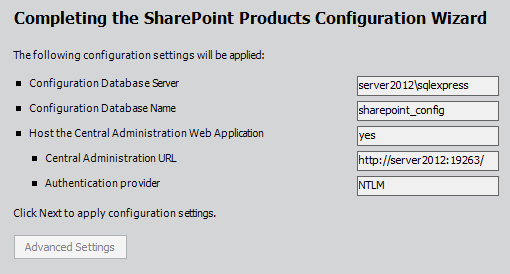
View the summary.

The configuration wizard will complete.

You should now get to the point of seeing the SharePoint 2013 Central Administration site. although not generally a good idea select the option to Run the Wizard to attempt to configure everything.

Select the Service Account (here I used the administrator which is not best security practices).

If you scroll down you’ll see all the option checked except for the Lotus Notes Connector. Continue.
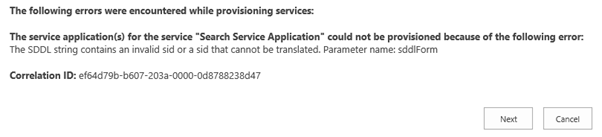
Here’s where I get the error with the Search Service Application. Press Next to continue anyway.

The wizard will complete and you’ll have a SharePoint site like so:

Problem is the search service won’t be running which obviously has something to do with that error mentioned previously.
Apart from that you should have a a SharePoint Foundation 2013 site running on a stand alone server. Neat. Again, remember that is NOT a supported configuration.
I’m sure I can find a solution to the error given some time so watch out for a future update on the topic.

