Does a M365 Copilot license include message quotas?

*** Updated information – https://blog.ciaops.com/2025/12/01/copilot-agents-licensing-usage-update/
bp1

Yes, a 25,000 message quota is included with each Microsoft 365 Copilot license for Copilot Studio and is a monthly allowance—not a one-time allocation.

Key Details:
  • The quota is per license, per month 1.
  • It resets each month and applies to all messages sent to the agent, including those from internal users, external Entra B2B users, and integrations 2.
  • Once the quota is exhausted, unlicensed users will no longer receive responses unless your tenant has:
    • Enabled Pay-As-You-Go (PAYG) billing, or
    • Purchased additional message packs (each pack includes 25,000 messages/month at $200) 2.

This means in a setup where only the agent creator has a license of M365 Copilot, any agent created will continue to work with internal data (i.e. inside the agent, like uploaded PDFs, or data inside the tenant, such as SharePoint sites) for all unlicensed users until that monthly creator license quota is used up.

Thus, each Microsoft 365 Copilot license includes:

  • 25,000 messages per month for use with Copilot Studio agents.

So with 2 licensed users, the tenant receives

2 × 25,000 = 50,000 messages per month

This quota is shared across all users (internal and external) who interact with your Copilot Studio agents.


References:

1. https://community.powerplatform.com/forums/thread/details/?threadid=FCD430A0-8B89-46E1-B4BC-B49760BA809A

2. https://www.microsoft.com/en-us/microsoft-365/copilot/pricing/copilot-studio

SharePoint Agents PAYG costs

image

To get a better idea of the costs of using SharePoint Agents, I’d suggest you have a look at:

https://techcommunity.microsoft.com/blog/spblog/consumption-based-pricing-for-sharepoint-agents/4389591

with the highlight being:

Under the PAYGO model, customers are billed $0.01 per message. Each interaction with a SharePoint agent uses thirty-two (32) messages, so customers are billed at $0.32 per interaction with SharePoint agents. The PAYGO meter uses your Azure subscription as the payment instrument, ensuring seamless integration with existing billing processes. This meter is available worldwide.

and

There are no in-product feature differences between the PAYGO meter, and the SharePoint agent included in the Microsoft 365 Copilot license. Users have the same capabilities and benefits, regardless of the billing model they choose.

Thus, with each interaction being $0.32, let say that typically a user will interact with SharePoint agents three times during any inquiry. That makes it about $1 per enquiry. If we now say that an average user will make 20 inquiries per day, that is $20 per user per day. Multiply that across all the users in an organisation and you can see how it could get very expensive very quickly.

Clearly then, pay as you go SharePoint agents is for very low volume of usage across the organisation, typically one enquiry per day. Otherwise, it make more sense to buy a full license of Microsoft 365 Copilot for the user in question because they effectively get unlimited SharePoint agent enquiries as well as a personal AI assistant plus more.

If you combine any other pay as go usage of Copilot, such as with Copilot Studio as I have outlined before, then it make far more sense to get a full Microsoft 365 Copilot for those who need to use any AI tools. However, pay as you go billing does provide you the flexibility to mix and match with full Microsoft 365 Copilot licenses. If you have a business with 5 major users and 20 casual users then teh starting point is for those 5 users to have full Microsoft 365 Copilot license, while the rest simply use an Azure subscription to cover any incidental costs until the point when another person in the business needs a full license.

To keep control of any SharePoint or Copilot pay as you go, you shoudl always set up a budget in Azure as I have outlined before with Security Copilot

Pay as you SharePoint agents do provide a degree of flexibility of quickly and easily enabling AI across your SharePoint information for your whole organisation but if usage of AI starts to grow then so too will the costs, and potentially quite dramatically if appropriate limits are not configured. The best option with pay as you go SharePoint agents then is its use in combination with full Microsoft 365 Copilot licenses for users who need to use AI extensively in their jobs, while casual users can remain on the pay as you go option. The good news is that you do have the flexibility to mix and match with the two types of licenses as needed and Azure does give you the added benefit of being able to turn off immediately where Microsoft 365 Copilot licenses are typically an annual commitment.

Copilot Studio PAYG costs

Now that I have set up pay as you go (PAYG) Copilot Studio via an Azure subscription, the next big question is what are the costs likely to be? These are somewhat hard to quantify exactly because it ‘depends’ on a lot of factors.

Start with:

Copilot Studio licensing here:

https://learn.microsoft.com/en-us/microsoft-copilot-studio/billing-licensing

which says:

  • Pay-as-you-go: $0.01 per message

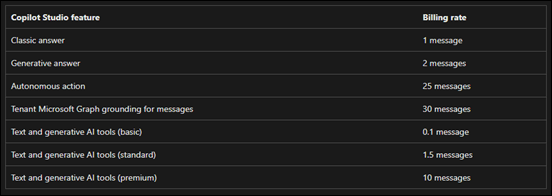
but then it isn’t a simple ratio of 1 question = 1 message, oh no. You need to look at this:

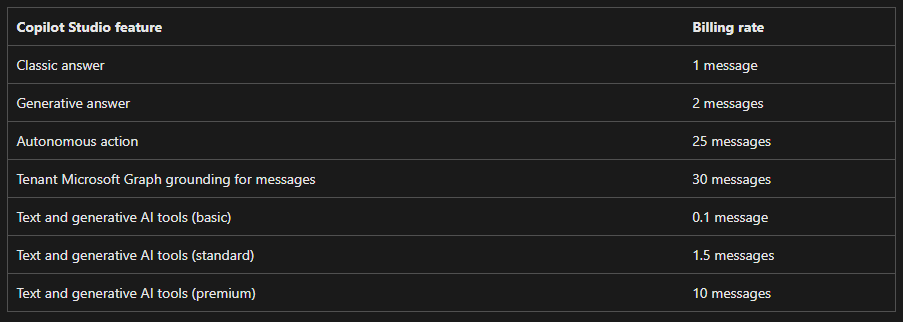
Message scenarios

which gives you this table:
Screenshot 2025-03-13 140428

The example Microsoft provides is:

Diagram illustrating various Copilot Studio events and their corresponding billing events.

Each interaction with an agent might utilize multiple message types simultaneously. For example, an agent grounded in a tenant Microsoft Graph could use 32 messages (30 messages for the Microsoft Graph grounding, and two for generative answers) to respond to a single complex prompt from a user.

Agent costs depend on an agent’s complexity and its usage.

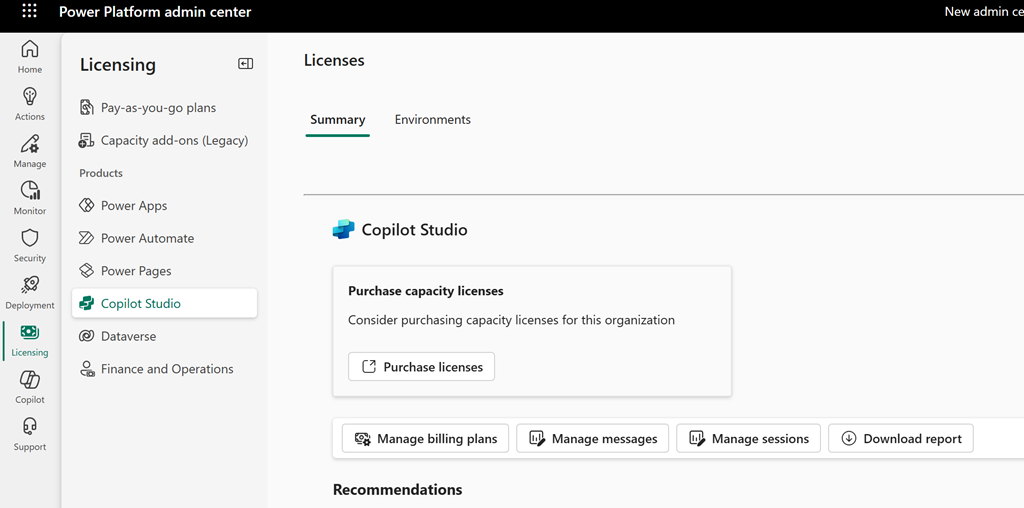
Inside the Power Platform admin center, under licensing and Copilot Studio I see this:
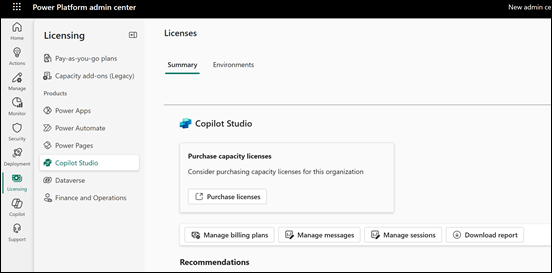
Screenshot 2025-03-13 141042

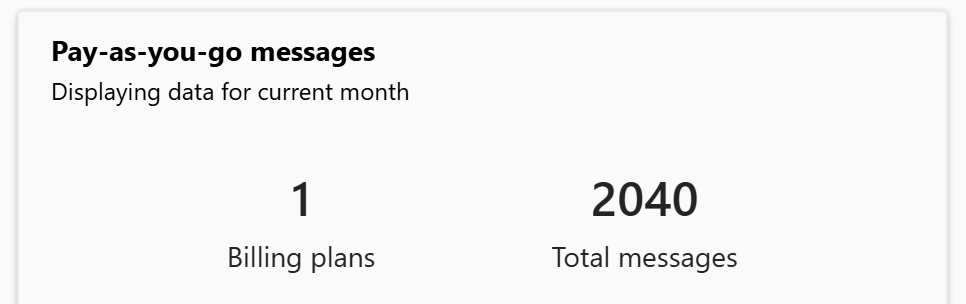
if I drill into this a little more I find:
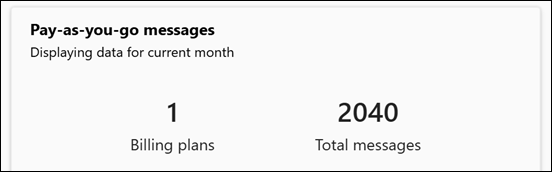
Screenshot 2025-03-13 141024

Ok, so 2,040 messages is the usage.

I then waited and checked my Azure billing for the period and it reports:
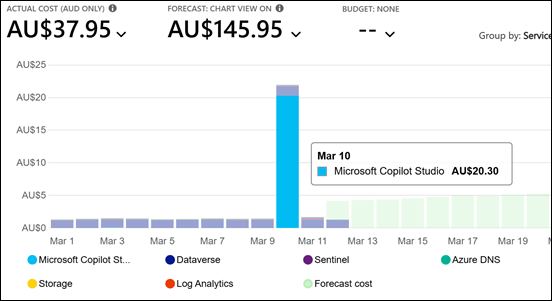
Screenshot 2025-03-13 134801

which is AU$20.30 for Copilot Studio usage across those 2,040 messages I suggest. If you divide the cost by the messages you come out to around that suggested $0.01 per message as expected.

How does that relate to usage? Again, hard to exactly quantify as I was the only user and I was building and testing an autonomous agent with Copilot Studio for around 8 hours roughly. Thus, that means an average of 255 AI message per hour or 4.25 messages per minute.

Based on that, the best estimate (rule of thumb) I could give you would be, based on ‘average use’ across a typical day (8 hours), for a single user using Copilot regularly throughout the day the cost is going you around AU$20 per user for that 8 hours of sustained usage.

I fully appreciate this is nowhere near exact but, so far it is the best average I can come up with for sustained daily usage.

If we assume that a ‘normal’ user is not going to using AI in the sustained manner across the whole day we could then apply say a 50% usage discount and settle on around AU$10 per user per day for an ‘average’ user using Copilot resources in an ‘average’ way per day. More intensive usage would be considered around AU$20 per user per day I suggest.

In summary then, via my imperfect observations and calculations I would suggest to you that if you do indeed implement Copilot service via Pay As You Go (PAYG) then the ‘typical’ costs you can expect would be around AU$10 per user per day up to AU$20 per user per day. If this was sustained across a full month then you would be looking at $300 per average user per month which is way above the cost of a full license of Microsoft 365 Copilot whih which would be a flat fee of around AU$45 per user per month.

This is the best estimate I can give you and your costs and usage will vary but I think $10 per user per day for average Copilot use on a PAYG plan is as good as any place to start.

Clearly then, if your users are planning on sustained Microsoft 365 Copilot usage a paid license of Microsoft 365 Copilot is a much more effective investment from what I can determine.


Why I can NOW delete a Power Platform PAYG billing plan

About a month ago I discovered that I couldn’t delete a Power Platform PAYG billing plan. It turns out that now I can.

Screenshot 2025-02-05 201444

As you can see in the above screen shot the Delete billing plan button isnow available. Seems that because the paint was still wet on the features for this the team at Microsoft was making adjustments. However, I am now told this has been all sorted so you can delete your billing plans as you wish.

Why can’t I delete a Power Platform PAYG billing plan?

*** Update 5 Feb 2025: Delete billing plan is now available. Developers were working on the back end causing the issue.

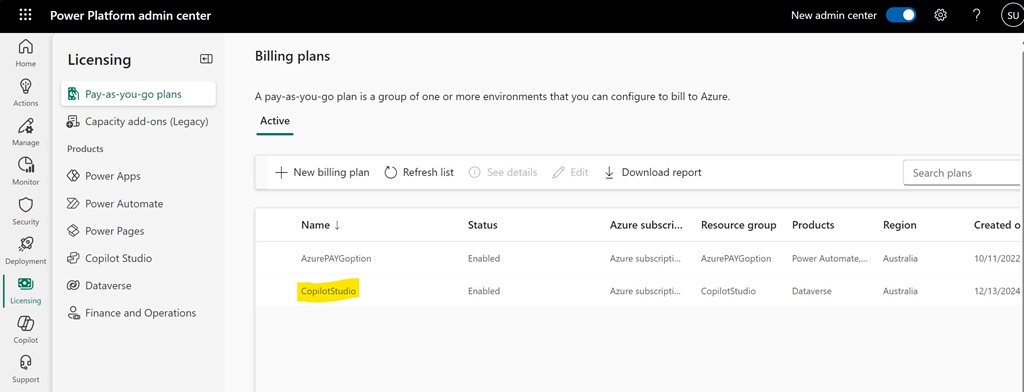
Screenshot 2025-01-17 154952

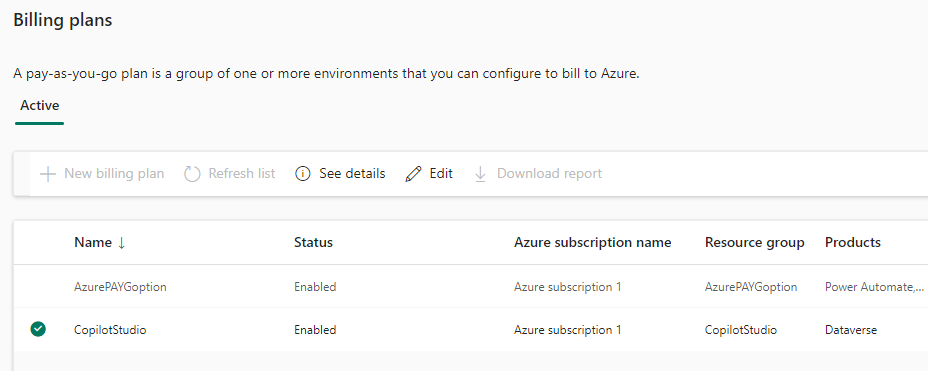
I want to delete the Power Platform PAYG Billing plan called CopilotStudio as seen above.

Screenshot 2025-01-17 155309

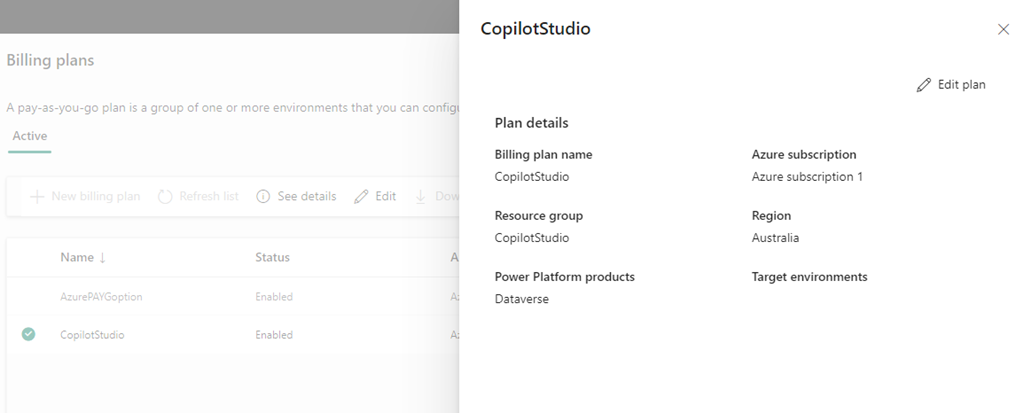
If I select the pla, as shown above, the the options See details and Edit are available only.

Screenshot 2025-01-17 155502

If I Select See details the above information is shown but with no delete option.

Screenshot 2025-01-17 155808

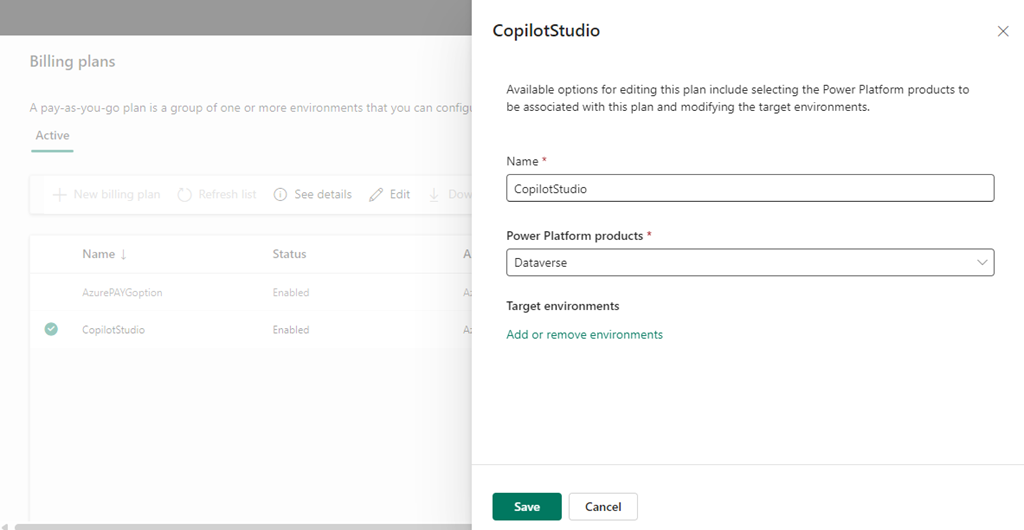
Selecting Edit plan displays the above, again with no Delete option.

The billing plan has no environments inside it.

Originally, the PAYG Billing plan was tied to an Azure Resource Group that has also now been removed. Yet, the billing plan remains?

Where is the delete option? Anyone know?