Embedding a OneDrive for Business file anonymously

OneDrive for Business gives you the ability to share files with others quickly and easily. You can even share files with others so that anyone can view them without needing a login. This is known as anonymous sharing.
clip_image002

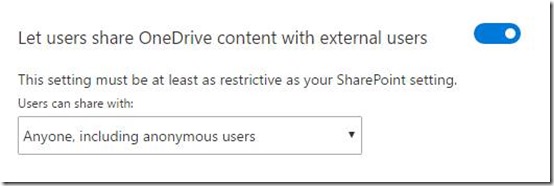
To share anonymously, firstly ensure that you have enabled your users to share OneDrive content with external users as shown above. You’ll find that setting at:

https://admin.onedrive.com/?v=SharingSettings

which you need to access as a global administrator.
image

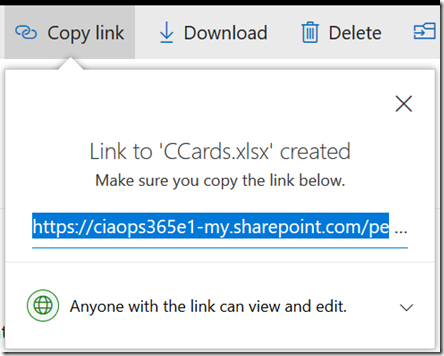
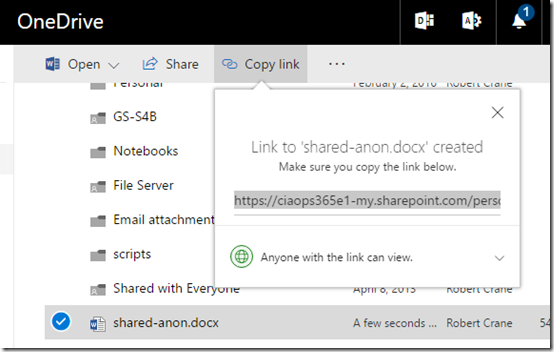
Next, select the file you want to share in OneDrive and then select Copy link from the menu across the top. Set the desired permissions. I’d generally recommend you set these to read only.

Copy the link which should look like:
https://ciaops365e1-my.sharepoint.com/personal/admin_ciaops365_com/_layouts/15/guestaccess.aspx?docid=0b35508db56c24e4293bb50e33391c1b0&authkey=AXr72CMhu3Pqd8d6jUwjkpE

image

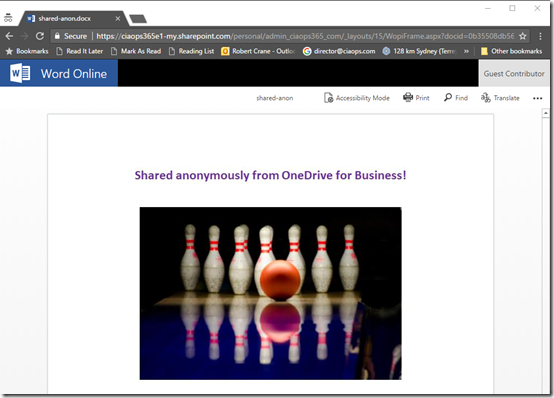
If you now plug that into another browser or an ‘in-private’ browser session the file contents should be display as shown above.

If the document doesn’t appear or you are prompted to login then you need to double check your document sharing.

However, let’s now say you want to embed this document into a public web page.
image

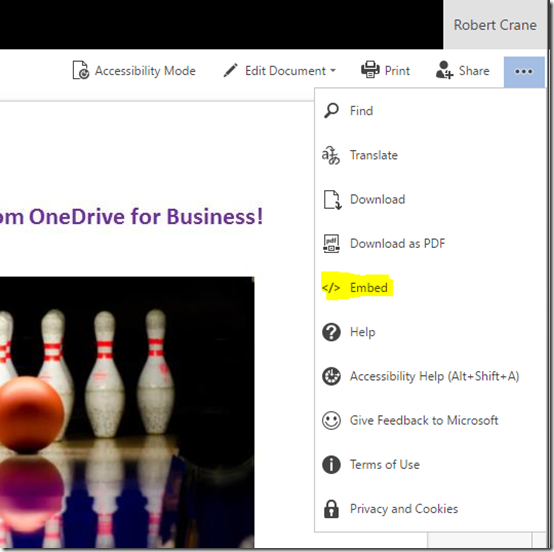
If you return to the source document in OneDrive for Business and view that document is a browser by clicking on it, the document should display. If you you select the three dots at the right a menu should appear as shown above. From that menu, select the Embed option
image

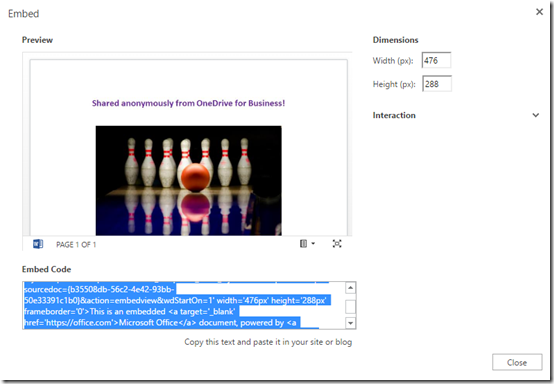
You should now see an embed dialog like that shown above. You will notice that the embed is also listed.
image

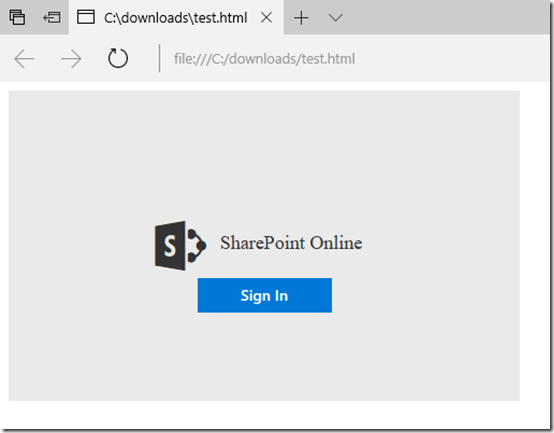
However, if you copy and paste that code you end up with a web page like that shown above that asks for a login.

From what I can determine the embed code provided is only for embedding inside something like a Team Site in Office 365. The embed code is not for use with anonymous external users. That is, it won’t work for public viewing on the Internet.

However, the native embed codes appears as:

image

If you replace:

image

with the actual sharing link you received originally, the embed code then looks like:

image

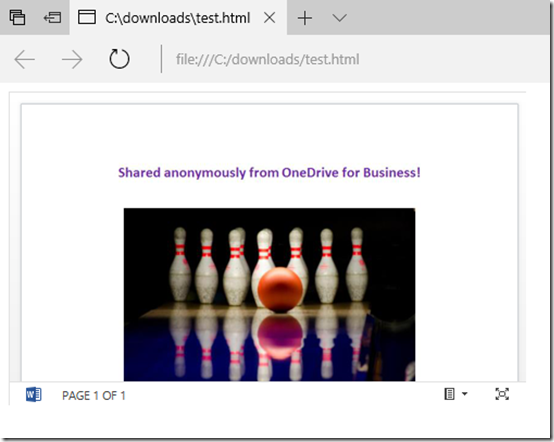
If you now use that edited embed code in a a public web page, that page should now appear with the embedded file item from OneDrive for Business like so:
image

So the trick when it comes to embedding anonymous document from OneDrive for Business is to change the embed code to include the URL of the external sharing link you received when you shared the file with everyone.

Not as nice as other applications can embed anonymous documents, but then really, Office 365 isn’t really aimed at sharing information anonymously now is it? I’m also pretty sure Microsoft have this anonymous embedding feature on the roadmap but my guess is that it doesn’t have a high priority at this stage.

I have embedded that file below to confirm that doing so anonymously is possible:
https://ciaops365e1-my.sharepoint.com/personal/admin_ciaops365_com/_layouts/15/guestaccess.aspx?docid=0b35508db56c24e4293bb50e33391c1b0&authkey=AXr72CMhu3Pqd8d6jUwjkpE&action=embedview&wdStartOn=1

Office 365 and Azure codex available to patrons

image

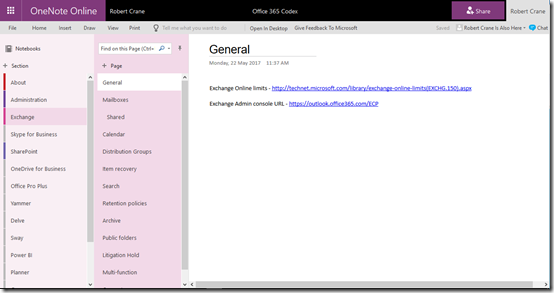
The majority of my learnings end up in OneNote. As you would expect I have OneNote notebooks for just about everything including Office 365 and Azure.

Having them in OneNote means they are searchable, available on every device and I can quickly add information no matter where I am. To my mind, they are pretty much the perfect as a portable personal knowledge base.

I have now taken all my accumulated Azure and Office 365 knowledge and made them available as continually sync’ed OneNote notebooks for CIAOPS Patrons. That’s right, all you need to do to gain access to this material is sign up to be a CIAOPS Patrons for which you’ll get access to both the Office 365 and Azure notebooks (plus I few more I’m planning on releasing) as well as access to my private Facebook community to discuss everything Microsoft cloud as well as a range of discounts (starting at 25%) to my online courses and publications.

The great thing about these OneNote notebooks is that they are dynamic, in that I’ll continue to add information to them over time, posting all the stuff I’m already posted into the Facebook group, but organising it for people to locate quicker when they need to. Best of all, as long as you stay a CIAOPS Patron you’ll get access to this included for as little as US$10 per month. That’s a pretty small price to pay for the notebooks let alone everything else that comes along with being a CIAOPS Patron.

Become a CIAOPS Patron today and enjoy the benefits! You can sign up to be a CIAOPS Patron here:

https://www.ciaopsacademy.com/p/patron/

Need to Know podcast–Episode 153

Marc and I report on our impressions of the recent Microsoft Build conference. There are quite a few things that caught our eye that we thought we’d like to share with our audience. Everything from CosmosDB to OneDrive on Demand and a few things in between. Get the latest information about all the important stuff for IT Pros from Build along with our thoughts on why they are things that you should be paying attention to.

Take a listen and let us know what you think –feedback@needtoknow.cloud

You can listen to this episode directly at:

https://ciaops.podbean.com/e/episode-153-microsoft-build-2017/


Subscribe via iTunes at:

https://itunes.apple.com/au/podcast/ciaops-need-to-know-podcasts/id406891445?mt=2

The podcast is also available on Stitcher at:

http://www.stitcher.com/podcast/ciaops/need-to-know-podcast?refid=stpr

Don’t forget to give the show a rating as well as send us any feedback or suggestions you may have for the show.

Resources

@marckean

@directorcia

Azure news from Marc

Build Keynotes

OneDrive on demand

Windows Timeline

Cloud powered clipboard

iTunes comes to the Windows Store

Video remix

Channel 9 Xbox preview app

This episode brought to you by: https://cpem.io/tJ01Hzu2k.js

Learning Collaboration in Office 365

people-woman-coffee-meeting2

A little while ago I announced that I’ll be conducting a new course focused on showing you the best practices when it comes to collaboration in Office 365. This will answer questions about whether you should use Microsoft Teams over Yammer, what roles Groups plays and to drive adoption for your business to ensure that everyone makes full use of the Office 365 suite they have been allocated.

You’ll find all the original information about the course here:

Understanding collaboration in Office 365 course

The course gives you the opportunity to participate in the learning live. You’ll be able to complete the hands on tutorials right there and then. You’ll get immediate feedback on what you’ve learnt and you’ll also be able to ask questions and most importantly get your questions answered right there and then. If you think this is just going to be a boring webinar style presentation, then you in for a shock as nothing could be further from the truth. This course will be more hands on than if you were sitting in a classroom!

Best of all is that all the sessions will be recorded and made available to you, along with all the training materials (notes, links, whitepapers and more) FOREVER! That’s right, you can continue to come back to the course and watch the training at your leisure. You can even download it all and watch it offline. So if you are too shy to attend the live events you’ll still get full benefit from all the material.

Those lucky enough to have signed up already have been able to take advantage of the initial substantial early bird discount, however if you missed that then you need to act now to get a $30 discount. Use the coupon code EAERLYBIRD2 at checkout or click here to have the discount automatically applied upon registration:

Understanding collaboration in Office 365 – $30 discount

Remember, you need to use the link or the coupon code to get the discount.

An additional offer is that if you are not already a CIAOPS Academy affiliate you should sign up so you can offer this course to others and receive a commission. That’s right, just refer this (or any CIAOPS Academy course) to others and you’ll receive a percentage of the course direct to you. To become an affiliate simply sign up for free at the CIAOPS Academy and then contact me (director@ciaops.com) to let me know you want to be an affiliate and I’ll send you all the details and get you signed up asap.

The count down to the course kick off on the 1st of June is on and I’d encourage you to take advantage of this discount before it expires on the 19th of May. Remember, the course includes over 5 hours of hands on training, video recordings of all sessions as well a lifetime access to all the course materials including video replays, course notes, links, white papers and more. All of which you can download and view offline.

If you want to learn how Office 365 can give your business a completive edge by being more effective and productive then sign up today to take advantage of this discount.

I’ll also point out that if you sign up as a CIAOPS Patron you’ll not only receive discounts starting at 25% on this course but you’ll also get access to my private Office 365 Facebook community where you can get your questions answered by myself and other in the community daily. For all the benefits of being a CIAOPS Patron head over to:

http://www.patreon.com/ciaops

I hope to see you on the course with me and those who have already signed up.

New sharing interface in Office 365

image

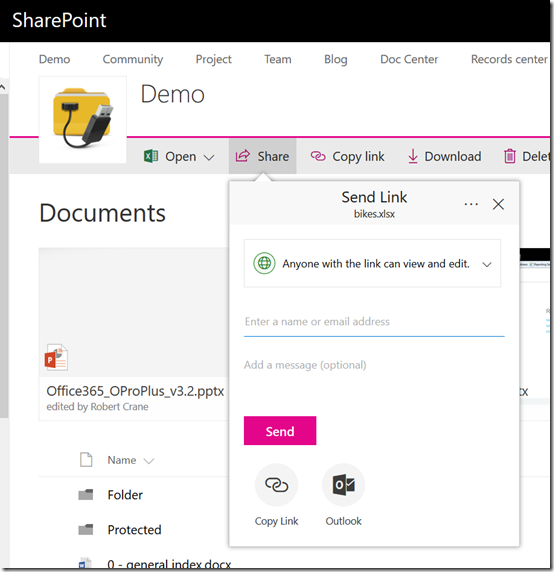
Looks like we have a new interface for sharing files in both Teams Sites (above),

image

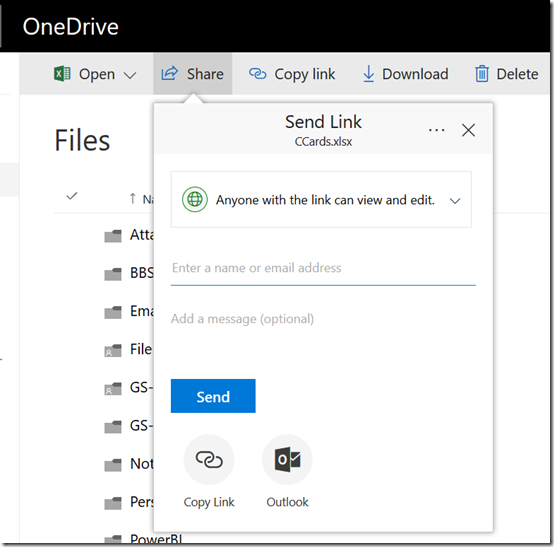
and OneDrive (above).

Now the sharing option drops down from the Share menu rather than popping up a dialog box in front of everything.

image

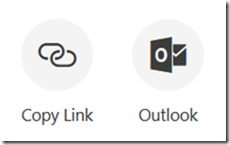
It also has some buttons at the bottom to help you with the way you want to share the item.

image

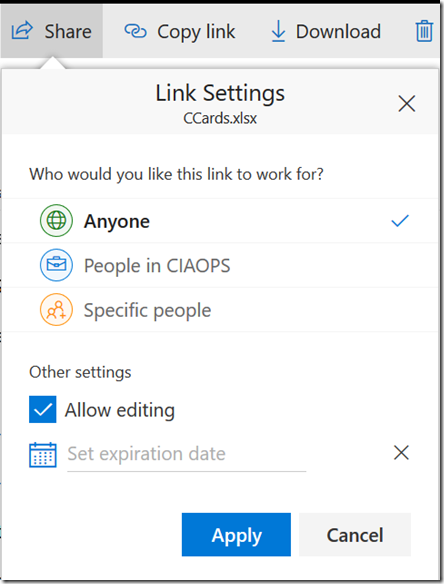
You can adjust the link settings by clicking on the pull down menu for whom you wish to share the link with.

image

You also get the same style of menu when you try and get a link as shown above.

You may not as yet see these options but expect them to be rolling out to you soon.

Understanding collaboration in Office 365 course

people-woman-coffee-meeting2

I’m happy to announce a new course is available from the CIAOPS Academy. This course will focus on the collaboration tools available in Office 365. This means SharePoint, Teams, Yammer, OneDrive and more. You’ll not only learn how these products work but you’ll also learn how to use them effectively to increase the productivity of your business.

The course will divided into 5 live sessions held every Friday in June. Thus:

Friday June 2nd 2017 – SharePoint & OneDrive
Friday June 9th 2017 – Groups, Teams and Staffhub
Friday June 16th 2017 – Yammer & Skype for Business
Friday June 23rd 2017 – Delve & Planner
Friday June 30th 2017 – Migration and Driving adoption

The sessions will run for 1 hour and be recorded. Session time are:

8am – 9am – Sydney, Australia
3pm – 4pm – PDT, USA
6pm – 7pm – EDT, USA
11pm – 12am – BST, UK

The recordings of each session will be available shortly after each session is completed. Although each session will run for 60 minutes, there will be an open Q and A at the end that will continue as long as people have questions not answered in the session.

All the material, including recordings, course notes and additional offers will be available for download after the fact.

The material presented during this course is a great way to fast track you understanding and adoption of Office 365 adoption tools in your business. Not only will you see the technology in use but the sessions will include hands on material for all students to participate in, so you’ll be directly interacting with the technology during the time. This way you’ll get to see and experience exactly what is possible with Office 365 collaboration technologies.

If you are keen to jump on board then I have a special early bird discount as a reward. Normally the cost of the course is US$299 but if you sign up before the 12th of May 2017 at 9:00am you’ll receive $60 off the cost using the coupon code EARLYBIRD1 or this direct link:

Understanding collaboration in Office 365 – $60 early bird discount

Remember, you need to use the link or the coupon code to get the discount.

An additional offer is that if you are not already a CIAOPS Academy affiliate you should sign up so you can offer this course to others and receive a commission. That’s right, just refer this (or any CIAOPS Academy course) to others and you’ll receive a percentage of the course direct to you. To become an affiliate simply sign up for free at the CIAOPS Academy and then contact me (director@ciaops.com) to let me know you want to be an affiliate and I’ll send you all the details and get you signed up asap.

In summary. Sign up for the upcoming CIAOPS Academy Office 365 collaboration course here (and get an early bird discount):

Understanding collaboration in Office 365 – $60 early bird discount

and contact me (director@ciaops.com) if you want to become an academy affiliate and receive commissions for courses you sell.

I hope to see you in attendance at the course in June.

February Webinar Resources

https://docs.com/d/embed/D25191508-8189-6254-8310-001748698594%7eMd4186d87-61d5-259a-4d26-00a8bd86cfff

Our February webinar event is all done. You can see the slides either above or download them directly from here:

February 2017 Need to Know Webinar

If you are not a CIAOPS patron you want to view or download a full copy of the video from the session you can do so here:

http://www.ciaopsacademy.com/p/february-2017-need-to-know-webinar/

you can also now get access to all webinars via:

http://ciaops-academy.teachable.com/courses/need-to-know-webinars

for a nominal fee.

Thanks to everyone who attended and I hope to see you again next month when the focus session will be on Microsoft Teams.

Sharing files with external users using OneDrive for Business

Here’s a bright shiny new video detailing how to share files with external users from OneDrive for Business. You’ll see how to share with external users via email address and via a direct URL. Nice and easy.

If you wish to share with external users via email (i.e. they have to actually login to view the document), then they’ll need a free Microsoft account which they may already have or can easily set up using their own email address.

If you wish to share the document without the need for a login you can also do that easily via OneDrive for Business.

Sharing your files via OneDrive for Business means that you retain the source and control of the files. It also means there is a single point of truth when it comes to the document. That alone is worth using OneDrive for Business to share personal business documents.