CIAOPS Need to Know Office 365 Webinar–May

laptop-eyes-technology-computer

For this month’s webinar we are going to take a look at what Office 365 Data Loss Prevention (DLP) is and how it can be used to safeguard the information inside your organisation. You’ll learn what DLP is all about and how to implement it with Office 365. Of course, I’ll also bring you up to speed with all the latest news and updates in the world of Office 365 and Microsoft 365.

You can register for free at:

May Webinar Registrations

The details are:

CIAOPS Need to Know Webinar – May 2018
Friday 25th of May 2018
11am – 12am Sydney Time

All sessions are recorded and posted to the CIAOPS Academy.

There of course will also be open Q and A so make sure you bring your questions for me and I’ll do my best to answer them.

The CIAOPS Need to Know Webinars are free to attend but if you want to receive the recording of the session you need to sign up as a CIAOPS patron which you can do here:

http://www.ciaopspatron.com

or purchase them individually at:

http://www.ciaopsacademy.com/

Also feel free at any stage to email me directly via director@ciaops.com with your webinar topic suggestions.

I’d also appreciate you sharing information about this webinar with anyone you feel may benefit from the session.

Need to Know podcast–Episode 180

We have been lucky enough to speak with Microsoft Senior Marketing Manager for OneDrive for Business Stephen Rose all about how OneDrive helps customers collaborate in this episode. I chat with Stephen about how to resist the urge to map drive letters to OneDrive and how it is superior to the competition amongst plenty of other things. Lots of really great information about OneDrive for Business and we thank Stephen for his time and information that he shared with us. Of course Brenton and I also wrap up the latest news and events in the Microsoft Cloud world and share with you our take on the current happenings. Don’t for get to send us your feedback.

Take a listen and let us know what you think –feedback@needtoknow.cloud

You can listen directly to this episode at

https://ciaops.podbean.com/e/episode-180-stephen-rose/

Subscribe via iTunes at:

https://itunes.apple.com/au/podcast/ciaops-need-to-know-podcasts/id406891445?mt=2

The podcast is also available on Stitcher at:

http://www.stitcher.com/podcast/ciaops/need-to-know-podcast?refid=stpr

Don’t forget to give the show a rating as well as send us any feedback or suggestions you may have for the show.

Resources

@stephenlrose

@contactbrenton

@directorcia

OneDrive

OneDrive Uservoice

Microsoft Fasttrack

Microsoft 365 gets a swag of updates

Making IT simpler with a modern workplace

Make the most of your time with the new Windows 10 update

Office 2019 Preview is ready for commercial users

New survey explores the changing landscape of teamwork

Increase in SharePoint Online storage allocation

Microsoft Forms is enterprise ready

Microsoft results

Microsoft Kaizala

Microsoft 365 Business gets serious

night-portrait-canon-flash-74472

Recently Microsoft announced that Microsoft 365 Business had added a number of new features. You can read the announcement here:

https://www.microsoft.com/en-us/microsoft-365/blog/2018/04/30/safeguard-your-business-with-new-security-features-for-microsoft-365-business/

Now, I was super impressed with what they added. Things like Advanced Threat Protection (ATP) and Data Loss Prevention (DLP) are amazing add ons. However, when I went and looked at the actual Services Descriptions for what has been added I was blown away with what has in fact been added. Here’s the complete list:

1. Microsoft 365 Business includes Exchange Online Archiving subscription. This effectively turns an Exchange Online Plan 1 mailbox into a Plan 2 mailbox. This means that it effectively makes the mailbox unlimited in capacity. This was previously only available on E3 plans or better!

2. Azure Information Protection (AIP) Plan 1 is included in Microsoft 365 Business. This includes even more features that are part of Office 365 E3! For example, AIP Plan 1 includes the following items above and beyond what you get with Office 365 E3:

–  Manual, default, and mandatory document classification and consumption of classified documents

– Azure Information Protection connector with on-premises Windows Server file shares by using the File Classification Infrastructure (FCI) connector

– Document tracking and revocation

3. Data Loss Prevention features will be available in Microsoft 365 Business in Summer 2018. Normally this required a minimum of Office 365 E3.

4. Enterprise State Roaming for Windows 10 with Azure AD join. This is a feature of Azure AD Premium 1 but is now in Microsoft 365 Business.

5. Full Intune capabilities for iOS, Android, MacOS, and other cross-platform device management built into Azure console, also licensed for use with Microsoft 365 Business. Now this is the REALLY interesting one. It says FULL Intune!

6. In-Place Hold and Litigation Hold. This used to require a minimum of Office 365 E3.

7. Microsoft Stream. This used to require a minimum of Office 365 E1.

Interestingly, there now seems to more flexibility when it comes to integration with local Active directory per:

8. Azure AD Connect tool for enabling directory synchronization is supported in Office 365 Business Premium, which is a component of Microsoft 365 Business. However, when Windows Management components are enabled for Microsoft 365 Business, an Azure AD-join is required. If you have an on-premises Active Directory environment and you want to join your domain-joined devices to Azure AD, you can accomplish this by configuring hybrid Azure AD joined devices.

9. Advanced Threat Protection (ATP). This used to only be included in Office 365 E5 or as an addon SKU.

Some things Microsoft 365 Business still doesn’t include:

A. Conditional access (based on group, location, device state, sign-in, or user risk).

B. Device objects two-way synchronization between on-premises directories and Azure AD (device write-back).

C. Dynamic Groups.

D. Group Naming Policy. I am going to assume this one as I can’t find information that say it is included. However, fingers crossed.

E. Advanced eDiscovery.

If you want to check out all the details see:

https://technet.microsoft.com/en-us/library/mt846681.aspx

This really changes the whole Microsoft 365 Business conversation. These additional features I believe make Microsoft 365 Business the hero SKU for SMB, especially considering that that the price has not been increased (as far as I am aware). That is a huge amount of added value for no additional price.

The two big ones for me are the inclusion of Advanced Threat Protection (ATP) and Intune. If you then go and add everything else, wow, simply wow, is all I can say. This puts Microsoft 365 Business into the must have for most small businesses.

If you haven’t looked at Microsoft 365 Business, you really, really should!

Need to Know podcast–Episode 179

I’m joined my Microsoft MVP Mark O’Shea to talk Microsoft 365, what it is, why it is important and how to implement it. Mark shares his experiences and thoughts on the product and why it so important going forward. There is of course our usual cloud news and updates from Microsoft so sit back and enjoy this deep dive episode into Microsoft 365.

Take a listen and let us know what you think –feedback@needtoknow.cloud

You can listen directly to this episode at

https://ciaops.podbean.com/e/episode-179-mark-oshea/

Subscribe via iTunes at:

https://itunes.apple.com/au/podcast/ciaops-need-to-know-podcasts/id406891445?mt=2

The podcast is also available on Stitcher at:

http://www.stitcher.com/podcast/ciaops/need-to-know-podcast?refid=stpr

Don’t forget to give the show a rating as well as send us any feedback or suggestions you may have for the show.

Resources

Intunedin

Contactbrenton

directorcia

Intunedin web site

New Microsoft Teams and Skype for Business admin center

Schooling a sea of phishing part 3

SharePoint Migration tool beta

View Planner tasks in your Outlook

Best version of OneNote on Windows

Introducing Microsoft Azure Sphere

Need to Know Podcast–Episode 178

We have a special interview for this episode, Doug Hazelman from Cloudberry Labs, to talk all about their backup solutions that include the ability to backup from places like Azure and Office 365 as well as from on premises. We talk about the products as well as the opportunities that Cloudberry provides for Managed Service providers. Of course Brenton and I headline the episode with some updates as to what’s happening with technology and the Cloud.

Take a listen and let us know what you think –feedback@needtoknow.cloud

You can listen directly to this episode at

https://ciaops.podbean.com/e/episode-178-cloudberry/

Subscribe via iTunes at:

https://itunes.apple.com/au/podcast/ciaops-need-to-know-podcasts/id406891445?mt=2

The podcast is also available on Stitcher at:

http://www.stitcher.com/podcast/ciaops/need-to-know-podcast?refid=stpr

Don’t forget to give the show a rating as well as send us any feedback or suggestions you may have for the show.

Resources

@VMDoug

@Cloudberrylab

@contactbrenton

@directorcia

Cloudberry

Cloudberry Managed Backup

Cloudberry Backup for Office 365

Cloudberry Blog

Cloudberry forum

Doug Hazelman – doug.h@cloudberrylab.com

Was your data compromised on Facebook?

Facebook admits public data of its 2.2 billion users has been compromised

View Planner tasks in your Outlook calendar

New Teams and Skype for Business Online admin center appears

Office 365 Personal accounts get an upgrade

Another great benefit of Office 365 Advanced Threat Protection

image

I recommend that any Office 365 tenant sold these days also include Office 365 Advanced Threat Protection (ATP), which costs around AU$2.50 per license.

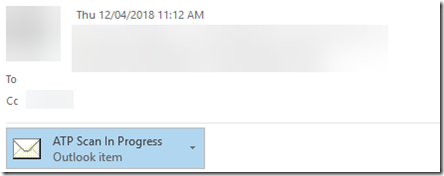
ATP does many things but of the things that I really like is that it takes a very deep look into attachments you receive, sandboxing them to see exactly what they do when opened. You can see an example above that I received.

In this case, I have set ATP to use dynamic delivery which means I get notified of the ATP scanning process with a place marker as shown above.

image

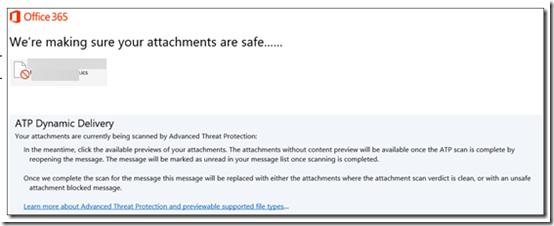
When I open that place marker I see the above which informs me that the attachment is being checked by ATP.

image

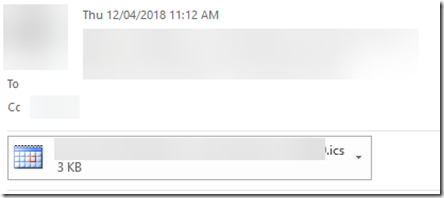
In a short period I see the attachment as normal once ATP has completed checking it for me.

ATP is included in E5 but is an add on for other plans but as I said, I consider it a mandatory add on if you are serious about security and minimising the risk of a dodgy attachment being delivered to your business.