CIAOPS Need to Know Azure Webinar–April 2018

pexels-photo-325229

Azure can do a lot of things including host website using a variety of methods. This month I’ll show you the different ways that you can host web sites in Azure and some best practices. There’ll also be news, updates and Q and A. I hope to see you there.

April Azure Webinar Registrations

The details are:

CIAOPS Need to Know Azure Webinar – April 2018
Tuesday 24th of April 2017
2pm – 3pm Sydney Time

All sessions are recorded and posted to the CIAOPS Academy.

There of course will also be open Q and A so make sure you bring your questions for me and I’ll do my best to answer them.

The CIAOPS Need to Know Webinars are free to attend but if you want to receive the recording of the session you need to sign up as a CIAOPS patron which you can do here:

http://www.ciaopspatron.com

or purchase them individually at:

http://www.ciaopsacademy.com/

Also feel free at any stage to email me directly via director@ciaops.com with your webinar topic suggestions.

I’d also appreciate you sharing information about this webinar with anyone you feel may benefit from the session.

Need to Know Podcast–Episode 177

Brenton and I give you an update on all the latest news from the Microsoft Cloud, and there has been plenty. Across Office 365 and Azure there is plenty of updates for you to be aware of. So have a listen and take a look at the show notes to get more information.

Take a listen and let us know what you think –feedback@needtoknow.cloud

You can listen directly to this episode at

https://ciaops.podbean.com/e/episode-177-cloud-news/

Subscribe via iTunes at:

https://itunes.apple.com/au/podcast/ciaops-need-to-know-podcasts/id406891445?mt=2

The podcast is also available on Stitcher at:

http://www.stitcher.com/podcast/ciaops/need-to-know-podcast?refid=stpr

Don’t forget to give the show a rating as well as send us any feedback or suggestions you may have for the show.

Resources

@contactbrenton

@directorcia

Azure AD resources

Azure private DNS zones now in preview

Azure Virtual Machine serial console access

General availability of Azure File snapshot

The Microsoft AI Landscape and what to use when

Microsoft re-organisation

Cloud PSTN comes to Australia

Calling Plans from Telstra

SharePoint Hub Sites

External access coming to Planner

Yammer networks being consolidated

Announcing 1.1.1.1


Deploy Office 365 and Azure together

image

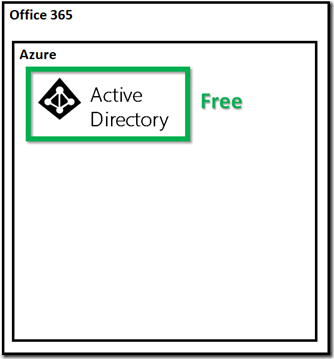
When you get an Office 365 license you also receive a free Azure tenant. This Azure tenant only generally has a single service enabled. That service is Azure Active Directory.

You do not pay for this, it is included with your Office 365 subscription and here’s how you are able to view it:

Enabling your Office 365 Azure AD access

image

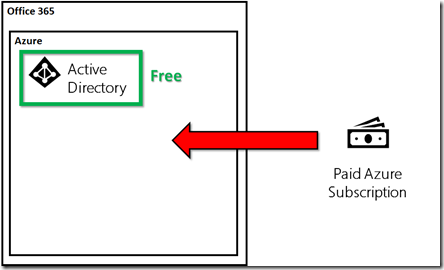
The Azure tenant that you get with Office 365 won’t unfortunately provide you with access to other Azure services (such as Virtual Machines) out of the box but it can. The way that you enable this existing Azure tenant for other Azure workloads is that you now add a paid Azure subscription.

image

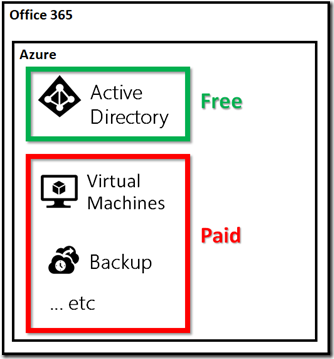
Thus, when you add a paid Azure subscription into an Azure tenant created by Office 365 you now get the ability to access all the Azure services (like Virtual Machines, Backups, etc.).

What I suggest is that when enable an Office 365 tenant you should also immediately add a paid Azure subscription. The reason I say that is that Azure billing is handled differently to Office 365.

Office 365 is a flat fee per month based on the user count in the tenant. Azure however is a consumption based pricing model generally. This means, you don’t pay for Azure services until you start using them. Thus, enabling a paid Azure subscription into you Office 365 subscription is not going to cost you anything until you start actually using Azure services.

Adding a paid Azure subscription immediately gives you the flexibility to spin up Azure services immediately when you need them instead of having to wait for the subscription to be provisioned. It means if you need a temporary server or some cloud backup then you can configure and start using that service immediately, no waiting as the tenant and services are ready to go.

So with an Office 365 tenant created and a paid Azure subscription in place what are most likely first Azure services you should consider? I’d be looking at Azure DNS to host the name server records for Office 365, a site to site VPN back to on premises infrastructure, Azure SMB Files and then probably Azure Backup and Site Recovery. The choice is yours and with the paid Azure subscription in place you can run these up whenever you need and feel assured that you’ll only be billed when you actually start using them.

In short, think of Office 365 and Azure together. This means they should be deployed together as there is no financial reason not to in my books. With both deployed you’ll be in a far better place to respond to whatever the needs of the business are.

March Azure Webinar Resources

Here are the slides from the March Azure webinar where we took a look at Azure pricing.

https://www.slideshare.net/directorcia/ciaops-need-to-know-azure-webinar-march-2018

The recording is also available at:

http://www.ciaopsacademy.com.au/p/need-to-know-azure-webinars

which CIAOPS patrons get free access to as part of their subscription.

This webinar set more of the ground work for upcoming monthly webinars that will go deeper into Azure features and abilities.

So make sure you sign up for next month’s webinar.

Need to Know Podcast–Episode 175

Brenton and I talk about the importance of data compliance in light of recent legislation updates in both Australia and overseas. This means that it is very important to firstly understand what your obligations are when it comes to personal data but to also ensure you own systems are compliant. Technology is not the only solution required here, you’ll need policy as well as training to help people better understand what their responsibility is. We cover off all the major highlights as well as give you some suggestions of how you should be approaching this with your Office 365 tenants.

Take a listen and let us know what you think –feedback@needtoknow.cloud

You can listen directly to this episode at

https://ciaops.podbean.com/e/episode-175-compliance/

Subscribe via iTunes at:

https://itunes.apple.com/au/podcast/ciaops-need-to-know-podcasts/id406891445?mt=2

The podcast is also available on Stitcher at:

http://www.stitcher.com/podcast/ciaops/need-to-know-podcast?refid=stpr

Don’t forget to give the show a rating as well as send us any feedback or suggestions you may have for the show.

Resources

@contactbrenton

@directorcia

Non Azure AD accounts can now join Microsoft Teams

Azure AD Connect: Version release history

How Office 365 protects your organisation from modern phishing campaigns

Azure migrate is now generally available

Introducing Azure Advanced Protection

Check those Office 365 forwards

CIAOPS Need to Know Azure Webinar–March 2018

pexels-photo-325229

One of biggest challenges people have with Azure is determining pricing. So for March we’ll focus on understanding how pricing works with Azure and how you can optimize your spend There’ll also be news, updates and well as open Q & A so I’d love to see you attend.

You can register for free at:

March Azure Webinar Registrations

The details are:

CIAOPS Need to Know Azure Webinar – March 2018
Thursday 29th of March 2017
2pm – 3pm Sydney Time

All sessions are recorded and posted to the CIAOPS Academy.

There of course will also be open Q and A so make sure you bring your questions for me and I’ll do my best to answer them.

The CIAOPS Need to Know Webinars are free to attend but if you want to receive the recording of the session you need to sign up as a CIAOPS patron which you can do here:

http://www.ciaopspatron.com

or purchase them individually at:

http://www.ciaopsacademy.com/

Also feel free at any stage to email me directly via director@ciaops.com with your webinar topic suggestions.

I’d also appreciate you sharing information about this webinar with anyone you feel may benefit from the session.

Why following best practices in Azure is a good idea

Over my time I have seen so many Azure solutions built in ways that are contrary to agreed best practices. Why does this happen? Typically, it is because people bring old concepts and methodologies to new environments like Azure. Yes, many of the fundaments are the same. Things like TCP/IP, networking and the like are the same as on premises but others are very, very different.

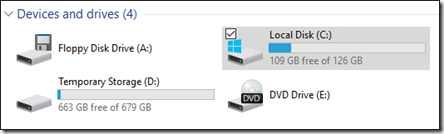
One of the key differences when it comes to storage with Azure Virtual Machines (VMs) is the disk topology. When you spin up an Azure VM you typically get two drives, C: and D:. C: is the boot partition and holds the operating system while D: is a temporary or caching disk that gets recreated upon every reboot.
image

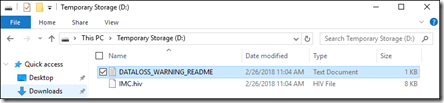
Above you can see an example of a topology from an Azure machine. You will see that D: has the label ‘Temporary Storage’.
image

A closer looks at D: reveals the contents shown above.

image

If you look at the contents of the warning file you see the above. Note the first line which says (in capitals):

WARNING: THIS IS A TEMPORARY DISK

Why am I emphasising this? I can’t tell you the number of people I have seen bring previous practices to Azure and put production data (such as Active Directory Databases) onto this temporary drive because ‘this is the way they have always done it”. That unfortunately, is only going to end in tears.

Best practice when it comes to Azure is to always add data disks to Azure and start the labelling from F:. Yes, there is an additional cost for adding data disks but that cost is small compared to the flexibility you gain.

Case in point. I have a nested virtualisation server running in Azure that hosts a number of machines for testing. This machine has two data disks striped together for storage and performance optimisation. Using striping is another change from the ‘de-facto’ that I’ll look at in an upcoming article.

Unfortunately, when I put on some recent Windows updates the machine decided it no longer wanted to boot. I tried all the troubleshooting tips to get the system to boot but to no avail.
image

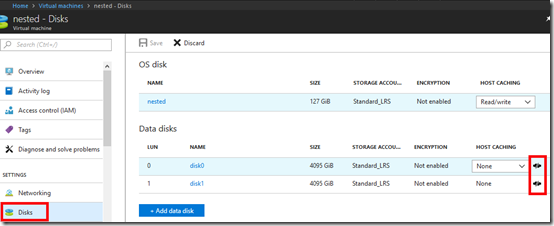
I therefore went in to the disk configuration of the failed machine and ‘detached’ the existing data disks, which as you can see, you can do from the Azure portal, although there are also PowerShell commands to accomplish this.

With the data disks ‘freed’ from the original failed machine, I proceeded to create a new virtual machine to mirror the original failed host. After doing this I went to the disks area of the new machine and selected the option to Add data disk. However, instead of specifying to create new clean disk, I elected to use existing disks and select the ones that I had detached from the failed original.

When I now looked at the new machine, with the existing disk attached, I found that the striping environment was already in place and needed no further configuration. All I needed to do was to restore my virtual machines that were on the data disks using the Hyper V manager. All really simple.

If I had installed everything on the C: drive then I would have lost the lot and would have needed to rebuild every virtual machine in that Hyper V environment from scratch. That would have cost me a lot of time, where in fact the total recovery time here was only a matter of minutes. That’s a BIG difference!

The moral of this tale is that a new environment like Azure does operate in a different manner from previous technologies. It is generally not appropriate to always bring old practices to a new environment without taking time to understand the ‘best practices’ for a new environment. Doing things the same old way just because this is the ‘way it’s always done’ can lead to a lot of pain and heartache. On the contrary, when you take the time to understand any new environment and follow best practices for that environment, things tend to be much easier as the above hopefully illustrates. This applies as much to Azure as it does Office 365. New technologies need new approaches and new best practices.

In summary, please oh please DON’T put your production data on C: or D: with Azure virtual machines.


February Azure Webinar Resources

Here are the slides from the February Azure webinar where we took a look at Azure networking.

https://www.slideshare.net/directorcia/ciaops-need-to-know-azure-webinar-february-2018

The recording is also available at:

http://www.ciaopsacademy.com.au/p/need-to-know-azure-webinars

which CIAOPS patrons get free access to as part of their subscription.

This webinar set more of the ground work for upcoming monthly webinars that will go deeper into Azure features and abilities.

So make sure you sign up for next month’s webinar.