Major trends

This is the third part of my presentation “Making money from the cloud”. You can find the full slides at:

https://doc.co/LyrxvF/qcihGm

and the previous parts are at:

We live in exponential times

Consider the following
image

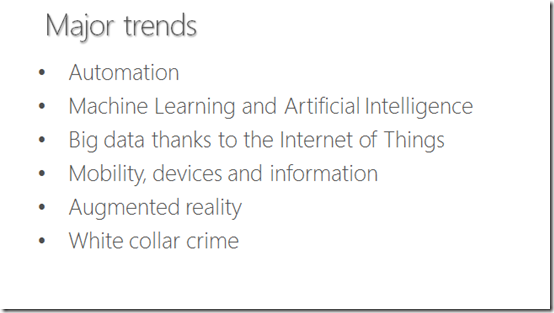
To develop a plan for your professional and business development going forward you need to start with the macro and move to the micro. So what are the major trends we see in today’s world?

The first is automation. A great discussion on this can be found in this Dan Pink video:

If you play the video by clicking the above it should start at the right place, if not forward to 29 minutes and 52 seconds to hear about automation. The whole video is worth watching, and I recommend you do, but the section on automation is especially pertinent. In essence what we will see is anything that is routine, linear, or process driven can be automated using software. Have a look at this video at the 46m mark through to the 50m 30s point for a idea of what is becoming possible when it comes to automating something as mundane as ordering at the drive through:

The ramifications here are two fold. Firstly, it indicates that to be more competitive and attractive is today’s business environment you need to be developing more and more automated systems. This automation is typically created via software. Thus, no matter who or what you are you need to using software effectively to become more competitive. Secondly, it means that tasks that can be automated will fast move to a commodity model, which means the lowest price wins. For most business and individuals this will not be a profitable option. Thus, if you can’t compete in the world of process that can be automated then may be you shouldn’t be playing there!

We are witnessing a new focus on artificial intelligence and machine learning thanks to software. The data you generate when you shop, use your credit card, use GPS navigation, read your emails is all being aggregated to create a better profile of you as an individual. This allows the system to deliver you better results. It allows the system to know what you want before you know you want it.

Here’s a good example:

ThyssenKrupp is using tools from Microsoft like Internet of Things (IoT), Azure machine learning, and Power to provide more reliable lift operations. With the sensor data feeding into predictive algorithms in Azure machine learning ThyssenKrupp can determine pre-emptively when components may fail and can take action before they do.

We live in a world were more and more items are becoming directly connected to the Internet. These devices are generating massive amounts of data that can be analysed to provide benefits in so many ways. Here’s a great example of what is possible with IoT;

So the question is, what is your business doing about IoT? Machine Learning? Big Data? and Artificial Intelligence? They need to be part of your game plan going forward. How can you use these technologies in you business to be more productive or provide better solutions for you customers?

An indicative statistic when it comes to the growth of mobile devices is the fact that mobile ads now exceed ads delivered on TV! Also previously, nearly all office workers were tethered to their cubicle by a blue network patch lead. Today, by contrast, users are rarely solely working from their cubicle. Work is no longer a place you go, it is something that you do. That typically means that wherever you have internet connectivity the expectation is that you can work. The growth of mobile device has fuelled this ability to work remotely and will continue to do so.

Mobility raises challenges for IT departments in that they are still expected to manage, monitor and maintain fleets of devices now roaming the streets untethered. I see that many IT support departments have the ability to manage desktop devices but as yet have no strategy in place to manage mobile devices. Consider that the decline of desktop workstations and servers is only going to increase while sales of mobile device will increase. Also, mobile devices are upgraded at a much faster clip than on-premises hardware. If you consider those trends, what should your IT management business be focused on? Yes, that’s right, mobile devices.

Augmented reality is allowing a new layer on top of our existing world that can provide some amazing abilities as the above video demonstrates. Combine a HoloLens with a drone and now you can examine some of the dangerous places in the world from the safety of your armchair. The applications for business are enormous. Imagine being able to work on a jet engine and having the full schematics available to you in front of your eyes. Imagine being able to overlay those plans on what you are exactly looking at.

Some good novels I have read that give you a glimpse into this potential universe are:

Daemon

Freedom TM

Ready Player One

Rather than learning about something by reading it or watching a video, imagine instead immersing yourself directly in the experience, right in front of your eyes? The quickest way to learn someone is to actually do it as they say. Augmented reality allows that. Although perhaps still in its infancy it won’t be long before we simple accept this ability as the default.

If you want to being to appreciate how modern technology is changing the basics of how people learn then I urge you to watch the video above Build a School in the Cloud. You’ll see how the availability of information has levelled the playing field. The question for you however is, how are you taking advantage of these trends? How are you using the wealth of information and technology that is in your hands TODAY, to lead a better life and help others?

Unfortunately, there are always two sides to the technology coin. Technology is neutral. It is neither good or bad. It’s nature depends solely on how it is used.

I have written many articles on how we are allowing the bad guys to constantly win:

Bad guys just keep winning

and I fear as we rush into this new world of everything being connected we are making ourselves more vulnerable to catastrophic failure.

An eye opening video I’d encourage you to watch is:

A vision of crimes in the future

Don’t believe security will be ab issue in our technological future? Then tell me why cryptolocker is still running rampant through businesses today? How it this possible with all the security, anti-virus and protection software in place? In most cases the cryptolocker delivery mechanism goes straight through all of these and entices the end user to activate. How is that possible? Why haven’t we solved these issues as IT people?

Technology is two headed beast. What works for good can also be used for bad. The more technology we adopt, the more risk we place ourselves in. If you took most people’s mobile phone away from them, they’d be lost and pretty much be unable to function in today’s society. That is not a good state of affairs now is it?

At this point many IT people smile smugly believing they are immune from such a future. My response to that is to ask whether every device they carry outside their business is encrypted? Every mobile device today has the ability to have the information on it encrypted so that if it is every lost the data can not be read by unauthorised parties.

So, is EVERY device you have encrypted? Are you using two factor authentication to protect you identity? Hmmm… are you? If not then you are certainly vulnerable and as we move forward more and more of your precious data will be vulnerable unless you take continuing steps to give security the primary priority it should have when it comes to our digital world. Alas, I fear the opposite is transpiring with more and more people abdicating the security of their digital universe and that unfortunately makes us all more vulnerable every day because we live an increasingly connected world.

These are the major technology trends sweeping our world today, both good and bad. Their adoption continues at unprecedented rates. However, the question remains, what are you doing to take advantage, adapt and to keep up in the face of these changes?

Need to Know Podcast–Episode 119

Marc reports back on what happened during his first trip to the MVP Summit in Redmond. You’ll learn his experiences with the events, the people and the places as well as an interesting aside on Microsoft grass! You’ll also get the latest Office 365 and Azure news so listen for details of our roving reporter in the belly of the beast.

You can listen to this episode directly at:

http://ciaops.podbean.com/e/episode-119-mvp-summit/

or subscribe via iTunes at:

https://itunes.apple.com/au/podcast/ciaops-need-to-know-podcasts/id406891445?mt=2

The podcast is also available on Stitcher at:

http://www.stitcher.com/podcast/ciaops/need-to-know-podcast?refid=stpr

Don’t forget to give the show a rating as well as send us any feedback or suggestions you may have for the show.

Resources

@marckean

@directorcia

Automated patching for Azure VMS

Getting started with the new Azure AD Management experience

The Azure portals

https://rc.portal.azure.com

https://ms.portal.azure.com

https://portal.azure.com

Master the art of stage presence with James Whittaker

Azure detailed login auditing

Microsoft Teams

Enabling Azure AD Domain Services

One of the last remaining pieces of infrastructure that was required to either stay on premises or be virtualised was the Active Directory Domain Controller (DC). That is no longer the case as Microsoft has made its Directory Services as a Service available from Azure.

What that effectively now means is that you no longer need a dedicated box (physical or virtualised) for Active Directory, you can simply consume it as a service directly from Azure.

Given that this is a new Azure service there are some challenges. The main one is that Azure Active Directory Services is only available in the older Service Manager portal, not the newer Resource Manager model where everything should really be created these days. Azure Active Directory Services will be coming to the Resource Manager, however at the moment, we need to deploy it using the older Service Manager.

In preparation, I’ve used Azure AD Connect to synchronise users from an existing on-premises Active Directory to Office 365. This has also created accounts for those users in Azure AD. I’ve then added a paid Azure subscription to my free Office 365 Azure AD to enable all the services required.

Next, I created a Virtual Network in both Service Manager and Resource Manager. I then connected these together using a site to site VPN. The idea is that the Service Manager network will simply be used for Directory Services, while the Resource Manager network will hold all the other services such as member servers and so on.

Now, with the site to site VPN between Azure Service Manager (ASM) and Azure Resource Manager (ARM) in place, I navigate to the ASM portal.

image

Here I select my Active Directory option and then name of the Active Directory.

image

I select the Groups option at the top of the page and create a new security group called:

AAD DC Administrators

It is to create a group EXACTLY as it appears above.

Into this new security group add all the users from your AD that you want to be effectively Domain Administrators in Azure AD Domain Services.

image

Now select the Configure option at the top of the page.

image

Scroll down the page until you locate the Domain Services area as shown above.

Select the Yes option to enable the service.

image

You’ll also need to check that the DNS Domain and Virtual Network options are correct. in this case I’ve select the custom domain I have in Office 365 and synchronised from an on-premises AD.

Select Save at the bottom of the page to complete the configuration.

image

Azure will now hum away for about 35 minutes enabling the service for you.

image

When the enablement process is complete you should now see two IP addresses at the bottom of the domain services area as shown above.

You should update the virtual network on the ARM network to point to these DNS servers on the ASM network. You can think of it like the Domain Controller for the whole network is now on the ASM network which is reached by the ARM network across the VPN.

So let’s say you now spin up a member server on the ARM network. You add this member server to the domain as you would normally. When you do, you’ll be prompted for credentials to allow this. Here you’ll need to use a member of the security group AAD DC Administrators you created earlier. Apart from that everything is exactly the same as if there was a physical domain controller in the network.

image

So your next question is probably going to be about to manage this ‘DC as a service’? Easy. Simply add the AD management tools to any member server and as you can see from the above, the domain appears exactly like it would if there as an on-premises server on the network. If you go in and look a the domain controllers on the network you’ll two, as see above. They have a random GUID and obvious correlate to the two IP addresses provided by the Directory Service during configuration.

If you then elect to say, remove the on-premises domain controller you’ll have all your users and a fully functioning domain in Azure. You’ll have your AD now as service rather than requiring dedicated equipment, which is far more flexible as easier to manage. You’ll be able to manage your users, group policy and the like just as you could on premises, but now totally in the cloud.

At the moment there is some extra configuration because of the necessity of an ASM network for Directory Services but in time everything will move to ARM which will make it even easier to have your domain controllers as a service!

For more information on Azure AD Domain Services visit:

https://azure.microsoft.com/en-us/documentation/articles/active-directory-ds-getting-started/

Need to Know Podcast–Episode 118

After the usual cloud news wrap up with both of us Marc dives deep into Azure backup with Trinadh who is the Program Manager for Azure IaaS backup. He also ropes in fellow MVP Stephan Budo to learn more about what Azure backup can do and what options are available.

You can listen to this episode directly at:

http://ciaops.podbean.com/e/episode-118-azure-backup/

or subscribe via iTunes at:

https://itunes.apple.com/au/podcast/ciaops-need-to-know-podcasts/id406891445?mt=2

The podcast is also available on Stitcher at:

http://www.stitcher.com/podcast/ciaops/need-to-know-podcast?refid=stpr

Don’t forget to give the show a rating as well as send us any feedback or suggestions you may have for the show.

Resources

Marc Kean – @marckean

Stephane Budo – @_TheWorks_

Robert Crane – @directorcia

Dynamics 365 now generally available

Microsoft Flow and PowerApps now generally available

New scheduling experience for Outlook for iOS

Azure Onboarding Guide for IT organizations

Need to Know podcast–Episode 117

Marc and I round up all the cloud news and then I spend some time with Nigel Moore talking about selling an IT business. Nigel has extensive and current experience in exactly this having just sold his own IT business. Nigel shares some real world learnings that will benefit anyone who runs a business.

You can listen to this episode directly at:

http://ciaops.podbean.com/e/episode-117-nigel-moore/

or subscribe via iTunes at:

https://itunes.apple.com/au/podcast/ciaops-need-to-know-podcasts/id406891445?mt=2

The podcast is also available on Stitcher at:

http://www.stitcher.com/podcast/ciaops/need-to-know-podcast?refid=stpr

Don’t forget to give the show a rating as well as send us any feedback or suggestions you may have for the show.

Resources

Nigel Moore – @nigel_moore

Marc Kean – @marckean

Robert Crane – @directorcia

Dynamics 365

Facebook Workplace

PowerBI Office 365 Content Pack

Using Azure to test OneDrive for Business Sync

image

In a recent blog I detailed how you could automatically download all the content from the recent Microsoft Ignite 2016 conference. In that post I also said that the ultimate destination for that content, in my case, was going to be SharePoint Online.

There are number of different ways that you could get all these files into SharePoint Online but I thought that this would be a great opportunity to test the new Preview OneDrive for Business Sync client that now works with SharePoint Online document libraries. You can read more about this release here:

Getting started syncing SharePoint sites with the new OneDrive sync client – preview

I will caution you before you go charging in and setting this up. This is still currently PREVIEW software! That means it is not yet complete. I will also caution you that it is not simply a process of installing a download. The release of the completed sync client is due in November 2016, which isn’t really that far away. So, unless your job is to play with software, I’d wait until the released product is available real soon.

Luckily, part of my job IS to play with software and let people know what it’s all about. So what I thought I’d do to test out this new OneDrive for Business sync client is to use it to upload all the material I captured from Microsoft Ignite.

Now there’s another aspect to way I approach these tasks these days and that is to use Azure as my primary tool. So, to actually download the Microsoft Ignite content, as detailed previously, I actually did this using an Azure virtual machine? Why? Firstly, it is nice to have a clean machine with plenty of disks space. I can also adjust the power and storage of the machine to suit my needs and only pay for what I need. I can also leave the machine running in the Microsoft data center and access it from anywhere. However, in this case, the major reason is simply better bandwidth.

The downloading process of the Ignite 2016 content ran about ten times faster in Azure versus downloading locally. This likewise also means that uploads to SharePoint Online will run ten or more time faster. Given that time is money, that’s why I prefer to use Azure even for mundane stuff like this.

Now the Ignite 2016 PowerPoint slides alone come to over 10GB of data. So once the I had downloaded all that to my Azure Azure VM, I installed the new OneDrive for Business sync client and sync’ed the existing destination Team Site Document Library. The sync tool then downloaded the existing contents to my Azure VM without issue (about 3GB of data). I then created a new directory in my local sync area and then dumped the 10GB+ of data into that location.

image

I watched as the sync client merrily start chewing away on all these new files. I check the status (as you can now do on the new client by simply click on the System Tray icon) and saw the files uploaded to the SharePoint Document Library.

Even though this was an azure VM, 10GB+ of data is still not going to happen instantaneously. I checked back with the process regularly. I did see the sync client crash once (remember, it’s still in preview) and restart but apart from that, in a short period of time all that data was now not only in a SharePoint Document Library but also synced to the Azure VM.

image

I then checked the properties of what I had stored locally in my sync folder and you see from the above that it was all there.

So there you have it. I successfully sync 12GB+ of data to a SharePoint Online Document Library using the new preview OneDrive for Business sync client. YEAH!

Even though you’ve seen this success, remember my earlier warning about this currently being demo software. It won’t be long before the completed production version is available to all and I’ll report on that when it happens. However, the big takeaway should be that new OneDrive for Business sync tool is looking pretty good and I am very confident about not only its reliability but also features upon release.

If you have been frustrated with previous versions of the sync tool, I’d suggest now is perhaps a good time to start looking at it again as I believe it is going to become a very powerful feature of the Office 365 suite that is going to challenge many existing incumbent third party software products that competes with the OneDrive for Business sync tool currently.

In summary, I am very confident that the new OneDrive for Business sync will be a major reason TO shift to Office 365.

Need to Know Podcast–Episode 116

Marc and I are joined by MVP Bill Chestnut, maybe better known as Biz Talk Bill, to speak about the wave of automation that is sweeping Microsoft products. Bill brings us up to date about Microsoft Biztalk Server and then shares with us his insights around things such as Azure functions, Microsoft Flow and PowerApps. We also cover the latest Azure, Office 365 and Microsoft Cloud news for you to ensure you have the latest.

You can listen to this episode directly at:

http://ciaops.podbean.com/e/episode-116-bill-chestnut/

or subscribe via iTunes at:

https://itunes.apple.com/au/podcast/ciaops-need-to-know-podcasts/id406891445?mt=2

The podcast is also available on Stitcher at:

http://www.stitcher.com/podcast/ciaops/need-to-know-podcast?refid=stpr

also now on Soundcloud at:

Don’t forget to give the show a rating as well as send us any feedback or suggestions you may have for the show.

Resources

Bill Chestnut – @biztalkbill

Marc Kean – @marckean

Robert Crane – @directorcia

Biztalkbill.com

Azure functions

Azure Logic Apps

Microsoft Flow

PowerApps

Marc’s blog

New access controls for Office 365

New Office 365 App launcher

Updates to Yammer

Automatically download all the Microsoft Ignite 2016 content

Azure Site Recovery is cool!

image

I’ve been working on a new course for the CIAOPS Academy around all things Azure Backup.

Now because I’m not really an on-prem kinda guy any more, and also because I don’t have the physical equipment to do this, I never spent much time with Azure Site Recovery (ASR), which uses Hyper V replica technology. However, thanks to creating this course and including an ASR module I gotta say this Hyper V replica stuff is really cool!

The great thing with Hyper V replica is that you can do it directly between machine or via a cloud service such as Azure. Once you get the two locations replicated and synced you can do all sorts of fail overs. That allows you to easily spin up replacement machines in the backup location (such as Azure) as well as recover from these locations.

What really blew me away was how easy this was all to set up with Azure. Much, much easier than I thought. There is a three step wizard you follow through to get everything connected up. Then from there you have lots of disaster recovery (DR) and even migration options.

Thus, you can fail over a local Hyper V guest to Azure and then use that as a migration process to get that machine into the cloud. That is a really nifty way of moving whole VMs to Azure!

Now of course there is some leg work and understanding you need around Azure Site Recovery and Hyper V Replicas, but like I said, it is surprising at how easy it is to actually implement. I’d therefore suggest that if you are looking to provide DR services for businesses with local Hyper V guests or looking to migrate existing Hyper V guests to Azure VMs then you should take a look at Azure Site Recovery.

Of course, I’d also recommend you sign up for my Azure Backup online course to give you a quick start on all the backup options with, including Site Recovery. I’ve also got an option where you can sign up for the complete catalogue of my courses annually. One fixed price for access to every online course I create now and into the future. To find out more visit:

http://www.ciaopsacademy.com

By purchasing my online courses you give me the resources to build more.