Copilot for Security–The day after

Having set up Copilot for Security yesterday,

A day with Copilot for Security

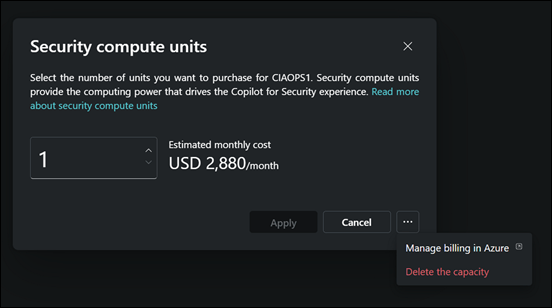
and having an initial look around I decided to de-provision it after I was done for the day.
image

I returned the following day and set it all back up again using the same process as before. No issues.
image

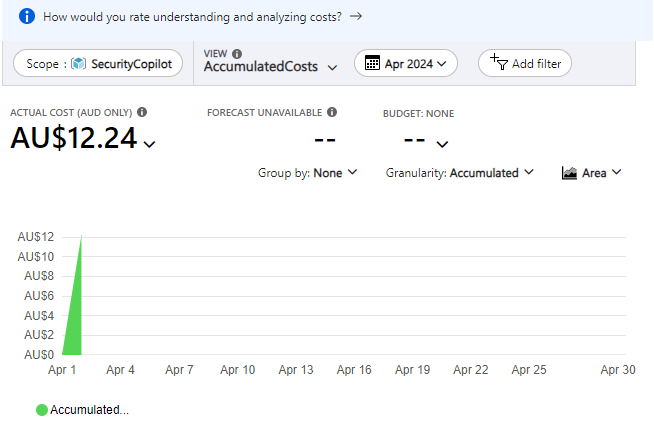
I had a quick look at the billing in my Azure portal and noticed that some charges had appeared as shown above. They seem to however lag actual usage by at least 24 hours or more, so keep that in mind if you are trying to track costs closely
image

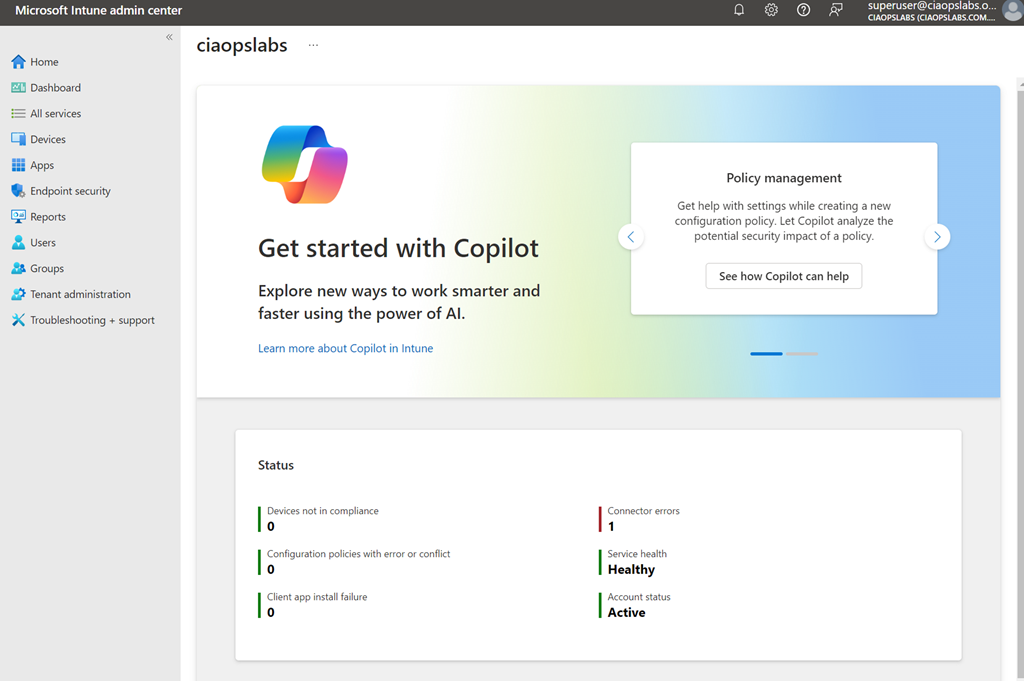
Because I also have Intune in the environment I took a look at where Copilot for Security is surfaced there. As you can see you get a big message in the homepage of the Intune portal when you navigate there reminding you that Copilot for Intune is available to you as part of Copilot for Security.
image

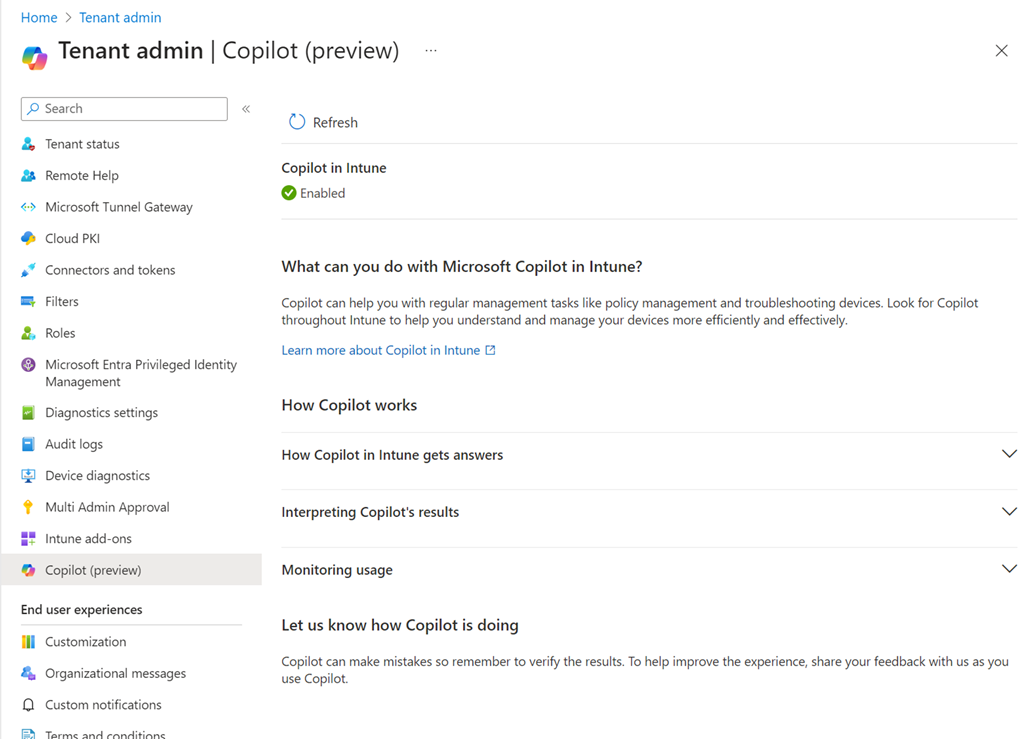
If you visit the Intune Tenant Admin area you’ll find a Copilot area as shown above. My check icon was green so I knew everything was working as expected.
image

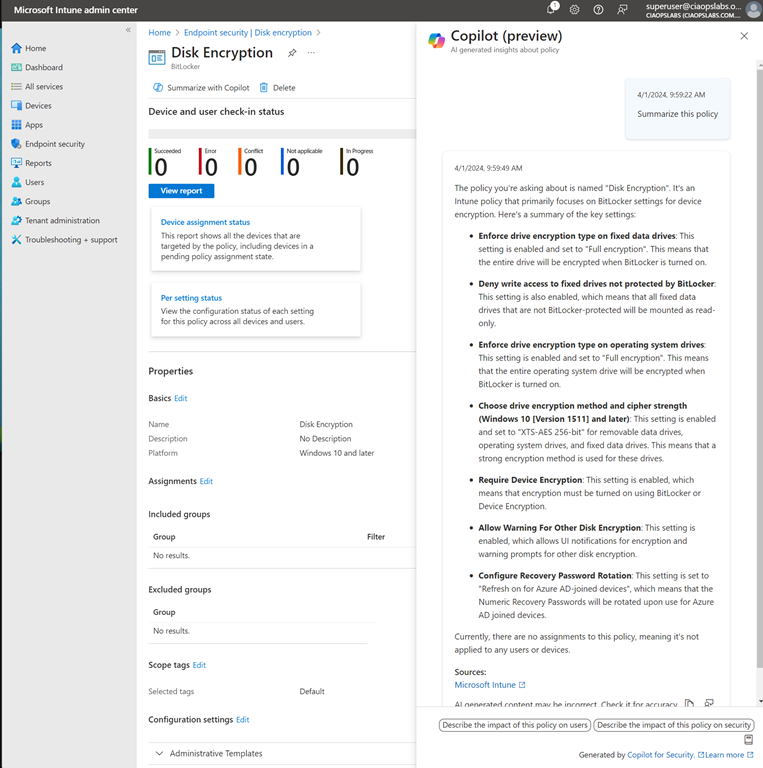
I then opened a policy and found a Summarize with Copilot button which I used to generate the summary you see on the right hand side of the policy. Very handy.
image

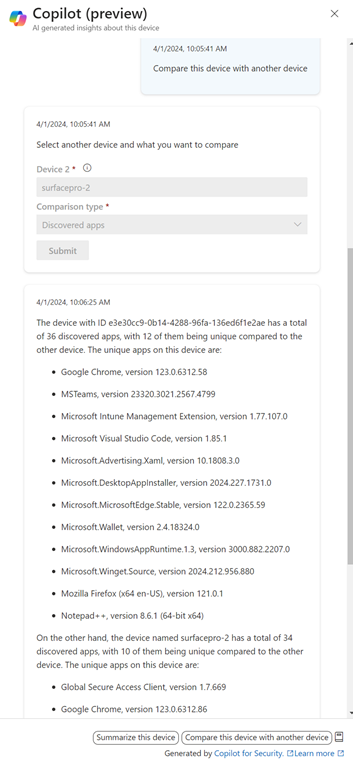
I also found a Copilot button when I looked at individual devices. As you can see above, I can use Copilot to give me a comparison between the apps installed on devices. Nice.
image

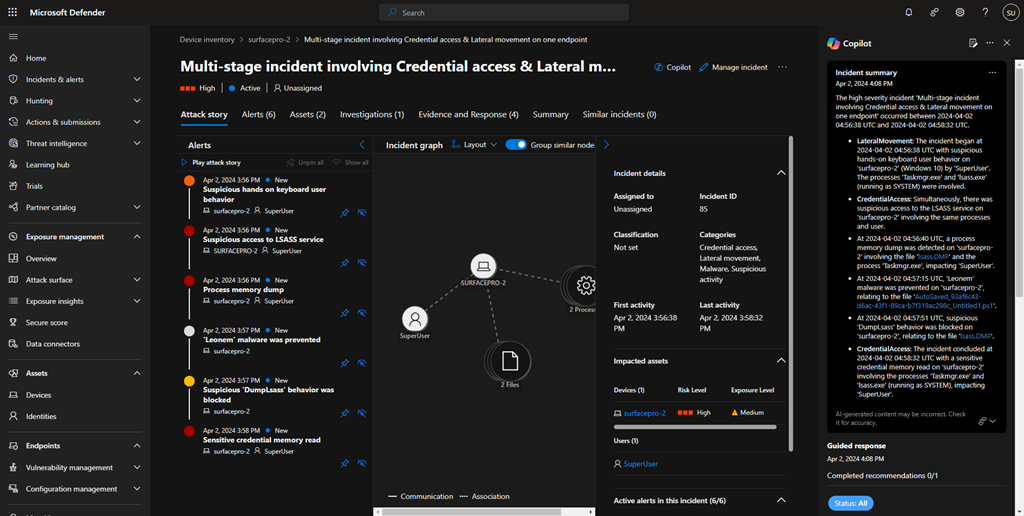
I then generated some security ‘incidents’ on a device and checked the device in the Microsoft Security portal to see how Copilot would be surfaced. You’ll see it appears as a pane on the right, as shown above.
image

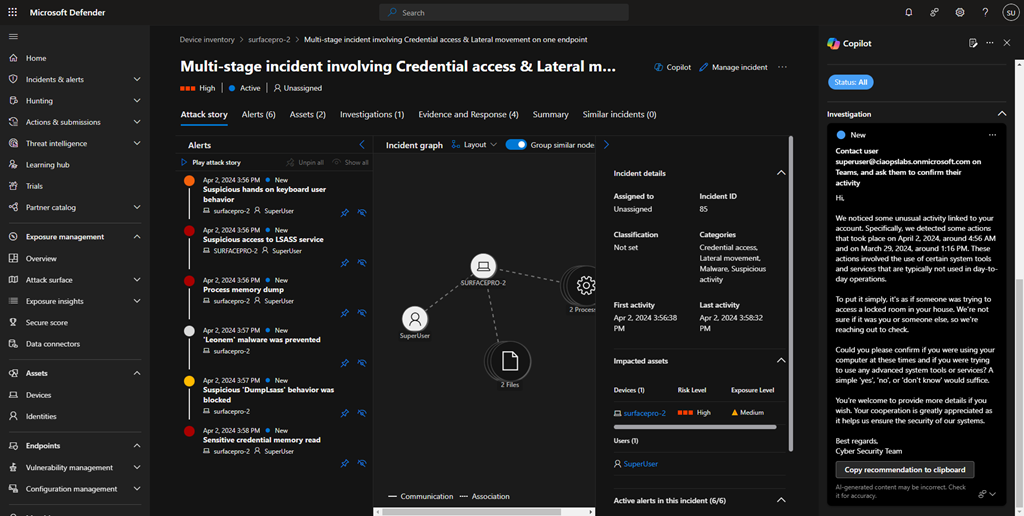
You’ll see in the above screen shot, I got Copilot to draft and email to send to the user of the problem machine. Very handy.
image

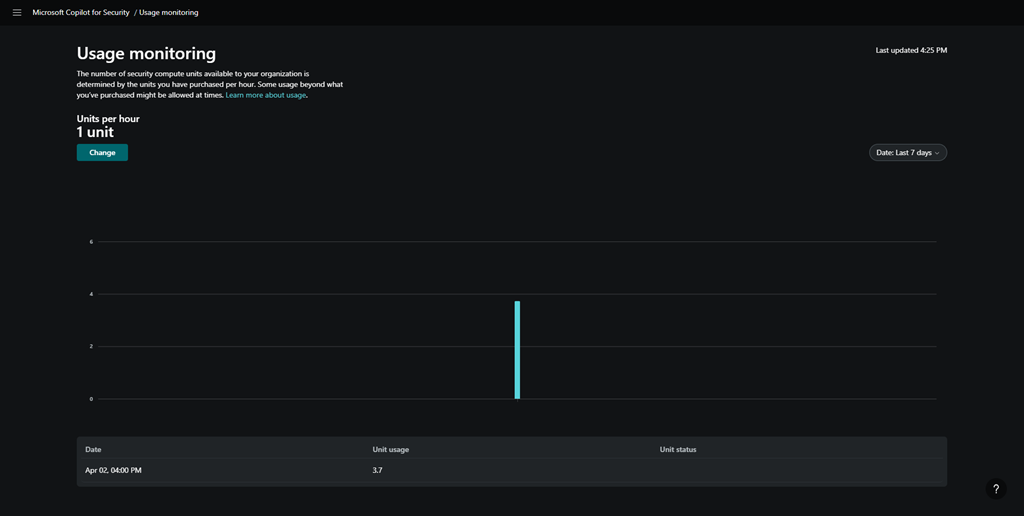
After playing around some more I went and looked at the Copilot for Security usage and you can see above, my unit usage was significantly higher than I initially provisioned. I assume I will be billed for those 3.7 units at US$4ph x the time I was actually playing around (about 1 hour). Let’s see when the costing make their way into the Azure portal.
image

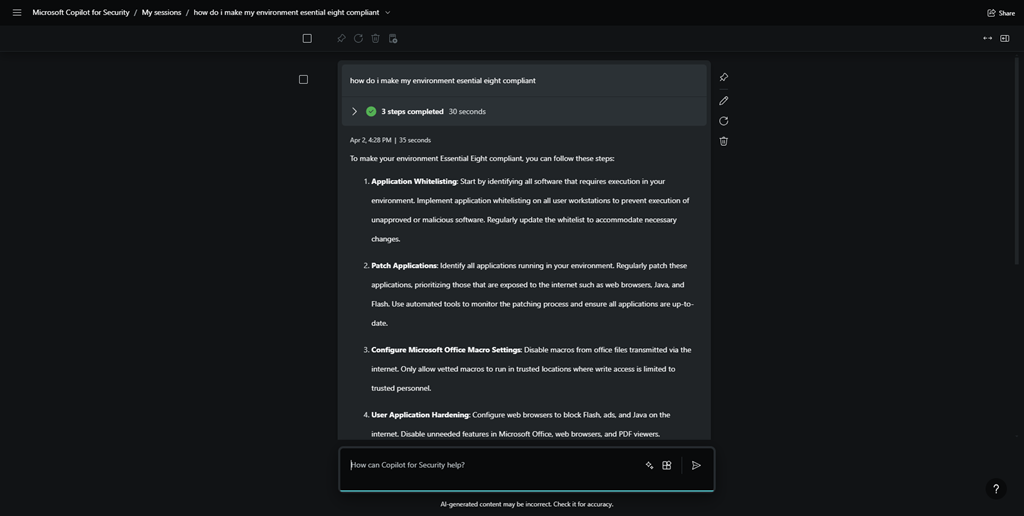
I then went off and asked Copilot for Security about how to make my environment Essential 8 compliant, and you can see the response above.
image

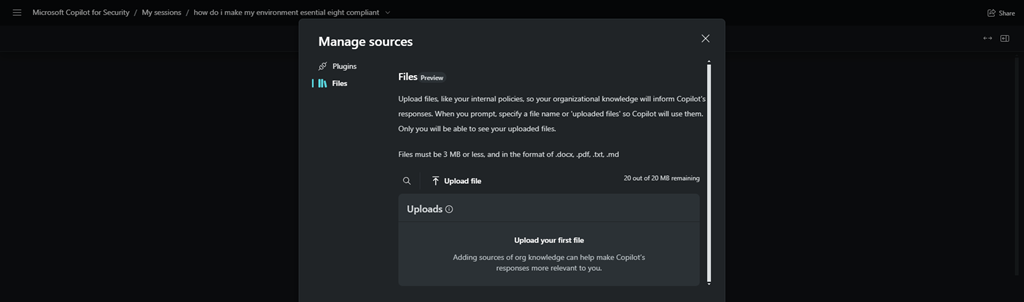
I also found where you can upload you own company files to the environment to give it even more information you can use in your investigations.
image

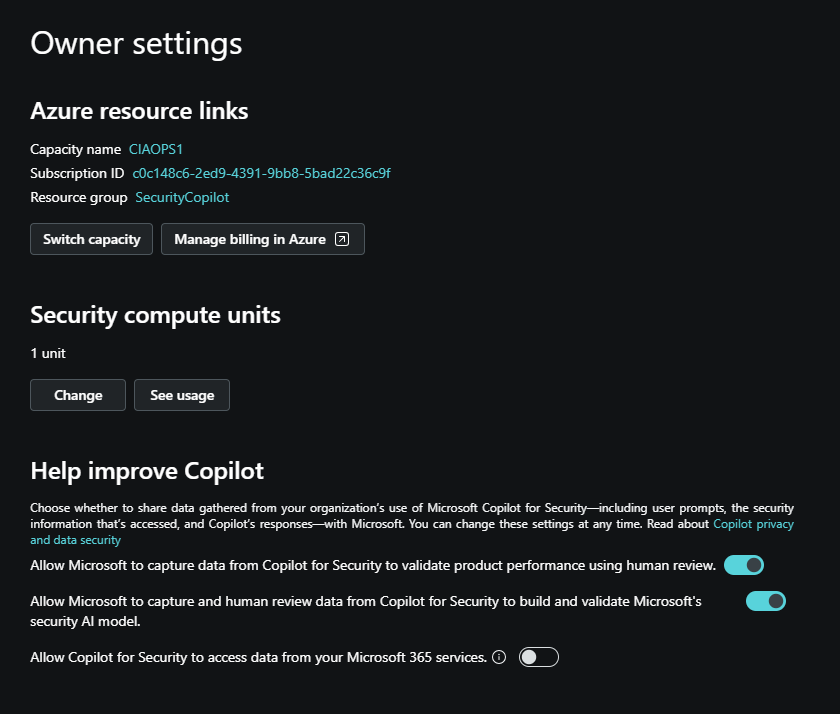
I found an area where there was an option to allow Copilot for Security to access my Microsoft 365 data, shown above.

image

However, for whatever reason, it did not allow me enable this option as you can see from the error above. I’ll try that again during my next session.

So today’s session has shown me that you can de-commission and re-commission Copilot for Security on demand. At the moment that is a manual process via the GUI, but I expect that I’ll be able to script that with something PowerShell soon enough.

Without Copilot for Security being re-enabled I found that most Copilot menu items in places like Intune remained but failed to operate, not unexpectantly. However, when I re-provisioned Copilot for Security again on the second day, all those options worked again. Some took and little while to ‘refresh’, but they all started working again as on the first day.

I also noticed that all my previous chat sessions where all still available and accessible. This is thanks to retention that is part of Copilot for Security. I just need to find out how long that retention is.

So the main thing I learnt from day 2 with Copilot for Security is that you can utilise it on demand. It doesn’t seem that you actually need to have it running 24/7, which is great new for smaller businesses on a budget. I’m sure you get more out of it if you do indeed leave an SCU running 24/7 but seems to me, so far, that you don’t lose much just enabling it as you need.

I also learned that the cost reporting seems to take at least 24 hours to start appearing which can make budgeting a little butt clenching until the actual cost figure appear in the Azure portal. I also learned that after you enable Copilot for Security the menu option remain in the various portals, even after your de-provision the service. Now, these may indeed disappear after a period time if you don’t re-provision but I’d find any of the disable menu items presented any errors, they just didn’t do anything any more. Which is understandable.

In short, I think Copilot for Security will work in an SMB environment but currently, you’ll need to a bit of manual labour to enable and disable the service but I expect that can be improved with automation down the track.

I’ll be playing with Copilot for Security for another day and I’ll then share my overall thoughts and feedback on what I’ve seen and the ROI it provides. However, I will certainly be implementing this, in an on demand capacity, in my production environment.

More updates soon from day 3.
A day with Copilot for Security

Given that Copilot for Security has just been released, I thought I’d spin it up in my tenant and see what it looks like.

To get the most from Copilot for Security you’ll first need to have an Azure subscription. You’ll get more out of the service if you also have Intune and Sentinel as well as aggregation of your logs, but an Azure subscription is all you need to get started.

image

The easiest way to commence the set up process is to visit:

https://securitycopilot.microsoft.com

where you’ll be greeted with the set up wizard shown above.

Prior to setting up Copilot for Security, as I mentioned, you need an Azure subscription and I’d also recommend setting up a dedicated Azure Resource Group to help monitor and manage costs.

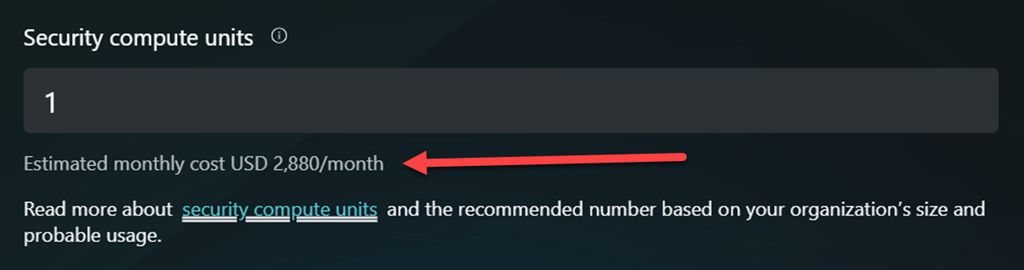
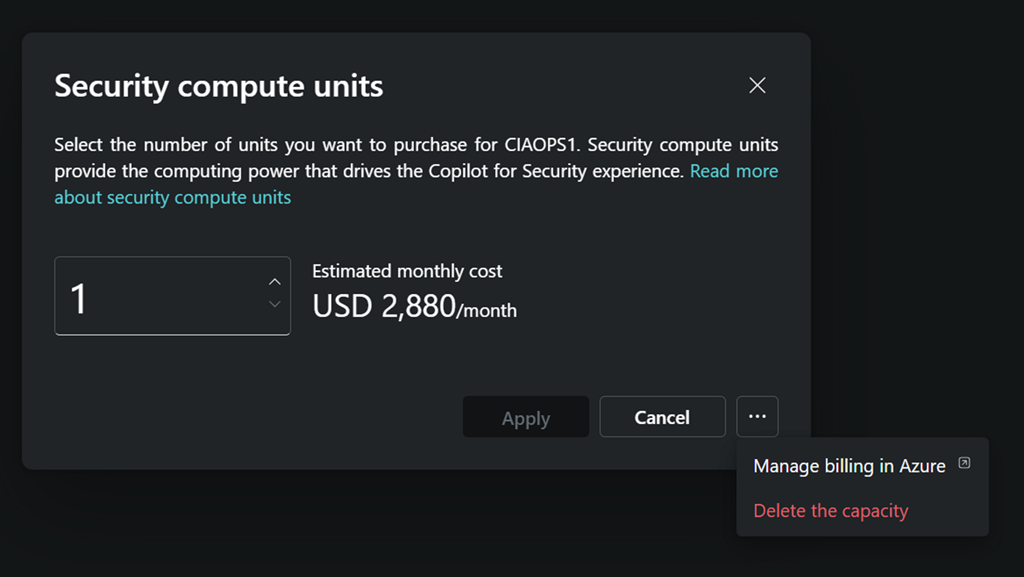
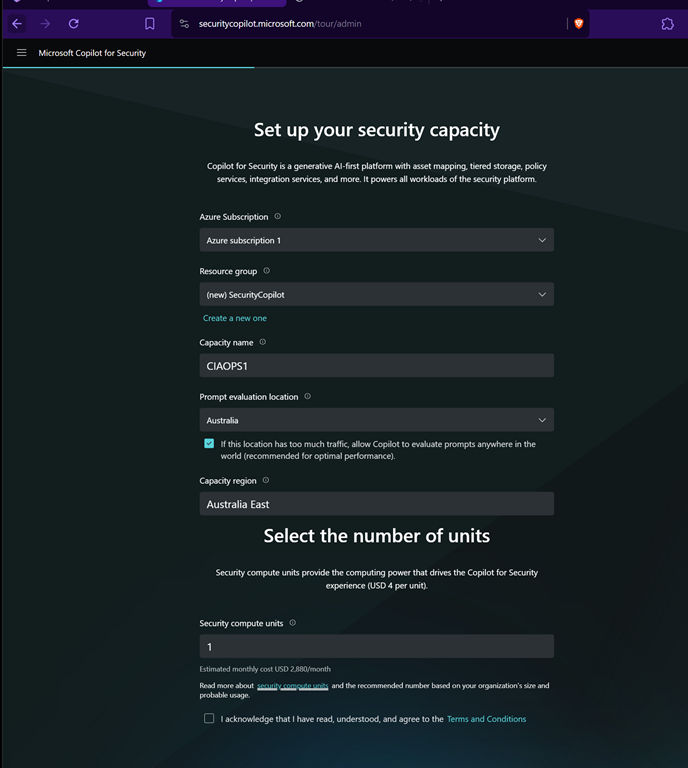
It is important to under what this will cost you in the default configuration. That is detailed on this page:

image

Yup, you read right $2,880 per month is the minimum! That is basically $4 per hour over 730 hours in a month. So, ensure you turn all this OFF once you have finished testing!

Once you complete all the listed fields you can continue.

image

You’ll need to wait a moment or two as the service is set up.

image

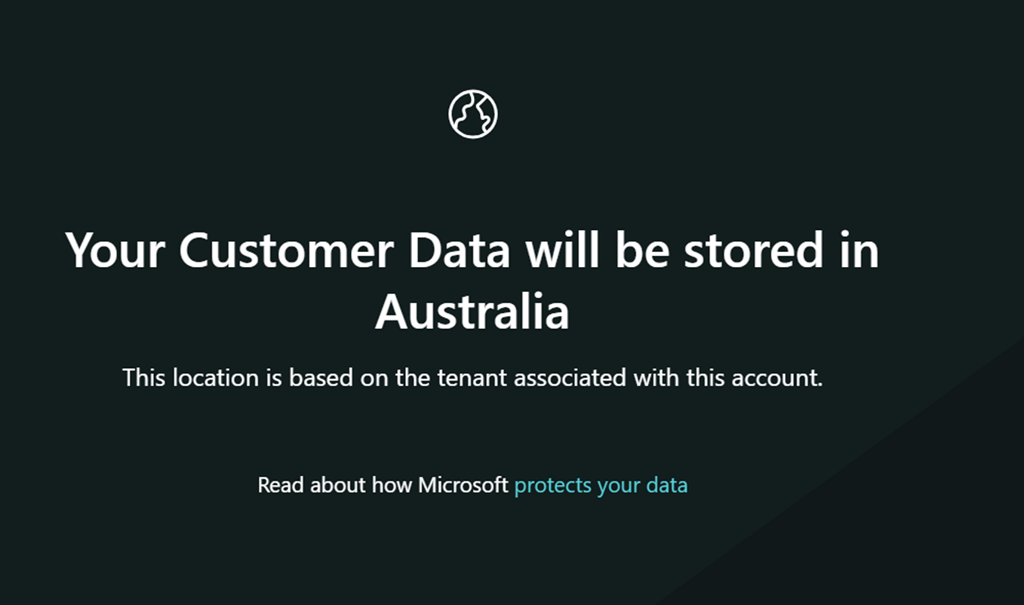
Since the Azure Resource Group into which I’m placing Copilot for Security is in Australia, my data will also be in Australia.

image

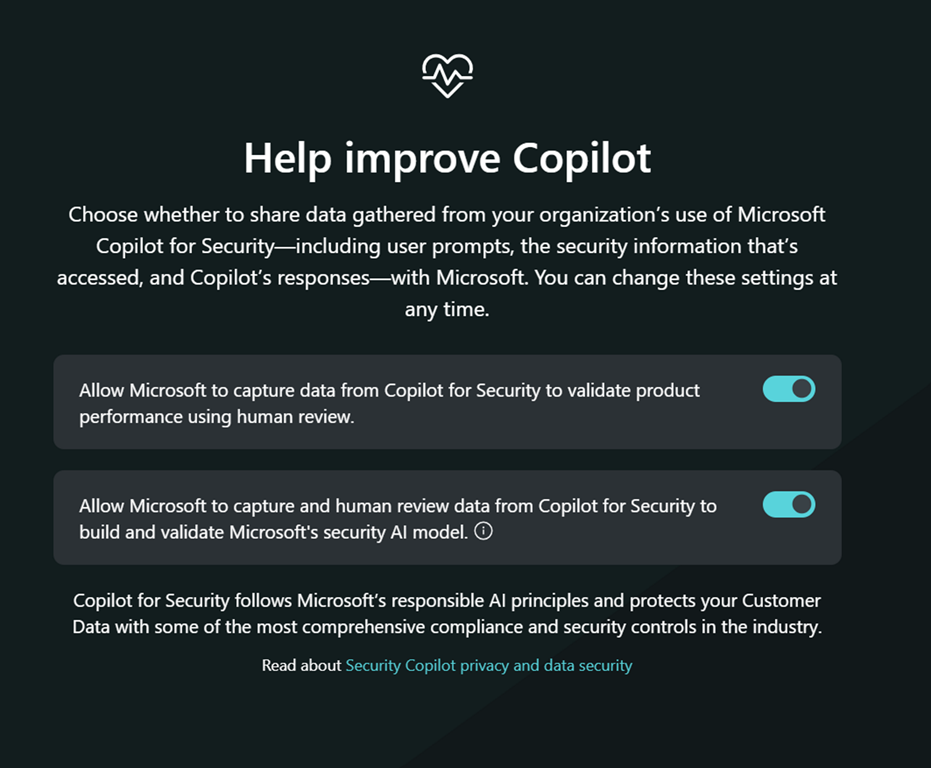
You’ll then be asked whether you wish to help Copilot improve as shown above. Make your choice and continue.

image

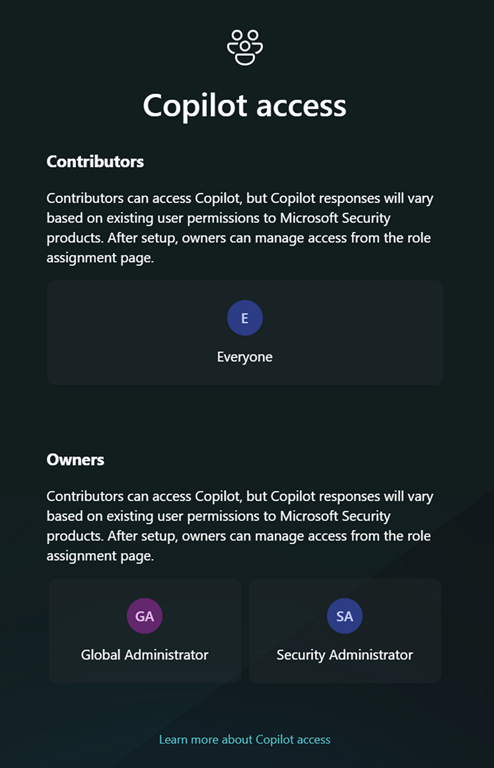
Next, you get the option to set up any permissions. As this is simply a test and I’ll be the only one using it I didn’t make any changes and just continued.

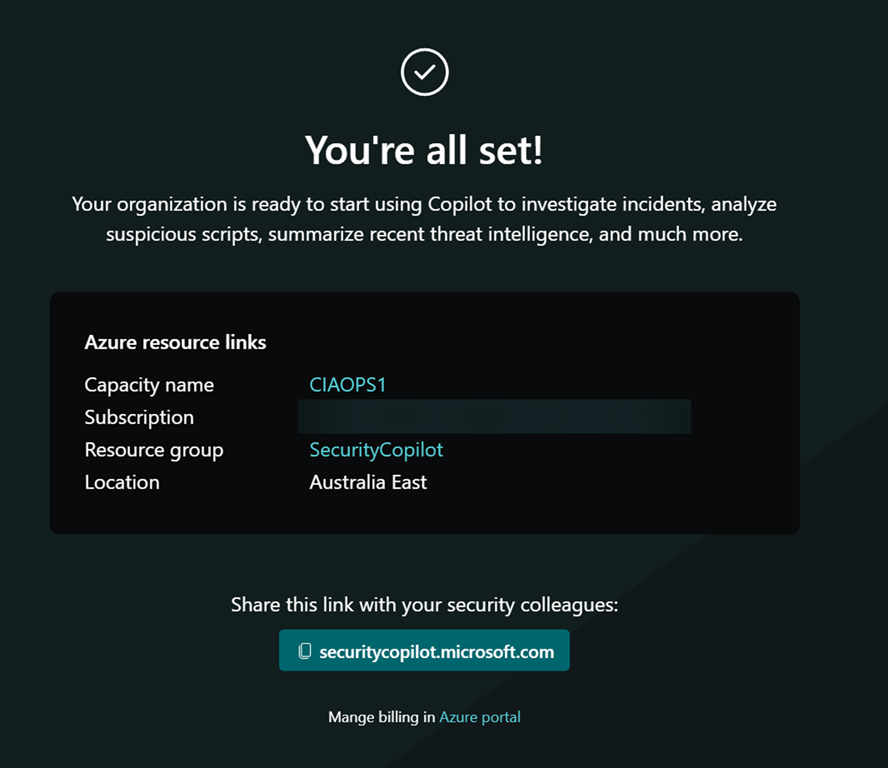
image

You should be all good to go as shown above.

image

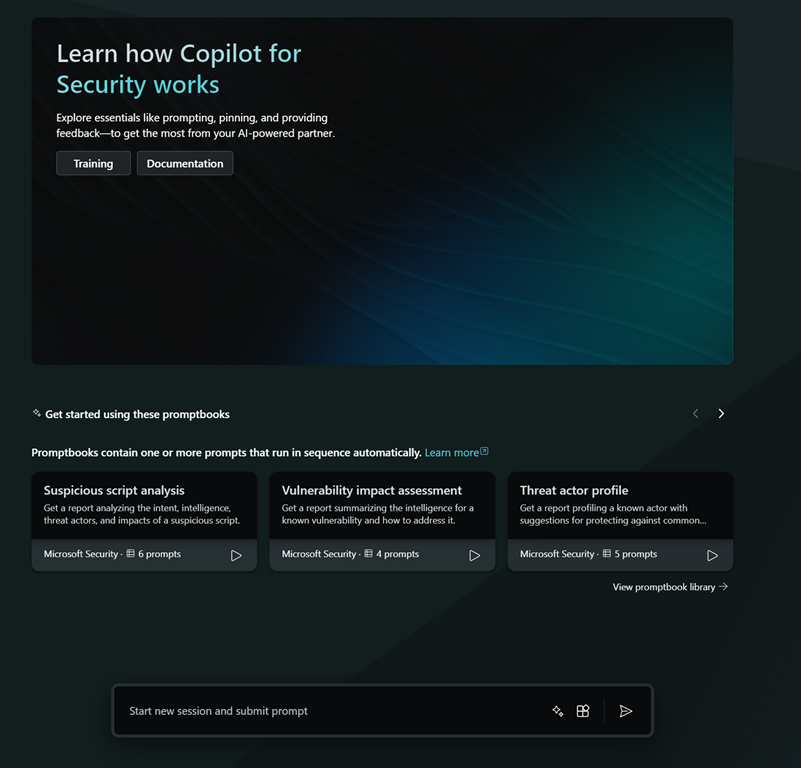
If you now return to the initial starting point:

https://securitycopilot.microsoft.com

you should see the above, where you can input your query.

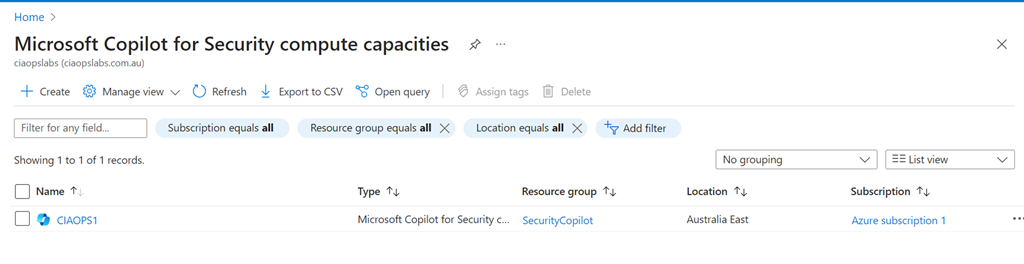
image

If you look in the Azure back end you will see a new item called Copilot inside your Azure portal, which looks like the above.

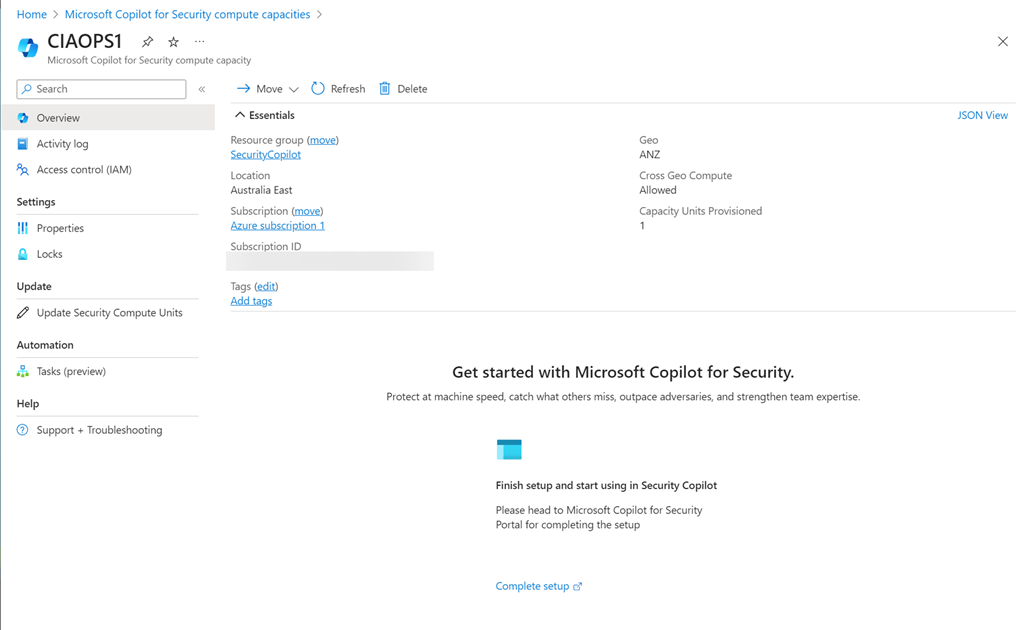
image

Selective the resource displayed the above.

image

You’ll also notice that you can’t adjust the Security Compute Units (SCU) below 1.

By clicking this button in the prompt

image

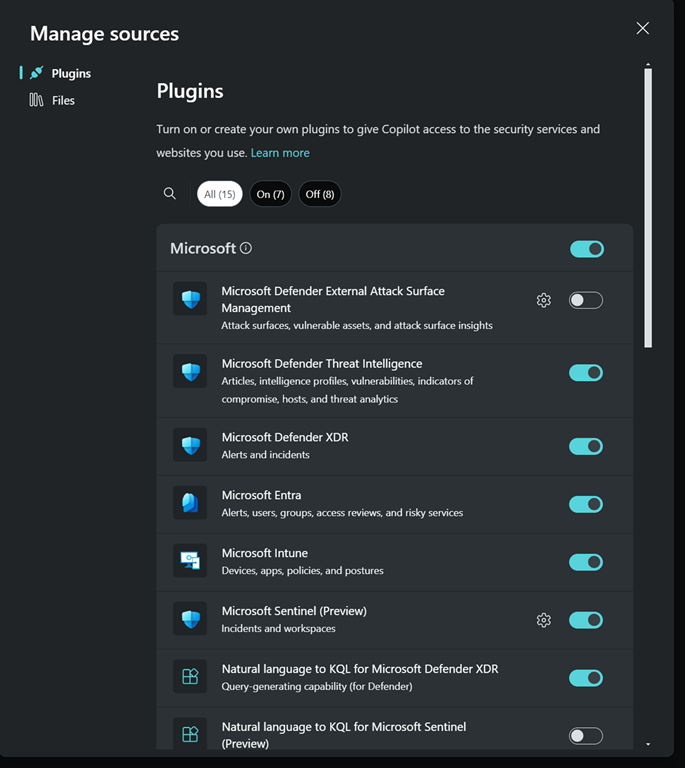
you’ll see all the plugins that can be configured in your environment

image

So, I went off and had a play to see what results it would give me.

image

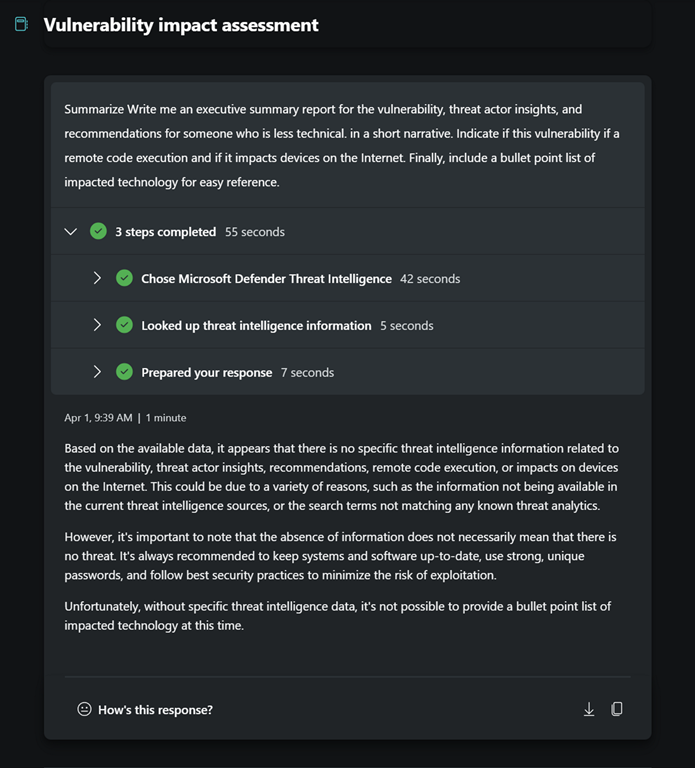
I asked for some summaries.

image

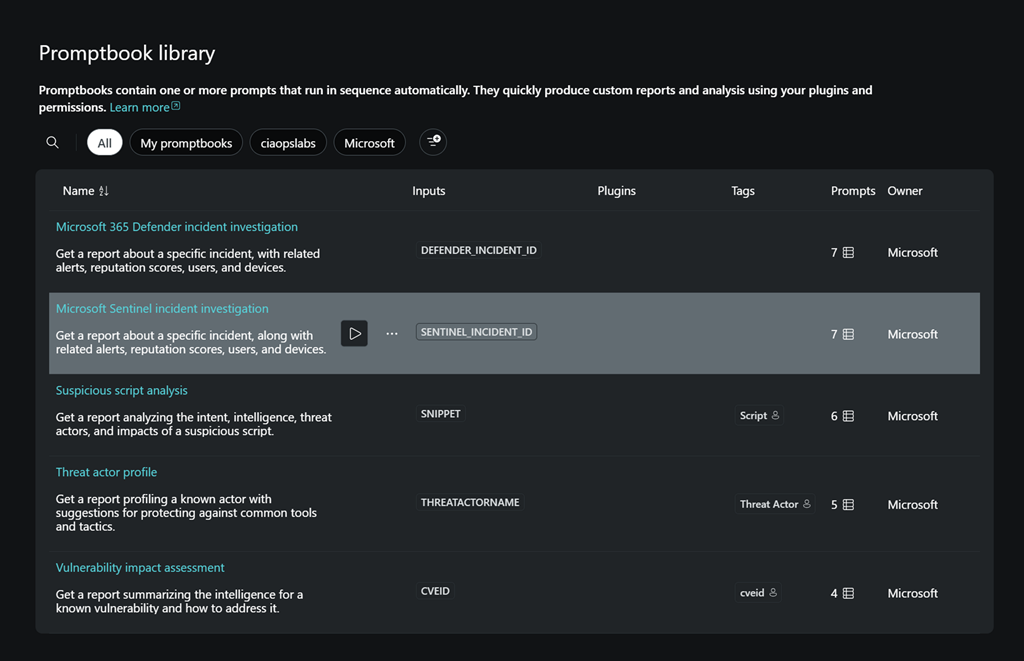
and I had a look at some inbuilt playbooks.

image

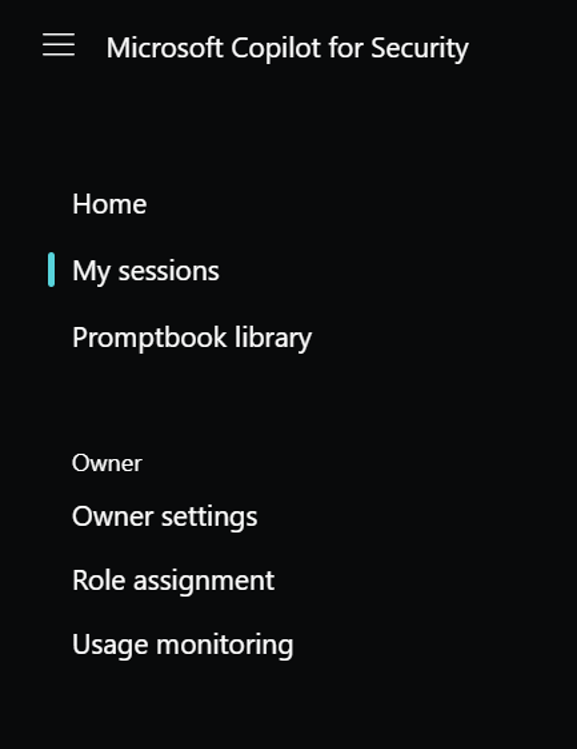
I them dug around into the Usage monitoring which you’ll find the menu at the top left of the page.

image

In here I could change the Security compute units and delete them as well. Which I did eventually after play around a bit more.

Clearly, most smaller businesses are not going to justify running this full time. It is therefore VERY important to delete the SCU when you have finished playing around. After doing that and running Copilot for Security I was interested to see my bill, but as yet no amounts have appeared in my Azure portal. I’ll share these when they appear.

I still however believe this can be an effective security tool for SMB, PROVIDED, you enable and disable it as required, kind of on demand. I’m playing with doing that for myself to better understand any limitations on that approach and I’ll report back.

I have more to share on my findings so far so stay tuned.

Need to Know podcast–Episode 317

It is only a matter of days now before we get our hands on Copilot for Security. Listen along for the latest information on this exciting new service from Microsoft. You’ll also hear about the new Security Exposure Management and lots more announcements from Microsoft.

You can listen directly to this episode at:

https://ciaops.podbean.com/e/episode-327-copilot-for-security-is-almost-amongst-us/

Subscribe via iTunes at:

https://itunes.apple.com/au/podcast/ciaops-need-to-know-podcasts/id406891445?mt=2

Don’t forget to give the show a rating as well as send me any feedback or suggestions you may have for the show.

Brought to you by www.ciaopspatron.com

Resources

@directorcia

Join my shared channel

CIAOPS merch store

Become a CIAOPS Patron

CIAOPS Blog

CIAOPS Brief

CIAOPSLabs

Support CIAOPS

Here’s what you missed from Microsoft Secure

Microsoft Copilot for Security generally available on April 1

Microsoft Copilot for Security is generally available on April 1, 2024, with new capabilities

Microsoft Copilot for Security: AI-Powered Security for All

Security Exposure Management

Introducing Microsoft Security Exposure Management

Microsoft introduces a preview of Copilot in Intune

Advancing the new era of work with Copilot, Windows, and Surface

Introducing Microsoft Surface Pro 10 and Surface Laptop 6 for Business

Collect information like a pro – New Microsoft Lists forms experience

The new Planner in Teams is now in Public Preview

Troubleshoot and Manage Microsoft Purview Data Loss Prevention for your Endpoint Devices

Introducing Restricted SharePoint Search to help you get started with Copilot for Microsoft 365

What is Global Secure Access (preview)?

Summary of podcast episode straight from Copilot for Microsoft 365:

Main ideas:

Microsoft Secure event highlights: Microsoft announced two major security products at the online event: Security Copilot and Security Exposure Management.

Security Copilot features and pricing: Security Copilot is an AI service that helps defenders analyze and respond to security incidents, as well as optimize their security posture. It will be available on April 1st as a pay-as-you-go service, with a billing unit of $4 per month.

Security Exposure Management features and availability: Security Exposure Management is a tool that helps users understand and reduce their attack surface, by providing insights into internal and external threats, critical assets, attack paths, and security initiatives. It is integrated with other Microsoft security products, such as Defender EAS and DLP. It is now available to all users at security.microsoft.com.

New Surface devices for business users: Microsoft also launched a new Surface Pro 10 and a Surface Laptop 6, aimed at business users. These devices feature a neural processing unit (NPU) for local AI workloads, and a Copilot key that launches Copilot on the desktop.6

New Microsoft List Forms experience: Microsoft introduced a new feature that allows users to create a Microsoft style form based on a SharePoint list, and save the data back to the list. This feature is currently only available for internal users.89

New Planner in Teams public preview: Microsoft announced a public preview of the new Planner in Teams, which is part of its vision to consolidate its task management capabilities. The new Planner has a cleaner and more consistent interface, and supports personal, team, and project planning.

CIAOPS Brief 20240330

image

Microsoft Entra resilience update: workload identity authentication –

https://techcommunity.microsoft.com/t5/microsoft-entra-blog/microsoft-entra-resilience-update-workload-identity/ba-p/4094704

Microsoft Entra Internet Access: Unify Security Service Edge with Identity and Access Management –

https://techcommunity.microsoft.com/t5/microsoft-entra-blog/microsoft-entra-internet-access-unify-security-service-edge-with/ba-p/4088980

The foundation for responsible analytics with Microsoft Purview –

https://www.microsoft.com/en-us/security/blog/2024/03/26/the-foundation-for-responsible-analytics-with-microsoft-purview/

Transform your business with AI skill building on Microsoft Learn –

https://www.microsoft.com/en-us/microsoft-cloud/blog/2024/03/18/transform-your-business-with-ai-skill-building-on-microsoft-learn/

Redefining forms creation with Copilot –

https://insider.microsoft365.com/en-us/blog/redefining-forms-creation-with-copilot

Custom Plugins in Microsoft Copilot for Security –

https://www.linkedin.com/pulse/custom-plugins-microsoft-copilot-security-chris-stelzer-enc0c/

4 tabletop exercises every security team should run –

https://www.csoonline.com/article/1311295/4-tabletop-exercises-every-security-team-should-run.html

Frost & Sullivan names Microsoft a Leader in the Frost Radar™: Managed Detection and Response, 2024 –

https://www.microsoft.com/en-us/security/blog/2024/03/25/frost-sullivan-names-microsoft-a-leader-in-the-frost-radar-managed-detection-and-response-2024/

Seamlessly secure your data estate with Microsoft Purview –

https://techcommunity.microsoft.com/t5/security-compliance-and-identity/seamlessly-secure-your-data-estate-with-microsoft-purview/ba-p/4095930

How Microsoft Incident Response and Microsoft Defender for Identity work together to detect and respond to cyberthreats –

https://www.microsoft.com/en-us/security/blog/2024/03/21/how-microsoft-incident-response-and-microsoft-defender-for-identity-work-together-to-detect-and-respond-to-cyberthreats/

After hours

You’ve Never Seen A Wheelchair Like This – https://www.youtube.com/watch?v=QpwJEYGCngI

Editorial

If you found this valuable, the I’d appreciate a ‘like’ or perhaps a donation at https://ko-fi.com/ciaops. This helps me know that people enjoy what I have created and provides resources to allow me to create more content. If you have any feedback or suggestions around this, I’m all ears. You can also find me via email director@ciaops.com and on X (Twitter) at https://www.twitter.com/directorcia.

If you want to be part of a dedicated Microsoft Cloud community with information and interactions daily, then consider becoming a CIAOPS Patron – www.ciaopspatron.com.

Watch out for the next CIA Brief next week.

Time to enable more logging

Having logs enabled is a good thing because it allows you to track down information after the fact. This is especially handy when you are performing a security investigation. Here is some additional logging that I recommend you enable.

image

Start by navigating to:

https://entra.microsoft.com

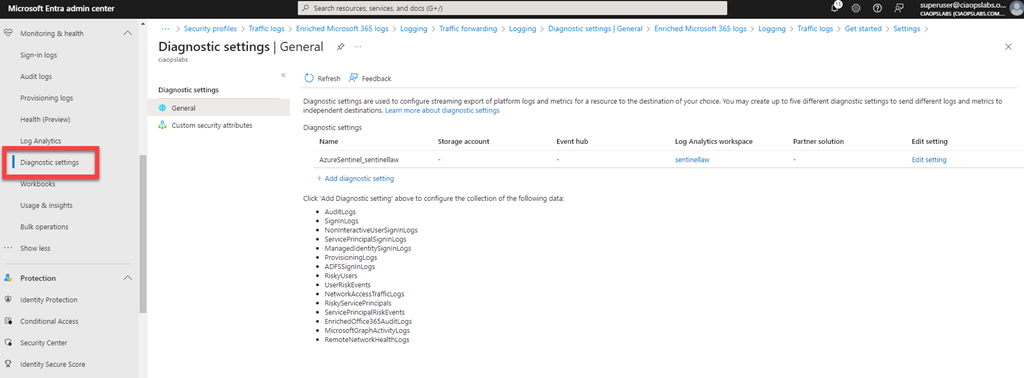
You’ll need to login with an administrative account that has rights. Expand the menu on the left of the screen until you see Monitoring & health and shown above.

image

Under this option you will find the menu item Diagnostic settings as shown above, which you select. This will display your diagnostic settings on the right. Here you can see that I am currently sending logs to a Log Analytics workspace, which is linked to Microsoft Sentinel for analysis. If you aren’t already sending your logs to a Log Analytics workspace you can set one up via the Add diagnostic setting hyperlink. I will assume here you already have something set up.

image

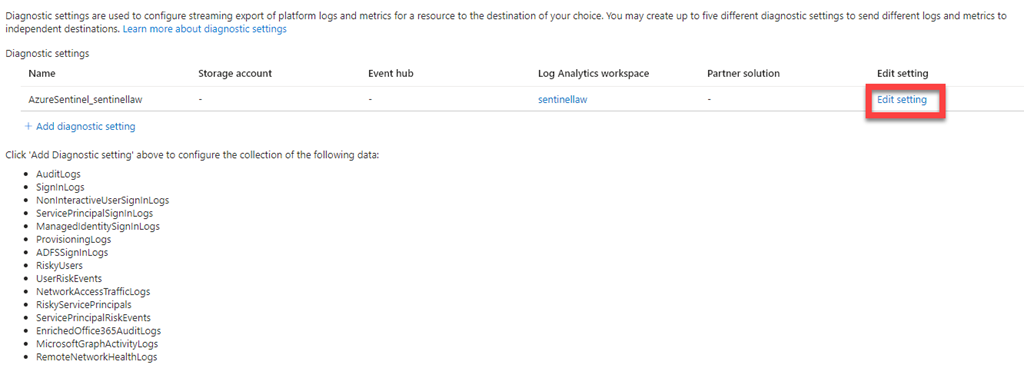
Select the Edit settings hyperlink and under Edit settings column on the right, as shown above.

image

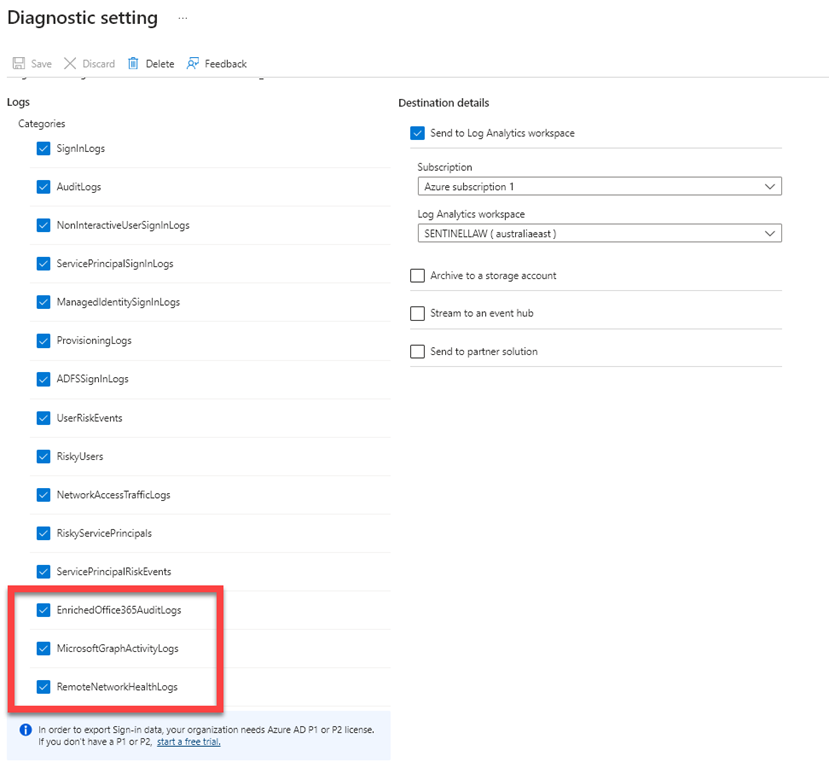
Scroll down the categories of logs listed and ensure they are all select so the logging data will be sent to Microsoft Sentinel via the Log Analytics workspace.

If you have already enabled this logging I suggest you go back in and check that all categories are selected as Microsoft has now added some additional items:

– EnrichedOffice365Auditlogs

– MicrosoftGraphActivityLogs

– RemoteNetworkHealthLogs

which I had to enable.

When you have completed your category selections press the Save button in the menu bar at the top of the window to update your preferences.

This now means that you’ll have even more data in your Sentinel environment to help keep you secure.

March Microsoft 365 Webinar resources

image

The slides from this month’s webinar are available at:

https://github.com/directorcia/general/blob/master/Presentations/Need%20to%20Know%20Webinars/202403.pdf

If you are not a CIAOPS patron you want to view or download a full copy of the video from the session you can do so here:

http://www.ciaopsacademy.com.au/p/need-to-know-webinars

Watch out for next month’s webinar.

Recap from Copilot for Microsoft 365:

Main ideas:

Webinar overview: The document is a transcript of a webinar hosted by Robert Crane on March 20, 2021, about Microsoft 365 updates and forms.

Microsoft Copilot for Security: One of the major updates in Microsoft 365 is the launch of Microsoft Copilot for Security, a cloud-based AI service that analyzes security logs and helps detect and respond to threats.

Surface devices with Copilot button: Microsoft also announced new Surface devices with a Copilot button that can launch the AI assistant directly. The devices have a neural processing unit for local AI calculations.

Microsoft Forms update: Microsoft Forms has a new user interface and features, such as multilingual support, email receipts, and quick polls. There is also a Forms Pro version with more capabilities.

Forms integration with Stream: Forms can be integrated with Stream, Microsoft’s video platform, to add interactivity and feedback to videos. Users can embed forms in Stream videos and see the results in real time.

Centralised Microsoft 365 Add in deployments with PowerShell

Almost 4 years ago I wrote this article:

Centralised Office 365 Add in deployments with PowerShell

Upon review, it seems that the Finedtime addin is no longer available. I have therefore updated the script:

https://github.com/directorcia/Office365/blob/master/o365-addin-deploy.ps1

to remove this and prevent errors.

If you have any Office addins that you believe should be deployed as a ‘standard’ to all users in a tenant, please let me know and I’ll look at adding them to the script.

CIAOPS Brief 20240323

image

Follow the Breadcrumbs with Microsoft Incident Response and MDI: Working Together to Fight Identity –
https://techcommunity.microsoft.com/t5/microsoft-security-experts-blog/follow-the-breadcrumbs-with-microsoft-incident-response-and-mdi/ba-p/4089623

Advancing the new era of work with Copilot, Windows, and Surface –
https://www.microsoft.com/en-us/microsoft-365/blog/2024/03/21/advancing-the-new-era-of-work-with-copilot-windows-and-surface/

Introducing Microsoft Surface Pro 10 and Surface Laptop 6 for Business –
https://www.youtube.com/watch?v=uxHn2DMigb4

AI Data Drop: The 11-by-11 Tipping Point –
https://www.microsoft.com/en-us/worklab/ai-data-drop-the-11-by-11-tipping-point/

Collect information like a pro – New Microsoft Lists forms experience –
https://techcommunity.microsoft.com/t5/microsoft-sharepoint-blog/collect-information-like-a-pro-new-microsoft-lists-forms/ba-p/4086659

How to chat with Microsoft Copilot in Word –
https://www.youtube.com/watch?v=9ewTQGTvtW0

Here’s what you missed from Microsoft Secure –
https://www.youtube.com/watch?v=n9lFglSnlzM

Microsoft Threat Intelligence unveils targets and innovative tactics amidst tax season –
https://www.microsoft.com/en-us/security/blog/2024/03/20/microsoft-threat-intelligence-unveils-targets-and-innovative-tactics-amidst-tax-season/

Microsoft Visio | The Ultimate Diagramming Tool –
https://www.youtube.com/watch?v=5XjwaDmire4

How to edit .vsd files in Visio for the web –
https://www.youtube.com/watch?v=fWBlv2amooo

Implementing Passwordless Authentication with Microsoft Entra ID for SMB – Part 2 –
https://www.youtube.com/watch?v=OIwsd572nnI

After hours

Why work doesn’t happen at work– https://www.youtube.com/watch?v=5XD2kNopsUs

Editorial

If you found this valuable, the I’d appreciate a ‘like’ or perhaps a donation at https://ko-fi.com/ciaops. This helps me know that people enjoy what I have created and provides resources to allow me to create more content. If you have any feedback or suggestions around this, I’m all ears. You can also find me via email director@ciaops.com and on X (Twitter) at https://www.twitter.com/directorcia.

If you want to be part of a dedicated Microsoft Cloud community with information and interactions daily, then consider becoming a CIAOPS Patron – www.ciaopspatron.com.

Watch out for the next CIA Brief next week.