CIAOPS Need to Know Microsoft 365 Webinar – June

laptop-eyes-technology-computer_thumb

Join me for the free monthly CIAOPS Need to Know webinar. Along with all the Microsoft Cloud news we’ll be taking a look at Viva Engage.

Shortly after registering you should receive an automated email from Microsoft Teams confirming your registration, including all the event details as well as a calendar invite.

You can register for the regular monthly webinar here:

June Webinar Registrations

(If you are having issues with the above link copy and paste – https://bit.ly/n2k2405

The details are:

CIAOPS Need to Know Webinar – June 2024
Friday 28th of June 2024
11.00am – 12.00am Sydney Time

All sessions are recorded and posted to the CIAOPS Academy.

The CIAOPS Need to Know Webinars are free to attend but if you want to receive the recording of the session you need to sign up as a CIAOPS patron which you can do here:

http://www.ciaopspatron.com

or purchase them individually at:

http://www.ciaopsacademy.com/

Also feel free at any stage to email me directly via director@ciaops.com with your webinar topic suggestions.

I’d also appreciate you sharing information about this webinar with anyone you feel may benefit from the session and I look forward to seeing you there.

Need to Know podcast–Episode 320

I’ve now had a chance to play with Copilot for Security and can recommend it but to ensure that costs don’t spiral out of control for SMB, it needs to used in an ad hoc manner. Listen along for my thoughts and a walk through of resources available for you. Also news of updates of Exchange email threshold limits being changed as well as improvements for Microsoft Mesh, Loop and more. Listen in for the latest updates.

You can listen directly to this episode at:

https://ciaops.podbean.com/e/episode-320-build-is-now-done/

Subscribe via iTunes at:

https://itunes.apple.com/au/podcast/ciaops-need-to-know-podcasts/id406891445?mt=2

Don’t forget to give the show a rating as well as send me any feedback or suggestions you may have for the show.

Brought to you by www.ciaopspatron.com

Resources

@directorcia

Join my shared channel

CIAOPS merch store

Become a CIAOPS Patron

CIAOPS Blog

CIAOPS Brief

CIAOPSLabs

Support CIAOPS

Microsoft Build 2024 book of news

Build presentation keynote

New agent capabilities in Microsoft Copilot unlock business value

Introducing Team Copilot

Microsoft Copilot Studio: Building copilots with agent capabilities

New Windows 11 security features are designed for hybrid work

Introducing Copilot+ PCs

You’re wrong about Windows Recall — How Microsoft keeps your data safe on Copilot+ PCs

Microsoft Edge for Business: Revolutionizing your business with AI, security and productivity

Demystifying Microsoft Entra ID, Tenants and Azure Subscriptions

Windows deployment with the next generation of Windows Autopilot

Summary of podcast episode straight from Copilot for Microsoft 365:

Key Topics:
  • Microsoft Build 2024: Robert highlighted the new AI features and capabilities announced at the developer conference, such as Copilot Studio, Teams Copilot, and GPT-4O. 2:23

  • Windows 11 security updates: Robert explained some of the new security features in Windows 11, such as Smart App Control, Vulnerability Driver Protection, and Credential Guard. 9:39

  • Copilot Plus PCs: Robert shared his thoughts on the new PC form factor with an NPU and Windows Recall, and asked for feedback from anyone who has bought or considered buying one. 13:38

  • Edge browser: Robert recommended using Edge for better security and productivity, and pointed out some of the AI features in the browser. 15:56

  • Azure tenants and subscriptions: Robert suggested reading a blog post that clarifies the concepts of Azure tenants, Entra ID, and subscriptions. 16:41

  • Windows Autopilot: Robert mentioned the benefits of using Windows Autopilot for hands-off deployment of Windows devices, and shared a link to an article that details the new features in the next generation of Autopilot. 17:28

CIAOPS Brief 20240601

image

What’s New in Copilot | May 2024 –

https://techcommunity.microsoft.com/t5/copilot-for-microsoft-365/what-s-new-in-copilot-may-2024/ba-p/4155445

Boost security with Microsoft Intune device attestation –

https://techcommunity.microsoft.com/t5/microsoft-intune-blog/boost-security-with-microsoft-intune-device-attestation/ba-p/4129714

Exploring Copilot for Security to Automate Incident Triage –

https://techcommunity.microsoft.com/t5/microsoft-security-copilot-blog/exploring-copilot-for-security-to-automate-incident-triage/ba-p/4154887

Windows deployment with the next generation of Windows Autopilot –

https://techcommunity.microsoft.com/t5/microsoft-intune-blog/windows-deployment-with-the-next-generation-of-windows-autopilot/ba-p/4148169

Demystifying Microsoft Entra ID, Tenants and Azure Subscriptions –

https://techcommunity.microsoft.com/t5/startups-at-microsoft/demystifying-microsoft-entra-id-tenants-and-azure-subscriptions/ba-p/4155261

Moonstone Sleet emerges as new North Korean threat actor with new bag of tricks –

https://www.microsoft.com/en-us/security/blog/2024/05/28/moonstone-sleet-emerges-as-new-north-korean-threat-actor-with-new-bag-of-tricks/

Simplify triage with the new Alert Timeline –

https://techcommunity.microsoft.com/t5/microsoft-defender-for-endpoint/simplify-triage-with-the-new-alert-timeline/ba-p/4152653

Securing access to any resource, anywhere –

https://techcommunity.microsoft.com/t5/microsoft-entra-blog/securing-access-to-any-resource-anywhere/ba-p/4120308

Hunting for MFA manipulations in Entra ID tenants using KQL –

https://techcommunity.microsoft.com/t5/microsoft-security-experts-blog/hunting-for-mfa-manipulations-in-entra-id-tenants-using-kql/ba-p/4154039

You’re wrong about Windows Recall — How Microsoft keeps your data safe on Copilot+ PCs –

https://www.windowscentral.com/software-apps/windows-11/youre-wrong-about-windows-recall-how-microsoft-keeps-your-data-safe-on-copilot-pcs

Microsoft Edge for Business: Revolutionizing your business with AI, security and productivity –

https://blogs.windows.com/msedgedev/2024/05/21/microsoft-edge-for-business-revolutionizing-your-business-with-ai-security-and-productivity/

After hours

Robots that fly … and cooperate – https://www.youtube.com/watch?v=4ErEBkj_3PY

Editorial

If you found this valuable, the I’d appreciate a ‘like’ or perhaps a donation at https://ko-fi.com/ciaops. This helps me know that people enjoy what I have created and provides resources to allow me to create more content. If you have any feedback or suggestions around this, I’m all ears. You can also find me via email director@ciaops.com and on X (Twitter) at https://www.twitter.com/directorcia.

If you want to be part of a dedicated Microsoft Cloud community with information and interactions daily, then consider becoming a CIAOPS Patron – www.ciaopspatron.com.

Watch out for the next CIA Brief next week.

May Microsoft 365 Webinar resources

image

The slides from this month’s webinar are available at:

https://github.com/directorcia/general/blob/master/Presentations/Need%20to%20Know%20Webinars/202405.pdf

If you are not a CIAOPS patron you want to view or download a full copy of the video from the session you can do so here:

http://www.ciaopsacademy.com.au/p/need-to-know-webinars

Watch out for next month’s webinar

Meeting recap from Copilot

Key Topics:
  • Microsoft 365 and AI updates: Robert shared some news and videos from the recent Build conference and the Open AI demo, highlighting the new features and capabilities of Copilot, GPT-4, and AI agents. 4:58

  • Microsoft Bookings demo: Robert showed how to create and customize booking pages, services, staff, and customers, and how to integrate Bookings with Outlook, Teams, and Power Automate. 17:29

  • Questions and feedback: David asked about the Outlook add-in for scheduling polls and the future of AI in Bookings. Robert suggested using Bookings instead of the add-in and expected more AI integration in the future. 42:05

Defender for Cloud App connectors

An important piece of the security puzzle is to ensure everything that you have access to is enabled and configured fully. If you have any version of Defender for Cloud Apps you should verify that the signals from Microsoft 365 are feeding into Defender for Cloud Apps.

To verify or enable this connection fully navigate to:

http://security.microsoft.com

image

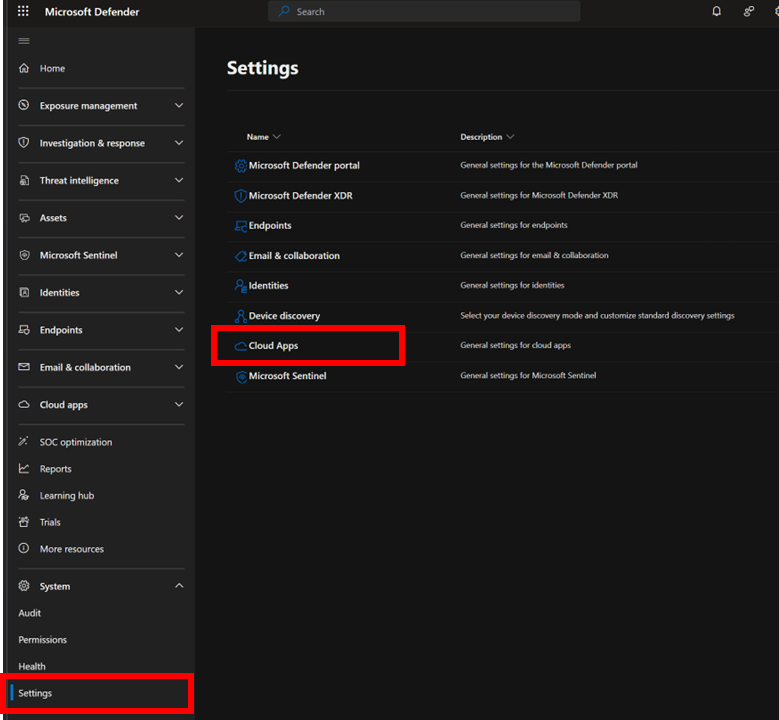
Open the Settings option from the menu on the left. From the options that appear on the right select Cloud Apps as shown above.

image

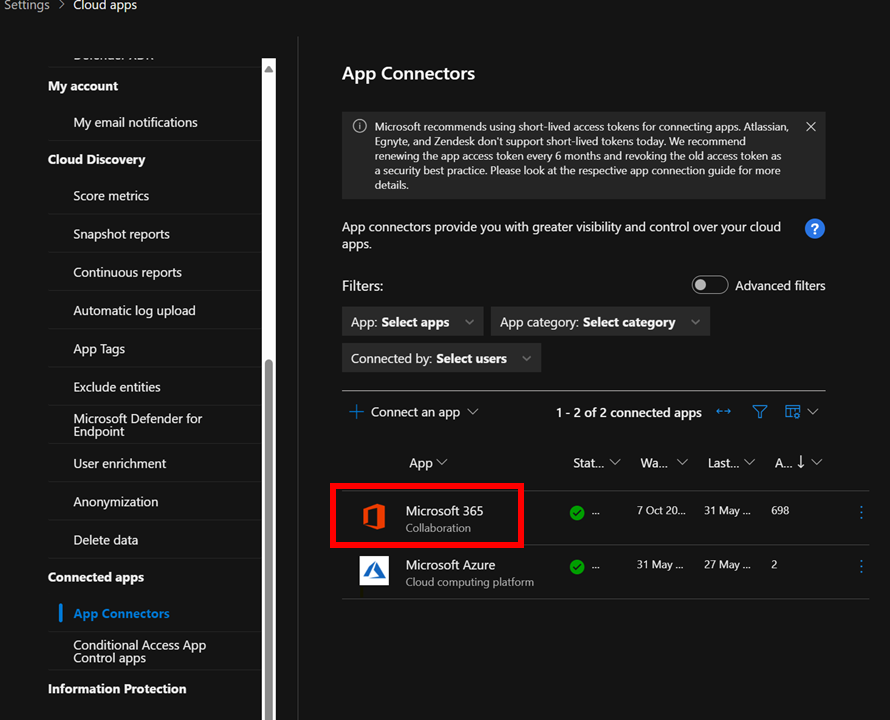
Then under the Connected Apps heading select App connectors as shown above. Ensure that connectors for Microsoft 365 and Microsoft Azure appear. If they don’t you can use the Connect an app option on the menu.

image

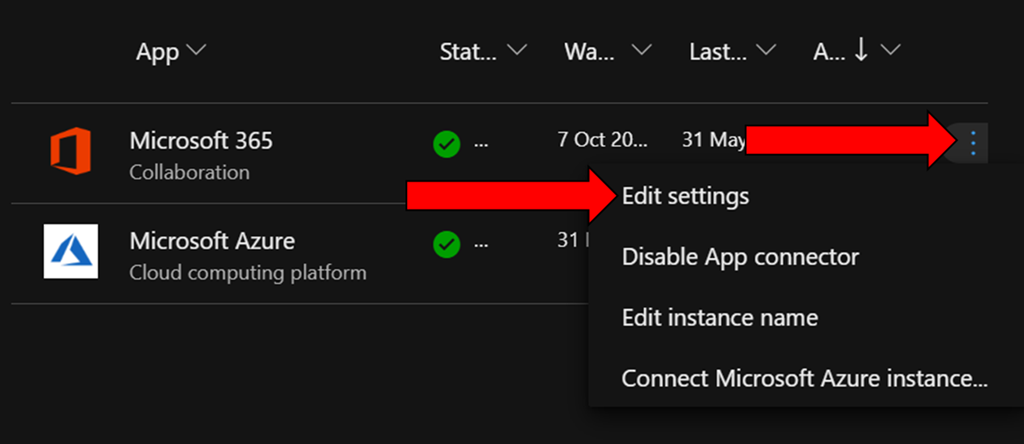
To verify the Microsoft 365 app is fully enabled locate the ellipse (three dots) on the right hand side of this connector and select it as shown above.

From the menu that appears select Edit Settings.

image

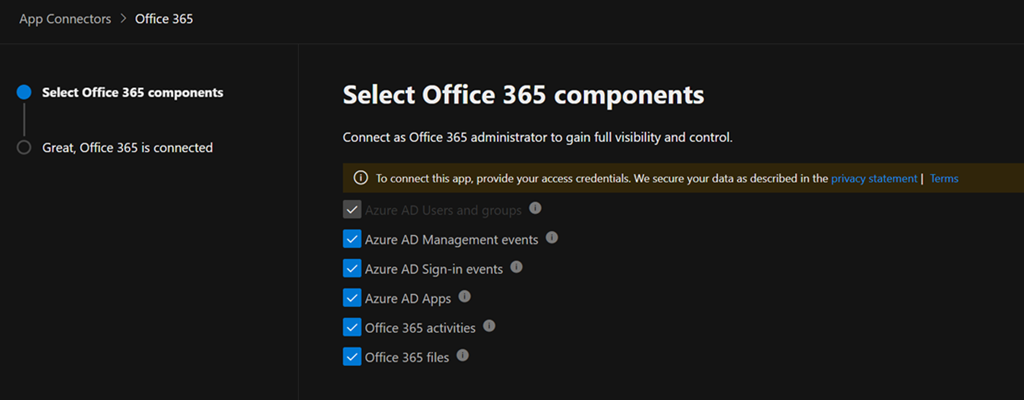
Ensure all the settings available to you are enabled as shown. Select the Connect to Office 365 button at the bottom of the dialog to save your settings and continue.

There is no addition cost to enabling these options and when you do you are able to monitor, audit and capture the logs for:

– Azure AD Users and Groups

– Azure AD Management events

– Azure AD Sign-in events

– Azure AD Apps

– Office 365 Activities

– Office 365 files

all thanks to Defender for Cloud apps.

CIAOPS Brief 20240525

image

Automatic attack disruption in Microsoft Defender XDR –

https://www.youtube.com/watch?v=Hv1jTgBgs6Y

Introducing Team Copilot –

https://www.youtube.com/watch?v=4k2T5sfGIP4

Missing devices in Windows Update for Business reports? –

https://techcommunity.microsoft.com/t5/windows-it-pro-blog/missing-devices-in-windows-update-for-business-reports/ba-p/4150561

Microsoft Security Exposure Management Graph: unveiling the power –

https://techcommunity.microsoft.com/t5/security-compliance-and-identity/microsoft-security-exposure-management-graph-unveiling-the-power/ba-p/4148546

Accelerating business transformation with industry AI and copilots –

https://www.microsoft.com/en-us/industry/blog/retail/2024/05/23/accelerating-business-transformation-with-industry-ai-and-copilots/

Cyber Signals: Inside the growing risk of gift card fraud –

https://www.microsoft.com/en-us/security/blog/2024/05/23/cyber-signals-inside-the-growing-risk-of-gift-card-fraud/

Cyber Signals: Inside the growing risk of gift card fraud –

https://www.microsoft.com/en-us/security/blog/2024/05/23/cyber-signals-inside-the-growing-risk-of-gift-card-fraud/

Increased security visibility through new Standard Logs in Microsoft Purview Audit –

https://techcommunity.microsoft.com/t5/security-compliance-and-identity/increased-security-visibility-through-new-standard-logs-in/ba-p/4144454

Copilot for Microsoft 365 | Enhance your productivity –

https://www.youtube.com/watch?v=ZWXbd2fKTu8

Copilot for Microsoft 365 | Your AI assistant for work –

https://www.youtube.com/watch?v=pqcOAvYveIc

Windows deployment with the next generation of Windows Autopilot –

https://techcommunity.microsoft.com/t5/microsoft-intune-blog/windows-deployment-with-the-next-generation-of-windows-autopilot/ba-p/4148169

Microsoft Copilot Studio: Building copilots with agent capabilities –

https://microsoftcopilotstudio.microsoft.com/en-us/blog/microsoft-copilot-studio-building-copilots-with-agent-capabilities/

Revolutionize the way you work with automation and AI –

https://powerautomate.microsoft.com/en-us/blog/revolutionize-the-way-you-work-with-automation-and-ai/

New ways of development with copilots and Microsoft Power Platform –

https://www.microsoft.com/en-us/power-platform/blog/2024/05/21/new-ways-of-development-with-copilots-and-microsoft-power-platform/

Evolving Copilot in Windows for your workforce –

https://techcommunity.microsoft.com/t5/windows-it-pro-blog/evolving-copilot-in-windows-for-your-workforce/ba-p/4141999

Power Apps is making it easier for developers to build with Microsoft Copilot and each other –

https://powerapps.microsoft.com/en-us/blog/power-apps-is-making-it-easier-for-developers-to-build-with-microsoft-copilot-and-each-other/

Secure and Govern Your Custom-Built AI Apps with Microsoft Purview –

https://techcommunity.microsoft.com/t5/security-compliance-and-identity/secure-and-govern-your-custom-built-ai-apps-with-microsoft/ba-p/4146187

Accelerate cloud security risk remediation with Microsoft Copilot for Security –

https://techcommunity.microsoft.com/t5/microsoft-defender-for-cloud/accelerate-cloud-security-risk-remediation-with-microsoft/ba-p/4143161

New agent capabilities in Microsoft Copilot unlock business value –

https://www.microsoft.com/en-us/microsoft-365/blog/2024/05/21/new-agent-capabilities-in-microsoft-copilot-unlock-business-value/

New Windows 11 security features are designed for hybrid work –

https://www.microsoft.com/en-us/security/blog/2022/09/20/new-windows-11-security-features-are-designed-for-hybrid-work/

New Windows 11 features strengthen security to address evolving cyberthreat landscape –

https://www.microsoft.com/en-us/security/blog/2024/05/20/new-windows-11-features-strengthen-security-to-address-evolving-cyberthreat-landscape/

Introducing Copilot+ PCs –

https://blogs.microsoft.com/blog/2024/05/20/introducing-copilot-pcs/

Play videos in Outlook with Microsoft Stream –

https://insider.microsoft365.com/en-us/blog/play-videos-in-outlook-with-microsoft-stream

Top features of Microsoft Teams –

https://www.youtube.com/watch?v=akvBvcNr3Uo

Meet the new Microsoft Surface Pro –

https://www.youtube.com/watch?v=jg1ZxdBFEYg

Microsoft Surface Copilot + PC Event: Everything Revealed in 13 Minutes –

https://www.youtube.com/watch?v=iHQgf3DNAr8

After hours

The puzzle of motivation – Dan Pink – https://www.youtube.com/watch?v=rrkrvAUbU9Y

Editorial

If you found this valuable, the I’d appreciate a ‘like’ or perhaps a donation at https://ko-fi.com/ciaops. This helps me know that people enjoy what I have created and provides resources to allow me to create more content. If you have any feedback or suggestions around this, I’m all ears. You can also find me via email director@ciaops.com and on X (Twitter) at https://www.twitter.com/directorcia.

If you want to be part of a dedicated Microsoft Cloud community with information and interactions daily, then consider becoming a CIAOPS Patron – www.ciaopspatron.com.

Watch out for the next CIA Brief next week.

Need to Know podcast–Episode 319

Lots of Ai and security news since the last episode. We are also on the cusp of Microsoft Build so we expect even more shortly. Although I’m a tad under the weather (apologies for sounding a bit nasal) but I felt I needed to get this episode out before the deluge of information we expect shortly from build. I think the OpenAI announcements along with those from Google are the most worthy to pay attention to here but I’m sure there should be something to interest everyone here. Listen on and enjoy!

You can listen directly to this episode at:

https://ciaops.podbean.com/e/episode-319-ai-gets-a-voice/

Subscribe via iTunes at:

https://itunes.apple.com/au/podcast/ciaops-need-to-know-podcasts/id406891445?mt=2

Don’t forget to give the show a rating as well as send me any feedback or suggestions you may have for the show.

Brought to you by www.ciaopspatron.com

Resources

@directorcia

Join my shared channel

CIAOPS merch store

Become a CIAOPS Patron

CIAOPS Blog

CIAOPS Brief

CIAOPSLabs

Support CIAOPS

Introducing GPT-4o

Project Astra: our Vision of the Future of AI assistance

Security above all else—expanding Microsoft’s Secure Future Initiative

RSA news: What’s new in Defender XDR?

Respond to trending threats and adopt zero-trust with Exposure Management

Public preview: Expanding passkey support in Microsoft Entra ID

Microsoft introduces passkeys for consumer accounts

Public preview: External authentication methods in Microsoft Entra ID

Teams enhancements to the Presenter window while screensharing

Email Protection Basics in Microsoft 365 Part Five: Mastering Overrides

Protect your data and recover from insider data sabotage

SharePoint Roadmap Pitstop: April 2024

What’s New in Microsoft Teams | April 2024

What’s new in Microsoft Intune: April 2024

What’s New in Copilot | April 2024

Unveiling the Newest OneDrive Capabilities

Summary of podcast episode straight from Copilot for Microsoft 365:

Key topics:

Key Topics:
  • GPT-4 announcement and demo: Robert highlighted the impressive features and capabilities of the new AI model from Open AI and how it might integrate with Microsoft products. 2:23

  • Google Project Astra and augmented reality: Robert shared his interest in the Google demo of AI vision and voice and how it could revive the Google Glass concept. 6:47

  • Microsoft Build and security initiatives: Robert anticipated some major announcements from Microsoft around AI and security at the Build conference and mentioned the Secure Future initiative to address recent breaches. 8:03

  • Passkeys and passwordless authentication: Robert encouraged the listeners to try out the new passkeys feature for Microsoft 365 and consumer accounts to enhance their security and convenience. 12:18

  • Teams enhancements and features: Robert reviewed some of the new and improved functionalities in Teams, such as presenter window, voice isolation, multiple accounts, and guest sharing with Loop. 15:28

  • Copilot updates and improvements: Robert showcased some of the ways that Copilot can help with creating summaries, FAQs, notebooks, and templates across different Microsoft 365 apps. 21:47

  • OneDrive for Business capabilities: Robert summarized some of the new and enhanced features in OneDrive for Business, such as media view, offline mode, coloured folders, and export sync reports. 24:40

CIAOPS Brief 20240518

image

Microsoft Entra Private Access for on-prem users –

https://techcommunity.microsoft.com/t5/microsoft-entra-blog/microsoft-entra-private-access-for-on-prem-users/ba-p/3905450

How to stay in sync and on track with Microsoft Loop and Copilot –

https://www.youtube.com/watch?v=k8fBA9d_lZk

Threat actors misusing Quick Assist in social engineering attacks leading to ransomware –

https://www.microsoft.com/en-us/security/blog/2024/05/15/threat-actors-misusing-quick-assist-in-social-engineering-attacks-leading-to-ransomware/

The rise of the AI power user | AI at work with Microsoft’s Jared Spataro –

https://www.youtube.com/watch?v=sWrAAzGi-2w

Email Protection Basics in Microsoft 365 Part Five: Mastering Overrides –

https://techcommunity.microsoft.com/t5/microsoft-defender-for-office/email-protection-basics-in-microsoft-365-part-five-mastering/ba-p/4139035

Introducing GPT-4o –

https://www.youtube.com/watch?v=DQacCB9tDaw

Introducing GPT-4o: OpenAI’s new flagship multimodal model now in preview on Azure –

https://azure.microsoft.com/en-us/blog/introducing-gpt-4o-openais-new-flagship-multimodal-model-now-in-preview-on-azure/

Microsoft Places | AI brings new life to flexible work –

https://www.youtube.com/watch?v=XOEpDXkjofE

Microsoft Entra delivers increased transparency –

https://techcommunity.microsoft.com/t5/microsoft-entra-blog/microsoft-entra-delivers-increased-transparency/ba-p/3796388

Microsoft Teams DLP Playbook –

https://techcommunity.microsoft.com/t5/security-compliance-and-identity/microsoft-teams-dlp-playbook/ba-p/4137462

10 (more) AI terms everyone should know –

https://news.microsoft.com/source/features/ai/10-more-ai-terms-everyone-should-know/

After hours

Project Astra: our Vision of the Future of AI assistance:–

https://www.youtube.com/watch?v=nXVvvRhiGjI

Editorial

If you found this valuable, the I’d appreciate a ‘like’ or perhaps a donation at https://ko-fi.com/ciaops. This helps me know that people enjoy what I have created and provides resources to allow me to create more content. If you have any feedback or suggestions around this, I’m all ears. You can also find me via email director@ciaops.com and on X (Twitter) at https://www.twitter.com/directorcia.

If you want to be part of a dedicated Microsoft Cloud community with information and interactions daily, then consider becoming a CIAOPS Patron – www.ciaopspatron.com.

Watch out for the next CIA Brief next week.