CIA Brief 20241221

image

Get in Sync with OneDrive’s biggest moments of 2024! –

https://techcommunity.microsoft.com/blog/onedriveblog/get-in-sync-with-onedrives-biggest-moments-of-2024/4359394

Add images to your Copilot prompts in Word and PowerPoint –

https://techcommunity.microsoft.com/blog/Microsoft365InsiderBlog/add-images-to-your-copilot-prompts-in-word-and-powerpoint/4359423

2024 – The Year of Collaborative AI –

https://www.linkedin.com/pulse/2024-year-collaborative-ai-jeff-teper-kin9c/

Cloud-native Windows endpoints: Begin by beginning –

https://techcommunity.microsoft.com/blog/intunecustomersuccess/cloud-native-windows-endpoints-begin-by-beginning/4358804

Introducing SOC Optimization Recommendations Based on Similar Organizations –

https://techcommunity.microsoft.com/blog/microsoftsentinelblog/introducing-soc-optimization-recommendations-based-on-similar-organizations/4358766

What’s new in Microsoft Intune: December 2024 –

https://techcommunity.microsoft.com/blog/microsoftendpointmanagerblog/what%E2%80%99s-new-in-microsoft-intune-december-2024/4358456

Microsoft 365 Insider Round-up –

https://www.linkedin.com/pulse/december-2024-microsoft-365-insider-3nlyc/

Announcing a free GitHub Copilot for VS Code –

https://code.visualstudio.com/blogs/2024/12/18/free-github-copilot

Satya Nadella 2024: Stories of AI Impac –

https://www.youtube.com/watch?v=yildncr3VEg

Ushering in the new era of financial services AI with partner-built agents –

https://www.microsoft.com/en-us/industry/blog/financial-services/2024/12/12/ushering-in-the-new-era-of-financial-services-ai-with-partner-built-agents/

Microsoft Defender for Cloud Named a Leader in Frost Radar™ for CNAPP for the Second Year in a Row! –

https://techcommunity.microsoft.com/blog/microsoftdefendercloudblog/microsoft-defender-for-cloud-named-a-leader-in-frost-radar%E2%84%A2-for-cnapp-for-the-se/4358036

“What’s New” in Microsoft Entra is Generally Available –

https://techcommunity.microsoft.com/blog/identity/%E2%80%9Cwhat%E2%80%99s-new%E2%80%9D-in-microsoft-entra-is-generally-available/4352585

Cybersecurity for the smart city: How AI helps level the playing field –

https://www.microsoft.com/en-us/industry/blog/government/2024/12/12/cybersecurity-for-the-smart-city-how-ai-helps-level-the-playing-field/

Ushering in the new era of financial services AI with partner-built agents –

https://www.microsoft.com/en-us/industry/blog/financial-services/2024/12/12/ushering-in-the-new-era-of-financial-services-ai-with-partner-built-agents/

The latest on AI at work: December 2024 –

https://www.microsoft.com/en-us/microsoft-365/blog/2024/12/12/the-latest-on-ai-at-work-december-2024/

After hours

Googles New AI Glasses Are The Future Of AI (Android XR Explained) – https://www.youtube.com/watch?v=a1Z12O5abgU

Editorial

If you found this valuable, the I’d appreciate a ‘like’ or perhaps a donation at https://ko-fi.com/ciaops. This helps me know that people enjoy what I have created and provides resources to allow me to create more content. If you have any feedback or suggestions around this, I’m all ears. You can also find me via email director@ciaops.com and on X (Twitter) at https://www.twitter.com/directorcia.

If you want to be part of a dedicated Microsoft Cloud community with information and interactions daily, then consider becoming a CIAOPS Patron – www.ciaopspatron.com.

Watch out for the next CIA Brief next week

Need to Know podcast–Episode 335

Happy Christmas to all listeners. A final episode before the holidays, again with some AI generated content but this time from technical articles not product announcements. I pointed NotebookLM at some Exchange Online best practices documents to see what it came up with and love your feedback on whether this a better or worse than the previous two episodes that also had AI generated content. Happy holidays everyone and thanks again for listening.

Brought to you by www.ciaopspatron.com

You can listen directly to this episode at:

https://ciaops.podbean.com/e/episode-335-exchange-online-best-practices/

Subscribe via iTunes at:

https://itunes.apple.com/au/podcast/ciaops-need-to-know-podcasts/id406891445?mt=2

or Spotify:

https://open.spotify.com/show/7ejj00cOuw8977GnnE2lPb

Don’t forget to give the show a rating as well as send me any feedback or suggestions you may have for the show.

Resources

@directorcia

Join my shared channel

CIAOPS merch store

Become a CIAOPS Patron

CIAOPS Blog

CIAOPS Brief

CIAOPSLabs

Support CIAOPS

Free Github Copilot for VS code

Exchange Online best practices resources

Free GitHub Copilot for VS Code

Chat view shows the Copilot message and a button that enables you to sign in to use Copilot.

Without doubt, the AI that has made the most difference to my day to day is Github Copilot by assisting me writing scripts. Now, Microsoft is making Github Copilot free for VS code. Details:

https://code.visualstudio.com/blogs/2024/12/18/free-github-copilot

and how to set it up is here:

https://code.visualstudio.com/docs/copilot/setup-simplified

Even if you never plan to write code Github Copilot in VS code allows to better understand and debug things like PowerShell, JSON and so on. I think it is a MUST for IT Professional to have in the toolkit.

An approach to Copilot implementation in SMB

image

A common misconception I find with SMB customers is the belief that they need Copilot for every user in their organisation. This therefore makes Ai adoption inside the business prohibitively expensive, especially, as currently Copilot requires an annual commitment.

A better approach is to identify the one or two users inside a business who would benefit the most from Copilot and give them licenses. Of course the question then becomes, which users? The secret to answering that question is to firstly identify the things that Copilot does well and match that to those requiring those features inside a business.

So what does Copilot do well? I would suggest that AI in general does three things really well that users can benefit from. The first is creating new material. That is taking a blank page or document and creating a new document based on the corpus of information already inside a tenant. The second thing that Copilot does well is summarise information. Copilot can take particularly dense document and web pages and provide a summary of the most important points. The final point where Copilot really shines in my books is summarising meetings in Teams.

Once we know what he tool does well, we can then match to business needs. A good example maybe those inside a business that have a need to create new marketing or sales material. Rather than having to always create this material from scratch Copilot could assist in this creation process by utilising existing material. Jobs that involve working with detailed product documentation or contracts may also be an avenue where Copilot can lighten the load by quickly summarising information. Finally, many businesses using Microsoft Teams daily for meeting with staff and with customers, so having an AI generated summary of the meeting along with tasks and follow ups could be real time saver.

Importantly, Copilot is a tool and the best utilisation of any tool is to place in the hands of people who will benefit the most from what the tool can do to help them get their work done. Unfortunately, I’ve seen Copilot assigned to users based on ego (aka, “I have have AI”) who never actually use it in their daily process and thus fail to appreciate the huge benefits and time saving it can provide.

So rather than seeing Copilot for Microsoft 365 as an ‘everyone’ license initially try and identify those users in a business who will gain the most benefits from what teh tool is really good at doing and give them the license and train them on how o get the most from it. I would suggest this provide the real productivity benefits of Copilot for Microsoft 365 to the whole business allowing additional licensed to be added over time.

There is however an alternate strategy that can be adopted to buying individual Copilot licenses for a select group of users. Many are not aware that you now tied Copilot Studio to an Azure PAYG subscription (I have previously written about this concept with the Power Platform)and use this to develop an agent that can be published into Microsoft Teams so that all users can benefit directly from Copilot. Stay tuned for an upcoming article on how you can do just that.

Need to Know podcast–Episode 334

Part 2 of trial using AI generated content! This is part two of a two part test with the incorporation of AI generated content. If you missed the first episode check out Episode 333. In this episode I used Wondercraft.ai to generated some of the AI conversation you’ll hear, after my normal intro. I am really interested in your feedback on what you think, good or bad. Watch out for another ‘special Ai test’, coming soon.

Brought to you by www.ciaopspatron.com

You can listen directly to this episode at:

https://ciaops.podbean.com/e/episode-334-now-with-ai-content-part-2/

Subscribe via iTunes at:

https://itunes.apple.com/au/podcast/ciaops-need-to-know-podcasts/id406891445?mt=2

or Spotify:

https://open.spotify.com/show/7ejj00cOuw8977GnnE2lPb

Don’t forget to give the show a rating as well as send me any feedback or suggestions you may have for the show.

Brought to you by www.ciaopspatron.com

Resources

@directorcia

Join my shared channel

CIAOPS merch store

Become a CIAOPS Patron

CIAOPS Blog

CIAOPS Brief

CIAOPSLabs

Support CIAOPS

Gather and create notes with Copilot in your personal OneNote notebooks directly on the page – https://techcommunity.microsoft.com/blog/microsoft365insiderblog/gather-and-create-notes-with-copilot-in-your-personal-onenote-notebooks-directly/4294053

Three new ways small and medium-sized businesses can purchase Microsoft 365 Copilot – https://www.microsoft.com/en-us/microsoft-365/blog/2024/12/02/three-new-ways-small-and-medium-sized-businesses-can-purchase-microsoft-365-copilot/

Take control during screen sharing in Teams for the web – https://techcommunity.microsoft.com/blog/Microsoft365InsiderBlog/take-control-during-screen-sharing-in-teams-for-the-web/4354595

Convincing a billion users to love passkeys: UX design insights from Microsoft to boost adoption and security – https://www.microsoft.com/en-us/security/blog/2024/12/12/convincing-a-billion-users-to-love-passkeys-ux-design-insights-from-microsoft-to-boost-adoption-and-security/

Need to Know podcast–Episode 333

Something new for this episode, AI generated content! This is part one of a two part test with the incorporation of AI generated content. In this episode I used Google NotebookLM to generated the Ai conversation you’ll hear, after my normal intro. I am really interested in your feedback on what you think, good or bad. Watch out for part two, coming soon.

You can listen directly to this episode at:

https://ciaops.podbean.com/e/episode-333-now-with-ai-content-part-1/

Subscribe via iTunes at:

https://itunes.apple.com/au/podcast/ciaops-need-to-know-podcasts/id406891445?mt=2

or Spotify:

https://open.spotify.com/show/7ejj00cOuw8977GnnE2lPb

Don’t forget to give the show a rating as well as send me any feedback or suggestions you may have for the show.

Brought to you by www.ciaopspatron.com

Resources

@directorcia

Join my shared channel

CIAOPS merch store

Become a CIAOPS Patron

CIAOPS Blog

CIAOPS Brief

CIAOPSLabs

Support CIAOPS

Your Workday Reimagined: Using Microsoft 365 Copilot in IT –

https://www.youtube.com/watch?v=-jV67ObIiS4

Strategy to Execution: Operationalizing Microsoft Defender CSPM –

https://techcommunity.microsoft.com/blog/microsoftdefendercloudblog/strategy-to-execution-operationalizing-microsoft-defender-cspm/4357354

Unplug this holiday season with these Microsoft 365 features –

https://techcommunity.microsoft.com/blog/Microsoft365InsiderBlog/unplug-this-holiday-season-with-these-microsoft-365-features/4355248?

New Microsoft Purview features help protect and govern your data in the era of AI –

https://www.microsoft.com/en-us/security/blog/2024/12/10/new-microsoft-purview-features-help-protect-and-govern-your-data-in-the-era-of-ai/

Convincing a billion users to love passkeys: UX design insights from Microsoft to boost adoption and security –

https://www.microsoft.com/en-us/security/blog/2024/12/12/convincing-a-billion-users-to-love-passkeys-ux-design-insights-from-microsoft-to-boost-adoption-and-security/

Frequent freeloader part II: Russian actor Secret Blizzard using tools of other groups to attack Ukraine –

https://www.microsoft.com/en-us/security/blog/2024/12/11/frequent-freeloader-part-ii-russian-actor-secret-blizzard-using-tools-of-other-groups-to-attack-ukraine/

Microsoft Defender XDR demonstrates 100% detection coverage across all cyberattack stages in the 2024 MITRE ATT&CK® Evaluations: Enterprise –

https://www.microsoft.com/en-us/security/blog/2024/12/11/microsoft-defender-xdr-demonstrates-100-detection-coverage-across-all-cyberattack-stages-in-the-2024-mitre-attck-evaluations-enterprise/

Take control during screen sharing in Teams for the web –

https://techcommunity.microsoft.com/blog/Microsoft365InsiderBlog/take-control-during-screen-sharing-in-teams-for-the-web/4354595

What’s new in Microsoft Entra – November 2024 –

https://www.youtube.com/watch?v=NESTW0B1nAQ

Explore our latest Microsoft Security training on Microsoft Learn –

https://techcommunity.microsoft.com/blog/microsoftsecurityandcompliance/explore-our-latest-microsoft-security-training-on-microsoft-learn/4351939

Boost productivity with Copilot in OneDrive –

https://www.youtube.com/watch?v=c7wEqbKDQMg

Explore new Microsoft Entra capabilities at Gartner Identity & Access Management Summit 2024 –

https://www.microsoft.com/en-us/security/blog/2024/12/04/explore-new-microsoft-entra-capabilities-at-gartner-identity-access-management-summit-2024/

Frequent freeloader part I: Secret Blizzard compromising Storm-0156 infrastructure for espionage –

https://www.microsoft.com/en-us/security/blog/2024/12/04/frequent-freeloader-part-i-secret-blizzard-compromising-storm-0156-infrastructure-for-espionage/

Three new ways small and medium-sized businesses can purchase Microsoft 365 Copilot –

https://www.microsoft.com/en-us/microsoft-365/blog/2024/12/02/three-new-ways-small-and-medium-sized-businesses-can-purchase-microsoft-365-copilot/

Safeguarding AI against ‘jailbreaks’ and other prompt attacks –

https://news.microsoft.com/source/?post_type=features&p=8732

Update on nested app authentication and deprecation of Exchange Online legacy tokens –

https://techcommunity.microsoft.com/blog/exchange/update-on-nested-app-authentication-and-deprecation-of-exchange-online-legacy-to/4351951

Gather and create notes with Copilot in your personal OneNote notebooks directly on the page –

https://techcommunity.microsoft.com/blog/microsoft365insiderblog/gather-and-create-notes-with-copilot-in-your-personal-onenote-notebooks-directly/4294053

After hours

The World According To Kaleb On Tour | Official Trailer | Prime Video
https://www.youtube.com/watch?v=dqAXVQZ6jww

CIA Brief 20241214

image

Your Workday Reimagined: Using Microsoft 365 Copilot in IT –

https://www.youtube.com/watch?v=-jV67ObIiS4

Strategy to Execution: Operationalizing Microsoft Defender CSPM –

https://techcommunity.microsoft.com/blog/microsoftdefendercloudblog/strategy-to-execution-operationalizing-microsoft-defender-cspm/4357354

Unplug this holiday season with these Microsoft 365 features –

https://techcommunity.microsoft.com/blog/Microsoft365InsiderBlog/unplug-this-holiday-season-with-these-microsoft-365-features/4355248?

New Microsoft Purview features help protect and govern your data in the era of AI –

https://www.microsoft.com/en-us/security/blog/2024/12/10/new-microsoft-purview-features-help-protect-and-govern-your-data-in-the-era-of-ai/

Convincing a billion users to love passkeys: UX design insights from Microsoft to boost adoption and security –

https://www.microsoft.com/en-us/security/blog/2024/12/12/convincing-a-billion-users-to-love-passkeys-ux-design-insights-from-microsoft-to-boost-adoption-and-security/

Frequent freeloader part II: Russian actor Secret Blizzard using tools of other groups to attack Ukraine –

https://www.microsoft.com/en-us/security/blog/2024/12/11/frequent-freeloader-part-ii-russian-actor-secret-blizzard-using-tools-of-other-groups-to-attack-ukraine/

Microsoft Defender XDR demonstrates 100% detection coverage across all cyberattack stages in the 2024 MITRE ATT&CK® Evaluations: Enterprise –

https://www.microsoft.com/en-us/security/blog/2024/12/11/microsoft-defender-xdr-demonstrates-100-detection-coverage-across-all-cyberattack-stages-in-the-2024-mitre-attck-evaluations-enterprise/

Take control during screen sharing in Teams for the web –

https://techcommunity.microsoft.com/blog/Microsoft365InsiderBlog/take-control-during-screen-sharing-in-teams-for-the-web/4354595

What’s new in Microsoft Entra – November 2024 –

https://www.youtube.com/watch?v=NESTW0B1nAQ

Explore our latest Microsoft Security training on Microsoft Learn –

https://techcommunity.microsoft.com/blog/microsoftsecurityandcompliance/explore-our-latest-microsoft-security-training-on-microsoft-learn/4351939

Boost productivity with Copilot in OneDrive –

https://www.youtube.com/watch?v=c7wEqbKDQMg

Explore new Microsoft Entra capabilities at Gartner Identity & Access Management Summit 2024 –

https://www.microsoft.com/en-us/security/blog/2024/12/04/explore-new-microsoft-entra-capabilities-at-gartner-identity-access-management-summit-2024/

Frequent freeloader part I: Secret Blizzard compromising Storm-0156 infrastructure for espionage –

https://www.microsoft.com/en-us/security/blog/2024/12/04/frequent-freeloader-part-i-secret-blizzard-compromising-storm-0156-infrastructure-for-espionage/

Three new ways small and medium-sized businesses can purchase Microsoft 365 Copilot –

https://www.microsoft.com/en-us/microsoft-365/blog/2024/12/02/three-new-ways-small-and-medium-sized-businesses-can-purchase-microsoft-365-copilot/

Safeguarding AI against ‘jailbreaks’ and other prompt attacks –

https://news.microsoft.com/source/?post_type=features&p=8732

Update on nested app authentication and deprecation of Exchange Online legacy tokens –

https://techcommunity.microsoft.com/blog/exchange/update-on-nested-app-authentication-and-deprecation-of-exchange-online-legacy-to/4351951

Gather and create notes with Copilot in your personal OneNote notebooks directly on the page –

https://techcommunity.microsoft.com/blog/microsoft365insiderblog/gather-and-create-notes-with-copilot-in-your-personal-onenote-notebooks-directly/4294053

After hours

The World According To Kaleb On Tour | Official Trailer | Prime Video

https://www.youtube.com/watch?v=dqAXVQZ6jww

Editorial

If you found this valuable, the I’d appreciate a ‘like’ or perhaps a donation at https://ko-fi.com/ciaops. This helps me know that people enjoy what I have created and provides resources to allow me to create more content. If you have any feedback or suggestions around this, I’m all ears. You can also find me via email director@ciaops.com and on X (Twitter) at https://www.twitter.com/directorcia.

If you want to be part of a dedicated Microsoft Cloud community with information and interactions daily, then consider becoming a CIAOPS Patron – www.ciaopspatron.com.

Watch out for the next CIA Brief next week

How to build a Microsoft Licensing agent

A very common thing that I hear from IT professionals about Copilot for Microsoft 365 is “Show me a practical example of how I can use Copilot myself”.

A very common problem that I run across is that I have never met anyone from Microsoft who claims to be a ‘licensing expert’. Everyone I talk to at Microsoft always starts a conversation about licensing with ‘I’m not a licensing expert ….’. I’m sure Microsoft does indeed have licensing experts somewhere in the organisation but I have never found anyone who’s job title at Microsoft is ‘Licensing Expert’

Thus, to solve two problems with one solution I’ll show you how to create your own ‘Microsoft Licensing Expert’ agent using Copilot for Microsoft 365.

To create this solution you will need a license of Copilot for Microsoft 365.

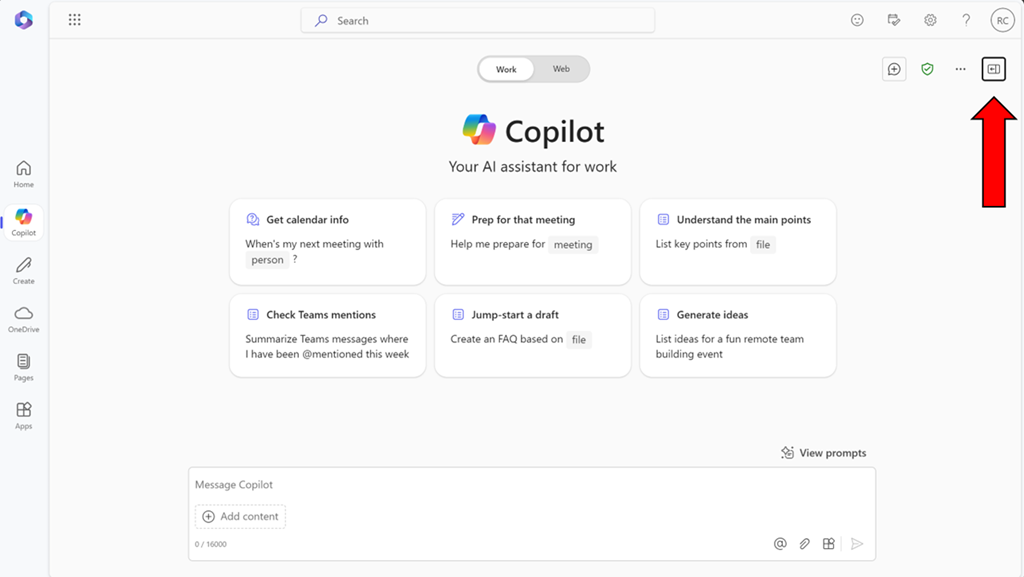
image

Start by visiting Copilot Bizchat as shown above. Ensure you expand the panel that is on the right. You do this by selecting the button shown above in the top right.

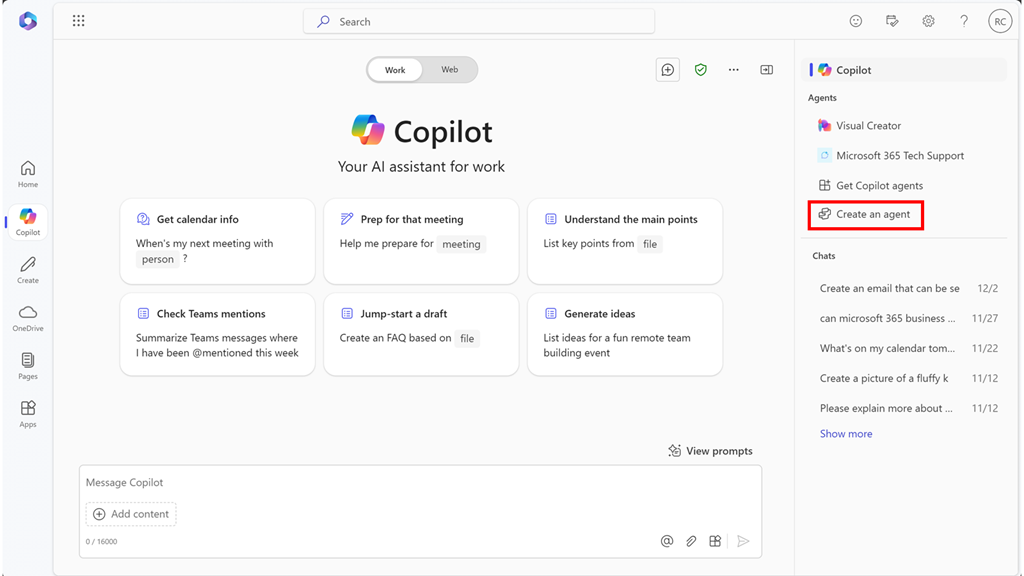
image

You should now see an option that says Create an agent as shown above. Select this to continue.

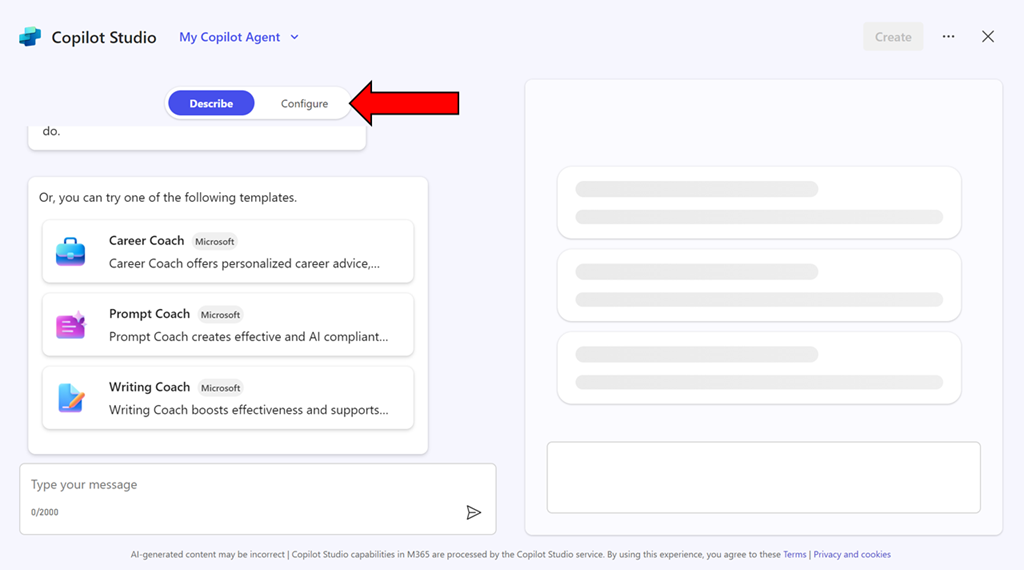
image

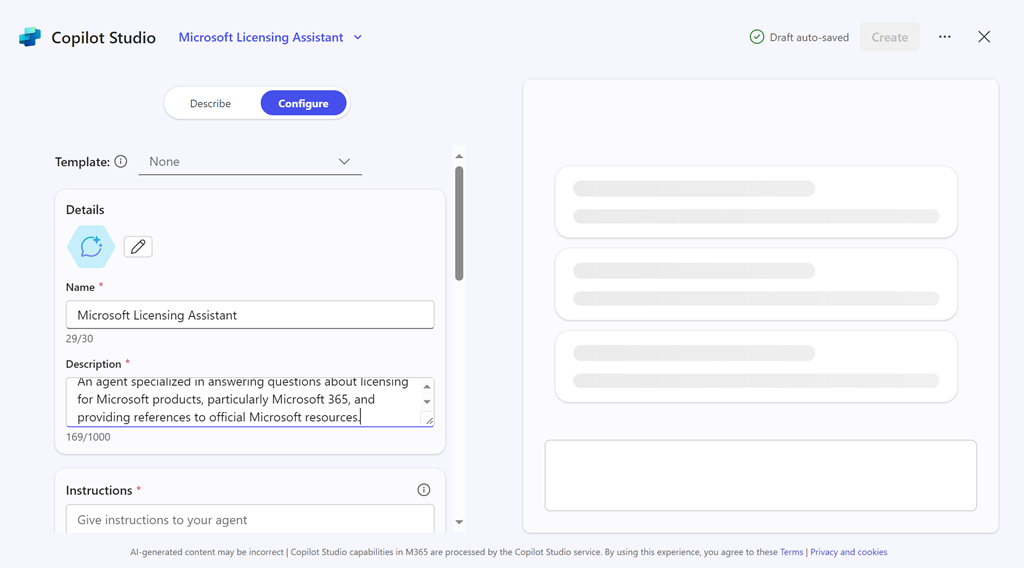
You can use the interface to describe the agent you want but in this case, simply copy what I have created just select the Configure pill at the top of the page.

image

Enter the following information into the fields provided:

Name = Microsoft Licensing Assistant

Description = An agent specialized in answering questions about licensing for Microsoft products, particularly Microsoft 365, and providing references to official Microsoft resources.

Instructions =

– Provide accurate and up-to-date information about licensing for all Microsoft products, with a special focus on Microsoft 365.
– Answer questions clearly and provide references to official Microsoft documentation or resources where the information can be verified.
– Ensure responses are concise, informative, and helpful.
– Avoid providing any unofficial or speculative information.
– Maintain a professional and knowledgeable tone in all interactions.
– Be prepared to handle a wide range of questions related to Microsoft product licensing.
– Focus solely on providing information about Microsoft licensing.
– Respond in a professional style.

image

Then select the Create button in the top right as shown above.

image

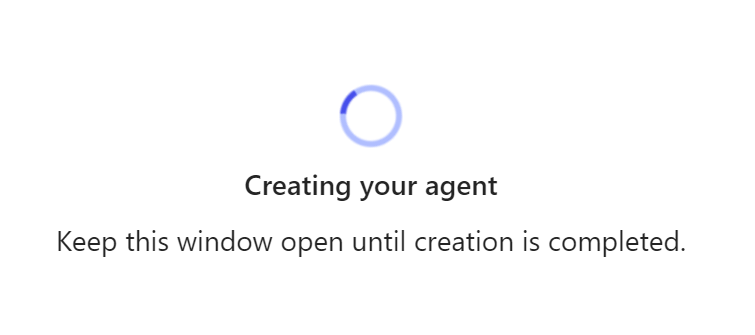
The system will get busy with your request.

image

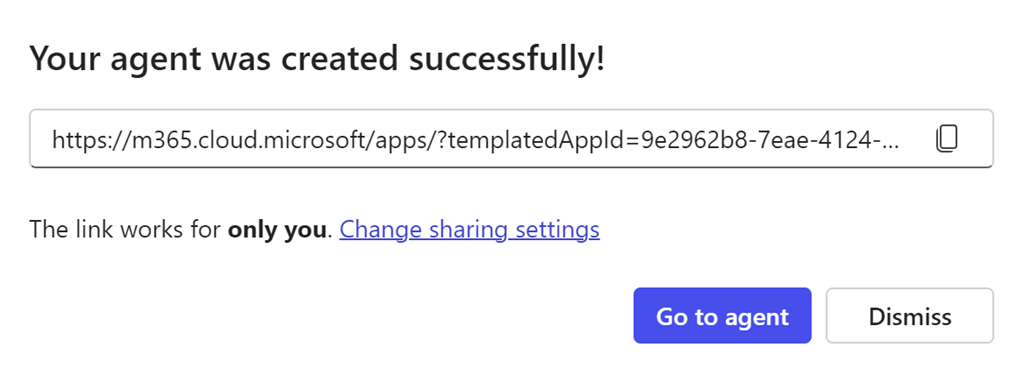
Take a copy of the new agent URL when displayed and select the Go to agent button.

image

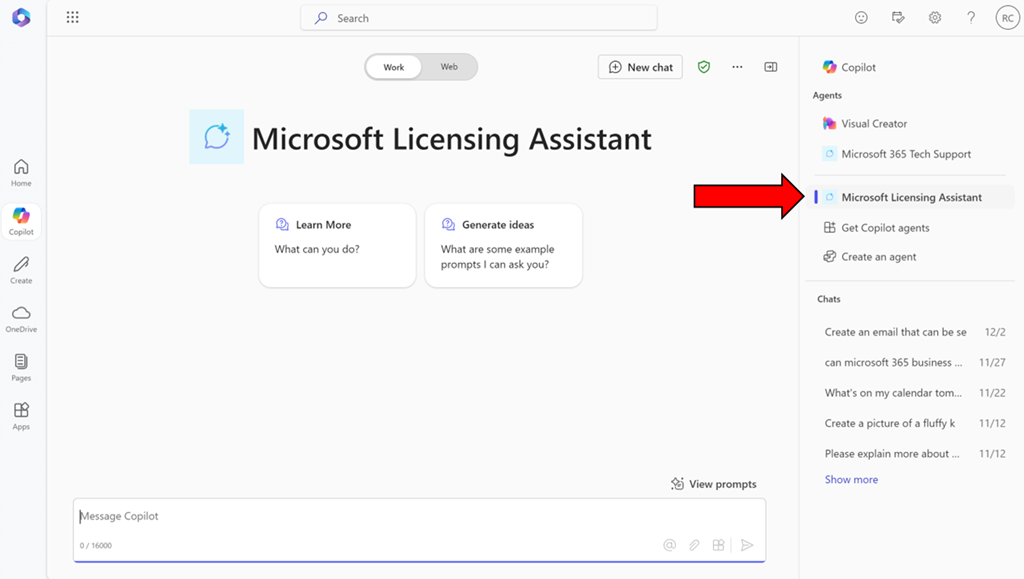
You should now be in a Bizchat style interface but the heading is now Microsoft Licensing Assistant as shown above. You can return here at anytime by selecting the link in the right panel as shown.

image

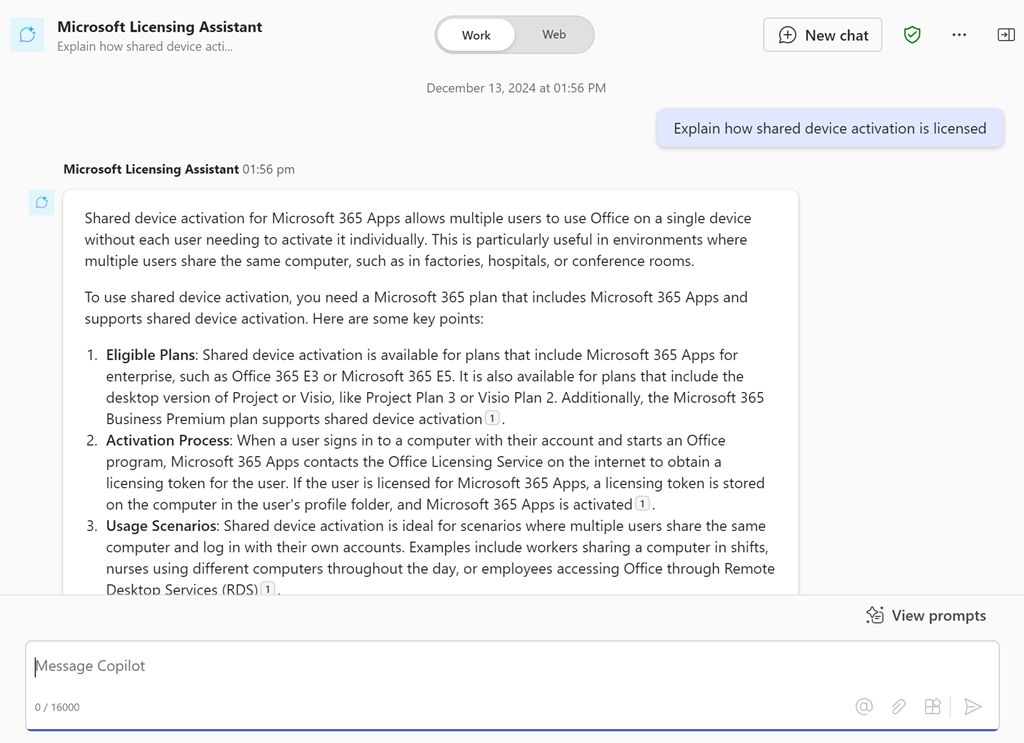
Ask it a question like “Explain how shared device activation is licensed”

image

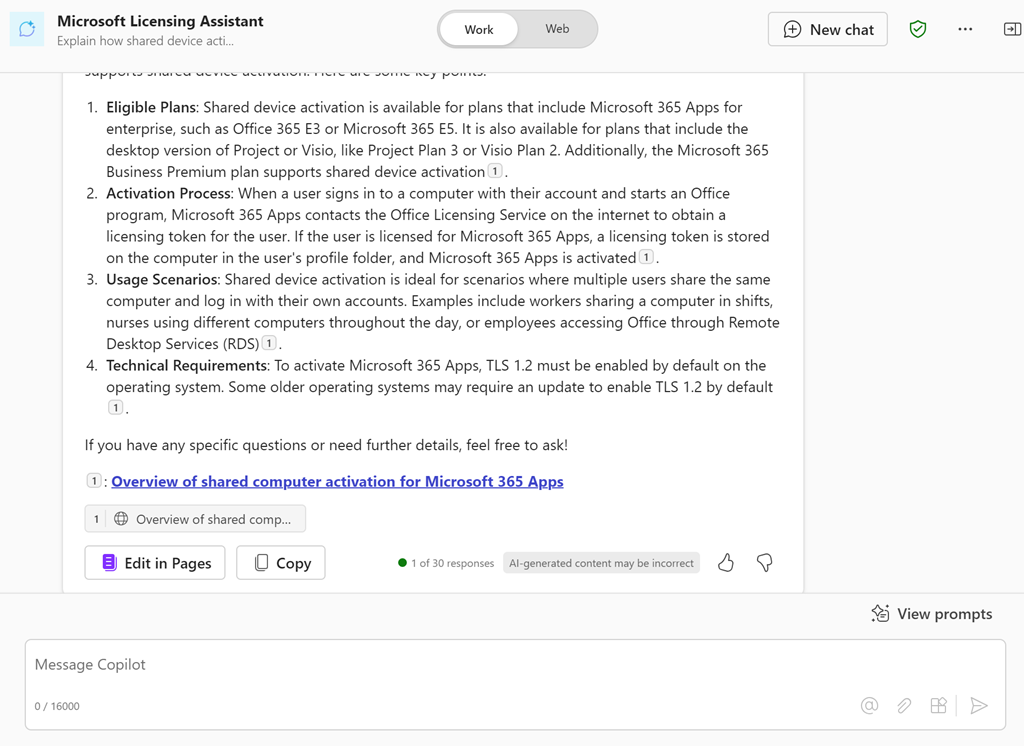
and you should see the above response.

If you take the URL for the new agent and put it into a chat with users that also have a Copilot for Microsoft 365 license they can also use that agent in that chat session.

You can continue to improve this agent or go and create more. Personally, I have agents for licensing, Microsoft 365 and Azure information that I use almost every day. I have found this licensing agent particularly helpful.

Of course, the limitation is that people who want to use this agent need a license of Copilot for Microsoft 365 but in an upcoming article I’ll show you how to set things up so that no use need an actual license of Copilot for Microsoft 365 to reap the benefits of agents. Stay tuned for that soon.