Here are 10 tailored prompts you can use with your ASD Secure Cloud Blueprint agent to address common Microsoft 365 Business Premium security concerns for SMBs, with a focus on automated implementation using PowerShell:
🔐 Identity & Access Management
“What are the ASD Blueprint recommendations for securing user identities in M365 Business Premium, and how can I enforce MFA using PowerShell?”
“How does the ASD Blueprint suggest managing admin roles in M365 Business Premium, and what PowerShell scripts can I use to audit and restrict global admin access?”
📁 Data Protection & Information Governance
“What ASD Blueprint controls apply to protecting sensitive data in M365 Business Premium, and how can I automate DLP policy deployment with PowerShell?”
“How can I implement ASD Blueprint-compliant retention policies in Exchange and SharePoint using PowerShell for M365 Business Premium tenants?”
🛡️ Threat Protection
“What are the ASD Blueprint recommendations for Defender for Office 365 in Business Premium, and how can I configure anti-phishing and safe links policies via PowerShell?”
“How can I automate the deployment of Microsoft Defender Antivirus settings across endpoints in line with ASD Blueprint guidance using PowerShell?”
🔍 Auditing & Monitoring
“What audit logging standards does the ASD Blueprint recommend for M365 Business Premium, and how can I enable and export unified audit logs using PowerShell?”
“How can I use PowerShell to monitor mailbox access and detect suspicious activity in accordance with ASD Blueprint security controls?”
🔧 Configuration & Hardening
“What baseline security configurations for Exchange Online and SharePoint Online are recommended by the ASD Blueprint, and how can I apply them using PowerShell?”
“How can I automate the disabling of legacy authentication protocols in M365 Business Premium to meet ASD Blueprint standards using PowerShell?”
In this video, I walk you through exactly how I upgraded my Copilot Studio agent to harness the power of GPT-5! If you’ve been stuck with GPT-4 and want to access the latest AI features, watch as I show you the full process—from navigating the Power Platform Admin Center, creating a new environment with early release features, to switching your agent’s model to GPT-5. I share practical tips, licensing requirements, and everything you need to know to get ahead with cutting-edge AI in Copilot Studio. Don’t miss out on unlocking the future of AI for your projects!
Here are 10 ready-to-use prompts you can ask your ASD-aligned security agent to tackle the most common SMB security issues in Microsoft 365 Business Premium tenants. Each prompt is engineered to:
Align with the ASD Secure Cloud Blueprint / Essential Eight and ACSC guidance
Use only features available in M365 Business Premium
Produce clear, step-by-step outcomes you can apply immediately
Avoid E5-only capabilities (e.g., Entra ID P2, Defender for Cloud Apps, Insider Risk, Auto-labelling P2, PIM)
Tip for your agent: For each prompt, request outputs in this structure: (a) Current state → (b) Gaps vs ASD control → (c) Recommended configuration (Business Premium–only) → (d) Click-path + PowerShell → (e) Validation tests & KPIs → (f) Exceptions & rollback.
Prompt: “Assess our tenant’s MFA and sign-in posture against ASD/ACSC guidance using only Microsoft 365 Business Premium features. Return: (1) Conditional Access policies to enforce MFA for all users, admins, and high-risk scenarios (without Entra ID P2); (2) exact assignments, conditions, grant/ session controls; (3) block legacy authentication; (4) break-glass account pattern; (5) click-paths in Entra admin portal and Exchange admin centre; (6) PowerShell for disabling per-user MFA legacy and enabling CA-based MFA; (7) how to validate via Sign-in logs and audit; (8) exceptions for service accounts and safe rollback.”
Prompt: “Create Intune compliance and configuration baselines for Windows/macOS/iOS/Android aligned to ASD/ACSC using Business Premium. Include: (1) Windows BitLocker and macOS FileVault enforcement; (2) OS version minimums, secure boot, tamper protection, firewall, Defender AV; (3) jailbreak/root detection; (4) role-based scope (admins stricter); (5) conditional access ‘require compliant device’ for admins; (6) click-paths and JSON/OMA-URI where needed; (7) validation using device compliance reports and Security baselines; (8) exceptions for servers/VDI and rollback.”
4) BYOD Data Protection (App Protection / MAM-WE)
Prompt: “Design BYOD app protection for iOS/Android using Intune App Protection Policies (without enrollment), aligned to ASD data protection guidance. Deliver: (1) policy sets for Outlook/Teams/OneDrive/Office mobile; (2) cut/copy/save restrictions, PIN/biometrics, encryption-at-rest, wipe on sign-out; (3) Conditional Access ‘require approved client app’ and ‘require app protection policy’; (4) blocking downloads to unmanaged locations; (5) step-by-step in Intune & Entra; (6) user experience notes; (7) validation and KPIs (unenrolled device access, selective wipe success).”
5) Endpoint Security with Defender for Business (EDR/NGAV/ASR)
Prompt: “Harden endpoints using Microsoft Defender for Business (included in Business Premium) to meet ASD controls. Return: (1) Onboarding method (Intune) and coverage; (2) Next-Gen AV, cloud-delivered protection, network protection; (3) Attack Surface Reduction rules profile (Business Premium-supported), Controlled Folder Access; (4) EDR enablement and Automated Investigation & Response scope; (5) threat & vulnerability management (TVM) priorities; (6) validation via MDE portal; (7) KPIs (exposure score, ASR rule hits, mean time to remediate).”
6) Patch & Update Strategy (ASD: Patch Apps/OS)
Prompt: “Produce a Windows Update for Business and Microsoft 365 Apps update strategy aligned to ASD Essential Eight for SMB. Include: (1) Intune update rings and deadlines; (2) quality vs feature update cadence, deferrals, safeguards; (3) Microsoft 365 Apps channel selection (e.g., Monthly Enterprise); (4) TVM-aligned prioritisation for CVEs; (5) rollout waves and piloting; (6) click-paths, policies, and sample assignments; (7) validation dashboards and KPIs (patch latency, update compliance, CVE closure time).”
7) External Sharing, DLP & Sensitivity Labels (ASD: Data Protection)
Prompt: “Lock down external sharing and implement Data Loss Prevention using Business Premium (no auto-labelling P2), aligned to ASD guidance. Deliver: (1) SharePoint/OneDrive external sharing defaults, link types, expiration; (2) guest access policies for Teams; (3) Purview DLP for Exchange/SharePoint/OneDrive—PII templates, alerting thresholds; (4) user-driven sensitivity labels (manual) for email/files with recommended taxonomy; (5) transport rules for sensitive emails to external recipients; (6) step-by-step portals; (7) validation & KPIs (external sharing volume, DLP matches, label adoption).”
8) Least Privilege Admin & Tenant Hygiene (ASD: Restrict Admin)
Prompt: “Review and remediate admin privileges and app consent using Business Premium-only controls. Provide: (1) role-by-role least privilege mapping (Global Admin, Exchange Admin, Helpdesk, etc.); (2) emergency access (‘break-glass’) accounts with exclusions and monitoring; (3) enforcement of user consent settings and admin consent workflow; (4) risky legacy protocols and SMTP AUTH usage review; (5) audit logging and alert policies; (6) step-by-step remediation; (7) validation and KPIs (admin count, app consents, unused privileged roles).”
9) Secure Score → ASD Gap Analysis & Roadmap
Prompt: “Map Microsoft Secure Score controls to ASD Essential Eight and generate a 90‑day remediation plan for Business Premium. Return: (1) Top risk-reducing actions feasible with Business Premium; (2) control-to-ASD mapping; (3) effort vs impact matrix; (4) owner, dependency, and rollout sequence; (5) expected Secure Score lift; (6) weekly KPIs and reporting pack (including recommended dashboards). Avoid recommending E5-only features—offer Business Premium alternatives.”
10) Detection & Response Playbooks (SMB-ready)
Prompt: “Create incident response playbooks using Defender for Business and Defender for Office 365 for common SMB threats (phishing, BEC, ransomware). Include: (1) alert sources and severities; (2) triage steps, evidence to collect, where to click; (3) auto-investigation actions available in Business Premium; (4) rapid containment (isolate device, revoke sessions, reset tokens, mailbox rules sweep); (5) user comms templates and legal/escalation paths; (6) post-incident hardening steps; (7) validation drills and success criteria.”
Optional meta‑prompt you can prepend to any of the above
“You are my ASD Secure Cloud Blueprint agent. Only recommend configurations available in Microsoft 365 Business Premium. If a control typically needs E5/P2, propose a Business Premium‑compatible alternative and flag the limitation. Return exact portal click-paths, policy names, JSON samples/PowerShell, validation steps, and KPIs suitable for SMBs.”
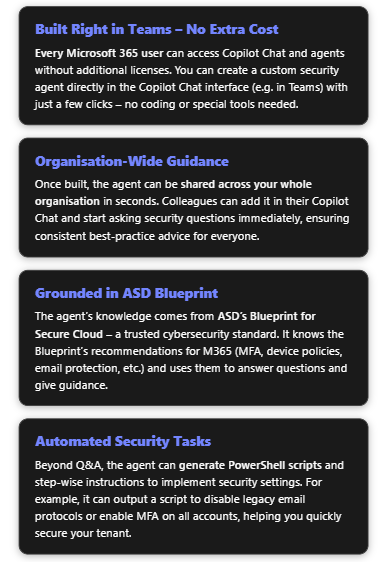
ASD’s Blueprint for Secure Cloud is a comprehensive set of security guidelines published by the Australian Signals Directorate. It details how to configure cloud services (including Microsoft 365) to meet high security standards, incorporating strategies like the Essential Eight. For Microsoft 365, the Blueprint covers everything from enforcing multi-factor authentication and blocking legacy authentication, to hardening Office 365 services (Exchange, SharePoint, Teams) and securing Windows devices via Intune policies[1][2]. By creating a dedicated Copilot Chat agent based on this Blueprint, you give your organisation an easy way to access all that expertise. The agent will act as a virtual security advisor: available through Microsoft Teams (Copilot Chat) to answer questions, provide configuration guidance, and even supply automation scripts – all for free using your existing M365 subscription.
Below is a step-by-step guide to build the agent within the Copilot Chat interface, followed by examples of how it can improve your Microsoft 365 security management.
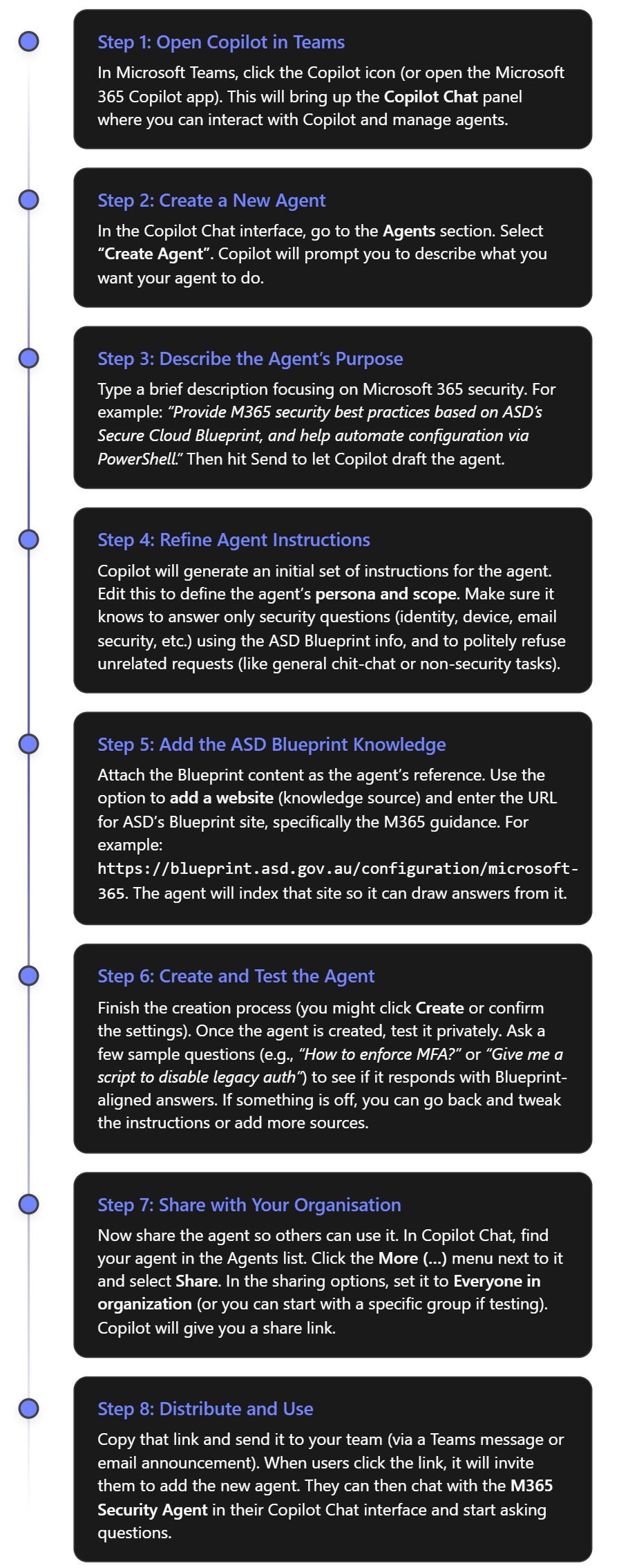
Step-by-Step: Creating the Copilot Agent in Teams Copilot Chat
You can create the agent entirely within the Microsoft 365 Copilot Chat interface (such as in Teams), using the built-in Agent Builder. There’s no need to use separate tools or write code. Here’s how to set it up quickly:
Note: The above assumes that the Copilot Agents feature is enabled in your tenant. Microsoft made Copilot Chat available to all users by 2025, but an admin might need to turn on custom agent creation if it’s in preview. Check your M365 admin settings for “Copilot” or “Agents” if you don’t see the option to create an agent. Once enabled, any user can build or use agents in Copilot Chat[3].
How the Agent Improves M365 Security
With your M365 Security Copilot agent up and running, your IT team (and potentially all employees) can leverage it in several ways to strengthen security. Here are some examples of what it can do:
1. Instant Q&A on Security Best Practices
The agent can answer questions about Microsoft 365 security configurations, drawing directly from the ASD Blueprint’s guidance and related Microsoft documentation. This is like having a security policy expert available 24/7.
Example:“What does the ASD Blueprint say about email protection?” – The agent might respond: “It recommends enabling Microsoft Defender for Office 365 features like Safe Links and Safe Attachments for all users[2]. Safe Links will check URLs in emails and documents for malicious content and redirect users if the link is unsafe. Safe Attachments will open email attachments in a sandbox to detect malware before delivering them to the recipient[2].” It would likely go on to mention anti-phishing policies as well. This guidance helps you know which settings to configure (e.g. turn on Safe Links and Safe Attachments in your Exchange Online security policies).
Example:“Do we allow legacy email protocols?” – Legacy protocols like IMAP/POP3 (which use Basic Auth) are a known security risk. The agent knows the Blueprint stance is to disable them in favour of Modern Authentication. It might answer: “No. According to ASD’s guidelines, legacy authentication protocols such as POP3 and IMAP should be disabled[4]. This prevents attackers from bypassing MFA. You should ensure only Modern Auth is allowed for Exchange Online.” The agent could even cite Microsoft’s policy that basic auth is deprecated. This reminds your team to verify those settings (or use the script the agent provides, which we’ll see below).
Example:“What are the password requirements for Windows 10 devices?” – The agent can pull from the Intune compliance policy Blueprint. It could respond: “The Blueprint’s baseline for Windows 10 requires a complex password of at least 15 characters[1]. Simple passwords are blocked, and the device must be encrypted with BitLocker[1]. It also enforces screen lock after 15 minutes of inactivity.” This gives a clear answer that aligns with your organisation’s policy (assuming you adopt the Blueprint settings).
Why this helps: It eliminates guesswork. Admins and helpdesk staff don’t have to search through lengthy documents or remember every detail. They can just ask the agent and get an authoritative answer with the reasoning included. This ensures consistent application of security best practices.
2. Guidance for Implementation and Automation
The agent doesn’t just cite policy – it can help you implement it. Through step-by-step guidance or actual code snippets, it translates the recommendations into action:
Step-by-Step Instructions: For instance, if you ask “How do I enforce MFA for all users?”, the agent will explain the methods. It might say: “To enforce MFA, you have options: (1) Enable Security Defaults in Azure AD, which require MFA for all users by default; or (2) create a Conditional Access policy that requires MFA for all sign-ins[2]. In Azure AD portal, go to Conditional Access -> New policy, assign to all users, cloud apps All, then under Access Controls, require MFA.” It will outline these steps clearly. If the Blueprint or Microsoft docs have a sequence, it will present it in order. This is like having a tutor walk you through the Azure AD configuration.
PowerShell Script Generation: Perhaps the biggest time-saver. The agent can generate scripts to configure settings across your tenant:
If you say, “Give me a PowerShell script to disable POP and IMAP for all mailboxes,” the agent can produce something like:
It knows from context that disabling these protocols is recommended, and the commands to do so. In fact, this script (getting all mailboxes and piping to Set-CASMailbox to turn off POP/IMAP) is a common solution[4]. The agent might add, “This script connects to Exchange Online and then disables POP and IMAP on every user’s mailbox.” With this, an admin can copy-paste and execute it in PowerShell to enforce the policy in seconds.
Another example: “Generate a script to require MFA for all users.” The agent could output a script using Azure AD PowerShell to set MFA on each account. For instance, it might use the MSOnline module:
And it would explain that this iterates through all users and enforces MFA. This aligns with the Blueprint’s mandate for MFA everywhere. The agent is effectively writing the code so you don’t have to. (As always, you should test such scripts in a safe environment, but it provides a solid starting point.) Not here that the MSOL module has been deprecated by Microsoft and you really should use the latest option. Always check your results from AI!
The agent can assist with device policies too. If you ask, “How can I deploy the Windows 10 baseline settings?”, apart from describing the steps in Intune, it might mention scriptable options (like exporting the Blueprint’s Intune configuration as JSON and using Graph API or PowerShell to import it). It will guide you to the appropriate tooling.
Why this helps: It automates tedious work and ensures it’s done right. Many IT admins know what they need to do conceptually, but writing a script or clicking through dozens of settings can be error-prone. The agent provides ready-made, Blueprint-aligned solutions. This speeds up implementation of secure configurations. Your team can focus on higher-level oversight rather than nitty-gritty syntax.
3. Organisation-Wide Security Awareness
By sharing the agent with the whole organisation, you extend its benefits beyond the IT/security team (if desired):
Empowering Helpdesk and Junior Staff: Frontline IT support can use the agent to answer user questions or to verify they’re giving correct advice. For example, if a user asks “Why can’t I use my old Outlook 2010 with company email?”, a helpdesk tech could consult the agent, which might answer: “Outlook 2010 uses legacy authentication which is not allowed because it doesn’t support modern security features. We require newer Outlook versions or clients that support Modern Auth to protect your account.” This backs up the helpdesk with authoritative reasoning.
Training New Team Members: New hires in the IT department can learn your security policies by interacting with the agent. They can ask it various “why do we do X” questions and get consistent answers. It’s like an interactive policy manual. Over time, this improves everyone’s understanding of security in the company.
Consistent Messaging: The agent will always refer to the Blueprint’s guidance. This means the language and recommendations are consistent. If two different people ask about, say, OneDrive sharing settings, they’ll get the same answer from the agent. Consistency is key in security – you don’t want conflicting info. The agent ensures one voice (that of the ASD Blueprint) is answering.
4. Keeping the Agent (and Advice) Up-to-Date
As threats evolve and the ASD Blueprint (or Microsoft’s recommendations) update, you can refresh the agent easily:
Periodically check the Blueprint site for updates. If new sections or changes appear (e.g., a new recommendation to use a particular security feature), you can update the agent’s knowledge. In Copilot’s agent settings, you can re-index the website or add new URLs if needed. For example, if a new “Design Decision” is added on the blueprint site about a feature, include it.
You might also feed the agent additional sources. Suppose Microsoft releases a detailed blog on a new M365 security feature not covered by the current Blueprint. You can add that blog URL to the agent’s sources. Now the agent can incorporate that into its answers as well.
Because you can edit the agent’s instructions at any time, you can also adjust its behavior. If your organisation decides on a custom policy that slightly deviates from the Blueprint, you can instruct the agent about that. For instance, “our company chooses to disable feature X due to internal reasons – reflect that in answers.”
All of this ensures the agent remains a living tool that adapts to the latest best practices and your organisation’s needs.
Example Questions & Agent Responses
To illustrate, here are some example questions you could ask your new security Copilot agent, and the kind of answers you can expect:
Question
Agent’s Response (Summary)
“How do I enforce MFA for all users?”
“Multi-Factor Authentication is mandatory for all users. The ASD Blueprint advises enabling it tenant-wide. You can do this by turning on Azure AD Security Defaults or creating a Conditional Access policy requiring MFA for all accounts. This ensures every login uses a second factor, which makes accounts 99.9% less likely to be compromised[5].” The agent would then guide through setting up the policy (as described in step-by-step above).
“Give me a script to disable legacy email auth.”
“To block legacy authentication (like basic auth for POP/IMAP) on Exchange Online, run the following PowerShell commands: Connect-ExchangeOnline -Credential (Get-Credential) Get-Mailbox -ResultSize Unlimited | Set-CASMailbox -PopEnabled $false -ImapEnabled $false This disables POP and IMAP for all mailboxes[4], forcing the use of Modern Authentication (which supports MFA).”
“What are the device security requirements?”
“For Windows 10/11 devices, the Blueprint baseline requires: BitLocker disk encryption enabled, a password of at least 15 characters with complexity, screen lock after 15 minutes, and up-to-date antivirus/antispyware protection[1]. Jailbroken or rooted mobile devices are not compliant. These ensure devices meet a strong security standard.”
“How can we protect email from phishing?”
“Use Microsoft Defender for Office 365. The Blueprint recommends Safe Links and Safe Attachments for all users[2]. Safe Links will scan and rewrite URLs in incoming emails to shield users from malicious sites. Safe Attachments will open email attachments in a virtual machine to detect malware. Enable these in your Office 365 security center under Threat Management > Policy.” The agent might also mention anti-phishing policies and user training reminders.
“Why do we insist on MFA for login?”
“Because it dramatically improves security. As Microsoft reports, an account is over 99.9% less likely to be hacked if MFA is enabled[5]. The ASD Blueprint therefore mandates MFA for all users. Even if a password is stolen, the attacker cannot get in without the second factor.” This kind of answer provides the rationale you can pass on to users or execs who ask the same question.
These examples show how the agent can be used in practice. It provides precise, actionable answers with evidence (often even citing the official guidance). By interacting with the agent, your IT staff can save time and ensure they’re following the correct procedures, and your end-users get consistent answers on why security measures are in place.
In summary, a dedicated Copilot Chat agent based on the ASD Secure Cloud Blueprint can greatly streamline your Microsoft 365 security operations. It’s free to set up (since Copilot Chat agents are available to all M365 users[3]), quick to distribute via Teams, and immediately useful for both answering questions and executing security tasks. Your organisation gets the benefit of an always-available expert that reflects approved best practices, helping you raise the security baseline across the board.
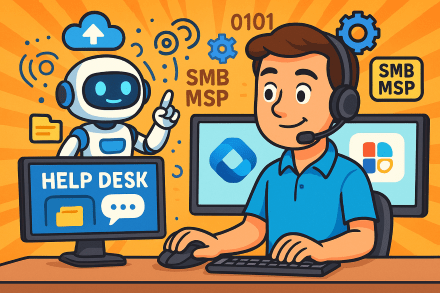
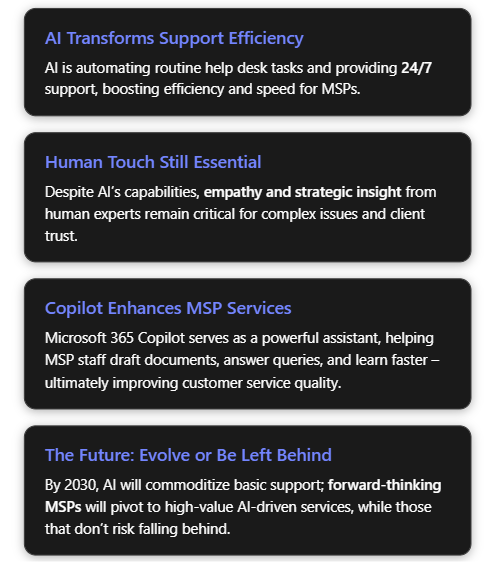
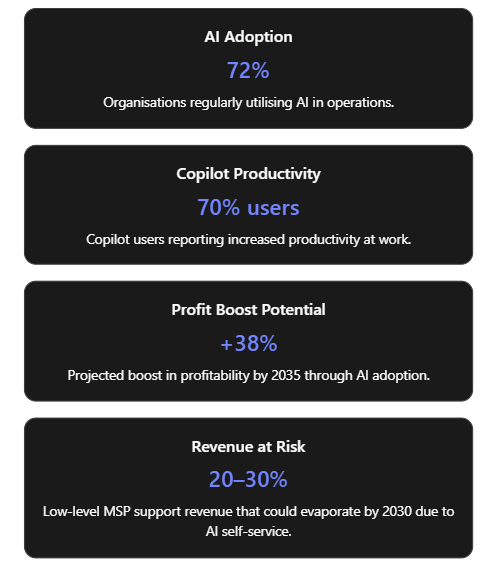
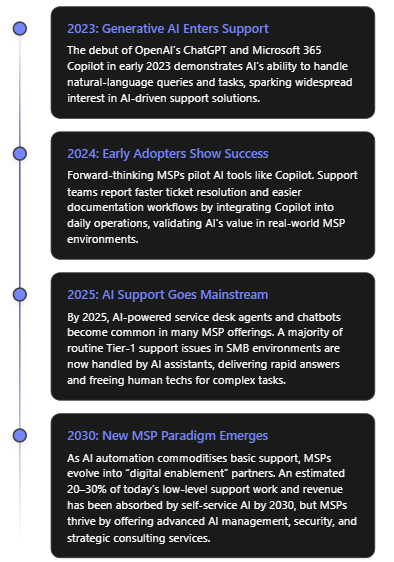
Managed Service Providers (MSPs) serving small-to-medium businesses (SMBs) typically operate help desks that handle IT support requests, from password resets to system troubleshooting. Traditionally, these support desks rely on human technicians available only during business hours, which can mean delays and higher costs. Today, artificial intelligence (AI) is revolutionising this model by introducing intelligent automation and chat-based agents that can work tirelessly around the clock[1][1]. AI-driven service desks leverage machine learning and natural language processing to handle routine tasks (like password resets or basic user queries) with minimal human intervention[1]. This transformation is happening rapidly: as of mid-2020s, an estimated 72% of organisations are regularly utilising AI technologies in their operations[2]. The surge of generative AI (exemplified by OpenAI’s ChatGPT and Microsoft’s Copilot) has shown how AI can converse with users, analyse large data context, and generate content, making it extremely relevant to customer support scenarios.
Microsoft 365 Copilot is one high-profile example of this AI wave. Introduced in early 2023 as an AI assistant across Microsoft’s productivity apps[3], Copilot combines large language models with an organisation’s own data through Microsoft Graph. For MSPs, tools like Copilot represent an opportunity to augment their help desk teams with AI capabilities within the familiar Microsoft 365 environment, ensuring data remains secure and context-specific[4]. In the following sections, we examine the positive and negative impacts of AI on SMB-focused MSP help desks, explore how MSPs can utilise Microsoft 365 Copilot to enhance service delivery, and project the long-term changes AI may bring to MSP support operations.
Positive Impacts of AI on MSP Help Desks
AI is bringing a multitude of benefits to help desk operations for MSPs, especially those serving SMB clients. Below are some of the most significant advantages, with examples:
24/7 Availability and Faster Response: AI-powered virtual agents (chatbots or voice assistants) can handle inquiries at any time, providing immediate responses even outside normal working hours. This round-the-clock coverage ensures no customer request has to wait until the next business day, significantly reducing response times[1]. For example, an AI service desk chatbot can instantly address a password reset request at midnight, whereas a human technician might not see it until morning. The result is improved customer satisfaction due to swift, always-on support[1][1].
Automation of Routine Tasks: AI excels at handling repetitive, well-defined tasks, which frees up human technicians for more complex issues. Tasks like password resets, account unlocks, software installations, and ticket categorisation can be largely automated. An AI service desk can use chatbots with natural language understanding to guide users through common troubleshooting steps and resolve simple requests without human intervention[1][1]. One industry report notes that AI-driven chatbots are now capable of resolving many Level-1 support issues (e.g. password resets or printer glitches) on their own[5]. This automation not only reduces the workload on human staff but also lowers operational costs (since fewer manual labour hours are spent on low-value tasks)[1].
Improved Efficiency and Cost Reduction: By automating the mundane tasks and expediting issue resolution, AI can dramatically increase the efficiency of help desk operations. Routine incidents get resolved faster, and more tickets can be handled concurrently. This efficiency translates to cost savings – MSPs can support more customers without a linear increase in headcount. A 2025 analysis of IT service management tools indicates that incorporating AI (for example, using machine learning to categorise tickets or recommend solutions) can save hundreds of man-hours each month for an MSP’s service team[6][6]. These savings come from faster ticket handling and fewer repetitive manual interventions. In fact, AI’s contribution to productivity is so significant that an Accenture study projected AI technologies could boost profitability in the IT sector by up to 38% by 2035[6], reflecting efficiency gains.
Scalability of Support Operations: AI allows MSP help desks to scale up support capacity quickly without a proportional increase in staff. Because AI agents can handle multiple queries simultaneously and don’t tire, MSPs can on-board new clients or handle surge periods (such as a major incident affecting many users at once) more easily[1]. For instance, if dozens of customers report an email outage at the same time, an AI system could handle all incoming queries in parallel – something a limited human team would struggle with. This scalability ensures service quality remains high even as the customer base grows or during peak demand.
Consistency and Knowledge Retention: AI tools provide consistent answers based on the knowledge they’ve been trained on. They don’t forget procedures or skip troubleshooting steps, which means more uniform service quality. If an AI is integrated with a knowledge base, it will tap the same repository of solutions every time, leading to standardized resolutions. Moreover, modern AI agents can maintain context across a conversation and even across sessions. By 2025, advanced AI service desk agents were capable of keeping track of past interactions with a client, so the customer doesn’t have to repeat information if they come back with a related issue[7]. This contextual continuity makes support interactions smoother and more personalized, even when handled by AI.
Proactive Issue Resolution: AI’s predictive analytics capabilities enable proactive support rather than just reactive. Machine learning models can analyze patterns in system logs and past tickets to predict incidents before they occur. For example, AI can flag that a server’s behavior is trending towards failure or that a certain user’s laptop hard drive shows signs of impending crash, prompting preemptive maintenance. MSPs are leveraging AI to perform predictive health checks – e.g. automatically identifying anomaly patterns that precede network outages or using predictive models to schedule patches at optimal times before any disruption[6][7]. This results in fewer incidents for the help desk to deal with and reduced downtime for customers. AI can also intelligently prioritize tickets that are at risk of violating SLA (service level agreement) times by learning from historical data[6], ensuring critical issues get speedy attention.
Enhanced Customer Experience and Personalisation: Counterintuitively, AI can help deliver a more personalized support experience for clients. By analysing customer data and past interactions, AI systems can tailor responses or suggest solutions that are particularly relevant to that client’s history and environment[7]. For example, an AI might recognize that a certain client frequently has issues with their email system and proactively suggest steps or upgrades to preempt those issues. AI chatbots can also dynamically adjust their language tone and complexity to match the user’s skill level or emotional state. Some advanced service desk AI can detect sentiment – if a user sounds frustrated, the system can route the conversation to a human or respond in a more empathetic tone automatically[1][1]. Multilingual support is another boon: AI agents can fluently support multiple languages, enabling an MSP to serve diverse or global customers without needing native speakers of every language on staff[7]. All these features drive up customer satisfaction, as clients feel their needs are anticipated and understood. Surveys have shown faster service and 24/7 availability via AI lead to higher customer happiness ratings on support interactions[1].
Allowing Human Focus on Complex Tasks: Perhaps the most important benefit is that by offloading simple queries to AI, human support engineers have more bandwidth for complex problem-solving and value-added work. Rather than spending all day on password resets and setting up new accounts, the human team members can focus on high-priority incidents, strategic planning for clients, or learning new technologies. MSP technicians can devote attention to issues that truly require human creativity and expertise (like diagnosing novel problems or providing consulting advice to improve a client’s infrastructure) while the AI handles the “busy work.” This not only improves morale and utilisation of skilled engineers, but it also delivers better outcomes for customers when serious issues arise, because the team isn’t bogged down with minor tasks. As one service desk expert put it, with **AI handling Level-1 tickets, MSPs can redeploy their technicians to activities that more directly **“impact the business”, such as planning IT strategy or digital transformation initiatives for clients[6]. In other words, AI raises the ceiling of what the support team can achieve.
In summary, AI empowers SMB-focused MSPs to provide faster, more efficient, and more consistent support services to their customers. It reduces wait times, solves many problems instantly, and lets the human team shine where they are needed most. Many MSPs report that incorporating AI service desk tools has led to higher customer satisfaction and improved service quality due to these factors[1].
Challenges and Risks of AI in Help Desk Operations
Despite the clear advantages, the integration of AI into help desk operations is not without challenges. It’s important to acknowledge the potential drawbacks, risks, and limitations that come with relying on AI for customer support:
Lack of Empathy and Human Touch: One of the most cited limitations of AI-based support is the absence of genuine empathy. AI lacks emotional intelligence – it cannot truly understand or share human feelings. While AI can be programmed to recognise certain keywords or even tone of voice indicating frustration, its responses may still feel canned or unempathetic. Customers dealing with stressful IT outages or complex problems often value a human who can listen and show understanding. An AI, no matter how advanced, may respond to an angry or anxious customer with overly formal or generic language, missing the mark in addressing the customer’s emotional state[7]. Over-reliance on AI chatbots can lead to customers feeling that the service is impersonal. For example, if a client is upset about recurring issues, an AI might continue to give factual solutions without acknowledging the client’s frustration, potentially aggravating the situation[7][7]. **In short, AI’s inability to *“read between the lines”* or pick up subtle cues can result in a poor customer experience in sensitive scenarios**[7].
Handling of Complex or Novel Issues: AI systems are typically trained on existing data and known problem scenarios. They can struggle when faced with a completely new, unfamiliar problem, or one that requires creative thinking and multidisciplinary knowledge. A human technician might be able to use intuition or past analogies to tackle an odd issue, whereas an AI could be stumped if the problem doesn’t match its training data. Additionally, many complex support issues involve nuanced judgement calls – understanding business impact, making decisions with incomplete information, or balancing multiple factors. AI’s problem-solving is limited to patterns it has seen; it might give incorrect answers (or no answer) if confronted with ambiguity or a need for outside-the-box troubleshooting. This is related to the phenomenon of AI “hallucinations” in generative models, where an AI might produce a confident-sounding but completely incorrect solution if it doesn’t actually know the answer. Without human oversight, such errors could mislead customers. Thus, MSPs must be cautious: AI is a great first-line tool, but complex cases still demand human expertise and critical thinking[1].
Impersonal Interaction & Client Relationship Concerns: While AI can simulate conversation, many clients can tell when they’re dealing with a bot versus a human. For longer-term client relationships (which are crucial in the MSP industry), solely interacting through AI might not build the personal rapport that comes from human interaction. Clients often appreciate knowing there’s a real person who understands their business on the other end. If an MSP over-automates the help desk, some clients might feel alienated or think the MSP is “just treating them like a ticket number.” As noted earlier, AI responses can be correct but impersonal, lacking the warmth or context a human would provide[7]. Over time, this could impact customer loyalty. MSPs thus need to strike a balance – using AI for efficiency while maintaining human touchpoints to nurture client relationships[7].
Potential for Errors and Misinformation: AI systems are not infallible. They might misunderstand a user’s question (especially if phrased unconventionally), or access outdated/incomplete data, leading to wrong answers. If an AI-driven support agent gives an incorrect troubleshooting step, it could potentially make a problem worse (imagine an AI telling a user to run a wrong command that causes data loss). Without a human double-check, these errors could slip through. Moreover, advanced generative AI might sometimes fabricate plausible-sounding answers (hallucinations) that are entirely wrong. Ensuring the AI is thoroughly tested and paired with validation steps (or easy escalation to humans) is critical. Essentially, relying solely on AI without human oversight introduces a risk of incorrect solutions, which could harm customer trust or even violate compliance if the AI gives advice that doesn’t meet regulatory standards.
Data Security and Privacy Risks: AI helpdesk implementations often require feeding customer data, system logs, and issue details into AI models. If not managed carefully, this raises privacy and security concerns. For example, sending sensitive information to an external AI service (like a cloud-based chatbot) could inadvertently expose that data. There have been cautionary tales – such as incidents where employees used public AI tools (e.g., ChatGPT) with confidential data and caused breaches of privacy[4][4]. MSPs must ensure that any AI they use is compliant with data protection regulations and that clients’ data is handled safely (encrypted in transit and at rest, access-controlled, and not retained or used for AI training without consent)[8][8]. Another aspect is ensuring the AI only has access to information it should. In Microsoft 365 Copilot’s case, it respects the organisation’s permission structure[4], but if an MSP used a more generic AI, they must guard against information bleed between clients. AI systems also need constant monitoring for unusual activities or potential vulnerabilities, as malicious actors might attempt to manipulate AI or exploit it to gain information[8][8]. In summary, introducing AI means MSPs have to double-down on cybersecurity and privacy audits around their support tools.
Integration and Technical Compatibility Issues: Deploying AI into an existing MSP environment is not simply “plug-and-play.” Many MSPs manage a heterogeneous mix of client systems, some legacy and some modern. AI tools may struggle to integrate with older software or disparate platforms[7]. For instance, an AI that works great with cloud-based ticket data may not access information from a client’s on-premises legacy database without custom integration. Data might exist in silos (separate systems for ticketing, monitoring, knowledge base, etc.), and connecting all these for the AI to have a full picture can be challenging[7]. MSPs might need to invest significant effort to unify data sources or update infrastructure to be AI-ready. During integration, there could be temporary disruptions or a need to reconfigure workflows, which in the short term can hamper productivity or confuse support staff[7][7]. For smaller MSPs, lacking in-house AI/ML expertise, integrating and maintaining an AI solution can be a notable hurdle, potentially requiring new hires or partnerships.
Over-reliance and Skill Erosion: There is a softer risk as well: if an organisation leans too heavily on AI, their human team might lose opportunities to practice and sharpen their own skills on simpler issues. New support technicians often “learn the ropes” by handling common Level-1 problems and gradually taking on more complex ones. If AI takes all the easy tickets, junior staff might not develop a breadth of experience, which could slow their growth. Additionally, there’s the strategic risk of over-relying on AI for decision-making. AI can provide data-driven recommendations, but it doesn’t understand business strategy or ethics at a high level[7][7]. MSP managers must be careful not to substitute AI outputs for their own judgement, especially in decisions about how to service clients or allocate resources. Important decisions still require human insight – AI might suggest a purely cost-efficient solution, but a human leader will consider client relationships, long-term implications, and ethical aspects that AI would miss[7][7].
Customer Pushback and Change Management: Finally, some end-users simply prefer human interaction. If an MSP suddenly routes all calls to a bot, some customers might react negatively, perceiving it as a downgrade in service quality. There can be a transition period where customers need to be educated on how to use the new AI chatbot or voice menu. Ensuring a smooth handoff to a human agent on request is vital to avoid frustration. MSPs have to manage this change carefully, communicating the benefits of the new system (such as faster answers) while assuring clients that humans are still in the loop and reachable when needed.
In essence, while AI brings remarkable capabilities to help desks, it is not a panacea. The human element remains crucial: to provide empathy, handle exceptions, verify AI outputs, and maintain strategic oversight[7][7]. Many experts stress that the optimal model is a hybrid approach – AI and humans working together, where AI handles the heavy lifting but humans guide the overall service and step in for the nuanced parts[7][7]. MSPs venturing into AI-powered support must invest in training their staff to work alongside AI, update processes for quality control, and maintain open channels for customers to reach real people when necessary. Striking the right balance will mitigate the risks and ensure AI augments rather than alienates.
To summarise the trade-offs, the table below contrasts AI service desks with traditional human support on key factors:
High on well-known issues (follows predefined solutions exactly)[1]
Strong on complex troubleshooting; can adapt when a known solution fails[1]
Personalisation & Empathy
Limited emotional understanding; responses feel robotic if issue is nuanced[1]
Natural empathy and personal touch; can adjust tone and approach to the individual[1]
Scalability
Easily handles many simultaneous requests (no queue for simple issues)[1]
Scalability limited by team size; multiple requests can strain capacity
Cost
Lower marginal cost per ticket (after implementation)[1]
Higher ongoing cost (salaries, training for staff)[1]
Table: AI vs Human Support – Both have strengths; best results often come from combining them.
Using Microsoft 365 Copilot in an SMB MSP Environment
Microsoft 365 Copilot is a cutting-edge AI assistant that MSPs can leverage internally to enhance help desk and support operations. Copilot integrates with tools like Teams, Outlook, Word, PowerPoint, and more – common applications that MSP staff use daily – and supercharges them with AI capabilities. Here are several ways an SMB-focused MSP can use M365 Copilot to take advantage of AI and provide better customer service:
Real-time assistance during support calls (Teams Copilot): Copilot in Microsoft Teams can act as a real-time aide for support engineers. For example, during a live call or chat with a customer, a support agent can ask Copilot in Teams contextual questions to get information or troubleshooting steps without leaving the conversation. One MSP Head-of-Support shared that “Copilot in Teams can answer specific questions about a call with a user… providing relevant information and suggestions during or after the call”, saving the team time they’d otherwise spend searching manuals or past tickets[9]. The agent can even ask Copilot to summarize what was discussed in a meeting or call, and it will pull the key details for reference. This means the technician stays focused on the customer instead of frantically flipping through knowledge base articles. The information Copilot provides can be directly added to ticket notes, making documentation faster and more accurate[9]. Ultimately, this leads to quicker resolutions and more thorough records of what was done to fix an issue.
Faster documentation and knowledge base creation (Word Copilot): Documentation is a big part of MSP support – writing up how-to guides, knowledge base articles, and incident reports. Copilot in Word helps by drafting and editing documentation alongside the engineer. Support staff can simply prompt Copilot, e.g., “Draft a knowledge base article on how to connect to the new VPN,” and Copilot will generate a first draft by pulling relevant info from existing SharePoint files or previous emails[3][3]. In one use case, an MSP team uses Copilot to create and update technical docs like user guides and policy documents; it “helps us write faster, better, and more consistently, by suggesting improvements and corrections”[9]. Copilot ensures the writing is clear and grammatically sound, and it can even check for company-specific terminology consistency. It also speeds up reviews by highlighting errors or inconsistencies and proposing fixes[9]. The result is up-to-date documentation produced in a fraction of the time it used to take, which means customers and junior staff have access to current, high-quality guidance sooner.
Streamlining employee training and support tutorials (PowerPoint Copilot): Training new support staff or educating end-users often involves creating presentations or guides. Copilot in PowerPoint can transform written instructions or outlines into slide decks complete with suggested images and formatting. An MSP support team described using Copilot in PowerPoint to auto-generate training slides for common troubleshooting procedures[9]. They would input the steps or a rough outline of resolving a certain issue, and Copilot would produce a coherent slide deck with graphics, which they could then fine-tune. Copilot even fetches appropriate stock images based on content to make slides more engaging[9], eliminating the need to manually search for visuals. This capability lets the MSP rapidly produce professional training materials or client-facing “how-to” guides. For example, after deploying a new software for a client, the MSP could quickly whip up an end-user training presentation with Copilot’s help, ensuring the client’s staff can get up to speed faster.
Accelerating research and problem-solving (Edge Copilot): Often, support engineers need to research unfamiliar problems or learn about a new technology. Copilot in Microsoft Edge (the browser) can serve as a research assistant by providing contextual web answers and learning resources. Instead of doing a generic web search and sifting through results, a tech can ask Copilot in Edge something like, “How do I resolve error code X in Windows 11?” and get a distilled answer or relevant documentation links right away[9]. Copilot in Edge was noted to “provide the most relevant and reliable information from trusted sources…almost replacing Google search” for one MSP’s technical team[9]. It can also suggest useful tutorials or forums to visit for deeper learning. This reduces the time spent hunting for solutions online and helps the support team solve issues faster. It’s especially useful for SMB MSPs who cover a broad range of technologies with lean teams – Copilot extends their knowledge by quickly tapping into the vast information on the web.
Enhancing customer communications (Outlook Copilot & Teams Chat): Communications with customers – whether updates on an issue, reports, or even drafting an outage notification – can be improved with Copilot. In Outlook, Copilot can summarize long email threads and draft responses. Imagine an MSP engineer inherits a complex email chain about a persistent problem; Copilot can summarize what has been discussed, highlight the different viewpoints or concerns from each person, and even point out unanswered questions[3]. This allows the engineer to grasp the situation quickly without reading every email in detail. Then, the engineer can ask Copilot to draft a reply email that addresses those points – for instance, “write a response thanking the client for their patience and summarizing the next steps we will take to fix the issue.” Copilot will generate a polished, professional email in seconds, which the engineer can review and send[3]. This is a huge time-saver and ensures communication is clear and well-formulated. In Microsoft Teams chats, Business Chat (Copilot Chat) can pull together data from multiple sources to answer a question or produce an update. An MSP manager could ask, “Copilot, generate a brief status update for Client X’s network outage yesterday,” and it could gather info from the technician’s notes, the outage Teams thread, and the incident ticket to produce a cohesive update message for the client. By using Copilot for these tasks, MSPs can respond to clients more quickly and with well-structured communications, improving professionalism and client confidence in the support they receive[3][3].
Knowledge integration and context: Because Microsoft 365 Copilot works within the MSP’s tenant and on top of its data (documents, emails, calendars, tickets, etc.), it can connect dots that might be missed otherwise. For example, if a customer asks, “Have we dealt with this printer issue before?”, an engineer could query Business Chat, which might pull evidence from a past meeting note, a SharePoint document with troubleshooting steps, and a previous ticket log, all summarized in one answer[3][3]. This kind of integrated insight is incredibly valuable for institutional knowledge – the MSP effectively gains an AI that knows all the past projects and can surface the right info on demand. It means faster resolution and demonstrating to customers that “institutional memory” (even as staff come and go) is retained.
Overall, Microsoft 365 Copilot acts as a force-multiplier for MSP support teams. It doesn’t replace the engineers, but rather augments their abilities – handling the grunt work of drafting, searching, and summarising so that the human experts can focus on decision-making and problem-solving. By using Copilot internally, an MSP can deliver answers and solutions to customers more quickly, with communications that are well-crafted and documentation that is up-to-date. It also helps train and onboard new team members, as Copilot can quickly bring them up to speed on procedures and past knowledge.
From the customer’s perspective, the use of Copilot by their MSP translates to better service: faster turnaround on tickets, more thorough documentation provided for solutions, and generally a more proactive support approach. For example, customers might start receiving helpful self-service guides or troubleshooting steps that the MSP created in half the time using Copilot – so issues get resolved with fewer back-and-forth interactions.
It’s important to note that Copilot operates within the Microsoft 365 security and compliance framework, meaning data stays within the tenant’s boundaries. This addresses some of the privacy concerns of using AI in support. Unlike generic AI tools, Copilot will only show content that the MSP and its users have permission to access[4]. This feature is crucial when dealing with multiple client data sets and sensitive information; it ensures that leveraging AI does not inadvertently leak information between contexts.
In conclusion, adopting Microsoft 365 Copilot allows an SMB MSP to ride the AI wave in a controlled, enterprise-friendly manner. It directly boosts the productivity of the support team and helps standardise best practices across the organisation. As AI becomes a bigger part of daily work, tools like Copilot give MSPs a head start in using these capabilities to benefit their customers, without having to build an AI from scratch.
Long-Term Outlook: The Future of MSP Support in the AI Era
Looking ahead, the influence of AI on MSP-provided support is only expected to grow. Industry observers predict significant changes in how MSPs operate over the next 5–10 years as AI technologies mature. Here are some key projections for the longer-term impact of AI on MSPs and their help desks:
Commoditisation of Basic Services: Over the long term, many basic IT support services are likely to become commoditised or bundled into software. For instance, routine monitoring, patch management, and straightforward troubleshooting might be almost entirely automated by AI systems. Microsoft and other vendors are increasingly building AI “co-pilots” directly into their products (as indicated by features rolling out in tools by 2025), allowing end-users to self-serve solutions that once required an MSP’s intervention[5][5]. As a result, MSPs may find that the traditional revenue from things like alert monitoring or simple ticket resolution diminishes. In fact, experts predict that by 2030, about a quarter of the current low-complexity ticket volume will vanish – either resolved automatically by AI or handled by intuitive user-facing AI assistants[5]. This means MSPs must prepare for possible pressure on the classic “all-you-can-eat” support contracts, as clients question paying for tasks that AI can do cheaply[5]. We may see pricing models shift from per-seat or per-ticket to outcome-based agreements where the focus is on uptime and results (with AI silently doing much of the work in the background)[5].
New High-Value Services and Roles: On the flip side, AI will open entirely new service opportunities for MSPs who adapt. Just as some revenue streams shrink, others will grow or emerge. Key areas poised for expansion include:
AI Oversight and Management: Businesses will need help deploying, tuning, and governing AI systems. MSPs can provide services like training AI on custom data, monitoring AI performance, and ensuring compliance (preventing biased outcomes or data leakage). One new role mentioned is managing “prompt engineering” and data quality to avoid AI errors like hallucinations[5]. MSPs could bundle services to regularly check AI outputs, update the knowledge base the AI draws from, and keep the AI models secure and up-to-date.
AI-Enhanced Security Services: The cybersecurity landscape is escalating as both attackers and defenders leverage AI. MSPs can develop AI-driven security operation center (SOC) services, using advanced AI to detect anomalies and respond to threats faster than any human could[5]. Conversely, they must counter AI-empowered cyber attacks. This arms race creates demand for MSP-led managed security services (like “MDR 2.0” – Managed Detection & Response with AI) that incorporate AI tools to protect clients[5]. Many MSPs are already exploring such offerings as a higher-margin, value-add service.
Strategic AI Consulting: As AI pervades business processes, clients (especially SMBs) will turn to their MSPs for guidance on how to integrate AI into their operations. MSPs can evolve into consultants for AI adoption, advising on the right AI tools, data strategies, and process changes for each client. They might conduct AI readiness assessments and help implement AI in areas beyond IT support – such as in analytics or workflow automation – effectively becoming a “virtual CIO for AI” for small businesses[5][5].
Data Engineering and Integration: With AI’s hunger for data, MSPs might offer services to clean, organise, and integrate client data so that AI systems perform well. For instance, consolidating a client’s disparate databases and migrating data to cloud platforms where AI can access it. This ensures the client’s AI (or Copilot-like systems) have high-quality data to work with, improving outcomes[2]. It’s a natural extension of the MSP’s role in managing infrastructure and could become a significant service line (data pipelines, data lakes, etc., managed for SMBs).
Industry-specific AI Solutions: MSPs might develop expertise in specific verticals (e.g., healthcare, legal, manufacturing) and provide custom AI solutions tuned to those domains[5]. For example, an MSP could offer an AI toolset for medical offices that assists with compliance (HIPAA) and automates patient IT support with knowledge of healthcare workflows. These niche AI services could command premium prices and differentiate MSPs in the market.
Evolution of MSP Workforce Skills: The skill profile of MSP staff will evolve. The level-1 help desk role may largely transform into an AI-supported custodian role, where instead of manually doing the work, the technician monitors AI outputs and handles exceptions. There will be greater demand for skills in AI and data analytics. We’ll see MSPs investing in training their people on AI administration, scripting/automation, and interpreting AI-driven insights. Some positions might shift from pure technical troubleshooting to roles like “Automation Specialist” or “AI Systems Analyst.” At the same time, soft skills (like client relationship management) become even more important for humans since they’ll often be stepping in primarily for the complex or sensitive interactions. MSPs that encourage their staff to upskill in AI will stay ahead. As one playbook suggests, MSPs should “upskill NOC engineers in Python, MLOps, and prompt-engineering” to thrive in the coming years[5].
Business Model and Competitive Landscape Changes: AI may lower the barrier for some IT services, meaning MSPs face new competition (for example, a product vendor might bundle AI support directly, or a client might rely on a generic AI service instead of calling the MSP for minor issues). To stay competitive, MSPs will likely transition from being pure “IT fixers” to become more like a partner in continuous improvement for clients’ technology. Contracts might include AI as part of the service – for example, MSPs offering a proprietary AI helpdesk portal to clients as a selling point. The overall managed services market might actually expand as even very small businesses can afford AI-augmented support (increasing the TAM – total addressable market)[5]. Rather than needing a large IT team, a five-person company could engage an MSP that uses AI to give them enterprise-grade support experience. So there’s a scenario where AI helps MSPs scale down-market to micro businesses and also up-market by handling more endpoints per engineer than before. Analysts foresee that MSPs could morph into “Managed Digital Enablement Providers”, focusing not just on keeping the lights on, but on actively enabling new tech capabilities (like AI) for clients[5]. The MSPs who embrace this and market themselves as such will stand out.
MSPs remain indispensable (if they adapt): A looming question is whether AI will eventually make MSPs obsolete, as some pessimists suggest. However, the consensus in the industry is that MSPs will continue to play a critical role, but it will be a changed role. AI is a tool – a powerful one – but it still requires configuration, oversight, and alignment with business goals. MSPs are perfectly positioned to fill that need for their clients. The human element – strategic planning, empathy, complex integration, and handling novel challenges – will keep MSPs relevant. In fact, AI could make MSPs more valuable by enabling them to deliver higher-level outcomes. Those MSPs that fail to incorporate AI may find themselves undercut on price and losing clients to more efficient competitors, akin to “the taxi fleet in the age of Uber” – still around but losing ground[5]. On the other hand, those that invest in AI capabilities can differentiate and potentially command higher margins (e.g., an MSP known for its advanced AI-based services can justify premium pricing and will be attractive to investors as well)[5]. Already, by 2025, MSP industry experts note that buyers looking to acquire or partner with MSPs ask about their AI adoption plan – no strategy often leads to a devaluation, whereas a clear AI roadmap is seen as a sign of an innovative, future-proof MSP[5][5].
In summary, the long-term impact of AI on MSP support is a shift in the MSP value proposition rather than a demise. Routine support chores will increasingly be handled by AI, which is “the new normal” of service delivery. Simultaneously, MSPs will gravitate towards roles of AI enablers, advisors, and security guardians for their clients. By embracing this evolution, MSPs can actually improve their service quality and deepen client relationships – using AI not as a competitor, but as a powerful ally. The MSP of the future might spend less time resetting passwords and more time advising a client’s executive team on technology strategy with AI-generated insights. Those who adapt early will likely lead the market, while those slow to change may struggle.
Ultimately, AI is a force-multiplier, not a wholesale replacement for managed services[5]. The most successful MSPs will be the ones that figure out how to blend AI with human expertise, providing a seamless, efficient service that still feels personal and trustworthy. As we move toward 2030 and beyond, an MSP’s ability to harness AI – for their own operations and for their clients’ benefit – will be a key determinant of their success in the industry.
If you found this valuable, the I’d appreciate a ‘like’ or perhaps a donation at https://ko-fi.com/ciaops. This helps me know that people enjoy what I have created and provides resources to allow me to create more content. If you have any feedback or suggestions around this, I’m all ears. You can also find me via email director@ciaops.com and on X (Twitter) at https://www.twitter.com/directorcia.
If you want to be part of a dedicated Microsoft Cloud community with information and interactions daily, then consider becoming a CIAOPS Patron – www.ciaopspatron.com.
In this episode of the CIAOPS “Need to Know” podcast, we dive into the latest updates across Microsoft 365, GitHub Copilot, and SMB-focused strategies for scaling IT services. From new Teams features to deep dives into DLP alerts and co-partnering models for MSPs, this episode is packed with insights for IT professionals and small business tech leaders looking to stay ahead of the curve. I also take a look at building an agent to help you work with frameworks like the ASD Blueprint for Secure Cloud.
If you found this valuable, the I’d appreciate a ‘like’ or perhaps a donation at https://ko-fi.com/ciaops. This helps me know that people enjoy what I have created and provides resources to allow me to create more content. If you have any feedback or suggestions around this, I’m all ears. You can also find me via email director@ciaops.com and on X (Twitter) at https://www.twitter.com/directorcia.
If you want to be part of a dedicated Microsoft Cloud community with information and interactions daily, then consider becoming a CIAOPS Patron – www.ciaopspatron.com.



 CIAOPS