Getting an early look

image

With things changing so fast these days it is important to keep ahead of the curve, especially if your job is to manage IT for an organisation. Office 365 makes this process pretty simple.

If you want to get access to the latest desktop software firstly login to your Office 365 tenant as an administrator. Then navigate to the Admin center as shown above. In the top right of the dashboard you should see a section Office software.

image

Inside the Office software section you will find an option, Software download settings, which you should select.

image

This will now show you a number of software options as shown above.

image

If you scroll down a bit you should find the option about when to get the latest features. Here you can select Current or Deferred channel as shown above. To get the latest software select Every month (Current channel) and save the changes.

image

You’ll then need to head back to the Admin center and do a search for First Release which is in the Organization profile area as shown above. Ensure that you enable the appropriate users for First Release and save any changes. For more information on First Release see:

Set up the Standard or First Release options in Office 365

image

First Release users should now see, when they install the desktop software and look in File | Account as shown above, that they are now on the Office Insider program.

For more information see these links:

Be an Office Insider

How Office 365 commercial customers can get early access to new Office 2016 features

Overview of update channels for Office 365 ProPlus

Version and build numbers of update channel releases for Office 365 clients

Office 365 client update channel releases

CIAOPS Need to know Webinar–April 2017

laptop-eyes-technology-computer

Time for our April webinar! This month’s free webinar will feature the usual cloud updates and news along with open Q & A but also a look at Microsoft Staffhub that is now part of Office 365 and allows you to do basic rostering. I’ll show you the product and how it integrates into the Office 365 ecosystem.

You can register now for free at:

April Webinar Registration

The details are:

CIAOPS Need to Know Webinar – April 2017
Thursday 20th of April 2017
11am – 12am Sydney Time

All sessions are recorded and posted to the CIAOPS Academy.

There of course will also be open Q and A so make sure you bring your questions for me and I’ll do my best to answer them.

The CIAOPS Need to Know Webinars are free to attend but if you want to receive the recording of the session you need to sign up as a CIAOPS patron (for only USD$10 per month) which you can do here:

https://www.patreon.com/ciaops

or purchase them individually at:

http://www.ciaopsacademy.com/

Also feel free at any stage to email me directly via director@ciaops.com with your webinar topic suggestions.

I’d also appreciate you sharing information about this webinar with anyone you feel may benefit from the session.

Need to Know Podcast–Episode 147

We speak with a few Microsoft Community Regional Directors whom we caught up with at a recent MVP event in Sydney. On this show you’ll hear from Troy Hunt, Adam Coogan and Greg Low and their thoughts about what’s been happening at Microsoft over the past 12 months. Some great insights from some of the leaders in Microsoft technologies today. You’ll also get a behind the scenes peek about this podcast as Marc and I speak about the presentation we gave to MVPs about this very podcast and how it all happens.

Take a listen and let us know what you think –feedback@needtoknow.cloud

You can listen to this episode directly at:

https://ciaops.podbean.com/e/episode-147-mvp-community-event/

or on Soundcloud here:

Resources

@marckean

@directorcia

@troyhunt

@adamcogan

@greglow

This show is brought to you by:

https://cpem.io/tJ01Hzu2k.js

The power of uservoice

No software product is perfect. There are always features that can be added. There are always improvements that should be included. The problem has always been, how to make the developers aware of these? From the developers side, the problem has been, ok, we could add this feature but really, how many people will actually use it? Enter Uservoice.

Microsoft uses this system to allow for feedback and suggestions on their products, especially Office 365. You simply do a search for ‘uservoice’ and the product you are interested in, say ‘teams’. Thus, searching for ‘uservoice teams” will take you here:

https://microsoftteams.uservoice.com/forums/555103-public

Here you can view all the suggestions people have made about improving the product. You can also vote on which improvements you’d personally like to see. The more votes a specific feature gets the more resources Microsoft can devote to make it a reality.

Uservoice provides a really great for both users and vendors to understand what features and improvements are the most critical for a product.

image

Case in point. I recent wrote a post about some of the administration challenges around Microsoft Teams:

Compliance challenges of Microsoft Teams

but what I also did was go onto the Uservoice for Microsoft Teams and log a suggestion as you can see above. I then let others know and asked them to go and vote up this suggestion.

As you can see, that suggestion has been seen and responded to by Microsoft and we will hopefully see the ability to restore a deleted Microsoft Team very shortly. The system works!

Too many times I hear people complaining about products. I then ask them whether they have taken the time to let the supplier know. Most never do. So how’s the product ever going to improve if you don’t take the time to provide feedback? Thanks to Uservoice this is now really, really simple way to provide feedback for all Office 365 products.

I’d therefore encourage you to take a look at Uservoice for Office 365 products (just search for the Uservoice for each product) and vote up suggestions you’d like to see as well as make you own suggestions. You can help make a better product by providing feedback and as you can see, Microsoft is listening.

Need to Know Podcast–Episode 146

We try some different things in this podcast. Firstly, our normal news segment we do from a local cafe. This means you’ll get the full experience of outside dining plus all the latest Office 365 and Azure news. Our content piece this week is from a live presentation I gave to a number of resellers on how different the world is today from what many believe.

Take a listen and let us know what you think – feedback@needtoknow.cloud

You can listen to this episode directly at:

https://ciaops.podbean.com/e/episode-146-al-fresco/

or on Soundcloud here:

Subscribe via iTunes at:

https://itunes.apple.com/au/podcast/ciaops-need-to-know-podcasts/id406891445?mt=2

The podcast is also available on Stitcher at:

http://www.stitcher.com/podcast/ciaops/need-to-know-podcast?refid=stpr

Don’t forget to give the show a rating as well as send us any feedback or suggestions you may have for the show.

Resources

@marckean

@directorcia

Azure news from Marc

Microsoft Teams now available in Education

Compliance challenges of Microsoft Teams

New Office 365 MVA course

Web SSO Portal Evernote set up tutorial

Office 365 video now supports Kiosk plans as view only

How SMB resellers can transform their business

Azure Logic Apps

Don’t say “can’t” when you mean “won’t”

image

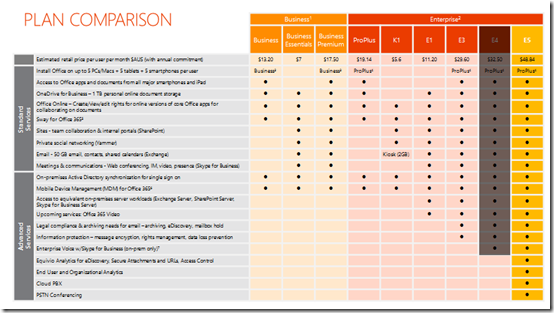
When I present the Office 365 opportunity to IT resellers I typically show them the above slide which provides an overview of the major Office 365 suites and services that they contain.

I them ask them what is the most typical Office 365 suite they sell and is sold in overall in SMB. The answers is generally always Office 365 Business Premium. I then ask why that is? The response is that it is the cheapest way to get hosted email and the latest version of Office applications on the desktop.

I then suggest that instead of Business Premium they should be focused on only presenting the top of the range suite, E5, to all their customers as the starting point of any discussions about Office 365. It is at this point that I am greeted with the complete range of negative responses, from incredulity to outright hostility. At least I have you attention eh?

When pushed, most resellers retort that their customers “would never” pay for E5 over Business Premium. The reason sighted for that is purely based on price. My response is that ANYTIME you get push back from customers in regards to the price of a product, including Office 365 E5, it is because the seller has failed. They have failed to show the customer the value the E5 suite holds.

You then typically hear how resellers “know” their customers will never pay the extra for the E5 suite. Are you sure about that or just making assumptions based on your own prejudices? People will only ask for what they know, if they don’t know there is something better they won’t for it will they now? They haven’t been educated in what the full range of Office 365 plans offers so how will they “know” to ask for things like unlimited inboxes, unlimited personal file storage, legal hold, information rights management, customer lockbox, etc., etc.?. It’s not the customer’s job to know the product range and details, that’s the role the reseller should play.

So, the reason customers aren’t asking for the E5 suite is probably because they don’t even know that it exists or what it includes. Again, the responsibility falls to the reseller not to “guess” what the customer wants but to “show” them the what’s available and how different options may suit their needs. Showing them may in fact open their minds to opportunities in their business. It may show them how to solves a challenge or concern in their business today. But how the hell will they ever see that if it isn’t shown to them? They are being deprived of choice because a reseller “thinks” they understand what their customers want.

However, on the other hand, being able to demonstrate the benefits of the E5 plans means the reseller has to actually invest the time and firstly learn what the plan includes and then how those options help solve business needs. “Oh, I can’t do that”, is the typical response, “I don’t have enough time to dig into that” or “I don’t know where the information for that would be” or a variety of other lame excuses.

It comes down to saying “can’t” when you really mean “won’t”. It means you “won’t” tell customers about the value Office 365 E5 provides because you don’t know it yourself. It means that you “won’t” because you aren’t prepared to invest the time to learn about the benefits the E5 provides. It means you “won’t” try doing something different. It means you “won’t” focus on value rather than price. It means you “won’t” help give your customers the best solutions for their business. It means you “won’t” because you don’t want to invest the proposal process.

What do resellers have to lose by focusing on E5 and presenting this to customers? If you learn about E5 you learn the full suite of Office 365 services because every other suite is simply a subset of this one. E5 provides over twice the number of services that Business Premium provides. That means additional services you can enable, configure and bill for as a reseller.

Another benefit of focusing on E5 for customers is that if you have your business value proposals down and the majority of customers agree with you and go E5, but that one customer doesn’t. It might be an indication that that customer is focused more on price than on value. That means they are always going to be beating you down on the price of everything. Do you really want those sort of customers or the ones who see the value and are excited for you to enable everything E5 provides for them? I know what I’d be doing if faced with that decision.

Finally, by focusing on the right hand side of the above list of suites, you have a first fall back from E5 being E3 which still provides a HUGE amount of value and opportunity for customers and resellers. Why start trying to sell from the cheapest option? Pushing uphill than down is much harder in my experience. A much better approach is to educate customers on the full features set and help them understand the value. If you only show them the cheapest option, you are doing them a complete disservice as their technology provides and should hang your head in shame.

Everything I hear the phrase “I can’t sell anything but Office 365 Business Premium” I know that it typically really means “I won’t sell anything but Office 365 Business Premium because I have a closed mind set”. If you open your mind, invest in some deliberate learning around what the full suite Office 365 provides and develop business value scenarios, then have the courage to step outside your normal “won’t” mentality,  you may be surprised to find out what customers actually will buy!

If you focus solely on price, then that is how people see you as well. But if you focus on value ,you’ll graduate to a completely different level where price isn’t part of the equation.

More free training from CIAOPS

lecture-series

image

I’ve just added four more lessons to my free cloud training at:

CIAOPS Cloud Lecture Series

In there you’ll now find over 25 individual lessons on not only technical topics like Office 365 and Azure but you’ll also find information about building a successful cloud business. I cover a lots of the techniques I use and what you should also be using if you are a IT reseller focused on the Microsoft Cloud.

These are recorded sessions I have conducted live and now posted up for anyone to take advantage of. The ones that I have just added include:

– Office 365 adoption tool

– Selling Office 365 Azure options

– Marketing approaches

– How to demo Office 365

All the lesson materials can be downloaded for you to view at your own leisure without the need of an Internet connection.

Stay tuned for more free lessons soon.

Need to Know Podcast–Episode 145

Just news this week, no guest. We’ll bring you up to date with the latest happenings from the Microsoft Cloud around Azure and Office 365.

Don’t forget to send us your feedback at feedback@needtoknow.cloud

You can listen to this episode directly at:

https://ciaops.podbean.com/e/episode-145-cloud-news/

or on Soundcloud here:

Subscribe via iTunes at:

https://itunes.apple.com/au/podcast/ciaops-need-to-know-podcasts/id406891445?mt=2

The podcast is also available on Stitcher at:

http://www.stitcher.com/podcast/ciaops/need-to-know-podcast?refid=stpr

Don’t forget to give the show a rating as well as send us any feedback or suggestions you may have for the show.

Resources

@marckean

@directorcia

Azure bootcamps

Script to download Australian Ignite sessions

Azure news from Marc

Success with Microsoft Teams

Microsoft Teams rolls out worldwide

Get started with Azure machine learning

The modern way of collaborating using Microsoft Teams