
Live summary of major Microsoft 365 outages for MSPs and IT administrators, maintained by CIAOPS. Updated automatically from Microsoft’s service status page, @MSFT365Status on X and Downdetector Australia. Times are Sydney time (AEDT).
Last updated: 3:31 pm AEDT, Friday 13 November 2026
Microsoft 365 service incident – Users unable to connect to multiple Microsoft 365 services – Service degradation – update 3:22 pm AEDT, Fri 13 Nov 2026
Status
- Active, mixed: Microsoft sees partial recovery in regions where it has applied traffic adjustments, but it is not sustained. Microsoft classes it as a service degradation.
Impact
Users may be unable to connect to:
- Exchange Online, Microsoft Teams, SharePoint Online
- Microsoft 365 Copilot, Planner, To Do
- Microsoft Intune, Defender XDR, Defender for Office 365
- Microsoft Purview (authorisation, auto-labelling, DLP, communication compliance, data classification)
- Power BI: export of reports with sensitivity labels to PDF may fail intermittently
- Microsoft 365 Apps admin center (Cloud Update, Cloud Policy, Inventory)
- Universal Print: errors submitting print jobs and using admin features
- Windows 365: Cloud PCs that use Purview Customer Key may not connect
What Microsoft is doing
Microsoft is continuing to improve server stability and traffic flow by adjusting traffic protocols, redistributing traffic and applying strategic traffic blocking. It is seeing partial recovery in regions where these adjustments were applied, but the recovery is not sustained, so it is reviewing what additional actions can improve overall infrastructure stability. Earlier it identified the cause as a process on affected servers that establishes secure connections becoming overwhelmed.
Timeline (AEDT)
- About 5:00 am: user reports start rising on Downdetector AU
- 8:01 am: Microsoft’s first status post
- 10:06 am: some servers back in service and partial recovery in some regions
- 11:08 am: setback, as servers returned to service stopped responding again under load
- 12:06 pm: root cause identified (secure-connection process overloaded); configuration fix being validated, network change being reverted, traffic limits now in effect
- 12:50 pm: positive results from restarting affected infrastructure; being monitored for stability before remediation is expanded
- 1:14 pm: capacity improvements applied as regions come back online
- 2:07 pm: setback, capacity change not taking effect as expected; alternate capacity workstreams being identified
- 2:37 pm: Microsoft reviewing traffic flows and routing to optimise it
- 3:11 pm: same status, plus confirmation of no indication of malicious activity
- 3:22 pm: partial recovery in regions where traffic adjustments were applied, but not sustained; further actions being reviewed
- Next Microsoft update due by 4:00 pm
Independent signals
- Downdetector AU (user-reported, so a rough guide only): reports show problems with Microsoft 365, Outlook and Teams, and possible problems with OneDrive. Recent comments still report outages and none report recovery.
- @MSFT365Status on X: no new information beyond the status page. Incident numbers EX1550543 and MO1550821 were noted earlier.
Admin actions
- Track EX1550543 and MO1550821 under Health > Service health in the Microsoft 365 admin center.
- This is a Microsoft-side fault. Don’t reset passwords, rebuild profiles, reinstall Office or change tenant settings to try to fix it.
- Tell users that Outlook, Teams and SharePoint access may come and go, and to save work locally where they can.
- Expect recovery to be gradual as apps reconnect. Users may need to restart Outlook or Teams once services are stable.
- If you rely on Intune, Defender or Purview policies, expect delays in policy updates and alerts during the outage.
Downdetector Australia charts
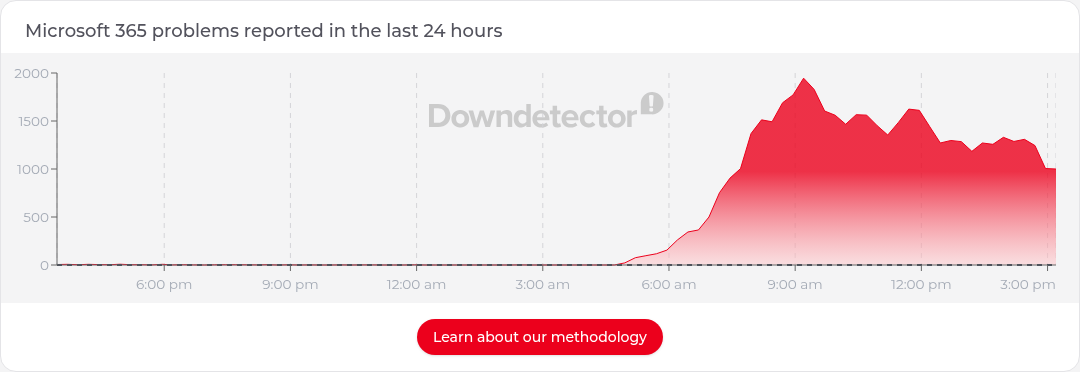
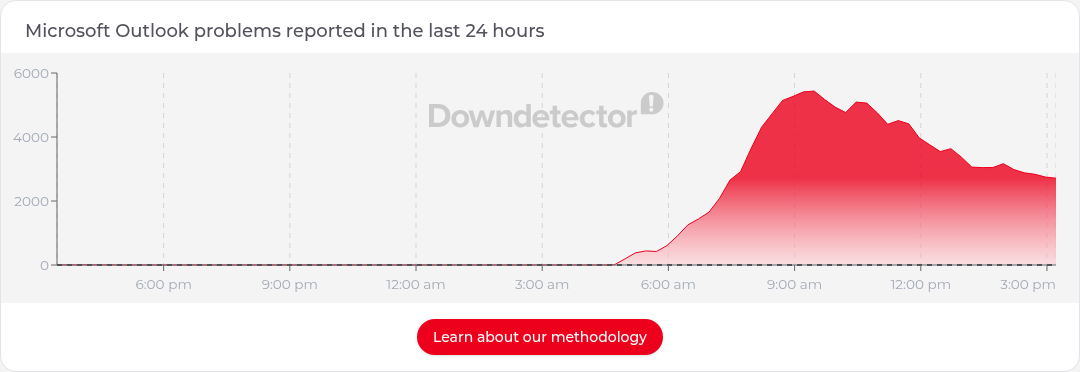
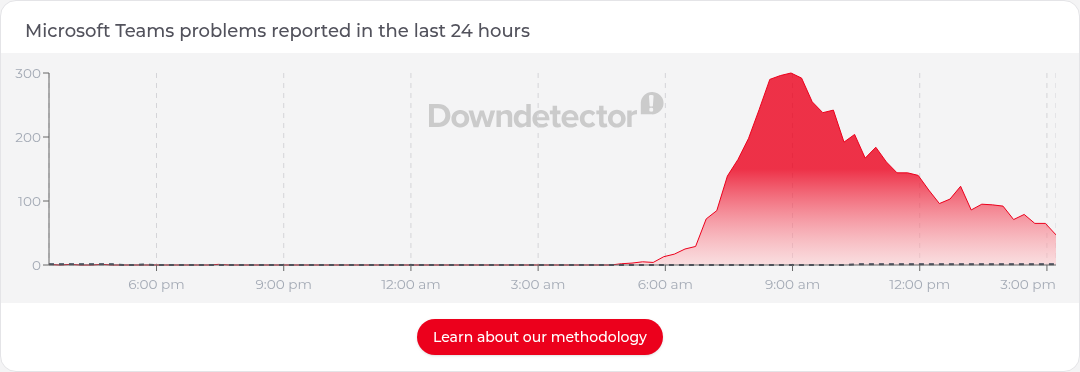
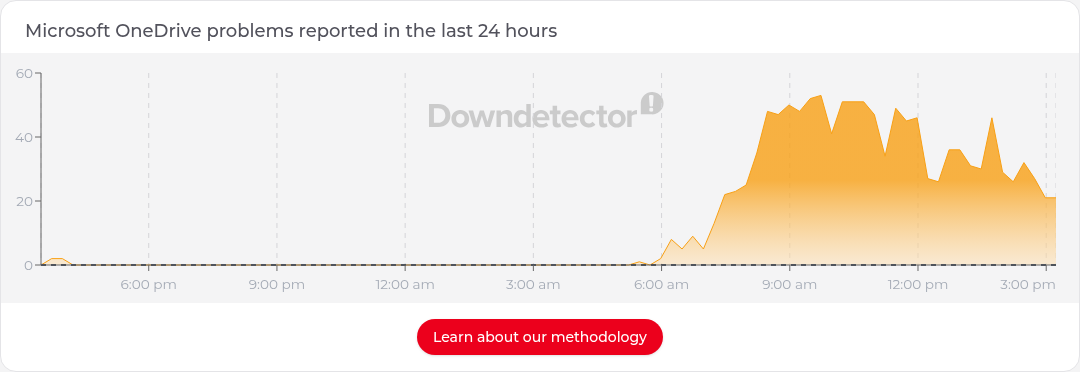
Sources
Downdetector data is user-reported and indicative only. Always confirm in your own tenant’s Service health in the Microsoft 365 admin center.

