OneDrive for Business admin console rolling out

image

Microsoft has commenced the roll out of a dedicated OneDrive for Business administration console as you can see above. You can read more details about this here:

New OneDrive Admin Center Preview

image

To access the new console you’ll need to have set your Office 365 tenant to first release and then visit:

http://admin.onedrive.com

As you can see from the screen shots here the console is currently divided into a number of menu options.

The Sharing option allows you control who outside your tenant can receive shared files.

image

I like the option here that allows an administrator to set options such as how long anonymous links remain.

image

The Sync option controls the sync client.

image

The Storage allows you to manage the default storage allocated to each user along with the retention time of deleted user’s OneDrive information.

image

The Device Access tab allows you to control access based on network location as well as controlling OneDrive policies on the mobile devices.

image

At the bottom you’ll also find the option to control how long data is retained when a device is offline.

image

The final tab allows you to control the Compliance of OneDrive for Business.

This new admin center for OneDrive for Business is still in preview but we expect to see more and more options become available with the eventual integration into the existing Office 365 admin center.

If you have Office 365 first release enabled, go and take a look!

December Webinar Resources

https://docs.com/d/embed/D25192052-8876-6203-9880-001902666907%7eMd4186d87-61d5-259a-4d26-00a8bd86cfff

We’re all done now for 2016. Another great turn out for the webinar, the slides from which you can view above or download via:

December 2016 Need to Know Webinar

If you are not a CIAOPS patron you want to view or download a full copy of the video from the session you can do so here:

http://ciaops-academy.teachable.com/p/december-2016-need-to-know-webinar

you can also now get access to all webinars via:

http://ciaops-academy.teachable.com/courses/need-to-know-webinars

for a nominal fee.

Thanks to all attendees in 2016. I’m looking to continue these free monthly webinars in 2017 so stay tuned for the sign up to the next event in January.

Need to Know Podcast–Episode 122

Marc and I run through all the latest cloud news in the wind down to the holiday season. Still plenty of things happening, especially around Azure so listen in for the latest.

You can listen to this episode directly at:

http://ciaops.podbean.com/e/episode-122-cloud-news/

or subscribe via iTunes at:

https://itunes.apple.com/au/podcast/ciaops-need-to-know-podcasts/id406891445?mt=2

The podcast is also available on Stitcher at:

http://www.stitcher.com/podcast/ciaops/need-to-know-podcast?refid=stpr

Don’t forget to give the show a rating as well as send us any feedback or suggestions you may have for the show.

Resources

@marckean

@directorcia

New Skype for Business Mac Client

Azure AD PAss through authentication

New capabilities for EMS

Clarification on Azure SMB file share transactions

I have previously written about the flexibility of Azure SMB file shares:

Creating an SMB file share

Azure SMB file shares – price and performance
image

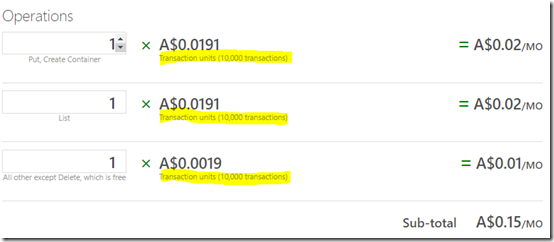
Upon revisiting the Azure price calculator I now note there are three options when it comes to calculating operations costs on these file shares.

Each operation consists of units of 10,000 transactions. However, my questions was what actually constitutes a transaction? If I copy 10,001 files into an Azure SMB file share, is that 10,001 transactions or just one because it is a bulk operation?

So the answer (as I understand it) is that ANY file operation constitutes a transaction. For example, copy 10,001 file to Azure SMB file share = 10,001 transactions (cost = 2 operations = $ 0.0382 (put operation)). For example, do a directory listing of those 10,001 files once they have been copied to the Azure SMB file share = 10,001 transactions (cost = 2 operations = $ 0.0382 (list operation)). The only thing that won’t cost you a transaction is a delete operation.

With this in mind let’s try and cost out a generalised scenario. Let’s say you set up a 1TB Azure SMB file share for 50 users. That will cost you A$114.78 in storage. Now let’s say that your 50 users work on an average of 50 files a day. This means, your business is working with 2,500 files per day. Let’s now say that on average there are 4 transactions per file (list, open, put, list) per day. Thus, we now have an average of 10,000 transactions across your organisation for this Azure SMB file share per day. Thus, that means we get about 300,000 transactions per month on average. So this means we get 300,000 divided by 10,000 operations per month = 30. The total cost of these transactions over the month is then 30 x $ 0.0191 = A$0.57.

That means the cost of such an Azure SMB file share is: storage + operations = A$114.78 + (300,000/10,000) x A$0.0191 = A$114.78 + A$0.57 = A$115.35 per month. Remember, that this price also EXCLUDES any bandwidth costs to an on premises location.

That equates to about A$3.85 per month per user cost for such Azure SMB file storage.

The hardest thing about determining such pricing is clearly the number of operations (i.e. number of 10,000 transactions) that will take place on the data in the Azure SMB file share. However, what is important to remember here is that if you have a very active Azure SMB file share with lost of users ensure you need to keep a close eye on your operations (i.e. file transaction) costs because they can become quite expensive if you have lots and lots of them. For example, if we say we got 1,000 times more transactions a month (i.e. 300 million per month) that equates to 30,000 operations per month (i.e. 300,000,000/10,000), which is A$573 in transaction costs alone. Suddenly the Azure SMB file share option becomes a tad expensive. 

Azure SMB file shares are a great solution but like everything in Azure they may not be appropriate in all situations. In the case of high volume file transactions perhaps an Azure VM with a traditional file share would be more cost effective. Of course, there are other cost factors to consider with an Azure VM including the compute monthly cost, maintenance, etc. To provide a true comparison you need to ensure you consider all the relevant costs.

A future blog post will compare the costs of doing a file share from a traditional Azure VM so that you have a comparison to what’s been discussed here. So stay tuned for more on that real soon.

CIAOPS Need to Know Webinar–December 2016

My last Need to Know webinar for 2016 is now open for registrations. As always, the event is free to attend and provides you with the latest news around Office 365 and the Microsoft Cloud as well as deep dive into a particular topic. This month we are going to have a close look at SharePoint Online permissions and how to secure your data in Office 365 Team Sites.

You can register now at:

December Webinar Registration

The details are:

CIAOPS Need to Know Webinar – December 2016
Thursday 15th of December 2016
10am – 11am Sydney Time

All sessions are recorded and posted to the CIAOPS Academy.

There of course will also be open Q and A so make sure you bring your questions for me and I’ll do my best to answer them.

The CIAOPS Need to Know Webinars are free to attend but if you want to receive the recording of the session you need to sign up as a CIAOPS patron (for only USD$10 per month) which you can do here:

https://www.patreon.com/ciaops

or purchase them individually at:

http://www.ciaopsacademy.com/

Also feel free at any stage to email me directly atdirector@ciaops.com with your webinar topic suggestions.

I’d also appreciate you sharing information about this webinar with anyone you feel may benefit from the session.

Need to Know Podcast–Episode 121

After getting through all the cloud news, Marc and I have a chat to an old and frequent podcast guest, Technical Solution Specialist, Enterprise Mobility and Security, Jeff Alexander. We hope this will be the first in a series focused on the Enterprise Mobility and Security Suite from Microsoft. We kick off the discussions with Jeff telling us all about Azure AD and role that it plays both on premises and in the cloud. We dig deep in how Azure AD is being used to secure the growth of mobile devices and the demands of users to have full access to their information at all times.

You can listen to this episode directly at:

http://ciaops.podbean.com/e/episode-121-jeff-alexander/

or on Soundcloud here:

or subscribe via iTunes at:

https://itunes.apple.com/au/podcast/ciaops-need-to-know-podcasts/id406891445?mt=2

The podcast is also available on Stitcher at:

http://www.stitcher.com/podcast/ciaops/need-to-know-podcast?refid=stpr

Don’t forget to give the show a rating as well as send us any feedback or suggestions you may have for the show.

Resources

@marckean

@directorcia

@jeffa36

Microsoft Enterprise Mobility and Security Suite

EMS blog

Start and Stop Azure VM’s using autmation

Announcing auto VM shutdown from the portal

Azure news from Marc

Office 365 group guest access available to all tenants

Macro Trends

This is the fourth part of my presentation “Making money from the cloud”. You can find the full slides at:

https://doc.co/LyrxvF/qcihGm

and the previous parts are at:

We live in exponential times

Consider the following

Major Trends

image

We previously took a look at the large trends that are shaping our world but now let’s take a look at the small trends that impact smaller businesses.

No matter how large or small you are technology is the key differentiation point. The Internet has allowed any single person to compete globally, The Cloud has allowed any single person access to the same level (power) of technology that once was only once available to the largest of businesses for a few dollars a month. Now it is not about what technology you have, it is about how effectively you use that technology. That is what determines your profitability above everything else.

Companies like Amazon are at the cutting edge of utilising technology to provide better service to their customers as the above video demonstrates. Thus, the focus of technology is about being able to deliver better results for customers.

This means that if you are an IT professional you need to be not simply ‘selling’ technology, you need to implementing technology that helps your customers grow their business. IT professionals need to help their customers understand and get the best out of technology. If left to their own devices people use less than 10% of the full functionality of any technology that is provided to them. This means there is an untapped 90% opportunity to work with the existing technology people have. It is much easier to get more from what you have rather than trying to sell you something new now isn’t it?

This means that the business of an IT professional is all about consulting now. Pure reselling of technology is a commodity game and only the largest can survive in that environment. Much of this consulting will also involve the re-engineering of existing businesses. A good example of this, once again, is the shift from traditional email to things such as social networks for communications. You can’t simply enable a social network like Yammer inside a business, you need to help the business make the transition to this new way of working. However, this is not possible unless the IT professional themselves is actually using the latest technology themselves. You can’t implement a technology without understanding, and typically using it, yourself.

Here’s the key. Those that adopt new technology effectively are simply more competitive, able to react faster and adapt to suit market conditions quicker. Yes, that adoption requires and investment but that investment pays major dividends in the future. Unfortunately, so many businesses and IT professionals don’t want to make that investment, instead preferring to ‘stay with the current way of doing things’. That of course means living in the past as the future continues to accelerate away. That means that when change is forced upon the organisation it is that much harder because the leap is that much greater.

There is no doubt that change is hard, both for a business and for an individual. However, if you can get comfortable with change then you really have a competitive edge. The trick to becoming comfortable with change is to develop a system to help you manage it and therefore look at change as providing you a competitive advantage in the market as the vast majority are resistant to change.

However, the really adjustment most need to make when it comes to change is simply doing less. The real secret of success in the future is doing less and doing that exceptionally well. The traditional model of business growth was always to continue to grow revenue more and more. The problem is that costs and complications can rise faster than revenue. Thus, a focus on revenue is folly, while a focus on profit is sanity. The smaller you are, the reality is that you can’t do ‘everything’. You need to focus on a niche and become the best in the world at that niche and partner with others to fill any gaps. If you need heart surgery you don’t go to a GP now do you? You go to a heart surgeon. Heart surgeons make pretty good money even though they specialise. The same applies elsewhere. If you are everything to everyone, then you are nothing to no one. Focus on becoming more effective and generating more profit not merely revenue.

Technology is the game changer that effectively levels the playing field for all businesses. However, it is something that is always changing and needs a process for adoption. Those that can deal with the changes we see have an opportunity to be more competitive than any one else. This opportunity requires an on going investment and typically results in a change of business model but the message is clear. You can’t remain in the past. You can’t remain standing still as the progress of technology continues to move forward allowing others to leap frog you and take away your advantage.

Technology is a tool. Success is a measure of how well that is applied to benefit customers. Therefore, any technology implementations need to be focused on the value they provide to their customers. This will also require challenges of innovation to solve problems using different tools but when you do, truly, the world is your oyster!

Two day Azure deep dive from me

On the 6th and 7th of December 2016 I’m running a two day intensive, deep dive, hands on training for SMB Partners in Sydney around Azure. This will hopefully be the first of the roll out of this program to Microsoft partners around Australia in 2017.

The training is basically broken up into two days, IaaS and PaaS. It it also unique in that it will provide attendees with not only technical training but also business training on how to cost and sell Azure solutions to customers.

You’ll be expected to work through a typical scenario of moving on premises SMB workloads to Azure. This means you’ll be learning how to set up and configure things like Azure virtual networks and virtual machines. You’ll create site to site VPNs and learn best practices for migrating data to the cloud. You’ll also learn how to integrate Office 365 with on premises environments and with Azure. There will also be the opportunity to gain exposure to other Azure services such as Logic Apps, Machine Learning, Web Apps, Azure SQL and more. Best of all you’ll be working in teams with your peers to complete challenges which also provides a huge networking opportunity. If you want to grow your cloud business and gain real world hands on experience with Microsoft Cloud technologies for SMB, this is not a session to miss.

Now because this first course is a bit of a test, if you are interested in attending then you’ll need to send me an email directly (director@ciaops.com) with your reasons for wanting to attend. I’ll forward these requests directly to Microsoft for inclusion in the course as attendance is strictly limited by number but also by desire to really get serious about deploying Azure.

This course is going to challenge both your technical and business abilities but you’ll walk away with a wealth of knowledge on Azure and Office 365 that I don’t believe is available elsewhere. Perhaps more importantly, you’ll walk away with the ability to confidently quote, sell and implement Azure/Office 365 solutions to your customers.

Thanks to Microsoft, this course is free to attend but you’ll need to send me your details as I have mentioned above to get a shot at attending.

Once again, places are strictly limited so hurry if you want to accelerate your business using Azure!