
CIA Brief – 231111

How AI Can Improve Threat Intelligence Gathering and Usage – https://techcommunity.microsoft.com/t5/educator-developer-blog/how-ai-can-improve-threat-intelligence-gathering-and-usage/ba-p/3975449

Reflecting on 20 years of Windows Patch Tuesday – https://blogs.windows.com/windowsexperience/2023/11/09/reflecting-on-20-years-of-windows-patch-tuesday/

Must-have skills for the AI era | AI at work with Microsoft’s Jared Spataro – https://www.youtube.com/watch?v=F8nzcGC8la0

Using Microsoft Defender Threat Intelligence with the Diamond Model for Threat Intelligence – https://techcommunity.microsoft.com/t5/microsoft-defender-threat/using-microsoft-defender-threat-intelligence-with-the-diamond/ba-p/3976100

Insights from Microsoft Security Copilot early adopters – https://www.microsoft.com/en-us/security/blog/2023/11/08/insights-from-microsoft-security-copilot-early-adopters/

Microsoft shares threat intelligence at CYBERWARCON 2023 – https://www.microsoft.com/en-us/security/blog/2023/11/09/microsoft-shares-threat-intelligence-at-cyberwarcon-2023/

Copilot in Microsoft 365 Chat | Uncover Similar Themes – https://www.youtube.com/watch?v=Hj5xpC5_ZJw

Create a company-wide signature or disclaimer in Microsoft 365 – https://www.youtube.com/watch?v=r-JDQPeoLig

Microsoft 365 Chat | Generate New Ideas with Copilot – https://www.youtube.com/watch?v=tU96RtPhQ0k

Microsoft 365 Chat | Manage Your Inbox – https://www.youtube.com/watch?v=yWC2XcRvH7E

Copilot in Teams | Get meeting overviews – https://www.youtube.com/watch?v=UNQeA2uqNPA

Now is the time—manage your Mac endpoints with Microsoft Intune – https://techcommunity.microsoft.com/t5/microsoft-intune-blog/now-is-the-time-manage-your-mac-endpoints-with-microsoft-intune/ba-p/3974449

Simplified security settings management is now generally available – https://techcommunity.microsoft.com/t5/microsoft-defender-for-endpoint/simplified-security-settings-management-is-now-generally/ba-p/3975158

Getting started with Microsoft Lists – Edit a view of a list – https://www.youtube.com/watch?v=Xcd7IW3p8Fw

Copilot in Microsoft 365 Chat | Grow your knowledge – https://www.youtube.com/watch?v=hkS-qS0ClSs

Discover, prepare, and recap your meetings in one place with Meet in Microsoft Teams – https://www.youtube.com/watch?v=JBxI4qiBPdk

Getting started with OneDrive – Share files and folders with Microsoft 365 – https://www.youtube.com/watch?v=Rs7hqD8nzyw

Emphasizing Security by Default with Advanced Microsoft Authenticator Features. – https://techcommunity.microsoft.com/t5/microsoft-entra-azure-ad-blog/emphasizing-security-by-default-with-advanced-microsoft/ba-p/3773130

Automatic Conditional Access policies in Microsoft Entra streamline identity protection – https://www.microsoft.com/en-us/security/blog/2023/11/06/automatic-conditional-access-policies-in-microsoft-entra-streamline-identity-protection/

Enterprise IoT security with Defender for IoT now included in Microsoft 365 E5 and E5 Security plans – https://techcommunity.microsoft.com/t5/microsoft-365-defender-blog/enterprise-iot-security-with-defender-for-iot-now-included-in/ba-p/3967533

What’s new for Security: Training and Certification – https://techcommunity.microsoft.com/t5/microsoft-learn-blog/what-s-new-for-security-training-and-certification/ba-p/3644507

Complete the new 30 Days to Learn It Challenge and explore the new trainings in Security – https://techcommunity.microsoft.com/t5/security-compliance-and-identity/complete-the-new-30-days-to-learn-it-challenge-and-explore-the/ba-p/3966324

Copilot in Outlook | Manage your inbox – https://www.youtube.com/watch?v=PSTSOyBccnY

Copilot in Word | Locate key information – https://www.youtube.com/watch?v=hxc5t3AfpKo

Copilot in Word | Transform a document – https://www.youtube.com/watch?v=Tx0IbvgI4NA

Announcing Microsoft Secure Future Initiative to advance security engineering – https://www.microsoft.com/en-us/security/blog/2023/11/02/announcing-microsoft-secure-future-initiative-to-advance-security-engineering/

After hours

Candy Thieves vs Rigged Candy Bowl – https://www.youtube.com/watch?v=Zb01RStdzEs

Editorial

Next week is going to be a firehose with Microsoft Ignite taking place, so be prepared for lots of links in the CIA Brief next week.

If you found this valuable, the I’d appreciate a ‘like’. This helps me know that people enjoy what I have created. If you have any feedback or suggestions around this, I’m all ears. You can also find me via email director@ciaops.com and on X (Twitter) at https://www.twitter.com/directorcia.

Watch out for the next CIA Brief next week.

CIA Brief – 231104

Here’s all the Microsoft Cloud news I have come across this week.

Microsoft Defender Monthly news – November 2023 – https://techcommunity.microsoft.com/t5/microsoft-365-defender-blog/monthly-news-november-2023/ba-p/3970796

Microsoft Entra ID Governance licensing for business guests – https://techcommunity.microsoft.com/t5/microsoft-entra-azure-ad-blog/microsoft-entra-id-governance-licensing-for-business-guests/ba-p/3575579

Copilot in Outlook | Manage your inbox –

https://www.youtube.com/watch?v=PSTSOyBccnY

Copilot in Word | Locate key information –

https://www.youtube.com/watch?v=hxc5t3AfpKo

Copilot in Word | Transform a document –

https://www.youtube.com/watch?v=Tx0IbvgI4NA

Announcing Microsoft Secure Future Initiative to advance security engineering –

https://www.microsoft.com/en-us/security/blog/2023/11/02/announcing-microsoft-secure-future-initiative-to-advance-security-engineering/

Copilot in Excel | Be more analytical –

https://www.youtube.com/watch?v=9K5EptYm-B4

Copilot in Word | Gain focus time –

https://www.youtube.com/watch?v=KzOxnZBDbwQ

Latest updates to Microsoft 365 Migration Manager –

https://www.youtube.com/watch?v=C-MbzTrZJ0A

A new world of security: Microsoft’s Secure Future Initiative –

https://blogs.microsoft.com/on-the-issues/2023/11/02/secure-future-initiative-sfi-cybersecurity-cyberattacks/

Copilot for work –

https://www.microsoft.com/en-us/microsoft-365/copilot-for-work

HDFC Bank uses the Microsoft Power Platform to lead digital transformation –

https://www.youtube.com/watch?v=seD7BapZeMA

Copilot in Excel | Identify key insights –

https://www.youtube.com/watch?v=OmbIJv0WY0I

Copilot in Word | Get a head start –

https://www.youtube.com/watch?v=H5tDkC2dOj8

Microsoft 365 Business Premium now comes with 100 print jobs per user –

[MC682087 · Published Oct 17, 2023]: Organizations with Microsoft 365 Business Premium licenses will receive one hundred (100) print jobs per license per month starting on November 14, 2023. Today, Microsoft 365 Business Premium customers receive five (5) print jobs per license per month. These print jobs are refreshed every month and are pooled, so all licensed employees can use them. This change is similar to the April 2023 extension of print jobs per license for Microsoft 365 E3 and E5 organizations.

OneDrive Quickstart Guide –

https://adoption.microsoft.com/files/onedrive/Microsoft-OneDrive-quick-start-guide.pdf

Microsoft Security Copilot Demo: Defend at Machine Speed –

https://www.youtube.com/watch?v=psWW3g1CJvY

Latest updates to Microsoft 365 Migration Manager – https://www.youtube.com/watch?v=C-MbzTrZJ0A

Storing data for thousands of years | Microsoft Project Silica – https://www.youtube.com/watch?v=-rfEYd4NGQg

What’s new for IT pros in Windows 11, version 23H2

https://techcommunity.microsoft.com/t5/windows-it-pro-blog/what-s-new-for-it-pros-in-windows-11-version-23h2/ba-p/3967814

The Defender’s Watch: Disrupting Attacks in Real Time – https://info.microsoft.com/ww-thankyou-the-defenders-watch-episode-4.html?LCID=EN-US

Windows passwordless experience expands – https://techcommunity.microsoft.com/t5/windows-it-pro-blog/windows-passwordless-experience-expands/ba-p/3962005

What’s new in Microsoft Intune (2310) October edition – https://techcommunity.microsoft.com/t5/microsoft-intune-blog/what-s-new-in-microsoft-intune-2310-october-edition/ba-p/3964074

If you found this valuable, the I’d appreciate a ‘like’. This helps me know that people enjoy what I have created. If you have any feedback or suggestions around this, I’m all ears.

Watch out for the next CIA Brief next week.
CIA Brief is coming

messenger delivering a new annoucement to the pubblic

For a long while I used Power Automate to push out interesting stories around the Microsoft Cloud I found to Twitter (X now). Unfortunately, X changed the pricing of their API which made it prohibitively expensive to continue with this approach.

Given this, I’ve been thinking about what would be a suitable replacement. I initially considered an email list, as that is what all the cool kids do, but I also needed a process that was simple and easy for me, especially if I was going to do something weekly. The problem using a bulk email system like Mailchimp, is that I would need to format each blast using the Mailchimp website as well as send it from there. If I planned to do a weekly update of links I have found, that becomes time consuming and inconvenient, especially if I’m travelling.

Another reason I have not opted for an email list is that I am already on plenty that send updates weekly and honestly I don’t find that it is a very effective mechanism. Yes, I do read them all and yes, they provide value but I tend to put off reading them and deal with more important things in my inbox. I kind of need to be in the ‘mood’ to sit there and read through all the information and if I’m not then they tend to ‘backup’ as a to-do item.

I also considered doing a video update and posting it on YouTube as many others do. The downside to this method is it is a huge amount of work behind the scenes. My experience is also that a video of a whole bunch of screen shots or text really doesn’t appeal to people because when I tried it a while back by posting my podcasts with this content, the number of views simply didn’t reach acceptable minimums for the amount of invested effort.

Thus, I ruled out setting up an email list or using a video update as well as few other methods and instead have favoured posting the information here on my blog. The benefits of this is that it will be easy for me to quickly copy, paste and post the collection of stuff I find weekly. For those that do want emails there is the option to subscribe to my blog as email if you wish. The blog method however means you can simply read the post without having to give up your email if you choose and not have additional emails in your inbox, which is always a good thing. I also like that it will be searchable and publicly available.

I have created a tag on my blog called ‘CIA Brief’ which allows you to filter by just that tag. For example the feed will be:

https://blog.ciaops.com/tag/CIA-Brief/

that means you can simply follow the items I post with this tag the get the list of information I plan to post.

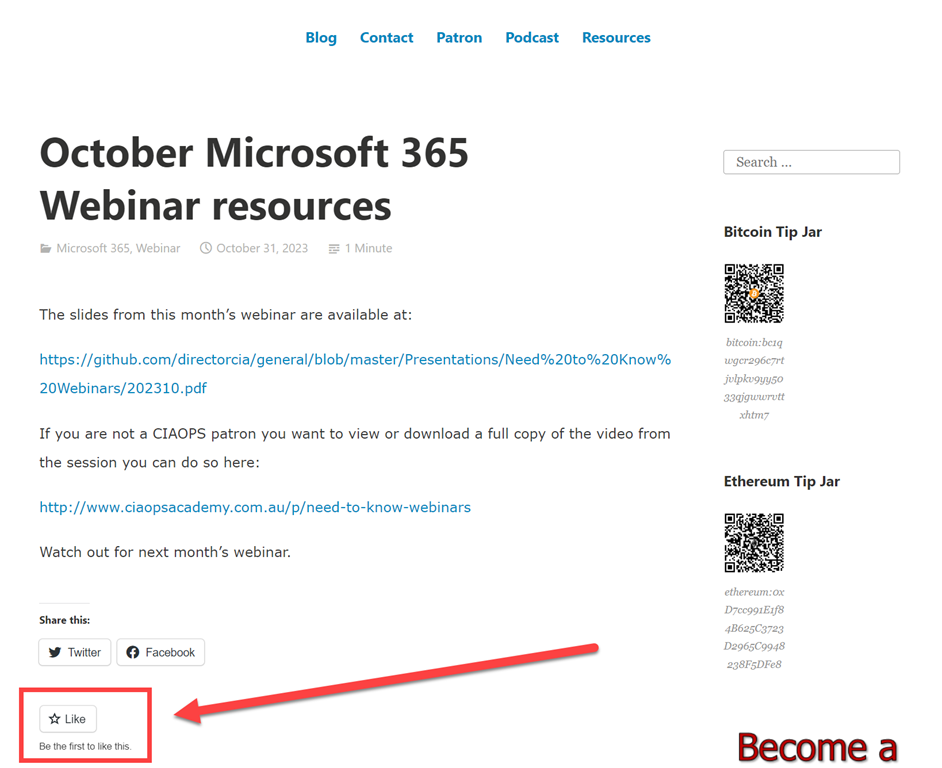
image

The ask I have of those that find value in the CIA Brief is to Like the post, as shown above at the bottom of each post. This way I know that the information is of value to people and provides an incentive for me to continue producing it. If you can Like each CIA Brief you see that would be very much appreciated.

Of course, I also welcome your feedback about how to make this concept even more valuable to people. I want something that is quick and easy to view on a weekly basis that will keep you up to date with the Microsoft Cloud. If you have any suggestions or feedback then I’m all ears.

That is the why and wherefores done. Stay tuned for the first CIA brief at the end of this week.