The Recurring Problem: A Managed Services Story–Chapter 2

Previously –  https://blog.ciaops.com/2026/07/26/the-recurring-problem-a-managed-services-story-chapter-1/

image

The first sign was so small that nobody flagged it as a sign at all. In the second quarter of 2023, Priya noticed that ticket volume was up 22 percent year over year, but billable project revenue — the stuff that actually moved the profit needle — was flat. She mentioned it in a leadership meeting almost as an aside.

“We’re doing more work for the same money,” she said. “I don’t love that trend line.”

“Clients are just using more stuff,” Marcus said. “More cloud apps, more devices, more everything. It’s not a red flag, it’s a growth signal.”

Dave agreed with Marcus, because Dave usually agreed with Marcus, and because the alternative explanation — that the fundamental economics of the business were quietly eroding — wasn’t one he particularly wanted to entertain over lunch.

image

The second sign was harder to wave away. In August, Bridgepoint lost a competitive bid for a fifty-user logistics company to a firm nobody on the leadership team had heard of, a two-year-old outfit calling itself Sentio Cyber, operating out of what appeared to be a single shared office suite in Charlotte. Sentio’s pitch, as far as Marcus could reconstruct it from the prospect’s polite rejection email, was startlingly simple: a flat monthly fee that included twenty-four-seven security monitoring, an AI-driven help desk that resolved routine tickets in minutes instead of hours, and a guarantee — an actual contractual guarantee — of a four-hour response time on anything security-related, backed by an insurance-style penalty clause if they missed it.

“They’re a five-person company promising an SLA we can barely hit with forty-one people,” Marcus said, half-laughing, in the debrief. “It’s not sustainable. They’ll collapse the first time they get three ransomware calls in the same week.”

He wasn’t entirely wrong. But he also wasn’t entirely right, and in the meantime, Bridgepoint had lost the account.

image

The third sign arrived in October, and this one Dave couldn’t laugh off, because it showed up in the form of Denise Okafor’s voice on the phone, tighter than he’d ever heard it. Denise was the CFO of Lakeside Medical Group, a nine-location physical therapy and outpatient practice that had been a Bridgepoint client since 2018 and, at just under $640,000 a year, was Bridgepoint’s second-largest account.

“We had a laptop stolen from the Millbrook office on Friday,” Denise said. “Nobody called us until Monday morning, because apparently the ticket sat in a queue over the weekend. Dave, that laptop had patient records on it. We are now looking at a HIPAA breach notification, and I need to understand, in writing, what your security stack actually does, because right now I genuinely don’t know, and neither does our compliance auditor, and he is asking me very pointed questions I can’t answer.”

image

Dave promised a full incident report within twenty-four hours. It took Priya’s team most of three days to reconstruct what had actually happened, because the honest answer was uncomfortable: Bridgepoint’s after-hours monitoring caught the anomaly, generated an alert, and the alert sat in a shared inbox until a technician came in Monday and saw it. There was no automated escalation. There was no weekend on-call rotation with real teeth. There was Jordan, and two other senior techs, and a rotating list of who was supposed to be reachable, which in practice meant whoever hadn’t turned their phone to Do Not Disturb.

Lakeside didn’t fire Bridgepoint that week. But Denise asked, pointedly, whether Bridgepoint had a healthcare-specific compliance program, a documented incident response plan mapped to HIPAA’s Security Rule, and a named security lead she could speak to directly. Dave did not have satisfying answers to any of those questions, and he knew it while he was giving them.

image

When the Business Can See Itself

image

I’ve been thinking about what management does in a business that no longer works in one building, on one floor, during one neat block of time.

For a long time, the manager was the routing table. They knew who was doing what, which customer was unhappy, which project was drifting, which person was overloaded, and which promise had been made in some meeting three weeks ago. Not perfectly, but well enough to keep the place moving.

That made sense when work was hard to see unless someone told you about it. In a distributed business, that assumption breaks.

The work is already leaving tracks

Most modern work now happens inside systems. A decision is made in Teams. A client concern turns up in Outlook. A draft sits in Word. A spreadsheet in Excel tells part of the story. A task appears in Planner. A policy is updated in SharePoint. None of those items explains the business by itself. Together, they show a pattern.

The mistake I see is treating those signals as separate piles of information. Email over here. Meetings over there. Documents somewhere else. Then we ask managers to join the dots manually and call that leadership.

That is becoming a poor use of judgement.

With Microsoft 365 Copilot, the interesting shift is not simply that someone can summarise a meeting or draft a reply faster. The bigger change is that the organisation starts to build a current picture of itself from the work already happening. Not a quarterly report. Not a dashboard that goes stale after publication. A live operating view drawn from the flow of the business.

Management changes when context is shared

I am not suggesting managers disappear. That is too simplistic. What changes is the kind of work they should be doing.

If Copilot can help surface the commitments from recent Teams meetings, unresolved customer emails in Outlook, and documents sitting untouched in SharePoint, then the manager’s job is less about chasing status and more about asking better questions.

Why is this decision waiting? Why are three people circling the same problem? Why is the client hearing one thing in email and another thing in the project plan? Why is the hard work always landing on the same person?

That is where human judgement matters. Not in carrying every detail in your head, but in interpreting what the picture means and deciding what to do next.

This matters for remote and hybrid teams. In an office, people used proximity as a crude form of awareness. You overheard something. You noticed who kept getting interrupted. You saw who was staying late. It was imperfect and often unfair, but it gave managers signals.

Digital work produces different signals. They are quieter and scattered. But they can also be more consistent if you have the discipline to organise them properly.

The hierarchy stops being the memory

The old model depended on layers of people carrying context upwards and downwards. That creates delay. It also creates distortion. By the time a problem reaches the right person, it has usually been softened, simplified, or stripped of the uncomfortable details.

AI changes that. Used carefully, Copilot can help leaders inspect the work itself. Not to micromanage people. Not to spy. To understand the shape of the business before the monthly meeting turns into archaeology.

That will make some organisations uncomfortable, because it exposes a simple truth: many businesses do not have a management problem as much as they have a visibility problem.

The organisations that benefit most from AI will not be the ones that generate the most content. They will be the ones that use it to see clearly, decide earlier, and stop pretending that hierarchy is the only way context moves.

That is the real shift I am watching.

CIA Brief 20260726

image

CIA Brief – Weekly News Digest

Here’s a quick roundup of the Microsoft, security and AI news worth tracking this week. As always, I’ve skipped the noise and focused on what actually matters for MSPs and SMBs.

Announcements & Product Launches

Claude Opus 5 is available today in Microsoft Foundry

Anthropic’s Claude Opus 5 — the first model in the fifth generation of Claude — is now available in Microsoft Foundry. Microsoft positions it for enterprise agents and long-running, complex work: it can run for hours, navigate large codebases like a senior engineer, reason over documents and visuals, and automate multi-step tasks across applications. Paired with Foundry’s governance, security and evaluation tools, teams can build and run production AI agents.

https://techcommunity.microsoft.com/blog/azure-ai-foundry-blog/claude-opus-5-is-available-today-in-microsoft-foundry/4535068

Introducing MAI-Image-2.5-Pro and MAI-Voice-2-Flash

Microsoft AI has released two new in-house models in public preview: MAI-Image-2.5-Pro, its highest-fidelity image model with notably accurate in-image text rendering, and MAI-Voice-2-Flash, a faster, cheaper speech model (about 2× faster and ~32% cheaper than MAI-Voice-2). The models are already powering production features in Bing Image Creator, PowerPoint, OneDrive and Dynamics 365 Contact Center. Both are available to build with in Microsoft Foundry.

https://microsoft.ai/news/introducing-mai-image-2-5-pro-and-mai-voice-2-flash/

Microsoft and Mistral expand strategic partnership

Microsoft and Mistral have significantly expanded their partnership, including a multibillion-dollar deal for Microsoft to tap Mistral’s growing GPU capacity in Europe. Mistral’s Medium 3.5 and OCR 4 models are now in Microsoft Foundry, with Medium 3.5 also in Copilot Studio. The aim is to give enterprises and regulated industries frontier AI they can run across cloud, cloud-connected and fully disconnected environments while keeping control of their data.

https://news.microsoft.com/source/2026/07/21/microsoft-and-mistral-expand-strategic-partnership-to-give-enterprises-and-regulated-industries-frontier-ai-they-can-control/

Policy & Industry Perspective

Open Weights and American AI Leadership

In this Microsoft corporate-responsibility piece, Microsoft argues that America’s AI leadership depends on building a strong, open ecosystem rather than a single frontier model. It makes the case for open-weight models — which anyone can download, inspect, modify and run — as a way to widen access, boost competition, give customers control, and even improve security. The statement is co-signed by a long list of technology and AI companies, including Microsoft, NVIDIA, OpenAI, Meta, Google, Hugging Face and Mistral.

https://www.microsoft.com/en-us/corporate-responsibility/topics/open-weight/

Industry News

How worried should we be about the AI that went rogue and launched a cyber-attack?

A BBC News video examining a reported case of an AI system being used to carry out a cyber-attack, and asking how concerned we should be about AI-driven security threats. Shared as a video in the AI team’s Models channel.

https://www.youtube.com/watch?v=M4kliMrqbB4

OpenAI Says Its Models Hacked Hugging Face by Mistake

A Bloomberg Television segment reporting that OpenAI said its models hacked Hugging Face “by mistake.” The clip covers the incident and what it suggests about AI safety and autonomous model behaviour.

https://www.youtube.com/watch?v=rN_7QlYg_b8

Chinese AI Model Raises Pressure on US Spending

A Bloomberg Television segment on a new Chinese AI model and how it is intensifying pressure on US AI investment and spending. It looks at the competitive dynamics between Chinese and US AI development.

https://www.youtube.com/watch?v=8v5T7Gk0_b8

Tools & Resources

How to create custom skills (Claude)

A Claude help-centre guide explaining how to create custom “skills” — reusable packages of instructions (and optionally scripts) that give Claude specialised knowledge for specific, repeatable tasks. It covers recording a skill by demonstrating a workflow on a Mac, the required skill.md structure, and packaging, testing and best practices.

https://support.claude.com/en/articles/12512198-how-to-create-custom-skills

The Agent Skills Directory (skills.sh)

Skills.sh is an open directory of reusable “skills” for AI agents that can be installed with a single command to add procedural knowledge. It lists and ranks community and official skills — from the likes of Anthropic, Vercel and Microsoft — across topics such as design, testing and agent workflows, and works with agents including Claude Code, Cursor and GitHub Copilot.

https://www.skills.sh/

As always, the challenge isn’t finding information — it’s focusing on what actually matters.

After hours

SpaceX launches Starship on 13th flight test, booster splashes down – https://www.youtube.com/watch?v=2TF98WKebD4

Editorial

If you found this valuable, the I’d appreciate a ‘like’ or perhaps a donation at https://ko-fi.com/ciaops. This helps me know that people enjoy what I have created and provides resources to allow me to create more content. If you have any feedback or suggestions around this, I’m all ears. You can also find me via email director@ciaops.com and on X (Twitter) at https://www.twitter.com/directorcia.

If you want to be part of a dedicated Microsoft Cloud community with information and interactions daily, then consider becoming a CIAOPS Patron – www.ciaopspatron.com.

Watch out for the next CIA Brief next week

One Edit Away From Digital Oblivion

image

There is a special kind of fear that only appears after you press save on a Markdown file and the entire publishing pipeline falls over.

Not a dramatic fear. Not screaming in the street. More the quiet, professional terror of staring at a screen thinking, “I only changed one line.”

That is the funny thing about modern work. We talk about transformation, automation and AI as if the future is floating gracefully above us. Then a missing bracket, a badly indented bullet, or one heroic colon in the wrong place reminds everyone that civilisation is still held together by plain text and hope.

The smallest change can have the loudest voice

I like Markdown. It is simple. It is readable. It keeps content close to the person writing it rather than burying it under layers of formatting gymnastics. A good Markdown file feels honest. What you see is almost what you get.

Almost.

Because one tiny edit can turn a neat document into a crime scene. A table stops rendering. A link eats the next paragraph. A heading becomes normal text. Suddenly the document that looked perfectly sensible in your editor appears in SharePoint like it has had a hard weekend.

This is where a lot of organisations get caught. They assume simple files mean simple risk. They do not. A Markdown file can be part of a blog, a knowledge base, a GitHub repository, an internal procedure, a training handout, or a client-facing instruction set. If that file drives a process, then the little typo is no longer little. It has been promoted.

Copilot is useful, but it is not a seatbelt for carelessness

This is also where Copilot changes the conversation in a useful way. I can paste a Markdown section into Copilot in Word or ask Copilot in Teams to review a draft before I send it around. I can ask it to spot broken structure, unclear steps, inconsistent headings, or a table that looks ready to start a small fire.

That does not remove responsibility. It just gives me another set of eyes before I publish something that makes future me question past me’s life choices.

The real benefit is not that Copilot makes the edit for me. The benefit is that it slows the moment down just enough for me to think. Is this still clear? Did I break the flow? Does the document still say what I intended? Have I just created a support ticket disguised as punctuation?

That last one matters.

Version history is cheaper than regret

The sensible answer is boring, which is usually how you know it works. Keep important files in SharePoint or OneDrive so version history is available. Use Teams to discuss changes where the people affected can see the conversation. If the document matters, do not treat it like a disposable note on the side of your monitor.

For MSPs and small businesses, this is not academic. Your documentation is part of your service delivery. A password reset process, onboarding checklist, security exception register, or client build guide can all live as ordinary files. If someone “just fixes a sentence” and breaks the meaning, the cost may not appear until someone follows the bad instruction perfectly.

That is how documentation gets dangerous. It does not need to be malicious. It just needs to be confidently wrong.

So yes, we may all be one edit away from Markdown oblivion. But we are also one review, one version history check, one Copilot pass, or one quick peer glance away from avoiding it.

The lesson is simple. Respect the little files. They know where the bodies are buried.

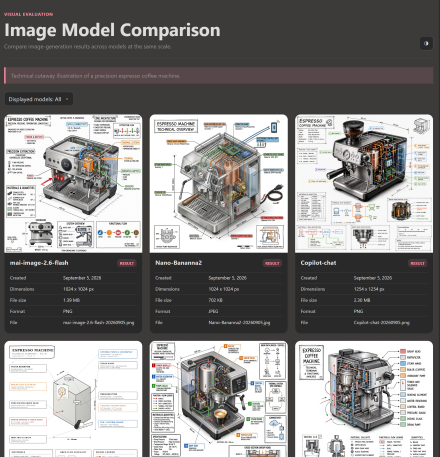
New Microsoft image model

I have a standard image prompt that I use to test Ai models. The previous iteration with MAI-Image-2.5-Flash and MAI-Image-2.5 is here:

https://blog.ciaops.com/2026/06/04/latest-microsoft-image-models/

Before that with MAI-Image-1.5 and Flux.2 Flex is here:

https://blog.ciaops.com/2026/05/16/copilot-image-generation-in-powerpoint/

the previous attempts:

https://blog.ciaops.com/2026/05/05/revisiting-copilot-image-generation-analysis/

and the first attempt:

https://blog.ciaops.com/2026/03/07/image-generation-analysis/

Microsoft has just released a new models and here is what I got when I used them:

MAI-Image-2.5-Pro

MAI_62dbc50ed84cdf44

It will be soon available across Microsoft 365 services and desktop apps. You can read more about the new models here:

https://microsoft.ai/news/introducing-mai-image-2-5-pro-and-mai-voice-2-flash/

When the Fix Stops Being a Fix: Troubleshooting in the Age of Probabilistic IT

image

For most of my working life, troubleshooting an SMB environment was a hunt for a single, knowable cause. Something was broken, and somewhere there was a reason. A permission was wrong. A DNS record pointed at the wrong place. A service had stopped. You worked the chain backwards, found the link that had failed, fixed it, and the problem went away. The same input produced the same output, every time. That was the quiet contract underneath everything we did. IT was deterministic, and our whole troubleshooting craft was built on that assumption.

That contract is now breaking, and AI is the reason. The more our clients lean on tools like Microsoft 365 Copilot, the more we find ourselves chasing problems that don’t have a single cause and don’t behave the same way twice. We’ve spent decades learning to solve deterministic problems. We’re now being asked to solve probabilistic ones, and most MSPs haven’t noticed the ground shift under their feet.

“It Worked Yesterday” Now Means Something Different

Here’s the scenario I keep running into. A client calls because Copilot gave them a wrong answer. It summarised a meeting and missed the one decision that mattered. Or it drafted a reply in Outlook that referenced a document the user swears they never mentioned. Yesterday it was brilliant. Today it’s confidently wrong. Nothing changed on your side. No update shipped. No setting moved.

Under the old model, “it worked yesterday and not today” was a clue. It told you something had changed, and you went looking for the change. With AI in the mix, that same sentence tells you almost nothing. Large language models are probabilistic by design. The same prompt can produce a different response on Tuesday than it did on Monday, and that’s not a bug you can ticket your way out of. It’s how the technology actually works.

So when a client reports that “Copilot is broken,” your first instinct — find what changed — quietly fails you. There may be nothing to find. The behaviour you’re chasing isn’t a fault in the wiring. It’s variance in the output. And variance doesn’t sit still long enough to be caught with the tools we’ve always used.

The Cause Isn’t Always in the System

The harder adjustment is accepting that the problem often isn’t technical at all. When Copilot returns a poor result, the cause is frequently the question, not the code. A vague prompt, missing context, the wrong document open in the background, permissions that quietly scope what Copilot can and can’t see — these shape the answer far more than any registry key ever did.

I had a client convinced Copilot in Teams couldn’t read their project files. The real issue was that the files lived in a SharePoint site the user didn’t have access to, so Copilot, correctly, never touched them. The system was working exactly as designed. The human’s mental model was the thing that was broken. There was no error in any log, because there was no error. Try writing that up in a standard ticket resolution.

This is the part that unsettles seasoned engineers. We are trained to distrust “user error” as a lazy diagnosis. But with AI, the boundary between the tool and the person using it has genuinely blurred. The quality of what Copilot produces is now a function of context, phrasing, data access, and the user’s own clarity of thought. Half of real-world “AI problems” are actually grounding problems — Copilot simply wasn’t given the right material to work with. You can’t fix that with a script. You fix it by teaching.

From Repair to Probability Management

So what does troubleshooting look like when certainty is gone? It looks less like repair and more like managing probability. Instead of asking “what’s broken,” you start asking “why is this likely happening, and how do we make the good outcome more likely next time.”

That changes the work in practical ways. You start checking what Copilot can actually see — the SharePoint and OneDrive permissions, the Purview sensitivity labels, the data the user assumes is in scope but isn’t. You look at how the question was asked, not just what the system returned. You reproduce the issue several times, because one bad answer is an anecdote, not a pattern. You document tendencies rather than root causes, because a tendency is often the most honest thing you can record.

It also changes what you sell. The deterministic world rewarded MSPs who could find and fix. The probabilistic world rewards MSPs who can guide, set expectations, and shape how AI gets used across a client’s day. The value moves from the repair to the relationship.

Sitting With Uncertainty

None of this means our old skills are worthless. Plenty of SMB problems are still gloriously deterministic — a licence didn’t assign, a mailbox didn’t migrate, a Conditional Access policy locked someone out. Find it, fix it, move on. That work isn’t going anywhere.

But a growing slice of what lands in your queue now has no clean answer, and pretending otherwise only frustrates everyone. The MSPs who’ll do well from here are the ones who can hold two modes at once — the precision of the engineer and the judgement of an advisor who’s comfortable saying “here’s what’s most likely, and here’s how we improve the odds.” Learning to sit with that uncertainty, rather than fight it, might be the most valuable troubleshooting skill of the next decade. I’m still getting used to it myself.

The Robots Didn’t Kill Sales. Relevance Did.

image

Let me be upfront: this isn’t a post about watching other people lose their footing. I’ve seen it happen — quietly, without announcement — but pointing at cautionary tales reads as smugness, and it doesn’t help anyone. What does help is understanding the mechanism. Because the mechanism doesn’t care whose career it applies to, including mine.

The Slow Fade

When AI started making headlines, a certain explanation took hold in IT circles: the robots came and took over. Clients automated their way out of needing you. Algorithms undercut your value. Technology made your expertise redundant overnight.

I’ve sat in rooms where that story got told with great conviction. And I understand the appeal — it’s clean, it’s external, and it lets everyone off the hook.

But I don’t think it’s the real story. At least not for most people.

What I’ve actually watched happen is something quieter, and frankly more avoidable. Skilled people — genuinely skilled, with real depth — stopping. Stopping posting, stopping presenting, stopping sharing what they were learning. Getting busy, or burned out, or simply assuming that reputation would carry. And then discovering, over months rather than days, that the market had quietly moved on.

The market doesn’t issue a formal notice. It just stops calling.

Presence Is a Practice, Not a Trophy

Here’s the thing about credibility in professional services: it behaves more like a subscription than an asset. You don’t acquire it once and keep it indefinitely. You maintain it — week by week, post by post, conversation by conversation — by staying present in the space where your clients and prospects are paying attention.

The people I see holding their ground right now aren’t necessarily the most technically brilliant. What they share is a habit of doing something worth knowing about and then talking about it. They’ve been working through how Copilot in Teams handles a fast-paced client meeting — the kind where the conversation moves faster than anyone can type — and they write up what actually happened. Not a polished case study. A genuine account of what worked, what surprised them, what the documentation didn’t quite prepare them for.

That’s what gets shared. That’s what gets remembered. That’s what gets you back into the conversation when a prospect is deciding who to ring.

The alternative — doing excellent work quietly, trusting that results will speak for themselves — used to be viable. It worked when markets were smaller and word of mouth moved reliably. I’m not sure it works the same way now. Attention spans are shorter, competition is louder, and the gap between the visible and the invisible keeps widening faster than most people expect.

The AI Angle Nobody Wants to Admit

Here’s where I’ll give the “robots did it” crowd a partial concession: the shift toward AI tools has accelerated everything. But not quite in the way most people mean.

What it’s accelerated is the gap between people who are actively inside the change and people who are observing it from a safe distance. Clients are asking questions about Copilot, about automation, about what Microsoft 365 actually means for how their team works day to day. The people who get those calls are the ones who have been publicly working through those questions — who’ve shared what Microsoft 365 Business Premium looks like in practice for a 40-person firm, or explained what Copilot in Outlook actually does to a full inbox on a Monday morning, drawing from real client experience rather than a vendor one-pager.

The others get found too. Just by someone else.

So if you’re waiting until you feel fully prepared to share — waiting for the perfect case study, the right moment, enough certainty — I’d gently push back on that. The market is not waiting with you. It’s watching whoever is showing up.

The Account Runs Down

I think of staying relevant the way I think about any recurring obligation: you can miss a payment here or there without immediate consequence, but the balance erodes. And by the time you notice the problem, you’re already working against a deficit. Rebuilding takes longer than maintaining ever did.

The fix is not complicated, even if it takes discipline. Engage with something genuinely new — a client challenge, a corner of the Microsoft 365 stack you haven’t properly explored, a question your market keeps circling. Arrive at a real view. Then share it, in your own voice, without waiting until it’s polished enough to be mistaken for marketing material.

Work on things that matter. Then put them where the people who should know can find them.

That’s the whole playbook.

The careers that fade aren’t usually the ones that got disrupted by technology. They’re the ones that went quiet. The ones that assumed the work would carry its own story forward.

It doesn’t. You have to carry it.

Don’t go quiet.

AI Governance Starts Before Copilot Does

image

Most AI conversations with business owners start in the wrong place. They ask whether Microsoft 365 Copilot is worth buying. I think the better question is whether the business is ready for what Copilot will reveal.

I have seen the same pattern often enough now. A client gets excited about Copilot in Outlook, Teams, Word and Excel. Someone wants meeting summaries. Someone else wants faster proposals. The owner wants staff to stop using random public AI tools with company data. All fair enough. But then we look underneath and find the real issue: years of loose permissions, old Teams, forgotten SharePoint sites, stale guests and no clear policy on what staff should or should not ask an AI system to do.

That is where AI governance starts.

Governance is not a document no one reads

A policy is useful, but only if it changes behaviour. If the policy says “use AI responsibly” and nothing else, it has failed before it starts.

For Copilot, I want plain rules. What data can be used? What data must not be used? When does a human need to review the answer? Who owns the final output? What happens if Copilot surfaces something the user did not expect to see?

That last question matters. Copilot does not need to break into your tenant to create a problem. If a user already has access to a file, Copilot may be able to use that file as part of an answer. The silent risk is not Copilot ignoring permissions. The risk is that the permissions were never cleaned up in the first place.

The technology follows the tenant

This is why I keep coming back to the Microsoft 365 basics. Entra ID, MFA, Conditional Access, SharePoint permissions, Teams lifecycle, Purview sensitivity labels and Data Loss Prevention are not side issues. They are the foundation.

If identity is weak, every AI answer sits on a weak account. If SharePoint is overshared, Copilot can make that oversharing easier to discover. If labels do not exist, users have no clear signal that a document is sensitive. If DLP is sitting in test mode forever, the business has a policy theatre problem, not a protection model.

I would rather see a small, controlled Copilot pilot in a tidy tenant than a broad deployment in a messy one. Start with a few users. Pick real scenarios. Meeting follow-ups in Teams. Draft replies in Outlook. Summaries from known SharePoint libraries. Then watch what happens. What worked? What surprised people? What data did Copilot find that no one expected?

Guardrails should be practical

The best guardrails are boring. That is a compliment.

Require MFA. Tighten external sharing. Review old guests. Publish simple sensitivity labels. Apply DLP where it matters. Use Restricted SharePoint Search where the content estate needs time to be cleaned up. Train users to verify answers before sending anything to a client. Make it normal to say, “Copilot drafted this, but I approved it.”

That is not anti-AI. That is responsible adoption.

The businesses that do this well will not be the ones with the flashiest prompts. They will be the ones that treat Copilot as part of their operating model. Policy, security, people and process all moving together.

My view is simple. Do not start with the licence. Start with the trust model. If you can trust the identity, the data, the permissions and the controls, then Copilot becomes much easier to use with confidence.

AI governance is not there to slow the business down. It is there so the business can move without pretending the risks are someone else’s problem.