Need to Know podcast–Episode 334

Part 2 of trial using AI generated content! This is part two of a two part test with the incorporation of AI generated content. If you missed the first episode check out Episode 333. In this episode I used Wondercraft.ai to generated some of the AI conversation you’ll hear, after my normal intro. I am really interested in your feedback on what you think, good or bad. Watch out for another ‘special Ai test’, coming soon.

Brought to you by www.ciaopspatron.com

You can listen directly to this episode at:

https://ciaops.podbean.com/e/episode-334-now-with-ai-content-part-2/

Subscribe via iTunes at:

https://itunes.apple.com/au/podcast/ciaops-need-to-know-podcasts/id406891445?mt=2

or Spotify:

https://open.spotify.com/show/7ejj00cOuw8977GnnE2lPb

Don’t forget to give the show a rating as well as send me any feedback or suggestions you may have for the show.

Brought to you by www.ciaopspatron.com

Resources

@directorcia

Join my shared channel

CIAOPS merch store

Become a CIAOPS Patron

CIAOPS Blog

CIAOPS Brief

CIAOPSLabs

Support CIAOPS

Gather and create notes with Copilot in your personal OneNote notebooks directly on the page – https://techcommunity.microsoft.com/blog/microsoft365insiderblog/gather-and-create-notes-with-copilot-in-your-personal-onenote-notebooks-directly/4294053

Three new ways small and medium-sized businesses can purchase Microsoft 365 Copilot – https://www.microsoft.com/en-us/microsoft-365/blog/2024/12/02/three-new-ways-small-and-medium-sized-businesses-can-purchase-microsoft-365-copilot/

Take control during screen sharing in Teams for the web – https://techcommunity.microsoft.com/blog/Microsoft365InsiderBlog/take-control-during-screen-sharing-in-teams-for-the-web/4354595

Convincing a billion users to love passkeys: UX design insights from Microsoft to boost adoption and security – https://www.microsoft.com/en-us/security/blog/2024/12/12/convincing-a-billion-users-to-love-passkeys-ux-design-insights-from-microsoft-to-boost-adoption-and-security/
Need to Know podcast–Episode 333

Something new for this episode, AI generated content! This is part one of a two part test with the incorporation of AI generated content. In this episode I used Google NotebookLM to generated the Ai conversation you’ll hear, after my normal intro. I am really interested in your feedback on what you think, good or bad. Watch out for part two, coming soon.

You can listen directly to this episode at:

https://ciaops.podbean.com/e/episode-333-now-with-ai-content-part-1/

Subscribe via iTunes at:

https://itunes.apple.com/au/podcast/ciaops-need-to-know-podcasts/id406891445?mt=2

or Spotify:

https://open.spotify.com/show/7ejj00cOuw8977GnnE2lPb

Don’t forget to give the show a rating as well as send me any feedback or suggestions you may have for the show.

Brought to you by www.ciaopspatron.com

Resources

@directorcia

Join my shared channel

CIAOPS merch store

Become a CIAOPS Patron

CIAOPS Blog

CIAOPS Brief

CIAOPSLabs

Support CIAOPS

Your Workday Reimagined: Using Microsoft 365 Copilot in IT –

https://www.youtube.com/watch?v=-jV67ObIiS4

Strategy to Execution: Operationalizing Microsoft Defender CSPM –

https://techcommunity.microsoft.com/blog/microsoftdefendercloudblog/strategy-to-execution-operationalizing-microsoft-defender-cspm/4357354

Unplug this holiday season with these Microsoft 365 features –

https://techcommunity.microsoft.com/blog/Microsoft365InsiderBlog/unplug-this-holiday-season-with-these-microsoft-365-features/4355248?

New Microsoft Purview features help protect and govern your data in the era of AI –

https://www.microsoft.com/en-us/security/blog/2024/12/10/new-microsoft-purview-features-help-protect-and-govern-your-data-in-the-era-of-ai/

Convincing a billion users to love passkeys: UX design insights from Microsoft to boost adoption and security –

https://www.microsoft.com/en-us/security/blog/2024/12/12/convincing-a-billion-users-to-love-passkeys-ux-design-insights-from-microsoft-to-boost-adoption-and-security/
Frequent freeloader part II: Russian actor Secret Blizzard using tools of other groups to attack Ukraine –

https://www.microsoft.com/en-us/security/blog/2024/12/11/frequent-freeloader-part-ii-russian-actor-secret-blizzard-using-tools-of-other-groups-to-attack-ukraine/

Microsoft Defender XDR demonstrates 100% detection coverage across all cyberattack stages in the 2024 MITRE ATT&CK® Evaluations: Enterprise –

https://www.microsoft.com/en-us/security/blog/2024/12/11/microsoft-defender-xdr-demonstrates-100-detection-coverage-across-all-cyberattack-stages-in-the-2024-mitre-attck-evaluations-enterprise/

Take control during screen sharing in Teams for the web –

https://techcommunity.microsoft.com/blog/Microsoft365InsiderBlog/take-control-during-screen-sharing-in-teams-for-the-web/4354595

What’s new in Microsoft Entra – November 2024 –

https://www.youtube.com/watch?v=NESTW0B1nAQ

Explore our latest Microsoft Security training on Microsoft Learn –

https://techcommunity.microsoft.com/blog/microsoftsecurityandcompliance/explore-our-latest-microsoft-security-training-on-microsoft-learn/4351939

Boost productivity with Copilot in OneDrive –

https://www.youtube.com/watch?v=c7wEqbKDQMg

Explore new Microsoft Entra capabilities at Gartner Identity & Access Management Summit 2024 –

https://www.microsoft.com/en-us/security/blog/2024/12/04/explore-new-microsoft-entra-capabilities-at-gartner-identity-access-management-summit-2024/

Frequent freeloader part I: Secret Blizzard compromising Storm-0156 infrastructure for espionage –

https://www.microsoft.com/en-us/security/blog/2024/12/04/frequent-freeloader-part-i-secret-blizzard-compromising-storm-0156-infrastructure-for-espionage/

Three new ways small and medium-sized businesses can purchase Microsoft 365 Copilot –

https://www.microsoft.com/en-us/microsoft-365/blog/2024/12/02/three-new-ways-small-and-medium-sized-businesses-can-purchase-microsoft-365-copilot/

Safeguarding AI against ‘jailbreaks’ and other prompt attacks –

https://news.microsoft.com/source/?post_type=features&p=8732

Update on nested app authentication and deprecation of Exchange Online legacy tokens –

https://techcommunity.microsoft.com/blog/exchange/update-on-nested-app-authentication-and-deprecation-of-exchange-online-legacy-to/4351951

Gather and create notes with Copilot in your personal OneNote notebooks directly on the page –

https://techcommunity.microsoft.com/blog/microsoft365insiderblog/gather-and-create-notes-with-copilot-in-your-personal-onenote-notebooks-directly/4294053

After hours

The World According To Kaleb On Tour | Official Trailer | Prime Video
https://www.youtube.com/watch?v=dqAXVQZ6jww

How to build a Microsoft Licensing agent

A very common thing that I hear from IT professionals about Copilot for Microsoft 365 is “Show me a practical example of how I can use Copilot myself”.

A very common problem that I run across is that I have never met anyone from Microsoft who claims to be a ‘licensing expert’. Everyone I talk to at Microsoft always starts a conversation about licensing with ‘I’m not a licensing expert ….’. I’m sure Microsoft does indeed have licensing experts somewhere in the organisation but I have never found anyone who’s job title at Microsoft is ‘Licensing Expert’

Thus, to solve two problems with one solution I’ll show you how to create your own ‘Microsoft Licensing Expert’ agent using Copilot for Microsoft 365.

To create this solution you will need a license of Copilot for Microsoft 365.

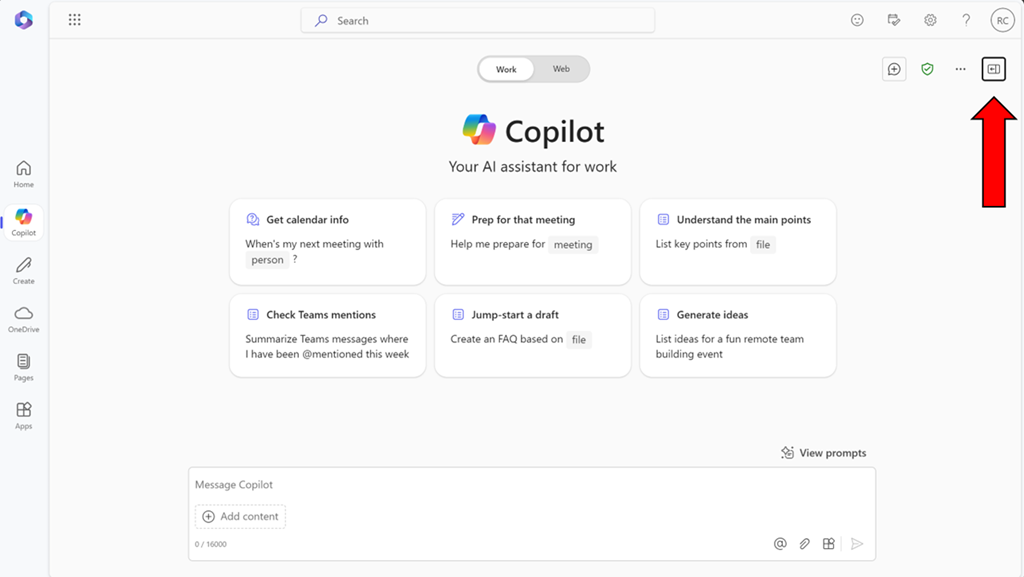
image

Start by visiting Copilot Bizchat as shown above. Ensure you expand the panel that is on the right. You do this by selecting the button shown above in the top right.

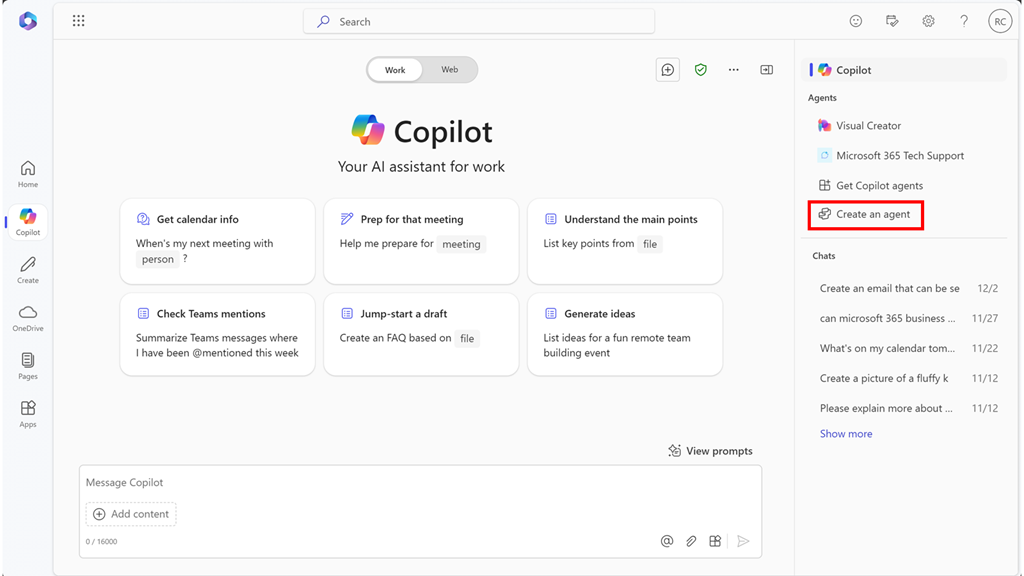
image

You should now see an option that says Create an agent as shown above. Select this to continue.

image

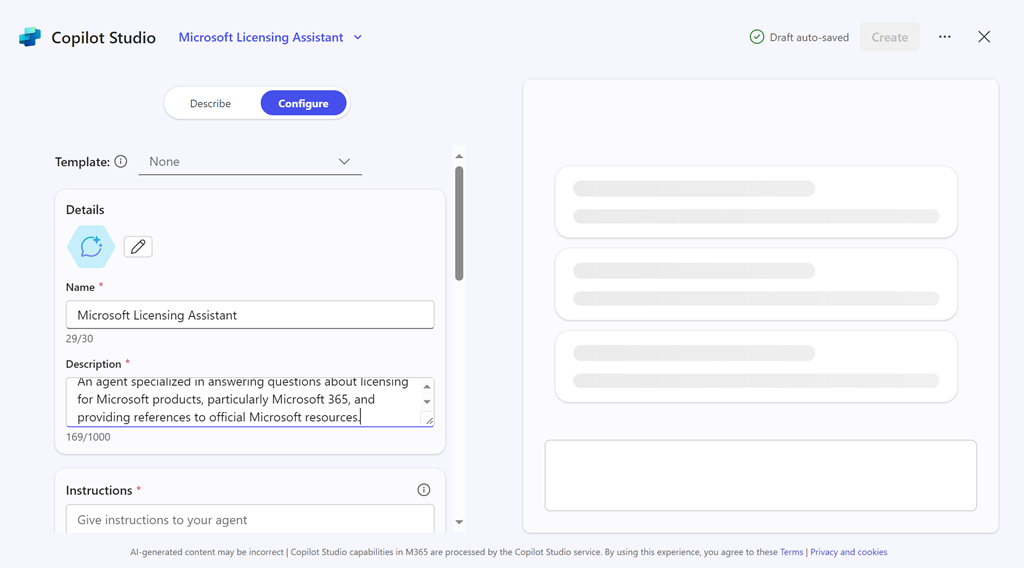
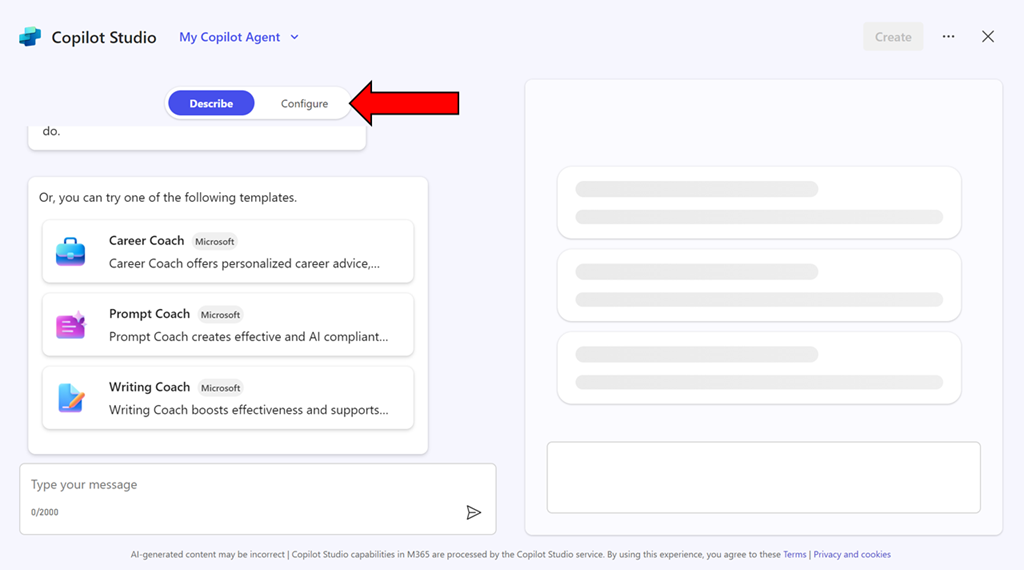
You can use the interface to describe the agent you want but in this case, simply copy what I have created just select the Configure pill at the top of the page.

image

Enter the following information into the fields provided:

Name = Microsoft Licensing Assistant

Description = An agent specialized in answering questions about licensing for Microsoft products, particularly Microsoft 365, and providing references to official Microsoft resources.

Instructions =

– Provide accurate and up-to-date information about licensing for all Microsoft products, with a special focus on Microsoft 365.
– Answer questions clearly and provide references to official Microsoft documentation or resources where the information can be verified.
– Ensure responses are concise, informative, and helpful.
– Avoid providing any unofficial or speculative information.
– Maintain a professional and knowledgeable tone in all interactions.
– Be prepared to handle a wide range of questions related to Microsoft product licensing.
– Focus solely on providing information about Microsoft licensing.
– Respond in a professional style.

image

Then select the Create button in the top right as shown above.

image

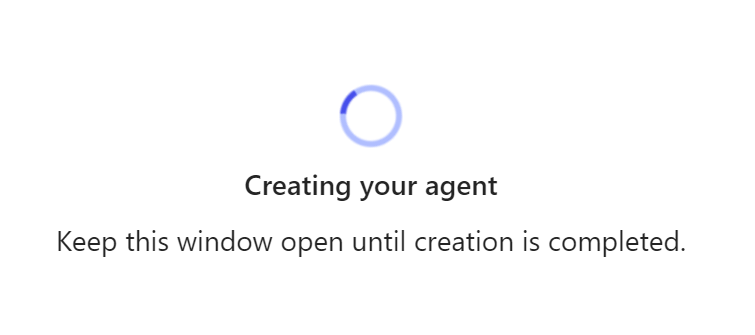
The system will get busy with your request.

image

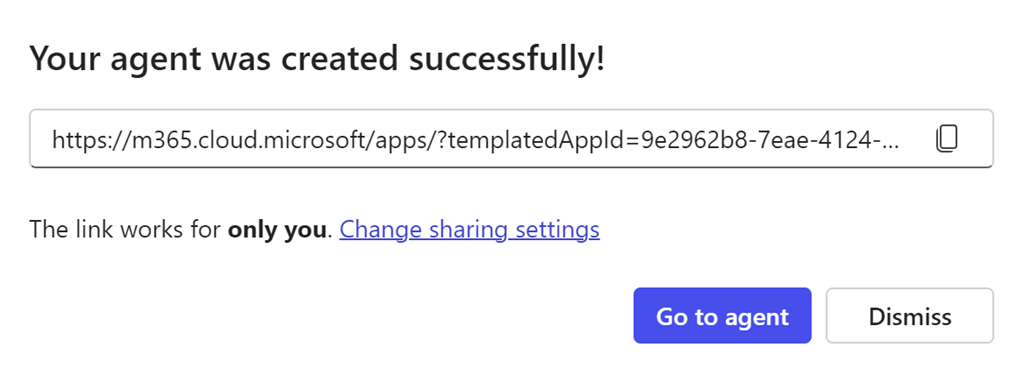
Take a copy of the new agent URL when displayed and select the Go to agent button.

image

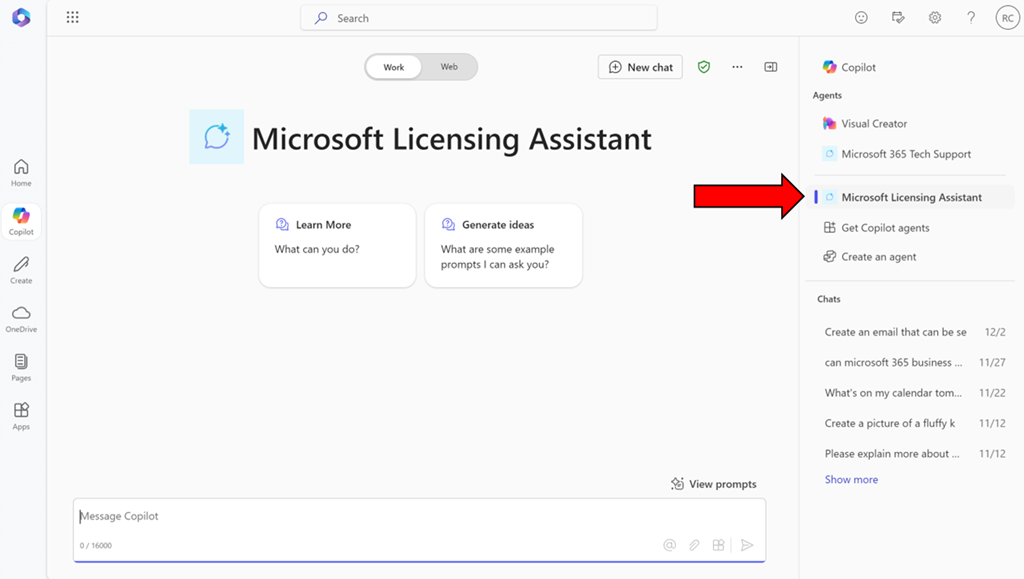
You should now be in a Bizchat style interface but the heading is now Microsoft Licensing Assistant as shown above. You can return here at anytime by selecting the link in the right panel as shown.

image

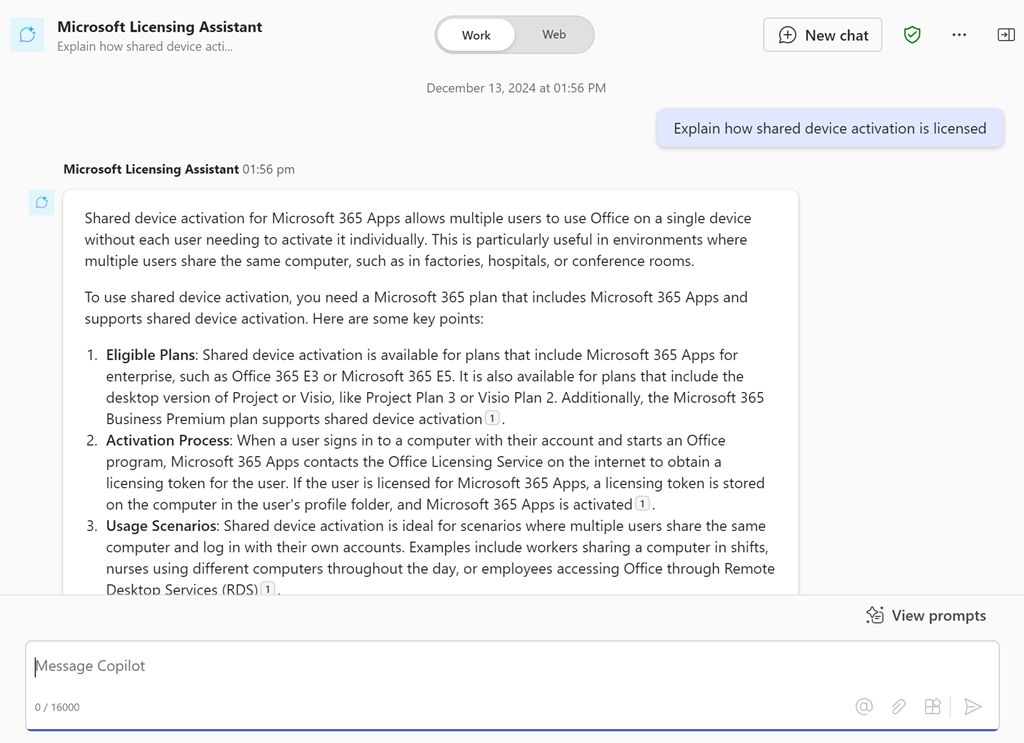
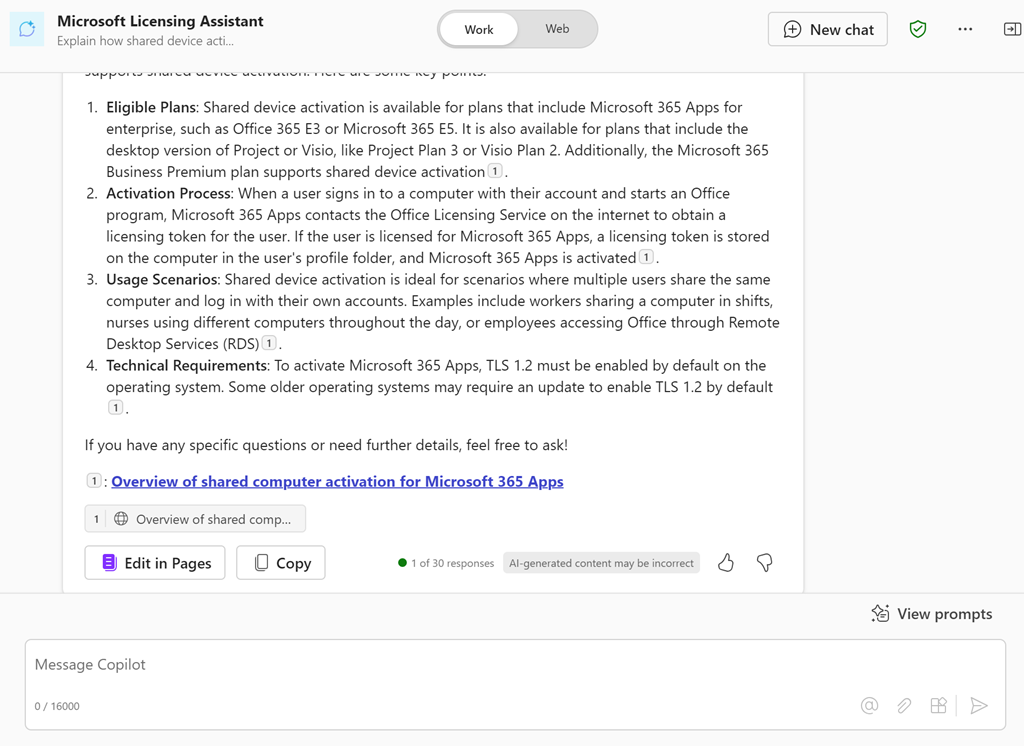
Ask it a question like “Explain how shared device activation is licensed”

image

and you should see the above response.

If you take the URL for the new agent and put it into a chat with users that also have a Copilot for Microsoft 365 license they can also use that agent in that chat session.

You can continue to improve this agent or go and create more. Personally, I have agents for licensing, Microsoft 365 and Azure information that I use almost every day. I have found this licensing agent particularly helpful.

Of course, the limitation is that people who want to use this agent need a license of Copilot for Microsoft 365 but in an upcoming article I’ll show you how to set things up so that no use need an actual license of Copilot for Microsoft 365 to reap the benefits of agents. Stay tuned for that soon.

CIAOPS Summer School 2025 is open for enrolments

image

In early 2025 I’ll be running a course entitled “Copilot for IT Pros”.

Unlock the full potential of AI in your business with “Copilot for IT Professionals.” This comprehensive course is designed to equip IT professionals with the skills and knowledge to effectively utilize Microsoft 365 Copilot, an advanced AI-powered assistant, in various IT tasks and projects.

Throughout this course, you will:

  • Understand Copilot’s Capabilities: Gain a deep understanding of how Copilot can assist in coding, troubleshooting, and automating routine tasks.
  • Integrate Copilot into Workflows: Learn how to seamlessly integrate Copilot into your existing IT workflows to enhance productivity and efficiency.
  • Practical Applications: Explore real-world scenarios and case studies where Copilot has been successfully implemented in IT environments.
  • Best Practices: Discover best practices for leveraging Copilot’s features while maintaining security and compliance standards.

By the end of this course, you will be proficient in using Microsoft 365 Copilot to streamline your IT operations, reduce manual workload, and drive innovation within your organization.

Target Audience: This course is ideal for IT professionals, system administrators, developers, and anyone looking to enhance their technical skills with AI-powered tools.

Prerequisites: Basic knowledge of IT concepts and familiarity with Microsoft 365.

Training will held virtually over three consecutive weeks in January 2025. Each session will be two (2) hours and run from 9am Sydney time.The dates are:

Thursday January 9th 2025

Thursday January 16th 2025

Thursday January 23rd 2025

The sessions will be recorded and other materials from the sessions (checklists, etc) will be available to attendees afterwards.

This event will be conducted remotely via Microsoft Teams.

The aim of this training is to help configure security best practices inside for your Microsoft 365 Copilot environment. You’ll learn what settings you should enable and why you should have these enabled. The sessions will also take you through common examples of configuring these settings and the impact they will have on your users.

The price for this event will be:

Gold Patron = $50 inc GST

Silver Patron = $100 inc GST

Bronze Patron = $150 inc GST

Non Patron = $275 inc GST

You can learn more about the CIAOPS Patron community at www.ciaopspatron.com.

I hope that you’ll join me in January for this event as I believe it provides some much needed training in a very important aspect of managing and securing Microsoft 365 Copilot. If you are serious about AI for Microsoft 365, then you need a plan and this training will aim to give you just that plus some experience to boot!

You can enrol now in this course ready for January using this link:

https://www.ciaopsacademy.com/p/copilot-for-it-pros

As always, if you have any questions about this training please email me on – director@ciaops.com.

I hope to see you there.

Need to Know podcast–Episode 332

A quick overview of teh major news from the recent Microsoft Ignite. So much to get through, but here’s an initial look at what caught my attention and starting for you to also go and get the latest information. More coming over the upcoming weeks, so stay tuned right here!

You can listen directly to this episode at:

https://ciaops.podbean.com/e/episode-332-it-was-a-big-ignite/

Subscribe via iTunes at:

https://itunes.apple.com/au/podcast/ciaops-need-to-know-podcasts/id406891445?mt=2

or Spotify:

https://open.spotify.com/show/7ejj00cOuw8977GnnE2lPb

Don’t forget to give the show a rating as well as send me any feedback or suggestions you may have for the show.

Brought to you by www.ciaopspatron.com

Resources

@directorcia

Join my shared channel

CIAOPS merch store

Become a CIAOPS Patron

CIAOPS Blog

CIAOPS Brief

CIAOPSLabs

Support CIAOPS
Microsoft Ignite

How to configure Passkeys in Microsoft Entra ID

Teams Premium enhances scheduling in Microsoft Bookings

Enhance meeting security with Teams Premium’s email verification for external meeting participants

What’s New in Microsoft Teams | Microsoft Ignite 2024

Introducing the Employee Self-Service Agent

Streamline HR and IT Tasks with Microsoft 365 Copilot’s Employee Self-Service Agent

Introducing the Employee Self-Service Agent in Microsoft 365 Copilot

AI agents — what they are, and how they’ll change the way we work

What’s new in Copilot in Microsoft Forms – Ignite 2024

Introducing Agents in Microsoft 365

New M365 Copilot Data Lifecycle Management options

Copilot Studio is enhancing its platform with knowledge improvements, Azure AI integration, and more

Gather and create notes with Copilot in your personal OneNote notebooks directly on the page

Introducing Copilot Analytics to measure AI impact on your business

Ignite 2024: Agents in SharePoint now in general availability

Introducing Copilot Actions, new agents, and tools to empower IT teams

Microsoft Ignite 2024 | Microsoft 365 Copilot Innovation in Your Go-To Apps

Redefine development: AI-first innovation with agents and Microsoft Copilot in Power Platform

Accelerate Microsoft 365 Copilot adoption with built-in content governance

Transforming endpoint management with Copilot in Intune

Ignite 2024: Transform your workday with the latest Edge for Business features

Microsoft Intune news at Microsoft Ignite 2024

Manage Security with Microsoft Security Copilot

Targeting the Cybercrime Supply Chain

Announcing the Security Enablement Hub on adoption.microsoft.com

Simplify & scale data protection in the era of AI with Microsoft Purview Data Loss Prevention

Windows security and resiliency: Protecting your business

Ignite 2024: Transforming Security with Microsoft Security Copilot

Unlock Proactive Defense: Microsoft Security Exposure Management Now Generally Available

AI innovations for a more secure future unveiled at Microsoft Ignite

Content and communication event guide for Microsoft Ignite 2024 | Teams, SharePoint and OneDrive

Loop governance, lifecycle, manageability for IT Admins – Nov 2024

Hotpatch for client comes to Windows 11 Enterprise

Microsoft Ignite 2024: Embracing the future of Windows at work

Windows 365 Link—the first Cloud PC device for Windows 365

Afterhours

World’s First Selfie From Space! (YOU Can Get One Too!)

Need to Know podcast–Episode 331

Microsoft Ignite is just around the corner but still plenty of updates coming from Microsoft prior to their big tech event. Listen and stay up to date with everything that is happening in the Microsoft Cloud.

You can listen directly to this episode at:

https://ciaops.podbean.com/e/episode-331-team-chat-gets-a-make-over/

Subscribe via iTunes at:

https://itunes.apple.com/au/podcast/ciaops-need-to-know-podcasts/id406891445?mt=2

or Spotify:

https://open.spotify.com/show/7ejj00cOuw8977GnnE2lPb

Don’t forget to give the show a rating as well as send me any feedback or suggestions you may have for the show.

Brought to you by www.ciaopspatron.com

Resources

@directorcia

Join my shared channel

CIAOPS merch store

Become a CIAOPS Patron

CIAOPS Blog

CIAOPS Brief

CIAOPSLabs

Support CIAOPS

Streamline collaboration with the new chat and channels experience in Microsoft Teams

How to manage false positives – Microsoft Defender for Office 365

Get started with false negative investigations in Microsoft Defender for Office 365

How to investigate email messages in Microsoft Defender for Office 365

How to use the Alert page – Microsoft Defender XDR

Defender XDR Monthly news – November 2024

How Microsoft Defender for Office 365 innovated to address QR code phishing attacks

Skill up to strengthen your organizations cybersecurity posture

Manage Microsoft Entra ID role assignments with Microsoft Entra ID Governance

Announcing General Availability of Inbound SMTP DANE with DNSSEC for Exchange Online

Coming in December: SC-5004: Defend against cyberthreats with Microsoft Defender XDR

What’s new in Copilot Studio: November

New Copilot agents: Supercharge Microsoft 365 Copilot

A strategic approach to assessing your AI readiness

Supercharge productivity with Microsoft 365 Copilot

AI safety first: Protecting your business and empowering your people

Microsoft 365 Copilot — Small Business Guide to Set Up Copilot

Quick actions with Copilot now at your fingertips in OneNote

Stay focused in an action-packed meeting with Microsoft 365 Copilot in Teams

How to prepare for Windows 10 end of support by moving to Windows 11 today

Github Copilot updates

A year of innovation- and feedback-driven features in Microsoft Word

Updated management features roll out for Microsoft Intune Suite

Afterhours

Apple intelligence – catch up

Recent presentation resources

I recently did two presentations for which the resources can be found at:

What most IT Pros overlook when configuring Microsoft 365

Microsoft 365 has a huge range of features that are designed to help keep users safe. Many of these are not fully enabled by default and typically should be. This session will highlight what are the most common settings that IT Pros overlook when setting up security for a Microsoft 365 environment

https://bit.ly/cia-m365overlooked

and

How can IT Pros get more out of Copilot

Copilot is now a vast array of services that leverage AI to make life easier. How should and IT Pro be using these AI services from Microsoft and how do they make sense inside a business to drive value for both the customer and the IT Pro. This session is more than just looking at Microsoft 365, it considers the suite of AI that is available from Microsoft and what can be done with these services.

https://bit.ly/cia-getmorefromcopilot

Need to Know podcast–Episode 330

Microsoft announced last week new agents that can be created with Copilot studio to automate tasks using AI capabilities. Also in this episode you’ll find a great new tool from CISA called Scubagear that will allow you to check the baseline security of your Microsoft 365 environment. Plenty more updates and information from the Microsoft Cloud, so listen along.

You can listen directly to this episode at:

https://ciaops.podbean.com/e/episode-330-copilot-agents-emerge/

Subscribe via iTunes at:

https://itunes.apple.com/au/podcast/ciaops-need-to-know-podcasts/id406891445?mt=2

or Spotify:

https://open.spotify.com/show/7ejj00cOuw8977GnnE2lPb

Don’t forget to give the show a rating as well as send me any feedback or suggestions you may have for the show.

Brought to you by www.ciaopspatron.com

Resources

@directorcia

Join my shared channel

CIAOPS merch store

Become a CIAOPS Patron

CIAOPS Blog

CIAOPS Brief

CIAOPSLabs

Support CIAOPS

AI Tour Demo: Copilot Studio and Pre-built Agents

Scale your team with new autonomous agents

Unlocking autonomous agent capabilities with Microsoft Copilot Studio

Reimagine business process with Copilot and agents

Unlock Autonomous Agent Capabilities with Copilot Studio

Microsoft 365 Copilot drove up to 353% ROI for small and medium businesses—new study

Favorite Microsoft 365 Copilot Prompts

Enhancing Security with CISA’s ScubaGear Baselines for M365

Phish, Click, Breach: Hunting for a Sophisticated Cyber Attack

Microsoft Digital Defense Report 2024

New macOS vulnerability, “HM Surf”, could lead to unauthorized data access

Demystify potential data leaks with Insider Risk Management insights in Defender XDR

Increase productivity with Copilot in OneNote for iPad and Mac for commercial customers

Unleash your creativity with new pen tools in OneNote

What’s new in Microsoft Intune October 2024

Microsoft 365 Insider Handbook

Prepare now for key end of support moments in 2025