Need to Know podcast–Episode 334

Part 2 of trial using AI generated content! This is part two of a two part test with the incorporation of AI generated content. If you missed the first episode check out Episode 333. In this episode I used Wondercraft.ai to generated some of the AI conversation you’ll hear, after my normal intro. I am really interested in your feedback on what you think, good or bad. Watch out for another ‘special Ai test’, coming soon.

Brought to you by www.ciaopspatron.com

You can listen directly to this episode at:

https://ciaops.podbean.com/e/episode-334-now-with-ai-content-part-2/

Subscribe via iTunes at:

https://itunes.apple.com/au/podcast/ciaops-need-to-know-podcasts/id406891445?mt=2

or Spotify:

https://open.spotify.com/show/7ejj00cOuw8977GnnE2lPb

Don’t forget to give the show a rating as well as send me any feedback or suggestions you may have for the show.

Brought to you by www.ciaopspatron.com

Resources

@directorcia

Join my shared channel

CIAOPS merch store

Become a CIAOPS Patron

CIAOPS Blog

CIAOPS Brief

CIAOPSLabs

Support CIAOPS

Gather and create notes with Copilot in your personal OneNote notebooks directly on the page – https://techcommunity.microsoft.com/blog/microsoft365insiderblog/gather-and-create-notes-with-copilot-in-your-personal-onenote-notebooks-directly/4294053

Three new ways small and medium-sized businesses can purchase Microsoft 365 Copilot – https://www.microsoft.com/en-us/microsoft-365/blog/2024/12/02/three-new-ways-small-and-medium-sized-businesses-can-purchase-microsoft-365-copilot/

Take control during screen sharing in Teams for the web – https://techcommunity.microsoft.com/blog/Microsoft365InsiderBlog/take-control-during-screen-sharing-in-teams-for-the-web/4354595

Convincing a billion users to love passkeys: UX design insights from Microsoft to boost adoption and security – https://www.microsoft.com/en-us/security/blog/2024/12/12/convincing-a-billion-users-to-love-passkeys-ux-design-insights-from-microsoft-to-boost-adoption-and-security/

Need to Know podcast–Episode 333

Something new for this episode, AI generated content! This is part one of a two part test with the incorporation of AI generated content. In this episode I used Google NotebookLM to generated the Ai conversation you’ll hear, after my normal intro. I am really interested in your feedback on what you think, good or bad. Watch out for part two, coming soon.

You can listen directly to this episode at:

https://ciaops.podbean.com/e/episode-333-now-with-ai-content-part-1/

Subscribe via iTunes at:

https://itunes.apple.com/au/podcast/ciaops-need-to-know-podcasts/id406891445?mt=2

or Spotify:

https://open.spotify.com/show/7ejj00cOuw8977GnnE2lPb

Don’t forget to give the show a rating as well as send me any feedback or suggestions you may have for the show.

Brought to you by www.ciaopspatron.com

Resources

@directorcia

Join my shared channel

CIAOPS merch store

Become a CIAOPS Patron

CIAOPS Blog

CIAOPS Brief

CIAOPSLabs

Support CIAOPS

Your Workday Reimagined: Using Microsoft 365 Copilot in IT –

https://www.youtube.com/watch?v=-jV67ObIiS4

Strategy to Execution: Operationalizing Microsoft Defender CSPM –

https://techcommunity.microsoft.com/blog/microsoftdefendercloudblog/strategy-to-execution-operationalizing-microsoft-defender-cspm/4357354

Unplug this holiday season with these Microsoft 365 features –

https://techcommunity.microsoft.com/blog/Microsoft365InsiderBlog/unplug-this-holiday-season-with-these-microsoft-365-features/4355248?

New Microsoft Purview features help protect and govern your data in the era of AI –

https://www.microsoft.com/en-us/security/blog/2024/12/10/new-microsoft-purview-features-help-protect-and-govern-your-data-in-the-era-of-ai/

Convincing a billion users to love passkeys: UX design insights from Microsoft to boost adoption and security –

https://www.microsoft.com/en-us/security/blog/2024/12/12/convincing-a-billion-users-to-love-passkeys-ux-design-insights-from-microsoft-to-boost-adoption-and-security/
Frequent freeloader part II: Russian actor Secret Blizzard using tools of other groups to attack Ukraine –

https://www.microsoft.com/en-us/security/blog/2024/12/11/frequent-freeloader-part-ii-russian-actor-secret-blizzard-using-tools-of-other-groups-to-attack-ukraine/

Microsoft Defender XDR demonstrates 100% detection coverage across all cyberattack stages in the 2024 MITRE ATT&CK® Evaluations: Enterprise –

https://www.microsoft.com/en-us/security/blog/2024/12/11/microsoft-defender-xdr-demonstrates-100-detection-coverage-across-all-cyberattack-stages-in-the-2024-mitre-attck-evaluations-enterprise/

Take control during screen sharing in Teams for the web –

https://techcommunity.microsoft.com/blog/Microsoft365InsiderBlog/take-control-during-screen-sharing-in-teams-for-the-web/4354595

What’s new in Microsoft Entra – November 2024 –

https://www.youtube.com/watch?v=NESTW0B1nAQ

Explore our latest Microsoft Security training on Microsoft Learn –

https://techcommunity.microsoft.com/blog/microsoftsecurityandcompliance/explore-our-latest-microsoft-security-training-on-microsoft-learn/4351939

Boost productivity with Copilot in OneDrive –

https://www.youtube.com/watch?v=c7wEqbKDQMg

Explore new Microsoft Entra capabilities at Gartner Identity & Access Management Summit 2024 –

https://www.microsoft.com/en-us/security/blog/2024/12/04/explore-new-microsoft-entra-capabilities-at-gartner-identity-access-management-summit-2024/

Frequent freeloader part I: Secret Blizzard compromising Storm-0156 infrastructure for espionage –

https://www.microsoft.com/en-us/security/blog/2024/12/04/frequent-freeloader-part-i-secret-blizzard-compromising-storm-0156-infrastructure-for-espionage/

Three new ways small and medium-sized businesses can purchase Microsoft 365 Copilot –

https://www.microsoft.com/en-us/microsoft-365/blog/2024/12/02/three-new-ways-small-and-medium-sized-businesses-can-purchase-microsoft-365-copilot/

Safeguarding AI against ‘jailbreaks’ and other prompt attacks –

https://news.microsoft.com/source/?post_type=features&p=8732

Update on nested app authentication and deprecation of Exchange Online legacy tokens –

https://techcommunity.microsoft.com/blog/exchange/update-on-nested-app-authentication-and-deprecation-of-exchange-online-legacy-to/4351951

Gather and create notes with Copilot in your personal OneNote notebooks directly on the page –

https://techcommunity.microsoft.com/blog/microsoft365insiderblog/gather-and-create-notes-with-copilot-in-your-personal-onenote-notebooks-directly/4294053

After hours

The World According To Kaleb On Tour | Official Trailer | Prime Video
https://www.youtube.com/watch?v=dqAXVQZ6jww

CIA Brief 20241214

image

Your Workday Reimagined: Using Microsoft 365 Copilot in IT –

https://www.youtube.com/watch?v=-jV67ObIiS4

Strategy to Execution: Operationalizing Microsoft Defender CSPM –

https://techcommunity.microsoft.com/blog/microsoftdefendercloudblog/strategy-to-execution-operationalizing-microsoft-defender-cspm/4357354

Unplug this holiday season with these Microsoft 365 features –

https://techcommunity.microsoft.com/blog/Microsoft365InsiderBlog/unplug-this-holiday-season-with-these-microsoft-365-features/4355248?

New Microsoft Purview features help protect and govern your data in the era of AI –

https://www.microsoft.com/en-us/security/blog/2024/12/10/new-microsoft-purview-features-help-protect-and-govern-your-data-in-the-era-of-ai/

Convincing a billion users to love passkeys: UX design insights from Microsoft to boost adoption and security –

https://www.microsoft.com/en-us/security/blog/2024/12/12/convincing-a-billion-users-to-love-passkeys-ux-design-insights-from-microsoft-to-boost-adoption-and-security/
Frequent freeloader part II: Russian actor Secret Blizzard using tools of other groups to attack Ukraine –

https://www.microsoft.com/en-us/security/blog/2024/12/11/frequent-freeloader-part-ii-russian-actor-secret-blizzard-using-tools-of-other-groups-to-attack-ukraine/

Microsoft Defender XDR demonstrates 100% detection coverage across all cyberattack stages in the 2024 MITRE ATT&CK® Evaluations: Enterprise –

https://www.microsoft.com/en-us/security/blog/2024/12/11/microsoft-defender-xdr-demonstrates-100-detection-coverage-across-all-cyberattack-stages-in-the-2024-mitre-attck-evaluations-enterprise/

Take control during screen sharing in Teams for the web –

https://techcommunity.microsoft.com/blog/Microsoft365InsiderBlog/take-control-during-screen-sharing-in-teams-for-the-web/4354595

What’s new in Microsoft Entra – November 2024 –

https://www.youtube.com/watch?v=NESTW0B1nAQ

Explore our latest Microsoft Security training on Microsoft Learn –

https://techcommunity.microsoft.com/blog/microsoftsecurityandcompliance/explore-our-latest-microsoft-security-training-on-microsoft-learn/4351939

Boost productivity with Copilot in OneDrive –

https://www.youtube.com/watch?v=c7wEqbKDQMg

Explore new Microsoft Entra capabilities at Gartner Identity & Access Management Summit 2024 –

https://www.microsoft.com/en-us/security/blog/2024/12/04/explore-new-microsoft-entra-capabilities-at-gartner-identity-access-management-summit-2024/

Frequent freeloader part I: Secret Blizzard compromising Storm-0156 infrastructure for espionage –

https://www.microsoft.com/en-us/security/blog/2024/12/04/frequent-freeloader-part-i-secret-blizzard-compromising-storm-0156-infrastructure-for-espionage/

Three new ways small and medium-sized businesses can purchase Microsoft 365 Copilot –

https://www.microsoft.com/en-us/microsoft-365/blog/2024/12/02/three-new-ways-small-and-medium-sized-businesses-can-purchase-microsoft-365-copilot/

Safeguarding AI against ‘jailbreaks’ and other prompt attacks –

https://news.microsoft.com/source/?post_type=features&p=8732

Update on nested app authentication and deprecation of Exchange Online legacy tokens –

https://techcommunity.microsoft.com/blog/exchange/update-on-nested-app-authentication-and-deprecation-of-exchange-online-legacy-to/4351951

Gather and create notes with Copilot in your personal OneNote notebooks directly on the page –

https://techcommunity.microsoft.com/blog/microsoft365insiderblog/gather-and-create-notes-with-copilot-in-your-personal-onenote-notebooks-directly/4294053

After hours

The World According To Kaleb On Tour | Official Trailer | Prime Video

https://www.youtube.com/watch?v=dqAXVQZ6jww

Editorial

If you found this valuable, the I’d appreciate a ‘like’ or perhaps a donation at https://ko-fi.com/ciaops. This helps me know that people enjoy what I have created and provides resources to allow me to create more content. If you have any feedback or suggestions around this, I’m all ears. You can also find me via email director@ciaops.com and on X (Twitter) at https://www.twitter.com/directorcia.

If you want to be part of a dedicated Microsoft Cloud community with information and interactions daily, then consider becoming a CIAOPS Patron – www.ciaopspatron.com.

Watch out for the next CIA Brief next week

How to build a Microsoft Licensing agent

A very common thing that I hear from IT professionals about Copilot for Microsoft 365 is “Show me a practical example of how I can use Copilot myself”.

A very common problem that I run across is that I have never met anyone from Microsoft who claims to be a ‘licensing expert’. Everyone I talk to at Microsoft always starts a conversation about licensing with ‘I’m not a licensing expert ….’. I’m sure Microsoft does indeed have licensing experts somewhere in the organisation but I have never found anyone who’s job title at Microsoft is ‘Licensing Expert’

Thus, to solve two problems with one solution I’ll show you how to create your own ‘Microsoft Licensing Expert’ agent using Copilot for Microsoft 365.

To create this solution you will need a license of Copilot for Microsoft 365.

image

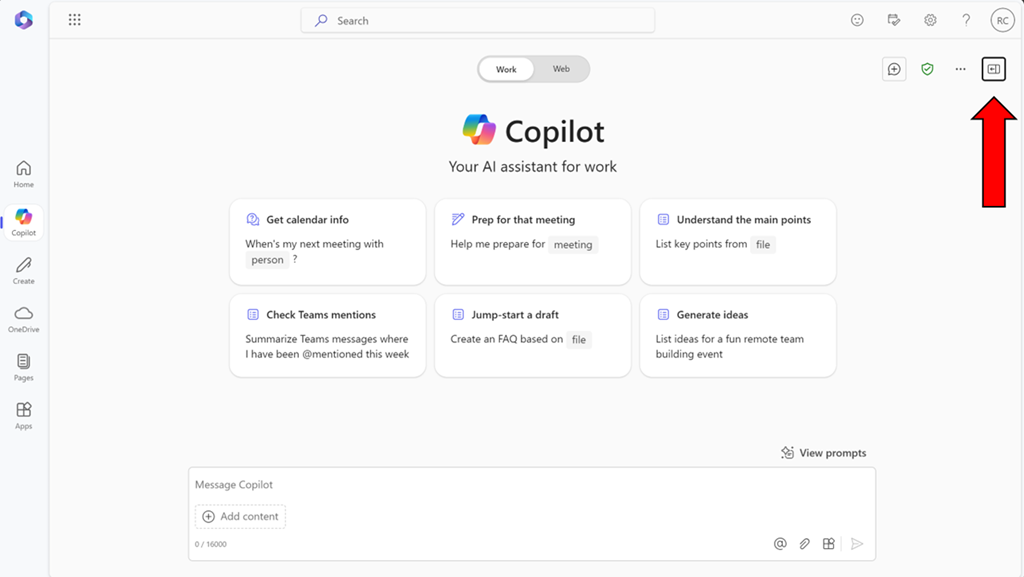
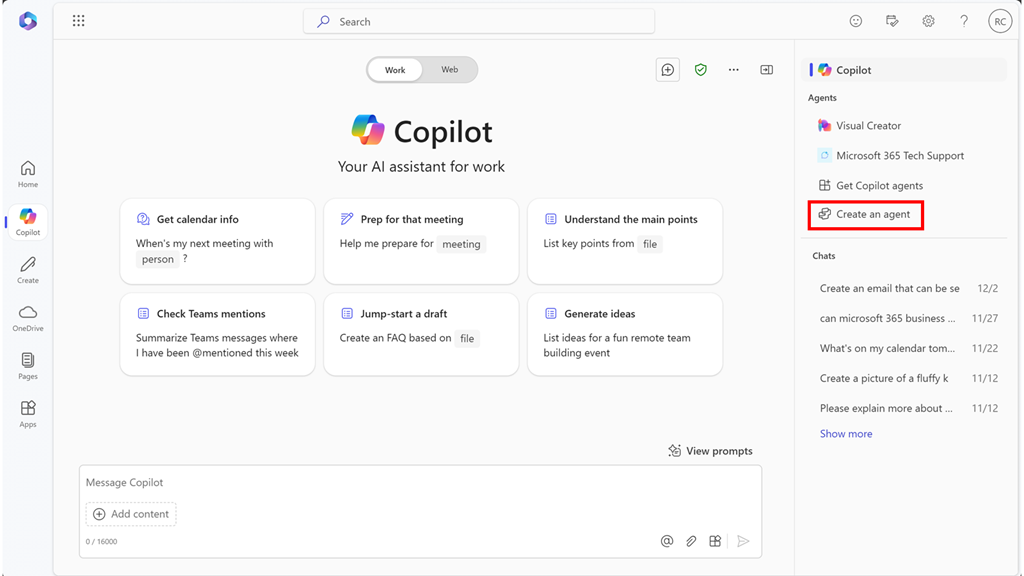
Start by visiting Copilot Bizchat as shown above. Ensure you expand the panel that is on the right. You do this by selecting the button shown above in the top right.

image

You should now see an option that says Create an agent as shown above. Select this to continue.

image

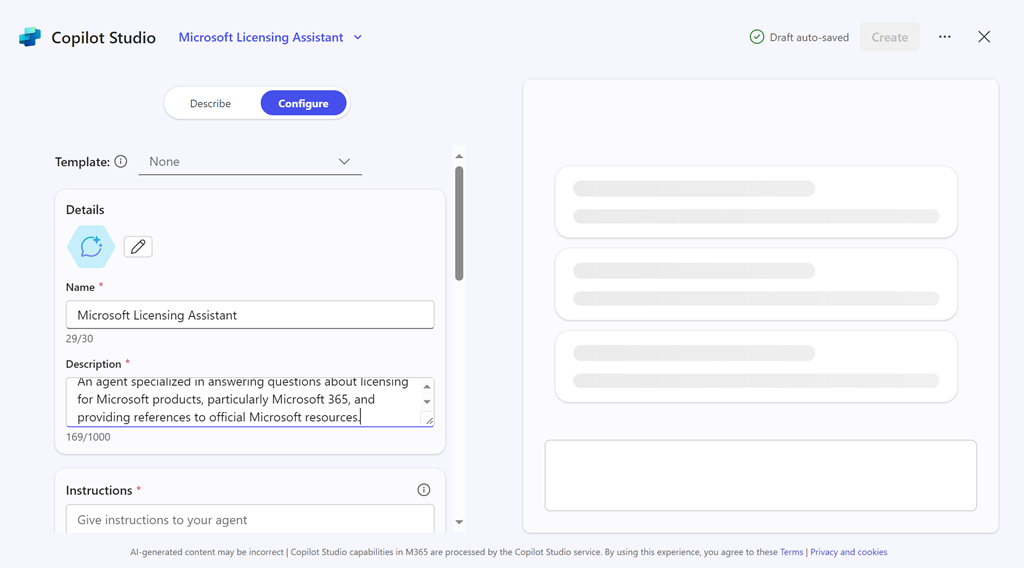
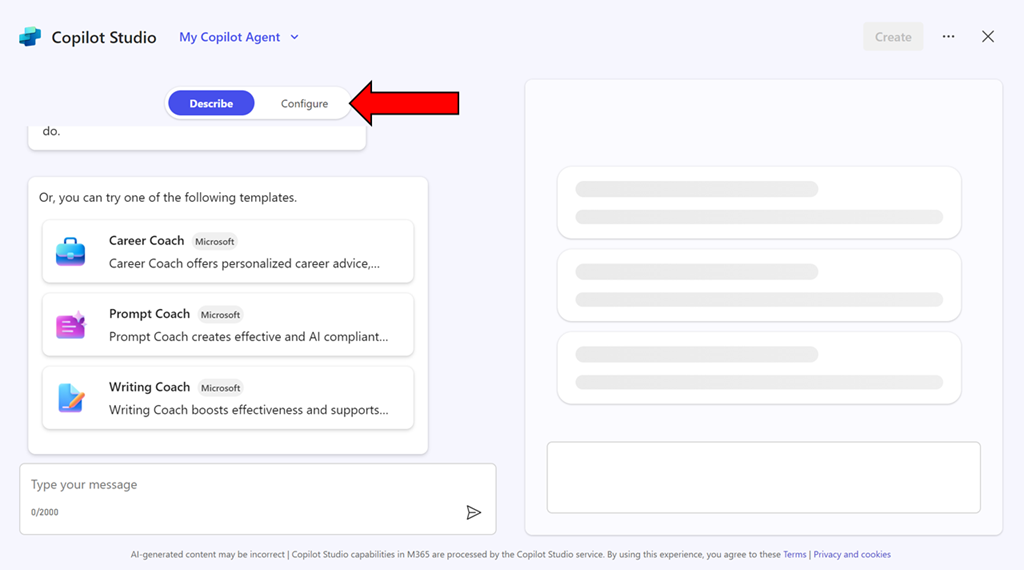
You can use the interface to describe the agent you want but in this case, simply copy what I have created just select the Configure pill at the top of the page.

image

Enter the following information into the fields provided:

Name = Microsoft Licensing Assistant

Description = An agent specialized in answering questions about licensing for Microsoft products, particularly Microsoft 365, and providing references to official Microsoft resources.

Instructions =

– Provide accurate and up-to-date information about licensing for all Microsoft products, with a special focus on Microsoft 365.
– Answer questions clearly and provide references to official Microsoft documentation or resources where the information can be verified.
– Ensure responses are concise, informative, and helpful.
– Avoid providing any unofficial or speculative information.
– Maintain a professional and knowledgeable tone in all interactions.
– Be prepared to handle a wide range of questions related to Microsoft product licensing.
– Focus solely on providing information about Microsoft licensing.
– Respond in a professional style.

image

Then select the Create button in the top right as shown above.

image

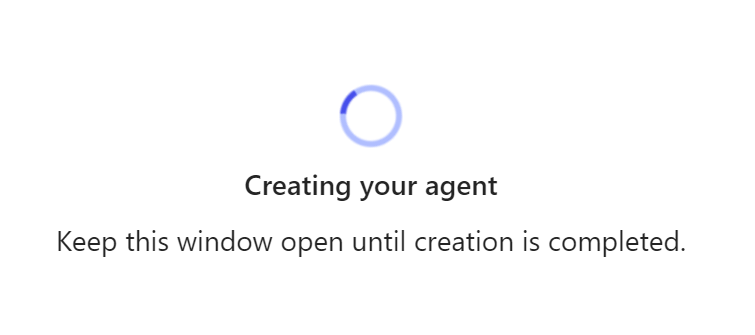
The system will get busy with your request.

image

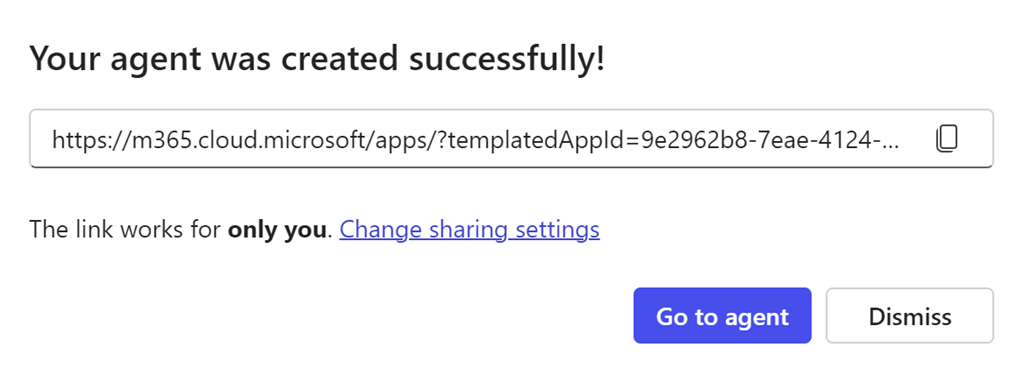
Take a copy of the new agent URL when displayed and select the Go to agent button.

image

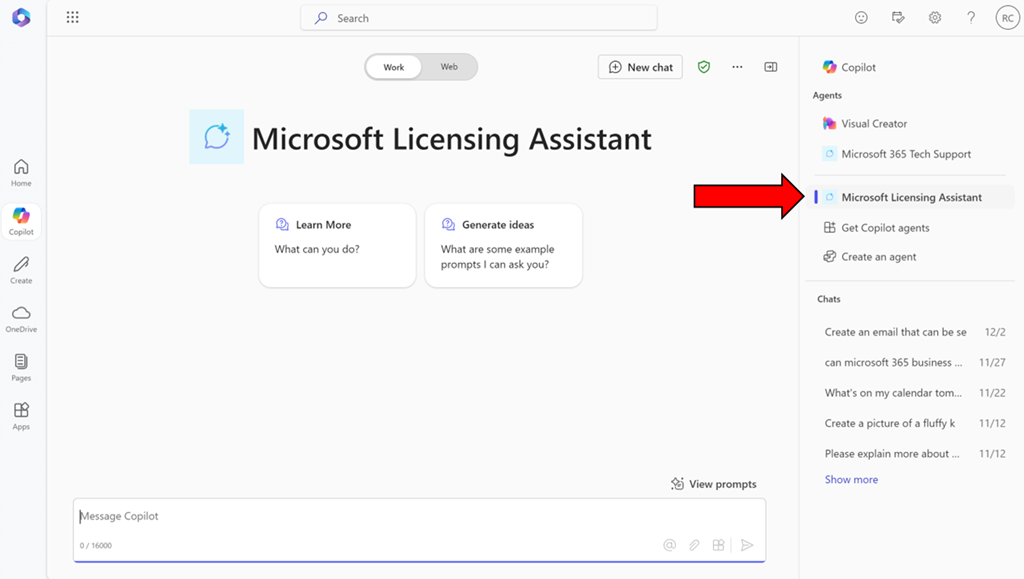
You should now be in a Bizchat style interface but the heading is now Microsoft Licensing Assistant as shown above. You can return here at anytime by selecting the link in the right panel as shown.

image

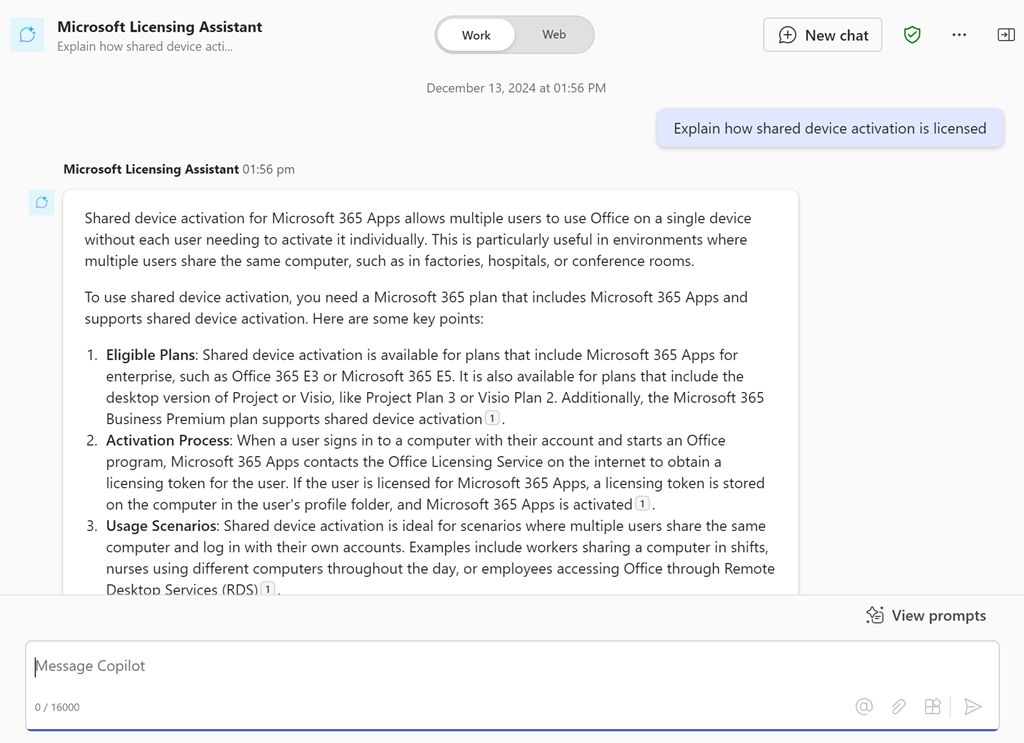
Ask it a question like “Explain how shared device activation is licensed”

image

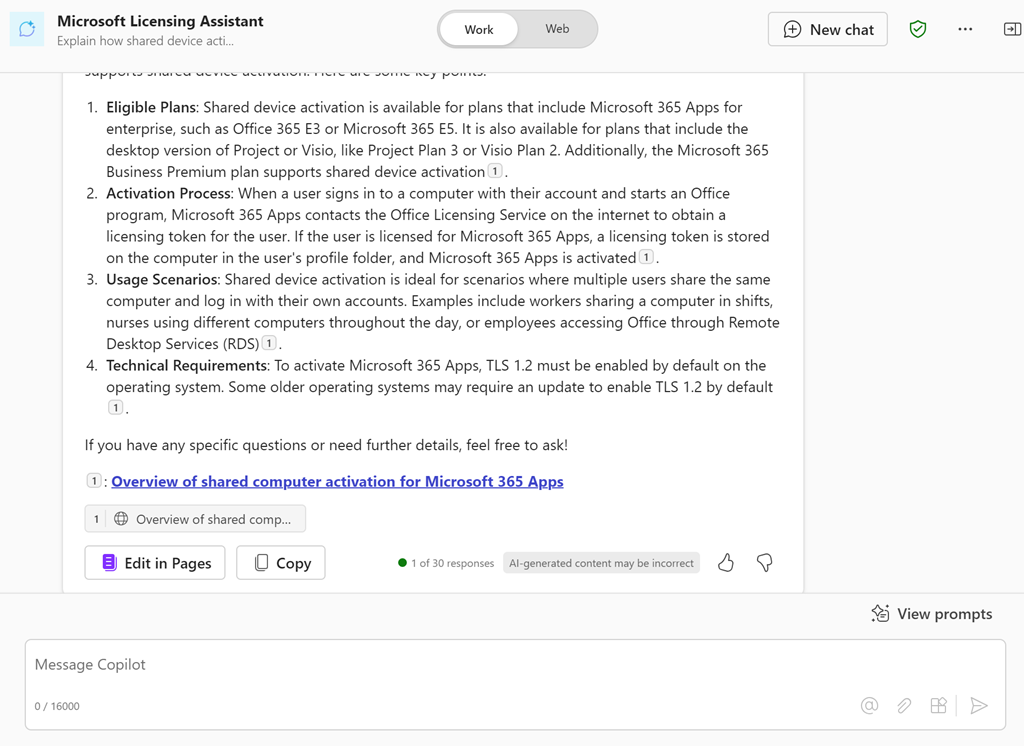
and you should see the above response.

If you take the URL for the new agent and put it into a chat with users that also have a Copilot for Microsoft 365 license they can also use that agent in that chat session.

You can continue to improve this agent or go and create more. Personally, I have agents for licensing, Microsoft 365 and Azure information that I use almost every day. I have found this licensing agent particularly helpful.

Of course, the limitation is that people who want to use this agent need a license of Copilot for Microsoft 365 but in an upcoming article I’ll show you how to set things up so that no use need an actual license of Copilot for Microsoft 365 to reap the benefits of agents. Stay tuned for that soon.

Script to report tenant directory activity

image

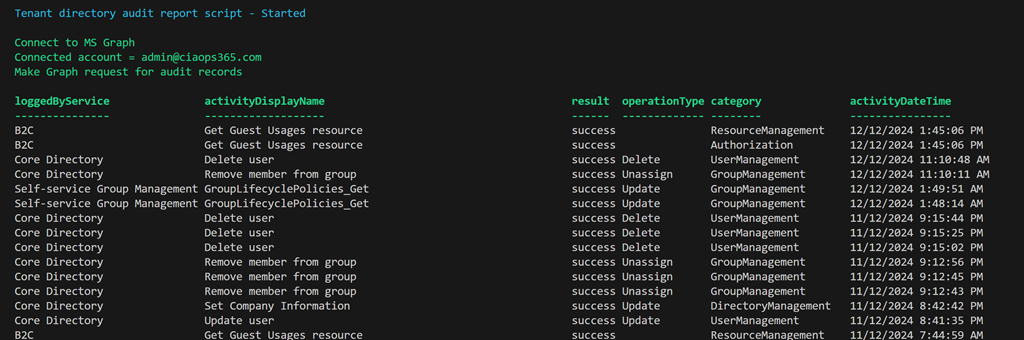
I have created a script that uses the Microsoft Graph to report directory activity for the tenant as shown above. You’ll find it here:

https://github.com/directorcia/Office365/blob/master/graph-diraudit-get.ps1

along with the documentation here:

https://github.com/directorcia/Office365/wiki/Report-directory-activity-in-a-tenant

You will need to have the Microsoft Graph PowerShell module installed and up to date.

The first time you run the script you maybe prompted to login to your tenant and then you may also be asked to provide permissions This script requires:

AuditLog.Read.All
Directory.Read.All

which you may need to consent to the first time.

After the script executes you should see an output as shown above showing the logging service, activity, result, operation, category and time stamp.

You can also use the –csv command line option to put the results to a CSV file in the parent directory.

Script to report tenant signins

image

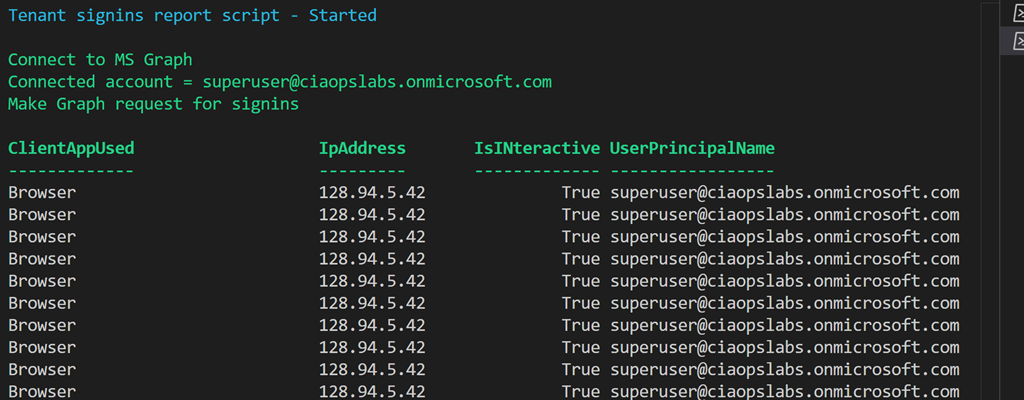
I have created a script that uses the Microsoft Graph to report signins for the tenant as shown above. You’ll find it here:

https://github.com/directorcia/Office365/blob/master/graph-signins-get.ps1

along with the documentation here:

https://github.com/directorcia/Office365/wiki/Get-tenant-signins

You will need to have the Microsoft Graph PowerShell module installed and up to date.

The first time you run the script you maybe prompted to login to your tenant and then you may also be asked to provide permissions This script requires:

AuditLog.Read.All
Directory.Read.All

which you may need to consent to the first time.

After the script executes you should see an output as shown above showing the Client App used, IP Address, is an interactive login and the user principal name.

You can also use the –csv command line option to put the results to a CSV file in the parent directory.

Script to report tenant users

image

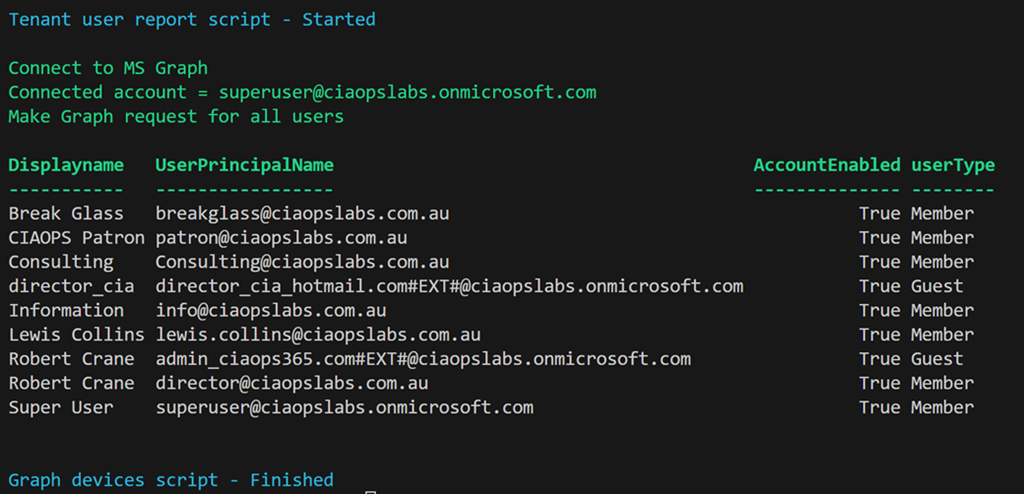
I have created a script that uses the Microsoft Graph to report users for the tenant as shown above. You’ll find it here:

https://github.com/directorcia/Office365/blob/master/graph-users-get.ps1

along with the documentation here:

https://github.com/directorcia/Office365/wiki/Report-Tenant-Users

You will need to have the Microsoft Graph PowerShell module installed and up to date.

The first time you run the script you maybe prompted to login to your tenant and then you may also be asked to provide permissions This script requires:

User.ReadBasic.All,
User.Read.All,
User.ReadWrite.All,
Directory.Read.All,
Directory.ReadWrite.All”

which you may need to consent to the first time.

After the script executes you should see an output as shown above showing the Display name, User Principal Name, whether the account is enabled and the user type.

You can also use the –csv command line option to put the results to a CSV file in the parent directory.

Script to report tenant devices

image

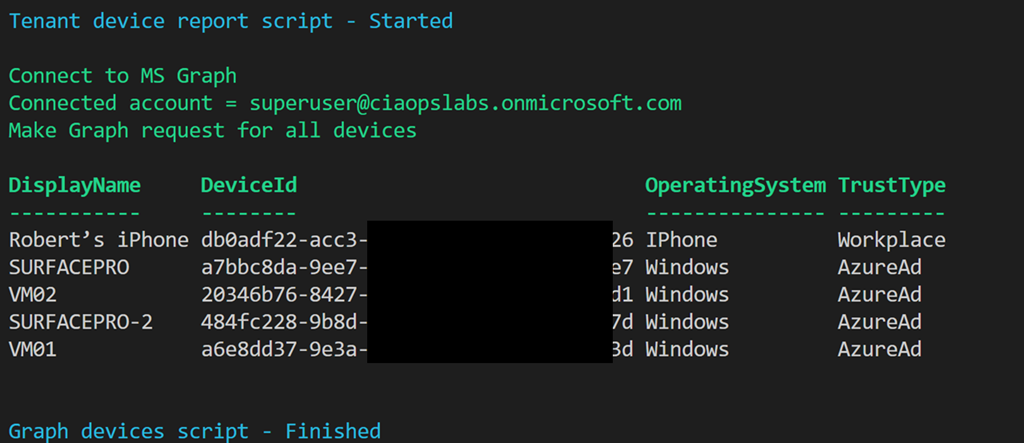
I have created a script that uses the Microsoft Graph to report devices for the tenant as shown above. You’ll find it here:

https://github.com/directorcia/Office365/blob/master/graph-devices-get.ps1

along with the documentation here:

https://github.com/directorcia/Office365/wiki/Report-tenant-devices

You will need to have the Microsoft Graph PowerShell module installed and up to date.

image

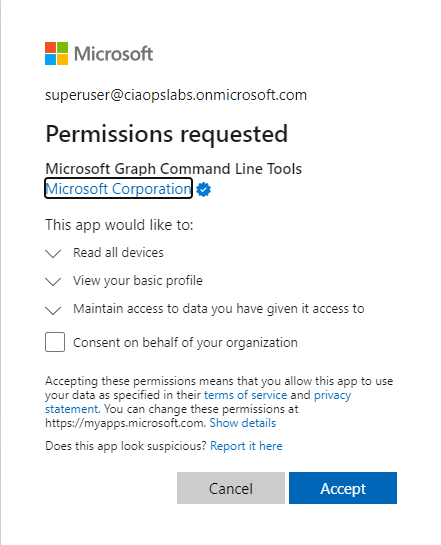
The first time you run the script you maybe prompted to login to your tenant and then you may also be asked to provide permissions as shown above. This script requires:

Device.Read.All

which you may need to consent to the first time.

After the script executes you should see an output as shown above showing the device, device id, operating system and tenant join type.

You can also use the –csv command line option to put the results to a CSV file in the parent directory.