ASD OWA settings check script

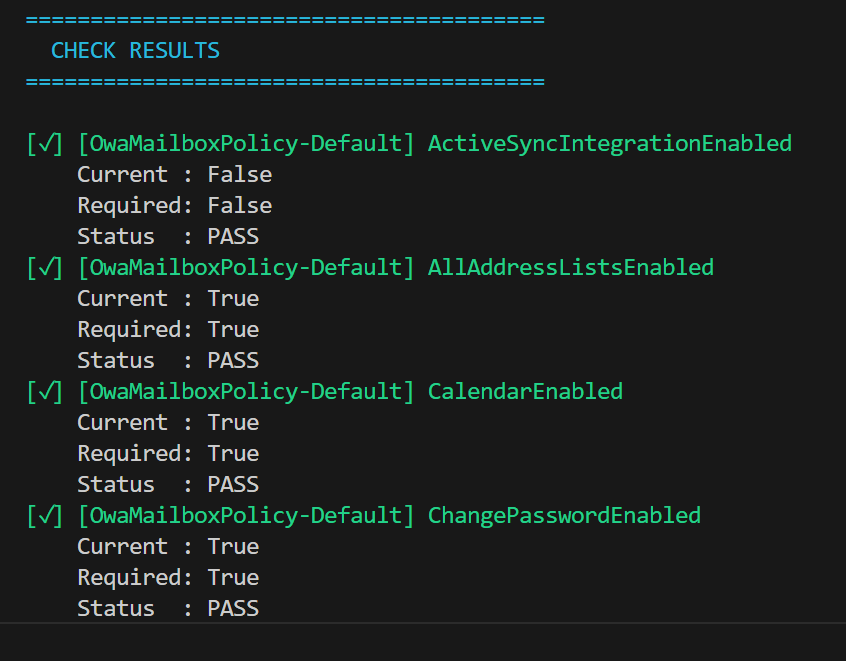
Screenshot 2025-11-13 073547

I’ve taken the Exchange Online Outlook web app policies settings recommendations from the ASD Blueprint for Secure Cloud and created an online JSON settings file here:

https://github.com/directorcia/bp/blob/main/ASD/Exchange-Online/Roles/owamail.json

I’ve then created a PowerShell script here:

https://github.com/directorcia/Office365/blob/master/asd-owamail-get.ps1

with documentation here:

https://github.com/directorcia/Office365/wiki/ASD-OWA-Mailbox-Configuration-Check

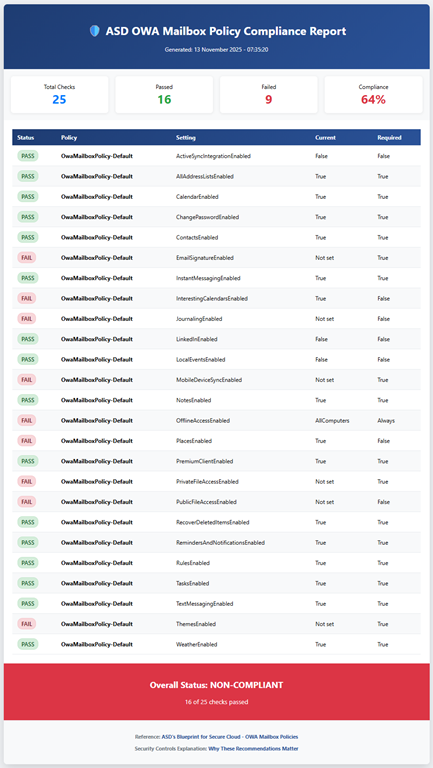
that reads the online JSON file (or uses a local version if you want to use that) and compares the recommended ASD settings to those in your own Exchange Online environment. Note, the script makes NO CHANGES to your environment, it simply reads the current settings.

It then produces the console output you see above and a HTML report like this:

Screenshot 2025-11-13 074141

You can refer to this page I also created:

https://github.com/directorcia/bp/wiki/Exchange-Online-OWA-Mailbox-Security-Controls

as to why these settings are important to the security of your M365 environment.

Look out for more scripts like this coming soon. I welcome any suggestion about improving this.

ASD Mailflow settings check script

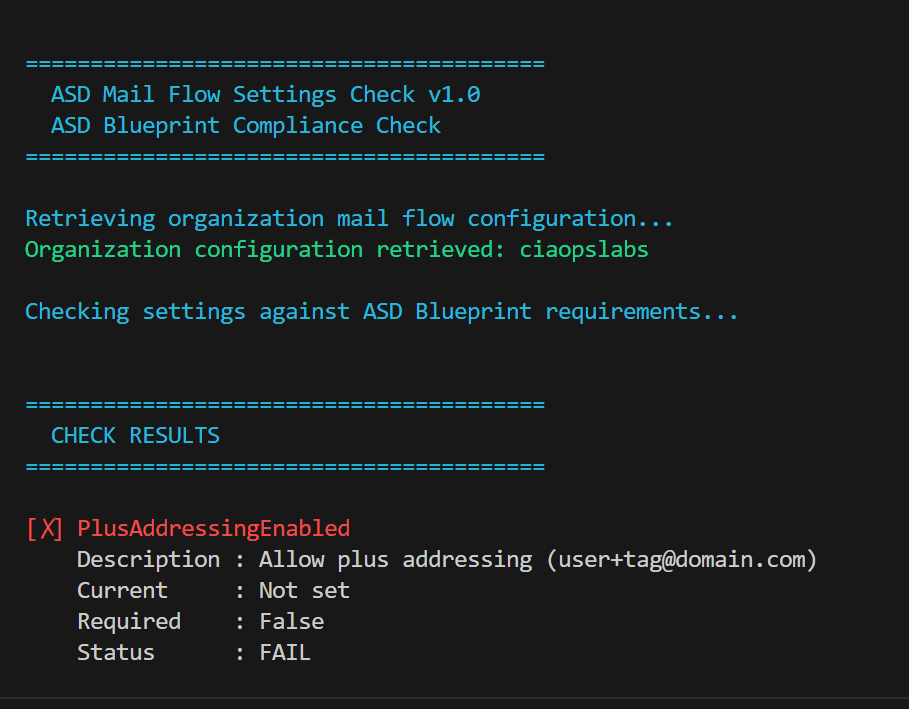
Screenshot 2025-11-12 091022

I’ve taken the Exchange Online Mail Flow settings recommendations from the ASD Blueprint for Secure Cloud and created an online JSON settings file here:

https://github.com/directorcia/bp/blob/main/ASD/Exchange-Online/Settings/mailflow.json

I’ve then created a PowerShell script here:

https://github.com/directorcia/Office365/blob/master/asd-mailflow-get.ps1

with documentation here:

https://github.com/directorcia/Office365/wiki/ASD-Mail-Flow-Configuration-Check

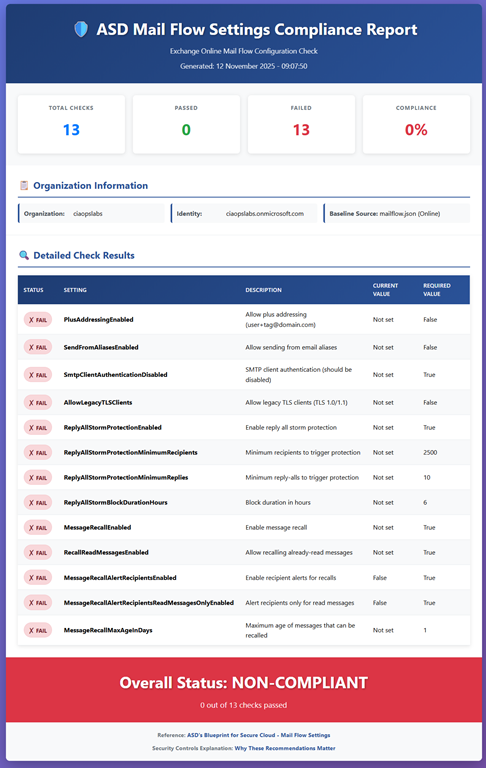
that reads the online JSON file (or uses a local version if you want to use that) and compares the recommended ASD settings to those in your own Exchange Online environment. Note, the script makes NO CHANGES to your environment, it simply reads the current settings.

It then produces the console output you see above and a HTML report like this:

Screenshot 2025-11-12 091607

You can refer to this page I also created:

https://github.com/directorcia/bp/wiki/Exchange-Online-Mail-Flow-Security-Controls

as to why these settings are important to the security of your M365 environment.

Look out for more scripts like this coming soon. I welcome any suggestion about improving this.

CIAOPS Academy deprecation notification

Screenshot 2025-11-10 194840

The CIAOPS Academy has now reached the end of lts life. I will soon remove the ability to subscribe to any existing courses and aim to fully close it down within the next twelve (12) months. Existing subscribers will still be able to access any courses until full closure in December 2026, however no additional course will be added and existing courses will not be updated.

Why have I decided to do this? The main reasons are:

1. When I look at the metrics I see that well below 5% of course subscriber’s complete their course. Most complete nothing more than the first lesson.

2. Microsoft is changing the the M365 screens more and more regularly. People want courses to match the exact current displays in M365 and this would require an inordinate amount of work on my part refreshing each course as the interfaces continue to evolve and change.

3. In a world of AI, YouTube, etc people no longer want full courses. They instead, typically, consume content piecemeal and on demand. Few are willing to invest in a multi-lesson course it seems.

4. I rarely receive feedback on the existing course content or what people would like to see made available in new courses. People are looking elsewhere for their information.

For these and other reasons (e.g. increasing hosting costs) I have decided to fully shut down the CIAOPS Academy.

I will be moving all new content directly into the CIAOPS Patron Community (www.ciaopspatron.com) going forward. You can still sign up to my free Microsoft Team. You can use Robert.Agent to have all your M365 question answered directly via email.

In an evolving landscape where AI is rapidly commoditising knowledge, the CIAOPS Academy is losing relevancy and simply becoming too hard to maintain and I believe this is mirrored in fewer and fewer people consuming the course material.

All good things must come to and end and so it is for the CIAOPS Academy.

CIA Brief 20251108

image

Whisper Leak: A novel side-channel attack on remote language models –

https://www.microsoft.com/en-us/security/blog/2025/11/07/whisper-leak-a-novel-side-channel-cyberatt…

3 Microsoft leaders share big ideas on the future of AI, gaming and work –

https://news.microsoft.com/signal/articles/microsoft-leaders-on-the-future-of-ai-gaming-and-work/?o…

New IDC research highlights a major cloud security shift –

https://www.microsoft.com/en-us/security/blog/2025/11/06/new-idc-research-highlights-a-major-cloud-…

Beware of double agents: How AI can fortify — or fracture — your cybersecurity –

https://blogs.microsoft.com/blog/2025/11/05/beware-of-double-agents-how-ai-can-fortify-or-fracture-…

Automating IOC hunts in Microsoft Sentinel data lake –

https://techcommunity.microsoft.com/blog/microsoftsentinelblog/automating-ioc-hunts-in-microsoft-se…

Microsoft offers in-country data processing to 15 countries to strengthen sovereign controls for Microsoft 365 Copilot –

https://www.microsoft.com/en-us/microsoft-365/blog/2025/11/04/microsoft-offers-in-country-data-proc…

Support tip: Aligning network policy with Microsoft Intune and Zero Trust –

https://techcommunity.microsoft.com/blog/intunecustomersuccess/support-tip-aligning-network-policy-…

Unlocking Business Value: Microsoft’s Dual Approach to AI for Security and Security for AI –

https://techcommunity.microsoft.com/blog/microsoftdefendercloudblog/unlocking-business-value-micros…

Build with Copilot Pages: A new way to bring your ideas to life –

https://techcommunity.microsoft.com/blog/microsoft365copilotblog/build-with-copilot-pages-a-new-way…

SesameOp: Novel backdoor uses OpenAI Assistants API for command and control –

https://www.microsoft.com/en-us/security/blog/2025/11/03/sesameop-novel-backdoor-uses-openai-assist…

7 hidden gems to effectively manage your tasks in Microsoft Planner –

https://techcommunity.microsoft.com/blog/Microsoft365InsiderBlog/7-hidden-gems-to-effectively-manag…

Delivering more threat hunting insights with Microsoft Defender Experts’ newest capabilities –

https://techcommunity.microsoft.com/blog/microsoftsecurityexperts/delivering-more-threat-hunting-in…

After hours

“The Garage” featuring Lewis Hamilton & Eric André – https://www.youtube.com/watch?v=sPp8DhuBsKA

Editorial

If you found this valuable, the I’d appreciate a ‘like’ or perhaps a donation at https://ko-fi.com/ciaops. This helps me know that people enjoy what I have created and provides resources to allow me to create more content. If you have any feedback or suggestions around this, I’m all ears. You can also find me via email director@ciaops.com and on X (Twitter) at https://www.twitter.com/directorcia.

If you want to be part of a dedicated Microsoft Cloud community with information and interactions daily, then consider becoming a CIAOPS Patron – www.ciaopspatron.com.

Watch out for the next CIA Brief next week

ASD Remote domains check script

Screenshot 2025-11-04 095333

I’ve taken the Exchange Online Remote Domains settings recommendations from the ASD Blueprint for Secure Cloud and created an online JSON settings file here:

https://github.com/directorcia/bp/blob/main/ASD/Exchange-Online/Mail-flow/remote-domains.json

I’ve then created a PowerShell script here:

https://github.com/directorcia/Office365/blob/master/asd-remotedomain-get.ps1

with documentation here:

https://github.com/directorcia/Office365/wiki/ASD-Remote-Domain-Configuration-Check

that reads the online JSON file (or uses a local version if you want to use that) and compares the recommended ASD settings to those in your own Exchange Online environment. Note, the script makes NO CHANGES to your environment, it simply reads the current settings.

It then produces the console output you see above and a HTML report like this:

Screenshot 2025-11-04 100053

You can refer to this page I also created:

https://github.com/directorcia/bp/wiki/Exchange-Online-Remote-Domain-Security-Controls

as to why these settings are important to the security of your M365 environment.

Look out for more scripts like this coming soon. I welcome any suggestion about improving this.

CIAOPS Need to Know Microsoft 365 Webinar – November

laptop-eyes-technology-computer_thumb

Join me for the free monthly CIAOPS Need to Know webinar. Along with all the Microsoft Cloud news we’ll be taking a look at my recommended security framework for Microsoft 365 environments.

*** BONUS CONTENT ***

cover - small440

As an added incentive to register for this webinar, I’ll send everyone that does a free copy of my M365 Security Framework Comparison analysis report. Stay tuned to your inbox once you have registered to help you secure your Microsoft 365 environment better.

Shortly after registering you should receive an automated email from Microsoft Teams confirming your registration, including all the event details as well as a calendar invite.

You can register for the regular monthly webinar here:

November Registrations

(If you are having issues with the above link copy and paste – https://bit.ly/n2k2511)

The details are:

CIAOPS Need to Know Webinar – November 2025
Friday 28th of November 2025
11.00am – 12.00am Sydney Time

All sessions are recorded and posted to the CIAOPS Academy.

The CIAOPS Need to Know Webinars are free to attend but if you want to receive the recording of the session you need to sign up as a CIAOPS patron which you can do here:

http://www.ciaopspatron.com

or purchase them individually at:

http://www.ciaopsacademy.com/

Also feel free at any stage to email me directly via director@ciaops.com with your webinar topic suggestions.

I’d also appreciate you sharing information about this webinar with anyone you feel may benefit from the session and I look forward to seeing you there.

CIAOPS AI Dojo 006–News from Ignite

image

What’s the session about?

This month we will be focusing on the expected fire hose of updates around AI we are expecting from the upcoming Microsoft Ignite.

Who should attend?

This session is perfect for:

  • IT administrators and support staff
  • Business owners
  • People looking to get more done with Microsoft 365
  • Anyone looking to automate their daily grind

Save the Date

Date: Friday the 28th of November 2025

Time: 9:30 AM Sydney AU time

Location: Online (link will be provided upon registration)

Cost: $80 per attendee (free for Dojo subscribers)

Register Now

CIA Brief 20251101

image

What’s new in Microsoft 365 Copilot | October 2025 –

https://techcommunity.microsoft.com/blog/Microsoft365CopilotBlog/what%E2%80%99s-new-in-microsoft-36…

Building human-centric security skills for AI –

https://techcommunity.microsoft.com/blog/microsoftlearnblog/building-human-centric-security-skills-…

GenAI vs Cyber Threats: Why GenAI Powered Unified SecOps Wins –

https://techcommunity.microsoft.com/blog/microsoft-security-blog/genai-vs-cyber-threats-why-genai-p…

Introducing Researcher with Computer Use in Microsoft 365 Copilot –

https://techcommunity.microsoft.com/blog/microsoft365copilotblog/introducing-researcher-with-comput…

Celebrating makers and innovation at Power Platform Community Conference 2025 –

https://www.microsoft.com/en-us/power-platform/blog/2025/10/30/celebrating-makers-and-innovation-at…

The 5 generative AI security threats you need to know about detailed in new e-book –

https://www.microsoft.com/en-us/security/blog/2025/10/30/the-5-generative-ai-security-threats-you-n…

What’s New in Microsoft Intune: October 2025 –

https://techcommunity.microsoft.com/blog/microsoftintuneblog/what%E2%80%99s-new-in-microsoft-intune…

Cyber security priorities for boards of directors 2025-26 –

https://www.cyber.gov.au/business-government/protecting-business-leaders/cyber-security-for-busines…

Automate with Workflows Agent in Microsoft 365 Copilot (Frontier) –

https://www.youtube.com/watch?v=Vvk1ScZT-lo

SharePoint Showcase highlights: Smarter Copilot responses using metadata with the Knowledge Agent –

https://techcommunity.microsoft.com/blog/microsoft365insiderblog/sharepoint-showcase-highlights-sma…

Liquid Glass and template category filters in Word, Excel, and PowerPoint for iOS –

https://techcommunity.microsoft.com/blog/microsoft365insiderblog/liquid-glass-and-template-category…

Secure external attachments with Purview encryption –

https://techcommunity.microsoft.com/blog/azurepurviewblog/secure-external-attachments-with-purview-…

Using Microsoft Sentinel MCP Server with GitHub Copilot for AI-Powered Threat Hunting –

https://techcommunity.microsoft.com/blog/coreinfrastructureandsecurityblog/using-microsoft-sentinel…

The next chapter of the Microsoft–OpenAI partnership –

https://blogs.microsoft.com/blog/2025/10/28/the-next-chapter-of-the-microsoft-openai-partnership/

Work smarter with Copilot in the People, Files, and Calendar apps –

https://techcommunity.microsoft.com/blog/microsoft365insiderblog/work-smarter-with-copilot-in-the-p…

Custom detections are now the unified experience for creating detections in Microsoft Defender –

https://techcommunity.microsoft.com/blog/microsoftthreatprotectionblog/custom-detections-are-now-th…

Build apps in minutes with App Builder agent in Microsoft 365 Copilot (Frontier) –

https://www.youtube.com/watch?v=v27H_R1ltB0

Microsoft 365 Copilot now enables you to build apps and workflows –

https://www.microsoft.com/en-us/microsoft-365/blog/2025/10/28/microsoft-365-copilot-now-enables-you…

After hours

The AI rollout is here – and it’s messy – https://www.youtube.com/watch?v=GY_Ywqd3mzA

Editorial

If you found this valuable, the I’d appreciate a ‘like’ or perhaps a donation at https://ko-fi.com/ciaops. This helps me know that people enjoy what I have created and provides resources to allow me to create more content. If you have any feedback or suggestions around this, I’m all ears. You can also find me via email director@ciaops.com and on X (Twitter) at https://www.twitter.com/directorcia.

If you want to be part of a dedicated Microsoft Cloud community with information and interactions daily, then consider becoming a CIAOPS Patron – www.ciaopspatron.com.

Watch out for the next CIA Brief next week