Empower attendees to design, build, and deploy intelligent chat agents using MCP servers, with a focus on real-world automation, integration, and user experience
Who should attend?
This session is perfect for:
IT administrators and support staff
Business owners
People looking to get more done with Microsoft 365
Anyone looking to automate their daily grind
Save the Date
Date: Friday the 31st of October 2025
Time: 9:30 AM Sydney AU time
Location: Online (link will be provided upon registration)
Join me for the free monthly CIAOPS Need to Know webinar. Along with all the Microsoft Cloud news we’ll be taking a look at how to get the most from SharePoint.
Shortly after registering you should receive an automated email from Microsoft Teams confirming your registration, including all the event details as well as a calendar invite.
You can register for the regular monthly webinar here:
CIAOPS Need to Know Webinar – October 2025 Friday 31st of October 2025 11.00am – 12.00am Sydney Time
All sessions are recorded and posted to the CIAOPS Academy.
The CIAOPS Need to Know Webinars are free to attend but if you want to receive the recording of the session you need to sign up as a CIAOPS patron which you can do here:
Also feel free at any stage to email me directly via director@ciaops.com with your webinar topic suggestions.
I’d also appreciate you sharing information about this webinar with anyone you feel may benefit from the session and I look forward to seeing you there.
If you found this valuable, the I’d appreciate a ‘like’ or perhaps a donation at https://ko-fi.com/ciaops. This helps me know that people enjoy what I have created and provides resources to allow me to create more content. If you have any feedback or suggestions around this, I’m all ears. You can also find me via email director@ciaops.com and on X (Twitter) at https://www.twitter.com/directorcia.
If you want to be part of a dedicated Microsoft Cloud community with information and interactions daily, then consider becoming a CIAOPS Patron – www.ciaopspatron.com.
Risk-based Conditional Access policies provide adaptive security that automatically adjusts authentication requirements based on the risk level of sign-ins and user behavior, helping you maintain an optimal balance between security and productivity.
Prerequisites and Licensing
Microsoft Entra ID P2 license required for risk-based policies (includes Identity Protection)
Microsoft 365 Business Premium includes Conditional Access features for small businesses
Users must be registered for Multi-Factor Authentication (MFA) before policy enforcement
Configure trusted network locations to reduce false positives
Step-by-Step Implementation Guide
Phase 1: Foundation Setup (Week 1)
Create Emergency Access Accounts
Set up at least two break-glass accounts excluded from all policies
These prevent complete lockout if policies are misconfigured
Start with Report-Only Mode
Deploy all new policies in report-only mode first
Monitor for at least 7-14 days to understand impact
Review sign-in logs to identify potential issues
Phase 2: Sign-in Risk Policy Configuration
Navigate to Microsoft Entra admin center > Conditional Access
Create new policy: “Require MFA for risky sign-ins”
Configure settings:
Users: Include all users, exclude emergency accounts
Cloud apps: All cloud apps
Conditions > Sign-in risk: Select Medium and High
Grant: Require multi-factor authentication
Session: Sign-in frequency – Every time
Enable policy: Report-only (initially)
Phase 3: User Risk Policy Configuration
Create new policy: “Require password change for high-risk users”
Configure settings:
Users: Include all users, exclude emergency accounts
Cloud apps: All cloud apps
Conditions > User risk: Select High
Grant: Require password change + Require MFA
Enable policy: Report-only (initially)
Microsoft’s Recommended Risk Levels for Small Business
Sign-in Risk: Require MFA for Medium and High risk levels
Provides security without excessive user friction
Allows self-remediation through MFA completion
User Risk: Require secure password change for High risk only
Prevents account lockouts from overly aggressive policies
Users can self-remediate compromised credentials
Balancing Security and Productivity
Enable Self-Remediation
Sign-in risks: Users complete MFA to prove identity and continue working
User risks: Users perform secure password change without admin intervention
Reduces helpdesk tickets and minimizes productivity disruption
Conditional Access is Microsoft’s Zero Trust policy engine that evaluates signals from users, devices, and locations to make automated access decisions and enforce organizational policies. Think of it as intelligent “if-then” statements: If a user wants to access a resource, then they must complete an action (like multifactor authentication).
For SMBs using Microsoft 365 Business Premium, Conditional Access provides enterprise-grade security without requiring complex infrastructure, protecting your organization from 99.9% of identity-based attacks.
Prerequisites
License Requirements: Microsoft 365 Business Premium (includes Entra ID P1) or Microsoft 365 E3/E5
Admin Role: Conditional Access Administrator or Global Administrator privileges
Preparation: Ensure all users have registered for MFA before implementing policies
Emergency Access Account: Create at least one break-glass account excluded from all policies
Phase 1: Initial Setup and Planning (Week 1)
Step 1: Turn Off Security Defaults
Navigate to Microsoft Entra admin center (entra.microsoft.com)
Go to Entra ID → Properties
Select Manage security defaults
Toggle Security defaults to Disabled
Select My organization is using Conditional Access as the reason
Click Save
Important: Only disable security defaults after you’re ready to create Conditional Access policies immediately.
Step 2: Create Emergency Access Accounts
Create two cloud-only accounts with complex passwords
Assign Global Administrator role to both accounts
Store credentials securely (separate locations)
Document these accounts for emergency use only
Exclude these accounts from ALL Conditional Access policies
Step 3: Access the Conditional Access Portal
Sign in to entra.microsoft.com
Navigate to Entra ID → Conditional Access
Select Policies to view the main dashboard
Phase 2: Create Baseline Policies (Week 1-2)
Policy 1: Require MFA for All Users
Click New policy from templates
Select Require multifactor authentication for all users template
Name your policy: “Baseline: MFA for All Users”
Under Assignments:
Users: All users
Exclude: Select your emergency access accounts
Under Target resources:
Select All resources (formerly ‘All cloud apps’)
Under Access controls → Grant:
Select Require multifactor authentication
Set Enable policy to Report-only
Click Create
Policy 2: Block Legacy Authentication
Click New policy from templates
Select Block legacy authentication template
Name your policy: “Security: Block Legacy Authentication”
Under Assignments:
Users: All users
Exclude: Emergency access accounts
Under Conditions → Client apps:
Configure: Yes
Select Exchange ActiveSync clients and Other clients
Under Access controls → Grant:
Select Block access
Set Enable policy to Report-only
Click Create
Policy 3: Require MFA for Administrators
Click New policy from templates
Select Require multifactor authentication for admins template
Name your policy: “Security: MFA for Admin Roles”
Under Assignments:
Users: Select users and groups
Select Directory roles
Choose all administrative roles
Exclude: Emergency access accounts
Under Access controls → Grant:
Select Require multifactor authentication
Set Enable policy to Report-only
Click Create
Phase 3: Testing and Validation (Week 2)
Step 1: Use the What If Tool
Navigate to Conditional Access → Policies → What If
Enter test scenarios:
Select a test user
Choose target applications
Set device platform and location
Click What If to see which policies would apply
Review both “Policies that will apply” and “Policies that will not apply”
Document results for each test scenario
Step 2: Monitor Report-Only Mode
Leave policies in Report-only mode for at least 7 days
Navigate to Entra ID → Sign-in logs
Filter by Conditional Access = Report-only
Review impacts:
Check for “Report-only: Success” entries
Investigate any “Report-only: Failure” entries
Look for “Report-only: User action required” entries
Address any issues before enforcement
Step 3: Pilot Testing
Create a pilot group with 5-10 users
Create a duplicate policy targeting only the pilot group
Set this pilot policy to On (enforced)
Monitor for 3-5 days
Gather feedback from pilot users
Address any issues identified
Phase 4: Production Deployment (Week 3)
Step 1: Enable Policies
After successful testing, return to each policy
Change Enable policy from Report-only to On
Start with one policy at a time
Wait 2-4 hours between enabling each policy
Monitor sign-in logs after each activation
Step 2: Communicate to Users
Send announcement email before enforcement
Include:
What’s changing and when
Why it’s important for security
What users need to do (register for MFA)
Support contact information
Provide MFA registration instructions
Schedule optional training sessions
Phase 5: Advanced Policies (Week 4+)
Optional: Require Compliant Devices
Only implement after basic policies are stable
Create new policy: “Security: Require Compliant Devices”
Microsoft has introduced two new add-on suites for Microsoft 365 Business Premium – the Defender Suite and the Purview Suite – to bring enterprise-grade security and compliance features to small and mid-sized businesses (SMBs) at an affordable price[1][2]. Below, we’ll break down each suite’s included services, compare them to what Business Premium already offers, and assess their value for an SMB. Real-world examples are provided to illustrate how these features can be used effectively in a small business setting.
Business Premium Baseline: What’s Included Already
Microsoft 365 Business Premium (≈$22 per user/month in the U.S. for annual subscriptions) is an SMB-focused bundle that already includes a solid foundation of productivity, security, and device management features. Key security/compliance features built into Business Premium (base license) are:
Azure AD Premium P1 (Microsoft Entra ID P1) – gives advanced identity management like Conditional Access policies and self-service password reset[3]. (Entra ID P2 is not included in base; more on that later.)
Microsoft Defender for Business – an endpoint security solution providing next-gen antivirus and endpoint detection and response (EDR) on PCs and mobile devices[4]. This is essentially a version of Defender for Endpoint tailored to SMBs; it includes robust malware protection and automated remediation, but lacks some advanced features like threat hunting that are in Plan 2.
Microsoft Defender for Office 365 Plan 1 – provides email and collaboration security such as Safe Attachments and Safe Links for phishing/malware protection in Exchange, OneDrive, SharePoint, and Teams[3]. (Plan 1 is included; Plan 2 features are not.)
Core Microsoft Purview Compliance features – Business Premium offers basic compliance tools:
Information Protection (AIP Plan 1) for manual sensitivity labeling and encryption of documents/emails[3][3].
Office 365 Data Loss Prevention (DLP) for Exchange Online, SharePoint, and OneDrive (but not Teams chats or device endpoints)[3][3]. This lets admins create policies to prevent sensitive info (e.g. credit card numbers) from being emailed or shared in documents.
Basic eDiscovery and Audit – content search and ability to place simple legal holds on mailboxes, plus audit log retention for 90 days[3][3]. This covers standard needs to find information across M365 and track user activities, but without advanced analytics.
Basic retention policies for data (manual setup of retention tags in Exchange/SharePoint)[3].
In short, Business Premium’s base license provides a “secure productivity foundation” for SMBs[3]. It has strong baseline security (device management and basic threat protection) and some compliance capabilities, sufficient for many smaller organizations’ needs. However, more advanced, enterprise-grade features – like proactive threat hunting, AI-driven identity protection, or comprehensive data governance – are not included in the base plan[3]. To get those, SMBs traditionally had to upgrade to costly Enterprise E5 licenses or layer multiple standalone products. This is where the new add-on suites come in.
Microsoft Defender Suite for Business Premium (Security Add-on)
Microsoft Defender Suite for Business Premium is a security-focused add-on that layers full E5-level threat protection onto Business Premium. Priced at $10 per user/month (U.S.), it includes five advanced security tools that were formerly found only in Microsoft 365 E5 (Security) subscriptions[2][1]:
Microsoft Entra ID P2 (Azure AD Premium P2): Upgrades your identity management to include risk-based Conditional Access, Identity Protection, and advanced identity governance. This means the system uses Microsoft’s trillions of signals to detect and automatically block or challenge risky sign-ins (e.g. atypical locations or known breached credentials) in real time[5]. It also includes features like Privileged Identity Management (PIM) and access reviews (helping enforce least privilege by time-bound admin access). Base Business Premium has Entra ID P1, which supports Conditional Access but does not do automated risk-based policies or PIM – with P2, an SMB gets the same identity security as an enterprise[5][6]. Example: if a hacker runs a password spray attack (trying common passwords on many accounts), Entra ID P2’s Identity Protection can detect the suspicious behavior and lock out the attempts, preventing a breach without IT needing to intervene[5].
Microsoft Defender for Endpoint Plan 2 (MDE P2): Enhances endpoint security beyond the included “Defender for Business” capabilities. With this, SMBs get industry-leading endpoint detection and response with features like threat advanced hunting, custom threat detection rules, detailed threat analytics, and up to 180 days of timeline retention for investigations[4][4]. Base Business Premium already provides next-gen antivirus and automated remediation on endpoints; the add-on unlocks advanced EDR: analysts can proactively hunt for threats using queries (KQL), detect advanced attacks, and even protect IoT devices[4][4]. It also adds capabilities like device-based Conditional Access (tying endpoint risk score to access decisions) and attack surface reduction rules. Example: With MDE P2, a small IT provider can query all devices for traces of a new ransomware indicator and quickly identify which PC is infected – something not possible with just the base antivirus alone.
Microsoft Defender for Office 365 Plan 2: Extends email and collaboration protection with Automated investigation & response, Threat Explorer, and Attack Simulation Training[5][1]. Base Business Premium includes Plan 1 (anti-phishing, safe links, safe attachments). Plan 2 adds the ability to run realistic phishing simulation campaigns to train employees in a safe environment[5], and to automatically investigate and remediate phishing attacks (e.g. auto-quarantine all emails malware after the first alert). It also provides rich reporting (who clicked what, etc.) and tools to analyze attacks after they happen. Example: An SMB can conduct a phishing simulation for its staff – say, sending a fake “reset your password” email – using built-in templates. Those who click the dummy link are flagged for training. This proactive training (available only with Plan 2) helps reduce real-world click rates, as one construction firm found it crucial after several employees fell for actual phishing emails (a scenario where Plan 2’s training could build awareness).
Microsoft Defender for Identity: A cloud-based tool that monitors on-premises Active Directory signals (if the business has local servers or domain controllers) to detect threats like lateral movement, DC attacks (e.g. Pass-the-Hash, Golden Ticket attacks). It’s essentially an Identity Threat Detection & Response (ITDR) sensor for your directory services[4][4]. Most small businesses with solely cloud identities might not use this, but those with hybrid setups benefit. Base Business Premium has no equivalent for on-prem AD monitoring – this is an added layer of defense against insider attacks or network intrusions targeting identity infrastructure. Example: A manufacturing SMB with a legacy AD server can catch suspicious behavior – Defender for Identity might alert if an attacker inside the network is trying to replicate domain controller credentials, giving early warning of a breach[4][4].
Microsoft Defender for Cloud Apps (formerly MCAS): A Cloud Access Security Broker (CASB) solution that gives visibility and control over SaaS app usage[5]. It can discover shadow IT (e.g. employees using unauthorized cloud storage or AI tools), monitor data in 3rd-party cloud apps, and enforce policies (like blocking downloads or applying DLP to those apps)[5][4]. Base Business Premium does not include a CASB, so SMBs often had zero visibility into, say, an employee using personal Dropbox or ChatGPT with company data. With this add-on, SMB IT can see all cloud apps in use and set risk policies. Example: A small consulting firm discovers via Defender for Cloud Apps that several employees are uploading client data to personal Google Drive accounts – a major data risk. They use the tool to block unapproved cloud storage and coach users to use OneDrive instead[5]. It can even apply real-time controls, like blocking risky file downloads from generative AI platforms (e.g. stop users from feeding confidential info into an AI chatbot web app)[4].
How Defender Suite Differs from Business Premium Base: Essentially, Defender Suite fills all the “gaps” in Business Premium’s security:
Identities: Base has Entra ID P1 (static policies), add-on gives P2 (adaptive risk-based policies, PIM)[5].
Endpoints: Base has Defender for Business (EDR without advanced hunt), add-on gives full Defender for Endpoint P2[4].
Email/Collab: Base has Defender for O365 P1, add-on gives P2 with automation & training[5].
Cloud Apps: Base has none, add-on includes CASB[5].
Threat Analytics: The combined XDR capability of correlating signals across identity, endpoint, email, and SaaS is realized only with the add-on. In other words, Defender Suite turns Business Premium into a unified XDR platform like an enterprise SOC would have[4][1].
Value for SMB: For $10/user, the Defender Suite is highly cost-effective. Buying these components individually would total around $30-$50+ per user (e.g. Entra P2 ~$6, Defender Endpoint P2 ~$5, Defender O365 P2 ~$6, etc.) – Microsoft cites about $47.20 if bought standalone vs $10 in the suite (≈ 68% savings)[1][1]. More importantly, SMBs face the same threats as enterprises (phishing, ransomware, credential attacks), but often lack the tools or full-time specialists. This add-on gives “big company” defenses in an integrated, easy-to-manage way[2][2]. For example, instead of juggling one vendor for email security, another for endpoint, etc., an SMB IT admin gets one unified Microsoft 365 security dashboard with all signals, making threat response faster and simpler[2].
Real-world SMB scenario: Consider a 20-person accounting firm handling sensitive financial data. With Business Premium alone, they get basic protection, but they still worry about things like business email compromise or malware sneaking in. By adding the Defender Suite, they dramatically boost their security: Defender for Office 365 P2 catches an employee’s risky click on a phishing email and automatically isolates the affected mailbox; Defender for Endpoint P2 flags and quarantines a strange PowerShell script on a PC before ransomware can execute; Entra ID P2 forces MFA re-authentication for a user sign-in coming from an unusual location (stopping a possible stolen password login)[4][4]. All these defenses work in concert, minimizing the chances of a breach that could be devastating for a small firm. Given the relatively low cost, the Defender Suite add-on often represents a very good value for SMBs that need stronger cyber defenses, especially those in sectors like finance, healthcare, or any handling sensitive data.
Microsoft Purview Suite for Business Premium (Compliance Add-on)
Microsoft Purview Suite for Business Premium is a compliance and data protection-focused add-on that brings the full range of Microsoft’s E5 compliance & information governance features to an SMB. It costs $10 per user/month and includes a comprehensive set of Microsoft Purview capabilities[1][2]. These go far beyond the base Business Premium’s limited compliance tools, enabling an SMB to protect and govern data just like an enterprise. The suite’s key components are:
Microsoft Purview Information Protection (Premium) – Extends sensitivity labeling and data classification with auto-labeling and encryption enforcement. In Business Premium, you can manually tag documents or emails as “Confidential” and apply encryption; with the Purview add-on, you can automatically detect sensitive content (e.g. a document containing a Social Security number or client health data) and have the system label and protect it in real-time[3][3]. It also includes Microsoft Purview Message Encryption (to easily send encrypted emails externally) and Customer Key (bring your own encryption keys for M365 data)[5][5]. Example: A small law firm can configure auto-labeling so that any file containing the keyword “Attorney-Client Privilege” or any credit card number is automatically labeled “Highly Sensitive” and encrypted. Even if an employee mistakenly emails that file externally, only authorized recipients can open it thanks to the attached encryption[3][3].
Microsoft Purview Data Loss Prevention (DLP) – Expands DLP beyond email/Documents to cover endpoints and Teams. Base Business Premium’s DLP can stop a sensitive email or document in SharePoint from being shared; the add-on enables endpoint DLP (monitoring and blocking sensitive data copied to USB drives, printed, or uploaded from a device) and extends DLP policies to Microsoft Teams chat conversations[3][3]. Example: With Purview DLP, a health clinic can ensure that staff cannot copy patient records to a USB stick or paste them into a Teams message. If someone tries to, the system will block it and log the attempt[3]. This helps prevent accidental leaks or malicious exfiltration of sensitive data (like medical info or credit card numbers), across all channels.
Microsoft Purview Insider Risk Management – Provides tools to detect and investigate potential insider threats. It uses behavioral analytics to flag risky activities by users, such as an employee downloading unusually large amounts of data, multiple file deletions, or attempts to forward sensitive info outside[5][3]. It intentionally anonymizes user identities in its dashboard until a certain risk threshold is met (to preserve privacy)[3]. Base Business Premium has no insider risk solution. Example: An SMB in design services notices via Insider Risk Mgmt that one of their designers downloaded 500 files in a day and attempted to upload them to a personal cloud account – a red flag the person may be preparing to leave and take IP with them. The system alerts IT, who can investigate and intervene before a data theft incident occurs[5][3].
Microsoft Purview Communication Compliance – Monitors internal communications (Teams, Exchange email, even Yammer) for policy violations like harassment, inappropriate language, or sharing of sensitive info[5][3]. In an SMB without a large HR or compliance team, this tool can automatically flag problematic communications. Base Business Premium doesn’t include this. Example: A 20-person company can set up a policy to detect harassment or discriminatory language in Teams chats. If an employee uses offensive language in a Teams channel, a compliance officer (or owner) is alerted with a snippet of the conversation[3]. This helps SMBs maintain a professional, safe work environment and meet workplace compliance standards without manually reading chats.
Microsoft Purview Records Management & Data Lifecycle Management – Offers advanced retention and records management capabilities. While Business Premium allows basic retention policies, the Purview suite lets you classify certain content as official records, apply retention labels with event-based retention (e.g. start a 7-year retention when a project closes or an employee leaves), and require dispositions (reviews before deletion)[3][3]. Example: A small investment advisory firm is legally required to keep client communications for 7 years. With Purview, they create a retention label “Client Record – 7yr” and apply it to all client email folders. All emails are then automatically retained for 7 years (and can’t be deleted sooner), helping them comply with regulations without manual admin work[3].
Microsoft Purview eDiscovery (Premium) – Greatly enhances the ability to respond to legal or investigative inquiries. Base Business Premium has Standard eDiscovery (basic search and hold). eDiscovery Premium offers an end-to-end workflow: case management, the ability to search across mailboxes, Teams, SharePoint with advanced filters, place content on hold, perform OCR text recognition, thread Teams chats, use relevance analytics to cull down data, and export results with auditing[3][3]. It essentially lets an SMB handle litigation-related document discovery in-house, similar to what large enterprises do. Example: A 50-person company gets an unexpected lawsuit and needs to gather all communications from certain employees over the past year. With eDiscovery Premium, their IT admin can create a case, search all email and Teams chats by keywords and date range, and quickly export the findings for legal counsel[3]. This could save significant time and outsourcing costs – bringing a capability in-house that normally only big firms have.
Microsoft Purview Audit (Premium) – Extends the audit log capabilities by keeping audit logs for up to 1 year (or more) and logging more events (like exactly who viewed or accessed a specific document, mailbox, or item)[3]. Base audit only retains 90 days and might miss certain detailed events. Audit Premium is invaluable for forensic investigations after an incident. Example: After a suspected data leak, an SMB can use Audit (Premium) to trace back an incident – e.g. see if a particular file was accessed or exported by a user, even 8 months ago, since the logs are retained[3]. That level of detail can provide evidence for an investigation or regulatory response that wouldn’t be available with standard logs.
Microsoft Purview Compliance Manager – While available in base in a limited form, the full suite gives the full Compliance Manager toolset: templates for various regulations (GDPR, HIPAA, ISO 27001, etc.), an assessment dashboard, and improvement actions tailored for your tenant[3]. This acts like a virtual consultant, showing where you meet or fall short of compliance requirements and suggesting steps to improve. Example: An SMB in healthcare can load the HIPAA template in Compliance Manager and instantly see a checklist of controls they should implement (e.g. enable DLP for certain data, enforce MFA, etc.)[3]. As they implement each recommendation, it checks off and improves their compliance score. This helps a small team manage complex regulations systematically.
(New)Microsoft Purview Data Security Posture Management (DSPM) for AI – A new capability mentioned for AI oversight[5]. It helps monitor how AI applications (like Microsoft 365 Copilot or even third-party generative AI) are accessing sensitive data, with real-time alerts for risky behavior and enforcement of policies (like blocking an AI from seeing certain content)[5]. Example: If an employee tries to have an AI bot summarize a file containing customer SSNs, DSPM for AI could flag or block that operation. This is forward-looking for SMBs preparing to adopt AI responsibly.
How Purview Suite Differs from Business Premium Base: In summary, the Purview Suite unlocks all the advanced compliance features that Business Premium lacks:
Broader DLP: from just emails/SharePoint to Teams chats and devices[3][3].
Smarter labeling: from just manual labels to auto-classification and enforcement (with encryption, etc.)[3][3].
Insider Risk & Comm Monitoring: none in base, fully available with suite[3][3].
Records Management: basic retention vs advanced records declarations and event-based retention[3].
Discovery & Audit: basic vs Premium eDiscovery and long-term audit logs[3][3].
Compliance Manager: base access vs full templates and analytics[3].
In effect, the Purview add-on transforms Business Premium into the equivalent of Microsoft 365 E5 Compliance for an SMB[3][3].
Value for SMB: For organizations in regulated industries (financial services, healthcare, legal, government contractors, etc.), the Purview Suite provides immense value. It allows a small business to enforce data protections and privacy controls on par with a Fortune 500 company, without hiring an army of compliance staff or buying multiple solutions. At $10/user, it’s much cheaper than third-party compliance tools (which might be needed for DLP or eDiscovery if one doesn’t have this). It’s also far cheaper than upgrading to Microsoft 365 E5 (which can cost ~$57/user) just to get these features – Business Premium ($22) + Purview ($10) totals around $32, nearly half the cost of E5, with almost the same compliance benefits[1][1]. And if both security and compliance are needed, the combined bundle at $15 makes it ~$37 total, still much lower cost than enterprise plans (while staying within the 300-user SMB licensing limit)[5].
Real-world SMB scenario: Imagine a small medical clinic (50 employees) handling patient records. With Business Premium alone, they can label documents as sensitive and have some basic DLP on email, but an employee could still, say, download a bunch of patient files to a personal device undetected. After adding the Purview Suite, the clinic gains fine-grained control: endpoint DLP blocks a nurse from saving patient data to an unencrypted USB drive; auto-labeling ensures any document containing patient insurance numbers is tagged “PHI – Confidential” and encrypted; Communication Compliance flags if a staff member tries to gossip about a patient’s case in Teams (violating HIPAA privacy); Insider Risk alerts the admin that a departing employee downloaded an unusual volume of records last week[5][3]. Later, when an audit or legal inquiry comes up, they use eDiscovery Premium to quickly pull all relevant emails and Teams chats about a specific patient, instead of combing through mailboxes manually[3]. All of this significantly reduces the risk of data breaches or compliance violations that could cost the clinic fines or reputational damage. For many SMBs, especially those dealing with sensitive customer data, the Purview Suite’s capabilities offer peace of mind and concrete risk reduction that justify the cost.
Feature Comparison: Business Premium vs. Defender & Purview Add-ons
The following table compares which key features are included in Business Premium out-of-the-box versus what is added by the Defender Suite and Purview Suite add-ons:
Feature / Capability
Business Premium (Base)
+ Defender Suite Add-on
+ Purview Suite Add-on
Identity Protection & Governance
Entra ID P1 – Conditional Access, basic SSPR; no risk-based policies[5].
Entra ID P2 – Adds risk-based Conditional Access, Identity Protection (automated ML-driven risk detection) and Privileged Identity Management[5][6].
(No change)
Endpoint Security (EDR)
Defender for Business – Included EDR with next-gen AV and auto-remediation; no advanced hunting[4][4].
Defender for Endpoint Plan 2 – Full EDR suite with threat advanced hunting, custom detections, 180-day data retention, threat analytics[4][4].
(No change)
Email & Office 365 Security
Defender for Office 365 Plan 1 – Safe Links, Safe Attachments, anti-phish for email/SharePoint/OneDrive/Teams[3].
Defender for Office 365 Plan 2 – Adds Attack Simulation Training, automated investigation & response, threat trackers, rich reporting[5].
(No change)
Cloud App Security (CASB)
None included (no CASB; shadow IT not visible)[5].
Defender for Cloud Apps – Full CASB: SaaS app discovery, OAuth app control, session policies (e.g. block risky downloads)[5][4].
(No change)
On-Prem Identity Threat Detection
None (no on-prem AD monitoring).
Defender for Identity – AD threat analytics (sensors for DCs to detect lateral movement, credential theft)[4][4].
(No change)
Information Protection (Sensitivity Labels & Encryption)
Manual labeling & encryption (AIP Plan 1). Users can apply sensitivity labels to emails/docs and encrypt them manually[3][3].
(No change)
Auto-labeling & advanced protection. Automatically detect sensitive content and apply labels with encryption automatically; includes Message Encryption for emails and Customer Key for BYO encryption keys[5][3].
Data Loss Prevention (DLP)
Office 365 DLP for Exchange, SharePoint, OneDrive. Can detect/prevent sharing sensitive info in email and M365 documents[3][3]. No coverage of Teams or Windows endpoints.
(No change)
Advanced DLP across Exchange, SharePoint, OneDrive, Teams chats, and endpoints (Windows devices). Can block sensitive info in Teams messages or copying to USB, etc.[3][3].
Insider Risk Management
Not included.
(No change)
Insider Risk Management – Detects risky user actions (mass downloads, data exfiltration indicators) with dashboards & alerts[5][3]. Privacy controls to pseudonymize user identities during investigation.[3]
Communication Compliance
Not included.
(No change)
Communication Compliance – Monitors internal communications (Teams, Exchange) for policy violations (e.g. harassment, inappropriate sharing) and flags them for review[5][3].
Records & Data Lifecycle Mgmt
Basic retention policies for email and files (manual setup, no record declaration)[3].
(No change)
Advanced Records Management – Classify content as records, apply retention with triggers & disposition reviews; automated lifecycle policies for regulatory compliance[3][3].
eDiscovery & Legal Hold
eDiscovery (Standard) – Basic content search and ability to place holds on mailboxes/sites[3][3]. Limited features, suitable for small-scale searches.
(No change)
eDiscovery (Premium) – Full case management, legal hold across M365, Teams conversation threading, search analytics, export toolset[3][3]. Enables in-house handling of legal inquiries at enterprise scale.
Audit Logging
Standard Audit – 90 days log retention; basic user/activity events[3][3].
(No change)
Audit (Premium) – 1 year (extendable) retention of detailed audit logs, including events like document read/access, item deletions, etc.[3]. Critical for forensic investigations and compliance audits.
Compliance Manager
Basic access – Compliance Manager with a few assessments; limited automation (mostly manual tracking)[3].
(No change)
Full Compliance Manager – All regulatory templates (GDPR, HIPAA, ISO, etc.), automated control tracking, improvement action workflow[3]. Provides a centralized compliance dashboard for managing requirements.
AI Data Insights (New)
None (base has no specialized AI data governance tools).
(No change)
DSPM for AI – Monitors AI/cognitive services interactions with your data, alerting on risky prompts or data exposure via AI. Helps ensure sensitive data isn’t misused by AI like Copilot[5].
Table: Key feature comparison between Business Premium base, and with Defender Suite or Purview Suite add-ons enabled. (A checkmark “✔” indicates the feature is included with that plan; blank/‘no’ means it’s not included. Some base features are enhanced by the add-ons as noted.)[3][1]
Are These Add-Ons Good Value for SMBs?
Considering their breadth of features and pricing, the Defender and Purview suites offer strong value for SMBs that need advanced security or compliance:
Cost-Effectiveness: At $10 per user each (or $15 for both), these add-ons are dramatically cheaper than upgrading to an Enterprise E5 license. For example, Business Premium + both suites = ~$37/user, whereas Microsoft 365 E5 (which includes similar security/compliance features plus other things) is ~$57/user – a significant jump[1][2]. Microsoft and partners estimate ~65–68% cost savings compared to purchasing equivalent capabilities standalone or moving to E5[1][6]. This puts enterprise-grade tools within reach of smaller budgets.
No Paying for Unneeded Extras: Unlike a full E5 upgrade, these focused suites let an SMB pay only for security and/or compliance enhancements, without paying for other E5 features they might not use (like phone system, Power BI Pro, etc.). It’s a targeted uplift: “exactly what SMBs need to stay secure and compliant” without unnecessary extras[2].
Integrated Simplicity: All Defender and Purview tools are part of the M365 platform, meaning one unified ecosystem instead of a patchwork of point solutions[2][1]. SMB IT teams benefit from a single pane of glass and correlated insights (e.g. a Defender alert can link directly to related user activities that Purview Audit logged)[2]. This reduces complexity and the learning curve. For a small business with perhaps one IT admin (who wears many hats), having these advanced capabilities built-in to Microsoft 365 is far easier than managing separate third-party security or compliance products.
Improved Security Posture: The Defender Suite’s real-time detection and XDR approach can dramatically shorten response times to threats – automatically containing incidents that might otherwise go unnoticed for days[2][2]. Shorter “dwell time” means less damage if a breach occurs. In an SMB, where a single cyberattack (ransomware, business email compromise, etc.) could be devastating, this proactive defense is invaluable. Additionally, many cyber insurers now require enhanced controls (like EDR, MFA, DLP) – these suites can help meet insurance or regulatory requirements that an SMB might face[4].
Strengthened Compliance & Client Trust: The Purview Suite helps SMBs meet data protection laws (like HIPAA for health, GDPR for any business dealing with EU data, GLBA for finance, etc.) without hiring a compliance team[2]. It can also be a selling point to clients – an SMB can demonstrate they use the same robust compliance tools as an enterprise to safeguard data. This can build trust and open doors to business that might demand certain security/compliance standards in contracts.
Flexibility: SMBs can choose either or both suites depending on their needs. For example, a small CPA firm might adopt Purview for compliance (to protect financial data) even if they feel base security is enough, or vice versa, a tech startup might take Defender Suite for security hardening. There’s also flexibility to license only certain users if desired – e.g. give Purview Suite licenses just to legal/HR personnel for eDiscovery and communication monitoring, or Defender Suite just to IT admins and high-risk users. (Note: Microsoft does recommend a consistent deployment for security tools to be fully effective[4], but the add-ons can technically be applied per user.)
Potential Considerations: Of course, whether it’s “good value” depends on the specific SMB. For a very small business (say 5-10 users) with a tight budget and minimal sensitive data, the base Business Premium might suffice – $10/user extra might not seem worth it if they feel low-risk. However, as soon as an organization has valuable data or regulatory obligations, the cost of these add-ons is modest compared to the potential cost of a data breach, fines, or a serious cyber incident. Also, deploying these advanced tools does require some IT expertise to configure policies (e.g. writing good DLP rules or tuning insider risk thresholds) – SMBs may need a partner’s help or IT consultant to get the most out of it. But many Microsoft partners offer managed services on top of these suites to assist SMBs (as noted by providers like Chorus and others)[1][1].
Overall, Microsoft has intentionally priced and packaged Defender and Purview suites to deliver high value to SMB customers. They effectively “democratize” enterprise security and compliance, letting a 50-person or 200-person company attain nearly the same level of protection as a 5,000-person company[2][3]. For most SMBs that “face the same threats as large enterprises, but without the same resources”, these add-ons are a welcome solution[2]. In practice, they allow SMBs to level up their security and data protection posture significantly without breaking the bank – which, in today’s threat and regulatory landscape, represents a very good value.
Real-World Examples of SMBs Using Defender & Purview Features
To illustrate how features from the Defender and Purview suites can be applied effectively, let’s look at a few concrete scenarios in small or mid-sized organizations:
Phishing and Ransomware Defense (Defender Suite):Scenario: A 100-user manufacturing company was frequently targeted by phishing emails, one of which led to a malware infection that halted production for a day. After adding the Defender Suite, they used Attack Simulation Training (Defender for O365 P2) to run quarterly fake phishing campaigns, educating employees on spotting malicious emails[5]. They also benefited from automated investigation – when an employee later clicked a real phishing link, Defender instantly quarantined the suspicious email across all mailboxes and isolated the user’s device. The attack was contained in minutes, with minimal impact. Defender for Endpoint P2’s advanced hunting then allowed their IT service provider to scour all machines for the malware’s indicators to ensure no foothold remained. This multi-layered defense, previously only feasible for enterprises, dramatically reduced successful phishing incidents at the company.
Shadow IT Control & Data Oversharing (Defender Suite + Purview):Scenario: A 50-person marketing agency found that employees were signing up for unapproved cloud apps to share large graphics files with clients, bypassing IT policies. This posed both security and client-data privacy concerns. Using Defender for Cloud Apps (CASB) from the Defender Suite, they discovered dozens of third-party apps in use[5]. The IT manager set policies to block high-risk apps and require OAuth approval for others. At the same time, with Purview DLP, they put rules in place so that even if users tried using personal apps, any file containing client personally identifiable information would be blocked from upload[2]. In one case, Defender for Cloud Apps flagged an employee trying to use a free AI writing tool with client data; thanks to integration with Purview, a DLP policy automatically prevented the user from feeding sensitive client info into that tool[2]. The combined suites helped the agency rein in shadow IT and protect client data, all through their Microsoft 365 admin consoles.
Insider Threat and Fraud Prevention (Purview Suite):Scenario: A small financial services firm (100 users) dealt with an incident where a departing employee attempted to take client lists and sensitive reports on their way out. Without Purview tools, this wasn’t noticed until after the data was gone. Now, with Insider Risk Management, the firm has policies to alert if someone downloads unusually large amounts of confidential data or tries to mass-delete files[3]. Recently, it flagged a middle manager who downloaded a portfolio of 200 client files in two days. Upon investigation, it turned out to be for legitimate work, and no action was taken – but the company leadership expressed relief knowing the system is actively looking for early warning signs. In another instance, Communication Compliance caught an employee in the finance department discussing “off-book accounts” in Teams with a colleague – triggering an alert to compliance officers. This led to an internal review that uncovered a potentially fraudulent activity, which they stopped early. For a firm subject to financial regulations, these kinds of internal checks were something they never imagined they could implement with a small IT team.
Regulatory Compliance & Audit Readiness (Purview Suite):Scenario: A healthcare clinic with 30 staff must follow HIPAA regulations. They used to rely on manual policies and trust. After adopting the Purview Suite, they leveraged Compliance Manager with the HIPAA template, which gave them a clear to-do list and showed they were only ~60% compliant initially. Over a few months, they methodically raised this score by enabling various controls (DLP policies for patient data, encryption on all sensitive emails, strict retention on medical records, etc.)[3]. When an external auditor came, the clinic was able to demonstrate – using Compliance Manager’s reports – exactly what safeguards were in place and how they map to HIPAA rules. They also had Audit (Premium) logs to show detailed histories of who accessed what information when, which impressed the auditors. The clinic’s administrator noted that what used to be a nerve-wracking, costly compliance audit process became far smoother thanks to having enterprise-grade compliance tooling. They avoided potential fines and felt more confident that they weren’t inadvertently failing their legal obligations.
Legal eDiscovery for a Small Business (Purview Suite):Scenario: A 25-person consulting company became party to a legal dispute and needed to produce all communications related to a particular project from the last year. Without eDiscovery tools, they would have had to manually search individual mailboxes and Teams chats – a time-consuming task (or hire an expensive external eDiscovery service). However, since they had the Purview add-on, their IT admin used eDiscovery Premium to create a case, search across all user data (emails, Teams, SharePoint files) with date and keyword filters, and then used the built-in relevance sorting to cull irrelevant data[3]. They placed a few mailboxes on hold to preserve data and exported a neatly organized dataset for their lawyer. What could have taken weeks manually was done in days, saving on legal fees and minimizing disruption. This level of capability, once exclusive to big companies’ legal departments, proved extremely valuable to this small firm in handling an unexpected legal challenge.
Conclusion
For small and medium businesses, the Microsoft Defender Suite and Microsoft Purview Suite add-ons represent a significant opportunity to enhance security and compliance without overspending or adding complexity. Business Premium already provides a strong base for SMB productivity and security, and with these add-ons an SMB can effectively elevate itself to E5-level protection in the areas of threat defense and data governance[3].
These suites include a rich array of services (from XDR across identities, devices, email, and cloud apps in Defender[6], to end-to-end information protection and risk management in Purview[6]) that previously were out-of-reach for many smaller organizations. Now, at roughly $10–15 per user, SMBs get access to tools that enterprise CISOs rely on, which can be a game-changer in fending off cyber threats and staying compliant with laws. The real-world examples above underscore how such capabilities can directly reduce incidents (like breaches or leaks) and empower SMBs to handle situations internally that they otherwise couldn’t.
In assessing value, it’s clear that Microsoft has targeted these suites to deliver maximum bang for the buck for SMBs: they consolidate multiple solutions into one package, leverage the existing Microsoft 365 platform (no extra infrastructure needed), and come at a price point that is justified by the risk mitigation they provide[1][2]. For most growing businesses – especially those handling sensitive customer data or operating in regulated sectors – the Defender and Purview suites are indeed worth the investment to secure their environment and protect their data. As one Microsoft partner put it, “You get an immense amount of coverage… at a heavily reduced price point. It’s offering incredible value for SMBs and offers the level of protection they’ve desperately wanted and needed for a long time.”[1][1]
Ultimately, with cyber threats rising and data regulations tightening even for smaller firms, these add-ons enable SMBs to operate with the same confidence and compliance as a larger enterprise, without having to incur an enterprise cost or complexity. In summary: Microsoft Defender Suite and Purview Suite for Business Premium equip SMBs to defend against external threats and guard against internal risks in a holistic way, making enterprise-grade security accessible and practical for businesses of any size[1][2].
In Episode 354 of the CIAOPS “Need to Know” podcast, host Robert Crane sits down with Philip Meyer, a seasoned Microsoft veteran, to explore the seismic shifts in the IT landscape driven by artificial intelligence. From reflections on decades of industry evolution to practical advice for SMBs and partners, this episode delivers a rich blend of insights, personal stories, and actionable strategies. Topics include AI’s impact on employment, cybersecurity challenges, digital labor, and the future of partner enablement.
Overview: What is Microsoft Purview Audit (Premium)?
Microsoft Purview Audit is a unified logging solution that captures user and admin activities across Microsoft 365 services, enabling organizations to track security events, investigate incidents, and meet compliance obligations[1]. Audit (Standard) refers to the baseline auditing features included by default in Microsoft 365 plans, while Audit (Premium) is an enhanced auditing tier providing longer log retention, advanced event insights, and custom retention policies beyond the standard offering[1][1]. In practice, Audit (Standard) gives you searchable audit logs for the last 180 days of activities, whereas Audit (Premium) extends that retention to 1 year (or more with add-ons) and logs additional detailed events (like when a user reads an email or searches content) useful for deeper forensic analysis[1][1].
For small and medium-sized businesses (SMBs) using Microsoft 365 Business Premium, Audit (Standard) is already enabled by default – no setup or licensing is needed to start recording basic audit logs[1]. Administrators can search these logs (e.g. who accessed a file, deleted a SharePoint item, or logged into Teams) to monitor user activity and verify policies. However, out-of-the-box Business Premium only includes Audit (Standard) capabilities. Audit (Premium) features are not included in Business Premium by default and require additional licensing (as detailed below)[2]. Upgrading to Audit (Premium) can be extremely valuable for an SMB: it provides a full year of audit history (instead of 6 months), the ability to retain certain logs up to 10 years, and captures high-value events that help investigate insider risks or security incidents more effectively[1][1].
In summary, Microsoft Purview Audit (Premium) is an advanced auditing solution tailored for organizations with heightened security or compliance needs. It builds upon Audit (Standard) by offering longer log retention, richer analytics, and granular policy control[1]. For an SMB already on Business Premium, enabling Audit (Premium) means bringing enterprise-grade audit and forensics capabilities into your environment – useful for scenarios like in-depth insider threat investigations, detailed tracking of data access, and meeting strict regulatory audit requirements.
Audit (Standard) vs Audit (Premium): Key Differences
Audit (Premium) includes all the functionality of Audit (Standard) and adds important enhancements. The table below compares their features, availability, and licensing:
Capability
Audit (Standard)
Audit (Premium)
Included by default?
Yes – enabled by default for all Microsoft 365 organisations[1]. No extra setup needed.
Partially – available only for licensed users (e.g. those with an E5 or add-on). Requires enabling Advanced Auditing for those users[2].
Audit log retention (default)
180 days (6 months) for all activities[1]. ⃣ (Pre-Oct 2023: was 90 days, now extended to 180) [1]
1 year for core workloads (Exchange, SharePoint, OneDrive, Entra ID) by default[1]; 180 days for other services unless extended.
Extended retention options
None beyond 180 days. (Logs expire after 6 months)
Yes – can retain logs up to 1 year via custom policies. Up to 10 years with an add-on license for specific users[1][1].
Custom audit retention policies
Not available. All activities use default retention.
Available. Create policies to retain certain audit records longer (e.g. by service, user, or activity) up to 1 year (or 10 years with add-on)[1][1].
“Intelligent” audit events (detailed insights)
Not included. Only standard events logged.
Included. Logs detailed events like when emails are read/accessed, replied or forwarded, and when users perform searches[1]. These insights help investigate insider actions (e.g. mass document access)[3].
Audit log search tools
Yes – same tools in Purview portal, PowerShell (Search-UnifiedAuditLog), Graph API, CSV export[1][1].
Yes – uses the same search interfaces as Standard. (Premium just ensures more data is available to search, for a longer period.)
Office 365 Management API access
Yes – baseline access (throttled at standard rate)[1].
Yes – higher bandwidth access (roughly double the API throughput for faster log export)[1]. Useful if exporting logs to SIEM.
Licensing – Business Premium
Included in Microsoft 365 Business Premium (and all M365 plans) with no additional cost[1].
Not included in Business Premium by default. Requires an add-on or upgrade (e.g. Purview Suite or E5 Compliance add-on) to license Audit (Premium) features[2].
Licensing – Enterprise
Included in E1/E3 plans (Standard only).
Included in E5 plans out of the box[4]. Also available with E3 + add-ons (e.g. Microsoft 365 E5 Compliance or E5 eDiscovery & Audit)[5].
*⃣ Note: The default retention for Audit (Standard) was extended from 90 to 180 days in late 2023[1]. All organisations now get six months of audit history without needing E5. Audit (Premium) further extends this to one year for certain services by default, with options for more.
As shown above, the main advantages of Audit (Premium) for an SMB are the longer retention period (12 months) and additional audit data that can be crucial in investigations (for example, the ability to see if a user merely read a file or email, not just that they accessed it)[1]. Audit (Standard) is sufficient for basic admin tracking and recent activity checks, but if you need to investigate incidents over a longer term or require detailed logs for compliance, Audit (Premium) is essential. In particular, regulated industries or scenarios involving potential insider misuse will greatly benefit from the extra visibility and history that Audit (Premium) provides.
Licensing Audit (Premium) in a Business Premium Environment
Microsoft 365 Business Premium includes Audit (Standard) for all users by default, but does not include Audit (Premium) features on its own[2]. To get Audit (Premium) capabilities in an SMB environment with Business Premium, you will need to augment your licensing. Here are the ways to access Audit (Premium) and how each maps to Australian pricing (AUD):
Microsoft Purview Suite Add-on for Business Premium: Introduced in September 2025, this is a new add-on designed for SMBs on Business Premium. For approximately A$15 per user/month (roughly US$10) you can add the Purview Suite, which unlocks Audit (Premium) along with other Microsoft Purview compliance features (like eDiscovery Premium, Insider Risk Management, Information Protection, etc.)[3][3]. The Purview Suite add-on is limited to tenants with 25–300 users (same scope as Business Premium) and offers a cost-effective way to get E5-level compliance capabilities without upgrading fully to E5. Licensing note: The Purview Suite is purchased through your Microsoft 365 admin center or partner as an add-on SKU and requires that all users who need Audit Premium (or other Purview features) have the add-on assigned.
Microsoft 365 E5 Compliance Add-on (or E5 eDiscovery and Audit Add-on): Prior to the Purview Suite bundle, the common way to get advanced auditing on non-E5 plans was to purchase an E5 Compliance add-on. This add-on similarly provides Audit (Premium) rights (as well as the full suite of E5 Compliance features) to users on an E3 or Business Premium plan[5]. The pricing is in the same ballpark, roughly A$18–20 per user/month for the compliance add-on (the Microsoft 365 E5 Compliance license is listed at ~A$216 per user/year in Australia, i.e. about A$18 per month). Functionally, if you have Business Premium + the E5 Compliance add-on for a user, that user will have Audit (Premium) logging enabled (after activating the Advanced Auditing service plan as described later). Similarly, Microsoft offers a more targeted E5 eDiscovery and Audit add-on (which is a subset just focusing on those features). Any of these E5-level add-ons will meet the requirement for Audit Premium.
Microsoft 365 E5 license: A full Microsoft 365 E5 subscription per user includes Audit (Premium) by default[4]. However, E5 is a much more expensive plan (roughly A$80–$90+ per user/month in Australia for the full suite) and is generally outside the budget or seat limit of most SMBs. If an organisation already has some E5 licenses (or the older Office 365 E5) for key users, those users automatically get Audit Premium capability (e.g. audit log retention for their activities goes to 1 year). For an SMB with Business Premium, adopting E5 licenses wholesale is usually not cost-effective; hence the introduction of the SMB-focused add-ons above.
Microsoft Defender and Purview Suite Bundle: For completeness, Microsoft also offers a bundled add-on that combines the Purview Suite and the Defender Suite for Business Premium for around A$22–23 per user/month (US$15)[3]. This includes Audit (Premium) (via the Purview portion) as well as advanced security (via Defender for Endpoint P2, Defender for Office 365 P2, etc.). SMBs that need both advanced compliance and security could opt for this bundle to save costs. However, if your primary goal is enabling Audit (Premium) and related compliance features, the standalone Purview Suite add-on is sufficient.
In summary, an SMB on Business Premium will require an add-on license to use Audit (Premium). The most straightforward path in 2025 is to obtain the Microsoft Purview Suite for Business Premium add-on, which is tailored for organisations of your size and offers the advanced auditing capability at a relatively affordable price point[3]. Each user who needs their activities retained for a year or to generate premium audit events should be assigned the add-on. Once licensed appropriately, those users’ actions will be recorded under the Audit (Premium) tier. (Users without the add-on will continue to be covered only by Audit Standard logs.)
Tip: If you want to try out Audit (Premium) before committing to additional licenses, Microsoft offers a 90-day free trial of Microsoft Purview solutions (which can enable E5 Compliance features like advanced audit during the trial)[2]. This can be activated from the Purview compliance portal trials hub and is a good way to evaluate the benefits (e.g. see if the additional audit log data is valuable for your organisation) before purchase.
Step-by-Step: Setting Up Microsoft Purview Audit (Premium)
Enabling Audit (Premium) in your Business Premium environment involves a few configuration steps. Below is a step-by-step guide to set up and use Audit (Premium) effectively, assuming you have already acquired the necessary licenses (e.g. Purview add-on or trial):
Note: If you ever need to disable Audit (Premium) or auditing generally (for example, in rare cases for troubleshooting), you can turn off audit log ingestion using the PowerShell command in Step 4 with $false. However, this is not recommended in production as it means you will stop capturing activity logs. In almost all cases, keep auditing enabled at all times for security and compliance continuity.
At this stage, you have set up Audit (Premium) in your Business Premium environment. You should have: the proper licenses in place, appropriate admin permissions, extended audit events (like search logs and mailbox reads) enabled, and custom retention policies (if needed) configured. Now you can leverage these logs to strengthen your organisation’s security monitoring and compliance reporting. In the next section, we’ll discuss how to use these audit logs effectively in common SMB scenarios like detecting insider threats, preventing data leaks, and fulfilling regulatory requirements.
Effective Use Cases for SMBs Using Audit (Premium)
Microsoft Purview Audit (Premium) equips SMBs with powerful capabilities that were once the domain of large enterprises. Here are some key use cases and scenarios where Audit (Premium) can be especially valuable for a Business Premium organisation:
Insider Risk Detection and User Activity Monitoring
Insider threats are a concern for organisations of all sizes. Whether it’s a disgruntled employee or simply an honest employee taking company data home out of misunderstanding, Audit (Premium) can be a critical tool for detection. In an SMB, IT staff can use audit logs to monitor tell-tale signs of risky behavior:
Mass download or access of files: With standard audit, you could see file download events, but only for 180 days. Audit (Premium) ensures you have a full year of file access records. If an employee is leaving and suddenly downloads hundreds of files from SharePoint or OneDrive, you’ll catch that in the logs. You can even set up an alert policy (in the Compliance portal’s Alert section) to notify you of unusual download activity. For example, if user X downloads >N files in an hour, trigger an alert. The audit data (file names, timestamps) will help confirm if they took sensitive information.
MailItemsAccessed (Premium insight): This is a special Audit (Premium) log that records when emails in a mailbox are read/accessed, even by the mailbox owner. Why is this useful? Imagine a scenario where an attacker compromises a user’s email account. They quietly read through the mailbox looking for valuable info. In standard audit logs, if the attacker didn’t send or delete anything, you might not have a clear trail. MailItemsAccessed, however, would show that a large number of emails were opened/read at odd hours[6][6]. This can be an early indicator of compromise or misuse. SMBs can utilize this to detect if, say, a terminated employee’s mailbox was accessed after departure or if a delegated admin is snooping on others’ emails.
Search queries: As enabled in the setup, Audit (Premium) can log what content a user searched for in Exchange or SharePoint. This can be useful in insider investigations – for instance, if an employee was searching SharePoint for “salary data” or other sensitive info before a leak. It’s a niche signal, but in certain cases provides insight into user intent. Insider Risk Management (as a higher-level tool) uses many of these audit signals to score risk, but even without IRM, an admin can manually look at audit logs for such patterns.
Privileged user monitoring: Audit logs also track admin actions (e.g., an admin downloading a mailbox via eDiscovery, or changing a configuration). With longer retention, you can periodically review admin activity. In an SMB, IT admins wear many hats – but it’s good practice to have oversight. For example, you could search the audit log for “Added mailbox permission” or “File deleted” activities over the last year to ensure no unauthorised or unexplained changes were made. This helps with separation-of-duties even in a small IT team.
By actively reviewing these logs or setting up alerts, an SMB can spot internal issues early – before they become major incidents. Microsoft Purview Audit (Premium) essentially provides an “activity DVR” for your organisation: you can rewind and see exactly what a user did, which is invaluable for both deterrence and investigation.
Data Loss Prevention and Forensic Investigations
When it comes to data leaks or policy violations, Audit (Premium) proves its worth by providing a detailed audit trail:
Suppose your company has set up Data Loss Prevention (DLP) policies (available in Business Premium for Exchange/SharePoint/OneDrive). If a DLP policy flags an attempted sharing of sensitive information (e.g. someone tried to email out a list of customer credit card numbers, which was blocked), you can use audit logs to investigate further. The audit log would show the “DLP rule match” event as well as the user’s subsequent activities. Did they attempt another method to send the data? Did they save it to a personal device? Audit logs will show file access, print events (if recorded by Windows and fed into audit logs via AIP), etc., giving a full picture around the incident.
In case of a confirmed data breach or cyber-incident, time is of the essence to understand what happened. Audit (Premium) lets you triage and scope incidents effectively. For example, if a rogue third-party application was discovered (perhaps a user installed an OAuth app that siphoned data), you can search audit logs for activities that app performed or what the user did under its influence. If ransomware hit your SharePoint, audit logs can show which files were mass-deleted or encrypted and by which account. With 1-year retention, you might find the initial entry point which could have been many months ago (some breaches aren’t discovered until long after the fact). Without Audit (Premium), those older breadcrumbs might be gone.
Forensic detail: Audit (Premium) records include useful information such as IP addresses, user agents, object details, etc., for each event[5]. After an incident, you can export relevant logs and hand them to forensic analysts or authorities. For example, after a suspected insider data theft, you could export all audit events of that user for the last 12 months – giving a timeline of their activities (file downloads, email sent, USB device insertions if those were captured by Defender and fed to audit, etc.). This can serve as evidence if needed and guide your response (e.g., which systems to secure or which partners to notify).
One thing to note is that Audit (Premium) isn’t a real-time blocking tool – it’s investigatory. For proactive protection, you’d rely on things like DLP policies, Defender for Cloud Apps (for anomaly detection), etc. But the audit logs are the backbone of investigating any alerts those systems raise. They often answer the questions “what exactly happened?” and “when and who did it?”. For an SMB, having this level of detail can be the difference in confidently handling an incident or being in the dark.
Compliance, Audit Trails, and Reporting
For organisations subject to compliance standards or client security assessments, Audit (Premium) provides assurance that you have robust audit trails in place:
Regulatory audits: If you need to comply with standards like HIPAA, ISO 27001, or various government regulations, auditors may ask for proof of controls. Audit logs can demonstrate controls like data access governance. For example, under GDPR, you should be able to trace who accessed personal data. With Audit (Premium), if a European customer exercises their right to know who accessed their data, you could query the audit log for any access events related to that data over the last year. Many SMBs struggle with these requests, but having the audit log makes it feasible. It shows a commitment to transparency and control.
Retention requirements: Some industries require logs to be kept for longer than 6 months. If you fall under such a rule (or your customers contractually require it), enabling Audit (Premium) is necessary. Moreover, the 10-year audit log retention (with add-on) might be relevant for, say, financial services or healthcare where legal proceedings or investigations can occur years later. SMBs like accounting firms or clinics, for instance, might consider using the 10-year retention for certain high-risk user accounts. Audit (Premium) allows you to meet these needs, whereas without it you’d have to implement an external log archive solution.
Internal audits and policy compliance: Even outside formal regulation, an organisation may have internal policies (“we review admin access every year” or “we ensure only authorised people accessed Project X files”). Audit logs are how you verify and report on these. With the ability to export to CSV and analyze in Excel or Power BI, you can generate internal audit reports. For example, you might periodically review all “File accessed” events on a confidential SharePoint site to ensure only the intended team accessed it. If someone outside the team shows up in the logs, that’s a flag to investigate permissions. Audit (Premium) giving 12 months of data means you can do a thorough annual review, not just a snapshot of recent activity.
Legal eDiscovery synergy: Often, when there’s litigation, you perform eDiscovery (searching across mailboxes and documents for relevant content). Audit logs complement this by showing audit trails of content. E.g., if a legal case questions whether a document was seen by certain people at a certain time, the audit log can confirm access. Interestingly, Microsoft’s eDiscovery (Premium) (also included in the Purview Suite add-on) can leverage audit logs to track views/edits of content. So, Audit (Premium) feeds into a stronger eDiscovery process. For an SMB, this level of preparedness can save a lot of time and cost if a legal situation arises.
In essence, Audit (Premium) helps SMBs operate with enterprise-level diligence. You can confidently answer “Who did what, when, and how” for most actions in your Microsoft 365 environment, even up to a year ago or more. This instills confidence not only within your security team but also for any external parties evaluating your IT controls.
Best Practices for Audit Policy Configuration and Usage
Enabling Audit (Premium) is powerful, but to get the most value (and avoid being overwhelmed by data), consider these best practices for configuring and using your audit logs:
🌳 Define clear audit retention policies: Don’t just blindly keep everything for one year. Decide which activities are most critical to retain longer. For example, Exchange, SharePoint, OneDrive, and Azure AD logs are already kept 1 year by default with Audit Premium[1]. You might not need to extend all other activities to 1 year. Perhaps extend Teams chat audit events or Power BI events if those are important, but maybe you don’t need year-long logs for, say, Sway or Yammer. Tailor the retention policies (Step 5 in setup) to balance useful data vs. clutter. Also, keep in mind storage – although Microsoft stores audit logs in the cloud and it’s not in your tenant data quota, extremely large volumes can affect export and search speed. So retain what you need for compliance/forensics, not just everything.
🔒 Limit and monitor access to audit logs: Audit logs contain sensitive information (they can reveal user activities, email subjects, file names, etc.). Only assign the Audit Reader/Manager roles to trusted personnel. In a small business, this might just be the IT manager or security officer. Consider enabling Multi-Factor Authentication on those accounts (as you should for all admins). Microsoft Purview doesn’t currently generate alerts for audit log access, but you as an admin could manually audit the auditors – e.g., check if someone outside the expected roles ran an audit search (that itself is an auditable event). This ensures privacy and security of the audit data itself.
📊 Use tools to analyze the logs: The Purview portal search is great for interactive queries, but for deeper analysis use export and other tools. For instance, export a month of logs to CSV and use Excel PivotTables or Power BI to spot trends (failed logins over time, most accessed files, etc.). There are also Microsoft Graph APIs to programmatically retrieve audit events, which could feed into a SIEM like Microsoft Sentinel or a custom dashboard[1]. If your SMB uses Sentinel or another security monitoring solution, configuring the Office 365 Management Activity API to pull your audit logs is a good idea[1]. With Audit Premium, you have higher API bandwidth, meaning such integrations will run more smoothly[1]. This way, you can get automated anomaly detection on top of your audit data.
🚦 Set up alert policies for critical events: Within the Compliance portal, under Alerts (or in the older Security & Compliance Center under Alert policies), you can define rules that trigger alerts based on audit events. Common ones to create:
Alert when an admin privilege is granted (e.g., someone added to a role group).
Alert when mass deletion of files occurs.
Alert on eDiscovery searches or content exports (to catch any misuse of those tools).
Alert on downgrading audit or disabling the log (if someone tried to turn off auditing, you want to know immediately). Many default alerts exist (like suspicious logins via Azure AD), but custom ones for these audit events can significantly improve your security oversight.
📆 Periodic audit reviews: Make audit log review a routine. For example, monthly spot checks on different areas: one month review sharing activities on OneDrive, next month review mailbox access logs, etc. In a small business, dedicating a couple of hours per month to this can help you catch issues proactively. It’s like doing an internal audit continuously. You may rarely find issues, but when you do, you’ll be glad you looked. Plus, it familiarizes your team with the logs, so in a crisis you’re already comfortable with the data format and tools.
✍️ Document and communicate audit practices: Let your users know, at least in broad terms, that activities are logged for security and compliance. This can be part of an IT policy users accept. It creates a deterrent effect for malicious behavior (“my actions might be traced”) and also assures well-meaning employees that the company is keeping track in case something goes wrong (“if someone accessed my account, it would be recorded”). Of course, be mindful of privacy laws – in some jurisdictions, you must disclose if you monitor employee communications. Microsoft Purview Audit is generally considered a security log, but transparency is still a good practice.
🤝 Combine Audit with other Purview solutions: If you have invested in the Purview Suite, you likely have tools like Insider Risk Management (IRM), Communication Compliance, etc. These tools use signals from audit logs but provide a layer of AI or policy-driven analysis on top. For example, IRM can create risk scores if an employee downloads a lot of files (as seen in audit logs) and also resigns (HR insight). It might then automatically flag that user. While our focus is audit logs, remember to explore these additional Purview features – they can amplify the value of your auditing by proactively identifying risks using the same data. For an SMB, even a simple policy in Communication Compliance (like flagging rude or threatening language internally) might be beneficial; and audit logs would be the evidence when investigating those flags.
Stay updated on new audit log capabilities: Microsoft occasionally expands auditing functionality. For instance, in late 2023 and early 2024, they made more audit log types available to Standard that were previously Premium-only (increasing the baseline logs all customers get)[6][6]. And they continue to add new event types as Microsoft 365 services evolve (e.g., new collaboration features might generate new kinds of audit records). Keep an eye on the Microsoft 365 Roadmap or TechCommunity blogs for announcements related to Purview Audit. This ensures you’re aware of any new logs you might want to incorporate or new settings to configure. For example, if Microsoft enables some new audit event (like Teams message reactions logging) you might need to adjust retention policies or decide if it’s useful to you.
By following these best practices, you’ll maintain an efficient and secure auditing process. Microsoft Purview Audit (Premium) can significantly strengthen your security posture and compliance readiness, but it should be managed deliberately. The goal is to have the right data, in the right hands, retained for the right amount of time.
Conclusion
Microsoft Purview Audit (Premium) brings enterprise-grade auditing to organisations of all sizes – and with the recent availability of compliance add-ons for Microsoft 365 Business Premium, SMBs can now leverage these advanced capabilities without a full E5 licensing upgrade. By enabling Audit (Premium) in your Business Premium environment, you gain a longer memory of events (crucial for investigations that surface months later) and deeper insight into user behaviors (crucial for detecting insider risks and misuses). This investment helps an SMB to proactively identify security issues, thoroughly investigate incidents or anomalies, and confidently meet compliance obligations with a detailed audit trail[5][1].
In practical terms, after following the setup steps, you will have a robust system where virtually every important action in Microsoft 365 – whether it’s a file read, an email sent, a permission changed, or a login attempt – is being recorded and retained for analysis. The combination of Business Premium’s security features and Purview’s Audit (Premium) gives you a comprehensive view of your digital workplace activities.
Remember that technology is just one part of the equation: ensure your team knows how to use these audit tools (consider Microsoft’s free training modules on Purview Audit) and integrate audit review into your IT processes. With that in place, your small or mid-sized business can enjoy many of the same benefits that large enterprises count on to secure and govern their data – all while using familiar Microsoft 365 interfaces and tools.
By prioritising audit and compliance now, you are not only reducing the risk of incidents but also putting your organisation in a position of strength – able to demonstrate accountability and respond to challenges swiftly. Microsoft Purview Audit (Premium) is a powerful ally in that journey, and with careful setup and use, it will significantly enhance your organisation’s security and compliance maturity.



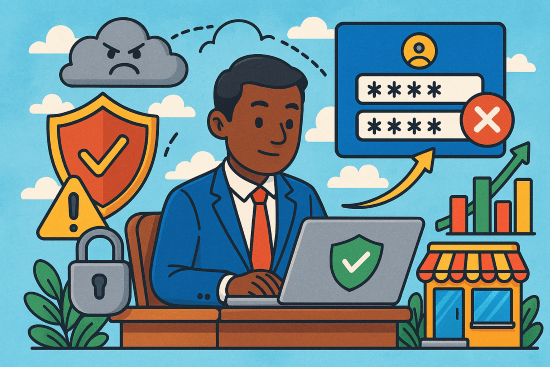
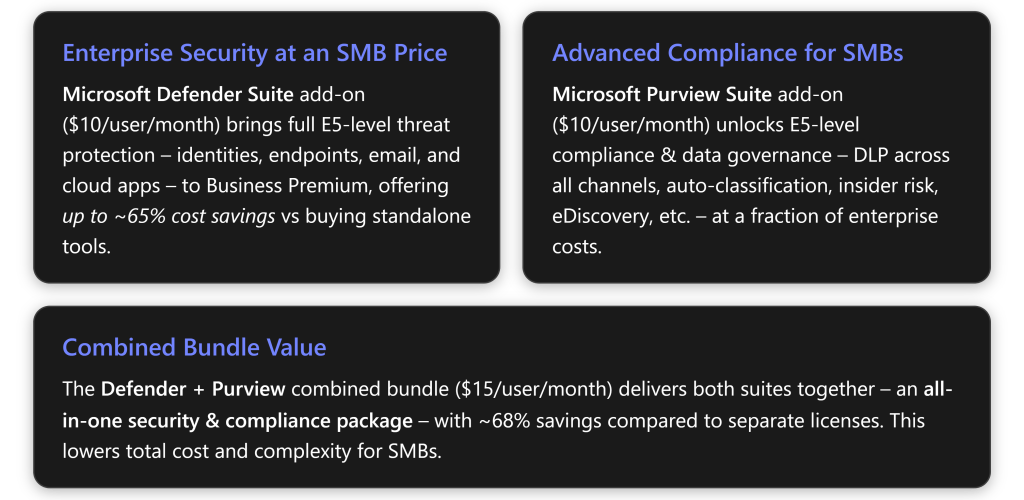

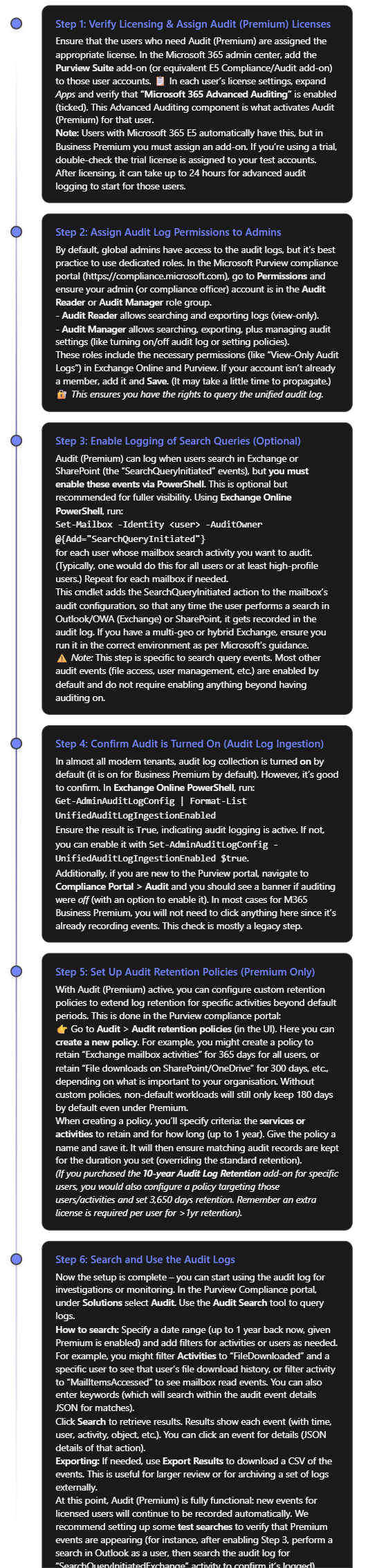
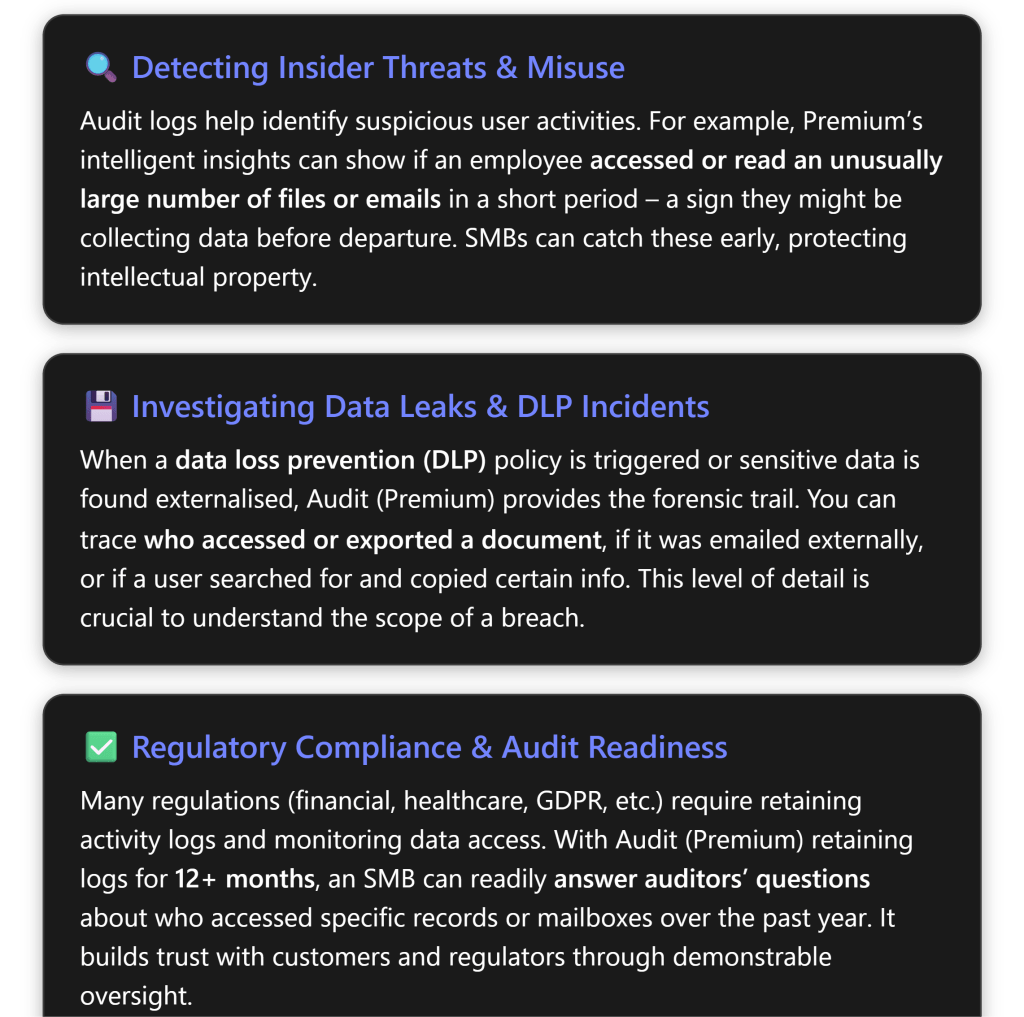
 CIAOPS